Windows Update Service not running after malware

kevinrs

New member
Local time
6:03 PM
Messages
4
On this computer, used by my parents, I found windows updates wasn't working, service not running, couldn't start service in services. Rebooted into safe mode, found and removed malware, new scans not finding malware, have gotten windows update service set to Automatic(Delayed start) and it's running, but I still get the error "Windows Update cannot currently check for updates, because the service is not running. You may need to restart your computer."
SURT gives no errors
SFC Scan finds no problems
I've got no error codes
 

My Computer My Computer

Computer type
PC/Desktop
Computer Manufacturer/Model Number
custom build
OS
Windows 7 home premium 64 bit
CPU
Intel core I7 860
Motherboard
Intel DP55WG
Memory
4.0 GB
Graphics Card(s)
Nvidia Gforce GT 220
Hard Drives
WDC_WD10EALS-00Z8A0 1 TB
Antivirus
Avast Free

My Computer My Computer

Computer type
Laptop
Computer Manufacturer/Model Number
Sony Vaio VPCEB47GM Laptop
OS
Win 7 Pro 64-bit
CPU
Intel i5 2.4 Ghz
Memory
8GB DDR3
Graphics Card(s)
Intel HD 3000
Sound Card
IDT High Definition
Monitor(s) Displays
15.6 WGXA Anti-Glare LED
Screen Resolution
1280x800
Hard Drives
640Gb 7200rpm
Antivirus
MSE
Browser
Opera (primary) with IE9 backup

My Computer My Computer

Computer type
PC/Desktop
Computer Manufacturer/Model Number
custom build
OS
Windows 7 home premium 64 bit
CPU
Intel core I7 860
Motherboard
Intel DP55WG
Memory
4.0 GB
Graphics Card(s)
Nvidia Gforce GT 220
Hard Drives
WDC_WD10EALS-00Z8A0 1 TB
Antivirus
Avast Free
I went through and did the manual steps on that page, I was keeping track of which steps on reregistering the bits and windows update files I was getting errors on, but then I got to the restart computer step and didn't save it. Anyway, I got 2 different errors on several files each, one error I'm paraphrasing as entry point not found, and the other as file not found. If it's important to know which, I'll start over and go through it again.
 

My Computer My Computer

Computer type
PC/Desktop
Computer Manufacturer/Model Number
custom build
OS
Windows 7 home premium 64 bit
CPU
Intel core I7 860
Motherboard
Intel DP55WG
Memory
4.0 GB
Graphics Card(s)
Nvidia Gforce GT 220
Hard Drives
WDC_WD10EALS-00Z8A0 1 TB
Antivirus
Avast Free
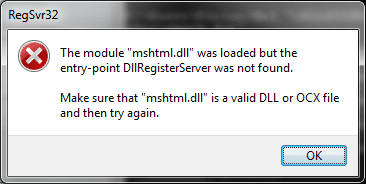
ok, tried doing the manual steps as on that page, don't know if it's pertinent, but did get an error
Code:
regsvr32.exe mshtml.dll
regsvr32.exe shdocvw.dll
regsvr32.exe browseui.dll
same error all 3 lines
on
Code:
regsvr32.exe msxml.dll
Specified Module could not be found
same with
Code:
regsvr32.exe gpkcsp.dll
Code:
regsvr32.exe sccbase.dll
Code:
regsvr32.exe slbcsp.dll
Code:
regsvr32.exe initpki.dll
Code:
regsvr32.exe wuaueng1.dll
Code:
regsvr32.exe wucltui.dll
Code:
regsvr32.exe wuweb.dll
the first error on
Code:
regsvr32.exe qmgr.dll
the second on
Code:
regsvr32.exe muweb.dll

turns out my post somehow is still here, surviving a reboot. the image is the first error
 

Attachments

  • Untitled.png
    Untitled.png
    7.1 KB · Views: 14

My Computer My Computer

Computer type
PC/Desktop
Computer Manufacturer/Model Number
custom build
OS
Windows 7 home premium 64 bit
CPU
Intel core I7 860
Motherboard
Intel DP55WG
Memory
4.0 GB
Graphics Card(s)
Nvidia Gforce GT 220
Hard Drives
WDC_WD10EALS-00Z8A0 1 TB
Antivirus
Avast Free
Try this...

Open Windows Update
Click on Change Settings
Select 'Never Update...'
Click OK
exit Windows Update
Now open Windows update again
Click on Change Settings
Select 'Update automatically'
Click OK
exit Windows Update
Open Windows Update, and do a manual Check for Updates.
 

My Computer My Computer

Computer type
Laptop
Computer Manufacturer/Model Number
Asus K52F or Lenovo B51-80
OS
Win 7 x64 Home Premium (and x86 VirtualBox VM)/Win10
CPU
i3 370M/i7 6500U
Motherboard
Asus/Lenovo
Memory
8GB - finally :)/8GB
Graphics Card(s)
it's an i3, dude!/dual Intel&nVidia
Sound Card
onboard
Monitor(s) Displays
15.6" built-in
Screen Resolution
1366x768/1920x1080
Hard Drives
750GB Seagate internal
Sundry external drives attached to other computers on the local network
1TB SSD on the Lenovo
PSU
n/a
Internet Speed
as much as I can get - usually on a dongle/phone, so <1MB/s
Antivirus
MSE/Defender
Browser
IE11/12/Edge/Chrome/FF(if I must)
Back
Top