
Windows Update service stuck in downloading

filthyavocado

New member
Local time
7:05 AM
Messages
7
Hey guys,

So basically, I ran windows update on my PC (I recently made a fresh install), it started downloading very slowly ; until it reached 25% where it's been at for 30 minutes. I tried stopping the download and selecting another update, to see if it was just one update that wouldn't download, but I had the same result :

Windows update was just stuck downloading.

EDIT: screen of the updates in question :
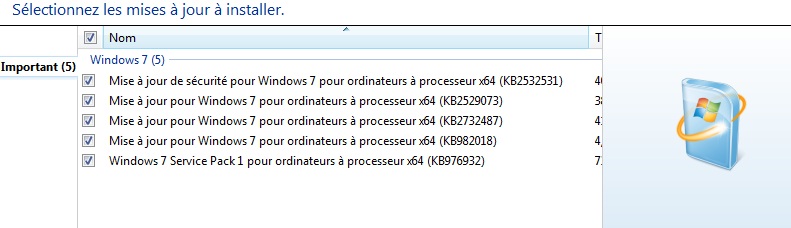
S7lYaCG.jpg


I tried to stop the firewall in ESET Smart Security; nothing. I tried the Fixit tools (.exe and .cab versions), nothing. (except that the .cab version is just stuck too).

Has that happened to any of you guys before?

I had problems yesterday with windows update (BSOD while installing updates), and it just wrecked my computer, and I had to restore to factory settings. But that can't be related?
 

My Computer My Computer

At a glance

Windows 7 Home Premium x64
Computer type
PC/Desktop
Computer Manufacturer/Model Number
Custom build
OS
Windows 7 Home Premium x64
Update : I tried to reboot, and got stuck on "windows is preparing your computer blablabla". So I hard rebooted, logged in, and now the windows update service doesn't show up any longer, I can't run anything because the UAC prompt is gone (I can't do anything that requires admin privileges)...
Fml

I am currently restoring my computer using the windows restore option... And it's stuck on "restoring your files".

So if it doesn't work out, I'll have to factory reset my computer for the third time in two days.
 

My Computer My Computer

At a glance

Windows 7 Home Premium x64
Computer type
PC/Desktop
Computer Manufacturer/Model Number
Custom build
OS
Windows 7 Home Premium x64

My Computer My Computer

At a glance

Win 7 x64 Home Premium (and x86 VirtualBox VM...i3 370M/i7 6500U8GB - finally :)/8GBit's an i3, dude!/dual Intel&nVidia
Computer type
Laptop
Computer Manufacturer/Model Number
Asus K52F or Lenovo B51-80
OS
Win 7 x64 Home Premium (and x86 VirtualBox VM)/Win10
CPU
i3 370M/i7 6500U
Motherboard
Asus/Lenovo
Memory
8GB - finally :)/8GB
Graphics Card(s)
it's an i3, dude!/dual Intel&nVidia
Sound Card
onboard
Monitor(s) Displays
15.6" built-in
Screen Resolution
1366x768/1920x1080
Hard Drives
750GB Seagate internal
Sundry external drives attached to other computers on the local network
1TB SSD on the Lenovo
PSU
n/a
Internet Speed
as much as I can get - usually on a dongle/phone, so <1MB/s
Antivirus
MSE/Defender
Browser
IE11/12/Edge/Chrome/FF(if I must)
I never had any hardware problems before. Btw the restore finally worked.
I have more info :

It started when I tried to install w7 sp1 update. For some reason it gets stuck, and when I reboot, it still tries to install it, thus, leading to weird problems
 

My Computer My Computer

At a glance

Windows 7 Home Premium x64
Computer type
PC/Desktop
Computer Manufacturer/Model Number
Custom build
OS
Windows 7 Home Premium x64
Please post the requested data - SP1 is classed as an update ;)
 

My Computer My Computer

At a glance

Win 7 x64 Home Premium (and x86 VirtualBox VM...i3 370M/i7 6500U8GB - finally :)/8GBit's an i3, dude!/dual Intel&nVidia
Computer type
Laptop
Computer Manufacturer/Model Number
Asus K52F or Lenovo B51-80
OS
Win 7 x64 Home Premium (and x86 VirtualBox VM)/Win10
CPU
i3 370M/i7 6500U
Motherboard
Asus/Lenovo
Memory
8GB - finally :)/8GB
Graphics Card(s)
it's an i3, dude!/dual Intel&nVidia
Sound Card
onboard
Monitor(s) Displays
15.6" built-in
Screen Resolution
1366x768/1920x1080
Hard Drives
750GB Seagate internal
Sundry external drives attached to other computers on the local network
1TB SSD on the Lenovo
PSU
n/a
Internet Speed
as much as I can get - usually on a dongle/phone, so <1MB/s
Antivirus
MSE/Defender
Browser
IE11/12/Edge/Chrome/FF(if I must)
I have a laptop, I can't access the RAM if the memtest find errors. But right now, using a .bat file I found here, I managed to make the update work.
I'll post again when it's done
 

My Computer My Computer

At a glance

Windows 7 Home Premium x64
Computer type
PC/Desktop
Computer Manufacturer/Model Number
Custom build
OS
Windows 7 Home Premium x64
If memtest finds errors then there's no point in applying the updates, because you'll just end up with the same problems again.

The same applies to the other likely hardware problem - the hard drive.
 

My Computer My Computer

At a glance

Win 7 x64 Home Premium (and x86 VirtualBox VM...i3 370M/i7 6500U8GB - finally :)/8GBit's an i3, dude!/dual Intel&nVidia
Computer type
Laptop
Computer Manufacturer/Model Number
Asus K52F or Lenovo B51-80
OS
Win 7 x64 Home Premium (and x86 VirtualBox VM)/Win10
CPU
i3 370M/i7 6500U
Motherboard
Asus/Lenovo
Memory
8GB - finally :)/8GB
Graphics Card(s)
it's an i3, dude!/dual Intel&nVidia
Sound Card
onboard
Monitor(s) Displays
15.6" built-in
Screen Resolution
1366x768/1920x1080
Hard Drives
750GB Seagate internal
Sundry external drives attached to other computers on the local network
1TB SSD on the Lenovo
PSU
n/a
Internet Speed
as much as I can get - usually on a dongle/phone, so <1MB/s
Antivirus
MSE/Defender
Browser
IE11/12/Edge/Chrome/FF(if I must)
Back
Top