Solved windows update stuck at 0%

ethel

New member
Power User
VIP
Local time
2:51 PM
Messages
474
I just had windows 7 home premium 64 reinstalled, after having new hard drive installed by technician.
I have managed to download IE11 again and all of the updates for it have succeeded. I am now trying
to download the rest of the updates 224 of them, but am unable to do so. I have started at the oldest,
which looks like the net.framework 3.5.1 updates, and I have let it go for about an hour, and nothing happens. I have already named the Software Distribution folder as Software Distribution old. and started
again, but the same thing occurs. Hope someone can help me. Windows Update must be okay to be able
to do all of the IE11 updates, and it did not sit at 0% just took of.:confused:
 

My Computer

Computer type
PC/Desktop
Computer Manufacturer/Model Number
ASUS A85XM-A custom build
OS
Windows 10 Pro 64 bit
CPU
AMD A4-5300 APU with Radeon(tm) HD Graphics
Motherboard
ASUSTeK COMPUTER INC. A85XM-A
Memory
8.00 GB
Graphics Card(s)
AMD Radeon HD 7480D
Sound Card
(1) High Definition Audio Device (2) Realtek High Definiti
Monitor(s) Displays
HP W2072a 20 inch Led Backlit Monitor
Screen Resolution
1600 x 900 x 32 bits (4294967296 colors) @ 60 Hz
Hard Drives
TOSHIBA DT01ACA100 SATA Disk Device
Keyboard
Acer
Mouse
Acer
Internet Speed
varies
Antivirus
Windows Defender Antivirus
Browser
Waterfox, Edge
I just had windows 7 home premium 64 reinstalled, after having new hard drive installed by technician.
I have managed to download IE11 again and all of the updates for it have succeeded. I am now trying
to download the rest of the updates 224 of them, but am unable to do so. I have started at the oldest,
which looks like the net.framework 3.5.1 updates, and I have let it go for about an hour, and nothing happens. I have already named the Software Distribution folder as Software Distribution old. and started
again, but the same thing occurs. Hope someone can help me. Windows Update must be okay to be able
to do all of the IE11 updates, and it did not sit at 0% just took of.:confused:

I ran into that issue when I reinstalled W7 two years ago. What worked for me may or may not work for you. I unticked all the updates except for the 3.5.1 updates, then I installed them on their own, restarted and was able to then download the remaining updates. In short, sometimes when trying to install all of the updates after a fresh install can cause things to get jammed up, one of my friends had the same issue after a fresh install and I had him do what I did and it solved his issue as well, so it may solve yours.

The other option is to install net.framework 4 manually.. I don't believe one needs 3.5 and 4 but I could be wrong.
 

My Computer

Computer type
PC/Desktop
Computer Manufacturer/Model Number
Custom Build
OS
Windows 7 64bit
CPU
I5 2300 Sandy Bridge 2.80ghz
Motherboard
Asus P8P67 LE
Memory
4gb DDR3 Patriot
Graphics Card(s)
Nvidia GTS 450
Sound Card
Realtek Integrated Audio
Screen Resolution
1920x1080
Hard Drives
C: Seagate 500GB (Primary
D: Western Digital Black (Secondary)
Case
Antec Two Hundred
Cooling
1 120MM rear case fan, 1 140mm top of the case fan
Antivirus
Eset 5
Browser
Chrome
Thank you Deviancy. Windows update seems to be now stuck at checking for updates. It shows all the
installed ones, but then on the update history all the failures are listed. Is there anyway I can remove
the failures without the successful ones being removed, because I have also installed MSE and use wot
site checker, as I do not go to any social sites. I don't want to have to download and install all MSE updates
again or IE11 and all the updates.:)
 

My Computer

Computer type
PC/Desktop
Computer Manufacturer/Model Number
ASUS A85XM-A custom build
OS
Windows 10 Pro 64 bit
CPU
AMD A4-5300 APU with Radeon(tm) HD Graphics
Motherboard
ASUSTeK COMPUTER INC. A85XM-A
Memory
8.00 GB
Graphics Card(s)
AMD Radeon HD 7480D
Sound Card
(1) High Definition Audio Device (2) Realtek High Definiti
Monitor(s) Displays
HP W2072a 20 inch Led Backlit Monitor
Screen Resolution
1600 x 900 x 32 bits (4294967296 colors) @ 60 Hz
Hard Drives
TOSHIBA DT01ACA100 SATA Disk Device
Keyboard
Acer
Mouse
Acer
Internet Speed
varies
Antivirus
Windows Defender Antivirus
Browser
Waterfox, Edge
Manually install KB3112343 (if not already installed) and try the Windows Update search again.

The list of installed updates is important. [Start > view installed updates] The update history is not important. That history goes completely away if you reset the Windows Update by deleting the Software Distribution folder. That history is kept in a database. Microsoft does not provide a way to selectively edit that database.
 

My Computer

Computer type
Laptop
Computer Manufacturer/Model Number
Employer provided Dell Latitude
OS
W7 Pro SP1 64bit
CPU
i7
Memory
8GB
Graphics Card(s)
Intel HD Graphics
Hard Drives
crappy SSD
Antivirus
Employer mandated Symantec Endpoint Protection
Browser
Pale Moon 64bit, IE11 64bit & Chrome 64bit
Thank you for replying. I did not have KB3112343 installed.I have downloaded it from Microsoft, and when
I open the download folder it says this update is not applicable to your computer.:D
 

My Computer

Computer type
PC/Desktop
Computer Manufacturer/Model Number
ASUS A85XM-A custom build
OS
Windows 10 Pro 64 bit
CPU
AMD A4-5300 APU with Radeon(tm) HD Graphics
Motherboard
ASUSTeK COMPUTER INC. A85XM-A
Memory
8.00 GB
Graphics Card(s)
AMD Radeon HD 7480D
Sound Card
(1) High Definition Audio Device (2) Realtek High Definiti
Monitor(s) Displays
HP W2072a 20 inch Led Backlit Monitor
Screen Resolution
1600 x 900 x 32 bits (4294967296 colors) @ 60 Hz
Hard Drives
TOSHIBA DT01ACA100 SATA Disk Device
Keyboard
Acer
Mouse
Acer
Internet Speed
varies
Antivirus
Windows Defender Antivirus
Browser
Waterfox, Edge
Thank you for replying. I did not have KB3112343 installed.I have downloaded it from Microsoft, and when
I open the download folder it says this update is not applicable to your computer.:D

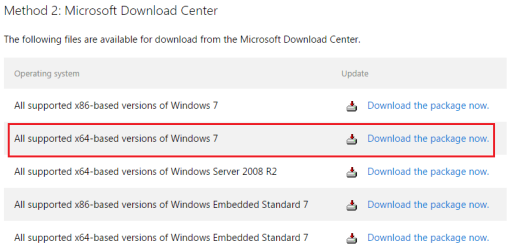
Did you get the file from this link?

Untitled.png
 

My Computer

Computer type
Laptop
Computer Manufacturer/Model Number
Employer provided Dell Latitude
OS
W7 Pro SP1 64bit
CPU
i7
Memory
8GB
Graphics Card(s)
Intel HD Graphics
Hard Drives
crappy SSD
Antivirus
Employer mandated Symantec Endpoint Protection
Browser
Pale Moon 64bit, IE11 64bit & Chrome 64bit
Sorry. Looks like I have downloaded the wrong one from Microsoft Official Site. I will go to the link below
and have another go. Thank you.:D
 

My Computer

Computer type
PC/Desktop
Computer Manufacturer/Model Number
ASUS A85XM-A custom build
OS
Windows 10 Pro 64 bit
CPU
AMD A4-5300 APU with Radeon(tm) HD Graphics
Motherboard
ASUSTeK COMPUTER INC. A85XM-A
Memory
8.00 GB
Graphics Card(s)
AMD Radeon HD 7480D
Sound Card
(1) High Definition Audio Device (2) Realtek High Definiti
Monitor(s) Displays
HP W2072a 20 inch Led Backlit Monitor
Screen Resolution
1600 x 900 x 32 bits (4294967296 colors) @ 60 Hz
Hard Drives
TOSHIBA DT01ACA100 SATA Disk Device
Keyboard
Acer
Mouse
Acer
Internet Speed
varies
Antivirus
Windows Defender Antivirus
Browser
Waterfox, Edge
window updates stuck at 0%

Thank you Deviancy and UsernameIssues. I have downloaded the correct KB3112343. I deleted the 3
Software Distribution folders I renamed after failures, pressed check for updates, and the whole lot were
showing in about 5 minutes, which was really good. I started of with all the net.framework updates, and
it just took of, and have now done about 60 updates altogether. It is a relief to know I can now just get
it all up to date. Even though my internet connection is only showing 1 green bar, it is still working. Very
much appreciate the help.:D
 

My Computer

Computer type
PC/Desktop
Computer Manufacturer/Model Number
ASUS A85XM-A custom build
OS
Windows 10 Pro 64 bit
CPU
AMD A4-5300 APU with Radeon(tm) HD Graphics
Motherboard
ASUSTeK COMPUTER INC. A85XM-A
Memory
8.00 GB
Graphics Card(s)
AMD Radeon HD 7480D
Sound Card
(1) High Definition Audio Device (2) Realtek High Definiti
Monitor(s) Displays
HP W2072a 20 inch Led Backlit Monitor
Screen Resolution
1600 x 900 x 32 bits (4294967296 colors) @ 60 Hz
Hard Drives
TOSHIBA DT01ACA100 SATA Disk Device
Keyboard
Acer
Mouse
Acer
Internet Speed
varies
Antivirus
Windows Defender Antivirus
Browser
Waterfox, Edge
Glad that the Windows Update process is working for you :-)


I scanned thru this thread and noticed the comment about .NET versions.

.NET 3.5.1 is built in to W7. It does not get replaced by version 4.
You will need to apply updates to .NET 3.5.1.

Apps written in .NET 3.x will need .NET 3.x in order to run.
Apps written in .NET 4.x will need .NET 4.x in order to run.

It has been a while since I checked, but I think that the Windows Update process offers .NET 4.5.2. You can install that and then install the updates to that if you wish. Or, you can manually download/install .NET 4.6.1. .NET is backward compatible within major version releases. .NET 4.6 has been out since late 2014. I wonder how long MS I going to wait before delpoying it via the Windows Update process.
 

My Computer

Computer type
Laptop
Computer Manufacturer/Model Number
Employer provided Dell Latitude
OS
W7 Pro SP1 64bit
CPU
i7
Memory
8GB
Graphics Card(s)
Intel HD Graphics
Hard Drives
crappy SSD
Antivirus
Employer mandated Symantec Endpoint Protection
Browser
Pale Moon 64bit, IE11 64bit & Chrome 64bit
windows updates net.framework

Thank you UsernameIssues. I have downloaded and installed all the net.framework 3.5, so on, and 4.5.2.
I will manually install 4.6 which is not listed.
 

My Computer

Computer type
PC/Desktop
Computer Manufacturer/Model Number
ASUS A85XM-A custom build
OS
Windows 10 Pro 64 bit
CPU
AMD A4-5300 APU with Radeon(tm) HD Graphics
Motherboard
ASUSTeK COMPUTER INC. A85XM-A
Memory
8.00 GB
Graphics Card(s)
AMD Radeon HD 7480D
Sound Card
(1) High Definition Audio Device (2) Realtek High Definiti
Monitor(s) Displays
HP W2072a 20 inch Led Backlit Monitor
Screen Resolution
1600 x 900 x 32 bits (4294967296 colors) @ 60 Hz
Hard Drives
TOSHIBA DT01ACA100 SATA Disk Device
Keyboard
Acer
Mouse
Acer
Internet Speed
varies
Antivirus
Windows Defender Antivirus
Browser
Waterfox, Edge
Back
Top