
Solved Windows Update Stuck (no error codes, just hanging)

BritAbroad

New member
Local time
12:31 AM
Messages
6
I think I am guilty of hijacking another thread on this - sorry, I'm new to this! :confused:

Thanks joshry101 for your response to where I'm up to...

I'm still stuck in cmd - I'm sorry I'm not too tech savvy but should I just close the cmd window amd proceed with the two installs you suggest ... it's not done anything for hours still at the Installing ..\w61-x64\ ...etc, etc - it all started so well!

I hope I just uploaded an image of how cmd looks right now - it's been there for a few hours following the offline download wsusoffline1062

Thanks!
 

Attachments
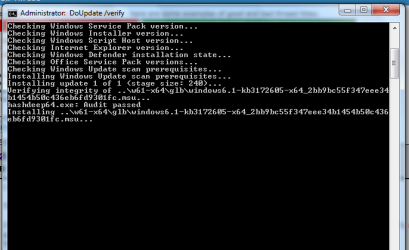
  • stuck in cmd.png
    stuck in cmd.png
    14.2 KB · Views: 16

My Computer

Computer type
PC/Desktop
Computer Manufacturer/Model Number
HP
OS
windows7 home premium 64 bit
Memory
6.0GB
Antivirus
Norton
Hi and welcome to SevenForums,
Not sure why you're using cmd
Just download the update,
Stop and switch windows update to manual and run the already downloaded KB

KB3020369 does have to be installed in order to be able to install KB3172605
download links,
Win-7 32 bit
https://download.microsoft.com/down...B0A-35769CBBE6B0/Windows6.1-KB3020369-x86.msu

Win-7 64 bit
https://download.microsoft.com/down...020-EC41D56B074F/Windows6.1-KB3020369-x64.msu

Then manually install KB3172605 main article page with all versions,
KB3172605 download links,
Win-7 32 bit
https://download.microsoft.com/down...A9C-6B30C3E1735A/Windows6.1-KB3172605-x86.msu

Win-7 64 bit
https://download.microsoft.com/down...67F-C713F7821374/Windows6.1-KB3172605-x64.msu

After switch your windows update and service settings back to what you had prior and manually check for updates and the rest should show up shortly.
 

My Computer

Computer type
PC/Desktop
Computer Manufacturer/Model Number
Custom assembled by me :}
OS
Win-7-Pro64bit 7-H-Prem-64bit
CPU
i7-5930K 2nd i9-9940x both water blocked VRM's too
Motherboard
ASUS SABERTOOTH X99 2nd ASUS x299 Apex
Memory
Trident-z 3200C14 2nd Trident-z 3600C16
Graphics Card(s)
EVGA 1080ti ftw3 2nd Titan Xp both water blocked
Sound Card
Built-in Realtek
Monitor(s) Displays
1-AOC G2460PG 24"G-Sync 144Hz/ 2nd 1-ASUS VG248QE 24" 144Hz
Screen Resolution
1920 x 1080 144Hz
Hard Drives
2-Samsung M.2 Evo & Evo Plus
2-Samsung 850 EVO 500GB SSD's/ 3-2.5 W.D. Black 1tb-&3-1tb/3-3.5 WD Black 1tb hdd's
PSU
EVGA SuperNOVA 1000-P2 2nd 1200-P2
Case
2-Corsair Obsidian Series 450D Black ATX Mid Tower
Cooling
Custom water loops
Keyboard
Logitech G710+/ 2nd Logitech G910
Mouse
2-RedDragon M901 Perdition 16400 dpi Gaming mouse = wired
Internet Speed
Comcast Ping 19ms 89.31mbps download speed 6.12mbps upload
Antivirus
Malwarebytes Pro/ Superantispyware Pro
Browser
FireFox & Pale moon
Other Info
2nd ASUS X299 Apex/Intel i9-9940x with Custom water loop/7H-Prem-x64/Corsair 450D case/Ram Trident-z 3600C16 4x8gb / Samsung970Evo plus 500gb SSD/Dual ssd EZ swap evo/PSU EVGA SuperNova 1200w-P2 80+Platinum/GPU Titan Xp /8-ML-140 on push-pull on 2-280GTX rads

My Computer

Computer type
Laptop
Computer Manufacturer/Model Number
Acer
OS
Windows 7 Home Premium 64bit
CPU
Intel Pentium T4400
Motherboard
Acer Aspire 5732Z
Memory
3 GBytes
Graphics Card(s)
ATI Mobility Radeon HD 4500/5100 Series
Sound Card
Realtek High Definition Audio
Monitor(s) Displays
Generic PnP Monitor
Screen Resolution
1366 X 768
Keyboard
Launch Manager
Mouse
USB Optical Mouse
Internet Speed
130.0 MBps
Antivirus
BT Virus Protect, Spybot Search and Destroy
Browser
Firefox
I did all of that and still no luck -everything I have tried so far just results in a progress bar saying downloading updates but it never gets off 0% - left it overnight last night and nothing!

Got the offline download advice from another thread - your solution was in there too I tried it first (even though they showed as being installed already) - the offline download was option 4 if nothing else worked :-/ but now that's stuck too.
 

My Computer

Computer type
PC/Desktop
Computer Manufacturer/Model Number
HP
OS
windows7 home premium 64 bit
Memory
6.0GB
Antivirus
Norton
BritAbroad - is this a fresh install / new PC or have your updates just stopped coming through?
 

My Computer

OS
Mostly Chrome OS
BritAbroad - this is exactly where I was stuck this morning, can't promise it's going to work for you (did for me)
So, close the CMD window - it might not respond, just restart your PC
Download KB3138612
Download KB3145739
Save them somewhere you can easily browse to - usually Downloads
You need to be disconnected from the Internet before installing - otherwise you'll be facing another monumental pause... (unplug or disable ethernet / wifi - if you need help with this ask)
Browse to the folder where you downloaded the 2 updates
Double click Windows6.1-KB3138612-x64.msu
Install & reboot
Double click Windows6.1-KB3145739-x64.msu
Install & reboot
Plugin or enable ethernet / wifi

Normal Windows update may well work at this stage, try it - should take 15 mins not hours / days!

I went back to Tyler1118's solution
Browse to where you extracted the wsusoffline folder
Then clients folder
Double click UpdateInstaller
First batch was about 8 updates (for me) then it tells you to reboot
Reboot then repeat this last process - another 150+ updates

After this the normal Windows update worked fine
The only other thing I did (on a fresh install) was to manually download & install Internet Explorer 11

Hope this helps / works
 

My Computer

OS
Mostly Chrome OS

My Computer

Computer type
PC/Desktop
Computer Manufacturer/Model Number
Custom assembled by me :}
OS
Win-7-Pro64bit 7-H-Prem-64bit
CPU
i7-5930K 2nd i9-9940x both water blocked VRM's too
Motherboard
ASUS SABERTOOTH X99 2nd ASUS x299 Apex
Memory
Trident-z 3200C14 2nd Trident-z 3600C16
Graphics Card(s)
EVGA 1080ti ftw3 2nd Titan Xp both water blocked
Sound Card
Built-in Realtek
Monitor(s) Displays
1-AOC G2460PG 24"G-Sync 144Hz/ 2nd 1-ASUS VG248QE 24" 144Hz
Screen Resolution
1920 x 1080 144Hz
Hard Drives
2-Samsung M.2 Evo & Evo Plus
2-Samsung 850 EVO 500GB SSD's/ 3-2.5 W.D. Black 1tb-&3-1tb/3-3.5 WD Black 1tb hdd's
PSU
EVGA SuperNOVA 1000-P2 2nd 1200-P2
Case
2-Corsair Obsidian Series 450D Black ATX Mid Tower
Cooling
Custom water loops
Keyboard
Logitech G710+/ 2nd Logitech G910
Mouse
2-RedDragon M901 Perdition 16400 dpi Gaming mouse = wired
Internet Speed
Comcast Ping 19ms 89.31mbps download speed 6.12mbps upload
Antivirus
Malwarebytes Pro/ Superantispyware Pro
Browser
FireFox & Pale moon
Other Info
2nd ASUS X299 Apex/Intel i9-9940x with Custom water loop/7H-Prem-x64/Corsair 450D case/Ram Trident-z 3600C16 4x8gb / Samsung970Evo plus 500gb SSD/Dual ssd EZ swap evo/PSU EVGA SuperNova 1200w-P2 80+Platinum/GPU Titan Xp /8-ML-140 on push-pull on 2-280GTX rads
I don't know why I had this same issue manifest seemingly overnight... but maybe try this.

I changed settings to "Never Check for Updates", stopped Windows Update in Services, then downloaded KB3172605 standalone. Restart. After the install & reboot, let your computer process updates (the thread I read said "don't touch your computer for 10mins). After waiting 10mins, I went back to Windows Update & changed my settings to "check for updates let me choose...", then clicked "check for updates", and WU worked like a charm (no more hang/lag... pulled up my Updates in 5 mins or less). KB3172605 is "Simplix approved" (in case you're KB cautious). Good luck
 

My Computer

Computer type
PC/Desktop
Computer Manufacturer/Model Number
HP Pavillion
OS
Windows 10
CPU
AMD A8-6410 APU with AMD Radeon R5 Graphics
Motherboard
HP 2B29
Memory
Total 8.00 GB Usable : 7.68 GB
Graphics Card(s)
AMD Radeon(TM) R5 Graphics
Sound Card
(1) AMD High Definition Audio Device (2) Realtek High Defi
Monitor(s) Displays
I need to figure out how to Add a Monitor (I use Dual Montrs
Hard Drives
ST1000DM003-1ER162 931.51 GB
Antivirus
McAfee
Browser
Depends
Other Info
This is all temporary. I'm going to change computers. I dislike the processor and need to address some different components.

I'm taking my new(er), 1 week old machine and returning it... I'm going to replace it with a new machine, with better components. Again, I can't do a custom build b/c I'm taking advantage of a retailer's 0% financing. Thanks
Thanks guys -it really did just require patience and the solution posted in another thread by Tyler1118 as Option #3 wsusoffline download (after trying the 2 easier solutions without success) worked. I have no idea when the cmd moved but when I got up this morning all the updates were downloaded and ready to install :-)
All updates are now installed so I will be moving on to my laptop to do the same there. Going to try the simpler ones first there again... not sure I can have my laptop out of commission for 48 hours!
 

My Computer

Computer type
PC/Desktop
Computer Manufacturer/Model Number
HP
OS
windows7 home premium 64 bit
Memory
6.0GB
Antivirus
Norton
Back
Top