Windows Updates Error Code's 8024000E & C80003FA

IcecoldUK

New member
Member
Local time
8:10 PM
Messages
93
Hi,

I keep getting Windows Update Error Code's 8024000E & C80003FA whenever I search for new updates. Error code 8024000E is the most common. This has been an ongoing problems for several months now. I have run SURT multiple times as well as SFC and the FixIt tool. I've tried to re-register the Windows dll's following the instructions here: How do I reset Windows Update components? and I've tried disabling my Norton anti-virus software and done a full system scan all to no avail.

CBS logs are attached as requested.

Any advice you can provide would be greatly appreciated!

Regards

Jon


http://support.microsoft.com/kb/971058
 

My Computer

Computer type
PC/Desktop
Computer Manufacturer/Model Number
Custom Build
OS
Windows 7 64 bit Home Premium
CPU
Intel Core 2 Quad Q9400 2.66GHz
Motherboard
Asus P5QL PRO
Memory
8GB
Graphics Card(s)
Nvidia 9800 GT
Hard Drives
Western Digital 320gb (Model WDC WD3200AAKS-75L9A0)
Antivirus
Norton Internet Security 2013
Browser
Firefox
SFC shows the following repairs were carried out...
Code:
 Line 3532: 2015-04-25 13:57:34, Info                  CSI    00000340 [SR] Repairing 7 components
 Line 3533: 2015-04-25 13:57:34, Info                  CSI    00000341 [SR] Beginning Verify and Repair transaction
 Line 3536: 2015-04-25 13:57:34, Info                  CSI    00000343 [SR] Repairing corrupted file [ml:60{30},l:58{29}]"\??\C:\Windows\SysWOW64\en-US"\[l:32{16}]"iernonce.dll.mui" from store
 Line 3539: 2015-04-25 13:57:34, Info                  CSI    00000345 [SR] Repairing corrupted file [ml:60{30},l:58{29}]"\??\C:\Windows\SysWOW64\en-US"\[l:30{15}]"iesetup.dll.mui" from store
 Line 3548: 2015-04-25 13:57:34, Info                  CSI    00000349 [SR] Repairing corrupted file [ml:48{24},l:46{23}]"\??\C:\Windows\SysWOW64"\[l:26{13}]"iesysprep.dll" from store
 Line 3554: 2015-04-25 13:57:34, Info                  CSI    0000034c [SR] Repairing corrupted file [ml:520{260},l:76{38}]"\??\C:\Program Files\Internet Explorer"\[l:14{7}]"pdm.dll" from store
 Line 3557: 2015-04-25 13:57:34, Info                  CSI    0000034e [SR] Repairing corrupted file [ml:520{260},l:76{38}]"\??\C:\Program Files\Internet Explorer"\[l:20{10}]"msdbg2.dll" from store
 Line 3566: 2015-04-25 13:57:34, Info                  CSI    00000352 [SR] Repairing corrupted file [ml:520{260},l:76{38}]"\??\C:\Program Files\Internet Explorer"\[l:14{7}]"pdm.dll" from store
 Line 3569: 2015-04-25 13:57:34, Info                  CSI    00000354 [SR] Repairing corrupted file [ml:520{260},l:76{38}]"\??\C:\Program Files\Internet Explorer"\[l:20{10}]"msdbg2.dll" from store
 Line 3578: 2015-04-25 13:57:34, Info                  CSI    00000358 [SR] Repairing corrupted file [ml:48{24},l:46{23}]"\??\C:\Windows\SysWOW64"\[l:22{11}]"iesetup.dll" from store
 Line 3581: 2015-04-25 13:57:34, Info                  CSI    0000035a [SR] Repairing corrupted file [ml:48{24},l:46{23}]"\??\C:\Windows\SysWOW64"\[l:22{11}]"ieuinit.inf" from store
 Line 3584: 2015-04-25 13:57:34, Info                  CSI    0000035c [SR] Repairing corrupted file [ml:48{24},l:46{23}]"\??\C:\Windows\SysWOW64"\[l:24{12}]"iernonce.dll" from store
 Line 3596: 2015-04-25 13:57:34, Info                  CSI    00000361 [SR] Repairing corrupted file [ml:520{260},l:88{44}]"\??\C:\Program Files (x86)\Internet Explorer"\[l:14{7}]"pdm.dll" from store
There were no other errors in either SFC or CheckSUR...
However, there was another error in the background CBS log...
Code:
2015-04-25 13:54:02, Error                 CSI    000001ba (F) Manifest parsing failed:
    Status: STATUS_UNSUCCESSFUL
    Node: 20038 (0x00004e46)
    Node (ln 4736 col 5) xpath: /#document/assembly/registryKeys/registryKey
    Strings: ([ml:8,l7]"keyName", [ml:0]"", [ml:33,l32]"urn:schemas-microsoft-com:asm.v1", [ml:33,l32]"urn:schemas-microsoft-com:asm.v2", [ml:33,l32]"urn:schemas-microsoft-com:asm.v3")[gle=0x80004005]
2015-04-25 13:54:02, Error                 CSI    [EMAIL="000001bb@2015/4/25:12:54:02.932"]000001bb@2015/4/25:12:54:02.932[/EMAIL] (F) d:\win7sp1_gdr\base\wcp\manifestparser\pcmc_manifestwalker.cpp(5009): Error STATUS_UNSUCCESSFUL originated in function CMicrodomManifestWalker::CommonReportError expression: (null)
[gle=0x80004005]
2015-04-25 13:54:04, Info                  CSI    000001bc Repair results created:
POQ 73 starts:

This is not an error I recall seeing before, but appears to relate to Exchange Server - and is no longer maintained. See https://msdn.microsoft.com/en-us/library/ms875940%28v=exchg.65%29.aspx?f=255&MSPPError=-2147217396
 

My Computer

Computer type
Laptop
Computer Manufacturer/Model Number
Asus K52F or Lenovo B51-80
OS
Win 7 x64 Home Premium (and x86 VirtualBox VM)/Win10
CPU
i3 370M/i7 6500U
Motherboard
Asus/Lenovo
Memory
8GB - finally :)/8GB
Graphics Card(s)
it's an i3, dude!/dual Intel&nVidia
Sound Card
onboard
Monitor(s) Displays
15.6" built-in
Screen Resolution
1366x768/1920x1080
Hard Drives
750GB Seagate internal
Sundry external drives attached to other computers on the local network
1TB SSD on the Lenovo
PSU
n/a
Internet Speed
as much as I can get - usually on a dongle/phone, so <1MB/s
Antivirus
MSE/Defender
Browser
IE11/12/Edge/Chrome/FF(if I must)
If you now attempt to do a new Check for Updates, and install ONLYthe oldest update found, what error message do you get?
 

My Computer

Computer type
Laptop
Computer Manufacturer/Model Number
Asus K52F or Lenovo B51-80
OS
Win 7 x64 Home Premium (and x86 VirtualBox VM)/Win10
CPU
i3 370M/i7 6500U
Motherboard
Asus/Lenovo
Memory
8GB - finally :)/8GB
Graphics Card(s)
it's an i3, dude!/dual Intel&nVidia
Sound Card
onboard
Monitor(s) Displays
15.6" built-in
Screen Resolution
1366x768/1920x1080
Hard Drives
750GB Seagate internal
Sundry external drives attached to other computers on the local network
1TB SSD on the Lenovo
PSU
n/a
Internet Speed
as much as I can get - usually on a dongle/phone, so <1MB/s
Antivirus
MSE/Defender
Browser
IE11/12/Edge/Chrome/FF(if I must)
Hi Noel,

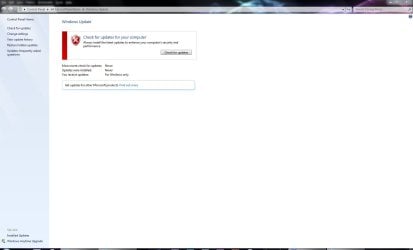
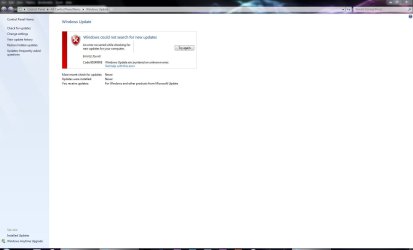
I am not presented with any updates, only that "Windows could not search for new updates" with the error code 8024000E.

Please see attached images.

Jon
 

Attachments

  • Capture 1.JPG
    Capture 1.JPG
    57.4 KB · Views: 4
  • Capture 2.JPG
    Capture 2.JPG
    58 KB · Views: 2

My Computer

Computer type
PC/Desktop
Computer Manufacturer/Model Number
Custom Build
OS
Windows 7 64 bit Home Premium
CPU
Intel Core 2 Quad Q9400 2.66GHz
Motherboard
Asus P5QL PRO
Memory
8GB
Graphics Card(s)
Nvidia 9800 GT
Hard Drives
Western Digital 320gb (Model WDC WD3200AAKS-75L9A0)
Antivirus
Norton Internet Security 2013
Browser
Firefox
First - please run an MGADiag report (there are two possible causes of this, and I'd like to try and work out a way to tell the difference before trying to fix it!

I need to see a full copy of the report produced by the MGADiag tool
(download and save to desktop - http://go.microsoft.com/fwlink/?linkid=52012 )
Once saved, run the tool.
Click on the Continue button, which will produce the report.
To copy the report to your response, click on the Copy button in the tool (ignore any error messages at this point), and then paste (using either r-click/Paste, or Ctrl+V ) into your response.


My Computer

Computer type
Laptop
Computer Manufacturer/Model Number
Asus K52F or Lenovo B51-80
OS
Win 7 x64 Home Premium (and x86 VirtualBox VM)/Win10
CPU
i3 370M/i7 6500U
Motherboard
Asus/Lenovo
Memory
8GB - finally :)/8GB
Graphics Card(s)
it's an i3, dude!/dual Intel&nVidia
Sound Card
onboard
Monitor(s) Displays
15.6" built-in
Screen Resolution
1366x768/1920x1080
Hard Drives
750GB Seagate internal
Sundry external drives attached to other computers on the local network
1TB SSD on the Lenovo
PSU
n/a
Internet Speed
as much as I can get - usually on a dongle/phone, so <1MB/s
Antivirus
MSE/Defender
Browser
IE11/12/Edge/Chrome/FF(if I must)
Diagnostic Report (1.9.0027.0):
-----------------------------------------
Windows Validation Data-->

Validation Code: 0
Cached Online Validation Code: 0x0
Windows Product Key: *****-*****-CBQ2X-BF4QT-GC8MP
Windows Product Key Hash: BLUXnngjWpbwzDlNEOZXPEkgS1I=
Windows Product ID: 00359-OEM-8702004-48810
Windows Product ID Type: 3
Windows License Type: OEM System Builder
Windows OS version: 6.1.7601.2.00010300.1.0.003
ID: {EC6B8D13-C2A6-4868-9C35-A5CF0541772E}(1)
Is Admin: Yes
TestCab: 0x0
LegitcheckControl ActiveX: Registered, 1.9.42.0
Signed By: Microsoft
Product Name: Windows 7 Home Premium
Architecture: 0x00000009
Build lab: 7601.win7sp1_gdr.140303-2144
TTS Error:
Validation Diagnostic:
Resolution Status: N/A

Vista WgaER Data-->
ThreatID(s): N/A, hr = 0x80070002
Version: N/A, hr = 0x80070002

Windows XP Notifications Data-->
Cached Result: N/A, hr = 0x80070002
File Exists: No
Version: N/A, hr = 0x80070002
WgaTray.exe Signed By: N/A, hr = 0x80070002
WgaLogon.dll Signed By: N/A, hr = 0x80070002

OGA Notifications Data-->
Cached Result: N/A, hr = 0x80070002
Version: N/A, hr = 0x80070002
OGAExec.exe Signed By: N/A, hr = 0x80070002
OGAAddin.dll Signed By: N/A, hr = 0x80070002

OGA Data-->
Office Status: 109 N/A
OGA Version: N/A, 0x80070002
Signed By: N/A, hr = 0x80070002
Office Diagnostics: 025D1FF3-364-80041010_025D1FF3-229-80041010_025D1FF3-230-1_025D1FF3-517-80040154_025D1FF3-237-80040154_025D1FF3-238-2_025D1FF3-244-80070002_025D1FF3-258-3

Browser Data-->
Proxy settings: N/A
User Agent: Mozilla/4.0 (compatible; MSIE 8.0; Win32)
Default Browser: C:\Program Files (x86)\Mozilla Firefox\firefox.exe
Download signed ActiveX controls: Prompt
Download unsigned ActiveX controls: Disabled
Run ActiveX controls and plug-ins: Allowed
Initialize and script ActiveX controls not marked as safe: Disabled
Allow scripting of Internet Explorer Webbrowser control: Disabled
Active scripting: Allowed
Script ActiveX controls marked as safe for scripting: Allowed

File Scan Data-->

Other data-->
Office Details: <GenuineResults><MachineData><UGUID>{EC6B8D13-C2A6-4868-9C35-A5CF0541772E}</UGUID><Version>1.9.0027.0</Version><OS>6.1.7601.2.00010300.1.0.003</OS><Architecture>x64</Architecture><PKey>*****-*****-*****-*****-GC8MP</PKey><PID>00359-OEM-8702004-48810</PID><PIDType>3</PIDType><SID>S-1-5-21-1790793413-3061751505-1455069250</SID><SYSTEM><Manufacturer>System manufacturer</Manufacturer><Model>P5QL PRO</Model></SYSTEM><BIOS><Manufacturer>American Megatrends Inc.</Manufacturer><Version>1004 </Version><SMBIOSVersion major="2" minor="5"/><Date>20090701000000.000000+000</Date></BIOS><HWID>0B633F07018400F8</HWID><UserLCID>0809</UserLCID><SystemLCID>0409</SystemLCID><TimeZone>GMT Standard Time(GMT+00:00)</TimeZone><iJoin>0</iJoin><SBID><stat>3</stat><msppid></msppid><name></name><model></model></SBID><OEM/><GANotification/></MachineData><Software><Office><Result>109</Result><Products/><Applications/></Office></Software></GenuineResults>

Spsys.log Content: 0x80070002

Licensing Data-->
Software licensing service version: 6.1.7601.17514

Name: Windows(R) 7, HomePremium edition
Description: Windows Operating System - Windows(R) 7, OEM_COA_NSLP channel
Activation ID: 586bc076-c93d-429a-afe5-a69fbc644e88
Application ID: 55c92734-d682-4d71-983e-d6ec3f16059f
Extended PID: 00359-00174-020-048810-02-2057-7601.0000-2692013
Installation ID: 014615819315954692080531984300034992389230286831557472
Processor Certificate URL: SpcService Web Service
Machine Certificate URL: RacService Web Service
Use License URL: UseLicenseService Web Service
Product Key Certificate URL: PkcService Web Service
Partial Product Key: GC8MP
License Status: Licensed
Remaining Windows rearm count: 3
Trusted time: 26/04/2015 12:00:06

Windows Activation Technologies-->
HrOffline: 0x00000000
HrOnline: N/A
HealthStatus: 0x0000000000000000
Event Time Stamp: N/A
ActiveX: Registered, Version: 7.1.7600.16395
Admin Service: Registered, Version: 7.1.7600.16395
HealthStatus Bitmask Output:


HWID Data-->
HWID Hash Current: OgAAAAIABgABAAEAAAABAAAAAwABAAEAln1U9HcWNHXGmIwmRrxoZYQ0ng8eCeQ50Je8/gqm0IZMWA==

OEM Activation 1.0 Data-->
N/A

OEM Activation 2.0 Data-->
BIOS valid for OA 2.0: yes, but no SLIC table
Windows marker version: N/A
OEMID and OEMTableID Consistent: N/A
BIOS Information:
ACPI Table Name OEMID Value OEMTableID Value
APIC A_M_I_ OEMAPIC
FACP A_M_I_ OEMFACP
HPET A_M_I_ OEMHPET
MCFG A_M_I_ OEMMCFG
OEMB A_M_I_ AMI_OEM
OSFR A_M_I_ OEMOSFR

 

My Computer

Computer type
PC/Desktop
Computer Manufacturer/Model Number
Custom Build
OS
Windows 7 64 bit Home Premium
CPU
Intel Core 2 Quad Q9400 2.66GHz
Motherboard
Asus P5QL PRO
Memory
8GB
Graphics Card(s)
Nvidia 9800 GT
Hard Drives
Western Digital 320gb (Model WDC WD3200AAKS-75L9A0)
Antivirus
Norton Internet Security 2013
Browser
Firefox
Now that's very interesting- the proposed fix from MS is to install the Intel Rapid Storage Drivers - problems with these drivers usually show a distinct pattern in the MGADiag report. That pattern is totally missing here, and the report is clear as a bell.

So - let's have a look and see if the driver install actually works ;)
https://support.microsoft.com/en-us/kb/2832609
 

My Computer

Computer type
Laptop
Computer Manufacturer/Model Number
Asus K52F or Lenovo B51-80
OS
Win 7 x64 Home Premium (and x86 VirtualBox VM)/Win10
CPU
i3 370M/i7 6500U
Motherboard
Asus/Lenovo
Memory
8GB - finally :)/8GB
Graphics Card(s)
it's an i3, dude!/dual Intel&nVidia
Sound Card
onboard
Monitor(s) Displays
15.6" built-in
Screen Resolution
1366x768/1920x1080
Hard Drives
750GB Seagate internal
Sundry external drives attached to other computers on the local network
1TB SSD on the Lenovo
PSU
n/a
Internet Speed
as much as I can get - usually on a dongle/phone, so <1MB/s
Antivirus
MSE/Defender
Browser
IE11/12/Edge/Chrome/FF(if I must)
Hi Noel,

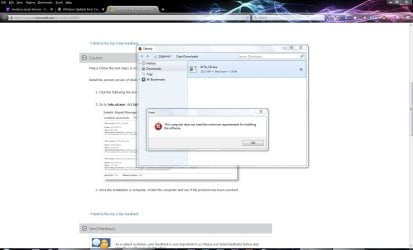
I get an error saying my computer does not meet the minimum requirements.

Jon
 

Attachments

  • Capture 3.JPG
    Capture 3.JPG
    106.9 KB · Views: 4

My Computer

Computer type
PC/Desktop
Computer Manufacturer/Model Number
Custom Build
OS
Windows 7 64 bit Home Premium
CPU
Intel Core 2 Quad Q9400 2.66GHz
Motherboard
Asus P5QL PRO
Memory
8GB
Graphics Card(s)
Nvidia 9800 GT
Hard Drives
Western Digital 320gb (Model WDC WD3200AAKS-75L9A0)
Antivirus
Norton Internet Security 2013
Browser
Firefox

My Computer

Computer type
Laptop
Computer Manufacturer/Model Number
Asus K52F or Lenovo B51-80
OS
Win 7 x64 Home Premium (and x86 VirtualBox VM)/Win10
CPU
i3 370M/i7 6500U
Motherboard
Asus/Lenovo
Memory
8GB - finally :)/8GB
Graphics Card(s)
it's an i3, dude!/dual Intel&nVidia
Sound Card
onboard
Monitor(s) Displays
15.6" built-in
Screen Resolution
1366x768/1920x1080
Hard Drives
750GB Seagate internal
Sundry external drives attached to other computers on the local network
1TB SSD on the Lenovo
PSU
n/a
Internet Speed
as much as I can get - usually on a dongle/phone, so <1MB/s
Antivirus
MSE/Defender
Browser
IE11/12/Edge/Chrome/FF(if I must)
Hi Noel,

It's still saying that my computer does not meet the minimum requirements?

Jon
 

My Computer

Computer type
PC/Desktop
Computer Manufacturer/Model Number
Custom Build
OS
Windows 7 64 bit Home Premium
CPU
Intel Core 2 Quad Q9400 2.66GHz
Motherboard
Asus P5QL PRO
Memory
8GB
Graphics Card(s)
Nvidia 9800 GT
Hard Drives
Western Digital 320gb (Model WDC WD3200AAKS-75L9A0)
Antivirus
Norton Internet Security 2013
Browser
Firefox

My Computer

Computer type
Laptop
Computer Manufacturer/Model Number
Asus K52F or Lenovo B51-80
OS
Win 7 x64 Home Premium (and x86 VirtualBox VM)/Win10
CPU
i3 370M/i7 6500U
Motherboard
Asus/Lenovo
Memory
8GB - finally :)/8GB
Graphics Card(s)
it's an i3, dude!/dual Intel&nVidia
Sound Card
onboard
Monitor(s) Displays
15.6" built-in
Screen Resolution
1366x768/1920x1080
Hard Drives
750GB Seagate internal
Sundry external drives attached to other computers on the local network
1TB SSD on the Lenovo
PSU
n/a
Internet Speed
as much as I can get - usually on a dongle/phone, so <1MB/s
Antivirus
MSE/Defender
Browser
IE11/12/Edge/Chrome/FF(if I must)
Nope, same thing....does not meet system requirements.

It's strange that the Asus one didnt work because I have an Asus P5QL PRO motherboard.

Jon
 

My Computer

Computer type
PC/Desktop
Computer Manufacturer/Model Number
Custom Build
OS
Windows 7 64 bit Home Premium
CPU
Intel Core 2 Quad Q9400 2.66GHz
Motherboard
Asus P5QL PRO
Memory
8GB
Graphics Card(s)
Nvidia 9800 GT
Hard Drives
Western Digital 320gb (Model WDC WD3200AAKS-75L9A0)
Antivirus
Norton Internet Security 2013
Browser
Firefox
Any ideas with this Noel?

I tried installing the Intel(R) Matrix Storage Manager V8.9.0.1023 for Windows 7 and Windows 64bit 7.(WHQL) from the official web page for my motherboard here: https://www.asus.com/Motherboards/P5QL_PRO/HelpDesk_Download/ however it gave me the same error: "does not meet system requirements" which is very strange!

Jon
 

My Computer

Computer type
PC/Desktop
Computer Manufacturer/Model Number
Custom Build
OS
Windows 7 64 bit Home Premium
CPU
Intel Core 2 Quad Q9400 2.66GHz
Motherboard
Asus P5QL PRO
Memory
8GB
Graphics Card(s)
Nvidia 9800 GT
Hard Drives
Western Digital 320gb (Model WDC WD3200AAKS-75L9A0)
Antivirus
Norton Internet Security 2013
Browser
Firefox
Error messages from the installer can be a little misleading - they may really mean that you have a later version installed currently.

Let's check Device Manager

Open Device Manager, and change the View to 'Devices by connection' and 'Show hidden devices'

Is anything flagged with a red X or yellow triangle? if so, what?
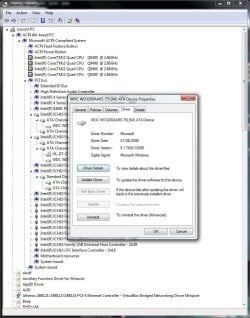
Find the HD in the listing, and work up the branch until you find the storage drivers - what version and manufacturer is quoted? (a screenshot may be useful)
 

My Computer

Computer type
Laptop
Computer Manufacturer/Model Number
Asus K52F or Lenovo B51-80
OS
Win 7 x64 Home Premium (and x86 VirtualBox VM)/Win10
CPU
i3 370M/i7 6500U
Motherboard
Asus/Lenovo
Memory
8GB - finally :)/8GB
Graphics Card(s)
it's an i3, dude!/dual Intel&nVidia
Sound Card
onboard
Monitor(s) Displays
15.6" built-in
Screen Resolution
1366x768/1920x1080
Hard Drives
750GB Seagate internal
Sundry external drives attached to other computers on the local network
1TB SSD on the Lenovo
PSU
n/a
Internet Speed
as much as I can get - usually on a dongle/phone, so <1MB/s
Antivirus
MSE/Defender
Browser
IE11/12/Edge/Chrome/FF(if I must)
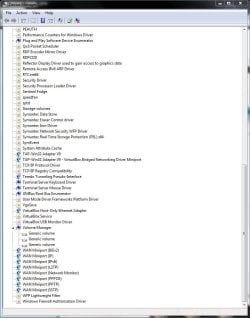
There is nothing flagged that I can see.

Please see the attached screen shot. Is this what you are looking for?

Jon
 

Attachments

  • Capture 4.JPG
    Capture 4.JPG
    56.6 KB · Views: 2

My Computer

Computer type
PC/Desktop
Computer Manufacturer/Model Number
Custom Build
OS
Windows 7 64 bit Home Premium
CPU
Intel Core 2 Quad Q9400 2.66GHz
Motherboard
Asus P5QL PRO
Memory
8GB
Graphics Card(s)
Nvidia 9800 GT
Hard Drives
Western Digital 320gb (Model WDC WD3200AAKS-75L9A0)
Antivirus
Norton Internet Security 2013
Browser
Firefox
That was in the default view - please do another one, after changing the View to 'Devices by connection', and opening the tree so that it shows the HD
 

My Computer

Computer type
Laptop
Computer Manufacturer/Model Number
Asus K52F or Lenovo B51-80
OS
Win 7 x64 Home Premium (and x86 VirtualBox VM)/Win10
CPU
i3 370M/i7 6500U
Motherboard
Asus/Lenovo
Memory
8GB - finally :)/8GB
Graphics Card(s)
it's an i3, dude!/dual Intel&nVidia
Sound Card
onboard
Monitor(s) Displays
15.6" built-in
Screen Resolution
1366x768/1920x1080
Hard Drives
750GB Seagate internal
Sundry external drives attached to other computers on the local network
1TB SSD on the Lenovo
PSU
n/a
Internet Speed
as much as I can get - usually on a dongle/phone, so <1MB/s
Antivirus
MSE/Defender
Browser
IE11/12/Edge/Chrome/FF(if I must)
Hi Noel,

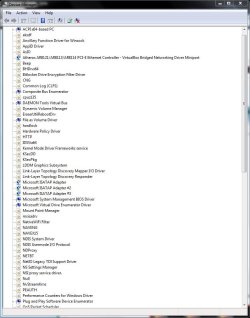
I have taken 2 screen shots of the device manager as you requested, nothing is flagged but I was unable to see anything that related to the HD?

Jon
 

Attachments

  • Capture 6.JPG
    Capture 6.JPG
    87.6 KB · Views: 1
  • Capture 5.JPG
    Capture 5.JPG
    82.4 KB · Views: 1

My Computer

Computer type
PC/Desktop
Computer Manufacturer/Model Number
Custom Build
OS
Windows 7 64 bit Home Premium
CPU
Intel Core 2 Quad Q9400 2.66GHz
Motherboard
Asus P5QL PRO
Memory
8GB
Graphics Card(s)
Nvidia 9800 GT
Hard Drives
Western Digital 320gb (Model WDC WD3200AAKS-75L9A0)
Antivirus
Norton Internet Security 2013
Browser
Firefox
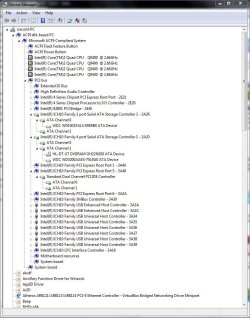
Yeah - you have to drill down through the ACPI x64-based PC>PCIBus>... (usually) to get it to show
 

My Computer

Computer type
Laptop
Computer Manufacturer/Model Number
Asus K52F or Lenovo B51-80
OS
Win 7 x64 Home Premium (and x86 VirtualBox VM)/Win10
CPU
i3 370M/i7 6500U
Motherboard
Asus/Lenovo
Memory
8GB - finally :)/8GB
Graphics Card(s)
it's an i3, dude!/dual Intel&nVidia
Sound Card
onboard
Monitor(s) Displays
15.6" built-in
Screen Resolution
1366x768/1920x1080
Hard Drives
750GB Seagate internal
Sundry external drives attached to other computers on the local network
1TB SSD on the Lenovo
PSU
n/a
Internet Speed
as much as I can get - usually on a dongle/phone, so <1MB/s
Antivirus
MSE/Defender
Browser
IE11/12/Edge/Chrome/FF(if I must)
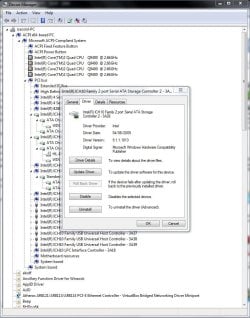
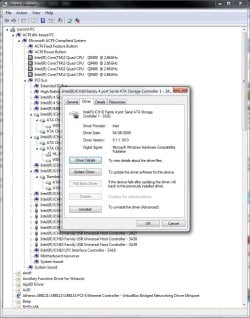
OK, hopefully these are what you're after. Sorry about this.

Jon
 

Attachments

  • Capture 7.JPG
    Capture 7.JPG
    113.4 KB · Views: 2
  • Capture 8.JPG
    Capture 8.JPG
    112.1 KB · Views: 2
  • Capture 9.JPG
    Capture 9.JPG
    112.5 KB · Views: 2
  • Capture 10.JPG
    Capture 10.JPG
    114.4 KB · Views: 1

My Computer

Computer type
PC/Desktop
Computer Manufacturer/Model Number
Custom Build
OS
Windows 7 64 bit Home Premium
CPU
Intel Core 2 Quad Q9400 2.66GHz
Motherboard
Asus P5QL PRO
Memory
8GB
Graphics Card(s)
Nvidia 9800 GT
Hard Drives
Western Digital 320gb (Model WDC WD3200AAKS-75L9A0)
Antivirus
Norton Internet Security 2013
Browser
Firefox
That looks normal enough - but from what I can make out, it should have taken at least one of the driver sets we have already thrown at it.
Try installing these Chipset drivers first....
https://downloadcenter.intel.com/download/20775
Does that change the WU error message at all?
 

My Computer

Computer type
Laptop
Computer Manufacturer/Model Number
Asus K52F or Lenovo B51-80
OS
Win 7 x64 Home Premium (and x86 VirtualBox VM)/Win10
CPU
i3 370M/i7 6500U
Motherboard
Asus/Lenovo
Memory
8GB - finally :)/8GB
Graphics Card(s)
it's an i3, dude!/dual Intel&nVidia
Sound Card
onboard
Monitor(s) Displays
15.6" built-in
Screen Resolution
1366x768/1920x1080
Hard Drives
750GB Seagate internal
Sundry external drives attached to other computers on the local network
1TB SSD on the Lenovo
PSU
n/a
Internet Speed
as much as I can get - usually on a dongle/phone, so <1MB/s
Antivirus
MSE/Defender
Browser
IE11/12/Edge/Chrome/FF(if I must)
Back
Top