Windows Updates Error Code's 8024000E & C80003FA

Hi Noel,

I installed the chipset drivers, however they appear to have made no improvements, I still receive the same Windows Update error codes :(

Jon
 

My Computer

Computer type
PC/Desktop
Computer Manufacturer/Model Number
Custom Build
OS
Windows 7 64 bit Home Premium
CPU
Intel Core 2 Quad Q9400 2.66GHz
Motherboard
Asus P5QL PRO
Memory
8GB
Graphics Card(s)
Nvidia 9800 GT
Hard Drives
Western Digital 320gb (Model WDC WD3200AAKS-75L9A0)
Antivirus
Norton Internet Security 2013
Browser
Firefox
OK - let's see if the other fix I know of has any effect...

Please run the following commands in an Elevated Command Prompt

NET STOP CRYPTSVC
REN C:\WINDOWS\SYSTEM32\CATROOT2 CATROOT2OLD
NET START CRYPTSVC


once complete, leave the system alone for at least an hour to rebuild the database, then reboot, and run another MGADiag report and post the results.

Note that this may delete your Update History - but all updates will remain installed, and can be viewed in the Installed Updates listing.
 

My Computer

Computer type
Laptop
Computer Manufacturer/Model Number
Asus K52F or Lenovo B51-80
OS
Win 7 x64 Home Premium (and x86 VirtualBox VM)/Win10
CPU
i3 370M/i7 6500U
Motherboard
Asus/Lenovo
Memory
8GB - finally :)/8GB
Graphics Card(s)
it's an i3, dude!/dual Intel&nVidia
Sound Card
onboard
Monitor(s) Displays
15.6" built-in
Screen Resolution
1366x768/1920x1080
Hard Drives
750GB Seagate internal
Sundry external drives attached to other computers on the local network
1TB SSD on the Lenovo
PSU
n/a
Internet Speed
as much as I can get - usually on a dongle/phone, so <1MB/s
Antivirus
MSE/Defender
Browser
IE11/12/Edge/Chrome/FF(if I must)
Hi Noel,

I ran the commands listed above as you requested and left the computer for over an hour, still no joy, same error code 8024000E.

I'll post the MGADiag log below.

Jon
 

My Computer

Computer type
PC/Desktop
Computer Manufacturer/Model Number
Custom Build
OS
Windows 7 64 bit Home Premium
CPU
Intel Core 2 Quad Q9400 2.66GHz
Motherboard
Asus P5QL PRO
Memory
8GB
Graphics Card(s)
Nvidia 9800 GT
Hard Drives
Western Digital 320gb (Model WDC WD3200AAKS-75L9A0)
Antivirus
Norton Internet Security 2013
Browser
Firefox
Code:
Diagnostic Report (1.9.0027.0):
-----------------------------------------
Windows Validation Data-->

Validation Code: 0
Cached Online Validation Code: 0x0
Windows Product Key: *****-*****-CBQ2X-BF4QT-GC8MP
Windows Product Key Hash: BLUXnngjWpbwzDlNEOZXPEkgS1I=
Windows Product ID: 00359-OEM-8702004-48810
Windows Product ID Type: 3
Windows License Type: OEM System Builder
Windows OS version: 6.1.7601.2.00010300.1.0.003
ID: {EC6B8D13-C2A6-4868-9C35-A5CF0541772E}(3)
Is Admin: Yes
TestCab: 0x0
LegitcheckControl ActiveX: Registered, 1.9.42.0
Signed By: Microsoft
Product Name: Windows 7 Home Premium
Architecture: 0x00000009
Build lab: 7601.win7sp1_gdr.140303-2144
TTS Error: 
Validation Diagnostic: 
Resolution Status: N/A

Vista WgaER Data-->
ThreatID(s): N/A, hr = 0x80070002
Version: N/A, hr = 0x80070002

Windows XP Notifications Data-->
Cached Result: N/A, hr = 0x80070002
File Exists: No
Version: N/A, hr = 0x80070002
WgaTray.exe Signed By: N/A, hr = 0x80070002
WgaLogon.dll Signed By: N/A, hr = 0x80070002

OGA Notifications Data-->
Cached Result: N/A, hr = 0x80070002
Version: N/A, hr = 0x80070002
OGAExec.exe Signed By: N/A, hr = 0x80070002
OGAAddin.dll Signed By: N/A, hr = 0x80070002

OGA Data-->
Office Status: 109 N/A
OGA Version: N/A, 0x80070002
Signed By: N/A, hr = 0x80070002
Office Diagnostics: 025D1FF3-364-80041010_025D1FF3-229-80041010_025D1FF3-230-1_025D1FF3-517-80040154_025D1FF3-237-80040154_025D1FF3-238-2_025D1FF3-244-80070002_025D1FF3-258-3

Browser Data-->
Proxy settings: N/A
User Agent: Mozilla/4.0 (compatible; MSIE 8.0; Win32)
Default Browser: C:\Program Files (x86)\Mozilla Firefox\firefox.exe
Download signed ActiveX controls: Prompt
Download unsigned ActiveX controls: Disabled
Run ActiveX controls and plug-ins: Allowed
Initialize and script ActiveX controls not marked as safe: Disabled
Allow scripting of Internet Explorer Webbrowser control: Disabled
Active scripting: Allowed
Script ActiveX controls marked as safe for scripting: Allowed

File Scan Data-->

Other data-->
Office Details: <GenuineResults><MachineData><UGUID>{EC6B8D13-C2A6-4868-9C35-A5CF0541772E}</UGUID><Version>1.9.0027.0</Version><OS>6.1.7601.2.00010300.1.0.003</OS><Architecture>x64</Architecture><PKey>*****-*****-*****-*****-GC8MP</PKey><PID>00359-OEM-8702004-48810</PID><PIDType>3</PIDType><SID>S-1-5-21-1790793413-3061751505-1455069250</SID><SYSTEM><Manufacturer>System manufacturer</Manufacturer><Model>P5QL PRO</Model></SYSTEM><BIOS><Manufacturer>American Megatrends Inc.</Manufacturer><Version>1004   </Version><SMBIOSVersion major="2" minor="5"/><Date>20090701000000.000000+000</Date></BIOS><HWID>0B633F07018400F8</HWID><UserLCID>0809</UserLCID><SystemLCID>0409</SystemLCID><TimeZone>GMT Standard Time(GMT+00:00)</TimeZone><iJoin>0</iJoin><SBID><stat>3</stat><msppid></msppid><name></name><model></model></SBID><OEM/><GANotification/></MachineData><Software><Office><Result>109</Result><Products/><Applications/></Office></Software></GenuineResults>  

Spsys.log Content: 0x80070002

Licensing Data-->
Software licensing service version: 6.1.7601.17514

Name: Windows(R) 7, HomePremium edition
Description: Windows Operating System - Windows(R) 7, OEM_COA_NSLP channel
Activation ID: 586bc076-c93d-429a-afe5-a69fbc644e88
Application ID: 55c92734-d682-4d71-983e-d6ec3f16059f
Extended PID: 00359-00174-020-048810-02-2057-7601.0000-2692013
Installation ID: 014615819315954692080531984300034992389230286831557472
Processor Certificate URL: [URL="http://go.microsoft.com/fwlink/?LinkID=88338"]SpcService Web Service[/URL]
Machine Certificate URL: [URL="http://go.microsoft.com/fwlink/?LinkID=88339"]RacService Web Service[/URL]
Use License URL: [URL="http://go.microsoft.com/fwlink/?LinkID=88341"]UseLicenseService Web Service[/URL]
Product Key Certificate URL: [URL="http://go.microsoft.com/fwlink/?LinkID=88340"]PkcService Web Service[/URL]
Partial Product Key: GC8MP
License Status: Licensed
Remaining Windows rearm count: 3
Trusted time: 30/04/2015 15:27:24

Windows Activation Technologies-->
HrOffline: 0x00000000
HrOnline: N/A
HealthStatus: 0x0000000000000000
Event Time Stamp: N/A
ActiveX: Registered, Version: 7.1.7600.16395
Admin Service: Registered, Version: 7.1.7600.16395
HealthStatus Bitmask Output:


HWID Data-->
HWID Hash Current: OgAAAAIABgABAAEAAAABAAAAAwABAAEAln1U9HcWNHXGmIwmRrxoZYQ0ng8eCeQ50Je8/gqm0IZMWA==

OEM Activation 1.0 Data-->
N/A

OEM Activation 2.0 Data-->
BIOS valid for OA 2.0: yes, but no SLIC table
Windows marker version: N/A
OEMID and OEMTableID Consistent: N/A
BIOS Information: 
  ACPI Table Name    OEMID Value    OEMTableID Value
  APIC            A_M_I_        OEMAPIC 
  FACP            A_M_I_        OEMFACP 
  HPET            A_M_I_        OEMHPET 
  MCFG            A_M_I_        OEMMCFG 
  OEMB            A_M_I_        AMI_OEM 
  OSFR            A_M_I_        OEMOSFR

 

My Computer

Computer type
PC/Desktop
Computer Manufacturer/Model Number
Custom Build
OS
Windows 7 64 bit Home Premium
CPU
Intel Core 2 Quad Q9400 2.66GHz
Motherboard
Asus P5QL PRO
Memory
8GB
Graphics Card(s)
Nvidia 9800 GT
Hard Drives
Western Digital 320gb (Model WDC WD3200AAKS-75L9A0)
Antivirus
Norton Internet Security 2013
Browser
Firefox
Sorry - didn't mean to ask for an MGADiag - it was just a hangover from one of my standard scripts!
(you'll be happy to know that your report was fine though :))

I was pretty certain that that would be the case - let's check something though...

Open an ELevated Command Prompt, and run the following command.

DIR C:\Windows\System32\Catroot2

post the results.


Here are some instructions to make life easier :)
1) To open an Elevated Command Prompt Window (the ECP window), click on Start, All Programs, Accessories – then right-click on Command Prompt, and select Run as Administrator. Accept the UAC prompt.
2) To run the commands easier, highlight the block of commands, and right-click on the highlight – select Copy. In the CP Window, click on the black/white icon at top left – select Paste. The commands will run but may not complete the last command, so hit the Enter Key once.
3) To copy the results... click on the Black/White icon in the top left, and select Edit... 'Select All', and hit the Enter key - then use Ctrl+V or r-click+Paste to paste it into your response.
 

My Computer

Computer type
Laptop
Computer Manufacturer/Model Number
Asus K52F or Lenovo B51-80
OS
Win 7 x64 Home Premium (and x86 VirtualBox VM)/Win10
CPU
i3 370M/i7 6500U
Motherboard
Asus/Lenovo
Memory
8GB - finally :)/8GB
Graphics Card(s)
it's an i3, dude!/dual Intel&nVidia
Sound Card
onboard
Monitor(s) Displays
15.6" built-in
Screen Resolution
1366x768/1920x1080
Hard Drives
750GB Seagate internal
Sundry external drives attached to other computers on the local network
1TB SSD on the Lenovo
PSU
n/a
Internet Speed
as much as I can get - usually on a dongle/phone, so <1MB/s
Antivirus
MSE/Defender
Browser
IE11/12/Edge/Chrome/FF(if I must)
Microsoft Windows [Version 6.1.7601]
Copyright (c) 2009 Microsoft Corporation. All rights reserved.

C:\Windows\system32>DIR C:\Windows\System32\Catroot2
Volume in drive C has no label.
Volume Serial Number is 4EAD-9B85

Directory of C:\Windows\System32\Catroot2

30/04/2015 11:53 <DIR> .
30/04/2015 11:53 <DIR> ..
30/04/2015 11:53 71,033 dberr.txt
30/04/2015 11:54 8,192 edb.chk
30/04/2015 11:53 65,536 edb.log
30/04/2015 11:53 65,536 edb002D9.log
30/04/2015 11:53 65,536 edb002DA.log
30/04/2015 11:53 65,536 edb002DB.log
30/04/2015 11:53 65,536 edb002DC.log
30/04/2015 11:53 65,536 edb002DD.log
30/04/2015 11:53 65,536 edb002DE.log
30/04/2015 11:53 65,536 edb002DF.log
30/04/2015 11:53 65,536 edb002E0.log
30/04/2015 11:53 65,536 edb002E1.log
30/04/2015 11:53 65,536 edb002E2.log
30/04/2015 11:53 65,536 edb002E3.log
30/04/2015 11:53 65,536 edb002E4.log
30/04/2015 11:53 65,536 edb002E5.log
30/04/2015 11:53 65,536 edb002E6.log
30/04/2015 11:53 65,536 edb002E7.log
30/04/2015 11:53 65,536 edb002E8.log
30/04/2015 11:53 65,536 edb002E9.log
30/04/2015 11:46 65,536 edbres00001.jrs
30/04/2015 11:46 65,536 edbres00002.jrs
30/04/2015 11:46 <DIR> {127D0A1D-4EF2-11D1-8608-00C04FC295EE}
30/04/2015 11:46 <DIR> {F750E6C3-38EE-11D1-85E5-00C04FC295EE}
22 File(s) 1,389,945 bytes
4 Dir(s) 72,456,986,624 bytes free

C:\Windows\system32>
 

My Computer

Computer type
PC/Desktop
Computer Manufacturer/Model Number
Custom Build
OS
Windows 7 64 bit Home Premium
CPU
Intel Core 2 Quad Q9400 2.66GHz
Motherboard
Asus P5QL PRO
Memory
8GB
Graphics Card(s)
Nvidia 9800 GT
Hard Drives
Western Digital 320gb (Model WDC WD3200AAKS-75L9A0)
Antivirus
Norton Internet Security 2013
Browser
Firefox
That looks normal enough - so let's have a look at the event logs and see if they give us a clue...

Open Event Viewer
click on the Windows logs entry in the left pane to expand it.
Now click on the Application entry - wait while it loads.
Click on 'File' in the menu bar and select Save...
Save the file as Appevt.evtx
Repeat for the System log
then zip both, and upload them.
 

My Computer

Computer type
Laptop
Computer Manufacturer/Model Number
Asus K52F or Lenovo B51-80
OS
Win 7 x64 Home Premium (and x86 VirtualBox VM)/Win10
CPU
i3 370M/i7 6500U
Motherboard
Asus/Lenovo
Memory
8GB - finally :)/8GB
Graphics Card(s)
it's an i3, dude!/dual Intel&nVidia
Sound Card
onboard
Monitor(s) Displays
15.6" built-in
Screen Resolution
1366x768/1920x1080
Hard Drives
750GB Seagate internal
Sundry external drives attached to other computers on the local network
1TB SSD on the Lenovo
PSU
n/a
Internet Speed
as much as I can get - usually on a dongle/phone, so <1MB/s
Antivirus
MSE/Defender
Browser
IE11/12/Edge/Chrome/FF(if I must)
Hi Noel,

Sorry for the delay getting back to you.

I have run windows update again a couple of times this morning, I'm still getting the same error code.

I have attached the Event Viewer logs as requested. I picked out the logs relating to this mornings update attempts to make life a little easier for you, however, if you do require the full logs I can of course post these for you also.

Jon
 

Attachments

My Computer

Computer type
PC/Desktop
Computer Manufacturer/Model Number
Custom Build
OS
Windows 7 64 bit Home Premium
CPU
Intel Core 2 Quad Q9400 2.66GHz
Motherboard
Asus P5QL PRO
Memory
8GB
Graphics Card(s)
Nvidia 9800 GT
Hard Drives
Western Digital 320gb (Model WDC WD3200AAKS-75L9A0)
Antivirus
Norton Internet Security 2013
Browser
Firefox
I really need all of the log data I asked for - there's a lot of stuff that goes on in the background that may give me a clue.

There's only one error there that relates to each update - 8024000e - which we already know about. It's what's happening at boot that I'm more interested in.
 

My Computer

Computer type
Laptop
Computer Manufacturer/Model Number
Asus K52F or Lenovo B51-80
OS
Win 7 x64 Home Premium (and x86 VirtualBox VM)/Win10
CPU
i3 370M/i7 6500U
Motherboard
Asus/Lenovo
Memory
8GB - finally :)/8GB
Graphics Card(s)
it's an i3, dude!/dual Intel&nVidia
Sound Card
onboard
Monitor(s) Displays
15.6" built-in
Screen Resolution
1366x768/1920x1080
Hard Drives
750GB Seagate internal
Sundry external drives attached to other computers on the local network
1TB SSD on the Lenovo
PSU
n/a
Internet Speed
as much as I can get - usually on a dongle/phone, so <1MB/s
Antivirus
MSE/Defender
Browser
IE11/12/Edge/Chrome/FF(if I must)
No problem, see attached.

Jon
 

My Computer

Computer type
PC/Desktop
Computer Manufacturer/Model Number
Custom Build
OS
Windows 7 64 bit Home Premium
CPU
Intel Core 2 Quad Q9400 2.66GHz
Motherboard
Asus P5QL PRO
Memory
8GB
Graphics Card(s)
Nvidia 9800 GT
Hard Drives
Western Digital 320gb (Model WDC WD3200AAKS-75L9A0)
Antivirus
Norton Internet Security 2013
Browser
Firefox
Aha!
wuaueng.dll (128) SUS20ClientDataStore: The database page read from the file "C:\Windows\SoftwareDistribution\DataStore\DataStore.edb" at offset 98304 (0x0000000000018000) (database page 2 (0x2)) for 32768 (0x00008000) bytes failed verification. Bit 131873 was corrupted and has been corrected. This problem is likely due to faulty hardware and may continue. Transient failures such as these can be a precursor to a catastrophic failure in the storage subsystem containing this file. Please
wuaueng.dll (128) SUS20ClientDataStore: The database page read from the file "C:\Windows\SoftwareDistribution\DataStore\DataStore.edb" at offset 98304 (0x0000000000018000) (database page 2 (0x2)) for 32768 (0x00008000) bytes failed verification. Bit 801 was corrupted and has been corrected. This problem is likely due to faulty hardware and may continue. Transient failures such as these can be a precursor to a catastrophic failure in the storage subsystem containing this file. Please contact your hardware vendor for further assistance diagnosing the problem.

You also have massive problems with the Bonjour Service (from Apple) - but that's so common I usually ignore it.
TombRaider is throwing a few Access Denied errors, and RealPlayer and Adobe Air are also throwing errors.

I think a CHKDSK is in order here...

Click on Start > All Programs > Accessories
Right-click on the Command Prompt entry
Select Run as Administrator and accept the UAC prompt - the Elevated Command Prompt window should pop up.
At the Command prompt, type
CHKDSK C: /R
and hit the Enter key.
You will be told that the drive is locked, and the CHKDSK will run at the next boot - hit the Y key, and then reboot.
The CHKDSK will take a few hours depending on the size of the drive, so be patient!
After the CHKDSK has run, Windows should boot normally (possibly after a second auto-reboot).

Please then rename the SoftwareDistribution folder -

Open an Elevated Command Prompt
Run the following commands

NET STOP WUAUSERV
REN C:\WINDOWS\SoftwareDistribution SDOLD
NET START WUAUSERV

reboot
then wait 10 minutes, and open Windows Updates, and run a Check for Updates.

Install only the oldest update found - and reboot once installed
then go back to Windows updates and install the others.
 

My Computer

Computer type
Laptop
Computer Manufacturer/Model Number
Asus K52F or Lenovo B51-80
OS
Win 7 x64 Home Premium (and x86 VirtualBox VM)/Win10
CPU
i3 370M/i7 6500U
Motherboard
Asus/Lenovo
Memory
8GB - finally :)/8GB
Graphics Card(s)
it's an i3, dude!/dual Intel&nVidia
Sound Card
onboard
Monitor(s) Displays
15.6" built-in
Screen Resolution
1366x768/1920x1080
Hard Drives
750GB Seagate internal
Sundry external drives attached to other computers on the local network
1TB SSD on the Lenovo
PSU
n/a
Internet Speed
as much as I can get - usually on a dongle/phone, so <1MB/s
Antivirus
MSE/Defender
Browser
IE11/12/Edge/Chrome/FF(if I must)
Thanks Noel, I'll do this and let you know the outcome.

Jon
 

My Computer

Computer type
PC/Desktop
Computer Manufacturer/Model Number
Custom Build
OS
Windows 7 64 bit Home Premium
CPU
Intel Core 2 Quad Q9400 2.66GHz
Motherboard
Asus P5QL PRO
Memory
8GB
Graphics Card(s)
Nvidia 9800 GT
Hard Drives
Western Digital 320gb (Model WDC WD3200AAKS-75L9A0)
Antivirus
Norton Internet Security 2013
Browser
Firefox
Hi Noel,

Right, I ran the CHKDSK as requested followed by the renaming of the SoftwareDistribution folder and a restart.

I re-ran Windows Update but got the error code: C80003FA. I then tried a second attempt and received error code:
8024000E :mad:

Any other suggestions?

Jon
 

My Computer

Computer type
PC/Desktop
Computer Manufacturer/Model Number
Custom Build
OS
Windows 7 64 bit Home Premium
CPU
Intel Core 2 Quad Q9400 2.66GHz
Motherboard
Asus P5QL PRO
Memory
8GB
Graphics Card(s)
Nvidia 9800 GT
Hard Drives
Western Digital 320gb (Model WDC WD3200AAKS-75L9A0)
Antivirus
Norton Internet Security 2013
Browser
Firefox
Please post the new C:\Windows\windowsupdate.log files - and new event logs.

(Both the above errors are indicative of problems with the connection between you and the Windows Update server.)
 

My Computer

Computer type
Laptop
Computer Manufacturer/Model Number
Asus K52F or Lenovo B51-80
OS
Win 7 x64 Home Premium (and x86 VirtualBox VM)/Win10
CPU
i3 370M/i7 6500U
Motherboard
Asus/Lenovo
Memory
8GB - finally :)/8GB
Graphics Card(s)
it's an i3, dude!/dual Intel&nVidia
Sound Card
onboard
Monitor(s) Displays
15.6" built-in
Screen Resolution
1366x768/1920x1080
Hard Drives
750GB Seagate internal
Sundry external drives attached to other computers on the local network
1TB SSD on the Lenovo
PSU
n/a
Internet Speed
as much as I can get - usually on a dongle/phone, so <1MB/s
Antivirus
MSE/Defender
Browser
IE11/12/Edge/Chrome/FF(if I must)
Attached as requested.

Jon
 

My Computer

Computer type
PC/Desktop
Computer Manufacturer/Model Number
Custom Build
OS
Windows 7 64 bit Home Premium
CPU
Intel Core 2 Quad Q9400 2.66GHz
Motherboard
Asus P5QL PRO
Memory
8GB
Graphics Card(s)
Nvidia 9800 GT
Hard Drives
Western Digital 320gb (Model WDC WD3200AAKS-75L9A0)
Antivirus
Norton Internet Security 2013
Browser
Firefox
There are still a number of corruptions appearing in the current event logs - but the disk appears to be fine.
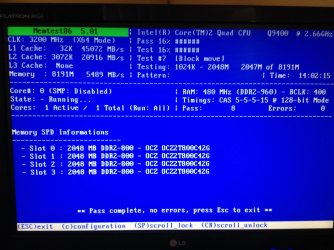
This means that the most likely source of the corruption is RAM
Please follow the RAM test tutorial here... http://www.sevenforums.com/tutorials/105647-ram-test-memtest86.html - you need to run at least three full passes without any errors to be fairly sure that the RAM is OK. (some like to run 7 or 8, but I think that's probably excessive)
 

My Computer

Computer type
Laptop
Computer Manufacturer/Model Number
Asus K52F or Lenovo B51-80
OS
Win 7 x64 Home Premium (and x86 VirtualBox VM)/Win10
CPU
i3 370M/i7 6500U
Motherboard
Asus/Lenovo
Memory
8GB - finally :)/8GB
Graphics Card(s)
it's an i3, dude!/dual Intel&nVidia
Sound Card
onboard
Monitor(s) Displays
15.6" built-in
Screen Resolution
1366x768/1920x1080
Hard Drives
750GB Seagate internal
Sundry external drives attached to other computers on the local network
1TB SSD on the Lenovo
PSU
n/a
Internet Speed
as much as I can get - usually on a dongle/phone, so <1MB/s
Antivirus
MSE/Defender
Browser
IE11/12/Edge/Chrome/FF(if I must)
Hi Noel,

I ran Memtest last night, 14hrs, 8 full passes, 0 errors

Jon
 

Attachments

  • image.jpg
    image.jpg
    496.7 KB · Views: 1

My Computer

Computer type
PC/Desktop
Computer Manufacturer/Model Number
Custom Build
OS
Windows 7 64 bit Home Premium
CPU
Intel Core 2 Quad Q9400 2.66GHz
Motherboard
Asus P5QL PRO
Memory
8GB
Graphics Card(s)
Nvidia 9800 GT
Hard Drives
Western Digital 320gb (Model WDC WD3200AAKS-75L9A0)
Antivirus
Norton Internet Security 2013
Browser
Firefox

My Computer

Computer type
Laptop
Computer Manufacturer/Model Number
Asus K52F or Lenovo B51-80
OS
Win 7 x64 Home Premium (and x86 VirtualBox VM)/Win10
CPU
i3 370M/i7 6500U
Motherboard
Asus/Lenovo
Memory
8GB - finally :)/8GB
Graphics Card(s)
it's an i3, dude!/dual Intel&nVidia
Sound Card
onboard
Monitor(s) Displays
15.6" built-in
Screen Resolution
1366x768/1920x1080
Hard Drives
750GB Seagate internal
Sundry external drives attached to other computers on the local network
1TB SSD on the Lenovo
PSU
n/a
Internet Speed
as much as I can get - usually on a dongle/phone, so <1MB/s
Antivirus
MSE/Defender
Browser
IE11/12/Edge/Chrome/FF(if I must)
Hi Noel,

Please see attached as requested.

Jon
 

Attachments

My Computer

Computer type
PC/Desktop
Computer Manufacturer/Model Number
Custom Build
OS
Windows 7 64 bit Home Premium
CPU
Intel Core 2 Quad Q9400 2.66GHz
Motherboard
Asus P5QL PRO
Memory
8GB
Graphics Card(s)
Nvidia 9800 GT
Hard Drives
Western Digital 320gb (Model WDC WD3200AAKS-75L9A0)
Antivirus
Norton Internet Security 2013
Browser
Firefox
The crash dumps are 9 months old, at least. So those will not reflect the present situation at all. But .... there are some things those you need to do.

Daemon Tools, Alcohol 120% and Power Archiver Pro uses SCSI Pass Through Direct (SPTD), which is a well known BSOD causer. Uninstall Daemon Tools at first. Then download SPTD standalone installer from Disk-Tools.com, and execute the downloaded file as guided below :

  • Double click to open it.
  • Click this button only:
  • 2012-12-13_224441.jpg
  • If it is grayed out, as in the picture, there is no more SPTD in your system, and you just close the window.
Free up the startup. Windows does not need any other program to auto start with it, but the auto start programs often conflicts and causes various problems including BSODs.

  1. Click on the Start button
  2. Type “msconfig (without quotes), click the resulting link. It will open the System Configuration window.
  3. Select the “Startup” tab.
  4. Deselect all items other than the antivirus.
  5. Apply > OK
  6. Accept then restart.
You have some factory bloatware installed, too. Uninstall them.
Start Menu\Programs\ASUS
Start Menu\Programs\ASUS\AsusUpdate
Start Menu\Programs\ASUS\EPU-4 Engine

And, as the computer is substantially old, is the computer hot? Report us the heat of the computer after a couple of hours of your normal usage. Upload a screenshot of the summery tab of Speccy. Alternatively, you can publish a Speccy snapshot too: http://www.sevenforums.com/tutorials/311593-speccy-publish-snapshot-your-system-specs.html .

Check if the Power Supply Unit (PSU) supplying adequate power to the computer or not.

Also let us know the wattage of the installed PSU.
 

My Computer

Computer type
PC/Desktop
Computer Manufacturer/Model Number
Self Assembled
OS
Microsoft Windows 10 Pro Insider Preview 64-bit
CPU
Intel(R) Core(TM) i3-4130 CPU @ 3.40GHz
Motherboard
Gigabyte Technology Co., Ltd. B85M-D3H
Memory
Corsair Vengence 4GB x2 (8.00GB Dual-Channel DDR3 @ 798MHz)
Graphics Card(s)
2047MB GeForce GTS 450 (ZOTAC International)
Sound Card
Onboard (Realtek High Definition Audio)
Monitor(s) Displays
LG Flatron E2040T
Screen Resolution
1600x900
Hard Drives
Western Digital 1 TB
Seagate 500 GB
PSU
Corsair VS550
Case
Cooler Master K380
Cooling
Cooler Master Seidon 120V Plus
Keyboard
Logitech MK260r
Mouse
Logitech MK260r
Internet Speed
PMPL Broadband
Antivirus
Windows Defender + MBAM
Browser
Firefox
Other Info
Dell Studio 15" Laptop
Back
Top