Windows Updates Error Code's 8024000E & C80003FA

The age of the dumps is surprising - from the Events logs...
Code:
 Line 604677: The previous system shutdown at 9:17:14 PM on ?3/?28/?2015 was unexpected.
 Line 612392: The previous system shutdown at 9:46:23 PM on ?3/?30/?2015 was unexpected.
 Line 616029: The previous system shutdown at 9:08:16 PM on ?3/?31/?2015 was unexpected.
 Line 619642: The previous system shutdown at 9:33:34 PM on ?4/?1/?2015 was unexpected.
 Line 623551: The previous system shutdown at 9:52:56 PM on ?4/?2/?2015 was unexpected.
 

My Computer

Computer type
Laptop
Computer Manufacturer/Model Number
Asus K52F or Lenovo B51-80
OS
Win 7 x64 Home Premium (and x86 VirtualBox VM)/Win10
CPU
i3 370M/i7 6500U
Motherboard
Asus/Lenovo
Memory
8GB - finally :)/8GB
Graphics Card(s)
it's an i3, dude!/dual Intel&nVidia
Sound Card
onboard
Monitor(s) Displays
15.6" built-in
Screen Resolution
1366x768/1920x1080
Hard Drives
750GB Seagate internal
Sundry external drives attached to other computers on the local network
1TB SSD on the Lenovo
PSU
n/a
Internet Speed
as much as I can get - usually on a dongle/phone, so <1MB/s
Antivirus
MSE/Defender
Browser
IE11/12/Edge/Chrome/FF(if I must)
The age of the dumps is surprising - from the Events logs...
Code:
 Line 604677: The previous system shutdown at 9:17:14 PM on ?3/?28/?2015 was unexpected.
 Line 612392: The previous system shutdown at 9:46:23 PM on ?3/?30/?2015 was unexpected.
 Line 616029: The previous system shutdown at 9:08:16 PM on ?3/?31/?2015 was unexpected.
 Line 619642: The previous system shutdown at 9:33:34 PM on ?4/?1/?2015 was unexpected.
 Line 623551: The previous system shutdown at 9:52:56 PM on ?4/?2/?2015 was unexpected.
Those are kernel power event 41, indicating to abnormal shutdowns. Those may be caused for a BSOD, or for any other reason. Whatever, we have to search for the reason behind it, and some housecleaning will reduce some noise there I hope. Let us see how it goes. :)
 

My Computer

Computer type
PC/Desktop
Computer Manufacturer/Model Number
Self Assembled
OS
Microsoft Windows 10 Pro Insider Preview 64-bit
CPU
Intel(R) Core(TM) i3-4130 CPU @ 3.40GHz
Motherboard
Gigabyte Technology Co., Ltd. B85M-D3H
Memory
Corsair Vengence 4GB x2 (8.00GB Dual-Channel DDR3 @ 798MHz)
Graphics Card(s)
2047MB GeForce GTS 450 (ZOTAC International)
Sound Card
Onboard (Realtek High Definition Audio)
Monitor(s) Displays
LG Flatron E2040T
Screen Resolution
1600x900
Hard Drives
Western Digital 1 TB
Seagate 500 GB
PSU
Corsair VS550
Case
Cooler Master K380
Cooling
Cooler Master Seidon 120V Plus
Keyboard
Logitech MK260r
Mouse
Logitech MK260r
Internet Speed
PMPL Broadband
Antivirus
Windows Defender + MBAM
Browser
Firefox
Other Info
Dell Studio 15" Laptop
Thanks for your input guys. I'll will deal with the points you raised tomorrow and I'll get back to you with the results.

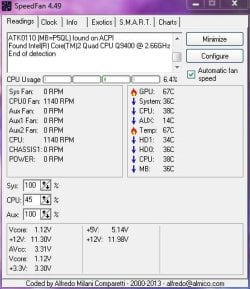
Although my system is quite old now I do not believe it to be related to an overheating issue (see attachment). The system has been running for approximately 9hrs, and i've just finished photoshopping a large number of photos, however, I will deal with your other points tomorrow.

Jon
 

Attachments

  • Capture 13.JPG
    Capture 13.JPG
    42.8 KB · Views: 24

My Computer

Computer type
PC/Desktop
Computer Manufacturer/Model Number
Custom Build
OS
Windows 7 64 bit Home Premium
CPU
Intel Core 2 Quad Q9400 2.66GHz
Motherboard
Asus P5QL PRO
Memory
8GB
Graphics Card(s)
Nvidia 9800 GT
Hard Drives
Western Digital 320gb (Model WDC WD3200AAKS-75L9A0)
Antivirus
Norton Internet Security 2013
Browser
Firefox
Guys I'm really sorry that I've not got round to this yet, my graphics card died on me yesterday and I've replaced it for another that I had spare. I'm in hospital for a days for an op tomorrow but ill definitely get round to this by the weekend. I didnt want you to think that I'd abandoned the matter! ;)

Jon
 

My Computer

Computer type
PC/Desktop
Computer Manufacturer/Model Number
Custom Build
OS
Windows 7 64 bit Home Premium
CPU
Intel Core 2 Quad Q9400 2.66GHz
Motherboard
Asus P5QL PRO
Memory
8GB
Graphics Card(s)
Nvidia 9800 GT
Hard Drives
Western Digital 320gb (Model WDC WD3200AAKS-75L9A0)
Antivirus
Norton Internet Security 2013
Browser
Firefox
Guys I'm really sorry that I've not got round to this yet, my graphics card died on me yesterday and I've replaced it for another that I had spare. I'm in hospital for a days for an op tomorrow but ill definitely get round to this by the weekend. I didnt want you to think that I'd abandoned the matter! ;)

Jon
A hospital is a good place, if you are not sick. Nice food, relaxation and nurses. :)

Get well soon. We may continue with troubleshooting at any future time when you are ready for it. No hurry. :)
 

My Computer

Computer type
PC/Desktop
Computer Manufacturer/Model Number
Self Assembled
OS
Microsoft Windows 10 Pro Insider Preview 64-bit
CPU
Intel(R) Core(TM) i3-4130 CPU @ 3.40GHz
Motherboard
Gigabyte Technology Co., Ltd. B85M-D3H
Memory
Corsair Vengence 4GB x2 (8.00GB Dual-Channel DDR3 @ 798MHz)
Graphics Card(s)
2047MB GeForce GTS 450 (ZOTAC International)
Sound Card
Onboard (Realtek High Definition Audio)
Monitor(s) Displays
LG Flatron E2040T
Screen Resolution
1600x900
Hard Drives
Western Digital 1 TB
Seagate 500 GB
PSU
Corsair VS550
Case
Cooler Master K380
Cooling
Cooler Master Seidon 120V Plus
Keyboard
Logitech MK260r
Mouse
Logitech MK260r
Internet Speed
PMPL Broadband
Antivirus
Windows Defender + MBAM
Browser
Firefox
Other Info
Dell Studio 15" Laptop
OK guys I'm back!

I have installed Daemon Tools, removed the SPTD drivers, cleaned up startup and removed the Asus bloatware.

Before going into hospital for a few days I also needed to change the graphics card for an old Geforce GT240. I have attached a new heat monitor screen-shot after the system has been running for several hours. I have 2 x 120mm fans drawing in cool air from the front of the case and over the HDD's, a single 120mm fan in the side panel which blows directly over the RAM and GPU and 1 x 120mm rear exhaust.

My power supply is an Artic 700w PSU which should be more then sufficient.

What steps should I take next?

Jon
 

Attachments

  • Capture 14.JPG
    Capture 14.JPG
    41.7 KB · Views: 11

My Computer

Computer type
PC/Desktop
Computer Manufacturer/Model Number
Custom Build
OS
Windows 7 64 bit Home Premium
CPU
Intel Core 2 Quad Q9400 2.66GHz
Motherboard
Asus P5QL PRO
Memory
8GB
Graphics Card(s)
Nvidia 9800 GT
Hard Drives
Western Digital 320gb (Model WDC WD3200AAKS-75L9A0)
Antivirus
Norton Internet Security 2013
Browser
Firefox
Now you should give it a time. Wait and observe how it goes. Report us for any further BSOD.
 

My Computer

Computer type
PC/Desktop
Computer Manufacturer/Model Number
Self Assembled
OS
Microsoft Windows 10 Pro Insider Preview 64-bit
CPU
Intel(R) Core(TM) i3-4130 CPU @ 3.40GHz
Motherboard
Gigabyte Technology Co., Ltd. B85M-D3H
Memory
Corsair Vengence 4GB x2 (8.00GB Dual-Channel DDR3 @ 798MHz)
Graphics Card(s)
2047MB GeForce GTS 450 (ZOTAC International)
Sound Card
Onboard (Realtek High Definition Audio)
Monitor(s) Displays
LG Flatron E2040T
Screen Resolution
1600x900
Hard Drives
Western Digital 1 TB
Seagate 500 GB
PSU
Corsair VS550
Case
Cooler Master K380
Cooling
Cooler Master Seidon 120V Plus
Keyboard
Logitech MK260r
Mouse
Logitech MK260r
Internet Speed
PMPL Broadband
Antivirus
Windows Defender + MBAM
Browser
Firefox
Other Info
Dell Studio 15" Laptop
Hi Noel/Iceland/Anyone else?

I am facing exactly the same issues as the previous poster and have tried the driver also and am getting the same messages.

Any help will be greatly appreciated.
 

My Computer

Computer type
PC/Desktop
OS
Windows 7 64 bit
Hi Noel / Icecold

Got exactly the same problem!! - please help!
 

My Computer

Computer type
PC/Desktop
OS
Windows 7 64 bit
Hi Arc,

Problem is that I've not actually experienced any BSOD's that I can recall. My main issue is that I still receive error code's 8024000E & C80003FA when checking for Windows Updates.

Jon
 

My Computer

Computer type
PC/Desktop
Computer Manufacturer/Model Number
Custom Build
OS
Windows 7 64 bit Home Premium
CPU
Intel Core 2 Quad Q9400 2.66GHz
Motherboard
Asus P5QL PRO
Memory
8GB
Graphics Card(s)
Nvidia 9800 GT
Hard Drives
Western Digital 320gb (Model WDC WD3200AAKS-75L9A0)
Antivirus
Norton Internet Security 2013
Browser
Firefox
Hi IcecoldUK.

I can help you with the BSOD issue. Windows update is Noel's specialization and he is the best person you can have in the world to help you with windows update related issue. So I would suggest you to continue with Noel with the update related errors. If you get any more BSOD, I am subscribed to your thread to help you with that.

But, there is one thing that you may try: http://www.sevenforums.com/tutorials/91738-windows-update-reset.html
 

My Computer

Computer type
PC/Desktop
Computer Manufacturer/Model Number
Self Assembled
OS
Microsoft Windows 10 Pro Insider Preview 64-bit
CPU
Intel(R) Core(TM) i3-4130 CPU @ 3.40GHz
Motherboard
Gigabyte Technology Co., Ltd. B85M-D3H
Memory
Corsair Vengence 4GB x2 (8.00GB Dual-Channel DDR3 @ 798MHz)
Graphics Card(s)
2047MB GeForce GTS 450 (ZOTAC International)
Sound Card
Onboard (Realtek High Definition Audio)
Monitor(s) Displays
LG Flatron E2040T
Screen Resolution
1600x900
Hard Drives
Western Digital 1 TB
Seagate 500 GB
PSU
Corsair VS550
Case
Cooler Master K380
Cooling
Cooler Master Seidon 120V Plus
Keyboard
Logitech MK260r
Mouse
Logitech MK260r
Internet Speed
PMPL Broadband
Antivirus
Windows Defender + MBAM
Browser
Firefox
Other Info
Dell Studio 15" Laptop
Hi Noel / Icecold

Got exactly the same problem!! - please help!

Please start a NEW thread of your own, and post your own results to it.

Please follow the Windows Update Posting Instructions and post the requested data

If the file is too large (8MB compressed), remove the older CBSPersist cab files until the final file is below the limit - you can always post them separately after zipping them. (the forum doesn't allow the upload of bare CAB files, for a number of reasons)

Please also post the C:\Windows\windowsudpate.log file
 

My Computer

Computer type
Laptop
Computer Manufacturer/Model Number
Asus K52F or Lenovo B51-80
OS
Win 7 x64 Home Premium (and x86 VirtualBox VM)/Win10
CPU
i3 370M/i7 6500U
Motherboard
Asus/Lenovo
Memory
8GB - finally :)/8GB
Graphics Card(s)
it's an i3, dude!/dual Intel&nVidia
Sound Card
onboard
Monitor(s) Displays
15.6" built-in
Screen Resolution
1366x768/1920x1080
Hard Drives
750GB Seagate internal
Sundry external drives attached to other computers on the local network
1TB SSD on the Lenovo
PSU
n/a
Internet Speed
as much as I can get - usually on a dongle/phone, so <1MB/s
Antivirus
MSE/Defender
Browser
IE11/12/Edge/Chrome/FF(if I must)
Back
Top