Windows won't fully start

All right.
Did that.
Took it from 80% full to 79.4%.


Anyway it's back to crashing a lot so what's the next step/option?
 

My Computer

Computer type
PC/Desktop
Computer Manufacturer/Model Number
HP 6005 Pro
OS
Windows 7 Pro x64
CPU
Athlon II X2 B24 (3.00GHz)
Memory
8GB DDR3
Hard Drives
1TB HDD
Is there some kind of program/app that will show why the computer keeps crashing?
Or is it on to the os repair/recovery?
 

My Computer

Computer type
PC/Desktop
Computer Manufacturer/Model Number
HP 6005 Pro
OS
Windows 7 Pro x64
CPU
Athlon II X2 B24 (3.00GHz)
Memory
8GB DDR3
Hard Drives
1TB HDD
Does it just freezes or give you the Blue Screen Of Death (BSOD)?
 

My Computers

System One System Two

  • Computer type
    PC/Desktop
    Computer Manufacturer/Model Number
    custom build
    OS
    Windows 7 HP 64
    CPU
    i5 6600K - 800MHz to 4200MHz
    Motherboard
    GA-Z170-HD3P
    Memory
    4+4G GSkill DDR4 3000
    Graphics Card(s)
    IG - Intel 530
    Monitor(s) Displays
    Samsung 226BW
    Screen Resolution
    1680x1050
    Hard Drives
    (1) -1 SM951 – 128GB M.2 AHCI PCIe SSD drive for Windows 7 and Lubuntu
    (2) -1 WD SATA 3 - 1T for Data
    (3) -1 WD SATA 3 - 1T for backup
    PSU
    Thermaltake 450W TR2 gold
    Keyboard
    Old and good Chicony mechanical keyboard
    Mouse
    Logitech mX performance - 9 buttons (had to disable some)
    Internet Speed
    500Mb/s
    Browser
    Firefox 64
    Other Info
    TinyWall firewall
  • Computer type
    Laptop
    System Manufacturer/Model Number
    Asus Q550LF
    OS
    Windows 7 Pro
    CPU
    i7-4500U 800MHz to 3.0GHz
    Motherboard
    Asus Q550LF
    Memory
    (4+4)G DDR3 1600
    Graphics Card(s)
    IG intel 4400 + NVIDIA GeForce GT 745M
    Sound Card
    Realtek
    Monitor(s) Displays
    LG Display LP156WF4-SPH1
    Screen Resolution
    1920 x 1080
    Hard Drives
    BX500 120G SSD for Windows and programs +
    1T HDD for data
    Internet Speed
    500 Mb/s
    Browser
    Firefox
    Other Info
    TinyWall firewall
Thanks for replying Megahertz.


Never had a BSOD before.
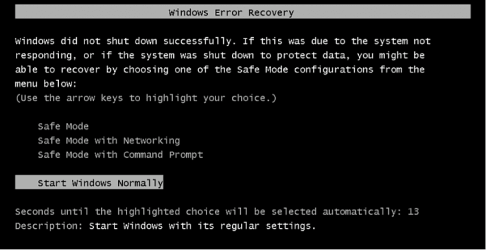
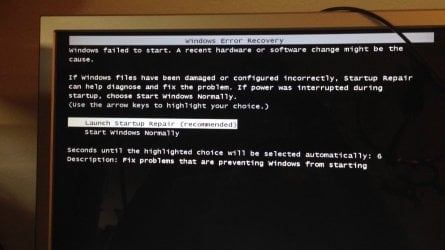
It just always goes to one of these two screens:
 

Attachments

  • WER - image3.png
    WER - image3.png
    19.8 KB · Views: 38
  • WER - maxresdefault.jpg
    WER - maxresdefault.jpg
    115.3 KB · Views: 0

My Computer

Computer type
PC/Desktop
Computer Manufacturer/Model Number
HP 6005 Pro
OS
Windows 7 Pro x64
CPU
Athlon II X2 B24 (3.00GHz)
Memory
8GB DDR3
Hard Drives
1TB HDD
The screens you showed are consequences of a bad shut down.
Describe what happens to lead to a shut down?
- It's running normally and then it shuts down and restart
- It freezes and then I have to shut it down
- It gives me the BSOD and then it restart.
 

My Computers

System One System Two

  • Computer type
    PC/Desktop
    Computer Manufacturer/Model Number
    custom build
    OS
    Windows 7 HP 64
    CPU
    i5 6600K - 800MHz to 4200MHz
    Motherboard
    GA-Z170-HD3P
    Memory
    4+4G GSkill DDR4 3000
    Graphics Card(s)
    IG - Intel 530
    Monitor(s) Displays
    Samsung 226BW
    Screen Resolution
    1680x1050
    Hard Drives
    (1) -1 SM951 – 128GB M.2 AHCI PCIe SSD drive for Windows 7 and Lubuntu
    (2) -1 WD SATA 3 - 1T for Data
    (3) -1 WD SATA 3 - 1T for backup
    PSU
    Thermaltake 450W TR2 gold
    Keyboard
    Old and good Chicony mechanical keyboard
    Mouse
    Logitech mX performance - 9 buttons (had to disable some)
    Internet Speed
    500Mb/s
    Browser
    Firefox 64
    Other Info
    TinyWall firewall
  • Computer type
    Laptop
    System Manufacturer/Model Number
    Asus Q550LF
    OS
    Windows 7 Pro
    CPU
    i7-4500U 800MHz to 3.0GHz
    Motherboard
    Asus Q550LF
    Memory
    (4+4)G DDR3 1600
    Graphics Card(s)
    IG intel 4400 + NVIDIA GeForce GT 745M
    Sound Card
    Realtek
    Monitor(s) Displays
    LG Display LP156WF4-SPH1
    Screen Resolution
    1920 x 1080
    Hard Drives
    BX500 120G SSD for Windows and programs +
    1T HDD for data
    Internet Speed
    500 Mb/s
    Browser
    Firefox
    Other Info
    TinyWall firewall
No it never goes to BSOD, never freezes to where I have to shut it down.
Sometimes it will run for hours and then just hang up and restart (2nd picture) on it's own.
Sometimes it will get to load desktop and icons and hang/restart from there, and sometimes it hangs/restarts during the windows logon process.
And on all of them the screen just goes black for a second or two at freeze/hang up.
 

My Computer

Computer type
PC/Desktop
Computer Manufacturer/Model Number
HP 6005 Pro
OS
Windows 7 Pro x64
CPU
Athlon II X2 B24 (3.00GHz)
Memory
8GB DDR3
Hard Drives
1TB HDD
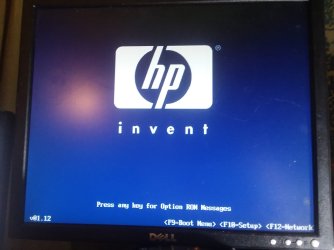
Like I say no BSOD the screen just goes black for 2-6 seconds and then goes to this screen and then windows error recovery:
 

Attachments

  • 20180731_011915.jpg
    20180731_011915.jpg
    233.1 KB · Views: 0

My Computer

Computer type
PC/Desktop
Computer Manufacturer/Model Number
HP 6005 Pro
OS
Windows 7 Pro x64
CPU
Athlon II X2 B24 (3.00GHz)
Memory
8GB DDR3
Hard Drives
1TB HDD
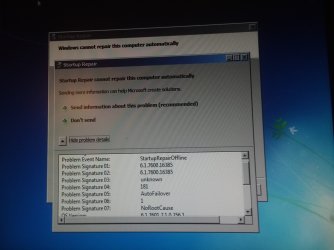
If I run the startup repair which it recommends it works for awhile and then I get this message:
 

Attachments

  • startup repair 20180731_011338.jpg
    startup repair 20180731_011338.jpg
    225.9 KB · Views: 3

My Computer

Computer type
PC/Desktop
Computer Manufacturer/Model Number
HP 6005 Pro
OS
Windows 7 Pro x64
CPU
Athlon II X2 B24 (3.00GHz)
Memory
8GB DDR3
Hard Drives
1TB HDD
Did the computer crash when you did the backup using the installation disk?
Do you have the COA sticker (on the side / bottom of the case) with the Win 7 key ?
Did you do the HP Factory Recover disks?
 

My Computers

System One System Two

  • Computer type
    PC/Desktop
    Computer Manufacturer/Model Number
    custom build
    OS
    Windows 7 HP 64
    CPU
    i5 6600K - 800MHz to 4200MHz
    Motherboard
    GA-Z170-HD3P
    Memory
    4+4G GSkill DDR4 3000
    Graphics Card(s)
    IG - Intel 530
    Monitor(s) Displays
    Samsung 226BW
    Screen Resolution
    1680x1050
    Hard Drives
    (1) -1 SM951 – 128GB M.2 AHCI PCIe SSD drive for Windows 7 and Lubuntu
    (2) -1 WD SATA 3 - 1T for Data
    (3) -1 WD SATA 3 - 1T for backup
    PSU
    Thermaltake 450W TR2 gold
    Keyboard
    Old and good Chicony mechanical keyboard
    Mouse
    Logitech mX performance - 9 buttons (had to disable some)
    Internet Speed
    500Mb/s
    Browser
    Firefox 64
    Other Info
    TinyWall firewall
  • Computer type
    Laptop
    System Manufacturer/Model Number
    Asus Q550LF
    OS
    Windows 7 Pro
    CPU
    i7-4500U 800MHz to 3.0GHz
    Motherboard
    Asus Q550LF
    Memory
    (4+4)G DDR3 1600
    Graphics Card(s)
    IG intel 4400 + NVIDIA GeForce GT 745M
    Sound Card
    Realtek
    Monitor(s) Displays
    LG Display LP156WF4-SPH1
    Screen Resolution
    1920 x 1080
    Hard Drives
    BX500 120G SSD for Windows and programs +
    1T HDD for data
    Internet Speed
    500 Mb/s
    Browser
    Firefox
    Other Info
    TinyWall firewall
Waiting and decided to try things.
Went to advanced boot options and restored to "Last Known Good Configuration".
Still crashes though.
 

My Computer

Computer type
PC/Desktop
Computer Manufacturer/Model Number
HP 6005 Pro
OS
Windows 7 Pro x64
CPU
Athlon II X2 B24 (3.00GHz)
Memory
8GB DDR3
Hard Drives
1TB HDD
Didn't come with disks (refurb).
Should have the c.o.a. sticker still there.
 

My Computer

Computer type
PC/Desktop
Computer Manufacturer/Model Number
HP 6005 Pro
OS
Windows 7 Pro x64
CPU
Athlon II X2 B24 (3.00GHz)
Memory
8GB DDR3
Hard Drives
1TB HDD
Hi All,
Greets,
Sir(s),

Didn't come with disks (refurb)
1. Who did refurb ?
2. If hp still supports your model, you may ask them for recovery disks for your model with win 7 64 for some amount. Its not a big deal for them but may be they call you at their service centre after a serious online grievance!
3. May be you are still having the 'Recovery Partition' on your harddisk. If its there & working, its done!

Should have the c.o.a. sticker still there
4. If you are too lucky! It is/was a valid genuine retail key in the format
XXXXX-XXXXX-XXXXX-XXXXX-XXXXX
5. If you manage for recovery disks from hp, it should include OEM license. Make sure!
6. If you fail to do above ones, you can try backing up the present activation. Not sure whether it would work 100% because it all depends on the activation means used in refurb. That's why i asked who did refurb ?
The other thing is if your current system state is too bad, even the activation backup may not work 100%. Even if you succeed to back up the activation with the tools, it may still not work! But you have nothing to do & in every case you should back up the activation :
3 Tools to Backup and Restore Windows 7 and Vista OEM Activation License • Raymond.CC
Advanced Tokens Manager and Activation Backup & Restore {BOTH}

Thanks & Regards. ...
 

My Computer

Computer type
Laptop
Computer Manufacturer/Model Number
hp compaq presario c795VU notebook pc
OS
Windows 7 Ultimate x32 With Sp1 + Vista Ultimate x32 with Sp1 & Sp2 !!
CPU
Intel Mobile Core 2 Duo T5750 @ 2.00GHz Merom 65nm Technolog
Motherboard
Hewlett-Packard 30D9 (CPU)
Memory
2.00GB Dual-Channel DDR2 @ 332MHz (5-5-5-15)
Graphics Card(s)
Mobile Intel(R) 965 Express Chipset Family
Sound Card
High Definition Audio Device
Monitor(s) Displays
LP154WX4-TLCB on Mobile Intel 965 Express Chipset Family
Screen Resolution
1280x800 @ 60Hz
Hard Drives
149GB Western Digital WDC WD1600BEVS-60VAT0 ATA Device (SATA)
Keyboard
Standard 101/102-Key or Microsoft Natural PS/2 Key + HP QLB
Mouse
ALPS pointing device
Antivirus
Kaspersky AV 2017(Win 7) & AVG AntiVirus Free 2016 (VISTA)
Browser
google chrome

My Computers

System One System Two

  • Computer type
    PC/Desktop
    Computer Manufacturer/Model Number
    custom build
    OS
    Windows 7 HP 64
    CPU
    i5 6600K - 800MHz to 4200MHz
    Motherboard
    GA-Z170-HD3P
    Memory
    4+4G GSkill DDR4 3000
    Graphics Card(s)
    IG - Intel 530
    Monitor(s) Displays
    Samsung 226BW
    Screen Resolution
    1680x1050
    Hard Drives
    (1) -1 SM951 – 128GB M.2 AHCI PCIe SSD drive for Windows 7 and Lubuntu
    (2) -1 WD SATA 3 - 1T for Data
    (3) -1 WD SATA 3 - 1T for backup
    PSU
    Thermaltake 450W TR2 gold
    Keyboard
    Old and good Chicony mechanical keyboard
    Mouse
    Logitech mX performance - 9 buttons (had to disable some)
    Internet Speed
    500Mb/s
    Browser
    Firefox 64
    Other Info
    TinyWall firewall
  • Computer type
    Laptop
    System Manufacturer/Model Number
    Asus Q550LF
    OS
    Windows 7 Pro
    CPU
    i7-4500U 800MHz to 3.0GHz
    Motherboard
    Asus Q550LF
    Memory
    (4+4)G DDR3 1600
    Graphics Card(s)
    IG intel 4400 + NVIDIA GeForce GT 745M
    Sound Card
    Realtek
    Monitor(s) Displays
    LG Display LP156WF4-SPH1
    Screen Resolution
    1920 x 1080
    Hard Drives
    BX500 120G SSD for Windows and programs +
    1T HDD for data
    Internet Speed
    500 Mb/s
    Browser
    Firefox
    Other Info
    TinyWall firewall
Hi All,
Greets,
Sir(s),
A new computer doesn't come with the recovery disks
1.Agreed. A new computer comes with a Recovery Partition & not with Recovery Disks. But if the model is still supported, they would charge some money and provide recovery disks. Ask them & make sure it is with win 7 64. In my country its available for some 600 INR. While the retail genuine key is for some 6000 INR.
2. You can create recovery disks only if there is still a working 'Recovery Partition' on your internal hard disk. And if it is there, you can directly access it without making recovery disks. Making Recovery Disks is always good for safety if that partition goes wrong or you decide to remove it!

Thanks & Regards. ...
 
Last edited:

My Computer

Computer type
Laptop
Computer Manufacturer/Model Number
hp compaq presario c795VU notebook pc
OS
Windows 7 Ultimate x32 With Sp1 + Vista Ultimate x32 with Sp1 & Sp2 !!
CPU
Intel Mobile Core 2 Duo T5750 @ 2.00GHz Merom 65nm Technolog
Motherboard
Hewlett-Packard 30D9 (CPU)
Memory
2.00GB Dual-Channel DDR2 @ 332MHz (5-5-5-15)
Graphics Card(s)
Mobile Intel(R) 965 Express Chipset Family
Sound Card
High Definition Audio Device
Monitor(s) Displays
LP154WX4-TLCB on Mobile Intel 965 Express Chipset Family
Screen Resolution
1280x800 @ 60Hz
Hard Drives
149GB Western Digital WDC WD1600BEVS-60VAT0 ATA Device (SATA)
Keyboard
Standard 101/102-Key or Microsoft Natural PS/2 Key + HP QLB
Mouse
ALPS pointing device
Antivirus
Kaspersky AV 2017(Win 7) & AVG AntiVirus Free 2016 (VISTA)
Browser
google chrome
Thanks for replying Vineet.


It was a reputable "Microsoft Authorized Refurbisher" I purchased it from.
Either thru Newegg, Amazon, or Ebay I forget which.


Megahertz the computer didn't crash when I backed up my files to the external hard drive.
It wasn't crashing as much at that one moment.
Under the link you gave it states "click Start (
c00898928.gif
), click All Programs, and then click Recovery Manager".
I don't have that under my programs.
Search yields nothing.


Funny when I shut the computer off and let it set for a few hours it seems to run fir a bit before crashing.


T have a "product key" on the sticker.
The refurbisher was astsys.com.
Just sent them email.
 

My Computer

Computer type
PC/Desktop
Computer Manufacturer/Model Number
HP 6005 Pro
OS
Windows 7 Pro x64
CPU
Athlon II X2 B24 (3.00GHz)
Memory
8GB DDR3
Hard Drives
1TB HDD
When you say "when I shut the computer off and let it set for a few hours it seems to run fir a bit before crashing" it seems that it's crashing due to a hardware problem related to temperature.
As your computer was terrible dirt, and after the clean it worked much longer, I would say that it still need a deep clean.
 

My Computers

System One System Two

  • Computer type
    PC/Desktop
    Computer Manufacturer/Model Number
    custom build
    OS
    Windows 7 HP 64
    CPU
    i5 6600K - 800MHz to 4200MHz
    Motherboard
    GA-Z170-HD3P
    Memory
    4+4G GSkill DDR4 3000
    Graphics Card(s)
    IG - Intel 530
    Monitor(s) Displays
    Samsung 226BW
    Screen Resolution
    1680x1050
    Hard Drives
    (1) -1 SM951 – 128GB M.2 AHCI PCIe SSD drive for Windows 7 and Lubuntu
    (2) -1 WD SATA 3 - 1T for Data
    (3) -1 WD SATA 3 - 1T for backup
    PSU
    Thermaltake 450W TR2 gold
    Keyboard
    Old and good Chicony mechanical keyboard
    Mouse
    Logitech mX performance - 9 buttons (had to disable some)
    Internet Speed
    500Mb/s
    Browser
    Firefox 64
    Other Info
    TinyWall firewall
  • Computer type
    Laptop
    System Manufacturer/Model Number
    Asus Q550LF
    OS
    Windows 7 Pro
    CPU
    i7-4500U 800MHz to 3.0GHz
    Motherboard
    Asus Q550LF
    Memory
    (4+4)G DDR3 1600
    Graphics Card(s)
    IG intel 4400 + NVIDIA GeForce GT 745M
    Sound Card
    Realtek
    Monitor(s) Displays
    LG Display LP156WF4-SPH1
    Screen Resolution
    1920 x 1080
    Hard Drives
    BX500 120G SSD for Windows and programs +
    1T HDD for data
    Internet Speed
    500 Mb/s
    Browser
    Firefox
    Other Info
    TinyWall firewall
I blew everything out.
How would I clean it any deeper?


Icons are not all rendering properly now.
Will enclose pic below.
Also just got off the phone with refurbisher.
Only support they will give is this .docx I'm attaching below.
System was purchased 4 years ago.
 

Attachments

My Computer

Computer type
PC/Desktop
Computer Manufacturer/Model Number
HP 6005 Pro
OS
Windows 7 Pro x64
CPU
Athlon II X2 B24 (3.00GHz)
Memory
8GB DDR3
Hard Drives
1TB HDD
Lets do a Repair installation. Repair Install - Windows 7 Help Forums
It will reinstall Windows keeping your programs and data.
Can you boot in safe mode?
If you can, copy all Win 7 Installation disk to a folder.
Go to \sources and delete ei.cfg. Deleting this file you can install any of the four version (HBasic, HPremium , Pro or Ultimate).
Run \Setup.exe. Install Pro version as you have the key for it on the COA sticker.
 

My Computers

System One System Two

  • Computer type
    PC/Desktop
    Computer Manufacturer/Model Number
    custom build
    OS
    Windows 7 HP 64
    CPU
    i5 6600K - 800MHz to 4200MHz
    Motherboard
    GA-Z170-HD3P
    Memory
    4+4G GSkill DDR4 3000
    Graphics Card(s)
    IG - Intel 530
    Monitor(s) Displays
    Samsung 226BW
    Screen Resolution
    1680x1050
    Hard Drives
    (1) -1 SM951 – 128GB M.2 AHCI PCIe SSD drive for Windows 7 and Lubuntu
    (2) -1 WD SATA 3 - 1T for Data
    (3) -1 WD SATA 3 - 1T for backup
    PSU
    Thermaltake 450W TR2 gold
    Keyboard
    Old and good Chicony mechanical keyboard
    Mouse
    Logitech mX performance - 9 buttons (had to disable some)
    Internet Speed
    500Mb/s
    Browser
    Firefox 64
    Other Info
    TinyWall firewall
  • Computer type
    Laptop
    System Manufacturer/Model Number
    Asus Q550LF
    OS
    Windows 7 Pro
    CPU
    i7-4500U 800MHz to 3.0GHz
    Motherboard
    Asus Q550LF
    Memory
    (4+4)G DDR3 1600
    Graphics Card(s)
    IG intel 4400 + NVIDIA GeForce GT 745M
    Sound Card
    Realtek
    Monitor(s) Displays
    LG Display LP156WF4-SPH1
    Screen Resolution
    1920 x 1080
    Hard Drives
    BX500 120G SSD for Windows and programs +
    1T HDD for data
    Internet Speed
    500 Mb/s
    Browser
    Firefox
    Other Info
    TinyWall firewall
Yes I can boot into all safe modes and it has never crashed in any of them.
I will follow all instructions.


One question on the c.o.a.
I have a "product key" number.
Is that the same?


thnx!
 

My Computer

Computer type
PC/Desktop
Computer Manufacturer/Model Number
HP 6005 Pro
OS
Windows 7 Pro x64
CPU
Athlon II X2 B24 (3.00GHz)
Memory
8GB DDR3
Hard Drives
1TB HDD
One question on the c.o.a.
I have a "product key" number.
Is that the same?

What do you mean by "I have a "product key" number". Where did you get the key number?
 

My Computers

System One System Two

  • Computer type
    PC/Desktop
    Computer Manufacturer/Model Number
    custom build
    OS
    Windows 7 HP 64
    CPU
    i5 6600K - 800MHz to 4200MHz
    Motherboard
    GA-Z170-HD3P
    Memory
    4+4G GSkill DDR4 3000
    Graphics Card(s)
    IG - Intel 530
    Monitor(s) Displays
    Samsung 226BW
    Screen Resolution
    1680x1050
    Hard Drives
    (1) -1 SM951 – 128GB M.2 AHCI PCIe SSD drive for Windows 7 and Lubuntu
    (2) -1 WD SATA 3 - 1T for Data
    (3) -1 WD SATA 3 - 1T for backup
    PSU
    Thermaltake 450W TR2 gold
    Keyboard
    Old and good Chicony mechanical keyboard
    Mouse
    Logitech mX performance - 9 buttons (had to disable some)
    Internet Speed
    500Mb/s
    Browser
    Firefox 64
    Other Info
    TinyWall firewall
  • Computer type
    Laptop
    System Manufacturer/Model Number
    Asus Q550LF
    OS
    Windows 7 Pro
    CPU
    i7-4500U 800MHz to 3.0GHz
    Motherboard
    Asus Q550LF
    Memory
    (4+4)G DDR3 1600
    Graphics Card(s)
    IG intel 4400 + NVIDIA GeForce GT 745M
    Sound Card
    Realtek
    Monitor(s) Displays
    LG Display LP156WF4-SPH1
    Screen Resolution
    1920 x 1080
    Hard Drives
    BX500 120G SSD for Windows and programs +
    1T HDD for data
    Internet Speed
    500 Mb/s
    Browser
    Firefox
    Other Info
    TinyWall firewall
Back
Top