Windows won't fully start

Hi cedar,
Sir,
1. All is well with the printer & other devices now. Maintain the status.
2.
(a) Cheers. That's what we were looking for from the recovery partition! Go for 'Reinstall Windows' option. It would not be like a normal install/reinstall & would be more of a restore where all of the important settings will be chosen for itself. Just go with the default settings & it will take care of.
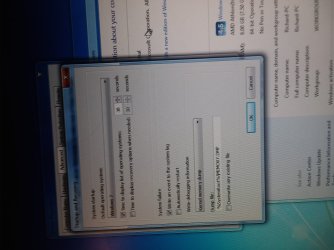
(b) For understanding the process & make out/avoiding any mistakes, just be ready with a notebook & pen. Wherever you have a doubt or make an input, make a note of it. It would be always good if you can make a video ( Last time your video was upside down! ).
3.Seniors/Pros say/recommend to make Windows Updates as soon as you are done. ( But i won't! I would make them only, once i have made a stable system & imaged it )

I would expect that your first contact with internet should be for installing/activating antivirus program & that too as soon as possible! As i said its not a clean install, so it may be that it includes a free 30/60 days trial of a security suite/program. You have to decide whether you want to enjoy the free trial. To enjoy free trial, you may need to connect to internet to activate the free trial. It depends.

If you don't want to enjoy the free trial, you will need to remove it properly. The removal process would depend upon the security suite installed. Then install the one you want.

I believe you should use/access only fully secure/scanned external media before that.

As for external devices, it would be better to make sure that your basic devices are installed & working properly. Then connect to internet & connect/insert them one by one.

So, for now proceed with the 'Reinstall Windows' option, follow the on screen instructions carefully & report once the process is finished.

Thanks & Regards. ...

Edit : Better concentrate on the process than making video. Still better don't make any video Just note down the doubts & inputs!
 
Last edited:

My Computer

Computer type
Laptop
Computer Manufacturer/Model Number
hp compaq presario c795VU notebook pc
OS
Windows 7 Ultimate x32 With Sp1 + Vista Ultimate x32 with Sp1 & Sp2 !!
CPU
Intel Mobile Core 2 Duo T5750 @ 2.00GHz Merom 65nm Technolog
Motherboard
Hewlett-Packard 30D9 (CPU)
Memory
2.00GB Dual-Channel DDR2 @ 332MHz (5-5-5-15)
Graphics Card(s)
Mobile Intel(R) 965 Express Chipset Family
Sound Card
High Definition Audio Device
Monitor(s) Displays
LP154WX4-TLCB on Mobile Intel 965 Express Chipset Family
Screen Resolution
1280x800 @ 60Hz
Hard Drives
149GB Western Digital WDC WD1600BEVS-60VAT0 ATA Device (SATA)
Keyboard
Standard 101/102-Key or Microsoft Natural PS/2 Key + HP QLB
Mouse
ALPS pointing device
Antivirus
Kaspersky AV 2017(Win 7) & AVG AntiVirus Free 2016 (VISTA)
Browser
google chrome
Well I did the reinstall windows.
Chose not to do updates.
Finished and it gave me the option to restore my files (snap below).
Just when I was going to select restore my files it crashed again just like it has always been doing.
When it restarted I didn't see the "restore files" option box reappear.
And it keeps crashing.
I just shut it off.


So it appears the reinstall was not what the problem/solution was and maybe I won't be able to restore my old files now.


Sighhhhhhhhhhhhhhh!
 

Attachments

  • 20180814_144535.jpg
    20180814_144535.jpg
    162.8 KB · Views: 0

My Computer

Computer type
PC/Desktop
Computer Manufacturer/Model Number
HP 6005 Pro
OS
Windows 7 Pro x64
CPU
Athlon II X2 B24 (3.00GHz)
Memory
8GB DDR3
Hard Drives
1TB HDD
Hi cedar,
Sir,
1. I would have said that don't try to restore/access/connect to any type of backups/datas/old things unless you have shielded your pc with Antivirus & Windows Updates. They may have infections. Then you have to scan them & if they are clear, you can use them. Also if you try to restore User Data, etc., it may always put you again in trouble as it is from a corrupted installation. Use only the files of your interests & not the system files, application settings,etc. Anyway, If you backed up the data, you can restore them later.
2. Just check the 'Action Center' Icon ( Flag ) : does it do some talking ? Also open it & expand the tabs ( Maintenance & Security ) on the right. Any talking ? Check 'Security' tab for installed security application(s). Take snaps & post.

desktop capture.JPG

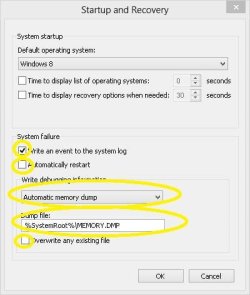
3. Go through 'Information', 'Note' & 'Option One', You are supposed to disable automatic restart using Option One & mention the Error Messages & Codes,etc. on crashes from now onwards!
System Failure Automatic Restart - Enable or Disable Tutorial | Windows 8 Help Forums
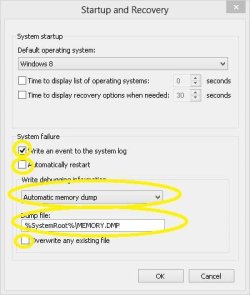
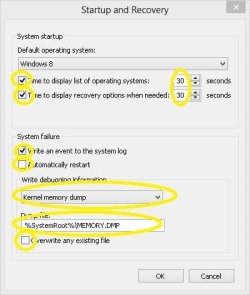
Below i show you what i expect in YELLOW

Startup & Recovery .JPG

4.I expect that you tell me whether there is a device with Yellow Exclamation Mark & what is its 'Hardware ID' ?
Device Manager - Finding Unknown Devices

Let us know,

Thanks & Regards. ...
 
Last edited:

My Computer

Computer type
Laptop
Computer Manufacturer/Model Number
hp compaq presario c795VU notebook pc
OS
Windows 7 Ultimate x32 With Sp1 + Vista Ultimate x32 with Sp1 & Sp2 !!
CPU
Intel Mobile Core 2 Duo T5750 @ 2.00GHz Merom 65nm Technolog
Motherboard
Hewlett-Packard 30D9 (CPU)
Memory
2.00GB Dual-Channel DDR2 @ 332MHz (5-5-5-15)
Graphics Card(s)
Mobile Intel(R) 965 Express Chipset Family
Sound Card
High Definition Audio Device
Monitor(s) Displays
LP154WX4-TLCB on Mobile Intel 965 Express Chipset Family
Screen Resolution
1280x800 @ 60Hz
Hard Drives
149GB Western Digital WDC WD1600BEVS-60VAT0 ATA Device (SATA)
Keyboard
Standard 101/102-Key or Microsoft Natural PS/2 Key + HP QLB
Mouse
ALPS pointing device
Antivirus
Kaspersky AV 2017(Win 7) & AVG AntiVirus Free 2016 (VISTA)
Browser
google chrome
Hello Vineet.


Didn't see your latest post til now.
Sorry.


I think you don't understand.
I didn't get a chance to restore anything.
The computer crashed just like it's always been doing.
In other words the repair/restore I did accomplished nothing.
It's just like it was before.
Maybe that means it's deinitely a hardware issue.
I don't know.


At any rate I don't have any flag.
I'm running windows 7 and your pics are from windows 8.


cheers.
 

My Computer

Computer type
PC/Desktop
Computer Manufacturer/Model Number
HP 6005 Pro
OS
Windows 7 Pro x64
CPU
Athlon II X2 B24 (3.00GHz)
Memory
8GB DDR3
Hard Drives
1TB HDD
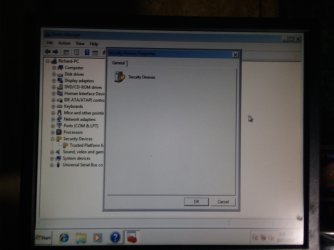
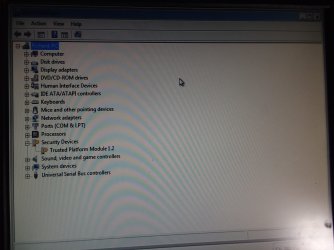
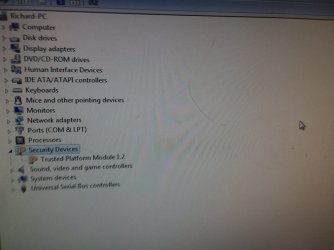
Started device manager in safe mode.


Right-clicked on the yellow key on the security device trusted platform module 1.2.
 

Attachments

  • 20180817_011627.jpg
    20180817_011627.jpg
    214.3 KB · Views: 1
  • 20180817_011611.jpg
    20180817_011611.jpg
    183.8 KB · Views: 0
  • 20180817_011557.jpg
    20180817_011557.jpg
    294.4 KB · Views: 1

My Computer

Computer type
PC/Desktop
Computer Manufacturer/Model Number
HP 6005 Pro
OS
Windows 7 Pro x64
CPU
Athlon II X2 B24 (3.00GHz)
Memory
8GB DDR3
Hard Drives
1TB HDD
Hi cedar,
Sir,
1.I think you don't understand. I didn't get a chance to restore anything.
I did never intend that you restore any backed up system files. Apart from security woes, there are other concerns with restoring user profiles,app settings,etc as it was a problematic installation. I asked you to manually back up/copy files of your personal interest i.e. Music, Video, PDF, Audio, Images, Word, Excel, Power point,etc. and keep them safely aside for using a little later. I would advise to secure shield your system, make sure your files are scanned/safe and then use them. Sacrifice system files from the previous installation to avoid any problems and keep only the files of your personal interest. The recovery has been done as desired.
2. The computer crashed just like it's always been doing. In other words the repair/restore I did accomplished nothing. It's just like it was before.
For the moment, it seems it changed nothing But the repair was needed for diagnosing purposes.
3. At any rate I don't have any flag.
The flag should be there in the system tray i.e. in the right bottom of desktop task bar. May be hidden somewhere!
Anyway, you just need to go to Action Center and analyze/report the things there.
If you find it difficult, you can use this desktop shortcut 'Option One> Step 1 To Step 4'
Action Center Shortcut - Create

4. I'm running windows 7 and your pics are from windows 8.
Those particular ones are almost same for windows 7 as well. Go ahead.
5. I need standard disk management snap as well.

Let us know.

Thanks & Regards. ...
 
Last edited:

My Computer

Computer type
Laptop
Computer Manufacturer/Model Number
hp compaq presario c795VU notebook pc
OS
Windows 7 Ultimate x32 With Sp1 + Vista Ultimate x32 with Sp1 & Sp2 !!
CPU
Intel Mobile Core 2 Duo T5750 @ 2.00GHz Merom 65nm Technolog
Motherboard
Hewlett-Packard 30D9 (CPU)
Memory
2.00GB Dual-Channel DDR2 @ 332MHz (5-5-5-15)
Graphics Card(s)
Mobile Intel(R) 965 Express Chipset Family
Sound Card
High Definition Audio Device
Monitor(s) Displays
LP154WX4-TLCB on Mobile Intel 965 Express Chipset Family
Screen Resolution
1280x800 @ 60Hz
Hard Drives
149GB Western Digital WDC WD1600BEVS-60VAT0 ATA Device (SATA)
Keyboard
Standard 101/102-Key or Microsoft Natural PS/2 Key + HP QLB
Mouse
ALPS pointing device
Antivirus
Kaspersky AV 2017(Win 7) & AVG AntiVirus Free 2016 (VISTA)
Browser
google chrome
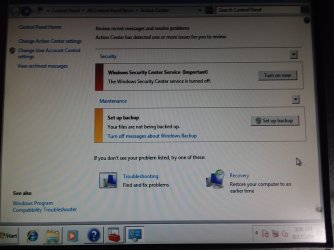
Downloaded the action center shortcut.
Can only run it in safe mode right now (snap below).


Will shut off computer for a few hours and hopefully will be able to run in normal mode tomorrow.
Will get back.


thanks!!!
 

Attachments

  • 20180817_032824.jpg
    20180817_032824.jpg
    273.2 KB · Views: 1

My Computer

Computer type
PC/Desktop
Computer Manufacturer/Model Number
HP 6005 Pro
OS
Windows 7 Pro x64
CPU
Athlon II X2 B24 (3.00GHz)
Memory
8GB DDR3
Hard Drives
1TB HDD
Last edited:

My Computer

Computer type
Laptop
Computer Manufacturer/Model Number
hp compaq presario c795VU notebook pc
OS
Windows 7 Ultimate x32 With Sp1 + Vista Ultimate x32 with Sp1 & Sp2 !!
CPU
Intel Mobile Core 2 Duo T5750 @ 2.00GHz Merom 65nm Technolog
Motherboard
Hewlett-Packard 30D9 (CPU)
Memory
2.00GB Dual-Channel DDR2 @ 332MHz (5-5-5-15)
Graphics Card(s)
Mobile Intel(R) 965 Express Chipset Family
Sound Card
High Definition Audio Device
Monitor(s) Displays
LP154WX4-TLCB on Mobile Intel 965 Express Chipset Family
Screen Resolution
1280x800 @ 60Hz
Hard Drives
149GB Western Digital WDC WD1600BEVS-60VAT0 ATA Device (SATA)
Keyboard
Standard 101/102-Key or Microsoft Natural PS/2 Key + HP QLB
Mouse
ALPS pointing device
Antivirus
Kaspersky AV 2017(Win 7) & AVG AntiVirus Free 2016 (VISTA)
Browser
google chrome
All right.


Got the views you wanted.
Looks just like it did in safe mode.
Snaps below.
There were no archived messages.


Did you want me to disable automatic restart now?
The link you gave is for windows 8.
What about this one?
Windows Update - Enable or Disable Automatic Restart


thnx!
 

Attachments

  • 20180817_174039.jpg
    20180817_174039.jpg
    560 KB · Views: 0
  • 20180817_174026.jpg
    20180817_174026.jpg
    344 KB · Views: 0
  • 20180817_174001.jpg
    20180817_174001.jpg
    338.7 KB · Views: 0
  • 20180817_173821.jpg
    20180817_173821.jpg
    171.5 KB · Views: 0
  • 20180817_173753.jpg
    20180817_173753.jpg
    602.7 KB · Views: 0

My Computer

Computer type
PC/Desktop
Computer Manufacturer/Model Number
HP 6005 Pro
OS
Windows 7 Pro x64
CPU
Athlon II X2 B24 (3.00GHz)
Memory
8GB DDR3
Hard Drives
1TB HDD
Sorry I think this is the view you wanted.
 

Attachments

  • 20180817_175606.jpg
    20180817_175606.jpg
    380.5 KB · Views: 0

My Computer

Computer type
PC/Desktop
Computer Manufacturer/Model Number
HP 6005 Pro
OS
Windows 7 Pro x64
CPU
Athlon II X2 B24 (3.00GHz)
Memory
8GB DDR3
Hard Drives
1TB HDD
Hi cedar,
Sir,
1.Everything is right in action center & device manager. You don't have any antivirus installed & i have plan to install Bitdefender Free Antivirus. But if the system crashes in the middle of installation, It would be a troublesome!
2. Don't worry & go with the recommended windows 8 link for disabling automatic restart after a system failure.
Additionally, before doing anything take a snap of the 'Startup & Recovery' box with default settings. Then make changes as asked.
It will give you time to see & note error codes/messages/reasons etc. for the crash. I am eagerly waiting for those!
( Disabling automatic restart after windows updates is a totally different thing )
3. I would like to ask : Do you have any memory where the system crashed from a safe boot, earlier or after recovery ?
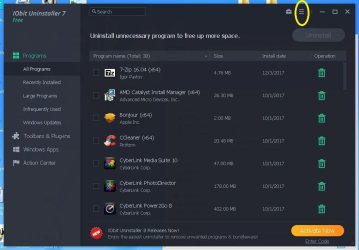
4. We downloaded 'Iobit Uninstaller Portable' earlier. Just install it, launch it, click 'Menu Bars' & click 'Export Program List'. Upload that here. ( You can also install it from your other pc on a pen drive, insert pen drive in the problematic pc & launch the app. Its a portable app ) The menu bar is yellow marked in the below image.

Iobit Uninstaller Capture.JPG

Let us know,

Thanks & Regards. ...

EDIT : Always run Iobit,etc. apps as admin during troubleshooting!
 
Last edited:

My Computer

Computer type
Laptop
Computer Manufacturer/Model Number
hp compaq presario c795VU notebook pc
OS
Windows 7 Ultimate x32 With Sp1 + Vista Ultimate x32 with Sp1 & Sp2 !!
CPU
Intel Mobile Core 2 Duo T5750 @ 2.00GHz Merom 65nm Technolog
Motherboard
Hewlett-Packard 30D9 (CPU)
Memory
2.00GB Dual-Channel DDR2 @ 332MHz (5-5-5-15)
Graphics Card(s)
Mobile Intel(R) 965 Express Chipset Family
Sound Card
High Definition Audio Device
Monitor(s) Displays
LP154WX4-TLCB on Mobile Intel 965 Express Chipset Family
Screen Resolution
1280x800 @ 60Hz
Hard Drives
149GB Western Digital WDC WD1600BEVS-60VAT0 ATA Device (SATA)
Keyboard
Standard 101/102-Key or Microsoft Natural PS/2 Key + HP QLB
Mouse
ALPS pointing device
Antivirus
Kaspersky AV 2017(Win 7) & AVG AntiVirus Free 2016 (VISTA)
Browser
google chrome
2. Don't worry & go with the recommended windows 8 link for disabling automatic restart after a system failure.
Additionally, before doing anything take a snap of the 'Startup & Recovery' box with default settings. Then make changes as asked.
It will give you time to see & note error codes/messages/reasons etc. for the crash. I am eagerly waiting for those!
( Disabling automatic restart after windows updates is a totally different thing )
3. I would like to ask : Do you have any memory where the system crashed from a safe boot, earlier or after recovery ?
4. We downloaded 'Iobit Uninstaller Portable' earlier. Just install it, launch it, click 'Menu Bars' & click 'Export Program List'. Upload that here. ( You can also install it from your other pc on a pen drive, insert pen drive in the problematic pc & launch the app. Its a portable app ) The menu bar is yellow marked in the below image.


What is startup and recovery box?


I THINK it might have crashed once on safe mode with command prompt but am not 100% sure.
It's never crashed on just safe mode.


thnx!
 

My Computer

Computer type
PC/Desktop
Computer Manufacturer/Model Number
HP 6005 Pro
OS
Windows 7 Pro x64
CPU
Athlon II X2 B24 (3.00GHz)
Memory
8GB DDR3
Hard Drives
1TB HDD
Hi cedar,
Sir,
1. I think it might have crashed once on safe mode with command prompt but am not 100% sure. It's never crashed on just safe mode
Important information!
2. What is startup and recovery box?
The box where you finally click/make the settings for disabling 'Automatic Restart On System Failure'. The latest update is that you make the settings as per yellow marking in below image.

Startup & Recovery Capture.JPG

Once you make the changes, restart the pc to apply the changes. Then go to the same box & take a snap.

3. Once you disable the Automatic Restart, pc will not restart on its own after a failure/crash . Thus giving you time/hint to know/note down what has happened & why it has happened ? The main thing would be error code & small description of the problem.

Let us know,

Thanks & Regards. ...
 
Last edited:

My Computer

Computer type
Laptop
Computer Manufacturer/Model Number
hp compaq presario c795VU notebook pc
OS
Windows 7 Ultimate x32 With Sp1 + Vista Ultimate x32 with Sp1 & Sp2 !!
CPU
Intel Mobile Core 2 Duo T5750 @ 2.00GHz Merom 65nm Technolog
Motherboard
Hewlett-Packard 30D9 (CPU)
Memory
2.00GB Dual-Channel DDR2 @ 332MHz (5-5-5-15)
Graphics Card(s)
Mobile Intel(R) 965 Express Chipset Family
Sound Card
High Definition Audio Device
Monitor(s) Displays
LP154WX4-TLCB on Mobile Intel 965 Express Chipset Family
Screen Resolution
1280x800 @ 60Hz
Hard Drives
149GB Western Digital WDC WD1600BEVS-60VAT0 ATA Device (SATA)
Keyboard
Standard 101/102-Key or Microsoft Natural PS/2 Key + HP QLB
Mouse
ALPS pointing device
Antivirus
Kaspersky AV 2017(Win 7) & AVG AntiVirus Free 2016 (VISTA)
Browser
google chrome
I don't believe it is a software problem. Everything looks OK to me in Device Manager. I believe it is a heat problem. You need to install a monitor to constantly know the temperature to tell if it is rising. I believe you said you have Speccy. As soon as you boot, monitor the Temperature to see if it is rising.
 

My Computer

Computer type
PC/Desktop
Computer Manufacturer/Model Number
Custom Build
OS
Windows 7 Home Premium 32-Bit - Build 7600 SP1
CPU
Intel Core i3-2120 3.30Ghz
Motherboard
Asus P8Z68-V LX Intel Z68 Socket H2 ATX
Memory
Kingston 4 GB DDR3 1333 mhz
Graphics Card(s)
AMD Radeon HD6670
Sound Card
Sound Blaster Audigy SE 24-Bit
Monitor(s) Displays
Asus VE228
Screen Resolution
1440 X 900
Hard Drives
OCZ Vertex 3 120 GB Sata 3 SSD ==
Kingston SH103/S3 120 G Hyper X 120 GB SSD ==
Western Digital 500 GB Caviar Green 7200 RPM ==
PSU
Corsair CX600M == 600 Watt
Case
NZXT Apollo - Silver with Clear Side Panel
Cooling
Three 120 mm Fans
Keyboard
Microsoft Natural 4000
Mouse
Microsoft Custom Optical 3000
Internet Speed
AT&T Fiber Optic Wireless Network
Antivirus
Microsoft Security Essentials
Browser
Chrome
Other Info
120 mm Blue LED Fan -- Three Blue LED Lazer Light Sticks
OK Vineet.


I used the .reg file to disable auto-restart after crash.
Ran IOrbituninstaller from pen drive and made programs list.
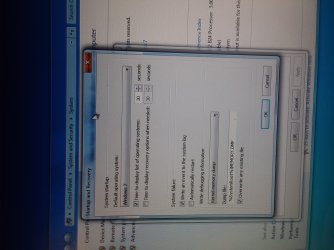
Made changes to startup and recovery like you asked.


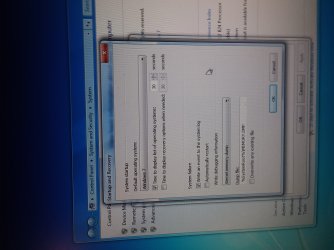
The pics are in order: before I made changes, after I made changes, and after a reboot.


thanks!!!
 

Attachments

  • 20180820_000335.jpg
    20180820_000335.jpg
    436.1 KB · Views: 1
  • 20180820_000125.jpg
    20180820_000125.jpg
    418.8 KB · Views: 1
  • 20180820_000045.jpg
    20180820_000045.jpg
    373.4 KB · Views: 1
  • Program List.txt
    Program List.txt
    3.8 KB · Views: 1

My Computer

Computer type
PC/Desktop
Computer Manufacturer/Model Number
HP 6005 Pro
OS
Windows 7 Pro x64
CPU
Athlon II X2 B24 (3.00GHz)
Memory
8GB DDR3
Hard Drives
1TB HDD
I don't believe it is a software problem. 0zs` I believe it is a heat problem. You need to install a monitor to constantly know the temperature to tell if it is rising. I believe you said you have Speccy. As soon as you boot, monitor the Temperature to see if it is rising.


thanks for replying bigmck.


Yeah I always thought it odd that if I let it set overnight it usually wouldn't crash right away.


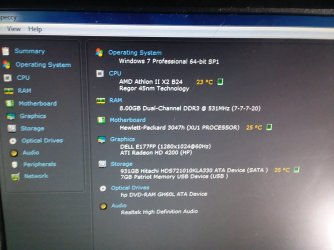
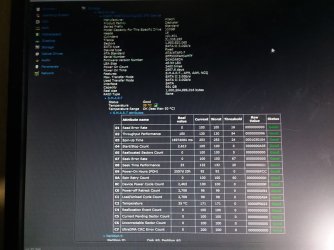
Here's some speccy screens a few minutes after startup.
 

Attachments

  • 20180820_010004.jpg
    20180820_010004.jpg
    361 KB · Views: 0
  • 20180820_010353.jpg
    20180820_010353.jpg
    385 KB · Views: 0

My Computer

Computer type
PC/Desktop
Computer Manufacturer/Model Number
HP 6005 Pro
OS
Windows 7 Pro x64
CPU
Athlon II X2 B24 (3.00GHz)
Memory
8GB DDR3
Hard Drives
1TB HDD
Hi Sir(s),
Greets,
cedar :

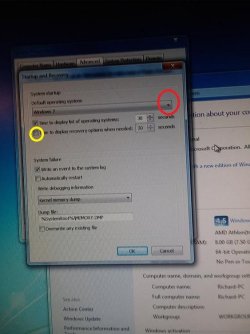
1. Startup & Recovery things are done right except the one : Click/check that Yellow marked box as well.

Startup & recovery.jpg

2. I believe you have only one OS & not a multiboot. Click that Red marked & just check whether there is any other entry as well ?

3. Sir bigmck is pointing to install Speccy. That will open the option of continuously monitoring the temperatures. It will stay in the system tray and periodically reflect the changes in temperatures. That way we won't need to launch Speecy, everytime we want to look at the temperature. Its very very important. I plan to install it to find out.

4. After you have done the change in the 'Startup & Recovery' box & saved changes, make Normal Boot & wait for the system to crash! Grab the error code & small description of the problem. Besides after the crash, boot in the OS & upload the latest 'Memory Dump File(s)' from 'C:\Windows\' directory.

Let us know.

bigmck : Sir,

1. Is there any other better option/app to monitor temperature,etc. ? Other Tips ?

2. I am surprised that it has never crashed in a safe boot as if there is a particular driver/hardware/app that comes into play in the normal boot & causes crashes. I am waiting for error code(s) & description(s).

Thanks & Regards. ...
 

My Computer

Computer type
Laptop
Computer Manufacturer/Model Number
hp compaq presario c795VU notebook pc
OS
Windows 7 Ultimate x32 With Sp1 + Vista Ultimate x32 with Sp1 & Sp2 !!
CPU
Intel Mobile Core 2 Duo T5750 @ 2.00GHz Merom 65nm Technolog
Motherboard
Hewlett-Packard 30D9 (CPU)
Memory
2.00GB Dual-Channel DDR2 @ 332MHz (5-5-5-15)
Graphics Card(s)
Mobile Intel(R) 965 Express Chipset Family
Sound Card
High Definition Audio Device
Monitor(s) Displays
LP154WX4-TLCB on Mobile Intel 965 Express Chipset Family
Screen Resolution
1280x800 @ 60Hz
Hard Drives
149GB Western Digital WDC WD1600BEVS-60VAT0 ATA Device (SATA)
Keyboard
Standard 101/102-Key or Microsoft Natural PS/2 Key + HP QLB
Mouse
ALPS pointing device
Antivirus
Kaspersky AV 2017(Win 7) & AVG AntiVirus Free 2016 (VISTA)
Browser
google chrome
Speccy is a good one. Just be sure to monitor it almost constantly after a boot.
 

My Computer

Computer type
PC/Desktop
Computer Manufacturer/Model Number
Custom Build
OS
Windows 7 Home Premium 32-Bit - Build 7600 SP1
CPU
Intel Core i3-2120 3.30Ghz
Motherboard
Asus P8Z68-V LX Intel Z68 Socket H2 ATX
Memory
Kingston 4 GB DDR3 1333 mhz
Graphics Card(s)
AMD Radeon HD6670
Sound Card
Sound Blaster Audigy SE 24-Bit
Monitor(s) Displays
Asus VE228
Screen Resolution
1440 X 900
Hard Drives
OCZ Vertex 3 120 GB Sata 3 SSD ==
Kingston SH103/S3 120 G Hyper X 120 GB SSD ==
Western Digital 500 GB Caviar Green 7200 RPM ==
PSU
Corsair CX600M == 600 Watt
Case
NZXT Apollo - Silver with Clear Side Panel
Cooling
Three 120 mm Fans
Keyboard
Microsoft Natural 4000
Mouse
Microsoft Custom Optical 3000
Internet Speed
AT&T Fiber Optic Wireless Network
Antivirus
Microsoft Security Essentials
Browser
Chrome
Other Info
120 mm Blue LED Fan -- Three Blue LED Lazer Light Sticks
Hi Sir(s),
Greets,
@cedar :

1. Startup & Recovery things are done right except the one : Click/check that Yellow marked box as well.

View attachment 404975

2. I believe you have only one OS & not a multiboot. Click that Red marked & just check whether there is any other entry as well ?

3. Sir bigmck is pointing to install Speccy. That will open the option of continuously monitoring the temperatures. It will stay in the system tray and periodically reflect the changes in temperatures. That way we won't need to launch Speecy, everytime we want to look at the temperature. Its very very important. I plan to install it to find out.

4. After you have done the change in the 'Startup & Recovery' box & saved changes, make Normal Boot & wait for the system to crash! Grab the error code & small description of the problem. Besides after the crash, boot in the OS & upload the latest 'Memory Dump File(s)' from 'C:\Windows\' directory.
.


Ok.
Will make changes you asked for.
Not sure how to grab error code or memory dump file.


thanks to both of you!
cheers.
 

My Computer

Computer type
PC/Desktop
Computer Manufacturer/Model Number
HP 6005 Pro
OS
Windows 7 Pro x64
CPU
Athlon II X2 B24 (3.00GHz)
Memory
8GB DDR3
Hard Drives
1TB HDD
Cedar. I see you are using IOBit. This program has caused a lot of problems in the past & the cause of strange computer problems. In fact in some cases the only remedy has been a complete OS reinstall.
 

My Computer

Computer type
PC/Desktop
Computer Manufacturer/Model Number
Self built using existing case
OS
Windows 7 Home Premium 64 bit sp1
CPU
Intel i5 3570 3.4Ghz Ivy Bridge SKT 1155 quad core
Motherboard
Gigabyte Z77-HD3 SKT 1155 2xSata 3, 4x USB 3.0
Memory
G-Skill Rip Jaws 16Gb (8x2) DDR3 -1600 PC3 12800 CL 10 red
Graphics Card(s)
Gigabyte NVIDIA GT610 1Gb DDR3 810/1200 PCI-E 2.0 Silent
Sound Card
NVIDIA High Definition & Realtech High Definition Audio
Monitor(s) Displays
2 x Philips 226V4L 16:9 aspect ratio
Screen Resolution
1920 x 1080 HD
Hard Drives
Samsung 840 Pro 256gb SSD, SATA 3.
Hitachi Touro Portable 1tb, USB 3.0 HDD used for image b/ups.
PSU
Corsair VS450
Case
Codeng
Cooling
PSU fan & CPU fan
Keyboard
Logitech
Mouse
Logitech Wireless trackball M570
Internet Speed
Wireless 3G. 3mg down & 550kb up.
Antivirus
Bitdefender Internet Security 2020
Browser
Opera (Current Version) & Firefox
Other Info
MS Office 2013 Pro. Davis weather station software. MGE Nova 600 avr UPS.
Back
Top