Solved windows XP to 7 installation help.

untilted413

New member
Local time
11:37 PM
Messages
25
hi

i am completely new here and i would like to get a simple yet detailed answer to a question that is troubling my mind

i have xp sp3 i am going to install win7 64bit but to do so i have to increase my c drive space which is at 10gb to 25gb which i will do no problem but the question is that during the installation of 7 will my other partitions namely d e f g (yes i have these!) remain the same? will my data on these partitions remain unaltered and i will be able to access it after 7?

i dont want my data to be gone or hard disk merged to just one which i am thinking could happen correct me if i am wrong please.

please answer quickly please
 

My Computer

OS
windows xp 32 bit
It's always best to have your data backed up externally in case of HD failure, and cannot be guaranteed safe during an install to the same HD. However if you take extra care not to touch the partitions where you have the data stored, then it should not be affected.

25gb is small for an OS partition. If I were you I'd want double that if you plan to install many programs or store your data on C.

If you find a way to back up your data externally, on the network, or to the cloud, you can delete all partitions on the HD and start fresh creating new ones as you wish as shown in Step 6/7 of Clean Install Windows 7.

Or if you'd like us to advise you on how to enlarge C, post back a screenshot of your maximized Disk Mgmt drive map and listings, using the Snipping Tool in Start menu. Attach file using paper clip in reply box. Tell us what is on each partition and what you'd like to do exactly.
 
...
i dont want my data to be gone or hard disk merged to just one which i am thinking could happen correct me if i am wrong please...

Sounds like you plan to increase the size of the C: partition to install Win7 inside it, right?

You do realize that will effectively erase the contents of that partition -- as MS does not provide an "upgrade path" from XP to Win7 that allows you to reuse your settings and applications, right?
 

My Computer

Computer type
PC/Desktop
Computer Manufacturer/Model Number
Custom
OS
Win7 Pro 32-bit, Win8 Pro 32-bit
CPU
AMD Phenom II X6 1090T
Motherboard
Gigabyte
Memory
4GB ddr3 1300
Graphics Card(s)
AMD HD 4290 onboard
Sound Card
Builtin Realtek HD Audio
Monitor(s) Displays
Samsung 24" widescreen, LG 23" widescreen
Screen Resolution
1920x1200/1920x1080
Hard Drives
Kingston 256GB SSD
Keyboard
Logitech Illuminated Keyboard
Mouse
Logitech M705 wireless mouse
Antivirus
Norton Av 2013
Browser
IE v10
...
i dont want my data to be gone or hard disk merged to just one which i am thinking could happen correct me if i am wrong please...

Sounds like you plan to increase the size of the C: partition to install Win7 inside it, right?

You do realize that will effectively erase the contents of that partition -- as MS does not provide an "upgrade path" from XP to Win7 that allows you to reuse your settings and applications, right?

yes i am trying to install 7 by increasing the size of c drive using partition manager from 10gb to 25gb and i am not going to store any other data on c except the os and microsoft softwares etc

ofcourse i know that will erase the data on c drive when i will install 7 but i am worried about my other partitions will they be affected in any way will my data on those partitions be safe? i know that if i dont touch them in the installation process they will be safe but this is the first time i am going to install 7 so i dont know actually what will happen to those partitions will they be merged ? if not please give me any advise u will like
 

My Computer

OS
windows xp 32 bit
Windows allows four "Primary" partitions on a single hard drive.

However, one of those could be an "Extended" partition, and you can create as many "Logical Partitions" inside the "Extended" partition as there are letters of the alphabet!! So figure C is used, and D for your CD-Rom, that leaves you E through Z, or 22 "Logical Partitions".

the above words are not mine but of a senior member iseeu. i was browsing the forums and this came up now can anyone tell if this is true what will happen to my existing d e f g drives which by the way are full of data and i dont want to lose let alone partition them!
if i install 7 on c drive but the fact is the installer will not mention if it is c or d it will just show disk0 partition 1 right?
will my other d e f g drives be showing when i will enter the advanced drive options?? what if i install 7 and after that my d e f g drives are merged into one and all i am left is with unallocated space. could that happen please i am confused and i really want to install 7 but i cant backup my data externally is there anyway my data will be safe???
 
Last edited:

My Computer

OS
windows xp 32 bit
Please open Disk Management, maximize the window.

Then press the Prt Scrn or Print Screen key.

Open Paint and Paste the clipboard into it.

Save the file, attach it using the paper clip in reply box. Tell us what is on each partition in reply.

While you wait, take a look at Skydrive , where you can upload your files for storage to the web with 7gb free for each Windows Live ID. Is this possibly an option for you so you can back up your files?

Or do you have another PC on the network there you can transfer your files for backup?

How much data do you have to backup exactly?

Answer all questions, skipping none.
 
what are u talking man i dont have win7 installed i have xp

the disk management screenshot u are asking is for 7 right?
 

My Computer

OS
windows xp 32 bit
No, if I'd asked for WIn7 screenshot I would have said to use it's Snipping Tool.

I gave you the steps to attach an XP screenshot.

And do not address me that way if you want my help. You are at the top tech forum in the world, so act like it.
 
Please open Disk Management, maximize the window.

Then press the Prt Scrn or Print Screen key.

Open Paint and Paste the clipboard into it.

Save the file, attach it using the paper clip in reply box. Tell us what is on each partition in reply.

While you wait, take a look at Skydrive , where you can upload your files for storage to the web with 7gb free for each Windows Live ID. Is this possibly an option for you so you can back up your files?

Or do you have another PC on the network there you can transfer your files for backup?

How much data do you have to backup exactly?

Answer all questions, skipping none.

thx for replying here are the answers
my d drive has 25gb+ of videos that i dont want to lose no way
e drive has further videos and games
f has pictures,games
g has pictures and videos

d e f drives are 35gb each while g is 30gb total 160gb harddisk
c drive is 10gb i am going to increase its size using partition manager and take the free space from d e f drives is that possible?

just give me confirmation that after installation will my d to g drive data be safe or deleted merged what if my drives dont show up in 7? could this happen if yes then how to deal with it

as far as backup is concerned i cant upload that much data on the cloud on such short time but maybe i will be able to store on my laptop which by the way runs 7
 

My Computer

OS
windows xp 32 bit
i think u are online now can we please chat on some platform please?

i have a lot of questions
 

My Computer

OS
windows xp 32 bit
and as far as the screenshot i will post it tomorrow i am using the laptop and dont have access to desktop
 

My Computer

OS
windows xp 32 bit
Fine. I'll reply when I see the screenshot so I know what I'm commenting on.
 
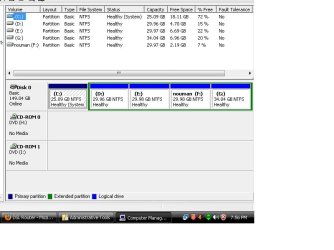
here is the screen shot plz now tell me if i can increase the space of c can my other d to g drives will me merged or not?
 

Attachments

  • disk-jpg.jpg
    disk-jpg.jpg
    52 KB · Views: 10

My Computer

OS
windows xp 32 bit
Use free Partition Wizard new Extend feature which can borrow space from another other partition to add to C. A video here shows how it works: How to extend partition easily with partition magic – Partition Wizard video help.

But to be safest if you cannot back up your data first, I would use the PW boot disk which has never failed in countless thousands of similar operations we've helped with here, whereas the Home Version can potentially fail with data loss. You'll have to confirm the Extend function works the same on boot disk. If not I can give you steps to do the same using the Partition Wizard Resize function. You can test any PW operation to see how it looks before actually Applying it.
 
why do you say that this partition manager can fail with data loss i saw the video and it doesnt show what happens after we apply the changes does the system reboots? and if say a power failure takes place during that reboot or while the changes are being made to disk will my hard disk be corrupted all data gone??
 

My Computer

OS
windows xp 32 bit
ok i have increased the size of c drive now plz tell me that now my drives d to g will not be affected in any way during or after the installation of win7.

plz tell me that if i install 7 on c drive and partition it during the setup, my drives d to g they wont be merged into unallocated space during the installation and also the data will be safe and even the drive names will be same or not and if the drive name changes will it affect the data held inside the drive?

plz reply asap waiting anxiously
 

Attachments

  • untitled-bmp.jpg
    untitled-bmp.jpg
    46.1 KB · Views: 10

My Computer

OS
windows xp 32 bit
As long as you dont' touch any drive except C during install then your data should be safe. But data should always be backed up as you never know when a HD can fail.

After booting DVD to do a Custom install, at steps 6 and 7 in Clean Install Windows 7 you should format the C drive. Triple check you are choosing the C drive ONLY to format, and then to click Next.
 
finally i installed win7 today on c drive and nothing went wrong all my data on other drives is at it was before so no problem

only now i have to update to sp1 for playing all the games like ac3 andd farcry3 and hitman absolution but yes job is done

thanks to greg for all his answers
 

My Computer

OS
windows xp 32 bit
Always use the latest official installer with latest SP when doing a reinstall, from Step 1 of Clean Reinstall - Factory OEM Windows 7.

For now just continue doing your Windows Updates to get all patches and drivers. Eventually it will offer SP1 which will be shrunken considerably since most updates contained within will already be installed.
 
Back
Top