
You are using an out of date browser. It may not display this or other websites correctly.
You should upgrade or use an alternative browser.
You should upgrade or use an alternative browser.
Winhlp32.exe
- Thread starter paulv44
- Start date

My Computer
- Computer type
- PC/Desktop
- Computer Manufacturer/Model Number
- Made by Dixon Butz
- OS
- Win7 Win 10, Win 8.1
- CPU
- AMD FX-8350, Corsair H100i
- Motherboard
- ASUS Crosshair V Formula-Z
- Memory
- 16GB G.SKILL Ripjaws DDR3
- Graphics Card(s)
- EVGA GTX 980, EVGA GTX 860
- Sound Card
- Denon x4200 Dolby AMOS!
- Monitor(s) Displays
- 65" Samsung 4K, +3 27inch
- Screen Resolution
- 4K, 1080x3
- Hard Drives
- 2TB Samsung hd204ui
1X Samsung 850 SSD
- PSU
- 1000w EVGA, 2000VA UPS, 1000VA UPS and many others
- Case
- Lian Li
- Cooling
- Corsair H100i
- Keyboard
- Logitech K800
- Mouse
- Logitech Couch Mouse
- Internet Speed
- Gigabit!
- Antivirus
- Defender
- Browser
- Slimjet Chrome
If I put the winhlp32.exe from the Windows\system32 folder on the desktop, and drop a *.hlp file on it, the help file opens, but I can't create an association with the *.hlp files to open automatically.
My Computer
- Computer Manufacturer/Model Number
- Dell XPS 400
- OS
- Windows 7 RC
- Memory
- 3 GB
Win 32hlp in Windows 7 RC
The win32hlp.exe file is included in the Windows 7 RC.
What I am attempting to do is:
Open Control Panel, Default Programs, Associate a File Type with a Protocol or Program.
Go to the .hlp extension and click the Change Program icon.
Browse to Windows\System32\winhlp32.exe, and click okay.
The default program (Windows Winhlp32 Stub), will not change.
Would someone who has the RC, please try this and see if it works for you?
Thanks.
The win32hlp.exe file is included in the Windows 7 RC.
What I am attempting to do is:
Open Control Panel, Default Programs, Associate a File Type with a Protocol or Program.
Go to the .hlp extension and click the Change Program icon.
Browse to Windows\System32\winhlp32.exe, and click okay.
The default program (Windows Winhlp32 Stub), will not change.
Would someone who has the RC, please try this and see if it works for you?
Thanks.
My Computer
- Computer Manufacturer/Model Number
- Dell XPS 400
- OS
- Windows 7 RC
- Memory
- 3 GB

- Local time
- 4:49 AM
- Messages
- 16,784
Hi,
Mine says it is already associated - see top left - what does yours say?
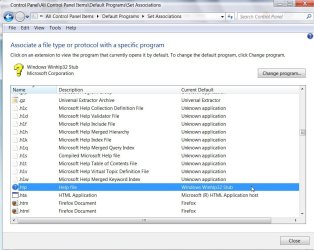
Are you looking in the right place - it is \Windows\Winhlp32.exe
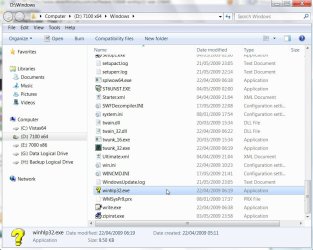
You are right - it won't change, and it won't open .hlp files - never noticed before. It is only a stub, just 10kb.
Mine says it is already associated - see top left - what does yours say?
Are you looking in the right place - it is \Windows\Winhlp32.exe
You are right - it won't change, and it won't open .hlp files - never noticed before. It is only a stub, just 10kb.
My Computers
System One System Two
-
- Computer type
- PC/Desktop
- OS
- 7 X64
- CPU
- i5 8400
- Motherboard
- gigabyte b365m ds3h
- Memory
- 2x8gb 3200mhz
- Hard Drives
- various
- PSU
- pure power 11 400w cm
- Case
- Coolermaster
- Cooling
- cryorig m9i
-
- Computer type
- PC/Desktop
- OS
- 7x64
- CPU
- g5400
- Motherboard
- ga b365m ds3h
- Memory
- 8gb ddr4 2400
- PSU
- xfx pro 450w
- Local time
- 4:49 AM
- Messages
- 16,784
You can use this, just extract the .zip, right click and run as admin - browse to the .hlp file you want to open :
View attachment winhlp32.zip
View attachment winhlp32.zip
My Computers
System One System Two
-
- Computer type
- PC/Desktop
- OS
- 7 X64
- CPU
- i5 8400
- Motherboard
- gigabyte b365m ds3h
- Memory
- 2x8gb 3200mhz
- Hard Drives
- various
- PSU
- pure power 11 400w cm
- Case
- Coolermaster
- Cooling
- cryorig m9i
-
- Computer type
- PC/Desktop
- OS
- 7x64
- CPU
- g5400
- Motherboard
- ga b365m ds3h
- Memory
- 8gb ddr4 2400
- PSU
- xfx pro 450w
- Local time
- 4:49 AM
- Messages
- 16,784
Seems to be the case.
My Computers
System One System Two
-
- Computer type
- PC/Desktop
- OS
- 7 X64
- CPU
- i5 8400
- Motherboard
- gigabyte b365m ds3h
- Memory
- 2x8gb 3200mhz
- Hard Drives
- various
- PSU
- pure power 11 400w cm
- Case
- Coolermaster
- Cooling
- cryorig m9i
-
- Computer type
- PC/Desktop
- OS
- 7x64
- CPU
- g5400
- Motherboard
- ga b365m ds3h
- Memory
- 8gb ddr4 2400
- PSU
- xfx pro 450w
- Local time
- 4:49 AM
- Messages
- 16,784
It's not keen on letting you add it to Open With , but you can create a shortcut, and put that in the Send To menu.
Seems to work fine.
, but you can create a shortcut, and put that in the Send To menu.Seems to work fine.
My Computers
System One System Two
-
- Computer type
- PC/Desktop
- OS
- 7 X64
- CPU
- i5 8400
- Motherboard
- gigabyte b365m ds3h
- Memory
- 2x8gb 3200mhz
- Hard Drives
- various
- PSU
- pure power 11 400w cm
- Case
- Coolermaster
- Cooling
- cryorig m9i
-
- Computer type
- PC/Desktop
- OS
- 7x64
- CPU
- g5400
- Motherboard
- ga b365m ds3h
- Memory
- 8gb ddr4 2400
- PSU
- xfx pro 450w
Thanks for your assistance.
The more I use Windows 7, the more I like it, except for some items, such as the above, and lack of a full screen dos window.
I have XP Pro and skipped Vista to try Windows 7.
The more I use Windows 7, the more I like it, except for some items, such as the above, and lack of a full screen dos window.
I have XP Pro and skipped Vista to try Windows 7.
My Computer
- Computer Manufacturer/Model Number
- Dell XPS 400
- OS
- Windows 7 RC
- Memory
- 3 GB
I associated it using the "open with" from the context menu.
My Computer
- Computer type
- PC/Desktop
- Computer Manufacturer/Model Number
- Made by Dixon Butz
- OS
- Win7 Win 10, Win 8.1
- CPU
- AMD FX-8350, Corsair H100i
- Motherboard
- ASUS Crosshair V Formula-Z
- Memory
- 16GB G.SKILL Ripjaws DDR3
- Graphics Card(s)
- EVGA GTX 980, EVGA GTX 860
- Sound Card
- Denon x4200 Dolby AMOS!
- Monitor(s) Displays
- 65" Samsung 4K, +3 27inch
- Screen Resolution
- 4K, 1080x3
- Hard Drives
- 2TB Samsung hd204ui
1X Samsung 850 SSD
- PSU
- 1000w EVGA, 2000VA UPS, 1000VA UPS and many others
- Case
- Lian Li
- Cooling
- Corsair H100i
- Keyboard
- Logitech K800
- Mouse
- Logitech Couch Mouse
- Internet Speed
- Gigabit!
- Antivirus
- Defender
- Browser
- Slimjet Chrome
Did you right click on a .hlp file and select "Open With"?
Open with box comes up.
Then click other programs arrow (the tiny down arrow on the right.)
Browse button
Browse to Win32hlp.exe
Open with box comes up.
Then click other programs arrow (the tiny down arrow on the right.)
Browse button
Browse to Win32hlp.exe
My Computer
- Computer type
- PC/Desktop
- Computer Manufacturer/Model Number
- Made by Dixon Butz
- OS
- Win7 Win 10, Win 8.1
- CPU
- AMD FX-8350, Corsair H100i
- Motherboard
- ASUS Crosshair V Formula-Z
- Memory
- 16GB G.SKILL Ripjaws DDR3
- Graphics Card(s)
- EVGA GTX 980, EVGA GTX 860
- Sound Card
- Denon x4200 Dolby AMOS!
- Monitor(s) Displays
- 65" Samsung 4K, +3 27inch
- Screen Resolution
- 4K, 1080x3
- Hard Drives
- 2TB Samsung hd204ui
1X Samsung 850 SSD
- PSU
- 1000w EVGA, 2000VA UPS, 1000VA UPS and many others
- Case
- Lian Li
- Cooling
- Corsair H100i
- Keyboard
- Logitech K800
- Mouse
- Logitech Couch Mouse
- Internet Speed
- Gigabit!
- Antivirus
- Defender
- Browser
- Slimjet Chrome
Using 7127
Can you get to the Open With on right clicking a hlp file?
Can you get to the Open With on right clicking a hlp file?
My Computer
- Computer type
- PC/Desktop
- Computer Manufacturer/Model Number
- Made by Dixon Butz
- OS
- Win7 Win 10, Win 8.1
- CPU
- AMD FX-8350, Corsair H100i
- Motherboard
- ASUS Crosshair V Formula-Z
- Memory
- 16GB G.SKILL Ripjaws DDR3
- Graphics Card(s)
- EVGA GTX 980, EVGA GTX 860
- Sound Card
- Denon x4200 Dolby AMOS!
- Monitor(s) Displays
- 65" Samsung 4K, +3 27inch
- Screen Resolution
- 4K, 1080x3
- Hard Drives
- 2TB Samsung hd204ui
1X Samsung 850 SSD
- PSU
- 1000w EVGA, 2000VA UPS, 1000VA UPS and many others
- Case
- Lian Li
- Cooling
- Corsair H100i
- Keyboard
- Logitech K800
- Mouse
- Logitech Couch Mouse
- Internet Speed
- Gigabit!
- Antivirus
- Defender
- Browser
- Slimjet Chrome
- Local time
- 4:49 AM
- Messages
- 16,784
You get the open with, but cannot add to it. Not on 7100 anyway.
My Computers
System One System Two
-
- Computer type
- PC/Desktop
- OS
- 7 X64
- CPU
- i5 8400
- Motherboard
- gigabyte b365m ds3h
- Memory
- 2x8gb 3200mhz
- Hard Drives
- various
- PSU
- pure power 11 400w cm
- Case
- Coolermaster
- Cooling
- cryorig m9i
-
- Computer type
- PC/Desktop
- OS
- 7x64
- CPU
- g5400
- Motherboard
- ga b365m ds3h
- Memory
- 8gb ddr4 2400
- PSU
- xfx pro 450w
I just added it on one of my other pc's with 7100
My Computer
- Computer type
- PC/Desktop
- Computer Manufacturer/Model Number
- Made by Dixon Butz
- OS
- Win7 Win 10, Win 8.1
- CPU
- AMD FX-8350, Corsair H100i
- Motherboard
- ASUS Crosshair V Formula-Z
- Memory
- 16GB G.SKILL Ripjaws DDR3
- Graphics Card(s)
- EVGA GTX 980, EVGA GTX 860
- Sound Card
- Denon x4200 Dolby AMOS!
- Monitor(s) Displays
- 65" Samsung 4K, +3 27inch
- Screen Resolution
- 4K, 1080x3
- Hard Drives
- 2TB Samsung hd204ui
1X Samsung 850 SSD
- PSU
- 1000w EVGA, 2000VA UPS, 1000VA UPS and many others
- Case
- Lian Li
- Cooling
- Corsair H100i
- Keyboard
- Logitech K800
- Mouse
- Logitech Couch Mouse
- Internet Speed
- Gigabit!
- Antivirus
- Defender
- Browser
- Slimjet Chrome
- Local time
- 4:49 AM
- Messages
- 16,784
That's curious - it definitely won't allow any change to the Open With menu for .hlp on my 7100 x64.
I can browse to the same winhlp32.exe that was added succesfuly to the Send To menu.
However, it is not added to to the Open With, it remains unchanged.
I can browse to the same winhlp32.exe that was added succesfuly to the Send To menu.
However, it is not added to to the Open With, it remains unchanged.
My Computers
System One System Two
-
- Computer type
- PC/Desktop
- OS
- 7 X64
- CPU
- i5 8400
- Motherboard
- gigabyte b365m ds3h
- Memory
- 2x8gb 3200mhz
- Hard Drives
- various
- PSU
- pure power 11 400w cm
- Case
- Coolermaster
- Cooling
- cryorig m9i
-
- Computer type
- PC/Desktop
- OS
- 7x64
- CPU
- g5400
- Motherboard
- ga b365m ds3h
- Memory
- 8gb ddr4 2400
- PSU
- xfx pro 450w
32bit here.
No mouse drivers for 64 so I won't be installing. Mouse moves too slow.
No mouse drivers for 64 so I won't be installing. Mouse moves too slow.
My Computer
- Computer type
- PC/Desktop
- Computer Manufacturer/Model Number
- Made by Dixon Butz
- OS
- Win7 Win 10, Win 8.1
- CPU
- AMD FX-8350, Corsair H100i
- Motherboard
- ASUS Crosshair V Formula-Z
- Memory
- 16GB G.SKILL Ripjaws DDR3
- Graphics Card(s)
- EVGA GTX 980, EVGA GTX 860
- Sound Card
- Denon x4200 Dolby AMOS!
- Monitor(s) Displays
- 65" Samsung 4K, +3 27inch
- Screen Resolution
- 4K, 1080x3
- Hard Drives
- 2TB Samsung hd204ui
1X Samsung 850 SSD
- PSU
- 1000w EVGA, 2000VA UPS, 1000VA UPS and many others
- Case
- Lian Li
- Cooling
- Corsair H100i
- Keyboard
- Logitech K800
- Mouse
- Logitech Couch Mouse
- Internet Speed
- Gigabit!
- Antivirus
- Defender
- Browser
- Slimjet Chrome
Similar threads


- Replies
- 2
- Views
- 2K
- Replies
- 2
- Views
- 16K