

- Local time
- 4:15 PM
- Messages
- 6,830
Ok good . Now the PC with the issue HP Pavilion Slimline s5310f PC could run both versions . Use the Product Key on the the PC case for either of the two versions . One key per version .
:ADDED:
Your PC comes with 4GB of RAM . You should install the x64-bit version of Windows 7 SP1 .
To get your 32-bit OS to be able to create a x64-bit USB installation drive do the workaround.
Copy the bootsect file from C:\Windows\Boot from your windows 7 32-bit OS and paste it to this folder C:\Users\username\AppData\Local\Apps\Windows 7 USB DVD Download Tool then start the Windows 7 USB DVD Download Tool
------------------------------------------------------------------------------------
You could use UltraISO to create a bootable USB drive as well
:ar: install application onto the 32-bit OS
:ar: click on the continue to try button ( image below )
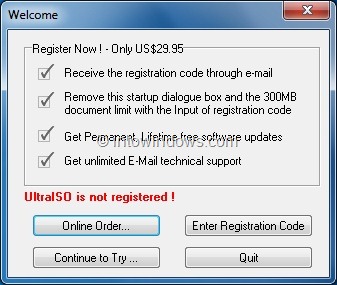
:ar: In the home screen, click File > Open option to browse to your Windows 7 ISO file
:ar: Next, in the home screen of UltraISO, click on Bootable menu and then click Write Disk Image option to launch Write Disk Image dialog box.
:ar: In the Write Disk Image dialog, select the Disk Drive as your USB flash drive, select the write method as USB-HDD before hitting the Format button. It will then launch Format Removable Disk dialog, where you need to simply click Start button to begin formatting the flash drive. Please backup all data from the USB device before hitting the Format button.
:ar: Once the format in done, click Write button and then click Yes for the warning prompt to start the process. When the writing is finished, you will see Burn Successful message event list. Close UltraISO software and connect your USB to a machine to start installing Windows.
:ADDED:
Your PC comes with 4GB of RAM . You should install the x64-bit version of Windows 7 SP1 .
To get your 32-bit OS to be able to create a x64-bit USB installation drive do the workaround.
Copy the bootsect file from C:\Windows\Boot from your windows 7 32-bit OS and paste it to this folder C:\Users\username\AppData\Local\Apps\Windows 7 USB DVD Download Tool then start the Windows 7 USB DVD Download Tool
------------------------------------------------------------------------------------
You could use UltraISO to create a bootable USB drive as well
:ar: install application onto the 32-bit OS
:ar: click on the continue to try button ( image below )
:ar: In the home screen, click File > Open option to browse to your Windows 7 ISO file
:ar: Next, in the home screen of UltraISO, click on Bootable menu and then click Write Disk Image option to launch Write Disk Image dialog box.
:ar: In the Write Disk Image dialog, select the Disk Drive as your USB flash drive, select the write method as USB-HDD before hitting the Format button. It will then launch Format Removable Disk dialog, where you need to simply click Start button to begin formatting the flash drive. Please backup all data from the USB device before hitting the Format button.
:ar: Once the format in done, click Write button and then click Yes for the warning prompt to start the process. When the writing is finished, you will see Burn Successful message event list. Close UltraISO software and connect your USB to a machine to start installing Windows.
Last edited:
My Computer
At a glance
Windows 7 Ultimate 32-Bit & Windows 7 Ultimat...Intel Core i7 CPU 950 @ 3.07GHzOCZ 6GB (3 x 2GB) 240-Pin DDR3 SDRAM DDR3 160...ATI Radeon HD 5700 Series
- Computer Manufacturer/Model Number
- Custom Built
- OS
- Windows 7 Ultimate 32-Bit & Windows 7 Ultimate 64-Bit
- CPU
- Intel Core i7 CPU 950 @ 3.07GHz
- Motherboard
- ASUS P6T DELUXE V2
- Memory
- OCZ 6GB (3 x 2GB) 240-Pin DDR3 SDRAM DDR3 1600 OCZ3X1600R2
- Graphics Card(s)
- ATI Radeon HD 5700 Series
- Sound Card
- OnBoard
- Hard Drives
- WD6400AACS-00M3B0 (640GB SATA )
- PSU
- CORSAIR 850w
- Case
- NZXT LEXA
- Cooling
- Intel Stock Heatsink Fan
- Keyboard
- Microsoft Wireless Laser Keyboard 7000
- Mouse
- Microsoft Wireless Laser Mouse 7000


