Wireless Issue: Unidentified Network (Windows 7)

lovelygarden

New member
Local time
10:25 AM
Messages
14
Hello everyone,

This is my first post, so I hope I'm doing this correctly. A few months ago, we upgraded our modem/router and got the Cisco DPC 3825. Our internet provider is Cox Communications. We have several laptops in our home and connect to our WiFi with our smartphones fine. However, my laptop is unable to identify this new modem/router. The only way I am able to connect is to be directly connected through a ethernet cable (I think that is what it is called? It looks like a yellow phone cable?).

I'm not very technologically savvy. All I know is that this issue arose after we upgraded to this new Cisco modem-router. Previously, with our old router/modem, I was able to connect to the wireless just fine.

The antivirus software on my laptop is Avast!

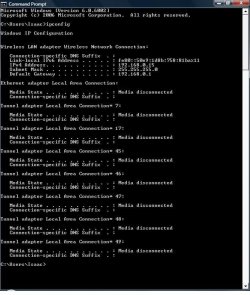
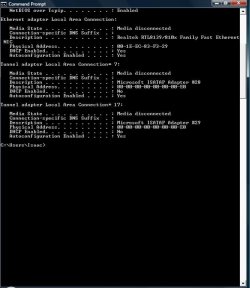
Attached is a screen capture of my ipconfig when I am not connected by the ethernet cable, as well as my ipconfig when I am connected (second screen capture). Any help is greatly appreciated.

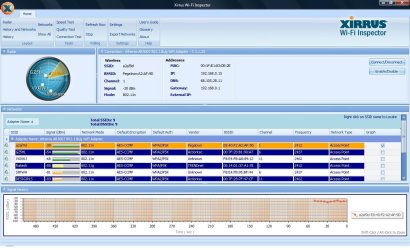
Edit: Attached is my Xirrus log as well. I hope I am doing this all correctly. Thank you everyone in advance.
 

Attachments
  • ipissue.jpg
    ipissue.jpg
    83.9 KB · Views: 0
  • connectedbyethernet.jpg
    connectedbyethernet.jpg
    91.9 KB · Views: 0
  • XirrusLog.jpg
    XirrusLog.jpg
    186.6 KB · Views: 3

My Computer

Computer type
PC/Desktop
OS
Windows 7
Hello everyone,

This is my first post, so I hope I'm doing this correctly. A few months ago, we upgraded our modem/router and got the Cisco DPC 3825. Our internet provider is Cox Communications. We have several laptops in our home and connect to our WiFi with our smartphones fine. However, my laptop is unable to identify this new modem/router. The only way I am able to connect is to be directly connected through a ethernet cable (I think that is what it is called? It looks like a yellow phone cable?).

I'm not very technologically savvy. All I know is that this issue arose after we upgraded to this new Cisco modem-router. Previously, with our old router/modem, I was able to connect to the wireless just fine.

The antivirus software on my laptop is Avast!

Attached is a screen capture of my ipconfig when I am not connected by the ethernet cable, as well as my ipconfig when I am connected (second screen capture). Any help is greatly appreciated.

Edit: Attached is my Xirrus log as well. I hope I am doing this all correctly. Thank you everyone in advance.

Ok, you have the tunnel adaptor problem which is nothing new.

To get rid of all those extra adaptors which is the cause of the connection problem you will need to run the file below which should delete all those extra adaptors.

There is a 32 and 64 bit version, you need to extract the file you need for your system "32 or 64 bit" and run the file then reboot.

It may require a reboot and a couple of tries to get rid of them all. Post the ipconfig/all again after you do that.

You will definitely want to update the firmware on this new router so as to make it compatible with your lap top which should prevent the problem from occurring again.
 

Attachments

My Computer

Computer type
PC/Desktop
Computer Manufacturer/Model Number
Home built
OS
Windows 7 Ult, Windows 8.1 Pro,
CPU
Q9650-4.275GHz, E8600 4.5GHz, E6750-3.8GHz
Motherboard
Evga 780i FTW
Memory
G.Skill PC2 9600 1200Mhz 5 5 5 15 2T
Graphics Card(s)
GTX480
Sound Card
Asus Xonar D2
Monitor(s) Displays
HannsG
Screen Resolution
1680X1050
Hard Drives
GSkill Phoenix Pro 120GB SSD
PSU
ThermalTake Toughpower 1000Watt modular
Case
ThermalTake XaserV
Cooling
Xigmatek S1283
Keyboard
Logitech G15
Mouse
Logitech G9
Internet Speed
T1
Thank you so much for identifying my problem. I really appreciate your help. I'm away from my home, so I won't be able to do anything for another few hours. However, I was wondering how I might update the firmware on our new router? I have no idea what that is or how to do it. :) And by updating the firmware, will it affect the other laptops and smartphones that connect to the wireless just fine? Again, thank you so so so much. You are AWESOME!!!! :)
 

My Computer

Computer type
PC/Desktop
OS
Windows 7
Thank you so much for identifying my problem. I really appreciate your help. I'm away from my home, so I won't be able to do anything for another few hours. However, I was wondering how I might update the firmware on our new router? I have no idea what that is or how to do it. :) And by updating the firmware, will it affect the other laptops and smartphones that connect to the wireless just fine? Again, thank you so so so much. You are AWESOME!!!! :)
Most routers have a firmware update page then you would obtain the file from the router manufacture's site, I'd need to know the make, model and version number of the router in order to help you find that.

It could even be a driver problem but Windows update should handle that for you.

Let me know what happens after you run the tunnel adaptor removal file per the directions I posted earlier. :)
 

My Computer

Computer type
PC/Desktop
Computer Manufacturer/Model Number
Home built
OS
Windows 7 Ult, Windows 8.1 Pro,
CPU
Q9650-4.275GHz, E8600 4.5GHz, E6750-3.8GHz
Motherboard
Evga 780i FTW
Memory
G.Skill PC2 9600 1200Mhz 5 5 5 15 2T
Graphics Card(s)
GTX480
Sound Card
Asus Xonar D2
Monitor(s) Displays
HannsG
Screen Resolution
1680X1050
Hard Drives
GSkill Phoenix Pro 120GB SSD
PSU
ThermalTake Toughpower 1000Watt modular
Case
ThermalTake XaserV
Cooling
Xigmatek S1283
Keyboard
Logitech G15
Mouse
Logitech G9
Internet Speed
T1
Ah, thank you again for turning on the light bulb! You are incredible!!!!! :) Our gadget is a modem/router all in one machine. It is the Cisco DPC 3825 (Cisco DPC/EPC3825 - Cisco Systems). I'm not sure if you need more information? If so, that is totally not a problem. I can look for the additional information on the device when I get home.

I will run Windows Update when I get home as well, but I was pretty religious about allowing the update to take its course and was still encountering this issue. It is such a huge relief to know what the issue is now. Thank you for your genius help! :)

Once I get home in a few hours, I will make sure to run the tunnel adapter removal file, per your instructions, as soon as possible. A million thanks to you!!!! :)
 

My Computer

Computer type
PC/Desktop
OS
Windows 7
Hi again, well.... I did as you instructed and unfortunately, it did not remedy the issue. I ran the tunnel adapter removal file as you instructed, did the windows update, then restarted the computer and it still won't connect to the wireless without the ethernet cable some reason. I know I am in great hands, so I am not stressing. :) Attached is the log after all was said and done.
 

Attachments

My Computer

Computer type
PC/Desktop
OS
Windows 7
So I ran the tunnel adapter for the second time and rebooted for the second time and I'm still unable to connect to the internet without the ethernet cable. I'm sorry to disappoint. Oh pooh! :(
 

My Computer

Computer type
PC/Desktop
OS
Windows 7
This shows that the extra tunnel adaptors are gone and you are showing a valid IP for both the wired and the wireless connection which is interesting considering your complaint about the wireless not working. Just remember to unplug the wired connection in order to test the wireless because Windows will typically choose the wired connection by default.

The extra tunnel adaptors must have been left over from the repeated attempts to connect to the modem/router although I'm not seeing any real problem with this connection, and from Xirrus I can see you are connected with a strong signal.

I don't have much faith in these so called modem/routers so resetting it or unplugging it for awhile may help., it looks to me like the problems started right after changing over to this modem/router.

When in doubt it's best to create a new wireless profile for this connection as it sometimes helps in these cases. Just go to the Network and Sharing Center>left side>Manage Wireless Connections, then click on the profile and delete it then create a new one with the correct SSID, password etc.

In the off chance that the network stack is corrupted you should run the file below, it will reset everything network related and reboot your machine.
 

Attachments

My Computer

Computer type
PC/Desktop
Computer Manufacturer/Model Number
Home built
OS
Windows 7 Ult, Windows 8.1 Pro,
CPU
Q9650-4.275GHz, E8600 4.5GHz, E6750-3.8GHz
Motherboard
Evga 780i FTW
Memory
G.Skill PC2 9600 1200Mhz 5 5 5 15 2T
Graphics Card(s)
GTX480
Sound Card
Asus Xonar D2
Monitor(s) Displays
HannsG
Screen Resolution
1680X1050
Hard Drives
GSkill Phoenix Pro 120GB SSD
PSU
ThermalTake Toughpower 1000Watt modular
Case
ThermalTake XaserV
Cooling
Xigmatek S1283
Keyboard
Logitech G15
Mouse
Logitech G9
Internet Speed
T1
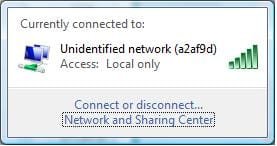
I'll do as you advised now. I have indeed tried to connect by disconnecting the ethernet cable and without the cable, the status on the wireless remains "Unidentified" (screen capture attached).

And yes, the problems started when we upgraded to this modem/router all in one unit. Previously, we had a modem and router in two separate units and I had no problem connecting then.
 

Attachments

  • issuesstill.jpg
    issuesstill.jpg
    60.7 KB · Views: 0
  • screen.jpg
    screen.jpg
    10.2 KB · Views: 14

My Computer

Computer type
PC/Desktop
OS
Windows 7
I think I may have figured out what is wrong. This new router/model by Cisco uses a pin instead of a security key. The pin is 9 digits. However, when I try to enter the pin, my computer only allows 8 digits, insisting that the pin can only be 8 characters long.

Do you know how I can bypass this and enter the full 9 digits??? I don't understand why my computer is insisting the pin is only 8 digits when it is actually 9?
 

Attachments

  • errorpin.jpg
    errorpin.jpg
    37.9 KB · Views: 14

My Computer

Computer type
PC/Desktop
OS
Windows 7
I think I may have figured out what is wrong. This new router/model by Cisco uses a pin instead of a security key. The pin is 9 digits. However, when I try to enter the pin, my computer only allows 8 digits, insisting that the pin can only be 8 characters long.

Do you know how I can bypass this and enter the full 9 digits??? I don't understand why my computer is insisting the pin is only 8 digits when it is actually 9?

Strange how it looked connected before, but I suppose this is where redoing the wireless profile shows mistakes.

I'm not sure about a number limit with windows, although you should be able to go into the routers settings at 192.168.0.1 and set up your own password instead of the default one which is more secure, and use letters instead or not so many numbers so that Windows can allow it.
 

My Computer

Computer type
PC/Desktop
Computer Manufacturer/Model Number
Home built
OS
Windows 7 Ult, Windows 8.1 Pro,
CPU
Q9650-4.275GHz, E8600 4.5GHz, E6750-3.8GHz
Motherboard
Evga 780i FTW
Memory
G.Skill PC2 9600 1200Mhz 5 5 5 15 2T
Graphics Card(s)
GTX480
Sound Card
Asus Xonar D2
Monitor(s) Displays
HannsG
Screen Resolution
1680X1050
Hard Drives
GSkill Phoenix Pro 120GB SSD
PSU
ThermalTake Toughpower 1000Watt modular
Case
ThermalTake XaserV
Cooling
Xigmatek S1283
Keyboard
Logitech G15
Mouse
Logitech G9
Internet Speed
T1
Thank you so much for your help. I just spent the past two hours talking to someone from Cox and we tried everything. We reset the password, made it into 8 characters, manually tried to add the network to no avail. I don't understand what is going on and why. According to one of the people from Cox, he believes there might be something wrong with Wireless Adapter Driver. He doesn't believe there is a issue with the router itself, especially since I am able to connect to the internet with the ethernet cable.

I just don't understand what could have happened to my Wireless Adapter Driver? It was perfectly fine with our previous router, which was from Linksys.

If anyone has any idea what could be wrong here, please share. I would really like to emancipate my laptop from the limitations of this ethernet cable. I wish it wasn't so hard to figure out. :( Thank you so much, Chev. You're awesome!!!!
 

My Computer

Computer type
PC/Desktop
OS
Windows 7
Thank you so much for your help. I just spent the past two hours talking to someone from Cox and we tried everything. We reset the password, made it into 8 characters, manually tried to add the network to no avail. I don't understand what is going on and why. According to one of the people from Cox, he believes there might be something wrong with Wireless Adapter Driver. He doesn't believe there is a issue with the router itself, especially since I am able to connect to the internet with the ethernet cable.

I just don't understand what could have happened to my Wireless Adapter Driver? It was perfectly fine with our previous router, which was from Linksys.

If anyone has any idea what could be wrong here, please share. I would really like to emancipate my laptop from the limitations of this ethernet cable. I wish it wasn't so hard to figure out. :( Thank you so much, Chev. You're awesome!!!!

I'm going to call Cox's bluff on this one. Dump that so called modem/router which they refuse to put the blame on, since it is most likely the problem. The Ethernet connection has nothing to do with the wireless, so it's easy for one to work without the other. Also the extra tunnel adaptors indicate there is a problem with the modem/router as well.

Like I mentioned earlier I don't like those so called modem/routers, call me old school but I see nothing but problems from those.

You would be better off using a regular modem connected to a good router which there are many to choose from. There may even be a modem mode on the Cox unit so you could use it in modem mode with a different router.
 

My Computer

Computer type
PC/Desktop
Computer Manufacturer/Model Number
Home built
OS
Windows 7 Ult, Windows 8.1 Pro,
CPU
Q9650-4.275GHz, E8600 4.5GHz, E6750-3.8GHz
Motherboard
Evga 780i FTW
Memory
G.Skill PC2 9600 1200Mhz 5 5 5 15 2T
Graphics Card(s)
GTX480
Sound Card
Asus Xonar D2
Monitor(s) Displays
HannsG
Screen Resolution
1680X1050
Hard Drives
GSkill Phoenix Pro 120GB SSD
PSU
ThermalTake Toughpower 1000Watt modular
Case
ThermalTake XaserV
Cooling
Xigmatek S1283
Keyboard
Logitech G15
Mouse
Logitech G9
Internet Speed
T1
I'm not a huge fan of this modem/router unit either. Cox highly recommended it, but then again, they are the company who sold the unit to us. I talked to Cox and then Cisco and then Cox again. Needless to say, it was exhausting.

For those who encounter this issue, I think the issue might also be that my laptop is Windows Vista. I don't think Vista and this Cisco modem/router unit are compatible. I tried connecting to the modem/router with another older spare laptop we have that is also Vista and same problem! The only similarities between my laptop and the spare I tried using last night is that they are both Windows Vista. All the other laptops that are connecting well are either MACs or Windows 8 (newer laptops). The smartphones that are able to connect to the wireless are either iPhones or Samsung Galaxies.

Thank you so much for all your help!!! :) I actually have another laptop that is Windows 8 but I had to send it in for a repair due to a cracked screen, hence why I was trying to use my second laptop, which was the laptop in question that cannot connect to the wireless and requires the ethernet cable. Hopefully my laptop with the cracked screen will be repaired and I can have peace in about 2-3 weeks time.
 

My Computer

Computer type
PC/Desktop
OS
Windows 7
I'm not a huge fan of this modem/router unit either. Cox highly recommended it, but then again, they are the company who sold the unit to us. I talked to Cox and then Cisco and then Cox again. Needless to say, it was exhausting.

For those who encounter this issue, I think the issue might also be that my laptop is Windows Vista. I don't think Vista and this Cisco modem/router unit are compatible. I tried connecting to the modem/router with another older spare laptop we have that is also Vista and same problem! The only similarities between my laptop and the spare I tried using last night is that they are both Windows Vista. All the other laptops that are connecting well are either MACs or Windows 8 (newer laptops). The smartphones that are able to connect to the wireless are either iPhones or Samsung Galaxies.

Thank you so much for all your help!!! :) I actually have another laptop that is Windows 8 but I had to send it in for a repair due to a cracked screen, hence why I was trying to use my second laptop, which was the laptop in question that cannot connect to the wireless and requires the ethernet cable. Hopefully my laptop with the cracked screen will be repaired and I can have peace in about 2-3 weeks time.

Well I assumed we were working with a Windows 7 machine here, I'm a bit out of touch with Vista although I have been doing support for Windows 8 since well before it was released to the public. It has a few problem which are unique but easy enough to fix.

Which ever machine is having the problem, I'd be interested in seeing if some of the system files are missing or corrupted. It's easy enough to find out by running the following command in an elevated command prompt. sfc /scannow let the scan run until complete and let me know what it says.
 

My Computer

Computer type
PC/Desktop
Computer Manufacturer/Model Number
Home built
OS
Windows 7 Ult, Windows 8.1 Pro,
CPU
Q9650-4.275GHz, E8600 4.5GHz, E6750-3.8GHz
Motherboard
Evga 780i FTW
Memory
G.Skill PC2 9600 1200Mhz 5 5 5 15 2T
Graphics Card(s)
GTX480
Sound Card
Asus Xonar D2
Monitor(s) Displays
HannsG
Screen Resolution
1680X1050
Hard Drives
GSkill Phoenix Pro 120GB SSD
PSU
ThermalTake Toughpower 1000Watt modular
Case
ThermalTake XaserV
Cooling
Xigmatek S1283
Keyboard
Logitech G15
Mouse
Logitech G9
Internet Speed
T1
Yes, I'm sorry. This was completely my fault for misleading you with the title. As I mentioned in my first post, I'm not well educated in regards to technology. I also assumed my laptop was Windows 7 until I spoke to Cox. I actually spoke to Cox several times last night, as well as Cisco and HP (the maker of my laptop).

I'm actually again away from my house and will not be home until later this evening, but I will absolutely do the elevated command prompt when I get home. Just to be sure, all I need to do is click Run --> CMD --> and enter sfc /scannow into the space, yes? Thank you again for all your help. It is so sincerely appreciated.
 

My Computer

Computer type
PC/Desktop
OS
Windows 7
Yes, I'm sorry. This was completely my fault for misleading you with the title. As I mentioned in my first post, I'm not well educated in regards to technology. I also assumed my laptop was Windows 7 until I spoke to Cox. I actually spoke to Cox several times last night, as well as Cisco and HP (the maker of my laptop).

I'm actually again away from my house and will not be home until later this evening, but I will absolutely do the elevated command prompt when I get home. Just to be sure, all I need to do is click Run --> CMD --> and enter sfc /scannow into the space, yes? Thank you again for all your help. It is so sincerely appreciated.


There are some drivers on the Cox page for this router/modem which are specific to Vista,XP etc. which might help. I'm not sure why they call them drivers instead of firmware but the one at the top of the page for Vista might be relevant.

Cisco DPC/EPC3825 - Cisco Systems
 

My Computer

Computer type
PC/Desktop
Computer Manufacturer/Model Number
Home built
OS
Windows 7 Ult, Windows 8.1 Pro,
CPU
Q9650-4.275GHz, E8600 4.5GHz, E6750-3.8GHz
Motherboard
Evga 780i FTW
Memory
G.Skill PC2 9600 1200Mhz 5 5 5 15 2T
Graphics Card(s)
GTX480
Sound Card
Asus Xonar D2
Monitor(s) Displays
HannsG
Screen Resolution
1680X1050
Hard Drives
GSkill Phoenix Pro 120GB SSD
PSU
ThermalTake Toughpower 1000Watt modular
Case
ThermalTake XaserV
Cooling
Xigmatek S1283
Keyboard
Logitech G15
Mouse
Logitech G9
Internet Speed
T1
There are some drivers on the Cox page for this router/modem which are specific to Vista,XP etc. which might help. I'm not sure why they call them drivers instead of firmware but the one at the top of the page for Vista might be relevant.

Cisco DPC/EPC3825 - Cisco Systems

Wow, thank you for this information!!!! :D Would you recommend that I download them all, or should I just download the first driver/firmware (Vista XP 2000 Series USB Drivers?).

A million thanks to you!!!! :)
 

My Computer

Computer type
PC/Desktop
OS
Windows 7
There are some drivers on the Cox page for this router/modem which are specific to Vista,XP etc. which might help. I'm not sure why they call them drivers instead of firmware but the one at the top of the page for Vista might be relevant.

Cisco DPC/EPC3825 - Cisco Systems

Wow, thank you for this information!!!! :D Would you recommend that I download them all, or should I just download the first driver/firmware (Vista XP 2000 Series USB Drivers?).

A million thanks to you!!!! :)

Just the first one although I can't say how to install the driver or exactly what it's for, you might ask Cox about them before hand. I would think the driver would allow for compatibility with Vista.
 

My Computer

Computer type
PC/Desktop
Computer Manufacturer/Model Number
Home built
OS
Windows 7 Ult, Windows 8.1 Pro,
CPU
Q9650-4.275GHz, E8600 4.5GHz, E6750-3.8GHz
Motherboard
Evga 780i FTW
Memory
G.Skill PC2 9600 1200Mhz 5 5 5 15 2T
Graphics Card(s)
GTX480
Sound Card
Asus Xonar D2
Monitor(s) Displays
HannsG
Screen Resolution
1680X1050
Hard Drives
GSkill Phoenix Pro 120GB SSD
PSU
ThermalTake Toughpower 1000Watt modular
Case
ThermalTake XaserV
Cooling
Xigmatek S1283
Keyboard
Logitech G15
Mouse
Logitech G9
Internet Speed
T1
Just the first one although I can't say how to install the driver or exactly what it's for, you might ask Cox about them before hand. I would think the driver would allow for compatibility with Vista.

I will absolutely do that and will try to speak to Cox as well. I spoke to a general technical support agent from Cox for over an hour. The call then got escalated to a more advanced department for support and the gentleman said that the internet was working with the ethernet, so it was clearly not a router issue and probably a issue with my Wireless Adapter Driver. So I called HP but they were not really helpful.

At this point, I've pretty much given up on getting this issue fixed but when I get home later this evening, I will definitely make sure to download this firmware provided by Cox and will also do the advanced command instruction you listed as well.

Many many many thanks to you! :)
 

My Computer

Computer type
PC/Desktop
OS
Windows 7
Back
Top