Wireless Problems

smooth1212

New member
Member
Local time
7:50 AM
Messages
65
Location
ohio
This weekend I installed win 7 as part of a dual boot system. Connecting to the Internet by wire works fine, however connecting through the wireless is not working. Any suggestions? Going back to XP Pro wireless works great!

rich
 

My Computer

Computer Manufacturer/Model Number
MSI GX620 sold by Powernotebooks.com as a model 15:3
OS
win 7
CPU
P9500 2.53GHz (25W),
Memory
4gig
Graphics Card(s)
Nvidia 9600m GT 512gddr3
Sound Card
Built-in HD Audio Codec (Realtek ALC888S)
Hard Drives
160gig
Mouse
micro soft notebook blue tooth
Internet Speed
comcast --- high speed
Please forgive me if I posted this in the wrong forum location!!!!!
 

My Computer

Computer Manufacturer/Model Number
MSI GX620 sold by Powernotebooks.com as a model 15:3
OS
win 7
CPU
P9500 2.53GHz (25W),
Memory
4gig
Graphics Card(s)
Nvidia 9600m GT 512gddr3
Sound Card
Built-in HD Audio Codec (Realtek ALC888S)
Hard Drives
160gig
Mouse
micro soft notebook blue tooth
Internet Speed
comcast --- high speed
Moved to Network & Internet section.

It will help if you list your system specs + wireless card model and any error messages that you are receiving.
 

My Computer

Computer type
PC/Desktop
OS
Windows 11
Hi smooth1212! Welcome to the forum!
Please provide more details on what you're encountering with your wireless connectivity issue(s), screenshoots would be helpful if there are somethings that are tough to explain. Filling out your system specs would also be useful to help forum members diagnose your problems easier.
 

My Computer

Computer Manufacturer/Model Number
Custom Build
OS
Windows 7 Build 7048 x64
CPU
Athlon 64 X2 Dual Core 4600+
Motherboard
EMX-AMD750G-PRO
Memory
4 x 1GB Kingston 400MHz 6-6-6-18 (800MHz)
Graphics Card(s)
ATI Radeon 3650
Sound Card
Realtek HD Audio
Monitor(s) Displays
22" AOC 2216Vw
Screen Resolution
1680x1050
Cooling
Arctic Cooling Freezer 64 Pro PWM
Keyboard
Generic Enhanced Natural Keyboard
Mouse
Logitech VX Nano
Other Info
Edifier M1550
Here are my wireless card specs:

PowerPro 15:3 Notebook

Intel Wireless WiFi Link 5300 802.11AGN - WiMax Ready
Built in Ethernet 10/100/1000BaseT Network ---Works good

According to the little wireless icon the connection is made it just wont open up a web page (any) using the wireless connection. Using a hard wired connection I can access the internet.


My Computer

Computer Manufacturer/Model Number
MSI GX620 sold by Powernotebooks.com as a model 15:3
OS
win 7
CPU
P9500 2.53GHz (25W),
Memory
4gig
Graphics Card(s)
Nvidia 9600m GT 512gddr3
Sound Card
Built-in HD Audio Codec (Realtek ALC888S)
Hard Drives
160gig
Mouse
micro soft notebook blue tooth
Internet Speed
comcast --- high speed
Usually, these types of issues of no browse, its a simple matter of removing/deleting the connection to your wireless router then joining it again. Give it a spin and see if that solves your issue.
 

My Computer

Computer Manufacturer/Model Number
Custom Build
OS
Windows 7 Build 7048 x64
CPU
Athlon 64 X2 Dual Core 4600+
Motherboard
EMX-AMD750G-PRO
Memory
4 x 1GB Kingston 400MHz 6-6-6-18 (800MHz)
Graphics Card(s)
ATI Radeon 3650
Sound Card
Realtek HD Audio
Monitor(s) Displays
22" AOC 2216Vw
Screen Resolution
1680x1050
Cooling
Arctic Cooling Freezer 64 Pro PWM
Keyboard
Generic Enhanced Natural Keyboard
Mouse
Logitech VX Nano
Other Info
Edifier M1550
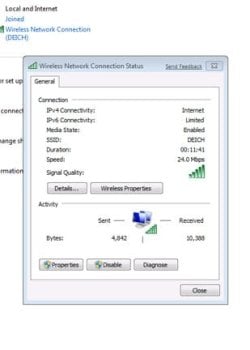
I deleted the connection and then tried again. Still no wireless. I tried to download a driver from Intel for the Intel Wireless WiFi Link 5300 802.11AGN card.....but the driver would not install. My connection is "limited" I'm not sure what that means but i do know it wont load a web page. When I hook up to the router with a cable my connection is lightning fast.

On another note......my blue tooth connection is working now for the mouse.....previous problem. Had to go to the MSI site and got a vista driver. They did not have a intel wireless driver!
 

My Computer

Computer Manufacturer/Model Number
MSI GX620 sold by Powernotebooks.com as a model 15:3
OS
win 7
CPU
P9500 2.53GHz (25W),
Memory
4gig
Graphics Card(s)
Nvidia 9600m GT 512gddr3
Sound Card
Built-in HD Audio Codec (Realtek ALC888S)
Hard Drives
160gig
Mouse
micro soft notebook blue tooth
Internet Speed
comcast --- high speed
Try going to control panel and disable your windows firewall and any firewall software you may have on your system. Try to connect again. If you are able to connect and finally able to browse, you've moved on to firewall configuration issues ;)
 

My Computer

Computer Manufacturer/Model Number
Custom Build
OS
Windows 7 Build 7048 x64
CPU
Athlon 64 X2 Dual Core 4600+
Motherboard
EMX-AMD750G-PRO
Memory
4 x 1GB Kingston 400MHz 6-6-6-18 (800MHz)
Graphics Card(s)
ATI Radeon 3650
Sound Card
Realtek HD Audio
Monitor(s) Displays
22" AOC 2216Vw
Screen Resolution
1680x1050
Cooling
Arctic Cooling Freezer 64 Pro PWM
Keyboard
Generic Enhanced Natural Keyboard
Mouse
Logitech VX Nano
Other Info
Edifier M1550
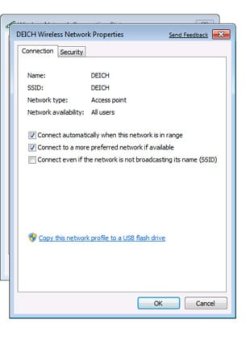
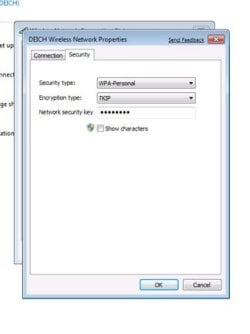
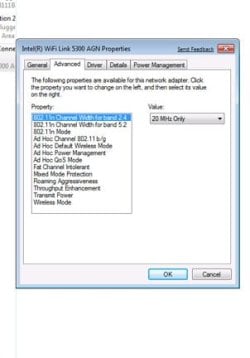
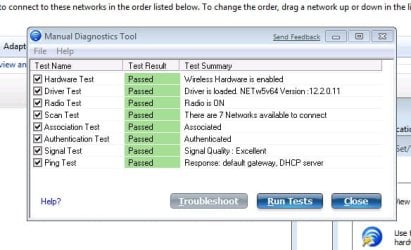
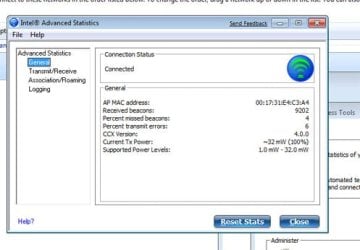
I disonnected the firewall stuff and still no luck. I took some screen shots of my wireless connection. My win 7 hard wire connection still works like a champ!

I hope you can view the screen shots

Also, are the bars in the lower right bottom of the screen supposed to turn colors when the signal is strong? The bars in the bottom of my screen are not colored at all.

I should also say that I'm using a netgear wireless cable modem
 

Attachments

  • connection 1.jpg
    connection 1.jpg
    30.4 KB · Views: 2,405
  • connection 2.jpg
    connection 2.jpg
    31.7 KB · Views: 1,954
  • connection3.jpg
    connection3.jpg
    27.4 KB · Views: 1,590
  • connection  4.jpg
    connection 4.jpg
    31.9 KB · Views: 2,032
  • connection  5.jpg
    connection 5.jpg
    50.3 KB · Views: 1,871
  • connection 6.jpg
    connection 6.jpg
    55.3 KB · Views: 1,805
  • connection 7.jpg
    connection 7.jpg
    41.3 KB · Views: 1,388
Last edited:

My Computer

Computer Manufacturer/Model Number
MSI GX620 sold by Powernotebooks.com as a model 15:3
OS
win 7
CPU
P9500 2.53GHz (25W),
Memory
4gig
Graphics Card(s)
Nvidia 9600m GT 512gddr3
Sound Card
Built-in HD Audio Codec (Realtek ALC888S)
Hard Drives
160gig
Mouse
micro soft notebook blue tooth
Internet Speed
comcast --- high speed
Wireless Troubleshooting Guide

Wireless issues that can be fixed by using these steps
(Limited or no connectivity, Connected but no data transfer, Can't connect to access point/router, etc...)

*Close all active applications
*Click Start -> Control Panel -> Network Connections
*Right click Wireless Network Connection, select Properties, Wireless Connection Properties window appears
*Wireless Connection Properties should contain at least three tabs (General, Wireless Network, Advanced)
**If Wireless Network is not present do steps below
***Close Wireless Connection Properties window
***Click Start -> Run, Type: services.msc, click ok
***Services window should appear
***Scroll all the way down and locate Wireless Zero Configuration
***Right click Wireless Zero Configuration, select Properties
***Make sure that the start-up type is set to Automatic, change if not
***If Wireless Zero Configuration service is started or stopped, re-start or start service
***Close Services windows (Wireless Network tab should now be activated)
**If Wireless Network tab is present continue below
*Click on Wireless Network tab
*Make sure that there's a check mark on the "Use Windows to configure my wireless connection automatically"
*In the Preferred Networks list, make sure that the box is empty, if not delete all access points found
*Just below the Preferred Networks list box, click on the Advanced button, a small window will appear
*Select the first option - Automatically connect to preferred networks
*Put a check mark on the last line that says - Connect to non-preferred networks
*Click close
*Click Ok on the Wireless Network Properties
*Go back to Control Panel -> click System -> System Properties window will come up
*Click on Hardware tab -> click on Device Manager button, Device Manager windows come up
*In Device Manager, click on the "+" beside Network Adapters to expand contents
*Right click and select un-install the Wireless Network device and confirm removal on the warning window
*Close all active windows
*Restart laptop/pc
*Upon startup, found new hardware will appear
**If no, found new hardware appears, the driver has already been installed automatically and should continue with the next steps
*Windows should automatically re-install the Wireless Network Device drivers
*Upon completion of installation, a pop-up window will appear stating "One or more wireless networks detected, click here for more options"
*Click on the balloon to bring up the "Available Wireless Networks Windows"
*You should now be able to see all available Wireless Networks in range
*Select desired Access Point to connect to then once connected, you should be able to browse the internet with no problems

***These steps should be able to resolve all if not most of the wireless issues encountered

Reminder: If connecting to a secured Wireless Access Point, entering an incorrect key will still allow you to connect but you will not be able to browse.

Notes: If after all these steps, you are still unable to connect or view any available networks, do the following with the Wireless Router
*Reset router
*Change "Channels"
*Change Work Mode to "g" only (can use "n" if present depending on your wireless card capability)
Try to connect to the wireless router with no security enabled, if successful and able to browse, you can then proceed to enable the security again

If you are able to detect Wireless Networks in range, you can safely assume that there's nothing wrong with the Wireless Network Card/Device installed on the computer

On intermittent Connections: Make sure that Windows built-in Firewall is turned off as well as any anti-virus programs, anti-spy-ware programs and the like are de-activated before doing these steps and/or before
attempting to connect to any Wireless Networks.

Applicable OS: Windows 2000/XP/Vista/7
Some window(s)/properties may be located differently depending on your OS. Adjust accordingly

I've designed these steps for one of the OEM I used to support ;)
 

My Computer

Computer Manufacturer/Model Number
Custom Build
OS
Windows 7 Build 7048 x64
CPU
Athlon 64 X2 Dual Core 4600+
Motherboard
EMX-AMD750G-PRO
Memory
4 x 1GB Kingston 400MHz 6-6-6-18 (800MHz)
Graphics Card(s)
ATI Radeon 3650
Sound Card
Realtek HD Audio
Monitor(s) Displays
22" AOC 2216Vw
Screen Resolution
1680x1050
Cooling
Arctic Cooling Freezer 64 Pro PWM
Keyboard
Generic Enhanced Natural Keyboard
Mouse
Logitech VX Nano
Other Info
Edifier M1550
Hi NosferatuX,

Good post - and a very important reminder :geek:

Reminder: If connecting to a secured Wireless Access Point, entering an incorrect key will still allow you to connect but you will not be able to browse.
worth some rep :D but have to spread it around ATM but will add when i can
 

My Computers

System One System Two

  • Computer type
    PC/Desktop
    Computer Manufacturer/Model Number
    ChillBlast - Custom to my design
    OS
    Windows 11 Pro x64 [Latest Release and Release Preview]
    CPU
    Ryzen 9 5950X, 3.8 - 5.2 MHz
    Motherboard
    Asus Prime X570-Pro
    Memory
    64GB [2 x 32GB] DDR4 3200MHz
    Graphics Card(s)
    4GB NVIDIA GEFORCE GTX 1650 Ti
    Sound Card
    On-board SPDIF to 5.1 System + HDMI [5.1 system]
    Monitor(s) Displays
    32" UHD 32 Bit HDR Monitor + 43" UHD 4K 32Bit HDR TV
    Screen Resolution
    2 x 3840 x 2160 @60Hz
    Hard Drives
    1TB M2 SSD OS, 500GB Fast Access SSD, 2 x 8TB Data + Various Externals from 1TB to 4TB, 10TB NAS
    PSU
    NZXT C750 80 PLUS Gold 750W Modular PSU
    Case
    Workstation Case [Matt Black]
    Cooling
    NZXT Kraken X63 280mm CPU Cooler +2x Quiet Case fans
    Keyboard
    Logitech Wireless MX Keys & K400 + others
    Mouse
    Logitech Wireless MX Master 3S
    Internet Speed
    920 MB Down 50 MB Up
    Antivirus
    BitDefender Total Security Pro
    Browser
    Chrome (always run latest Non-Beta)
    Other Info
    Also run ...
    Laptop - Quad 8GB - Windows 10 Pro x64
    Nexus 7 Android tablet x2
    Samsung 10.2" tablet
    Blackview TAB 8 4G Android Tablet c/w Keyboard
    Wacom Intuos Pro Medium Pen Pad
    Wacom Intuos Pro Small Pen Pad
    Wacom Expresskeys Remote
    Loopdeck+ Graphics Controller
    Shuttle Pro v2 Control
  • Computer type
    Laptop
    System Manufacturer/Model Number
    Dell XPS 17 10750H
    OS
    Windows 11 Pro x64 Latest RP
    CPU
    Intel I7 10750H 5.0GHz
    Motherboard
    Dell XPS
    Memory
    32GB [2x16GB] DDR4 2933 MHz
    Graphics Card(s)
    nVidia GTX1650Ti 4 GB GDDR6
    Sound Card
    Stock [Realtek] 4 Speaker
    Monitor(s) Displays
    17" IPS UHD+ Infinity Edge Touchscreen
    Screen Resolution
    3840 x 2400
    Hard Drives
    2TB M2 NVMe, 4TB External + various 500GB & 1TB External NVMe (also have access to spinner HDD from
    PSU
    Stock
    Case
    Stock XPS Aluminium & Carbon Fibre
    Cooling
    Stock - Active Fan Control
    Keyboard
    Backlit + Various Logitech
    Mouse
    Stock Track Pad + Logitech MX Trackball
    Internet Speed
    72 MB Down 18MB Up
    Browser
    Chrome
    Other Info
    Also run ...
    Laptop - Quad 8GB - Windows 10 Pro x64
    Nexus 7 Android tablet x2
    10.2" tablet
    Sony Z3 Android Smartphone
    Wacom Intuos Pro Medium Pen Pad
    Wacom Intuos Pro Small Pen Pad
    Wacom Expresskeys Remote
    Loopdeck+ Graphics Controller
    Shuttle Pro v2 Control Pad
    10TB NAS
Thank you Barman58 :o
 

My Computer

Computer Manufacturer/Model Number
Custom Build
OS
Windows 7 Build 7048 x64
CPU
Athlon 64 X2 Dual Core 4600+
Motherboard
EMX-AMD750G-PRO
Memory
4 x 1GB Kingston 400MHz 6-6-6-18 (800MHz)
Graphics Card(s)
ATI Radeon 3650
Sound Card
Realtek HD Audio
Monitor(s) Displays
22" AOC 2216Vw
Screen Resolution
1680x1050
Cooling
Arctic Cooling Freezer 64 Pro PWM
Keyboard
Generic Enhanced Natural Keyboard
Mouse
Logitech VX Nano
Other Info
Edifier M1550
Thanks for the additional information! I will run your checklist after work tonight when I get home.

There was a posting in the driver folder of this forum concerning drivers for netgear routers......should this be a concern?
 

My Computer

Computer Manufacturer/Model Number
MSI GX620 sold by Powernotebooks.com as a model 15:3
OS
win 7
CPU
P9500 2.53GHz (25W),
Memory
4gig
Graphics Card(s)
Nvidia 9600m GT 512gddr3
Sound Card
Built-in HD Audio Codec (Realtek ALC888S)
Hard Drives
160gig
Mouse
micro soft notebook blue tooth
Internet Speed
comcast --- high speed
There have been issues in some Netgear routers, but as long as your Netgear router has not been giving you any issues, I wouldn't really worry about it, especially if other wireless devices can connect to it with no problems. Though if there's a new firmware update for your router model, I'd go for the upgrade, might be worth a shot. Some of your settings might be reset to default but, it's easy to setup a Netgear router.

Keep us posted ;)
 

My Computer

Computer Manufacturer/Model Number
Custom Build
OS
Windows 7 Build 7048 x64
CPU
Athlon 64 X2 Dual Core 4600+
Motherboard
EMX-AMD750G-PRO
Memory
4 x 1GB Kingston 400MHz 6-6-6-18 (800MHz)
Graphics Card(s)
ATI Radeon 3650
Sound Card
Realtek HD Audio
Monitor(s) Displays
22" AOC 2216Vw
Screen Resolution
1680x1050
Cooling
Arctic Cooling Freezer 64 Pro PWM
Keyboard
Generic Enhanced Natural Keyboard
Mouse
Logitech VX Nano
Other Info
Edifier M1550
Still no wireless

Nosferatux,

First I must say thanks for all your advice. However, I ran your checklist and noticed the folowing.

1. wireless network propertes did not have the 3 taps (general, wireless network, and advance) see attached picture

2. I opened up the service.msc and could not find the wireless zero configuration line. The wired line was there but not wireless.

Any follow-on advice?

This is turning into a real pain in the A$$. Keep in mind I am running XP on the same hard drive and using the same wireless card and router (netgear cg814wg) and the wireless works fine.

Standing by for advice?
 

Attachments

  • connection 8.jpg
    connection 8.jpg
    43.7 KB · Views: 161
Last edited:

My Computer

Computer Manufacturer/Model Number
MSI GX620 sold by Powernotebooks.com as a model 15:3
OS
win 7
CPU
P9500 2.53GHz (25W),
Memory
4gig
Graphics Card(s)
Nvidia 9600m GT 512gddr3
Sound Card
Built-in HD Audio Codec (Realtek ALC888S)
Hard Drives
160gig
Mouse
micro soft notebook blue tooth
Internet Speed
comcast --- high speed
Nosferatux,

Thanks!
Yes yor post is detailed but was useless for me as I got nothing(Please correct me if I m wrong)! Please be specific to mention Correct entries.....
1....In Vista32 & Win 7 (32) there is no 3rd Advance Tab of Wireless Network Connection.
2....In services.msc there is no Wireless Zero Configuration entry!
My problem is that If I use adhoc connections all goes smoothly, but to connect to Router its not working at all...
Same wireless works fine in Vista Or in adhoc setup! I m sure its a problem of win7 But cant figure out How to rectify it!

Waiting for any help.....
 
Last edited:

My Computer

Computer Manufacturer/Model Number
Custom
OS
Windows 7 x64 RC1 & Windows 7 x86 build 7100
CPU
E4500 C2D
Motherboard
Asus P5E VMDO
Memory
Corsair-6GB
Graphics Card(s)
Nvidia 9500GT 1gb
Sound Card
Built in
Monitor(s) Displays
ViewSonic VX2233 22" Widescreen 1080p Full HD
Screen Resolution
1920x1080
Hard Drives
WD-500GB X2 SATA
SG-500GB x2 SATA
Non Raid
PSU
Cooler Master 600W
Case
CM 690 Cooler MAster
Cooling
Z600 Hyper from Cooler master with Dual fan
Internet Speed
3.1mb
How do I start the Wireless/WLAN/Wireless Zero Configuration?

How do I start the Wireless/WLAN/Wireless Zero Configuration?

Windows 7 & Windows Vista
To start Wireless Zero Configuration in Windows 7/Vista you need to log in as an Administrator.

Click on Start and Control Panel
Select Administrative Tools and then Services
In the Services box scroll down the list of Services (Local) until you find the one labeled Wired AutoConfig and double click it.
In the Wired AutoConfig Properties (Local Computer) box change the Startup type to Automatic
Click on Start and once the service has started click on OK
Now find the service labeled WLAN AutoConfig and double click it.
In the WLAN AutoConfig Properties (Local Computer) box change the Startup type to Automatic
Click on Start and once the service has started click on OK
Go to File and Exit to close the Services window

Windows XP
Windows XP users must have Service Pack 2 installed to activate the Wireless Zero Configuration and log in as Administrator

Go to Start and Control Panel
Click on Administrative Tools and Services
In the Services box scroll down the list of Services (Local) until you find the one labeled Wireless Zero Configuration and double click it.
In the Wireless Zero Configuration Properties (Local Computer) box change the Startup type to Automatic
Click on Start and once the service has started click on OK
Now find the service labeled WLAN AutoConfig and double click on it
In the WLAN AutoConfig Properties (Local Computer) box change the Startup type to Automatic
Click on Start and once the service has started click on OK
Go to File and Exit to close the Services window
 

My Computer

Computer Manufacturer/Model Number
Custom Build
OS
Windows 7 Build 7048 x64
CPU
Athlon 64 X2 Dual Core 4600+
Motherboard
EMX-AMD750G-PRO
Memory
4 x 1GB Kingston 400MHz 6-6-6-18 (800MHz)
Graphics Card(s)
ATI Radeon 3650
Sound Card
Realtek HD Audio
Monitor(s) Displays
22" AOC 2216Vw
Screen Resolution
1680x1050
Cooling
Arctic Cooling Freezer 64 Pro PWM
Keyboard
Generic Enhanced Natural Keyboard
Mouse
Logitech VX Nano
Other Info
Edifier M1550
NosferatuX
Thnx but No luck for me!!!!1
I have done exactly as u told..... But no luck.. Both Services are running.....
But I m still unable to connect to desired AP. "Windows was unable to connect to Network"
And adhoc connection works fine!
What could be wrong? I m so much frustrated. I hav to get som 30 feet of lan cable to connect this Win 7 PC to connect to my router...
So much annoying!
 

My Computer

Computer Manufacturer/Model Number
Custom
OS
Windows 7 x64 RC1 & Windows 7 x86 build 7100
CPU
E4500 C2D
Motherboard
Asus P5E VMDO
Memory
Corsair-6GB
Graphics Card(s)
Nvidia 9500GT 1gb
Sound Card
Built in
Monitor(s) Displays
ViewSonic VX2233 22" Widescreen 1080p Full HD
Screen Resolution
1920x1080
Hard Drives
WD-500GB X2 SATA
SG-500GB x2 SATA
Non Raid
PSU
Cooler Master 600W
Case
CM 690 Cooler MAster
Cooling
Z600 Hyper from Cooler master with Dual fan
Internet Speed
3.1mb
Hi zillaamer7F,
I've checked your specs, what type of wireless card are you using?
Maybe we can use your wireless device's native wireless manager...
 

My Computer

Computer Manufacturer/Model Number
Custom Build
OS
Windows 7 Build 7048 x64
CPU
Athlon 64 X2 Dual Core 4600+
Motherboard
EMX-AMD750G-PRO
Memory
4 x 1GB Kingston 400MHz 6-6-6-18 (800MHz)
Graphics Card(s)
ATI Radeon 3650
Sound Card
Realtek HD Audio
Monitor(s) Displays
22" AOC 2216Vw
Screen Resolution
1680x1050
Cooling
Arctic Cooling Freezer 64 Pro PWM
Keyboard
Generic Enhanced Natural Keyboard
Mouse
Logitech VX Nano
Other Info
Edifier M1550
My Router specs...802.11b/g 54MB Alfa Network Router with 1 WAN+4Lan Ports.
I hav 2 Dlink wireless adapters, 1 is DWA 110, 2 is DWL G122.
 

My Computer

Computer Manufacturer/Model Number
Custom
OS
Windows 7 x64 RC1 & Windows 7 x86 build 7100
CPU
E4500 C2D
Motherboard
Asus P5E VMDO
Memory
Corsair-6GB
Graphics Card(s)
Nvidia 9500GT 1gb
Sound Card
Built in
Monitor(s) Displays
ViewSonic VX2233 22" Widescreen 1080p Full HD
Screen Resolution
1920x1080
Hard Drives
WD-500GB X2 SATA
SG-500GB x2 SATA
Non Raid
PSU
Cooler Master 600W
Case
CM 690 Cooler MAster
Cooling
Z600 Hyper from Cooler master with Dual fan
Internet Speed
3.1mb
Back
Top