Solved won't boot with external USB attached

shimself

New member
Local time
7:24 AM
Messages
19
OK so the workaround isn't too bad, but still


I have a toshiba 3Tb usb hdd for backup. Like the title says the boot hangs if it's attached. I just changed machine and reinstalled windows, and it still happens. It hangs just after the Starting Windows message appear and just before the pretty coloured dots start waving around. Any ideas?


Thanks
 

My Computer

Computer type
PC/Desktop
Computer Manufacturer/Model Number
dell t3400
OS
w7 pro 64bit
Memory
8G
Screen Resolution
1920 1080
Hi shimself,


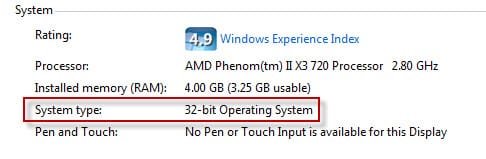
The HDD is too big for the Windows 32-bit platform. Windows 32-bit limits you to a 2TB storage device. That limitation is removed on 64-bit editions of the OS. The workaround is to re-format the drive as 2TB capacity, but then you would have 1TB of inaccessible storage space.
 

My Computer

Computer type
PC/Desktop
OS
Windows 7 x64, Vista x64, 8.1 smartphone
CPU
Intel E8400 65W 64-bit
Motherboard
Gigabyte EP45-UD3LR
Memory
DDR2 2 x 2GB, 1GB x 2
Graphics Card(s)
XFX Radeon HD5750
Sound Card
AMD High Definition Audio; Realtek High Definition Audio
Monitor(s) Displays
iiyama prolite X2377HDS
Screen Resolution
1920 x 1080
Hard Drives
500GB 7200 rpm Seagate ST3500413AS 16MB, 500GB 5400 rpm Toshiba MQ02ABF050H 32MB, 200GB 7200 rpm Seagate ST3200820AS 8MB, 2TB 7200 rpm Western Digital WD20EZRX 64MB
PSU
Enermax Liberty Modular
Case
Antec P193 Midi Tower
Keyboard
Mionix ZIBAL 60
Mouse
Razer USB 2.0 Diamondback Mouse or Huion Graphics Tablet
Browser
Internet Explorer, Lunascape, Firefox, Opera, Avast Safezone
Hi shimself,


The HDD is too big for the Windows 32-bit platform. Windows 32-bit limits you to a 2TB storage device. That limitation is removed on 64-bit editions of the OS. The workaround is to re-format the drive as 2TB capacity, but then you would have 1TB of inaccessible storage space.


it's win 7 pro 64 bit. Nice idea thanks. (To prove it I also have a 3T internal hdd)
 

My Computer

Computer type
PC/Desktop
Computer Manufacturer/Model Number
dell t3400
OS
w7 pro 64bit
Memory
8G
Screen Resolution
1920 1080
it's win 7 pro 64 bit. Nice idea thanks. (To prove it I also have a 3T internal hdd)

your forum profile states that you have Windows 32-bit :D


Perhaps you could update your System Specs in your User Profile?

Thanks.
 

My Computer

Computer type
PC/Desktop
OS
Windows 7 x64, Vista x64, 8.1 smartphone
CPU
Intel E8400 65W 64-bit
Motherboard
Gigabyte EP45-UD3LR
Memory
DDR2 2 x 2GB, 1GB x 2
Graphics Card(s)
XFX Radeon HD5750
Sound Card
AMD High Definition Audio; Realtek High Definition Audio
Monitor(s) Displays
iiyama prolite X2377HDS
Screen Resolution
1920 x 1080
Hard Drives
500GB 7200 rpm Seagate ST3500413AS 16MB, 500GB 5400 rpm Toshiba MQ02ABF050H 32MB, 200GB 7200 rpm Seagate ST3200820AS 8MB, 2TB 7200 rpm Western Digital WD20EZRX 64MB
PSU
Enermax Liberty Modular
Case
Antec P193 Midi Tower
Keyboard
Mionix ZIBAL 60
Mouse
Razer USB 2.0 Diamondback Mouse or Huion Graphics Tablet
Browser
Internet Explorer, Lunascape, Firefox, Opera, Avast Safezone
your forum profile states that you have Windows 32-bit :D


Perhaps you could update your System Specs in your User Profile?

Thanks.


done sorry.

(I would have added the laptops as well but it only seems to want one system)
 

My Computer

Computer type
PC/Desktop
Computer Manufacturer/Model Number
dell t3400
OS
w7 pro 64bit
Memory
8G
Screen Resolution
1920 1080
As I understood, the computer hangs during startup when the USB 3TB is attached.
Does it work normally if you attach it after boot is completed?

Open device manager. Is there any yellow alerts of missing drivers?
 

My Computers

System One System Two

  • Computer type
    PC/Desktop
    Computer Manufacturer/Model Number
    custom build
    OS
    Windows 7 HP 64
    CPU
    i5 6600K - 800MHz to 4200MHz
    Motherboard
    GA-Z170-HD3P
    Memory
    4+4G GSkill DDR4 3000
    Graphics Card(s)
    IG - Intel 530
    Monitor(s) Displays
    Samsung 226BW
    Screen Resolution
    1680x1050
    Hard Drives
    (1) -1 SM951 – 128GB M.2 AHCI PCIe SSD drive for Windows 7 and Lubuntu
    (2) -1 WD SATA 3 - 1T for Data
    (3) -1 WD SATA 3 - 1T for backup
    PSU
    Thermaltake 450W TR2 gold
    Keyboard
    Old and good Chicony mechanical keyboard
    Mouse
    Logitech mX performance - 9 buttons (had to disable some)
    Internet Speed
    500Mb/s
    Browser
    Firefox 64
    Other Info
    TinyWall firewall
  • Computer type
    Laptop
    System Manufacturer/Model Number
    Asus Q550LF
    OS
    Windows 7 Pro
    CPU
    i7-4500U 800MHz to 3.0GHz
    Motherboard
    Asus Q550LF
    Memory
    (4+4)G DDR3 1600
    Graphics Card(s)
    IG intel 4400 + NVIDIA GeForce GT 745M
    Sound Card
    Realtek
    Monitor(s) Displays
    LG Display LP156WF4-SPH1
    Screen Resolution
    1920 x 1080
    Hard Drives
    BX500 120G SSD for Windows and programs +
    1T HDD for data
    Internet Speed
    500 Mb/s
    Browser
    Firefox
    Other Info
    TinyWall firewall
As I understood, the computer hangs during startup when the USB 3TB is attached.
Does it work normally if you attach it after boot is completed?

Open device manager. Is there any yellow alerts of missing drivers?


yes it does. the workaround is unplug if rebooting, then plug in once login screen apears. As a new install with tons of windows updates running when you least expect it it's been a nuisance


and device manager has no alerts


Thanks for the help
 

My Computer

Computer type
PC/Desktop
Computer Manufacturer/Model Number
dell t3400
OS
w7 pro 64bit
Memory
8G
Screen Resolution
1920 1080
'.......The HDD is too big for the Windows 32-bit platform. Windows 32-bit limits you to a 2TB storage device. That limitation is removed on 64-bit editions of the OS. The workaround is to re-format the drive as 2TB capacity, but then you would have 1TB of inaccessible storage space.

Sorry iko22 , that statement is not correct. I have a Seagate Expansion 3TB external ( Desktop,) initialised as GPT) plugged into Windows Ultimate 32 bit Desktop at boot.

16-Jul-19 6-49-58 PM.jpg

16-Jul-19 6-34-50 PM.jpg

Megahertz07 is on the right track :-).
 
Last edited:

My Computer

OS
Windows 7 Home Premium 32 bit
Please attach an image of Disk Management (C:\Windows\System32\diskmgmt.msc) of the external disk as Jumanji did.
Expand the window and the columns so we can read them.
 

My Computers

System One System Two

  • Computer type
    PC/Desktop
    Computer Manufacturer/Model Number
    custom build
    OS
    Windows 7 HP 64
    CPU
    i5 6600K - 800MHz to 4200MHz
    Motherboard
    GA-Z170-HD3P
    Memory
    4+4G GSkill DDR4 3000
    Graphics Card(s)
    IG - Intel 530
    Monitor(s) Displays
    Samsung 226BW
    Screen Resolution
    1680x1050
    Hard Drives
    (1) -1 SM951 – 128GB M.2 AHCI PCIe SSD drive for Windows 7 and Lubuntu
    (2) -1 WD SATA 3 - 1T for Data
    (3) -1 WD SATA 3 - 1T for backup
    PSU
    Thermaltake 450W TR2 gold
    Keyboard
    Old and good Chicony mechanical keyboard
    Mouse
    Logitech mX performance - 9 buttons (had to disable some)
    Internet Speed
    500Mb/s
    Browser
    Firefox 64
    Other Info
    TinyWall firewall
  • Computer type
    Laptop
    System Manufacturer/Model Number
    Asus Q550LF
    OS
    Windows 7 Pro
    CPU
    i7-4500U 800MHz to 3.0GHz
    Motherboard
    Asus Q550LF
    Memory
    (4+4)G DDR3 1600
    Graphics Card(s)
    IG intel 4400 + NVIDIA GeForce GT 745M
    Sound Card
    Realtek
    Monitor(s) Displays
    LG Display LP156WF4-SPH1
    Screen Resolution
    1920 x 1080
    Hard Drives
    BX500 120G SSD for Windows and programs +
    1T HDD for data
    Internet Speed
    500 Mb/s
    Browser
    Firefox
    Other Info
    TinyWall firewall
Hello shimself

Sorry iko22 , that statement is not correct. I have a Seagate Expansion 3TB external ( Desktop,) initialised as GPT) plugged into Windows Ultimate 32 bit Desktop at boot.

View attachment 408714

View attachment 408715

Megahertz07 is on the right track :-).

sorry I goofed a bit earlier :cry:, and misconstrued my facts in my earlier reply.

Please follow jumanji and Megahertz07 excellent example on this matter.
 

My Computer

Computer type
PC/Desktop
OS
Windows 7 x64, Vista x64, 8.1 smartphone
CPU
Intel E8400 65W 64-bit
Motherboard
Gigabyte EP45-UD3LR
Memory
DDR2 2 x 2GB, 1GB x 2
Graphics Card(s)
XFX Radeon HD5750
Sound Card
AMD High Definition Audio; Realtek High Definition Audio
Monitor(s) Displays
iiyama prolite X2377HDS
Screen Resolution
1920 x 1080
Hard Drives
500GB 7200 rpm Seagate ST3500413AS 16MB, 500GB 5400 rpm Toshiba MQ02ABF050H 32MB, 200GB 7200 rpm Seagate ST3200820AS 8MB, 2TB 7200 rpm Western Digital WD20EZRX 64MB
PSU
Enermax Liberty Modular
Case
Antec P193 Midi Tower
Keyboard
Mionix ZIBAL 60
Mouse
Razer USB 2.0 Diamondback Mouse or Huion Graphics Tablet
Browser
Internet Explorer, Lunascape, Firefox, Opera, Avast Safezone
Please attach an image of Disk Management (C:\Windows\System32\diskmgmt.msc) of the external disk as Jumanji did.
Expand the window and the columns so we can read them.


herewith. (disk 2,3,4,5 will be the built in usb/sd etc panel on the front face)
 

Attachments

  • 3t.PNG
    3t.PNG
    30.1 KB · Views: 3

My Computer

Computer type
PC/Desktop
Computer Manufacturer/Model Number
dell t3400
OS
w7 pro 64bit
Memory
8G
Screen Resolution
1920 1080
Take the active flag off it.

type the following at command prompt:

diskpart
(press enter)
sel vol j:
(press enter)
inact
(press enter)
exi
(press enter)
 
Last edited:

My Computers

System One System Two

  • Computer type
    PC/Desktop
    OS
    7 X64
    CPU
    i5 8400
    Motherboard
    gigabyte b365m ds3h
    Memory
    2x8gb 3200mhz
    Hard Drives
    various
    PSU
    pure power 11 400w cm
    Case
    Coolermaster
    Cooling
    cryorig m9i
  • Computer type
    PC/Desktop
    OS
    7x64
    CPU
    g5400
    Motherboard
    ga b365m ds3h
    Memory
    8gb ddr4 2400
    PSU
    xfx pro 450w
Take the active flag off it.

type the following at command prompt:

diskpart
(press enter)
sel vol J: (not F:)
(press enter)
inact
(press enter)
exi
(press enter)

:ditto:

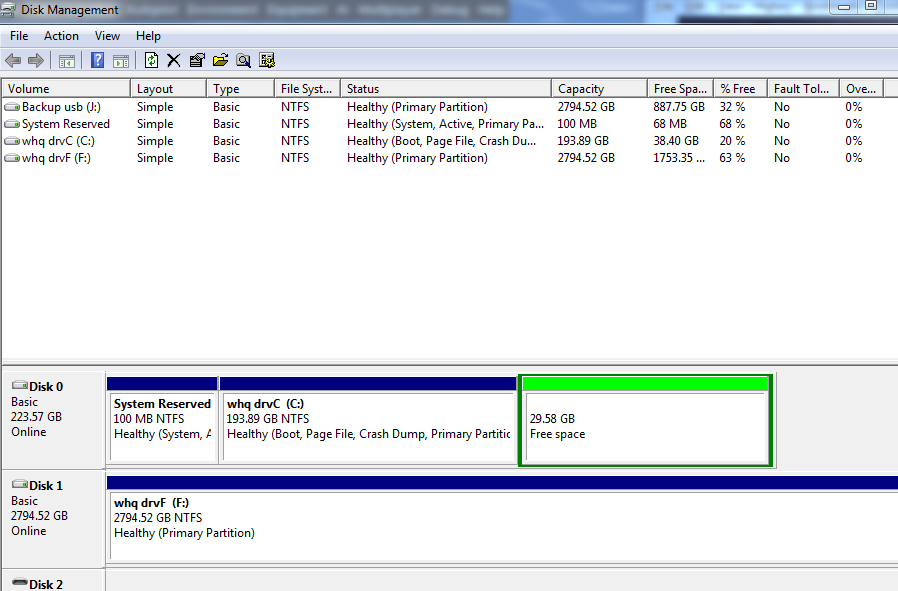
Disk J: is set as "active", it is set as a boot able disk. It probably had a OS installed and now is for data.
On BIOS, it is probably set as first boot option.
You have 3 options:
- On BIOS, set disk 0 as first boot option.
- Open a CMD window as Administrator and use the Diskpart commands SIW2 gave you or you can set disk J: as inactive using Disk Manager
 

My Computers

System One System Two

  • Computer type
    PC/Desktop
    Computer Manufacturer/Model Number
    custom build
    OS
    Windows 7 HP 64
    CPU
    i5 6600K - 800MHz to 4200MHz
    Motherboard
    GA-Z170-HD3P
    Memory
    4+4G GSkill DDR4 3000
    Graphics Card(s)
    IG - Intel 530
    Monitor(s) Displays
    Samsung 226BW
    Screen Resolution
    1680x1050
    Hard Drives
    (1) -1 SM951 – 128GB M.2 AHCI PCIe SSD drive for Windows 7 and Lubuntu
    (2) -1 WD SATA 3 - 1T for Data
    (3) -1 WD SATA 3 - 1T for backup
    PSU
    Thermaltake 450W TR2 gold
    Keyboard
    Old and good Chicony mechanical keyboard
    Mouse
    Logitech mX performance - 9 buttons (had to disable some)
    Internet Speed
    500Mb/s
    Browser
    Firefox 64
    Other Info
    TinyWall firewall
  • Computer type
    Laptop
    System Manufacturer/Model Number
    Asus Q550LF
    OS
    Windows 7 Pro
    CPU
    i7-4500U 800MHz to 3.0GHz
    Motherboard
    Asus Q550LF
    Memory
    (4+4)G DDR3 1600
    Graphics Card(s)
    IG intel 4400 + NVIDIA GeForce GT 745M
    Sound Card
    Realtek
    Monitor(s) Displays
    LG Display LP156WF4-SPH1
    Screen Resolution
    1920 x 1080
    Hard Drives
    BX500 120G SSD for Windows and programs +
    1T HDD for data
    Internet Speed
    500 Mb/s
    Browser
    Firefox
    Other Info
    TinyWall firewall
Yes, should be J: :-)
 

My Computers

System One System Two

  • Computer type
    PC/Desktop
    OS
    7 X64
    CPU
    i5 8400
    Motherboard
    gigabyte b365m ds3h
    Memory
    2x8gb 3200mhz
    Hard Drives
    various
    PSU
    pure power 11 400w cm
    Case
    Coolermaster
    Cooling
    cryorig m9i
  • Computer type
    PC/Desktop
    OS
    7x64
    CPU
    g5400
    Motherboard
    ga b365m ds3h
    Memory
    8gb ddr4 2400
    PSU
    xfx pro 450w
Most, or at least Many PC's and Laptops are setup in the Bios to boot from the Flash Drive first. OK?


If the attached Flash Drive (USB device) has a boot sector and OS, it will boot the PC, and if not the boot process will/may hang.


I have one old Flash Drive that I've used for years, with my Utilities programs on it. I use it on every Service Call. I have reformatted it several times over the years, but almost every PC will try to boot from it, if it's plugged in when I boot or re-boot the PC.
I've given up trying to figure out why, I just have to remember to unplug it before I re-boot a PC.
(it's an old PNY 8GB FD)
Ain't that weird?


Life is too short, to worry about the simple stuff.;)


:cool:
 

My Computer

Computer type
PC/Desktop
Computer Manufacturer/Model Number
Various
OS
Win 7 Pro, SP1, x86, Win-11/Pro/64
CPU
AMD
Motherboard
Various
Memory
8GB Crucial
Graphics Card(s)
Various
Sound Card
OnBoard
Monitor(s) Displays
Acer 21.5"
Hard Drives
Crucial SSD, 500 GB
PSU
OEM
Case
SFF Slim Line Case
Cooling
OEM
Keyboard
eMachines
Mouse
Logitech Wireless
Internet Speed
varies
Antivirus
Windows Defender/Super Anti-Spyware
Browser
Firefox
Thanks for the help. I'm on holiday so can't try anything out until I return. I am certain that the first disk in the boot order is indeed the SSD as it should be
 

My Computer

Computer type
PC/Desktop
Computer Manufacturer/Model Number
dell t3400
OS
w7 pro 64bit
Memory
8G
Screen Resolution
1920 1080
Please attach an image of Disk Management (C:\Windows\System32\diskmgmt.msc) of the external disk as Jumanji did.
Expand the window and the columns so we can read them.


Sorry for the huge delay, it stopped being a regular nuisance, but now I'd like to hand the pc over so it needs fixing


Done - it's disk J: (sorry about the drive letters, it's historical)


dm.png
 
Last edited:

My Computer

Computer type
PC/Desktop
Computer Manufacturer/Model Number
dell t3400
OS
w7 pro 64bit
Memory
8G
Screen Resolution
1920 1080
Welcome back shimself. Just to recap, does the computer+external disk still hang, after J: is marked as Inactive?
 

My Computer

Computer type
PC/Desktop
OS
Windows 7 x64, Vista x64, 8.1 smartphone
CPU
Intel E8400 65W 64-bit
Motherboard
Gigabyte EP45-UD3LR
Memory
DDR2 2 x 2GB, 1GB x 2
Graphics Card(s)
XFX Radeon HD5750
Sound Card
AMD High Definition Audio; Realtek High Definition Audio
Monitor(s) Displays
iiyama prolite X2377HDS
Screen Resolution
1920 x 1080
Hard Drives
500GB 7200 rpm Seagate ST3500413AS 16MB, 500GB 5400 rpm Toshiba MQ02ABF050H 32MB, 200GB 7200 rpm Seagate ST3200820AS 8MB, 2TB 7200 rpm Western Digital WD20EZRX 64MB
PSU
Enermax Liberty Modular
Case
Antec P193 Midi Tower
Keyboard
Mionix ZIBAL 60
Mouse
Razer USB 2.0 Diamondback Mouse or Huion Graphics Tablet
Browser
Internet Explorer, Lunascape, Firefox, Opera, Avast Safezone
Thanks for those who tried to help


The drastic solution was forced on me, the pc died, so same problem came up with 2 dell T3400, now replaced by a Lenovo and problem gone away
 

My Computer

Computer type
PC/Desktop
Computer Manufacturer/Model Number
dell t3400
OS
w7 pro 64bit
Memory
8G
Screen Resolution
1920 1080
Back
Top