
XP mode: Problem installation

sofquipeut

New member
Local time
11:50 AM
Messages
2
Hello,

I am using Windows7 Professional 64 bit and would like to install XP mode to be able to install a vpn only working with 32 bit.
I went on this website: Download Windows XP Mode to downlaiod it, change my BIOS setup to enable virtualization (the test tells me it is then OK9. But when I click on the first link: "Windows XP mode", it downlads a file named "Windowsactivationupdate.exe", I execute the file and get an error message : 0x80004005 (407) (see Screenshot enclosed). Does anyone has an idea how to solve this?? :sarc:

Thanks a lot for your help,

Sophie
 

Attachments
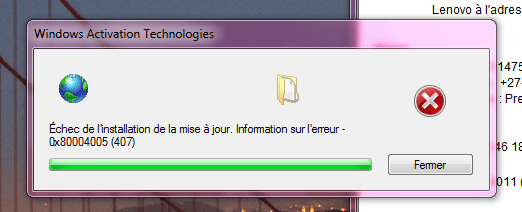
  • Capture.PNG
    Capture.PNG
    19.5 KB · Views: 37

My Computer

OS
Windows 7 64bit
This has to do with the activation failing for one reason or another.

1. Are you using a proxy server for internet access?

2. Most articles revolving around that error code tell you to do a repair install. Since I don't think you can do so with an XP Mode Installation, I'd suggest uninstalling and trying again.
 

My Computer

Computer Manufacturer/Model Number
Apple Macbook Pro (April 2009)
OS
W7 Ult. x64 | OS X
CPU
Intel Mobile Core 2 Duo 2.93Ghz [T9800 Penryn]
Motherboard
NVIDIA nForce 730i Rev. B1 [Mac-F2268EC8 (U2E1)]
Memory
4096MB Samsung DDR3 Dual Channel [PC3-8500F 1066Mhz]
Graphics Card(s)
NVIDIA GeForce 9600M GT 512MB [G96M Rev. C1]
Sound Card
SB X-Fi Surround 5.1 USB | Onboard Realtek (Disabled)
Monitor(s) Displays
Acer x223wbd 22" | Apple Anti-Glare 17" (Disabled)
Screen Resolution
{Current} 1440x900 {Acer} 1680x1050 {Apple} 1920x1200
Hard Drives
{Internal}
Seagate Momentus 320GB 2.5" 7200RPM [ST9320421AS]

{Externals}
LaCie 320GB USB 2.0 HDD [301284UR]
LaCie 750GB USB 2.0 FW400 eSATA HDD [301314U]
LaCie 1TB USB 2.0 HDD [301304UR]
PSU
Magsafe
Case
Aluminum/Unibody (MBP52)
Cooling
2 x 6000 RPM Fans
Keyboard
Logitech G-15v2 [PN 920-000379]
Mouse
Logitech G-9 [PN 910-000338]
Internet Speed
12Mbps/2.5Mbps w/ 24Mbps Speed Boost [Comcast]
Other Info
Logitech X-540 Speakers [PN 970223-0122]
Sennheiser PC-151 Headset
I desactivated the proxy and it is now working fine!

Thanks a lot for your help!! :D
 

My Computer

OS
Windows 7 64bit
Windows P mode: Problem installation

Hi,

I am currently using Windows 7 Professional (64 bit) and want to install XP mode.

When I was started to Download Windows XP Mode to download "Windowsactivationupdate.exe", I execute the file and get an error message :

Update installation failed. Error information - 0x80004005 (407)


Can any body help me out?????

I am using a proxy server for internet access.

Thanks
Jaiveer Singh
 

My Computer

Computer Manufacturer/Model Number
Dell Studio 1558
OS
Windows 7 Professional
CPU
Core i5 2.53Ghz
Motherboard
Intel
Memory
4GB
Graphics Card(s)
512MB ATI
Monitor(s) Displays
HD
Hard Drives
500GB
Back
Top