You don't currently have permission to access this fold

notheing is working for me please help

the tool didnt work for me any other thoughts
 

My Computer My Computer

At a glance

windows 7i5 7504 gb ddr3 1600 ocz goldati gt 250 1 gb
Computer Manufacturer/Model Number
custom
OS
windows 7
CPU
i5 750
Motherboard
Evga p55 LE
Memory
4 gb ddr3 1600 ocz gold
Graphics Card(s)
ati gt 250 1 gb
Sound Card
N/A
Monitor(s) Displays
sceptre 24 inch wide
Hard Drives
maxtor 320 internal, mybook 750 external, maxtor 300 external
PSU
apower 800 watt
Case
cooler master 932 haf
Cooling
artic pro 7
Hey people I just registered in this forum because I have a simillar problem to those previously here related.
Well I just did an upgrade to my pc and I bought among other thing a new hard drive where it was installed windows 7. The thing is that when I try to access some of my old songs / photos / videos of my old disk in which i have windows XP installed, I have those issues about ownership and i already tried almost everything but there is always an anoying error saying that the acess is denied! I was going to try Zidane's Tool but i just dont know how to run it!

Could you help me please?

Sorry about spelling mistakes but i am not english.
 

My Computer My Computer

At a glance

windows7
OS
windows7
im also having the exact same issue, can someone please help!
 

My Computer My Computer

At a glance

Windows 7 32 Bit
OS
Windows 7 32 Bit
I'm jumping in here because I have the same problem, Access Denied for folder "C: My Files". Am including an ANSI WINDOWS shot I used the snipping tool on. I don;t what to put in the add object box. I tried WILLIAM-PC and that was rejected. Help?
 

My Computer My Computer

At a glance

W7 Ultimate2.2 bh Intel Core i3-2330M4MBOn Board
Computer type
Laptop
Computer Manufacturer/Model Number
Asus
OS
W7 Ultimate
CPU
2.2 bh Intel Core i3-2330M
Motherboard
Asustek Computer Inc. P53E 1.0
Memory
4MB
Graphics Card(s)
On Board
Sound Card
On Board
Monitor(s) Displays
On Board
Screen Resolution
1366 X 768
Hard Drives
ST9500423AS
ST2000DM USB Backup Drive External

My Computer My Computer

At a glance

Win 8 Release candidate 8400[email protected]4 gigsNvidia 9600M
Computer Manufacturer/Model Number
HP Pavillion dv-7 1005 Tx
OS
Win 8 Release candidate 8400
CPU
[email protected]
Memory
4 gigs
Graphics Card(s)
Nvidia 9600M
Sound Card
HD built-in
Monitor(s) Displays
17" Wxga
Screen Resolution
1440x900
Cooling
none
Internet Speed
45Mb down 5Mb up
why should i start a new thread? won't that just make it more difficult for the next person with this problem?
 

My Computer My Computer

At a glance

windows 7 Ulti
OS
windows 7 Ulti
As I understand it some folders are locked into the 'trusted installer' program somehow.

I had a similar problem with Google Earth where the folders were locked out to all Admin accounts and users. Never did solve that one but reinstalling Google Earth worked so I didn't need to go any further.

I did read a suggestion that via a CMD prompt (run in Admin mode) you can use the 'takeown' followed by a 'calcs' command that is supposed to overwrite this to allow access ?

Can't remember the exact text required to follow the above commands.

I think Microsoft should look at this and allow local Admin users an efficient way to manage Windows folders and files when they are locked.
 

My Computer My Computer

At a glance

MSDN Home PremiumIntel i54GbATI Radeon HD 5770
Computer Manufacturer/Model Number
Novatech (UK) iRush Pro
OS
MSDN Home Premium
CPU
Intel i5
Motherboard
Intel DP55WB
Memory
4Gb
Graphics Card(s)
ATI Radeon HD 5770
Sound Card
On Board
Monitor(s) Displays
Philips 170B
Hard Drives
1 x 1Tb
(7 Partitions)
PSU
750W
Case
Antec 300
Cooling
Tricool Fans
Keyboard
Microsoft 3000 Wireless
Mouse
Microsoft 5000 Wireless BlueTrack
Internet Speed
6.1 Mbps
I believe that if you boot W7 into safe mode, you will have access to everything regardless of ownership. Perhaps you could copy the files you want in safe mode to a folder you have ownership of. Not sure if this would result in removing any restrictions after rebooting normally, but it might be worth a try if normal methods of taking ownership aren't working.
 

My Computer My Computer

At a glance

Windows 7 Ultimate x64 (Retail)i7-Q 7206 GBnVidia GeForce GT 230M (1GB)
Computer Manufacturer/Model Number
HP DV8t quad
OS
Windows 7 Ultimate x64 (Retail)
CPU
i7-Q 720
Motherboard
Motherboard Chipset Intel Ibex Peak-M PM55, Intel Lynnfield
Memory
6 GB
Graphics Card(s)
nVidia GeForce GT 230M (1GB)
Sound Card
IDT High Definition Audio CODEC
Monitor(s) Displays
18.4 inch HP Infinity FHD (Samsung 184HT03-001)
Screen Resolution
1920 x 1080
Hard Drives
Hitachi 500GB 7200 rpm (x2)
Seagate FreeAgent 1.5 TB External USB (x2)
Thermaltake BlacX eSATA/USB 2.0 3.5/2.5 HD dock
Cooling
Zalman NC-2000 notebook cooling pad
Keyboard
laptop
Mouse
Logitech VX Revolution
Other Info
Backup Unit: Lenovo T61p
OK, I'd asked a question on permissions in the "General" thread, and came across this thread that seems to have many of the same problems I'm having after an XP to W7 move. I followed this advise (below) and it seems to have solved my problems accessing my Doc and Settings folder, but I have what looks like a "shortcut" symbol on the "D&S" and the "Default" folder, and a lock on the "Tom" folder (me). I can open both (where I couldn't before). Then I have the other C\users folder, pretty much showing the same thing. Just looks wrong.

Now that I have access, what to do to combine all and make it "right"? (normal folders, no lock, no shortcut).

You get padlocks on folders and files in Windows 7 when low permissions have been removed i.e. users, guests account, authenticated users from the folder. Follow the bottom half of this webpage starting from Changing Permissions
Change the permissions and take ownership of your files and folders | Windows Vista for Beginners

Where they add Administrators add Authenticated users instead.

If your having problems with the sub folders still after that. Then from the Security tab, hit the advanced tab then change permissions at the bottom then tick 'Replace all child object permissions with inheritable permissions from this object' and hit OK.
 

My Computer My Computer

At a glance

Windows 7 64 biti5-7506gbGTS 240
Computer Manufacturer/Model Number
Dell XPS 8100
OS
Windows 7 64 bit
CPU
i5-750
Memory
6gb
Graphics Card(s)
GTS 240
Monitor(s) Displays
Dell U2311
Screen Resolution
1920 x 1080
Hard Drives
Seagate ST3250318AS
Samsung HD103SJ 1T
Yea I know this thread is old, but I got to say thank you!

This just helped me when changing permissions from a HDD configured in Windows XP Professional to work on Windows 7 Ultimate. Thank you so much!
 

My Computer My Computer

At a glance

Windows 7 Ultimate x64Intel Core i5 760 @ 2.80 GHzKingston Hyper X Blue 4GB DDR3 @ 1600MHzATI Radeon HD 5670
OS
Windows 7 Ultimate x64
CPU
Intel Core i5 760 @ 2.80 GHz
Memory
Kingston Hyper X Blue 4GB DDR3 @ 1600MHz
Graphics Card(s)
ATI Radeon HD 5670
Screen Resolution
1280 x 1024
Hard Drives
Hitachi 1TB, iBuffalo 1TB
PSU
Thermaltake 430W
Case
Thermaltake
Internet Speed
Cable
Found Solution to this problem

I was having the similar security issue as well and went thru step by step as I read this thread. I did a fresh Win7 install and was not able to access my Music folder like I could before. With no solution found, I went back to the help files from Windows 7 and found step by step on how to take ownership of a file or folder. I search under "Take Ownership of a File or Folder" I listed step by step similar to how it was discussed earlier in this thread. This steps worked for me in my current setup.

When I right clicked on properties and security tab, then advanced and made my username (setup as admin) i told Win7 that i was now the new owner, it did not work. So i thought, why restrict this folder to just me. So, i clicked on Onwer tab, then click edit, then other users or groups and typed "EVERYONE" so after i applied it, it worked.

By doing this it removed the previous owner from the old system that Win7 did not recognize. Here are the steps from windows:

The owner of the object controls how permissions are set on the object and to whom permissions are granted.
The Take Ownership permission on an object or the Restore files and directories user right are the minimum requirements to complete this procedure. Review the details in "Additional considerations" in this topic.

To take ownership of a file or folder
Open Windows Explorer, and then locate the file or folder you want to take ownership of.
Right-click the file or folder, click Properties, and then click the Security tab.
Click Advanced, and then click the Owner tab.
Click Edit, and then do one of the following:
To change the owner to a user or group that is not listed, click Other users and groups and, in Enter the object name to select (examples), type the name of the user or group, and then click OK.

To change the owner to a user or group that is listed, in the Change owner to box, click the new owner.

(Optional) To change the owner of all subcontainers and objects within the tree, select the Replace owner on subcontainers and objects check box.
Additional considerations
An administrator can take ownership of any file on the computer.

Assigning ownership of a file or a folder might require you to elevate your permissions by using User Access Control.

To open Windows Explorer, click Start, point to All Programs, click Accessories, and then click Windows Explorer.

You can transfer ownership in two ways:

The current owner can grant the Take Ownership permission to others, allowing those users to take ownership at any time. A user granted the Take Ownership permission can take ownership of the object or assign ownership to any group that the user is a member of.

A user who has the Restore files and directories privilege can double-click Other users and groups and choose any user or group to assign ownership to.

The Everyone group no longer includes the Anonymous Logon group.

 

My Computer My Computer

At a glance

win7 Ultimate 32bit
OS
win7 Ultimate 32bit
:p I kn ow its been a while sice anyone post on this thread , but bless you making a new folder worked for me :party:
 

My Computer My Computer

At a glance

windows 7 64
Computer type
PC/Desktop
OS
windows 7 64
Problem on my folder

Hi Squon,

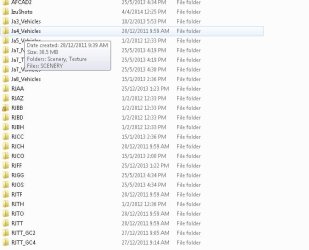
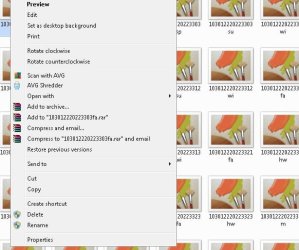
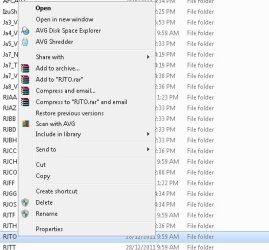
i have a same problem here. my problem is on flight simulator being lock and not able to see the file. when i try to on my flight sim and because this particular airport in this file is being lock and not able to fly on this airport. so the file is been lock.

here i let u see the sc shot.

i hope you can help me with step by step.

thanks
 

Attachments

  • 1.1.jpg
    1.1.jpg
    41.5 KB · Views: 22
  • 1.2.jpg
    1.2.jpg
    46.5 KB · Views: 22
  • 1.4.jpg
    1.4.jpg
    38.4 KB · Views: 22
  • 1.3.jpg
    1.3.jpg
    5.4 KB · Views: 2
  • Untitled.png
    Untitled.png
    22.5 KB · Views: 1

My Computer My Computer

At a glance

windiw 7 64
Computer type
PC/Desktop
OS
windiw 7 64
You don't currently have permission to access this folder

I also had this problem on Windows 10 and the suggestion to create a new folder on the drive and then CUT and PASTE the contents of the folder with the permissions problem into the newly created folder worked for me.

1) CREATE A NEW DIRECTORY
2) CUT AND PASTE THE FILES AND FOLDERS FROM THE DIRECTORY THAT HAS THE PERMISSION PROBLEM INTO THE NEWLY CREATED DIRECTORY
3) PROBLEM SOLVED
 

My Computer My Computer

At a glance

Win7 professional 64
Computer type
PC/Desktop
OS
Win7 professional 64
The process mentioned here can be quite tedious if you have multiple folders and subfolders to apply these security settings to.

To make the process easier I have developed a PowerShell script which uses the takeown and icacls commands to automate this for you, find out more and download my script from https://lukestoolkit.blogspot.com/2018/12/take-ownership-of-files-and-folders.html
 

My Computer My Computer

At a glance

Windows 7 Ultimate x64
Computer type
PC/Desktop
OS
Windows 7 Ultimate x64
Back
Top