Solved Your last browser session closed unexpectly.

Again, I have not read through the thread history.

Please do,
She has a stuck browser/ search hijacker,
Log files have been pasted on page 2 I believe,
Cheers.
 

My Computer My Computer

Computer type
PC/Desktop
Computer Manufacturer/Model Number
Custom assembled by me :}
OS
Win-7-Pro64bit 7-H-Prem-64bit
CPU
i7-5930K 2nd i9-9940x both water blocked VRM's too
Motherboard
ASUS SABERTOOTH X99 2nd ASUS x299 Apex
Memory
Trident-z 3200C14 2nd Trident-z 3600C16
Graphics Card(s)
EVGA 1080ti ftw3 2nd Titan Xp both water blocked
Sound Card
Built-in Realtek
Monitor(s) Displays
1-AOC G2460PG 24"G-Sync 144Hz/ 2nd 1-ASUS VG248QE 24" 144Hz
Screen Resolution
1920 x 1080 144Hz
Hard Drives
2-Samsung M.2 Evo & Evo Plus
2-Samsung 850 EVO 500GB SSD's/ 3-2.5 W.D. Black 1tb-&3-1tb/3-3.5 WD Black 1tb hdd's
PSU
EVGA SuperNOVA 1000-P2 2nd 1200-P2
Case
2-Corsair Obsidian Series 450D Black ATX Mid Tower
Cooling
Custom water loops
Keyboard
Logitech G710+/ 2nd Logitech G910
Mouse
2-RedDragon M901 Perdition 16400 dpi Gaming mouse = wired
Internet Speed
Comcast Ping 19ms 89.31mbps download speed 6.12mbps upload
Antivirus
Malwarebytes Pro/ Superantispyware Pro
Browser
FireFox & Pale moon
Other Info
2nd ASUS X299 Apex/Intel i9-9940x with Custom water loop/7H-Prem-x64/Corsair 450D case/Ram Trident-z 3600C16 4x8gb / Samsung970Evo plus 500gb SSD/Dual ssd EZ swap evo/PSU EVGA SuperNova 1200w-P2 80+Platinum/GPU Titan Xp /8-ML-140 on push-pull on 2-280GTX rads
Hi vonda,

I'm just jumping in - let Mike (Thrashzone) digest this post and give you the yea or nay on it - I don't want to distract the process you're following.

I have an HP laptop and had some issues with IE 10, so I rolled it back to IE 9. I waited for IE 11 to mature a bit, upgraded and ran fine for a while. Eventually I rolled back to IE 10, and rolled back to IE 9.

You might consider rolling back to IE 9 as a work around option. A caveat is that if you ran Disk cleanup and removed Windows superceded updates, you'll roll back to IE 8, then you need to accept Windows Update for IE 9 or install it manually.

There are Microsoft Fix it solutions for IE.
See http://www.sevenforums.com/tutorials/322887-microsoft-fix-portable.html
Category: Connect to the internet or networks
there might be other Ie Fix its.... look through the availble MATS (MS automated Trouble Shooter) offered in the Portable Fix it.

You can also check the online MS Fixt page:
Microsoft Fix it Solution Center: troubleshooting software issues
and select the IE category

See which MATS might apply and ask any questions before you run any.

Back to the sidelines.....

Bill
.
 

My Computer My Computer

Computer type
Laptop
Computer Manufacturer/Model Number
HP Pavilion dv6-6c10us
OS
x64 (6.3.9600) Win8.1 Pro & soon dual boot x64 (6.1.7601) Win7_SP1 HomePrem
CPU
AMD A6-3420M APU with Radeon(tm) HD Graphics
Motherboard
Hewlett-Packard 1805
Memory
6.00 GB
Graphics Card(s)
AMD Radeon(TM) HD 6520G
Sound Card
(1) AMD High Definition Audio Device (2) IDT High Definiti
Monitor(s) Displays
HP W2072a 20" LCD (1600 x 900) @ 60 Hz
Screen Resolution
1366 x 768 x 32 bits (4294967296 colors) @ 60 Hz
Hard Drives
ST640LM0 00 HM641JI SATA Disk Device
Keyboard
Logitech k520 wireless KB
Mouse
Logitech m320 wireless mouse (bundled with KB)
Internet Speed
15/5 | 54 MB Wireless 'n'
Antivirus
Realtime: Defender or Avast | On-demand: Malwarebytes, ESET
Browser
IE 11 on Win8, IE 10 on win 7
Other Info
Media: [Gimp, Audacity, VLC] || Comm: [WEmail 2012, Skype] || Productivity: [OpenOffice,| Textpad] || Utils: [Sysinternals, cCleaner, Speccy, Defraggler]
Hi vonda,

I'm just jumping in - let Mike (Thrashzone) digest this post and give you the yea or nay on it - I don't want to distract the process you're following.

I have an HP laptop and had some issues with IE 10, so I rolled it back to IE 9. I waited for IE 11 to mature a bit, upgraded and ran fine for a while. Eventually I rolled back to IE 10, and rolled back to IE 9.

You might consider rolling back to IE 9 as a work around option. A caveat is that if you ran Disk cleanup and removed Windows superceded updates, you'll roll back to IE 8, then you need to accept Windows Update for IE 9 or install it manually.

There are Microsoft Fix it solutions for IE.
See http://www.sevenforums.com/tutorials/322887-microsoft-fix-portable.html
Category: Connect to the internet or networks
there might be other Ie Fix its.... look through the availble MATS (MS automated Trouble Shooter) offered in the Portable Fix it.

You can also check the online MS Fixt page:
Microsoft Fix it Solution Center: troubleshooting software issues
and select the IE category

See which MATS might apply and ask any questions before you run any.

Back to the sidelines.....

Bill
.
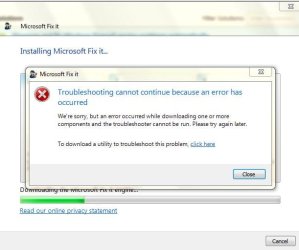
I did go back to IE 9, but the problem was even more pronounced, i.e. I could not even enter my user name to log on the forum. Unfortunately, Mr.fixit did not work either, see attachment. Thanks for replying.
 

Attachments

  • mr.fixit.JPG
    mr.fixit.JPG
    38 KB · Views: 25

My Computer My Computer

Computer Manufacturer/Model Number
HPE-400f
OS
Widows 7 home premium 64 bit
CPU
AMD phenom(tm) 11 x 4 processor 3.00 GHz
Motherboard
?
Memory
8.00 GB
Graphics Card(s)
ATI Radeon HD 5450
Sound Card
?
Monitor(s) Displays
HP vs17
Hard Drives
1 TB Sata
Mouse
usb
Internet Speed
download 15 mbps

My Computer My Computer

Computer Manufacturer/Model Number
HPE-400f
OS
Widows 7 home premium 64 bit
CPU
AMD phenom(tm) 11 x 4 processor 3.00 GHz
Motherboard
?
Memory
8.00 GB
Graphics Card(s)
ATI Radeon HD 5450
Sound Card
?
Monitor(s) Displays
HP vs17
Hard Drives
1 TB Sata
Mouse
usb
Internet Speed
download 15 mbps
Last edited:

My Computer My Computer

Computer type
PC/Desktop
Computer Manufacturer/Model Number
Custom assembled by me :}
OS
Win-7-Pro64bit 7-H-Prem-64bit
CPU
i7-5930K 2nd i9-9940x both water blocked VRM's too
Motherboard
ASUS SABERTOOTH X99 2nd ASUS x299 Apex
Memory
Trident-z 3200C14 2nd Trident-z 3600C16
Graphics Card(s)
EVGA 1080ti ftw3 2nd Titan Xp both water blocked
Sound Card
Built-in Realtek
Monitor(s) Displays
1-AOC G2460PG 24"G-Sync 144Hz/ 2nd 1-ASUS VG248QE 24" 144Hz
Screen Resolution
1920 x 1080 144Hz
Hard Drives
2-Samsung M.2 Evo & Evo Plus
2-Samsung 850 EVO 500GB SSD's/ 3-2.5 W.D. Black 1tb-&3-1tb/3-3.5 WD Black 1tb hdd's
PSU
EVGA SuperNOVA 1000-P2 2nd 1200-P2
Case
2-Corsair Obsidian Series 450D Black ATX Mid Tower
Cooling
Custom water loops
Keyboard
Logitech G710+/ 2nd Logitech G910
Mouse
2-RedDragon M901 Perdition 16400 dpi Gaming mouse = wired
Internet Speed
Comcast Ping 19ms 89.31mbps download speed 6.12mbps upload
Antivirus
Malwarebytes Pro/ Superantispyware Pro
Browser
FireFox & Pale moon
Other Info
2nd ASUS X299 Apex/Intel i9-9940x with Custom water loop/7H-Prem-x64/Corsair 450D case/Ram Trident-z 3600C16 4x8gb / Samsung970Evo plus 500gb SSD/Dual ssd EZ swap evo/PSU EVGA SuperNova 1200w-P2 80+Platinum/GPU Titan Xp /8-ML-140 on push-pull on 2-280GTX rads
That check did not work either. Is there not a way to find the culprit in the register?
 

My Computer My Computer

Computer Manufacturer/Model Number
HPE-400f
OS
Widows 7 home premium 64 bit
CPU
AMD phenom(tm) 11 x 4 processor 3.00 GHz
Motherboard
?
Memory
8.00 GB
Graphics Card(s)
ATI Radeon HD 5450
Sound Card
?
Monitor(s) Displays
HP vs17
Hard Drives
1 TB Sata
Mouse
usb
Internet Speed
download 15 mbps
This is a sticky wicket indeed.

As always, follow Mike's suggestions before mine - he's been helping you and I don't want to send you in a different direction.

Perhaps a step back and look at what's on your system might help everyone. Since you're having trouble with just about anything you try, the solution might entail a bit more agressive repair. By that I mean you might los some customization (toolbars, other settings) - this isn't as bad as it sounds - real toolbars and used setttings can be easily replaced and reconfigured.


Let's collect some data:
Download DDS from here
Select Save on the download action bar - default location is Downloads

On the download complete Action bar:
.....Select open folder and lauch dds (dbl click)
Answer Yes (or Run) to any security prompts

On the dds options window under Scan, make sure both txt file options are ticked
picture.php
dds.txt
picture.php
attach.txt

Press Start

A Command Prompt window shows the DDS progress. When dds is done, two text files will open (dds and attach) - save these to your desktop if they are not already there.

Please attach both files to a new post on this thread.......​
After you've posted the two dds log files


I know you reset IE, that should have helped.

Close IE and open Internet Options in Control Panel:

On the general tab: Press the Delete button. I have everything except the first (Preserve) ticked for removal on my machine and I also clear history on exit. You might want to keep Passwords if you store them in IE.

Press the delete button

On the Advanced tab: Press the Restore advanced settings button. This is different from a Reset that you already performed.

Press the OK button and exit Internet Options.


Then a bit more cleanup:
run Old timer Temp File Cleaner
TFC Download
Usage Instructions:
1. Download TFC from the download link above and save the file on your desktop.
2. Close ALL running applications as TFC will terminate them before attempting to clean up the temporary files.
3. Double-click on the TFC icon.
4. When the program starts, click on the Start button. TFC will terminate the Explorer process and all running applications and then begin the process of cleaning out all of your temp folders.
5. When done, press OK to reboot your computer and finish the cleanup.

Note 1: Depending on how much data is currently stored in the Temp folders, this process can take quite a while to remove all of the files, so please be patient.

Note 2: This program will not delete your Cookies or Browser History.

There is no log that I know of.

Restart the machine after Old Timer TFC finishes


Bill
.
 

My Computer My Computer

Computer type
Laptop
Computer Manufacturer/Model Number
HP Pavilion dv6-6c10us
OS
x64 (6.3.9600) Win8.1 Pro & soon dual boot x64 (6.1.7601) Win7_SP1 HomePrem
CPU
AMD A6-3420M APU with Radeon(tm) HD Graphics
Motherboard
Hewlett-Packard 1805
Memory
6.00 GB
Graphics Card(s)
AMD Radeon(TM) HD 6520G
Sound Card
(1) AMD High Definition Audio Device (2) IDT High Definiti
Monitor(s) Displays
HP W2072a 20" LCD (1600 x 900) @ 60 Hz
Screen Resolution
1366 x 768 x 32 bits (4294967296 colors) @ 60 Hz
Hard Drives
ST640LM0 00 HM641JI SATA Disk Device
Keyboard
Logitech k520 wireless KB
Mouse
Logitech m320 wireless mouse (bundled with KB)
Internet Speed
15/5 | 54 MB Wireless 'n'
Antivirus
Realtime: Defender or Avast | On-demand: Malwarebytes, ESET
Browser
IE 11 on Win8, IE 10 on win 7
Other Info
Media: [Gimp, Audacity, VLC] || Comm: [WEmail 2012, Skype] || Productivity: [OpenOffice,| Textpad] || Utils: [Sysinternals, cCleaner, Speccy, Defraggler]
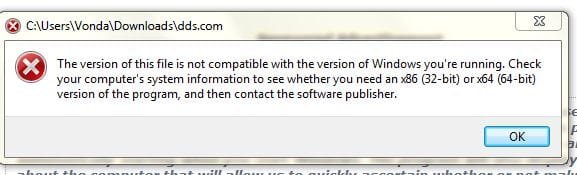
Hi Slartybart, I tried to download the dds and tfc, but both give me computer language in IE and in Google Chrome attached pic.
 

Attachments

  • Capturedds2.JPG
    Capturedds2.JPG
    26.9 KB · Views: 18

My Computer My Computer

Computer Manufacturer/Model Number
HPE-400f
OS
Widows 7 home premium 64 bit
CPU
AMD phenom(tm) 11 x 4 processor 3.00 GHz
Motherboard
?
Memory
8.00 GB
Graphics Card(s)
ATI Radeon HD 5450
Sound Card
?
Monitor(s) Displays
HP vs17
Hard Drives
1 TB Sata
Mouse
usb
Internet Speed
download 15 mbps
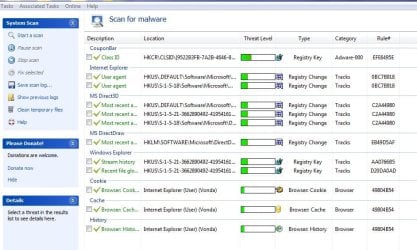
I did an a S&D scan , and saw something related to malware. Should I transfer this topic to the malware section?
**********
I assumed that the S&D would have deleted any malware that was found.
 

Attachments

My Computer My Computer

Computer Manufacturer/Model Number
HPE-400f
OS
Widows 7 home premium 64 bit
CPU
AMD phenom(tm) 11 x 4 processor 3.00 GHz
Motherboard
?
Memory
8.00 GB
Graphics Card(s)
ATI Radeon HD 5450
Sound Card
?
Monitor(s) Displays
HP vs17
Hard Drives
1 TB Sata
Mouse
usb
Internet Speed
download 15 mbps
I'm not familiar with Spybot S&D, but it looks as though it found 16 things but did nothing. Is there a second step or S&D configuration to actually clean what it finds?

If you get a fix screen like this:

SDScan.png


Please post a screen shot showing as much as possible (two screens are ok too)

Let's see what can be done here first before moving to the Security forum. They're going to ask you to download some of the same utilities that you are having difficulty with on this thread. Once you get past that issue, maybe move it (or maybe the issue gets resolved here).

Both TFC and dds run in either 32 or 64 bit systems so it's odd that you see that 'error' msg. There's definitely something 'bugging' your system - it's not just IE browser sessions.
 

My Computer My Computer

Computer type
Laptop
Computer Manufacturer/Model Number
HP Pavilion dv6-6c10us
OS
x64 (6.3.9600) Win8.1 Pro & soon dual boot x64 (6.1.7601) Win7_SP1 HomePrem
CPU
AMD A6-3420M APU with Radeon(tm) HD Graphics
Motherboard
Hewlett-Packard 1805
Memory
6.00 GB
Graphics Card(s)
AMD Radeon(TM) HD 6520G
Sound Card
(1) AMD High Definition Audio Device (2) IDT High Definiti
Monitor(s) Displays
HP W2072a 20" LCD (1600 x 900) @ 60 Hz
Screen Resolution
1366 x 768 x 32 bits (4294967296 colors) @ 60 Hz
Hard Drives
ST640LM0 00 HM641JI SATA Disk Device
Keyboard
Logitech k520 wireless KB
Mouse
Logitech m320 wireless mouse (bundled with KB)
Internet Speed
15/5 | 54 MB Wireless 'n'
Antivirus
Realtime: Defender or Avast | On-demand: Malwarebytes, ESET
Browser
IE 11 on Win8, IE 10 on win 7
Other Info
Media: [Gimp, Audacity, VLC] || Comm: [WEmail 2012, Skype] || Productivity: [OpenOffice,| Textpad] || Utils: [Sysinternals, cCleaner, Speccy, Defraggler]
I would also run SuperAnitSpyware and Malwarebytes to see what they find.

They're both installed on your system, so you shouldn't have the download issues you had with other utils.
 
Last edited:

My Computer My Computer

Computer type
Laptop
Computer Manufacturer/Model Number
HP Pavilion dv6-6c10us
OS
x64 (6.3.9600) Win8.1 Pro & soon dual boot x64 (6.1.7601) Win7_SP1 HomePrem
CPU
AMD A6-3420M APU with Radeon(tm) HD Graphics
Motherboard
Hewlett-Packard 1805
Memory
6.00 GB
Graphics Card(s)
AMD Radeon(TM) HD 6520G
Sound Card
(1) AMD High Definition Audio Device (2) IDT High Definiti
Monitor(s) Displays
HP W2072a 20" LCD (1600 x 900) @ 60 Hz
Screen Resolution
1366 x 768 x 32 bits (4294967296 colors) @ 60 Hz
Hard Drives
ST640LM0 00 HM641JI SATA Disk Device
Keyboard
Logitech k520 wireless KB
Mouse
Logitech m320 wireless mouse (bundled with KB)
Internet Speed
15/5 | 54 MB Wireless 'n'
Antivirus
Realtime: Defender or Avast | On-demand: Malwarebytes, ESET
Browser
IE 11 on Win8, IE 10 on win 7
Other Info
Media: [Gimp, Audacity, VLC] || Comm: [WEmail 2012, Skype] || Productivity: [OpenOffice,| Textpad] || Utils: [Sysinternals, cCleaner, Speccy, Defraggler]
Hello Vonda, I have read your whole thread and you're getting good advice from Thrashzone, he's very good with IE issues.

Some things I see, which may or may not cause issues:
eBay Toolbar
Google Tool bar
Spybot S&D

I've never seen any add-on toolbar to be useful, adding a site to Favorites is better. Toolbars work and run processes in the background and can cause problems. I would uninstall any toolbars you have from Control Panel/Programs and Features. Reboot after each one.

I have used Spybot with XP but caused me all types of problems in w7, I would uninstall it as well. In my sig is a link for Revo Uninstaller, you may use it to uninstall program and use the Moderate setting for cleaning the Registry.

Install CCleaner too, link in my sig, and run the Cleaner and Registry Cleaner at default settings after uninstalling those items.

Do another reboot and test.
 

My Computer My Computer

Computer type
PC/Desktop
Computer Manufacturer/Model Number
Home Built Desktop By DataTech
OS
Windows 7 Ultimate X64 SP1
CPU
Intel i5-2550K, Differing ~4.4-4.8GHz No built in GPU
Motherboard
ASUS P8Z68-V PRO/GEN3
Memory
16GB G.Skill Sniper 1866MHz @ 2133MHz 2x8GB
Graphics Card(s)
ASUS GTX650TIB-DC2OC-2GD5, (650TI Boost)
Sound Card
Onboard Realtek 5-1
Monitor(s) Displays
Samsung P2570HD
Screen Resolution
1920x1080
Hard Drives
Samsung 840 Pro 256GB SSD for OS, 500GB Seagate Constellation (Enterprise drive) for Data
PSU
Corsair HX650W
Case
Inwin Dragon Rider
Cooling
Hyper 212 EVO w/two Noctua fans, push-pull, @1300 RPM
Keyboard
E-Z Eyes, bright yellow keys with large characters
Mouse
steelseries SENSEI Laser Pro Gaming
Internet Speed
48-51Mbs Mbs down, 11 Mbs up Xfinity Cable
Antivirus
Norton Internet Security 2013
Browser
IE 10, Opera, Pale Moon if needed
Other Info
4 case fans, LG BluRay-RE, ASUS DVD-RW, Mr. Fusion power supply, 1.21 gigawatts.
Both Revo and cCleaner have been recently installed.

I would refrain from uninstalling Spybot as it seems to be the only thing running that might help with the issue. Afterwards, I agree that it should be removed, just not now.

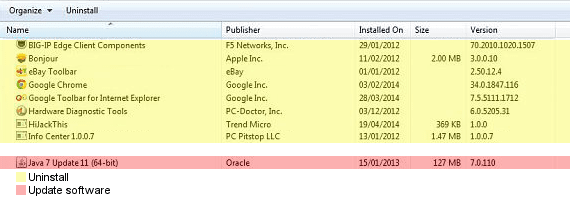
I would uninstall (yellow) and update (pink) the following (if you use Chrome - skip it)
P&F-Vonda.png

I had to look up Big-IP edge and found a security warning. It's geek speak, but you can read it if you need some sleep :)

https://www.kb.cert.org/vuls/id/146430

Post the Spybot S&D, Malwarebytes, and SusperAntiSpyware logs when you have them - thanks

Bill
.
 

My Computer My Computer

Computer type
Laptop
Computer Manufacturer/Model Number
HP Pavilion dv6-6c10us
OS
x64 (6.3.9600) Win8.1 Pro & soon dual boot x64 (6.1.7601) Win7_SP1 HomePrem
CPU
AMD A6-3420M APU with Radeon(tm) HD Graphics
Motherboard
Hewlett-Packard 1805
Memory
6.00 GB
Graphics Card(s)
AMD Radeon(TM) HD 6520G
Sound Card
(1) AMD High Definition Audio Device (2) IDT High Definiti
Monitor(s) Displays
HP W2072a 20" LCD (1600 x 900) @ 60 Hz
Screen Resolution
1366 x 768 x 32 bits (4294967296 colors) @ 60 Hz
Hard Drives
ST640LM0 00 HM641JI SATA Disk Device
Keyboard
Logitech k520 wireless KB
Mouse
Logitech m320 wireless mouse (bundled with KB)
Internet Speed
15/5 | 54 MB Wireless 'n'
Antivirus
Realtime: Defender or Avast | On-demand: Malwarebytes, ESET
Browser
IE 11 on Win8, IE 10 on win 7
Other Info
Media: [Gimp, Audacity, VLC] || Comm: [WEmail 2012, Skype] || Productivity: [OpenOffice,| Textpad] || Utils: [Sysinternals, cCleaner, Speccy, Defraggler]
Hi Bill, As I have to go out, I'll run the s&D again in the meantime. I did run scans with Malwarebytes and super anti Spyware and they did not find anything. I did click on the "fix selected" in S&D and assumed that all was fixed.
When I come back I shall run those scans again and do the suggested tasks in the other post. Thanks again.
 

My Computer My Computer

Computer Manufacturer/Model Number
HPE-400f
OS
Widows 7 home premium 64 bit
CPU
AMD phenom(tm) 11 x 4 processor 3.00 GHz
Motherboard
?
Memory
8.00 GB
Graphics Card(s)
ATI Radeon HD 5450
Sound Card
?
Monitor(s) Displays
HP vs17
Hard Drives
1 TB Sata
Mouse
usb
Internet Speed
download 15 mbps
Since there are issues now, remove Spybot now, if you want it you can reinstall it any time, but I don't recommend it any time.
 

My Computer My Computer

Computer type
PC/Desktop
Computer Manufacturer/Model Number
Home Built Desktop By DataTech
OS
Windows 7 Ultimate X64 SP1
CPU
Intel i5-2550K, Differing ~4.4-4.8GHz No built in GPU
Motherboard
ASUS P8Z68-V PRO/GEN3
Memory
16GB G.Skill Sniper 1866MHz @ 2133MHz 2x8GB
Graphics Card(s)
ASUS GTX650TIB-DC2OC-2GD5, (650TI Boost)
Sound Card
Onboard Realtek 5-1
Monitor(s) Displays
Samsung P2570HD
Screen Resolution
1920x1080
Hard Drives
Samsung 840 Pro 256GB SSD for OS, 500GB Seagate Constellation (Enterprise drive) for Data
PSU
Corsair HX650W
Case
Inwin Dragon Rider
Cooling
Hyper 212 EVO w/two Noctua fans, push-pull, @1300 RPM
Keyboard
E-Z Eyes, bright yellow keys with large characters
Mouse
steelseries SENSEI Laser Pro Gaming
Internet Speed
48-51Mbs Mbs down, 11 Mbs up Xfinity Cable
Antivirus
Norton Internet Security 2013
Browser
IE 10, Opera, Pale Moon if needed
Other Info
4 case fans, LG BluRay-RE, ASUS DVD-RW, Mr. Fusion power supply, 1.21 gigawatts.
Hi Bill, As I have to go out, I'll run the S&D again in the meantime. I did run scans with Malwarebytes and super anti Spyware and they did not find anything. I did click on the "fix selected" in S&D and assumed that all was fixed.
When I come back I shall run those scans again and do the suggested tasks in the other post. Thanks again.

Ok Vonda - when you have the time.

There are issues on your machine that AdwCleaner and Spybot recognized. I saw in that AdwCleaner did it's job and you updated me that you did fix using Spybot - thanks.

No need to rescan at this point. Malwarebytes and SuperAntispyware report clean.

The other uninstalls and updates - sure please do. It won't fix the issue though, just some housekeeping.
Include Spybot in the uninstall list - I wasn't certain that you hit the fix button before.

Keep Adwcleaner, Malwarebytes, and SuperAntiSpyware

When you're finished uninstalling (updating in the case of Java) - Restart the machine

Follow the install instructions for the ESET online scanner
Free Virus Scan | Online Virus Scanner from ESET :: Help

More information if you're curious: Online scanner FAQ - ESET Knowledgebase

ESET takes a while, so have a cup of coffee, watch a movie or ......

I hope you don't run into the issues you had with dds and TFC - we shall see.

Please post the ESET log when it's done and Rerstart your machine
C:\Program Files (x86)\ESET\EsetOnlineScanner\log.txt

Bill
.
 
Last edited:

My Computer My Computer

Computer type
Laptop
Computer Manufacturer/Model Number
HP Pavilion dv6-6c10us
OS
x64 (6.3.9600) Win8.1 Pro & soon dual boot x64 (6.1.7601) Win7_SP1 HomePrem
CPU
AMD A6-3420M APU with Radeon(tm) HD Graphics
Motherboard
Hewlett-Packard 1805
Memory
6.00 GB
Graphics Card(s)
AMD Radeon(TM) HD 6520G
Sound Card
(1) AMD High Definition Audio Device (2) IDT High Definiti
Monitor(s) Displays
HP W2072a 20" LCD (1600 x 900) @ 60 Hz
Screen Resolution
1366 x 768 x 32 bits (4294967296 colors) @ 60 Hz
Hard Drives
ST640LM0 00 HM641JI SATA Disk Device
Keyboard
Logitech k520 wireless KB
Mouse
Logitech m320 wireless mouse (bundled with KB)
Internet Speed
15/5 | 54 MB Wireless 'n'
Antivirus
Realtime: Defender or Avast | On-demand: Malwarebytes, ESET
Browser
IE 11 on Win8, IE 10 on win 7
Other Info
Media: [Gimp, Audacity, VLC] || Comm: [WEmail 2012, Skype] || Productivity: [OpenOffice,| Textpad] || Utils: [Sysinternals, cCleaner, Speccy, Defraggler]
I Like to keep Google Chrome as a back up browser because I prefer IE. Here are the results from the last S&D scan.
I looked in the control panel of Java, but did not see an icon to update Java. I shall now get to the ESET scanner.
 

Attachments

  • s&dpic.JPG
    s&dpic.JPG
    90.7 KB · Views: 1
  • s.txt
    s.txt
    8.2 KB · Views: 4

My Computer My Computer

Computer Manufacturer/Model Number
HPE-400f
OS
Widows 7 home premium 64 bit
CPU
AMD phenom(tm) 11 x 4 processor 3.00 GHz
Motherboard
?
Memory
8.00 GB
Graphics Card(s)
ATI Radeon HD 5450
Sound Card
?
Monitor(s) Displays
HP vs17
Hard Drives
1 TB Sata
Mouse
usb
Internet Speed
download 15 mbps
Hi Slartybart, I tried to download the dds and tfc, but both give me computer language in IE and in Google Chrome attached pic.

Is this msg displayed when you donwload the files or when you run them?

Try saving them to a different location - it's odd that you get a compatibility warning when downloading.

You might have better luck booting into safe mode with networking:
http://www.sevenforums.com/tutorials/666-advanced-boot-options.html
Steps 1, 3, & 4 (step 2 is for folks who have multpile boot options - just go on to step 3 after the restart)

I'll review your thread and see what you couldn't accomplish - safe mode might allow you to complete those tasks. I'll give you a list of what I find.

In the meantime - go ahead and do the uninstalls, updates, and ESET scan - thanks

Bill
.
 

My Computer My Computer

Computer type
Laptop
Computer Manufacturer/Model Number
HP Pavilion dv6-6c10us
OS
x64 (6.3.9600) Win8.1 Pro & soon dual boot x64 (6.1.7601) Win7_SP1 HomePrem
CPU
AMD A6-3420M APU with Radeon(tm) HD Graphics
Motherboard
Hewlett-Packard 1805
Memory
6.00 GB
Graphics Card(s)
AMD Radeon(TM) HD 6520G
Sound Card
(1) AMD High Definition Audio Device (2) IDT High Definiti
Monitor(s) Displays
HP W2072a 20" LCD (1600 x 900) @ 60 Hz
Screen Resolution
1366 x 768 x 32 bits (4294967296 colors) @ 60 Hz
Hard Drives
ST640LM0 00 HM641JI SATA Disk Device
Keyboard
Logitech k520 wireless KB
Mouse
Logitech m320 wireless mouse (bundled with KB)
Internet Speed
15/5 | 54 MB Wireless 'n'
Antivirus
Realtime: Defender or Avast | On-demand: Malwarebytes, ESET
Browser
IE 11 on Win8, IE 10 on win 7
Other Info
Media: [Gimp, Audacity, VLC] || Comm: [WEmail 2012, Skype] || Productivity: [OpenOffice,| Textpad] || Utils: [Sysinternals, cCleaner, Speccy, Defraggler]
Hi,
Thanks for everyones support here much appreciated,
Just a quick observation Vonda,
Are you checking the boxes next to the Green check marks of the found errors and click on Fix selected ?
It doesn't seem so ?
Or has anyone said not to ?
Cheers.
 

My Computer My Computer

Computer type
PC/Desktop
Computer Manufacturer/Model Number
Custom assembled by me :}
OS
Win-7-Pro64bit 7-H-Prem-64bit
CPU
i7-5930K 2nd i9-9940x both water blocked VRM's too
Motherboard
ASUS SABERTOOTH X99 2nd ASUS x299 Apex
Memory
Trident-z 3200C14 2nd Trident-z 3600C16
Graphics Card(s)
EVGA 1080ti ftw3 2nd Titan Xp both water blocked
Sound Card
Built-in Realtek
Monitor(s) Displays
1-AOC G2460PG 24"G-Sync 144Hz/ 2nd 1-ASUS VG248QE 24" 144Hz
Screen Resolution
1920 x 1080 144Hz
Hard Drives
2-Samsung M.2 Evo & Evo Plus
2-Samsung 850 EVO 500GB SSD's/ 3-2.5 W.D. Black 1tb-&3-1tb/3-3.5 WD Black 1tb hdd's
PSU
EVGA SuperNOVA 1000-P2 2nd 1200-P2
Case
2-Corsair Obsidian Series 450D Black ATX Mid Tower
Cooling
Custom water loops
Keyboard
Logitech G710+/ 2nd Logitech G910
Mouse
2-RedDragon M901 Perdition 16400 dpi Gaming mouse = wired
Internet Speed
Comcast Ping 19ms 89.31mbps download speed 6.12mbps upload
Antivirus
Malwarebytes Pro/ Superantispyware Pro
Browser
FireFox & Pale moon
Other Info
2nd ASUS X299 Apex/Intel i9-9940x with Custom water loop/7H-Prem-x64/Corsair 450D case/Ram Trident-z 3600C16 4x8gb / Samsung970Evo plus 500gb SSD/Dual ssd EZ swap evo/PSU EVGA SuperNova 1200w-P2 80+Platinum/GPU Titan Xp /8-ML-140 on push-pull on 2-280GTX rads
Back
Top