Images not displaying properly in any browser

edecamps

New member
Local time
10:29 AM
Messages
2
Hello, I've ran out of ideas of what may be causing this weird error, so I have come to you all in seek of a more experienced user. When I try to load images, sometimes they appear distorted with shifted colors and horribly misplaced (don't worry I've attached a picture) if I keep refreshing the page, they keep changing colors, until at one point, it loads correctly. (I've noticed it's more frequent with long images, which start just fine, then you scroll down and half of it is screwed up).
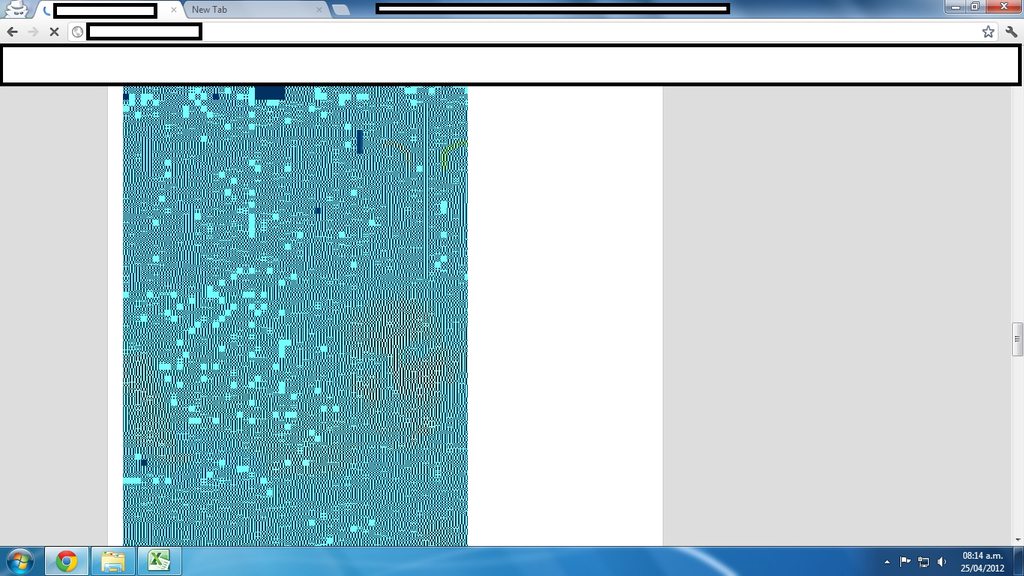
UVrjZh.jpg


I've tried:

  • Clearing the cache
  • Uninstalling the browsers (Firefox & Chrome)
  • System Restore
  • Extensive virus scan

I can't seem to find the answer to this problem, and it's driving me crazy.

Yzs1Bh.png


Also, I've attached an image of Gizmodo - The Gadget Guide, which shows me this... at first I thought it was them, but then I tried accessing through my iPhone and it loads just fine (both the mobile and desktop sites) :confused:

EDIT: Also, if I try to refresh the browser constantly, sometimes I see a chuck of code, and sometimes I get this error:

The webpage at http://kotaku.com/ might be temporarily down or it may have moved permanently to a new web address.
Error 330 (net::ERR_CONTENT_DECODING_FAILED): Unknown error.

Many thanks in advance.
 

My Computer My Computer

At a glance

Windows 7 Pro x64
OS
Windows 7 Pro x64
Does this problem happen on every website?
 

My Computer My Computer

At a glance

Windows 10 Pro. 64/ version 1709 Windows 7 Pr...Intel i7-6800K @ 4.3Corsair Platinum 16 gig @2400EVGA GTX 1070 OC
Computer type
PC/Desktop
Computer Manufacturer/Model Number
Home made Desktop
OS
Windows 10 Pro. 64/ version 1709 Windows 7 Pro/64
CPU
Intel i7-6800K @ 4.3
Motherboard
ASUS X-99 Deluxe II
Memory
Corsair Platinum 16 gig @2400
Graphics Card(s)
EVGA GTX 1070 OC
Monitor(s) Displays
Asus 27" LED LCD/VE278Q
Screen Resolution
1920-1080 or 1280-720 HDMI
Hard Drives
INTEL SSD 730-240 Gb Sata 3.0/
PSU
EVGA Platium 1200W
Case
Phanteks Luxe Tempered Glass 8 fans/ one radiator
Cooling
XSPC/ Water Cooled CPU
Keyboard
Das 4 Professional
Mouse
Logitech M705/MX Anywhere 2-S
Internet Speed
100 mbits
Antivirus
Microsoft Security Essentials/ Malwarebytes Premium 3.0/ SAS
Browser
I.E. 11 default/Firefox/ ISP Time Warner Cable/Spectrum
Other Info
LG BluRay Burner/
Sound system-KLipsch-THX/
Icy Dock ssd Hot Swap bays.
Most of them.. Youtube says movie not loaded too, and google sometimes stays blank, until I reload. I seem to get the most trouble with sites that contain high amounts of videos/pictures though.
 

My Computer My Computer

At a glance

Windows 7 Pro x64
OS
Windows 7 Pro x64
Same issue

Hi, I'm having the same issue, did you find a solution for this problem?
 

My Computer My Computer

At a glance

Windows 7 Home Premium x64
Computer type
PC/Desktop
OS
Windows 7 Home Premium x64

My Computer My Computer

At a glance

Win-7-Pro64bit 7-H-Prem-64biti7-5930K 2nd i9-9940x both water blocked VRM'...Trident-z 3200C14 2nd Trident-z 3600C16EVGA 1080ti ftw3 2nd Titan Xp both water blocked
Computer type
PC/Desktop
Computer Manufacturer/Model Number
Custom assembled by me :}
OS
Win-7-Pro64bit 7-H-Prem-64bit
CPU
i7-5930K 2nd i9-9940x both water blocked VRM's too
Motherboard
ASUS SABERTOOTH X99 2nd ASUS x299 Apex
Memory
Trident-z 3200C14 2nd Trident-z 3600C16
Graphics Card(s)
EVGA 1080ti ftw3 2nd Titan Xp both water blocked
Sound Card
Built-in Realtek
Monitor(s) Displays
1-AOC G2460PG 24"G-Sync 144Hz/ 2nd 1-ASUS VG248QE 24" 144Hz
Screen Resolution
1920 x 1080 144Hz
Hard Drives
2-Samsung M.2 Evo & Evo Plus
2-Samsung 850 EVO 500GB SSD's/ 3-2.5 W.D. Black 1tb-&3-1tb/3-3.5 WD Black 1tb hdd's
PSU
EVGA SuperNOVA 1000-P2 2nd 1200-P2
Case
2-Corsair Obsidian Series 450D Black ATX Mid Tower
Cooling
Custom water loops
Keyboard
Logitech G710+/ 2nd Logitech G910
Mouse
2-RedDragon M901 Perdition 16400 dpi Gaming mouse = wired
Internet Speed
Comcast Ping 19ms 89.31mbps download speed 6.12mbps upload
Antivirus
Malwarebytes Pro/ Superantispyware Pro
Browser
FireFox & Pale moon
Other Info
2nd ASUS X299 Apex/Intel i9-9940x with Custom water loop/7H-Prem-x64/Corsair 450D case/Ram Trident-z 3600C16 4x8gb / Samsung970Evo plus 500gb SSD/Dual ssd EZ swap evo/PSU EVGA SuperNova 1200w-P2 80+Platinum/GPU Titan Xp /8-ML-140 on push-pull on 2-280GTX rads
Thank you for your reply. Have tried you suggestion but unfortunately it hasn't worked.
 

My Computer My Computer

At a glance

Windows 7 Home Premium x64
Computer type
PC/Desktop
OS
Windows 7 Home Premium x64
You might fill in your system spec's sheet with the link above my signature picture,
Say which browser your having the issue with and if all browser are having the issue and which ones you have installed,
Also state which security suite is installed and if you use any utilities like ccleaner......
Cheers.
 

My Computer My Computer

At a glance

Win-7-Pro64bit 7-H-Prem-64biti7-5930K 2nd i9-9940x both water blocked VRM'...Trident-z 3200C14 2nd Trident-z 3600C16EVGA 1080ti ftw3 2nd Titan Xp both water blocked
Computer type
PC/Desktop
Computer Manufacturer/Model Number
Custom assembled by me :}
OS
Win-7-Pro64bit 7-H-Prem-64bit
CPU
i7-5930K 2nd i9-9940x both water blocked VRM's too
Motherboard
ASUS SABERTOOTH X99 2nd ASUS x299 Apex
Memory
Trident-z 3200C14 2nd Trident-z 3600C16
Graphics Card(s)
EVGA 1080ti ftw3 2nd Titan Xp both water blocked
Sound Card
Built-in Realtek
Monitor(s) Displays
1-AOC G2460PG 24"G-Sync 144Hz/ 2nd 1-ASUS VG248QE 24" 144Hz
Screen Resolution
1920 x 1080 144Hz
Hard Drives
2-Samsung M.2 Evo & Evo Plus
2-Samsung 850 EVO 500GB SSD's/ 3-2.5 W.D. Black 1tb-&3-1tb/3-3.5 WD Black 1tb hdd's
PSU
EVGA SuperNOVA 1000-P2 2nd 1200-P2
Case
2-Corsair Obsidian Series 450D Black ATX Mid Tower
Cooling
Custom water loops
Keyboard
Logitech G710+/ 2nd Logitech G910
Mouse
2-RedDragon M901 Perdition 16400 dpi Gaming mouse = wired
Internet Speed
Comcast Ping 19ms 89.31mbps download speed 6.12mbps upload
Antivirus
Malwarebytes Pro/ Superantispyware Pro
Browser
FireFox & Pale moon
Other Info
2nd ASUS X299 Apex/Intel i9-9940x with Custom water loop/7H-Prem-x64/Corsair 450D case/Ram Trident-z 3600C16 4x8gb / Samsung970Evo plus 500gb SSD/Dual ssd EZ swap evo/PSU EVGA SuperNova 1200w-P2 80+Platinum/GPU Titan Xp /8-ML-140 on push-pull on 2-280GTX rads
Was this problem resolved? I have exactly the same problem with many pictures not loading or distorted on Facebook and other websites. Also cannot view videos sometimes. I did try running the program advised above, but without success.
I am wondering if the problem could be caused by incompatibility between antivirus programs? I have Avira running, but also Windows Defender, Spybot and Spyware Blaster are on the computer.
 

My Computer My Computer

At a glance

Windows Home Premium 64 bitPantium dual core E5700 @ 3Ghz3Gb RAMIntel G41 Express Chipset
Computer type
PC/Desktop
Computer Manufacturer/Model Number
Packard Bell
OS
Windows Home Premium 64 bit
CPU
Pantium dual core E5700 @ 3Ghz
Memory
3Gb RAM
Graphics Card(s)
Intel G41 Express Chipset
Hard Drives
Hitachi ATA 512 GB
Antivirus
Avira, Windows Defender
Browser
Chrome, Firefox, Internet Explorer
Hi and welcome to SevenForums,
Does the issue happen in all browsers you list in your system spec's ?

SpyBot has some mixed reviews around here ?
Any real reason for having both that and spyblaster ?

Most like Superantispyware instead of either of the others but usually won't have multiple spyware programs :/

I doubt it's your antivirus,
Try resetting all the browsers effected,
Reset Chrome,
https://support.google.com/chrome/answer/3296214?hl=en
Reset Firefox,
https://support.mozilla.org/en-US/kb/reset-firefox-easily-fix-most-problems
Export Favorites to html file before resetting internet explorer,
http://www.sevenforums.com/tutorials/86795-internet-explorer-import-export-favorites.html
See a tutorial here to Reset Internet explorer,
http://www.sevenforums.com/tutorials/1222-internet-explorer-reset.html
 

My Computer My Computer

At a glance

Win-7-Pro64bit 7-H-Prem-64biti7-5930K 2nd i9-9940x both water blocked VRM'...Trident-z 3200C14 2nd Trident-z 3600C16EVGA 1080ti ftw3 2nd Titan Xp both water blocked
Computer type
PC/Desktop
Computer Manufacturer/Model Number
Custom assembled by me :}
OS
Win-7-Pro64bit 7-H-Prem-64bit
CPU
i7-5930K 2nd i9-9940x both water blocked VRM's too
Motherboard
ASUS SABERTOOTH X99 2nd ASUS x299 Apex
Memory
Trident-z 3200C14 2nd Trident-z 3600C16
Graphics Card(s)
EVGA 1080ti ftw3 2nd Titan Xp both water blocked
Sound Card
Built-in Realtek
Monitor(s) Displays
1-AOC G2460PG 24"G-Sync 144Hz/ 2nd 1-ASUS VG248QE 24" 144Hz
Screen Resolution
1920 x 1080 144Hz
Hard Drives
2-Samsung M.2 Evo & Evo Plus
2-Samsung 850 EVO 500GB SSD's/ 3-2.5 W.D. Black 1tb-&3-1tb/3-3.5 WD Black 1tb hdd's
PSU
EVGA SuperNOVA 1000-P2 2nd 1200-P2
Case
2-Corsair Obsidian Series 450D Black ATX Mid Tower
Cooling
Custom water loops
Keyboard
Logitech G710+/ 2nd Logitech G910
Mouse
2-RedDragon M901 Perdition 16400 dpi Gaming mouse = wired
Internet Speed
Comcast Ping 19ms 89.31mbps download speed 6.12mbps upload
Antivirus
Malwarebytes Pro/ Superantispyware Pro
Browser
FireFox & Pale moon
Other Info
2nd ASUS X299 Apex/Intel i9-9940x with Custom water loop/7H-Prem-x64/Corsair 450D case/Ram Trident-z 3600C16 4x8gb / Samsung970Evo plus 500gb SSD/Dual ssd EZ swap evo/PSU EVGA SuperNova 1200w-P2 80+Platinum/GPU Titan Xp /8-ML-140 on push-pull on 2-280GTX rads
Thanks for your reply. Yes, the issue is present in all three browsers. I did have AVG, but ran into some problems with it, so decided to try Spybot instead. Spyblaster does not have a scan facility, so that was the reason to have both. I will reset the browsers as you suggest as soon as I have time and I will report back.
 

My Computer My Computer

At a glance

Windows Home Premium 64 bitPantium dual core E5700 @ 3Ghz3Gb RAMIntel G41 Express Chipset
Computer type
PC/Desktop
Computer Manufacturer/Model Number
Packard Bell
OS
Windows Home Premium 64 bit
CPU
Pantium dual core E5700 @ 3Ghz
Memory
3Gb RAM
Graphics Card(s)
Intel G41 Express Chipset
Hard Drives
Hitachi ATA 512 GB
Antivirus
Avira, Windows Defender
Browser
Chrome, Firefox, Internet Explorer
Hi thanks,
I was unaware spybot was an antivirus ?
It would be unwise to have 2 antivirus programs,

If spyblaster doesn't have a scan facility what does it do exactly ?
Anything effecting all browsers is usually a third party program like the ones you posted so I would uninstall all of them except Avira which is the only antivirus I'm aware of that is a antivirus program ;)
Then see how things are after resetting all of your browsers,
Cheers.
Also make sure you got rid of avg completely,
Uninstall AVG | AVG
 

My Computer My Computer

At a glance

Win-7-Pro64bit 7-H-Prem-64biti7-5930K 2nd i9-9940x both water blocked VRM'...Trident-z 3200C14 2nd Trident-z 3600C16EVGA 1080ti ftw3 2nd Titan Xp both water blocked
Computer type
PC/Desktop
Computer Manufacturer/Model Number
Custom assembled by me :}
OS
Win-7-Pro64bit 7-H-Prem-64bit
CPU
i7-5930K 2nd i9-9940x both water blocked VRM's too
Motherboard
ASUS SABERTOOTH X99 2nd ASUS x299 Apex
Memory
Trident-z 3200C14 2nd Trident-z 3600C16
Graphics Card(s)
EVGA 1080ti ftw3 2nd Titan Xp both water blocked
Sound Card
Built-in Realtek
Monitor(s) Displays
1-AOC G2460PG 24"G-Sync 144Hz/ 2nd 1-ASUS VG248QE 24" 144Hz
Screen Resolution
1920 x 1080 144Hz
Hard Drives
2-Samsung M.2 Evo & Evo Plus
2-Samsung 850 EVO 500GB SSD's/ 3-2.5 W.D. Black 1tb-&3-1tb/3-3.5 WD Black 1tb hdd's
PSU
EVGA SuperNOVA 1000-P2 2nd 1200-P2
Case
2-Corsair Obsidian Series 450D Black ATX Mid Tower
Cooling
Custom water loops
Keyboard
Logitech G710+/ 2nd Logitech G910
Mouse
2-RedDragon M901 Perdition 16400 dpi Gaming mouse = wired
Internet Speed
Comcast Ping 19ms 89.31mbps download speed 6.12mbps upload
Antivirus
Malwarebytes Pro/ Superantispyware Pro
Browser
FireFox & Pale moon
Other Info
2nd ASUS X299 Apex/Intel i9-9940x with Custom water loop/7H-Prem-x64/Corsair 450D case/Ram Trident-z 3600C16 4x8gb / Samsung970Evo plus 500gb SSD/Dual ssd EZ swap evo/PSU EVGA SuperNova 1200w-P2 80+Platinum/GPU Titan Xp /8-ML-140 on push-pull on 2-280GTX rads
SpywareBlaster just sits in the background and blocks all sites known to be undesirable. I have Defender, but apart from updates, it doesn't appear to do anything, which is why I have Avira as well.

I have reset all browsers as suggested and the problem is the same on all of them.
1/ A TV streaming site I like to use is just a blank screen.
2/ Many pictures and videos do not load on Facebook (there is often a lot of script where there should be a picture).
3/ Some pictures are displayed as 'noise' as in attachment.

I should mention that I have the latest version of Adobe Flash Player.
 

Attachments

  • Distorted missing picture.jpg
    Distorted missing picture.jpg
    29.4 KB · Views: 27
Last edited:

My Computer My Computer

At a glance

Windows Home Premium 64 bitPantium dual core E5700 @ 3Ghz3Gb RAMIntel G41 Express Chipset
Computer type
PC/Desktop
Computer Manufacturer/Model Number
Packard Bell
OS
Windows Home Premium 64 bit
CPU
Pantium dual core E5700 @ 3Ghz
Memory
3Gb RAM
Graphics Card(s)
Intel G41 Express Chipset
Hard Drives
Hitachi ATA 512 GB
Antivirus
Avira, Windows Defender
Browser
Chrome, Firefox, Internet Explorer
Well you never know about items that just sit back and block stuff randomly :/
 

My Computer My Computer

At a glance

Win-7-Pro64bit 7-H-Prem-64biti7-5930K 2nd i9-9940x both water blocked VRM'...Trident-z 3200C14 2nd Trident-z 3600C16EVGA 1080ti ftw3 2nd Titan Xp both water blocked
Computer type
PC/Desktop
Computer Manufacturer/Model Number
Custom assembled by me :}
OS
Win-7-Pro64bit 7-H-Prem-64bit
CPU
i7-5930K 2nd i9-9940x both water blocked VRM's too
Motherboard
ASUS SABERTOOTH X99 2nd ASUS x299 Apex
Memory
Trident-z 3200C14 2nd Trident-z 3600C16
Graphics Card(s)
EVGA 1080ti ftw3 2nd Titan Xp both water blocked
Sound Card
Built-in Realtek
Monitor(s) Displays
1-AOC G2460PG 24"G-Sync 144Hz/ 2nd 1-ASUS VG248QE 24" 144Hz
Screen Resolution
1920 x 1080 144Hz
Hard Drives
2-Samsung M.2 Evo & Evo Plus
2-Samsung 850 EVO 500GB SSD's/ 3-2.5 W.D. Black 1tb-&3-1tb/3-3.5 WD Black 1tb hdd's
PSU
EVGA SuperNOVA 1000-P2 2nd 1200-P2
Case
2-Corsair Obsidian Series 450D Black ATX Mid Tower
Cooling
Custom water loops
Keyboard
Logitech G710+/ 2nd Logitech G910
Mouse
2-RedDragon M901 Perdition 16400 dpi Gaming mouse = wired
Internet Speed
Comcast Ping 19ms 89.31mbps download speed 6.12mbps upload
Antivirus
Malwarebytes Pro/ Superantispyware Pro
Browser
FireFox & Pale moon
Other Info
2nd ASUS X299 Apex/Intel i9-9940x with Custom water loop/7H-Prem-x64/Corsair 450D case/Ram Trident-z 3600C16 4x8gb / Samsung970Evo plus 500gb SSD/Dual ssd EZ swap evo/PSU EVGA SuperNova 1200w-P2 80+Platinum/GPU Titan Xp /8-ML-140 on push-pull on 2-280GTX rads
SpywareBlaster is definitely not the problem, because all the websites I normally use are not being blocked!
 

My Computer My Computer

At a glance

Windows Home Premium 64 bitPantium dual core E5700 @ 3Ghz3Gb RAMIntel G41 Express Chipset
Computer type
PC/Desktop
Computer Manufacturer/Model Number
Packard Bell
OS
Windows Home Premium 64 bit
CPU
Pantium dual core E5700 @ 3Ghz
Memory
3Gb RAM
Graphics Card(s)
Intel G41 Express Chipset
Hard Drives
Hitachi ATA 512 GB
Antivirus
Avira, Windows Defender
Browser
Chrome, Firefox, Internet Explorer
Welcome to Seven Forums Jolly Roger. Try visiting a known problem site in Safe Mode with Networking, see if it displays images there

http://www.sevenforums.com/tutorials/69585-safe-mode.html

If so, try a Clean Start to see if something is interfering

http://www.sevenforums.com/tutorial...ation-conflicts-performing-clean-startup.html

Neither Spybot S&D or SpywareBlaster should conflict with Avira. I still use SpywareBlaster, but long ago dumped Spybot for the superior Malwarebytes and Superantispyware.

If the same issues appear in Safe Mode, do other PCs on your network work normally? Is it a wired or wireless connection?

A Guy
 

My Computer My Computer

At a glance

Windows 10 Home x64INTEL Core i5-750 Quad-Core 3.37GHzHyperX Fury Black Series 8GB (2 x 4GB) 1866MhzEVGA GeForce GTX 750 Superclocked 1GB 128-Bit...
Computer type
PC/Desktop
OS
Windows 10 Home x64
CPU
INTEL Core i5-750 Quad-Core 3.37GHz
Motherboard
ASUS P7P55D
Memory
HyperX Fury Black Series 8GB (2 x 4GB) 1866Mhz
Graphics Card(s)
EVGA GeForce GTX 750 Superclocked 1GB 128-Bit GDDR5
Monitor(s) Displays
LG 32MA68HY 32" IPS
Screen Resolution
1920 x 1080
Hard Drives
Samsung 840 Evo 120GB, SEAGATE 500GB Barracuda® 7200.12, SATA 3 Gb/s, 7200 RPM, 16MB cache
PSU
ANTEC TruePower New TP-550, 80 PLUS, 550W
Case
ANTEC Three Hundred Illusion
Cooling
COOLER MASTER Hyper 212 Plus, 4 x 120mm 1 x 140mm Noctua's
Internet Speed
85 + Mbps
Antivirus
Avast
Browser
Vivaldi
Thanks 'A Guy' for your comments and suggestions. Here is the latest update...

I have run a complete antivirus scan. I have also done a system and registry clean with CCleaner. This has improved some issues such as viewing videos, online TV and loading Facebook. Still problems with loading some pictures.
Then I did a Clean Start as suggested. In this state, pictures were still not loading properly, so doesn't seem to be any start up items that are causing the problem.
The problem does not occur on other computers on the network. I am on a Wireless connection, but having tried a Wired connection and the problem is still there.

It looks like I might have to live with the problem and it might sort itself eventually.
 

My Computer My Computer

At a glance

Windows Home Premium 64 bitPantium dual core E5700 @ 3Ghz3Gb RAMIntel G41 Express Chipset
Computer type
PC/Desktop
Computer Manufacturer/Model Number
Packard Bell
OS
Windows Home Premium 64 bit
CPU
Pantium dual core E5700 @ 3Ghz
Memory
3Gb RAM
Graphics Card(s)
Intel G41 Express Chipset
Hard Drives
Hitachi ATA 512 GB
Antivirus
Avira, Windows Defender
Browser
Chrome, Firefox, Internet Explorer

My Computer My Computer

At a glance

Windows 10 Home x64INTEL Core i5-750 Quad-Core 3.37GHzHyperX Fury Black Series 8GB (2 x 4GB) 1866MhzEVGA GeForce GTX 750 Superclocked 1GB 128-Bit...
Computer type
PC/Desktop
OS
Windows 10 Home x64
CPU
INTEL Core i5-750 Quad-Core 3.37GHz
Motherboard
ASUS P7P55D
Memory
HyperX Fury Black Series 8GB (2 x 4GB) 1866Mhz
Graphics Card(s)
EVGA GeForce GTX 750 Superclocked 1GB 128-Bit GDDR5
Monitor(s) Displays
LG 32MA68HY 32" IPS
Screen Resolution
1920 x 1080
Hard Drives
Samsung 840 Evo 120GB, SEAGATE 500GB Barracuda® 7200.12, SATA 3 Gb/s, 7200 RPM, 16MB cache
PSU
ANTEC TruePower New TP-550, 80 PLUS, 550W
Case
ANTEC Three Hundred Illusion
Cooling
COOLER MASTER Hyper 212 Plus, 4 x 120mm 1 x 140mm Noctua's
Internet Speed
85 + Mbps
Antivirus
Avast
Browser
Vivaldi
OK, done a bit more as suggested.
Did the sfc/scannow and finally got this message.....'Windows Resource Protection found corrupt files but was unable to fix some of them. Details are included in the CBS.log windir\logs\CBS\CBS.log For example C:\Windows\system32>
I then went to the System32 folder and then Log files and then Scm folder. Here there is a long list of files, but I have no idea what they mean.
They have dates going back a long way, but out of about 80 files, 10 have today's date.

There is another issue. I deleted Advanced System Care and then tried to reload it. When I try to run it, I get a message saying 'the source file is corrupted'.
 

My Computer My Computer

At a glance

Windows Home Premium 64 bitPantium dual core E5700 @ 3Ghz3Gb RAMIntel G41 Express Chipset
Computer type
PC/Desktop
Computer Manufacturer/Model Number
Packard Bell
OS
Windows Home Premium 64 bit
CPU
Pantium dual core E5700 @ 3Ghz
Memory
3Gb RAM
Graphics Card(s)
Intel G41 Express Chipset
Hard Drives
Hitachi ATA 512 GB
Antivirus
Avira, Windows Defender
Browser
Chrome, Firefox, Internet Explorer

My Computer My Computer

At a glance

Windows 10 Home x64INTEL Core i5-750 Quad-Core 3.37GHzHyperX Fury Black Series 8GB (2 x 4GB) 1866MhzEVGA GeForce GTX 750 Superclocked 1GB 128-Bit...
Computer type
PC/Desktop
OS
Windows 10 Home x64
CPU
INTEL Core i5-750 Quad-Core 3.37GHz
Motherboard
ASUS P7P55D
Memory
HyperX Fury Black Series 8GB (2 x 4GB) 1866Mhz
Graphics Card(s)
EVGA GeForce GTX 750 Superclocked 1GB 128-Bit GDDR5
Monitor(s) Displays
LG 32MA68HY 32" IPS
Screen Resolution
1920 x 1080
Hard Drives
Samsung 840 Evo 120GB, SEAGATE 500GB Barracuda® 7200.12, SATA 3 Gb/s, 7200 RPM, 16MB cache
PSU
ANTEC TruePower New TP-550, 80 PLUS, 550W
Case
ANTEC Three Hundred Illusion
Cooling
COOLER MASTER Hyper 212 Plus, 4 x 120mm 1 x 140mm Noctua's
Internet Speed
85 + Mbps
Antivirus
Avast
Browser
Vivaldi
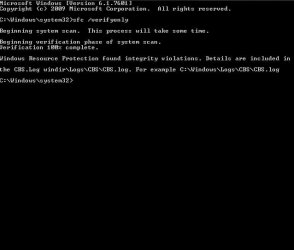
I have run the SFC tutorial resulting in the following screenshot.

I am not sure how to get sfcdetails.txt from here. I have followed the path to the CBS folder, which says 'no access' for CBS. However in the same folder there is CbsPersist with about 4000KB of results, so impossible to do screenshots of so much data.
 

Attachments

  • scan.jpg
    scan.jpg
    20.9 KB · Views: 9

My Computer My Computer

At a glance

Windows Home Premium 64 bitPantium dual core E5700 @ 3Ghz3Gb RAMIntel G41 Express Chipset
Computer type
PC/Desktop
Computer Manufacturer/Model Number
Packard Bell
OS
Windows Home Premium 64 bit
CPU
Pantium dual core E5700 @ 3Ghz
Memory
3Gb RAM
Graphics Card(s)
Intel G41 Express Chipset
Hard Drives
Hitachi ATA 512 GB
Antivirus
Avira, Windows Defender
Browser
Chrome, Firefox, Internet Explorer
Back
Top