Solved Your last browser session closed unexpectly.

Vonda, understood - you want to keep Chrome. That's fine.

Regarding Java - many people run their machines without Java. If none of your applications require it, please uninstall it. You can always download Java from here if you find that you need it
current version 7 update 55.

Mike (ThrashZone) - nice catch. I think you're right, Vonda has not checked any to be removed, only pressed the fix slected button. nothing selected, nothing fixed.

Vonda, please check all items on the list THEN press the fix selected button. It looks as though most of the entries are from when you rolled back or reset IE.
The first one Couponbar is reported as adware.

Bill
.
 

My Computer My Computer

Computer type
Laptop
Computer Manufacturer/Model Number
HP Pavilion dv6-6c10us
OS
x64 (6.3.9600) Win8.1 Pro & soon dual boot x64 (6.1.7601) Win7_SP1 HomePrem
CPU
AMD A6-3420M APU with Radeon(tm) HD Graphics
Motherboard
Hewlett-Packard 1805
Memory
6.00 GB
Graphics Card(s)
AMD Radeon(TM) HD 6520G
Sound Card
(1) AMD High Definition Audio Device (2) IDT High Definiti
Monitor(s) Displays
HP W2072a 20" LCD (1600 x 900) @ 60 Hz
Screen Resolution
1366 x 768 x 32 bits (4294967296 colors) @ 60 Hz
Hard Drives
ST640LM0 00 HM641JI SATA Disk Device
Keyboard
Logitech k520 wireless KB
Mouse
Logitech m320 wireless mouse (bundled with KB)
Internet Speed
15/5 | 54 MB Wireless 'n'
Antivirus
Realtime: Defender or Avast | On-demand: Malwarebytes, ESET
Browser
IE 11 on Win8, IE 10 on win 7
Other Info
Media: [Gimp, Audacity, VLC] || Comm: [WEmail 2012, Skype] || Productivity: [OpenOffice,| Textpad] || Utils: [Sysinternals, cCleaner, Speccy, Defraggler]
Installing Firefox will let you know if the same problem exist in Firefox.
If it does it's not I.E. only problem.
I have read the whole thread but I might of missed if the OP did try Firefox.

Post # 33 is worry some to me. Way to many things checked.
I would only have the Security programs checked.
I have heard nothing good about Spybot.

If it was my computer I would start by removing Spybot and Zone Alarm using their online removal tools and install Microsoft Security Essentials for testing. Use the Windows 7 firewall.

I would then use I.E. 11/32 bit set to default for testing.

Then I would run AdwCleaner again and remove what it finds.
Once again I would do this tutorial again to see if Windows 7 System Files are still okay.

By Brink:
http://www.sevenforums.com/tutorials/1538-sfc-scannow-command-system-file-checker.html

This is a attempt to get back to ground zero; a proper working system and then try the additional things like I.E.11/64.
 

My Computer My Computer

Computer type
PC/Desktop
Computer Manufacturer/Model Number
Home made Desktop
OS
Windows 10 Pro. 64/ version 1709 Windows 7 Pro/64
CPU
Intel i7-6800K @ 4.3
Motherboard
ASUS X-99 Deluxe II
Memory
Corsair Platinum 16 gig @2400
Graphics Card(s)
EVGA GTX 1070 OC
Monitor(s) Displays
Asus 27" LED LCD/VE278Q
Screen Resolution
1920-1080 or 1280-720 HDMI
Hard Drives
INTEL SSD 730-240 Gb Sata 3.0/
PSU
EVGA Platium 1200W
Case
Phanteks Luxe Tempered Glass 8 fans/ one radiator
Cooling
XSPC/ Water Cooled CPU
Keyboard
Das 4 Professional
Mouse
Logitech M705/MX Anywhere 2-S
Internet Speed
100 mbits
Antivirus
Microsoft Security Essentials/ Malwarebytes Premium 3.0/ SAS
Browser
I.E. 11 default/Firefox/ ISP Time Warner Cable/Spectrum
Other Info
LG BluRay Burner/
Sound system-KLipsch-THX/
Icy Dock ssd Hot Swap bays.
Actually, I did click on fix selected both times. I just took the snip before doing that.
I just finished the scan with ESET and it showed 0 infections and I did not find any log files about this scan.
**
I have no problem with Google Chrome, should I still download Firefox?
Also, run the SFC/Scannow again?
I shall uninstall java after posting this.
Can I download and install Microsoft security essentials firs before I disable zone Alarm?
Sorry about being a pain...
 

My Computer My Computer

Computer Manufacturer/Model Number
HPE-400f
OS
Widows 7 home premium 64 bit
CPU
AMD phenom(tm) 11 x 4 processor 3.00 GHz
Motherboard
?
Memory
8.00 GB
Graphics Card(s)
ATI Radeon HD 5450
Sound Card
?
Monitor(s) Displays
HP vs17
Hard Drives
1 TB Sata
Mouse
usb
Internet Speed
download 15 mbps
You do not want to install a new anti virus until you remove all other anti viruses. One anti virus on one computer at one time.
Did you remove what I suggested? Did you take care of your start up programs in msconfig.
Many people are having problems with Chrome that is why I suggested Firefox.

So we all stay on the same page please list things you do or don't do and the results.
I gave a few suggestion in my post #82. I at this time don't know if you have or have not followed any of them.

Post #82 has suggestion and the order that I would do them.
If you don't understand the sequence just ask and I will try to explain.
 

My Computer My Computer

Computer type
PC/Desktop
Computer Manufacturer/Model Number
Home made Desktop
OS
Windows 10 Pro. 64/ version 1709 Windows 7 Pro/64
CPU
Intel i7-6800K @ 4.3
Motherboard
ASUS X-99 Deluxe II
Memory
Corsair Platinum 16 gig @2400
Graphics Card(s)
EVGA GTX 1070 OC
Monitor(s) Displays
Asus 27" LED LCD/VE278Q
Screen Resolution
1920-1080 or 1280-720 HDMI
Hard Drives
INTEL SSD 730-240 Gb Sata 3.0/
PSU
EVGA Platium 1200W
Case
Phanteks Luxe Tempered Glass 8 fans/ one radiator
Cooling
XSPC/ Water Cooled CPU
Keyboard
Das 4 Professional
Mouse
Logitech M705/MX Anywhere 2-S
Internet Speed
100 mbits
Antivirus
Microsoft Security Essentials/ Malwarebytes Premium 3.0/ SAS
Browser
I.E. 11 default/Firefox/ ISP Time Warner Cable/Spectrum
Other Info
LG BluRay Burner/
Sound system-KLipsch-THX/
Icy Dock ssd Hot Swap bays.
Actually, I did click on fix selected both times. I just took the snip before doing that.
I just finished the scan with ESET and it showed 0 infections and I did not find any log files about this scan.
**
I have no problem with Google Chrome, should I still download Firefox?
Also, run the SFC/Scannow again?
I shall uninstall java after posting this.
Can I download and install Microsoft security essentials firs before I disable zone Alarm?
Sorry about being a pain...

I believe you clicked on the fix selected, but after seeing the screen shot you posted - both Thrashzone and I questioned if you placed check marks (selected) next to the items in the list before hitting the fix selected button. It's really a different question. I'm not worried about it now though, Other scanners report A-Ok.

Ok good ESET, Malwarebytes, SuperAntispyware all report nothing found.

I would download Firefox so that you have a secondary browser other than Chrome.

SFC already reported no issues found - I doubt running it again will show anything different.
Java is secondary - as I mentioned it's housekeeping - you can uninstall that whenever you get the chance.

Layback Bear gave some good suggestions on the startup items and his coment on Chrome reinforces Thrashzone and my own suspicion about that broswer. I would like to see Chrome uninstalled (I know, you like it as a backup... that's why downloading Firefox is a good idea).

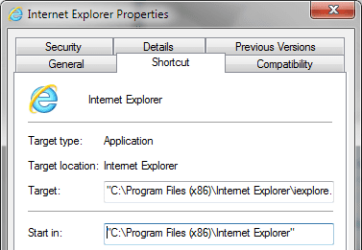
Do me a favor and look at the properies of the Internet Explorer shortcut you use to launch IE.
If it's the one on the taskbar toolbar
right click the icon, then
right click the words Internet Explorer in the jump list menu
select properties at the bottom of the context menu.

IElinkProps.png

Let me know what is in the Target field:
"C:\Program Files\Internet Explorer\iexplore.exe"
-- OR --
"C:\Program Files (x86)\Internet Explorer\iexplore.exe"

This won't fix the issue either, but it might prevent one in the near term future as you work through the main issue.

Bill
.
 
Last edited:

My Computer My Computer

Computer type
Laptop
Computer Manufacturer/Model Number
HP Pavilion dv6-6c10us
OS
x64 (6.3.9600) Win8.1 Pro & soon dual boot x64 (6.1.7601) Win7_SP1 HomePrem
CPU
AMD A6-3420M APU with Radeon(tm) HD Graphics
Motherboard
Hewlett-Packard 1805
Memory
6.00 GB
Graphics Card(s)
AMD Radeon(TM) HD 6520G
Sound Card
(1) AMD High Definition Audio Device (2) IDT High Definiti
Monitor(s) Displays
HP W2072a 20" LCD (1600 x 900) @ 60 Hz
Screen Resolution
1366 x 768 x 32 bits (4294967296 colors) @ 60 Hz
Hard Drives
ST640LM0 00 HM641JI SATA Disk Device
Keyboard
Logitech k520 wireless KB
Mouse
Logitech m320 wireless mouse (bundled with KB)
Internet Speed
15/5 | 54 MB Wireless 'n'
Antivirus
Realtime: Defender or Avast | On-demand: Malwarebytes, ESET
Browser
IE 11 on Win8, IE 10 on win 7
Other Info
Media: [Gimp, Audacity, VLC] || Comm: [WEmail 2012, Skype] || Productivity: [OpenOffice,| Textpad] || Utils: [Sysinternals, cCleaner, Speccy, Defraggler]
Vonda you are getting some excellent suggestions. Please let us know what you have tried and the results.

After I do several changes on my computers I like to run sfc /scannow just to make sure the System Files are still okay. It could be a little over kill but it's free.
 

My Computer My Computer

Computer type
PC/Desktop
Computer Manufacturer/Model Number
Home made Desktop
OS
Windows 10 Pro. 64/ version 1709 Windows 7 Pro/64
CPU
Intel i7-6800K @ 4.3
Motherboard
ASUS X-99 Deluxe II
Memory
Corsair Platinum 16 gig @2400
Graphics Card(s)
EVGA GTX 1070 OC
Monitor(s) Displays
Asus 27" LED LCD/VE278Q
Screen Resolution
1920-1080 or 1280-720 HDMI
Hard Drives
INTEL SSD 730-240 Gb Sata 3.0/
PSU
EVGA Platium 1200W
Case
Phanteks Luxe Tempered Glass 8 fans/ one radiator
Cooling
XSPC/ Water Cooled CPU
Keyboard
Das 4 Professional
Mouse
Logitech M705/MX Anywhere 2-S
Internet Speed
100 mbits
Antivirus
Microsoft Security Essentials/ Malwarebytes Premium 3.0/ SAS
Browser
I.E. 11 default/Firefox/ ISP Time Warner Cable/Spectrum
Other Info
LG BluRay Burner/
Sound system-KLipsch-THX/
Icy Dock ssd Hot Swap bays.
If anyone doesn't mind me putting in 2 cents worth I didn't see a chkdsk being run yet and I would also suggest the Emsisoft Emergency Scanner https://www.emsisoft.com/en/software/eek/ just use the first two scanners.

But a chkdsk would be on my first to check list,
http://www.sevenforums.com/tutorials/433-disk-check.html
Also I am very loathe to put anything Apple on my machines and especially that Bonjour stuff as the times I have used it - it has caused havoc and was VERY difficult to uninstall.
 

My Computer My Computer

Computer type
PC/Desktop
Computer Manufacturer/Model Number
Own build (new) Desk1 / Asus ROG Win 7 / Desk2 1st build
OS
Desk1 7 Home Prem / Desk2 10 Pro / Main lap Asus ROG 10 Pro 2 laptop Toshiba 7 Pro Asus P2520 7 & 10
CPU
Desk1 i5 3750K / Laptop i7 GTX 860M / Desk2 i5 2500
Motherboard
Desk1 Asus P877-V / Desk2 Gigabyte H67 UD3H / Laptop ?
Memory
Desk1 8GB (1866) / Desk2 16GB (1333) / Laptop 8Gb DDR3
Graphics Card(s)
Desk 1& 2NVidia GTX 650 & Laptops on board Intel
Sound Card
Desk 1 & 2 -XONAR DG Realtek High Def audio Laptop
Monitor(s) Displays
Desk 1 Benq HD 2450 / Desk2 Philips 24" / Laptop 17.5"
Screen Resolution
1920x1080 D1 & D2 & Laptop 1
Hard Drives
Desk1 Samsung 120GB 830 SSD
Asus ROG 256GB 850 Pro SSD
Desk2 Samsung 840 256 SSD
Toshiba 120GB EVO
PSU
Desk 1 Corsair HX 1050/ Laptop ? / Desk 2 Corsair HX 650
Case
Desk 1 Cooler HAF XM ? Toshiba laptop / Desk2 Coolermaster
Cooling
Fans on all Desk1 -2 Desk2 - all Coolermasters 5 Laptop ?
Keyboard
Desk 1 MS Sidewinder X6 Desk 2 MS Sidewinder X 4
Mouse
Desk 1&2 - Gigabyte MS 900 gamer - laptop - Logitec wireless
Internet Speed
ADSL2+
Other Info
One other Desktop (tester) and spare Toshba laptop both with SSD's
Running Kaspersky 2016 ISS on all machines config'd identically
Logitec audio stereo systems on each machine (x3)
Canon MG5250MFC
Router/modem TP-Link running WPA2SK
I think that I have done all the suggestions. After deleting S&D, Zone Alarm Extreme, Super anti Spyware and all the others mentioned in previous posts.
Now the IE 11 Browser seem to work properly. "C:\Program Files\Internet Explorer\iexplore.exe"
I really would like to know which program was the culprit.
As far I can tell, the youtube videos and pictures play/show now properly too.
I can't thank you all enough for the patience you all had dealing with my Problem.
Thank you all very very much.
Vonda
 

My Computer My Computer

Computer Manufacturer/Model Number
HPE-400f
OS
Widows 7 home premium 64 bit
CPU
AMD phenom(tm) 11 x 4 processor 3.00 GHz
Motherboard
?
Memory
8.00 GB
Graphics Card(s)
ATI Radeon HD 5450
Sound Card
?
Monitor(s) Displays
HP vs17
Hard Drives
1 TB Sata
Mouse
usb
Internet Speed
download 15 mbps
Hi,
Great news,
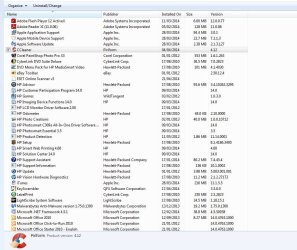
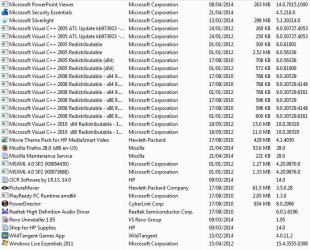
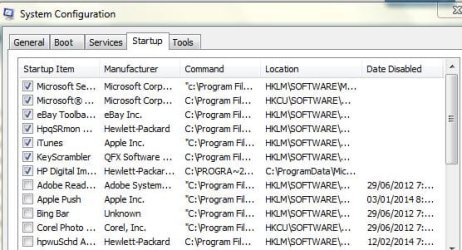
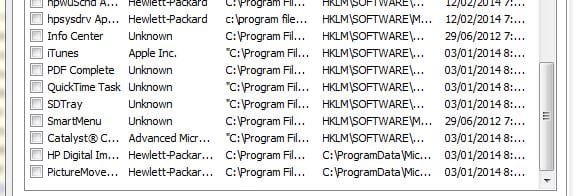
Is it possible to post new screen shots of your programs list and the startup section of msconfig to get a better idea of what is left,
Personally I have no experience of the S&D and zone alarm utilities so I couldn't say to uninstall them,
But also with apple products you never know,
iTunes has had issues with Internet explorer before,
Cheers.
You are still using the 64 bit version so Enhanced protection mode is still activated for sure.
Please verify with this link if you don't remember,
http://www.sevenforums.com/tutorials/280434-internet-explorer-10-enable-32-bit-64-bit-ie10-windows-7-a.html
 

My Computer My Computer

Computer type
PC/Desktop
Computer Manufacturer/Model Number
Custom assembled by me :}
OS
Win-7-Pro64bit 7-H-Prem-64bit
CPU
i7-5930K 2nd i9-9940x both water blocked VRM's too
Motherboard
ASUS SABERTOOTH X99 2nd ASUS x299 Apex
Memory
Trident-z 3200C14 2nd Trident-z 3600C16
Graphics Card(s)
EVGA 1080ti ftw3 2nd Titan Xp both water blocked
Sound Card
Built-in Realtek
Monitor(s) Displays
1-AOC G2460PG 24"G-Sync 144Hz/ 2nd 1-ASUS VG248QE 24" 144Hz
Screen Resolution
1920 x 1080 144Hz
Hard Drives
2-Samsung M.2 Evo & Evo Plus
2-Samsung 850 EVO 500GB SSD's/ 3-2.5 W.D. Black 1tb-&3-1tb/3-3.5 WD Black 1tb hdd's
PSU
EVGA SuperNOVA 1000-P2 2nd 1200-P2
Case
2-Corsair Obsidian Series 450D Black ATX Mid Tower
Cooling
Custom water loops
Keyboard
Logitech G710+/ 2nd Logitech G910
Mouse
2-RedDragon M901 Perdition 16400 dpi Gaming mouse = wired
Internet Speed
Comcast Ping 19ms 89.31mbps download speed 6.12mbps upload
Antivirus
Malwarebytes Pro/ Superantispyware Pro
Browser
FireFox & Pale moon
Other Info
2nd ASUS X299 Apex/Intel i9-9940x with Custom water loop/7H-Prem-x64/Corsair 450D case/Ram Trident-z 3600C16 4x8gb / Samsung970Evo plus 500gb SSD/Dual ssd EZ swap evo/PSU EVGA SuperNova 1200w-P2 80+Platinum/GPU Titan Xp /8-ML-140 on push-pull on 2-280GTX rads
A reminder to uninstall Java to see if it is ever missed.

:::back to lurking:::
 

My Computer My Computer

Computer type
Laptop
Computer Manufacturer/Model Number
Employer provided Dell Latitude
OS
W7 Pro SP1 64bit
CPU
i7
Memory
8GB
Graphics Card(s)
Intel HD Graphics
Hard Drives
crappy SSD
Antivirus
Employer mandated Symantec Endpoint Protection
Browser
Pale Moon 64bit, IE11 64bit & Chrome 64bit

My Computer My Computer

Computer Manufacturer/Model Number
HPE-400f
OS
Widows 7 home premium 64 bit
CPU
AMD phenom(tm) 11 x 4 processor 3.00 GHz
Motherboard
?
Memory
8.00 GB
Graphics Card(s)
ATI Radeon HD 5450
Sound Card
?
Monitor(s) Displays
HP vs17
Hard Drives
1 TB Sata
Mouse
usb
Internet Speed
download 15 mbps
Hi,
Great news,
Is it possible to post new screen shots of your programs list and the startup section of msconfig to get a better idea of what is left,
Personally I have no experience of the S&D and zone alarm utilities so I couldn't say to uninstall them,
But also with apple products you never know,
iTunes has had issues with Internet explorer before,
Cheers.
You are still using the 64 bit version so Enhanced protection mode is still activated for sure.
Please verify with this link if you don't remember,
[URL="http://www.sevenforums.com/tutorials/280434-internet-explorer-10-enable-32-bit-64-bit-ie10-windows-7-a.html"]http://www.sevenforums.com/tutorials/280434-internet-explorer-10-enable-32-bit-64-bit-ie10-windows-7-a.html[/URL]
Should I revert to the 32bit?
 

Attachments

  • prog.JPG
    prog.JPG
    123 KB · Views: 0
  • prog2.JPG
    prog2.JPG
    113.1 KB · Views: 0
  • config.JPG
    config.JPG
    48 KB · Views: 31
  • config2.JPG
    config2.JPG
    37.7 KB · Views: 31

My Computer My Computer

Computer Manufacturer/Model Number
HPE-400f
OS
Widows 7 home premium 64 bit
CPU
AMD phenom(tm) 11 x 4 processor 3.00 GHz
Motherboard
?
Memory
8.00 GB
Graphics Card(s)
ATI Radeon HD 5450
Sound Card
?
Monitor(s) Displays
HP vs17
Hard Drives
1 TB Sata
Mouse
usb
Internet Speed
download 15 mbps
Actually, I did click on fix selected both times. I just took the snip before doing that.
I just finished the scan with ESET and it showed 0 infections and I did not find any log files about this scan.
**
I have no problem with Google Chrome, should I still download Firefox?
Also, run the SFC/Scannow again?
I shall uninstall java after posting this.
Can I download and install Microsoft security essentials firs before I disable zone Alarm?
Sorry about being a pain...

A reminder to uninstall Java to see if it is ever missed.

:::back to lurking:::
Yes, I did uninstall that one also.
Thanks for confirming. Java is such a problem, that I just had to stick my nose into your thread to be sure that it is gone. If you ever find that you need it, please read the bottom half of this post concerning updating it once you get both the 32bit and 64bit versions installed. That post also suggests sticking with 64bit IE tabs.
 

My Computer My Computer

Computer type
Laptop
Computer Manufacturer/Model Number
Employer provided Dell Latitude
OS
W7 Pro SP1 64bit
CPU
i7
Memory
8GB
Graphics Card(s)
Intel HD Graphics
Hard Drives
crappy SSD
Antivirus
Employer mandated Symantec Endpoint Protection
Browser
Pale Moon 64bit, IE11 64bit & Chrome 64bit
Hi,
The only things I see is your Adobe flash player is out of date,
The current version is 13.0.0.182,

Uncheck Key scrambler from the startup/ boot when prompted too,
If I remember correctly you uninstalled the software long ago ?
Use revo and ccleaner to look for remnants,
Possibly someone will know how to search for that software ?

And you can now uninstall Eset scanner,
And redownload SAS Superantispyware it's a great little utility ;)
This will also test your ability to download starting normally using ie11,
Post any downloading issues with ie11 do not download using safe mode with networking or with another browser,
Reset ie11 first if you have an issue downloading I believe you know the reset drill ;)

You can disable Enhanced protection mode if you wish,
But if youtube works you can leave epm activated,
EPM does add an extra layer of protection and until you run into a problem you can disable epm anytime to test the site,
Often you would need to shut your machine down before epm would activate or be disabled.

After the above,
Your security should be,
MSE - Microsoft security essentials
Mabm - Malwarebytes
SAS - Superantispyware
This is a great combination,
I use this myself although I do use the Pro version of mabm (not the Free version)
It's all you need,
You did fantastic throughout this process :thumbsup:
Thanks to everyone for contributing :D
Cheers
 

My Computer My Computer

Computer type
PC/Desktop
Computer Manufacturer/Model Number
Custom assembled by me :}
OS
Win-7-Pro64bit 7-H-Prem-64bit
CPU
i7-5930K 2nd i9-9940x both water blocked VRM's too
Motherboard
ASUS SABERTOOTH X99 2nd ASUS x299 Apex
Memory
Trident-z 3200C14 2nd Trident-z 3600C16
Graphics Card(s)
EVGA 1080ti ftw3 2nd Titan Xp both water blocked
Sound Card
Built-in Realtek
Monitor(s) Displays
1-AOC G2460PG 24"G-Sync 144Hz/ 2nd 1-ASUS VG248QE 24" 144Hz
Screen Resolution
1920 x 1080 144Hz
Hard Drives
2-Samsung M.2 Evo & Evo Plus
2-Samsung 850 EVO 500GB SSD's/ 3-2.5 W.D. Black 1tb-&3-1tb/3-3.5 WD Black 1tb hdd's
PSU
EVGA SuperNOVA 1000-P2 2nd 1200-P2
Case
2-Corsair Obsidian Series 450D Black ATX Mid Tower
Cooling
Custom water loops
Keyboard
Logitech G710+/ 2nd Logitech G910
Mouse
2-RedDragon M901 Perdition 16400 dpi Gaming mouse = wired
Internet Speed
Comcast Ping 19ms 89.31mbps download speed 6.12mbps upload
Antivirus
Malwarebytes Pro/ Superantispyware Pro
Browser
FireFox & Pale moon
Other Info
2nd ASUS X299 Apex/Intel i9-9940x with Custom water loop/7H-Prem-x64/Corsair 450D case/Ram Trident-z 3600C16 4x8gb / Samsung970Evo plus 500gb SSD/Dual ssd EZ swap evo/PSU EVGA SuperNova 1200w-P2 80+Platinum/GPU Titan Xp /8-ML-140 on push-pull on 2-280GTX rads
Vonda,

Great work and great news, glad the issue is resolved for you. After a few days of running OK, please mark this thread as solved.

I'd like to add a few things to the housekeeping list..Uninstall the following:
eBay toolbar
ESET online scanner (already menitoned)
Keyscrambler (already menitoned)
Lightscribe (unless you have a Optical drive that can write labels with the laser)
Silverlight (seldom used video format -MS site only that I know of)​

I think the culprit was in fact Chrome, or to be more exact a bug attached itself to Chrome. I don't see it on your P&F list (Firefox is there).

There are a lot of HP "bloatware" that could also be cleaned up, but let your system run as is for a while and if you want to do some additional housekeeping, open a new thread and members will help you do that.

Thanks for everyone's input and time - this was a collaborative effort. Thanks Mike for taking the lead on solving this issue.

Bill
.
 

My Computer My Computer

Computer type
Laptop
Computer Manufacturer/Model Number
HP Pavilion dv6-6c10us
OS
x64 (6.3.9600) Win8.1 Pro & soon dual boot x64 (6.1.7601) Win7_SP1 HomePrem
CPU
AMD A6-3420M APU with Radeon(tm) HD Graphics
Motherboard
Hewlett-Packard 1805
Memory
6.00 GB
Graphics Card(s)
AMD Radeon(TM) HD 6520G
Sound Card
(1) AMD High Definition Audio Device (2) IDT High Definiti
Monitor(s) Displays
HP W2072a 20" LCD (1600 x 900) @ 60 Hz
Screen Resolution
1366 x 768 x 32 bits (4294967296 colors) @ 60 Hz
Hard Drives
ST640LM0 00 HM641JI SATA Disk Device
Keyboard
Logitech k520 wireless KB
Mouse
Logitech m320 wireless mouse (bundled with KB)
Internet Speed
15/5 | 54 MB Wireless 'n'
Antivirus
Realtime: Defender or Avast | On-demand: Malwarebytes, ESET
Browser
IE 11 on Win8, IE 10 on win 7
Other Info
Media: [Gimp, Audacity, VLC] || Comm: [WEmail 2012, Skype] || Productivity: [OpenOffice,| Textpad] || Utils: [Sysinternals, cCleaner, Speccy, Defraggler]
Good job everbody; I think Vonda is on the road to happy computing.

Vonda I will still like to see what you have checked in msconfig/Startup and Non Microsoft Services. I'm thinking their is room for improvement there.

Another good free program to use is FileHippo Updater. It checks for programs that need updates. It works well for me.

FileHippo.com - Download Free Software
 

My Computer My Computer

Computer type
PC/Desktop
Computer Manufacturer/Model Number
Home made Desktop
OS
Windows 10 Pro. 64/ version 1709 Windows 7 Pro/64
CPU
Intel i7-6800K @ 4.3
Motherboard
ASUS X-99 Deluxe II
Memory
Corsair Platinum 16 gig @2400
Graphics Card(s)
EVGA GTX 1070 OC
Monitor(s) Displays
Asus 27" LED LCD/VE278Q
Screen Resolution
1920-1080 or 1280-720 HDMI
Hard Drives
INTEL SSD 730-240 Gb Sata 3.0/
PSU
EVGA Platium 1200W
Case
Phanteks Luxe Tempered Glass 8 fans/ one radiator
Cooling
XSPC/ Water Cooled CPU
Keyboard
Das 4 Professional
Mouse
Logitech M705/MX Anywhere 2-S
Internet Speed
100 mbits
Antivirus
Microsoft Security Essentials/ Malwarebytes Premium 3.0/ SAS
Browser
I.E. 11 default/Firefox/ ISP Time Warner Cable/Spectrum
Other Info
LG BluRay Burner/
Sound system-KLipsch-THX/
Icy Dock ssd Hot Swap bays.
Is the key scrambler not a good protection against key loggers? I do not recall that it created any problems.
@ Layback Bear, is that not what I did in post 92? or is that another test?
@ TrashZone, I shall now perform do the other suggested tasks in post 94.
@ Slartybart, I shall now perform do the other suggested tasks in post 95, could you point out what is bloat ware from HP as I am not sure which programs I need to keep.
@ Brink, after I have done these task, I shall run the SFC command again.
Thanks again everybody.
 

My Computer My Computer

Computer Manufacturer/Model Number
HPE-400f
OS
Widows 7 home premium 64 bit
CPU
AMD phenom(tm) 11 x 4 processor 3.00 GHz
Motherboard
?
Memory
8.00 GB
Graphics Card(s)
ATI Radeon HD 5450
Sound Card
?
Monitor(s) Displays
HP vs17
Hard Drives
1 TB Sata
Mouse
usb
Internet Speed
download 15 mbps
Hi thanks,
This where you get into trouble Vonda,
One where do you download most of these types of programs,
Most download sites add pup's or potently unwanted programs to their downloads,
I really feel these types of encrypting utilities are unneeded,

At minimum make System images before doing them so the potential damage is easier to undo,
Recommended back up,
http://www.sevenforums.com/tutorials/73828-imaging-free-macrium.html
http://www.sevenforums.com/tutorials/73828-imaging-free-macrium.html?filter[2]=Backup
Cheers.

I didn't see a post from Brink but thanks Brink for any input :thumbsup:
 

My Computer My Computer

Computer type
PC/Desktop
Computer Manufacturer/Model Number
Custom assembled by me :}
OS
Win-7-Pro64bit 7-H-Prem-64bit
CPU
i7-5930K 2nd i9-9940x both water blocked VRM's too
Motherboard
ASUS SABERTOOTH X99 2nd ASUS x299 Apex
Memory
Trident-z 3200C14 2nd Trident-z 3600C16
Graphics Card(s)
EVGA 1080ti ftw3 2nd Titan Xp both water blocked
Sound Card
Built-in Realtek
Monitor(s) Displays
1-AOC G2460PG 24"G-Sync 144Hz/ 2nd 1-ASUS VG248QE 24" 144Hz
Screen Resolution
1920 x 1080 144Hz
Hard Drives
2-Samsung M.2 Evo & Evo Plus
2-Samsung 850 EVO 500GB SSD's/ 3-2.5 W.D. Black 1tb-&3-1tb/3-3.5 WD Black 1tb hdd's
PSU
EVGA SuperNOVA 1000-P2 2nd 1200-P2
Case
2-Corsair Obsidian Series 450D Black ATX Mid Tower
Cooling
Custom water loops
Keyboard
Logitech G710+/ 2nd Logitech G910
Mouse
2-RedDragon M901 Perdition 16400 dpi Gaming mouse = wired
Internet Speed
Comcast Ping 19ms 89.31mbps download speed 6.12mbps upload
Antivirus
Malwarebytes Pro/ Superantispyware Pro
Browser
FireFox & Pale moon
Other Info
2nd ASUS X299 Apex/Intel i9-9940x with Custom water loop/7H-Prem-x64/Corsair 450D case/Ram Trident-z 3600C16 4x8gb / Samsung970Evo plus 500gb SSD/Dual ssd EZ swap evo/PSU EVGA SuperNova 1200w-P2 80+Platinum/GPU Titan Xp /8-ML-140 on push-pull on 2-280GTX rads
Vonda,


I think the culprit was in fact Chrome, or to be more exact a bug attached itself to Chrome. I don't see it on your P&F list (Firefox is there).

There are a lot of HP "bloatware" that could also be cleaned up, but let your system run as is for a while and if you want to do some additional housekeeping, open a new thread and members will help you do that.

Thanks for everyone's input and time - this was a collaborative effort. Thanks Mike for taking the lead on solving this issue.

Bill
.
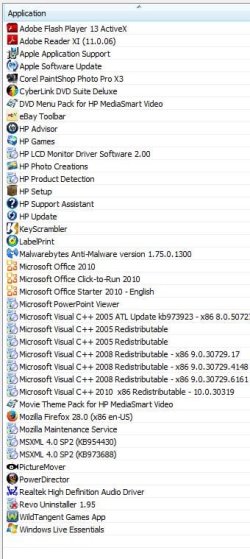
Here is my new list of programs, I like to keep the keyscrambler unless you think it does not the job it is supposed to do, ditto for the e-bay toolbar I have used this toolbar for years since I do some buying and selling on E-Bay.
 

Attachments

  • list of programs.JPG
    list of programs.JPG
    62.6 KB · Views: 0

My Computer My Computer

Computer Manufacturer/Model Number
HPE-400f
OS
Widows 7 home premium 64 bit
CPU
AMD phenom(tm) 11 x 4 processor 3.00 GHz
Motherboard
?
Memory
8.00 GB
Graphics Card(s)
ATI Radeon HD 5450
Sound Card
?
Monitor(s) Displays
HP vs17
Hard Drives
1 TB Sata
Mouse
usb
Internet Speed
download 15 mbps

My Computer My Computer

Computer type
PC/Desktop
Computer Manufacturer/Model Number
Custom assembled by me :}
OS
Win-7-Pro64bit 7-H-Prem-64bit
CPU
i7-5930K 2nd i9-9940x both water blocked VRM's too
Motherboard
ASUS SABERTOOTH X99 2nd ASUS x299 Apex
Memory
Trident-z 3200C14 2nd Trident-z 3600C16
Graphics Card(s)
EVGA 1080ti ftw3 2nd Titan Xp both water blocked
Sound Card
Built-in Realtek
Monitor(s) Displays
1-AOC G2460PG 24"G-Sync 144Hz/ 2nd 1-ASUS VG248QE 24" 144Hz
Screen Resolution
1920 x 1080 144Hz
Hard Drives
2-Samsung M.2 Evo & Evo Plus
2-Samsung 850 EVO 500GB SSD's/ 3-2.5 W.D. Black 1tb-&3-1tb/3-3.5 WD Black 1tb hdd's
PSU
EVGA SuperNOVA 1000-P2 2nd 1200-P2
Case
2-Corsair Obsidian Series 450D Black ATX Mid Tower
Cooling
Custom water loops
Keyboard
Logitech G710+/ 2nd Logitech G910
Mouse
2-RedDragon M901 Perdition 16400 dpi Gaming mouse = wired
Internet Speed
Comcast Ping 19ms 89.31mbps download speed 6.12mbps upload
Antivirus
Malwarebytes Pro/ Superantispyware Pro
Browser
FireFox & Pale moon
Other Info
2nd ASUS X299 Apex/Intel i9-9940x with Custom water loop/7H-Prem-x64/Corsair 450D case/Ram Trident-z 3600C16 4x8gb / Samsung970Evo plus 500gb SSD/Dual ssd EZ swap evo/PSU EVGA SuperNova 1200w-P2 80+Platinum/GPU Titan Xp /8-ML-140 on push-pull on 2-280GTX rads
Back
Top