Media Center- Setup Movie Library

How to Setup a Media Center Movie Library in Windows 7

   Information
This tutorial will show how to manage your movie library in Media Center, including poster images & full synopsis information.
   Note
Windows Media Center is not available in Windows 7 Starter and Windows 7 Home Basic editions.


The N and KN editions of Windows 7 have all the features that normally come with each individual Windows 7 edition, except for Windows Media Player 12 and related programs, such as Windows Media Center or Windows DVD Maker.

The N editions of Windows 7 allow you to choose your own media player and software required to manage and play CDs, DVDs, and other digital media files. If you choose to use Windows Media Player 12, downloading it, along with related software, is free. Download Media Feature Pack for Windows 7 N with Service Pack 1 and Windows 7 KN with Service Pack 1 (KB968211) from Official Microsoft Download Center

Examples: With & without poster information.
7 Example Media Center (Movies without posters).PNG8 Example Media Center (Movies with posters).png

Before you start:
NOTE: Special thanks to DemonSeed for the file2folder batch file. 1. Click on the Download button below to download the file2folder.zip file and extract the file2folder.bat file to the drive containing your movie files (e.g. G:\MOVIES). Run the file which will create directories based on the movie file name (e.g. Babylon A.D.avi will have the directory Babylon A.D created) and the movie file moved to the directory.

2. Search for & download a file for the movie you would like as a poster and save it in the movie folder and name it folder.jpg. Do this for each movie.
   Warning
I would advise at least 2GB of memory as due to the size of the folder.jpg files there is a lot of memory used. You could (like me) resize all folder.jpg files to a width of 300 pixels & maintain aspect ratio.


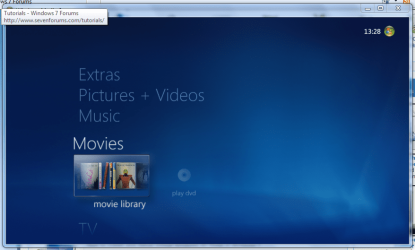
Here's How: 1. Run Media Center and navigate to Movies 1 Media Center (Start Page).PNG
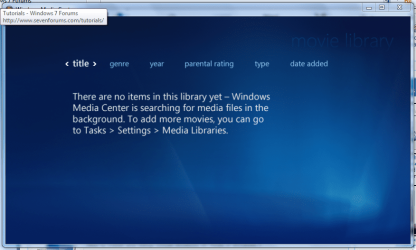
2. Open movie library, you should notice no movies shown 2 Media Center (Movie Library - Empty).PNG
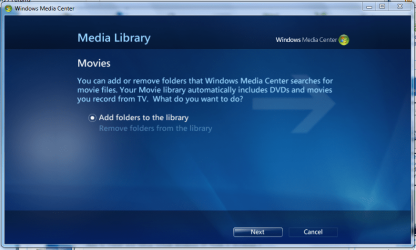
3. Right-Click within the inner (empty area) and select Manage Library, you will be shown the 'Add folders' wizard. Select 'Add folders to the library' and click next 3 Media Center (Add folder to library).PNG
4. Select the location where your drive with the videos is stored, and click on next. 4 Media Center (Folder Selection 1).PNG
5. Navigate to the folder where your videos are stored (e.g. G:\MOVIES), and click next. 5 Media Center (Select Folder).PNG
6. On the final screen select 'Yes, use these locations' and click finish 6 Media Center (Finish Selection).PNG


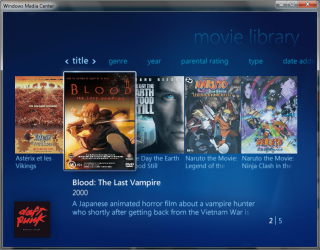
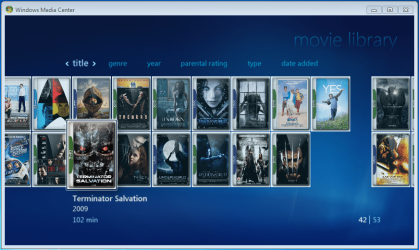
Now your folder is added, Media Center will show the Video folders (with posters if you downloaded an image file for each movie).

   Note
If you wish to include metadata you will need to download Yammm. The meta data will download the DVDID.XML file which will allow for Media Center to download full synopsis information for each movie
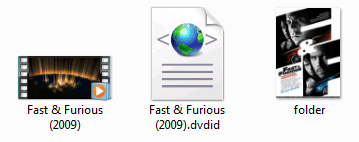

Example folder view.PNG

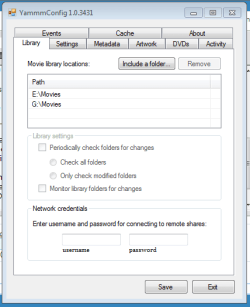
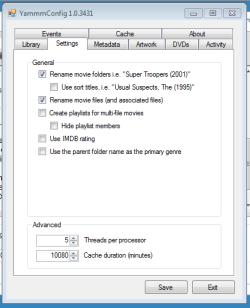
Recommended Yammm settings
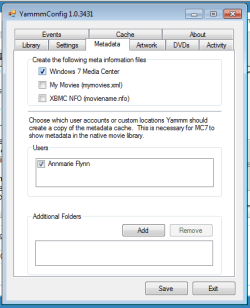
1 yammm paths.PNG2 yammm settings.PNG
3 yammm metadata.PNG
   Note
These setting will automatically rename folders/files, download folder.jpg & DVDID.XML files for Media Center to read from.


Update

The Yammm application has been updated to include Image Resizing
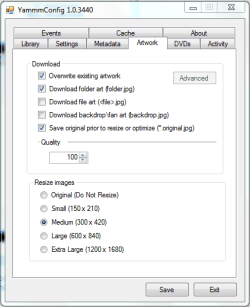
Yammm (Artwork).PNG

This will allow Media Center to use less memory when rendering folder images.

   Tip
It's recommended that you use a setting of 92 Quality & 300x420 medium size as this will greatly reduce the amount of memory used by 7MC when viewing a large movie library


Update 2: More Synopsis

I thought i'd include an example of how the DVDID.XML file works.

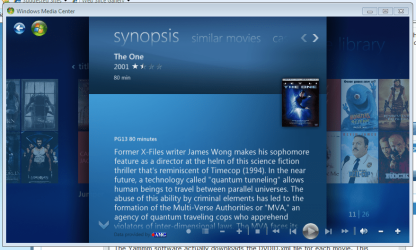
1, Full synopsis information Movie Library (Full Synopsis).PNG
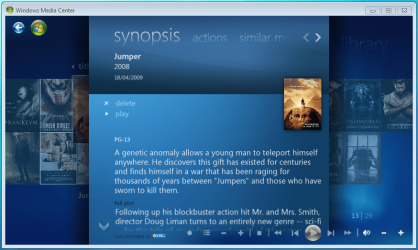
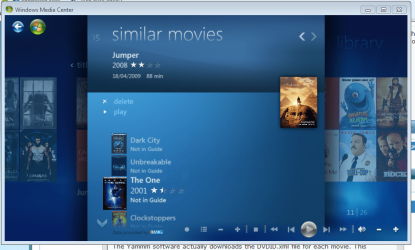
2, Similar Movies shown, with posters Movie Library (Similar Movies).PNG
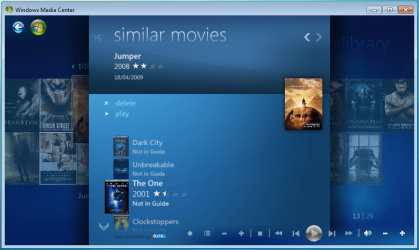
3, Click the similar movie to get full details of that movie Movie Library (Similar Movies - Synopsis).PNG
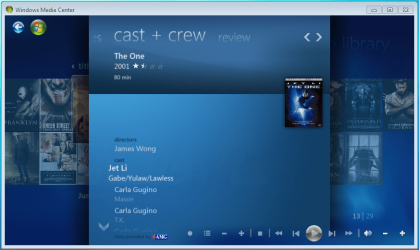
4, Cast & Crew information Movie Library (Cast & Crew).PNG
5, Click on a name to see a fimography (film list) relating to that actor/director Movie Library (Cast & Crew - Filmography).PNG

Enjoy
 

Attachments

  • file2folder.zip
    file2folder.zip
    230 bytes · Views: 22,835
  • synopsis.PNG
    synopsis.PNG
    127.1 KB · Views: 85
  • similar movies.PNG
    similar movies.PNG
    131.5 KB · Views: 66
  • similar movies detail.PNG
    similar movies detail.PNG
    140 KB · Views: 60
Last edited by a moderator:
Update added to last section of the turtorial
 

My Computer My Computer

Computer Manufacturer/Model Number
Compaq Desktop
OS
Windows 7 Ultimate x64
CPU
AMD Sempron Dual Core
Memory
3GB
Graphics Card(s)
NVIDIA GeForce 6150SE nForce 430
Screen Resolution
1024x768
Hard Drives
150GB Sata
Killer tutorial man, you get a rep from me :)
 

My Computer My Computer

Computer type
PC/Desktop
Computer Manufacturer/Model Number
Multirama PC Expert [Bulgaria]
OS
Windows 7 Home Premium [64-Bit]
CPU
Intel Core 2 Quad CPU Q8200 @ 2.33 GHz
Motherboard
GIGABYTE GA-G31M-S2C
Memory
4094 MB DDR2
Graphics Card(s)
SAPPHIRE Radeon HD 6970 (2 GB VRAM)
Sound Card
Realtek ALC883 @ Intel 82801GB ICH7 - High Definition Audio
Monitor(s) Displays
Samsung SyncMaster BX2235 [21.5" LCD with LED Backlight]
Screen Resolution
1920x1080
Hard Drives
Hitachi HDT721075SLA360 - 750 GB
PSU
Cooler Master GX750 - 750W
Case
Multirama (Black / 2010 Revision)
Cooling
Stock + Cooler Master
Keyboard
Logitech G510 (Gaming Keyboard)
Mouse
Razer Lachesis (4000 DPI, Blue Version)
Internet Speed
Vivacom Optical [100 Mbps]
Browser
Chrome [Windows]
Second update, showing examples of data pulled directly off the net (images might not show, click them to view)
 

My Computer My Computer

Computer Manufacturer/Model Number
Compaq Desktop
OS
Windows 7 Ultimate x64
CPU
AMD Sempron Dual Core
Memory
3GB
Graphics Card(s)
NVIDIA GeForce 6150SE nForce 430
Screen Resolution
1024x768
Hard Drives
150GB Sata
Nice tutorial Shark! Thanks for the pointers. I didnt know there was a DVDID.xml that MC could read. Cool Thanks
 

My Computer My Computer

Computer Manufacturer/Model Number
Custom Built Rig BY ME "My Baby"
OS
7 Ultimate x64
CPU
AMD Athlon 64X2 4600+ 2.51Ghz
Motherboard
ASUS M2N-E SLI
Memory
6GB DDR2 900 Kingston
Graphics Card(s)
2x BFG Nvidia 9600 GT-OC
Sound Card
SoundBlaster XF-I
Monitor(s) Displays
19"acer, 22"acer, 19"acer, 48" HITACHI HDTV
Screen Resolution
1400x900, 1680x1050, 1400x900, 1920x1080
Hard Drives
Seagate 500GB Sata
Seagate 500GB Sata
Seagate 500GB Sata
Seagate 500GB Sata
Seagate 320 Sata (Primary)
Western Digital 500GB IDE
Western Digital 300GB IDE
Maxter 720 Sata (USB)
PSU
BFG 800 Watt SLI Power Supply
Case
Game Master
Cooling
Thermotake
Keyboard
Logitech (Bluetooth)
Mouse
Logitech (Bluetooth)
Internet Speed
Turbo Cable
Other Info
ATI 650HD TV Tuner X2,
Samsung (Light scribe) DVD-R,
Sony (Dual Layer) DVD-R
Thanks :D

Even with the extremely small file sizes of the DVDID.XML files MC still downloads all the info it requires.
 

My Computer My Computer

Computer Manufacturer/Model Number
Compaq Desktop
OS
Windows 7 Ultimate x64
CPU
AMD Sempron Dual Core
Memory
3GB
Graphics Card(s)
NVIDIA GeForce 6150SE nForce 430
Screen Resolution
1024x768
Hard Drives
150GB Sata
awesome thanks for this iv been wondering how to do this
 

My Computer My Computer

Computer Manufacturer/Model Number
TripOG - Kwamathon
OS
windows 7 X64
CPU
amd phenom II x4 940
Motherboard
GIGABYTE GA-MA790GP-UD4H
Memory
8GB
Graphics Card(s)
integrated radeon hd3300
Sound Card
Realtek ALC889A
Monitor(s) Displays
ASUS VH222H
Screen Resolution
1920 x 1080
Hard Drives
PQI DK9320GD3R000A03
Internet Speed
30Mbps down / 2Mbps up
Thanks TripOG, you're welcome :)
 

My Computer My Computer

Computer Manufacturer/Model Number
Compaq Desktop
OS
Windows 7 Ultimate x64
CPU
AMD Sempron Dual Core
Memory
3GB
Graphics Card(s)
NVIDIA GeForce 6150SE nForce 430
Screen Resolution
1024x768
Hard Drives
150GB Sata
Nice tut, +rep to you. ;)
P.S: Again lol :p

EDIT: Lol, it says I gotta spread around rep before giving it to you again. Well I'll give you rep some time later. :sleepy:
 
Last edited:

My Computer My Computer

Computer type
Laptop
Computer Manufacturer/Model Number
Samsung
OS
Windows 8 x64
CPU
Intel Core i7 3630QM
Motherboard
Intel HM76
Memory
Samsung 8 GB DDR3 800 Mhz
Graphics Card(s)
ATI Radeon HD Graphics 7670M + Intel HD Graphics 4000
Screen Resolution
1366x768
Hard Drives
SAMSUNG Spinpoint M8 1TB
Internet Speed
4 Mb/sDownload Speed, 2 Mb/s Upload Speed
Antivirus
avast!
Thanks The Cool Guy :D
 

My Computer My Computer

Computer Manufacturer/Model Number
Compaq Desktop
OS
Windows 7 Ultimate x64
CPU
AMD Sempron Dual Core
Memory
3GB
Graphics Card(s)
NVIDIA GeForce 6150SE nForce 430
Screen Resolution
1024x768
Hard Drives
150GB Sata
Wow, I just noticed I'm skilled. Lol...:p
 

My Computer My Computer

Computer type
Laptop
Computer Manufacturer/Model Number
Samsung
OS
Windows 8 x64
CPU
Intel Core i7 3630QM
Motherboard
Intel HM76
Memory
Samsung 8 GB DDR3 800 Mhz
Graphics Card(s)
ATI Radeon HD Graphics 7670M + Intel HD Graphics 4000
Screen Resolution
1366x768
Hard Drives
SAMSUNG Spinpoint M8 1TB
Internet Speed
4 Mb/sDownload Speed, 2 Mb/s Upload Speed
Antivirus
avast!
@Orbital Shark , thanks again! Works with the movies I have tried so far! Screen:
1f2ba690802a9346.png
 
Last edited:

My Computer My Computer

Computer type
PC/Desktop
Computer Manufacturer/Model Number
Multirama PC Expert [Bulgaria]
OS
Windows 7 Home Premium [64-Bit]
CPU
Intel Core 2 Quad CPU Q8200 @ 2.33 GHz
Motherboard
GIGABYTE GA-G31M-S2C
Memory
4094 MB DDR2
Graphics Card(s)
SAPPHIRE Radeon HD 6970 (2 GB VRAM)
Sound Card
Realtek ALC883 @ Intel 82801GB ICH7 - High Definition Audio
Monitor(s) Displays
Samsung SyncMaster BX2235 [21.5" LCD with LED Backlight]
Screen Resolution
1920x1080
Hard Drives
Hitachi HDT721075SLA360 - 750 GB
PSU
Cooler Master GX750 - 750W
Case
Multirama (Black / 2010 Revision)
Cooling
Stock + Cooler Master
Keyboard
Logitech G510 (Gaming Keyboard)
Mouse
Razer Lachesis (4000 DPI, Blue Version)
Internet Speed
Vivacom Optical [100 Mbps]
Browser
Chrome [Windows]
Orbital Shark, you da man!!
I just wish id seen this a few hours ago, I've spent the last 2-3 hrs. putting my 150GB worth of movies into separate folders with folder.jpg's and then changing the picture sizes to 240x320....manually :(

I'm just gonna go drown myself now LOL

P.S What does the file2folder.bat do?
 

My Computer My Computer

Computer Manufacturer/Model Number
HP Touchsmart IQ771.uk
OS
Windows 7 Ultimate x64
CPU
AMD Turion(tm) 64 X2 Mobile Technology TL-56
Motherboard
ASUS Pheonix
Memory
3GB Nanya PC2-6400 DDR2-SDRAM SO-DIM (400MHz)
Graphics Card(s)
NVIDIA GeForce Go 7600 256MB GDDR3 SDRAM
Sound Card
High Definition Intergrated NVIDIA MCP51
Monitor(s) Displays
46" Sony Bravia HDTV
Screen Resolution
1600x1200
Hard Drives
1.5TB Samsug
320GB Seagate ST3320820AS - SATA 3Gb/s 8MB
500GB Maxtor Basics STM305003EHD301-RK
Internet Speed
↓6.32 Mb/s ↑0.35 Mb/s ↔26ms
Other Info
BIOS - American Megatrends Inc. 5.07
Ethernet Port - NVIDIA nForce 10/100/1000 Mbps
DVD Drive - TSSTcorp DVDR/RW TS-T632L
P.S What does the file2folder.bat do?
The File2Folder will place all single files bunched up in one folder into a folder for each file named after the file

Just place it in the folder with files and run and into folders they will go!
 

My Computer My Computer

Computer Manufacturer/Model Number
Custom Built Rig BY ME "My Baby"
OS
7 Ultimate x64
CPU
AMD Athlon 64X2 4600+ 2.51Ghz
Motherboard
ASUS M2N-E SLI
Memory
6GB DDR2 900 Kingston
Graphics Card(s)
2x BFG Nvidia 9600 GT-OC
Sound Card
SoundBlaster XF-I
Monitor(s) Displays
19"acer, 22"acer, 19"acer, 48" HITACHI HDTV
Screen Resolution
1400x900, 1680x1050, 1400x900, 1920x1080
Hard Drives
Seagate 500GB Sata
Seagate 500GB Sata
Seagate 500GB Sata
Seagate 500GB Sata
Seagate 320 Sata (Primary)
Western Digital 500GB IDE
Western Digital 300GB IDE
Maxter 720 Sata (USB)
PSU
BFG 800 Watt SLI Power Supply
Case
Game Master
Cooling
Thermotake
Keyboard
Logitech (Bluetooth)
Mouse
Logitech (Bluetooth)
Internet Speed
Turbo Cable
Other Info
ATI 650HD TV Tuner X2,
Samsung (Light scribe) DVD-R,
Sony (Dual Layer) DVD-R
Orbital Shark, you da man!!
I just wish id seen this a few hours ago, I've spent the last 2-3 hrs. putting my 150GB worth of movies into separate folders with folder.jpg's and then changing the picture sizes to 240x320....manually :(

I'm just gonna go drown myself now LOL

P.S What does the file2folder.bat do?

As Demonseed suggested, it creates a folder based on the movie filename and moves it into that folder e.g. Fast & Furious (2009).avi will have a folder named Fast & Furious (2009) (minus the .avi :p) and will be moved into it.
 

My Computer My Computer

Computer Manufacturer/Model Number
Compaq Desktop
OS
Windows 7 Ultimate x64
CPU
AMD Sempron Dual Core
Memory
3GB
Graphics Card(s)
NVIDIA GeForce 6150SE nForce 430
Screen Resolution
1024x768
Hard Drives
150GB Sata
curious, how is MWC supposed to work without the XML files?
 

My Computer My Computer

Computer Manufacturer/Model Number
IBM ThinkPad T61p
OS
Win7 x64 7232
CPU
Intel Core 2 Duo T7500 2.2GHz
Memory
4GB
Graphics Card(s)
NVIDIA Quadro NVS 140M
Hard Drives
WD 320GB
WMC will still detect the folder.jpg and use it as a poster, but unless there's a DVDID.XLM file then there will be no metadata (e.g. synopsis).
 

My Computer My Computer

Computer Manufacturer/Model Number
Compaq Desktop
OS
Windows 7 Ultimate x64
CPU
AMD Sempron Dual Core
Memory
3GB
Graphics Card(s)
NVIDIA GeForce 6150SE nForce 430
Screen Resolution
1024x768
Hard Drives
150GB Sata
Thanks to DemonSeed with This Link to Tyborg's app.

I've now managed to use Photoshop to 'Batch' save all the folder.png files as folder.jpg which gives Media Center a nice look in the Movie Library.
   Note
PNG files cannot be used as folder posters, and JPG files have no transparency but the effect is still quite nice

Capture.PNG
 

My Computer My Computer

Computer Manufacturer/Model Number
Compaq Desktop
OS
Windows 7 Ultimate x64
CPU
AMD Sempron Dual Core
Memory
3GB
Graphics Card(s)
NVIDIA GeForce 6150SE nForce 430
Screen Resolution
1024x768
Hard Drives
150GB Sata
Cool!! Glad that worked out for ya!
 

My Computer My Computer

Computer Manufacturer/Model Number
Custom Built Rig BY ME "My Baby"
OS
7 Ultimate x64
CPU
AMD Athlon 64X2 4600+ 2.51Ghz
Motherboard
ASUS M2N-E SLI
Memory
6GB DDR2 900 Kingston
Graphics Card(s)
2x BFG Nvidia 9600 GT-OC
Sound Card
SoundBlaster XF-I
Monitor(s) Displays
19"acer, 22"acer, 19"acer, 48" HITACHI HDTV
Screen Resolution
1400x900, 1680x1050, 1400x900, 1920x1080
Hard Drives
Seagate 500GB Sata
Seagate 500GB Sata
Seagate 500GB Sata
Seagate 500GB Sata
Seagate 320 Sata (Primary)
Western Digital 500GB IDE
Western Digital 300GB IDE
Maxter 720 Sata (USB)
PSU
BFG 800 Watt SLI Power Supply
Case
Game Master
Cooling
Thermotake
Keyboard
Logitech (Bluetooth)
Mouse
Logitech (Bluetooth)
Internet Speed
Turbo Cable
Other Info
ATI 650HD TV Tuner X2,
Samsung (Light scribe) DVD-R,
Sony (Dual Layer) DVD-R
i was just tinkering around with my movie library and noticed that my cast and crew, similar movies n all that junk are missing i cant remember if they were ever there to begin with but i downloaded and installed the latest version of yammm but still no go all i have is the synopsis and actions. i opened up some of the xml files i can see the cast and crew listed in there but it doesnt show up n media center

is there a setting i missed in yammm to display this information?

edit: nevermind a little while after i made this post it all appeared
 
Last edited:

My Computer My Computer

Computer Manufacturer/Model Number
TripOG - Kwamathon
OS
windows 7 X64
CPU
amd phenom II x4 940
Motherboard
GIGABYTE GA-MA790GP-UD4H
Memory
8GB
Graphics Card(s)
integrated radeon hd3300
Sound Card
Realtek ALC889A
Monitor(s) Displays
ASUS VH222H
Screen Resolution
1920 x 1080
Hard Drives
PQI DK9320GD3R000A03
Internet Speed
30Mbps down / 2Mbps up
Back
Top