Logon Screen - Fix Showing Only "Other User" and Last Logged On User

Logon Screen - Fix Showing Only "Other User" and Last Logged On User

How to Fix Windows 7 Logon Screen Showing Only "Other User" and Last Logged On User Icon

   Information
If your Windows 7 login, welcome, or switch user screen only displays the last user that was logged on and Other User icons instead of the icons of all users created on the computer, then this tutorial will show you how to fix this.

You must be logged in as an administrator to be able to do the steps in this tutorial.

   Warning
It is highly recommended that you create a restore point before doing this tutorial. This way if you make a mistake that leaves Windows 7 unbootable or messed up, you would be able to easily do a system restore and select the restore point to undo and fix the mistake.


EXAMPLE: Windows 7 Logon, Welcome, or Switch User Screen
NOTE: Image from here.
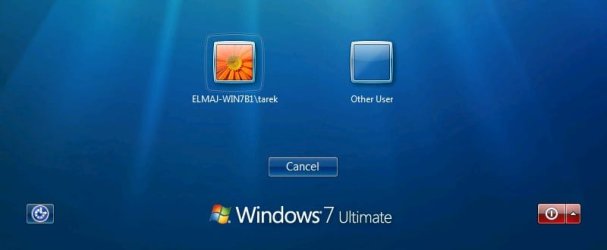
Example.jpg


Here's How:

   Note
Before getting started, if you have Windows set to automatically log on to a user account at startup, then do step 5 in Option One of the tutorial linked below to redo the settings to make sure that the correct user is selected and that the correct password is entered for the selected user.

How to Automatically Log On a User Account at Windows 7 Startup


1. Open the Control Panel (icons view), click on the User Accounts icon, and click on the Manage another account link. (see screenshot below)
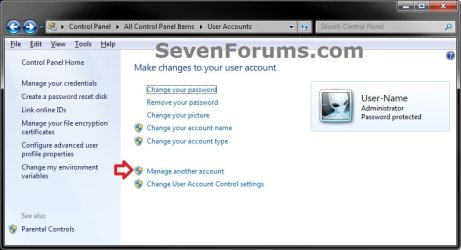
User-Accounts-1.jpg
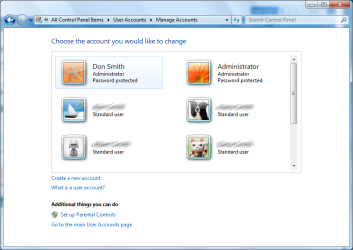
2. Make note of the user names for all user accounts that you have created in Windows 7 for the steps below. (see screenshot below)
NOTE: In addition to any name (ex: User-Name) of user accounts that you created, you will also have a Guest and the built-in Administrator (if enabled) accounts by default.
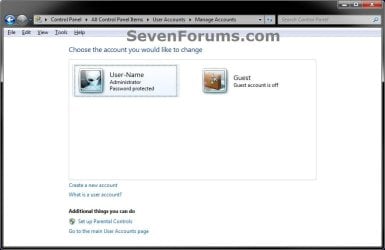
User-Accounts.jpg
3. In the Start Menu, type regedit in the search box and press Enter.

4. If prompted by UAC, then click on Yes.

5. In regedit, navigate to the location below. (see screenshot below step 6)

Code:
HKEY_LOCAL_MACHINE\SOFTWARE\Microsoft\Windows NT\CurrentVersion\ProfileList

6. If you have a .DEFAULT key in the left pane as a subkey under the ProfileList key, then right click on .DEFAULT, and click on Delete. (see screenshot below)
Default.jpg

A) Click on Yes to confirm to delete. (see screenshot below)
Delete.jpg
7. In the left pane under the ProfileList key, you will need to select and look at each S-1-5-xx subkey one at a time for the following items below.

   Warning
Please review each item listed below before deleting any S-1-5-xx subkey. You would only want to delete a S-1-5-xx subkey if you need to as outlined below.


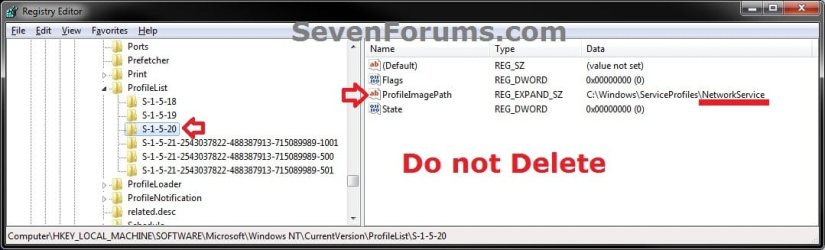
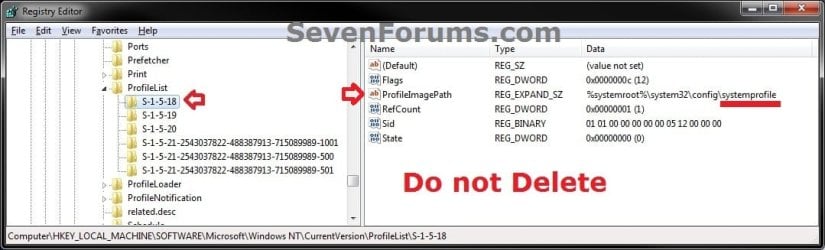
A) Do not delete S-1-5-xx subkeys in the left pane that have systemprofile, LocalService, and NetworkService names in the ProfileImagePath value in the right pane.
NOTE: These are system accounts used by Windows 7. (see screenshots below)
1.jpg
2.jpg
3.jpg
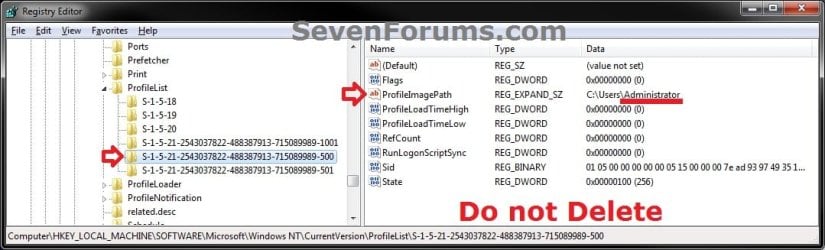
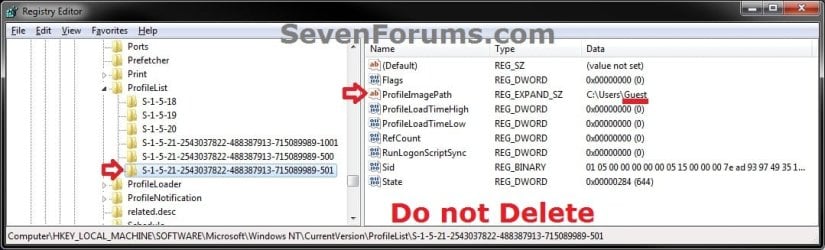
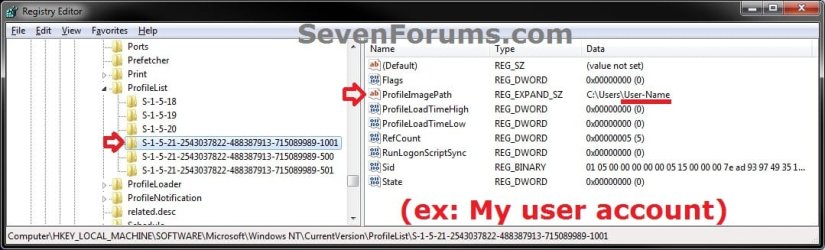
B) Do not delete S-1-5-xx subkeys in the left pane that have Guest, Administrator, or names of user accounts (ex: User-Name) in the ProfileImagePath value in the right pane from step 2 that you created in Windows 7. (see screenshots below)
4.jpg
5.jpg
6.jpg
C) If a selected S-1-5-xx subkey in the left pane has a user name in the ProfileImagePath value in the right pane that is not a user account that you have created in Windows 7 from step 2 or from step 7B, then right click on the S-1-5-xx subkey, click on Delete, and Yes to confirm.

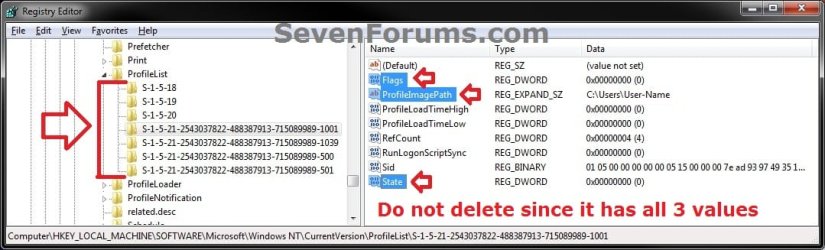
D) If any selected S-1-5-xx subkey in the left pane does not have at least all 3 of the default Flags, ProfileImagePath, and State values in it's right pane, then right click on the S-1-5-xx subkey, click on Delete, and Yes to confirm. (see screenshot below)
profiles.jpg
8. When finished, close regedit and User Accounts windows.

9. Log off or Switch User to test and see if the logon screen is now back to normal again with all user icons displayed.


That's it,
Shawn


Last edited:
Thank You Very Much!!
 

My Computer My Computer

Computer Manufacturer/Model Number
Advent/Roma
OS
Windows 7 Ultimate 32bit
CPU
Intel Celeron T3100
Motherboard
Phoenix 1.90AD, 12/04/2010
Memory
3GB
Graphics Card(s)
Intel GM45
Sound Card
Realtek High Definition Audio
Monitor(s) Displays
Generic PnP Monitor
Screen Resolution
1366x768
Hard Drives
320GB
You're most welcome Didaboss. :)
 

My Computer My Computer

Computer type
PC/Desktop
Computer Manufacturer/Model Number
Self built custom
OS
64-bit Windows 11 Pro for Workstations
CPU
Intel i7-8700K OC'd to 5 GHz
Motherboard
ASUS ROG Maximus XI Formula Z390
Memory
64 GB (4x16GB) G.SKILL TridentZ RGB DDR4 3600 MHz
Graphics Card(s)
ASUS ROG-STRIX-GTX1080TI-O11G-GAMING
Sound Card
Integrated
Monitor(s) Displays
2 x Samsung Odyssey G7 27"
Screen Resolution
2560x1440
Hard Drives
1TB Samsung 990 PRO M.2,
4TB Samsung 990 PRO PRO M.2,
TerraMaster F8 SSD Plus NAS
PSU
Seasonic Prime Titanium 850W
Case
Thermaltake Core P3
Cooling
Corsair Hydro H115i
Keyboard
Logitech wireless K800
Mouse
Logitech MX Master 4
Internet Speed
2 Gb/s Download and 100 Mb/s Upload
Antivirus
Malwarebyte Anti-Malware Premium
Browser
Google Chrome
Other Info
Logitech Z625 speaker system,
Logitech BRIO 4K Pro webcam,
HP Color LaserJet Pro MFP M477fdn,
APC SMART-UPS RT 1000 XL - SURT1000XLI,
Galaxy S23 Plus phone
How do we do the opposite

I have scoured and scoured Google for a way to automatically go to the login of the primary user or last user this is the second best thing.

i will not be using auto login/ (userspaswords2) as i still want a password to log on i just want to make it so it acts as the main user is the only user unless i click other users/change user
 

My Computer My Computer

Computer Manufacturer/Model Number
Me (Desktop/x64&Server/x32)/Dell (laptop/x32)
OS
Windows 7 Ultimate x64 & x32, Windows 98 (VM)
CPU
AMD Phenom II X4 850
Motherboard
ASUS
Memory
8 Gig
Graphics Card(s)
Geforce
Sound Card
Onboard
Monitor(s) Displays
2
Hard Drives
Desktop 5 (x3 500GB x1 750GB x1 1TB)
Server 3 (x1 60GB x2 2TB)
PSU
650W
Case
1mm Steel
Cooling
Heatsink/Fan Cold air from window
Hello Hhaddow, and welcome to Seven Forums.

I wouldn't recommend trying to get to have the "Other User" icon since that is an error that is not very functional.

You might see if the tutorial below to where you must enter the username and password to log on may work for you.

http://www.sevenforums.com/tutorials/61650-log-user-name-password.html

Hope this helps,
Shawn
 

My Computer My Computer

Computer type
PC/Desktop
Computer Manufacturer/Model Number
Self built custom
OS
64-bit Windows 11 Pro for Workstations
CPU
Intel i7-8700K OC'd to 5 GHz
Motherboard
ASUS ROG Maximus XI Formula Z390
Memory
64 GB (4x16GB) G.SKILL TridentZ RGB DDR4 3600 MHz
Graphics Card(s)
ASUS ROG-STRIX-GTX1080TI-O11G-GAMING
Sound Card
Integrated
Monitor(s) Displays
2 x Samsung Odyssey G7 27"
Screen Resolution
2560x1440
Hard Drives
1TB Samsung 990 PRO M.2,
4TB Samsung 990 PRO PRO M.2,
TerraMaster F8 SSD Plus NAS
PSU
Seasonic Prime Titanium 850W
Case
Thermaltake Core P3
Cooling
Corsair Hydro H115i
Keyboard
Logitech wireless K800
Mouse
Logitech MX Master 4
Internet Speed
2 Gb/s Download and 100 Mb/s Upload
Antivirus
Malwarebyte Anti-Malware Premium
Browser
Google Chrome
Other Info
Logitech Z625 speaker system,
Logitech BRIO 4K Pro webcam,
HP Color LaserJet Pro MFP M477fdn,
APC SMART-UPS RT 1000 XL - SURT1000XLI,
Galaxy S23 Plus phone
thanks but that was not what i wanted in fact i solved it just by doing the opposite of here (adding .Default to the profile list) as i wanted to keep the username without using autologin as i want to avoid displaying my admin user on login but still require passwords for all users/admin thanks anyway
 

My Computer My Computer

Computer Manufacturer/Model Number
Me (Desktop/x64&Server/x32)/Dell (laptop/x32)
OS
Windows 7 Ultimate x64 & x32, Windows 98 (VM)
CPU
AMD Phenom II X4 850
Motherboard
ASUS
Memory
8 Gig
Graphics Card(s)
Geforce
Sound Card
Onboard
Monitor(s) Displays
2
Hard Drives
Desktop 5 (x3 500GB x1 750GB x1 1TB)
Server 3 (x1 60GB x2 2TB)
PSU
650W
Case
1mm Steel
Cooling
Heatsink/Fan Cold air from window
Hhaddow,

I'm happy to hear that you got it sorted the way you wanted. Thank you for posting back with your results and solution. :)
 

My Computer My Computer

Computer type
PC/Desktop
Computer Manufacturer/Model Number
Self built custom
OS
64-bit Windows 11 Pro for Workstations
CPU
Intel i7-8700K OC'd to 5 GHz
Motherboard
ASUS ROG Maximus XI Formula Z390
Memory
64 GB (4x16GB) G.SKILL TridentZ RGB DDR4 3600 MHz
Graphics Card(s)
ASUS ROG-STRIX-GTX1080TI-O11G-GAMING
Sound Card
Integrated
Monitor(s) Displays
2 x Samsung Odyssey G7 27"
Screen Resolution
2560x1440
Hard Drives
1TB Samsung 990 PRO M.2,
4TB Samsung 990 PRO PRO M.2,
TerraMaster F8 SSD Plus NAS
PSU
Seasonic Prime Titanium 850W
Case
Thermaltake Core P3
Cooling
Corsair Hydro H115i
Keyboard
Logitech wireless K800
Mouse
Logitech MX Master 4
Internet Speed
2 Gb/s Download and 100 Mb/s Upload
Antivirus
Malwarebyte Anti-Malware Premium
Browser
Google Chrome
Other Info
Logitech Z625 speaker system,
Logitech BRIO 4K Pro webcam,
HP Color LaserJet Pro MFP M477fdn,
APC SMART-UPS RT 1000 XL - SURT1000XLI,
Galaxy S23 Plus phone
Not helping

The regedit suggestion does not work for me. there is nothing in my registry that's any different from the screens shots outlined. Anyone else having trouble with this?
 

My Computer My Computer

OS
Windows 7 Home Premium 64bit
Hello Don, and welcome to Seven Forums.

Could you export and upload your ProfileList key from step 5? I'll be happy to take a look at it to see if I may be able to spot anything as a cause. In addition, could you give more detais about your issue to see if there may be anything else at play? :)
 

My Computer My Computer

Computer type
PC/Desktop
Computer Manufacturer/Model Number
Self built custom
OS
64-bit Windows 11 Pro for Workstations
CPU
Intel i7-8700K OC'd to 5 GHz
Motherboard
ASUS ROG Maximus XI Formula Z390
Memory
64 GB (4x16GB) G.SKILL TridentZ RGB DDR4 3600 MHz
Graphics Card(s)
ASUS ROG-STRIX-GTX1080TI-O11G-GAMING
Sound Card
Integrated
Monitor(s) Displays
2 x Samsung Odyssey G7 27"
Screen Resolution
2560x1440
Hard Drives
1TB Samsung 990 PRO M.2,
4TB Samsung 990 PRO PRO M.2,
TerraMaster F8 SSD Plus NAS
PSU
Seasonic Prime Titanium 850W
Case
Thermaltake Core P3
Cooling
Corsair Hydro H115i
Keyboard
Logitech wireless K800
Mouse
Logitech MX Master 4
Internet Speed
2 Gb/s Download and 100 Mb/s Upload
Antivirus
Malwarebyte Anti-Malware Premium
Browser
Google Chrome
Other Info
Logitech Z625 speaker system,
Logitech BRIO 4K Pro webcam,
HP Color LaserJet Pro MFP M477fdn,
APC SMART-UPS RT 1000 XL - SURT1000XLI,
Galaxy S23 Plus phone
users.png
I have three other users of which one is "Guest". Wanna see what my registry looks like?
 

My Computer My Computer

OS
Windows 7 Home Premium 64bit
View attachment 196234
I have three other users of which one is "Guest". Wanna see what my registry looks like?

Yeah, if you could export and upload your ProfileList key from step 5 that would better help to see what may be wrong. :)

Are you having any other issues other than the "Other user" issue as in the tutorial?
 
Last edited:

My Computer My Computer

Computer type
PC/Desktop
Computer Manufacturer/Model Number
Self built custom
OS
64-bit Windows 11 Pro for Workstations
CPU
Intel i7-8700K OC'd to 5 GHz
Motherboard
ASUS ROG Maximus XI Formula Z390
Memory
64 GB (4x16GB) G.SKILL TridentZ RGB DDR4 3600 MHz
Graphics Card(s)
ASUS ROG-STRIX-GTX1080TI-O11G-GAMING
Sound Card
Integrated
Monitor(s) Displays
2 x Samsung Odyssey G7 27"
Screen Resolution
2560x1440
Hard Drives
1TB Samsung 990 PRO M.2,
4TB Samsung 990 PRO PRO M.2,
TerraMaster F8 SSD Plus NAS
PSU
Seasonic Prime Titanium 850W
Case
Thermaltake Core P3
Cooling
Corsair Hydro H115i
Keyboard
Logitech wireless K800
Mouse
Logitech MX Master 4
Internet Speed
2 Gb/s Download and 100 Mb/s Upload
Antivirus
Malwarebyte Anti-Malware Premium
Browser
Google Chrome
Other Info
Logitech Z625 speaker system,
Logitech BRIO 4K Pro webcam,
HP Color LaserJet Pro MFP M477fdn,
APC SMART-UPS RT 1000 XL - SURT1000XLI,
Galaxy S23 Plus phone
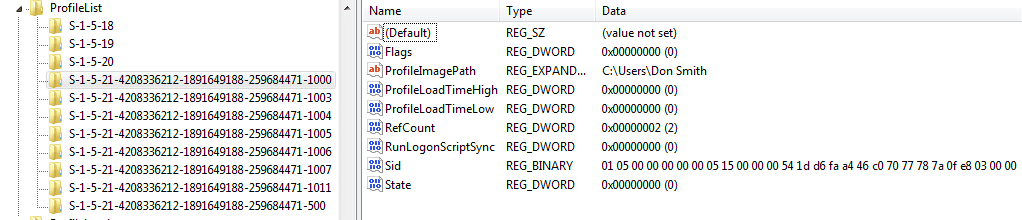
profile list in regedit.png
Hopefully I've followed the instructions right this time :)
 

My Computer My Computer

OS
Windows 7 Home Premium 64bit
That's great news Don. Don't sweat it. I'm just happy that you got it sorted. :)
 

My Computer My Computer

Computer type
PC/Desktop
Computer Manufacturer/Model Number
Self built custom
OS
64-bit Windows 11 Pro for Workstations
CPU
Intel i7-8700K OC'd to 5 GHz
Motherboard
ASUS ROG Maximus XI Formula Z390
Memory
64 GB (4x16GB) G.SKILL TridentZ RGB DDR4 3600 MHz
Graphics Card(s)
ASUS ROG-STRIX-GTX1080TI-O11G-GAMING
Sound Card
Integrated
Monitor(s) Displays
2 x Samsung Odyssey G7 27"
Screen Resolution
2560x1440
Hard Drives
1TB Samsung 990 PRO M.2,
4TB Samsung 990 PRO PRO M.2,
TerraMaster F8 SSD Plus NAS
PSU
Seasonic Prime Titanium 850W
Case
Thermaltake Core P3
Cooling
Corsair Hydro H115i
Keyboard
Logitech wireless K800
Mouse
Logitech MX Master 4
Internet Speed
2 Gb/s Download and 100 Mb/s Upload
Antivirus
Malwarebyte Anti-Malware Premium
Browser
Google Chrome
Other Info
Logitech Z625 speaker system,
Logitech BRIO 4K Pro webcam,
HP Color LaserJet Pro MFP M477fdn,
APC SMART-UPS RT 1000 XL - SURT1000XLI,
Galaxy S23 Plus phone
I had NONE of the Registry problems as listed in this fix BUT I fixed my OTHER USER bug.

(After a crash that now calls my Windows 7 installation (Recovered) I had this OTHER USER bug for a year or two!) Solved it finally.
OTHER USER only logon bug... ONE BLANK ICON..says OTHER USER. Must type in both logon name and password to get into any logon account. Stupid annoying thing to happen in Windows 7.
I fixed it! Go to RUN or Search..Type: "secpol.msc"

then go to local policies/security options/interactive logon: do not display last user name ...make it: DISABLED
http://www.sevenforums.com/tutorials/61650-log-user-name-password.html
Then TYPE in RUN or Search:
"control userpasswords2" for user controls. Check users must enter a user name ..reboot...GOT my old logon with Picture and just type in password and has all the other icons back of other accounts!
http://www.sevenforums.com/tutorials/377-log-automatically-startup.html
I did not have the .DEFAULT to delete and other stuff in Regedit method of trying to fix this found on the web. I had put in .DEFAULT key in Regedit to see what it would do and then ONLY my Main Account was shown.. by deleted the added key .DEFAULT all the icons were shown too.
Very happy now but it did take 3 hours of web search and screwing around with all these solutions that did nothing.
 
Last edited by a moderator:

My Computer My Computer

OS
WINDOWS 7 64 bit
Solved my problem just by deleting the .DEFAULT entry in the registry. If sevenforums is as useful on other issues as it was on this, I'm here to stay! Thanks for the help.
 

My Computer My Computer

OS
Windows 7 Home Premium 64 bit
Hi Brink

I Have The same Prob & I Tried Your solution & I still have the prob

& these are photos for registry

0001vrn.jpg


0002by.jpg


0003zl.jpg


0004r.jpg


0005ee.jpg


0006jf.jpg


0007dq.jpg
 
Last edited by a moderator:

My Computer My Computer

OS
Windows 7 Ultimate x64
Hello click1, and welcome to Seven Forums.

It appears that you need to delete this registry key in your screenshot below. :)

0005ee.jpg
 

My Computer My Computer

Computer type
PC/Desktop
Computer Manufacturer/Model Number
Self built custom
OS
64-bit Windows 11 Pro for Workstations
CPU
Intel i7-8700K OC'd to 5 GHz
Motherboard
ASUS ROG Maximus XI Formula Z390
Memory
64 GB (4x16GB) G.SKILL TridentZ RGB DDR4 3600 MHz
Graphics Card(s)
ASUS ROG-STRIX-GTX1080TI-O11G-GAMING
Sound Card
Integrated
Monitor(s) Displays
2 x Samsung Odyssey G7 27"
Screen Resolution
2560x1440
Hard Drives
1TB Samsung 990 PRO M.2,
4TB Samsung 990 PRO PRO M.2,
TerraMaster F8 SSD Plus NAS
PSU
Seasonic Prime Titanium 850W
Case
Thermaltake Core P3
Cooling
Corsair Hydro H115i
Keyboard
Logitech wireless K800
Mouse
Logitech MX Master 4
Internet Speed
2 Gb/s Download and 100 Mb/s Upload
Antivirus
Malwarebyte Anti-Malware Premium
Browser
Google Chrome
Other Info
Logitech Z625 speaker system,
Logitech BRIO 4K Pro webcam,
HP Color LaserJet Pro MFP M477fdn,
APC SMART-UPS RT 1000 XL - SURT1000XLI,
Galaxy S23 Plus phone
:):):)

thank u

I did that & The prob is solved
 

My Computer My Computer

OS
Windows 7 Ultimate x64
You're most welcome. I'm happy to hear it's fixed now. :)
 

My Computer My Computer

Computer type
PC/Desktop
Computer Manufacturer/Model Number
Self built custom
OS
64-bit Windows 11 Pro for Workstations
CPU
Intel i7-8700K OC'd to 5 GHz
Motherboard
ASUS ROG Maximus XI Formula Z390
Memory
64 GB (4x16GB) G.SKILL TridentZ RGB DDR4 3600 MHz
Graphics Card(s)
ASUS ROG-STRIX-GTX1080TI-O11G-GAMING
Sound Card
Integrated
Monitor(s) Displays
2 x Samsung Odyssey G7 27"
Screen Resolution
2560x1440
Hard Drives
1TB Samsung 990 PRO M.2,
4TB Samsung 990 PRO PRO M.2,
TerraMaster F8 SSD Plus NAS
PSU
Seasonic Prime Titanium 850W
Case
Thermaltake Core P3
Cooling
Corsair Hydro H115i
Keyboard
Logitech wireless K800
Mouse
Logitech MX Master 4
Internet Speed
2 Gb/s Download and 100 Mb/s Upload
Antivirus
Malwarebyte Anti-Malware Premium
Browser
Google Chrome
Other Info
Logitech Z625 speaker system,
Logitech BRIO 4K Pro webcam,
HP Color LaserJet Pro MFP M477fdn,
APC SMART-UPS RT 1000 XL - SURT1000XLI,
Galaxy S23 Plus phone
Back
Top