Transparency - Enable or Disable

How to Enable or Disable Transparency in Windows 7

   Information
This will show you how to enable or disable tranparency for windows, the Start Menu, and the taskbar in Windows 7.

The Windows 7 Starter and Home Basic editions do not have Aero Transparency included in them.

   Warning
You will not have the Transparency option if you have a Basic and High Contrast Theme instead of a Aero Theme.

Aero Requirements to be Enabled in Windows 7
NOTE: If Aero is not enabled, then Transparency will not work even when enabled.
  • 1 GHz 32-bit or 64-bit processor
  • 1 GB of system memory
  • A graphics card with support for DirectX 9 graphics with at least 128 MB of memory.
  • The graphics card must support Pixel Shader 2.0 and the Windows Display Driver Model (WDDM).
  • You must be have True Color (32 bit) set instead of High Color (16 bit).
  • Be sure to have the correct Windows 7 driver version installed for your graphics card/chip.
  • The desktop composition and Animate controls and elements inside windows options enabled in Visual Effects.
  • Refresh or update your WEI score.
  • The Desktop Window Manager Session Manager and Themes Services need to be set to Start and Automatic.


OPTION ONE

To Enable or Disable Transparency in Personalization

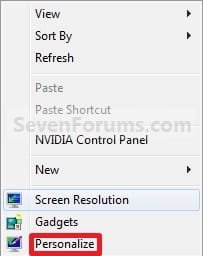
1. Right click on a empty space on the desktop and click on Personalize. (See screenshot below)
183d1230590680-transparency-enable-disable-right_click.jpg

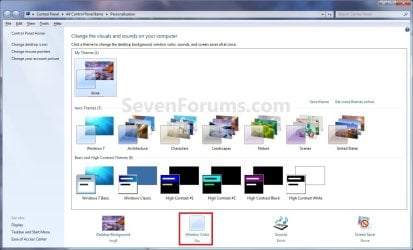
2. Click on the Window Color link at the bottom of the window. (See screenshot below)
NOTE: The name in gray under Windows Color is the current color selected. Personalize.jpg
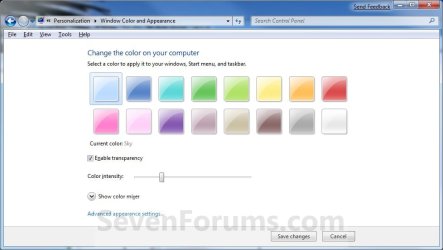
3. To Enable Transparency A) Check the Enable transparency box. (See screenshot below step 5)

B) Adjust your Color intensity slider for how transparent you want it.
  • Slide LEFT = More transparent
  • Slide RIGHT = Less to not transparent
C) Go to step 5.
4. To Disable Transparency A) Uncheck the Enable transparency box. (See screenshot below)
5. Click on Save changes. Color_and_Appearance-1.jpg


OPTION TWO

To Enable or Disable Transparency in Visual Effects

1. Open Visual Effects.

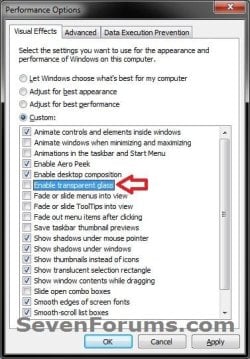
2. To Enable Transparency A) Check the Enable transparent glass box, and click on OK. (see screenshot below) Performance_Options.jpg
B) Go to step 4.
3. To Disable Transparency A) Uncheck the Enable transparent glass box, and click on OK. (see screenshot above)


OPTION THREE

Using a REG File Download

1. To Enable Transparency
NOTE: This is the default setting. A) Click on the download button below to download the file below. Enable_Transparent_Glass.reg

Download


B) Go to step 3.
2. To Disable Transparency A) Click on the download button below to download the file below.
Disable_Transparent_Glass.reg

Download


3. Save the .reg file to the Desktop.

4. Right click on the downloaded .reg file, and click on Merge.

5. Click on Run, Yes (Windows 7) or Continue (Vista), Yes, and OK when prompted.

6. Log off and log on, or restart the computer to apply the changes.

7. When done, you can delete the downloaded .reg file if you like.


OPTION FOUR

To Enable or Disable Transparency in Registry Editor

1. Open the Start Menu, then type regedit in the search boxand press Enter.

2. If prompted by UAC, then click on Yes (Windows 7) or Continue (Vista).

3. In regedit, navigate to the location below. (see screenshot below) HKEY_CURRENT_USER\Software\Microsoft\Windows\DWM
REG-1.jpg
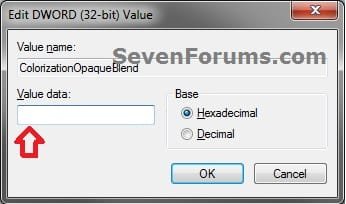
4. In the right pane, double click on ColorizationOpaqueBlend. (see screenshot above)

5. To Enable Transparency A) Type in 0, and click on OK. (see screenshot below)
NOTE: This is the default setting.
REG-2.jpg
B) Go to step 7.
6. To Disable Transparency A) Type in 1, and click on OK. (see screenshot above)
7. Close regedit.

8. Log off and log on, or restart the computer to apply the changes.
That's it,
Shawn


Attachments
Last edited:
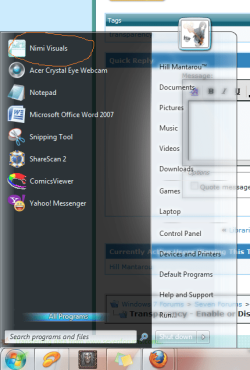
hello ..i used nimi visuals software to make start menu become transparent and it done good, but i think better to me to do manually..can u show me how to make start menu become transparent manually or with using registry..?
 

Attachments

  • Untitled.png
    Untitled.png
    53.6 KB · Views: 297,549
Last edited by a moderator:

My Computer

Computer Manufacturer/Model Number
GantZ™
OS
Windows 7 Eternity™ 2009
CPU
Boing-boing Inside™
Hello Hill,

You can just follow the tutorial to enable Transparency to make the Start Menu transparent if this is what you meant.

Hope this helps,
Shawn
 

My Computer

Computer type
PC/Desktop
Computer Manufacturer/Model Number
Self built custom
OS
64-bit Windows 11 Pro for Workstations
CPU
Intel i7-8700K OC'd to 5 GHz
Motherboard
ASUS ROG Maximus XI Formula Z390
Memory
64 GB (4x16GB) G.SKILL TridentZ RGB DDR4 3600 MHz
Graphics Card(s)
ASUS ROG-STRIX-GTX1080TI-O11G-GAMING
Sound Card
Integrated
Monitor(s) Displays
2 x Samsung Odyssey G7 27"
Screen Resolution
2560x1440
Hard Drives
1TB Samsung 990 PRO M.2,
4TB Samsung 990 PRO PRO M.2,
TerraMaster F8 SSD Plus NAS
PSU
Seasonic Prime Titanium 850W
Case
Thermaltake Core P3
Cooling
Corsair Hydro H115i
Keyboard
Logitech wireless K800
Mouse
Logitech MX Master 4
Internet Speed
2 Gb/s Download and 100 Mb/s Upload
Antivirus
Malwarebyte Anti-Malware Premium
Browser
Google Chrome
Other Info
Logitech Z625 speaker system,
Logitech BRIO 4K Pro webcam,
HP Color LaserJet Pro MFP M477fdn,
APC SMART-UPS RT 1000 XL - SURT1000XLI,
Galaxy S23 Plus phone
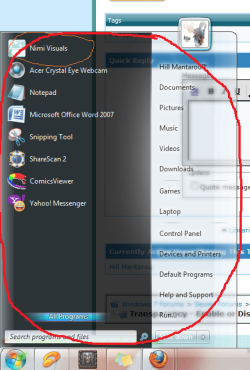
that just will make taskbar transparent right?.. that i can see in your tutorial..but what i mean is the whole "start menu"..
can u find a way to make it become transparent?? coz i don really like a 3rd party software.
 

Attachments

  • Untitled.png
    Untitled.png
    54.2 KB · Views: 295,965

My Computer

Computer Manufacturer/Model Number
GantZ™
OS
Windows 7 Eternity™ 2009
CPU
Boing-boing Inside™
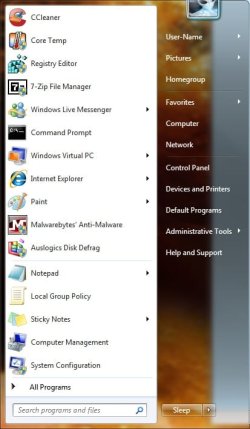
Yes, it will make the dark side of the default Start Menu transparent, as well as the taskbar and Windows Explorer window borders.

Start_Menu.jpg
 

My Computer

Computer type
PC/Desktop
Computer Manufacturer/Model Number
Self built custom
OS
64-bit Windows 11 Pro for Workstations
CPU
Intel i7-8700K OC'd to 5 GHz
Motherboard
ASUS ROG Maximus XI Formula Z390
Memory
64 GB (4x16GB) G.SKILL TridentZ RGB DDR4 3600 MHz
Graphics Card(s)
ASUS ROG-STRIX-GTX1080TI-O11G-GAMING
Sound Card
Integrated
Monitor(s) Displays
2 x Samsung Odyssey G7 27"
Screen Resolution
2560x1440
Hard Drives
1TB Samsung 990 PRO M.2,
4TB Samsung 990 PRO PRO M.2,
TerraMaster F8 SSD Plus NAS
PSU
Seasonic Prime Titanium 850W
Case
Thermaltake Core P3
Cooling
Corsair Hydro H115i
Keyboard
Logitech wireless K800
Mouse
Logitech MX Master 4
Internet Speed
2 Gb/s Download and 100 Mb/s Upload
Antivirus
Malwarebyte Anti-Malware Premium
Browser
Google Chrome
Other Info
Logitech Z625 speaker system,
Logitech BRIO 4K Pro webcam,
HP Color LaserJet Pro MFP M477fdn,
APC SMART-UPS RT 1000 XL - SURT1000XLI,
Galaxy S23 Plus phone
thanks brink..but i think u did't really understand what im asking..:(
anyway..thanks 4 ur help..:)
 

My Computer

Computer Manufacturer/Model Number
GantZ™
OS
Windows 7 Eternity™ 2009
CPU
Boing-boing Inside™
Hill,

Well, the Start Menu's dark side is transparent using this method after enabling transparency and sliding the intensity level to the left. What did you want instead?
 

My Computer

Computer type
PC/Desktop
Computer Manufacturer/Model Number
Self built custom
OS
64-bit Windows 11 Pro for Workstations
CPU
Intel i7-8700K OC'd to 5 GHz
Motherboard
ASUS ROG Maximus XI Formula Z390
Memory
64 GB (4x16GB) G.SKILL TridentZ RGB DDR4 3600 MHz
Graphics Card(s)
ASUS ROG-STRIX-GTX1080TI-O11G-GAMING
Sound Card
Integrated
Monitor(s) Displays
2 x Samsung Odyssey G7 27"
Screen Resolution
2560x1440
Hard Drives
1TB Samsung 990 PRO M.2,
4TB Samsung 990 PRO PRO M.2,
TerraMaster F8 SSD Plus NAS
PSU
Seasonic Prime Titanium 850W
Case
Thermaltake Core P3
Cooling
Corsair Hydro H115i
Keyboard
Logitech wireless K800
Mouse
Logitech MX Master 4
Internet Speed
2 Gb/s Download and 100 Mb/s Upload
Antivirus
Malwarebyte Anti-Malware Premium
Browser
Google Chrome
Other Info
Logitech Z625 speaker system,
Logitech BRIO 4K Pro webcam,
HP Color LaserJet Pro MFP M477fdn,
APC SMART-UPS RT 1000 XL - SURT1000XLI,
Galaxy S23 Plus phone
Hill,

Well, the Start Menu's dark side is transparent using this method after enabling transparency and sliding the intensity level to the left. What did you want instead?
He is wanting the entire start menu transparent (including were the recently opened items appear)

This is only possible in a custom theme
 

My Computer

Computer Manufacturer/Model Number
Compal JFT02 (Custom Build Laptop)
OS
Windows 7 Home Premium x64 - Mac OS X 10.6.4 x64
CPU
Intel Core 2 Duo T9300 2.5 GHz
Motherboard
JFT02
Memory
4GB Kingston DDR2-800
Graphics Card(s)
NVIDIA Geforce 8600M GT (512MB Model)
Sound Card
Realtek HD Audio
Monitor(s) Displays
WUXGA Standard Laptop Display
Screen Resolution
1680*1050
Hard Drives
Toshiba 320GB 5400RPM Laptop HD
PSU
Standard Laptop Power Supply
Case
Standard Laptop Case
Cooling
Standard Laptop Cooling
Keyboard
Standard Laptop 105 Key-Keyboard
Mouse
Synaptics Touchpad
Internet Speed
Verizion Online DSL 3360/864 kbs (dl/up)
Ah, then yes only with a 3rd party custom theme.
 

My Computer

Computer type
PC/Desktop
Computer Manufacturer/Model Number
Self built custom
OS
64-bit Windows 11 Pro for Workstations
CPU
Intel i7-8700K OC'd to 5 GHz
Motherboard
ASUS ROG Maximus XI Formula Z390
Memory
64 GB (4x16GB) G.SKILL TridentZ RGB DDR4 3600 MHz
Graphics Card(s)
ASUS ROG-STRIX-GTX1080TI-O11G-GAMING
Sound Card
Integrated
Monitor(s) Displays
2 x Samsung Odyssey G7 27"
Screen Resolution
2560x1440
Hard Drives
1TB Samsung 990 PRO M.2,
4TB Samsung 990 PRO PRO M.2,
TerraMaster F8 SSD Plus NAS
PSU
Seasonic Prime Titanium 850W
Case
Thermaltake Core P3
Cooling
Corsair Hydro H115i
Keyboard
Logitech wireless K800
Mouse
Logitech MX Master 4
Internet Speed
2 Gb/s Download and 100 Mb/s Upload
Antivirus
Malwarebyte Anti-Malware Premium
Browser
Google Chrome
Other Info
Logitech Z625 speaker system,
Logitech BRIO 4K Pro webcam,
HP Color LaserJet Pro MFP M477fdn,
APC SMART-UPS RT 1000 XL - SURT1000XLI,
Galaxy S23 Plus phone
owh..i see..
looks like i gonna used 3rd party software anyway..:rolleyes:
anyway..thanks brink n zidane:)
 

My Computer

Computer Manufacturer/Model Number
GantZ™
OS
Windows 7 Eternity™ 2009
CPU
Boing-boing Inside™
You're welcome Hill. :)
 

My Computer

Computer type
PC/Desktop
Computer Manufacturer/Model Number
Self built custom
OS
64-bit Windows 11 Pro for Workstations
CPU
Intel i7-8700K OC'd to 5 GHz
Motherboard
ASUS ROG Maximus XI Formula Z390
Memory
64 GB (4x16GB) G.SKILL TridentZ RGB DDR4 3600 MHz
Graphics Card(s)
ASUS ROG-STRIX-GTX1080TI-O11G-GAMING
Sound Card
Integrated
Monitor(s) Displays
2 x Samsung Odyssey G7 27"
Screen Resolution
2560x1440
Hard Drives
1TB Samsung 990 PRO M.2,
4TB Samsung 990 PRO PRO M.2,
TerraMaster F8 SSD Plus NAS
PSU
Seasonic Prime Titanium 850W
Case
Thermaltake Core P3
Cooling
Corsair Hydro H115i
Keyboard
Logitech wireless K800
Mouse
Logitech MX Master 4
Internet Speed
2 Gb/s Download and 100 Mb/s Upload
Antivirus
Malwarebyte Anti-Malware Premium
Browser
Google Chrome
Other Info
Logitech Z625 speaker system,
Logitech BRIO 4K Pro webcam,
HP Color LaserJet Pro MFP M477fdn,
APC SMART-UPS RT 1000 XL - SURT1000XLI,
Galaxy S23 Plus phone
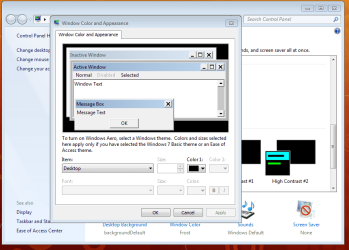
I can't enable transparency. I only get this screen.
 

Attachments

  • Capture.PNG
    Capture.PNG
    35.9 KB · Views: 4,700

My Computer

OS
Windows 7 Home Premium
Hello Lems, and welcome to Seven Forums.

Double check to make sure that you have a Aero Theme selected.

Hope this helps,
Shawn
 

My Computer

Computer type
PC/Desktop
Computer Manufacturer/Model Number
Self built custom
OS
64-bit Windows 11 Pro for Workstations
CPU
Intel i7-8700K OC'd to 5 GHz
Motherboard
ASUS ROG Maximus XI Formula Z390
Memory
64 GB (4x16GB) G.SKILL TridentZ RGB DDR4 3600 MHz
Graphics Card(s)
ASUS ROG-STRIX-GTX1080TI-O11G-GAMING
Sound Card
Integrated
Monitor(s) Displays
2 x Samsung Odyssey G7 27"
Screen Resolution
2560x1440
Hard Drives
1TB Samsung 990 PRO M.2,
4TB Samsung 990 PRO PRO M.2,
TerraMaster F8 SSD Plus NAS
PSU
Seasonic Prime Titanium 850W
Case
Thermaltake Core P3
Cooling
Corsair Hydro H115i
Keyboard
Logitech wireless K800
Mouse
Logitech MX Master 4
Internet Speed
2 Gb/s Download and 100 Mb/s Upload
Antivirus
Malwarebyte Anti-Malware Premium
Browser
Google Chrome
Other Info
Logitech Z625 speaker system,
Logitech BRIO 4K Pro webcam,
HP Color LaserJet Pro MFP M477fdn,
APC SMART-UPS RT 1000 XL - SURT1000XLI,
Galaxy S23 Plus phone
Thanks, Shawn!

I've tried to select many different Aero Themes, but I still get the same window. The first time I was playing around with the different themes I remember being able to adjust the transparency, but suddenly all I get is this window. Do you know what else it could be?
 

My Computer

OS
Windows 7 Home Premium
Lems,

Double check the items in the red WARNING box at the top of the tutorial to see if one of them may be the issue.
 

My Computer

Computer type
PC/Desktop
Computer Manufacturer/Model Number
Self built custom
OS
64-bit Windows 11 Pro for Workstations
CPU
Intel i7-8700K OC'd to 5 GHz
Motherboard
ASUS ROG Maximus XI Formula Z390
Memory
64 GB (4x16GB) G.SKILL TridentZ RGB DDR4 3600 MHz
Graphics Card(s)
ASUS ROG-STRIX-GTX1080TI-O11G-GAMING
Sound Card
Integrated
Monitor(s) Displays
2 x Samsung Odyssey G7 27"
Screen Resolution
2560x1440
Hard Drives
1TB Samsung 990 PRO M.2,
4TB Samsung 990 PRO PRO M.2,
TerraMaster F8 SSD Plus NAS
PSU
Seasonic Prime Titanium 850W
Case
Thermaltake Core P3
Cooling
Corsair Hydro H115i
Keyboard
Logitech wireless K800
Mouse
Logitech MX Master 4
Internet Speed
2 Gb/s Download and 100 Mb/s Upload
Antivirus
Malwarebyte Anti-Malware Premium
Browser
Google Chrome
Other Info
Logitech Z625 speaker system,
Logitech BRIO 4K Pro webcam,
HP Color LaserJet Pro MFP M477fdn,
APC SMART-UPS RT 1000 XL - SURT1000XLI,
Galaxy S23 Plus phone
Ah, now it works! I somehow managed to overlook the "Refresh or update your WEI score".

Thanks alot!
 

My Computer

OS
Windows 7 Home Premium
That's great news Lems. I'm happy to hear that you got it sorted. :)
 

My Computer

Computer type
PC/Desktop
Computer Manufacturer/Model Number
Self built custom
OS
64-bit Windows 11 Pro for Workstations
CPU
Intel i7-8700K OC'd to 5 GHz
Motherboard
ASUS ROG Maximus XI Formula Z390
Memory
64 GB (4x16GB) G.SKILL TridentZ RGB DDR4 3600 MHz
Graphics Card(s)
ASUS ROG-STRIX-GTX1080TI-O11G-GAMING
Sound Card
Integrated
Monitor(s) Displays
2 x Samsung Odyssey G7 27"
Screen Resolution
2560x1440
Hard Drives
1TB Samsung 990 PRO M.2,
4TB Samsung 990 PRO PRO M.2,
TerraMaster F8 SSD Plus NAS
PSU
Seasonic Prime Titanium 850W
Case
Thermaltake Core P3
Cooling
Corsair Hydro H115i
Keyboard
Logitech wireless K800
Mouse
Logitech MX Master 4
Internet Speed
2 Gb/s Download and 100 Mb/s Upload
Antivirus
Malwarebyte Anti-Malware Premium
Browser
Google Chrome
Other Info
Logitech Z625 speaker system,
Logitech BRIO 4K Pro webcam,
HP Color LaserJet Pro MFP M477fdn,
APC SMART-UPS RT 1000 XL - SURT1000XLI,
Galaxy S23 Plus phone
Aero transparency issues

I was having the same problem as Lems. I was also successful in enabling Transparency after I refreshed the WEI score. But the overall visual experience is just plain awful. I get blockiness in images, and the window edges are blurred and have lines around them. Even the contents inside the windows are unreadable unless I pass my cursor over the contents. I am assuming that my system meets all of the requirements otherwise Aero would not have been enabled. The tutorial itself lists several things to check, but provides no instructions for doing so. Any help you can provide will be appreciated.
 

My Computer

OS
windows 7
Hello Bhaskar, and welcome to Seven Forums.

The red WARNING box at the top of the tutorial includes links that you can click on to help show you how to. The ones that do not, are hardware related and you must check your hardware specs (ex: graphics card) for that information instead.

You might also check to make sure that you have the latest graphics card drivers installed as well to see if that may help.

Hope this helps for now,
Shawn
 

My Computer

Computer type
PC/Desktop
Computer Manufacturer/Model Number
Self built custom
OS
64-bit Windows 11 Pro for Workstations
CPU
Intel i7-8700K OC'd to 5 GHz
Motherboard
ASUS ROG Maximus XI Formula Z390
Memory
64 GB (4x16GB) G.SKILL TridentZ RGB DDR4 3600 MHz
Graphics Card(s)
ASUS ROG-STRIX-GTX1080TI-O11G-GAMING
Sound Card
Integrated
Monitor(s) Displays
2 x Samsung Odyssey G7 27"
Screen Resolution
2560x1440
Hard Drives
1TB Samsung 990 PRO M.2,
4TB Samsung 990 PRO PRO M.2,
TerraMaster F8 SSD Plus NAS
PSU
Seasonic Prime Titanium 850W
Case
Thermaltake Core P3
Cooling
Corsair Hydro H115i
Keyboard
Logitech wireless K800
Mouse
Logitech MX Master 4
Internet Speed
2 Gb/s Download and 100 Mb/s Upload
Antivirus
Malwarebyte Anti-Malware Premium
Browser
Google Chrome
Other Info
Logitech Z625 speaker system,
Logitech BRIO 4K Pro webcam,
HP Color LaserJet Pro MFP M477fdn,
APC SMART-UPS RT 1000 XL - SURT1000XLI,
Galaxy S23 Plus phone
same problem with me
57415d1267377374-transparency-enable-disable-capture.png


70621d1272775476-transparency-enable-disable-performance_options.jpg

in my side my win dont show these options
enable aero theme
enable transparent glass
any idea about this


and i cant copy two files in system32
dwm.exe
uDWM.dll

it says u dont have permission i m using administrator account when i try with parental user it ask for administrator password i enter password and again same error try again skip cancel
u dont have permission
 
Last edited:

My Computer

Computer Manufacturer/Model Number
Asus
OS
Windows 7 ultimate
CPU
Intel core i3 2.6
Motherboard
Asus
Memory
4gb
Graphics Card(s)
nivdia 512
Sound Card
Asus
Monitor(s) Displays
TFT
Hard Drives
Seagate 250gb
PSU
Orange
Case
Tower
Cooling
Fan
Back
Top