KB3083324 Any Info please

The nonsense MSpy has been pulling lately has ensured that, unless MSpy changes its present course back to the direction it had been on when Win 7 and Office 2010 came out, Win 7 and Office 2010 will be the last MS products I will ever use. I doubt I am alone in my feelings and that will most likely cost MSpy in the long run.
I concur that you are not alone in your feelings. I could be wrong in my estimate that the number of people that will (or can) stop using MS software is insignificant. The good news is: my estimate means nothing. It is just an opinion.

Businesses are a huge portion of MSpy's customer base. I seriously doubt they are going to be very receptive to MSpy's spyware.
 

My Computer

Computer type
PC/Desktop
Computer Manufacturer/Model Number
Custom Build
OS
Win 7 Ultimate 64 bit
CPU
Intel i7-3930K
Motherboard
ASUS P9X79 WS
Memory
Kingston HyperX Genesis 32GB Kit (8x4GB Modules) 1600MHz DDR
Graphics Card(s)
MSI R7850 Twin Frozr 2GD5/OC Radeon HD 7850 2GB 256-bit GDDR
Sound Card
Asus Xonar Essence STX
Monitor(s) Displays
3x Asus VG248QE 24", Vizio 32" TV
Screen Resolution
1920 x 1080, ?
Hard Drives
Samsung 128GB 840 Pro SSD (1),
Samsung 4TB 850 EVO SSDs (4)
Samsung 4TB 850 EVO SSDs (16) external backup drives used in 2.5" hot swap bays in the computer.
PSU
Corsair HX750w
Case
Antec Two Hundred v2 (modified)
Cooling
Cooler Master GeminII S524 120mm (fan replaced with a 140mm)
Keyboard
Logitech G510s
Mouse
Logitech M525 (two in use)
Internet Speed
=< 32Mbps down, 8Mbps up
Antivirus
AVAST!, MBAM, SAS, Spybot S&D (all but MBAM free) Glary Util
Browser
IE11
Other Info
LSI 9211-8i HBA card (8 SATA III ports), 2.5" & 3.5" Hot Swap Bays, HooToo HT-CR001 PCI-E to USB 3.0 Internal Hub + 6 Slot Card Reader, and LG Model CH12LS28 BD-ROM Optical Drive. Also, ScanSnap S1500 ADF duplexing scanner, Canon 9000F flat bed scanner, Corsair SP2500 2.1 speakers, Samsung CLP 415nw laser color printer, Cyberpower PP2200SW UPS
THERE IS NO SPYWARE - you can disable 99% of it by not signing up for the Customer Experience program (or whatever this week's name for it is).
 

My Computer

Computer type
Laptop
Computer Manufacturer/Model Number
Asus K52F or Lenovo B51-80
OS
Win 7 x64 Home Premium (and x86 VirtualBox VM)/Win10
CPU
i3 370M/i7 6500U
Motherboard
Asus/Lenovo
Memory
8GB - finally :)/8GB
Graphics Card(s)
it's an i3, dude!/dual Intel&nVidia
Sound Card
onboard
Monitor(s) Displays
15.6" built-in
Screen Resolution
1366x768/1920x1080
Hard Drives
750GB Seagate internal
Sundry external drives attached to other computers on the local network
1TB SSD on the Lenovo
PSU
n/a
Internet Speed
as much as I can get - usually on a dongle/phone, so <1MB/s
Antivirus
MSE/Defender
Browser
IE11/12/Edge/Chrome/FF(if I must)
As far as I know I haven't signed up for any Customer Experience program but that might be a KB that slipped in without my knowledge.

Does this Customer Experience program by chance have a KB number?
 

My Computer

Computer type
PC/Desktop
Computer Manufacturer/Model Number
Home made Desktop
OS
Windows 10 Pro. 64/ version 1709 Windows 7 Pro/64
CPU
Intel i7-6800K @ 4.3
Motherboard
ASUS X-99 Deluxe II
Memory
Corsair Platinum 16 gig @2400
Graphics Card(s)
EVGA GTX 1070 OC
Monitor(s) Displays
Asus 27" LED LCD/VE278Q
Screen Resolution
1920-1080 or 1280-720 HDMI
Hard Drives
INTEL SSD 730-240 Gb Sata 3.0/
PSU
EVGA Platium 1200W
Case
Phanteks Luxe Tempered Glass 8 fans/ one radiator
Cooling
XSPC/ Water Cooled CPU
Keyboard
Das 4 Professional
Mouse
Logitech M705/MX Anywhere 2-S
Internet Speed
100 mbits
Antivirus
Microsoft Security Essentials/ Malwarebytes Premium 3.0/ SAS
Browser
I.E. 11 default/Firefox/ ISP Time Warner Cable/Spectrum
Other Info
LG BluRay Burner/
Sound system-KLipsch-THX/
Icy Dock ssd Hot Swap bays.

My Computer

Computer type
PC/Desktop
Computer Manufacturer/Model Number
Self Built
OS
Win 10 Pro x64
CPU
Intel I5-2500K @3.3GHz
Motherboard
Asrock P67 Extreme4
Memory
16GB G.Skill Ripjaws X (4x4GB)
Graphics Card(s)
EVGA GeForce 750 Ti SC 2GB
Sound Card
ASUS Xonar DG 5.1 Channels 24-bit 96KHz PCI Interface Sound
Monitor(s) Displays
auria eq2367
Screen Resolution
1920 x 1080
Hard Drives
250GB Samsung 850 EVO SSD
1TB WD Blue
1TB Hitachi
PSU
SeaSonic X 650W 80 Plus Gold
Case
Corsair Obsidian 750D
Cooling
Corsair H60, Three 140mm case fans
Keyboard
Logitech Wireless Keyboard K520
Mouse
Logitech Wireless Mouse M310
Internet Speed
Wave Broadband ~ 100 dn 5 up
Antivirus
Windows Defender, Malwarebytes Premium
Browser
Edge, IE11, Chrome
Other Info
Laptop specs: HP g7-1365dx /
CPU: AMD A6-3420M APU with Radeon(tm) HD Graphics /
RAM: Crucial 8Gb (2x4Gb) /
SSD: Crucial M4-CT128M4SSD2 ATA Device/ FW 000F /
GFX: AMD Radeon HD 6520G /
OS: Windows 10 Pro x64
Thanks Derek. I check and it's off.
Now I have to keep checking it to see if a sneaky Update turns in back on.
 

My Computer

Computer type
PC/Desktop
Computer Manufacturer/Model Number
Home made Desktop
OS
Windows 10 Pro. 64/ version 1709 Windows 7 Pro/64
CPU
Intel i7-6800K @ 4.3
Motherboard
ASUS X-99 Deluxe II
Memory
Corsair Platinum 16 gig @2400
Graphics Card(s)
EVGA GTX 1070 OC
Monitor(s) Displays
Asus 27" LED LCD/VE278Q
Screen Resolution
1920-1080 or 1280-720 HDMI
Hard Drives
INTEL SSD 730-240 Gb Sata 3.0/
PSU
EVGA Platium 1200W
Case
Phanteks Luxe Tempered Glass 8 fans/ one radiator
Cooling
XSPC/ Water Cooled CPU
Keyboard
Das 4 Professional
Mouse
Logitech M705/MX Anywhere 2-S
Internet Speed
100 mbits
Antivirus
Microsoft Security Essentials/ Malwarebytes Premium 3.0/ SAS
Browser
I.E. 11 default/Firefox/ ISP Time Warner Cable/Spectrum
Other Info
LG BluRay Burner/
Sound system-KLipsch-THX/
Icy Dock ssd Hot Swap bays.
On the other side of the coin:

There are users and companies that are intentionally allowing all Windows 7 telemetry to be gathered in the hopes of creating a better Windows product line.

Microsoft owns the operating system. They can do whatever they want with it* (within applicable laws). You are only licensed to use Microsoft's operating system.

*sure MS can upset some users. Doing so has not significantly hurt their market share - yet.


UserNameissues,
That is like changing a rule in the middle of the game. You don't do that. You buy a devices to use the operating system with the current eula, not with what the eula will be years later. Just my opinion.

I do have KB3083324 installed. No issues that I am aware of. I don't have a monitoring program to see if KB3083324 is contacting Microsoft for telemetry. Anybody know a good free monitoring programs for windows 7 to see if it contacts Microsoft when not using Microsoft services?
 

My Computer

Computer type
PC/Desktop
Computer Manufacturer/Model Number
Dell All in one Inspiron 2020
OS
W10 32 bit, XUbuntu 18.xx 64 bit
CPU
Intel(R) Celeron(R) CPU G1620T @ 2.40GHz, 2400 Mhz
Motherboard
Dell
Memory
4GB
Graphics Card(s)
Intel HD graphics
Sound Card
High Definition Audio Device
Monitor(s) Displays
20 inch Screen
Screen Resolution
W7=1280 x 720 & Linux Mint Xfce=1360 x 768
Hard Drives
500 GB hard drive
Keyboard
Usb
Mouse
Usb
Internet Speed
High-Speed
Antivirus
MSE
Browser
Main Browser Firefox
Other Info
I have done a clean install of Windows 7 using Dell re-installation disk (Dell sent me one). I also use Free Macrium reflect backup and restore.
Peronally I removed KB3083324 and replaced with KB3075851. Note: My choice and not recommended for everyone.

RE: CEIP.

Note: Personal choices again.

Check Task Scheduler> Microsoft>

CEIP - disable everything listed
Application Experience - disable
AutoChk - disable
 

My Computer

Computer type
Laptop
Computer Manufacturer/Model Number
ASUS
OS
Microsoft Windows 7 Home Premium 64-bit 7601 Multiprocessor Free Service Pack 1
CPU
AMD C-60 APU with Radeon(tm) HD Graphics
Motherboard
ASUSTeK COMPUTER INC. X501U
Memory
4.00 GB
Graphics Card(s)
AMD Radeon HD 6290 Graphics
Sound Card
(1) AMD High Definition Audio Device (2) Realtek High Defi
Screen Resolution
1366 x 768 x 32 bits (4294967296 colors) @ 60 Hz
Hard Drives
Hitachi HTS545050A7E380 SATA Disk Device
Antivirus
Comodo CIS & FW, SecureAplus App Whitelisting, Threatfire
Browser
Cyberfox 64bit, Opera 64bit, Airfox
Other Info
Spy-The-Spy, HitmanPro.Alert, Norton Connect Safe, MJRegWatcher, BitDefender TrafficLight, Voodoo Shield, Zemana AntiMalware
Peronally I removed KB3083324 and replaced with KB3075851. Note: My choice and not recommended for everyone.

RE: CEIP.

Note: Personal choices again.

Check Task Scheduler> Microsoft>

CEIP - disable everything listed
Application Experience - disable
AutoChk - disable

Callender
Just in case I decided to remove that.

How did you uninstall that & install KB3083324?

Did you do it from the windows 7 powershell?
 

My Computer

Computer type
PC/Desktop
Computer Manufacturer/Model Number
Dell All in one Inspiron 2020
OS
W10 32 bit, XUbuntu 18.xx 64 bit
CPU
Intel(R) Celeron(R) CPU G1620T @ 2.40GHz, 2400 Mhz
Motherboard
Dell
Memory
4GB
Graphics Card(s)
Intel HD graphics
Sound Card
High Definition Audio Device
Monitor(s) Displays
20 inch Screen
Screen Resolution
W7=1280 x 720 & Linux Mint Xfce=1360 x 768
Hard Drives
500 GB hard drive
Keyboard
Usb
Mouse
Usb
Internet Speed
High-Speed
Antivirus
MSE
Browser
Main Browser Firefox
Other Info
I have done a clean install of Windows 7 using Dell re-installation disk (Dell sent me one). I also use Free Macrium reflect backup and restore.
THERE IS NO SPYWARE - you can disable 99% of it by not signing up for the Customer Experience program (or whatever this week's name for it is).

:what:Seriously? That IS spyware.
 

My Computer

Computer type
PC/Desktop
Computer Manufacturer/Model Number
Custom Build
OS
Win 7 Ultimate 64 bit
CPU
Intel i7-3930K
Motherboard
ASUS P9X79 WS
Memory
Kingston HyperX Genesis 32GB Kit (8x4GB Modules) 1600MHz DDR
Graphics Card(s)
MSI R7850 Twin Frozr 2GD5/OC Radeon HD 7850 2GB 256-bit GDDR
Sound Card
Asus Xonar Essence STX
Monitor(s) Displays
3x Asus VG248QE 24", Vizio 32" TV
Screen Resolution
1920 x 1080, ?
Hard Drives
Samsung 128GB 840 Pro SSD (1),
Samsung 4TB 850 EVO SSDs (4)
Samsung 4TB 850 EVO SSDs (16) external backup drives used in 2.5" hot swap bays in the computer.
PSU
Corsair HX750w
Case
Antec Two Hundred v2 (modified)
Cooling
Cooler Master GeminII S524 120mm (fan replaced with a 140mm)
Keyboard
Logitech G510s
Mouse
Logitech M525 (two in use)
Internet Speed
=< 32Mbps down, 8Mbps up
Antivirus
AVAST!, MBAM, SAS, Spybot S&D (all but MBAM free) Glary Util
Browser
IE11
Other Info
LSI 9211-8i HBA card (8 SATA III ports), 2.5" & 3.5" Hot Swap Bays, HooToo HT-CR001 PCI-E to USB 3.0 Internal Hub + 6 Slot Card Reader, and LG Model CH12LS28 BD-ROM Optical Drive. Also, ScanSnap S1500 ADF duplexing scanner, Canon 9000F flat bed scanner, Corsair SP2500 2.1 speakers, Samsung CLP 415nw laser color printer, Cyberpower PP2200SW UPS
Peronally I removed KB3083324 and replaced with KB3075851. Note: My choice and not recommended for everyone.

RE: CEIP.

Note: Personal choices again.

Check Task Scheduler> Microsoft>

CEIP - disable everything listed
Application Experience - disable
AutoChk - disable

Callender
Just in case I decided to remove that.

How did you uninstall that & install KB3083324?

Did you do it from the windows 7 powershell?

Well here's what I did:

Elevated Command Prompt > Powershell:

wusa /uninstall /kb:3083324

Uninstalled then disconnected from internet.

Rebooted.

Ran Advanced Disk Cleanup (including WU cleanup)

Rebooted.

Let windows check for updates using the rolled back version of WU Client.

Hid unwanted updates. Didn't install any others.

Rebooted.

Using IE - downloaded 3075851

https://catalog.update.microsoft.com/v7/site/Search.aspx?q=3075851

Forgot a step - see Editbelow

Installed it using this command:

"Full Path to installer" /wuforce

So in my case:

Code:
"C:\Users\Chris\Desktop\Update for Windows 7 for x64-based Systems (KB3075851)\AMD64-all-windows6.1-kb3075851-x64_5a748d6f403e548c985c81778c1c8e5967bf7c58.msu" /wuforce

Reboot:

Configure WU settings.

Reboot:

Check for updates.

Edit: Before installing 3075851 stopped BITS and WU Service.
 
Last edited:

My Computer

Computer type
Laptop
Computer Manufacturer/Model Number
ASUS
OS
Microsoft Windows 7 Home Premium 64-bit 7601 Multiprocessor Free Service Pack 1
CPU
AMD C-60 APU with Radeon(tm) HD Graphics
Motherboard
ASUSTeK COMPUTER INC. X501U
Memory
4.00 GB
Graphics Card(s)
AMD Radeon HD 6290 Graphics
Sound Card
(1) AMD High Definition Audio Device (2) Realtek High Defi
Screen Resolution
1366 x 768 x 32 bits (4294967296 colors) @ 60 Hz
Hard Drives
Hitachi HTS545050A7E380 SATA Disk Device
Antivirus
Comodo CIS & FW, SecureAplus App Whitelisting, Threatfire
Browser
Cyberfox 64bit, Opera 64bit, Airfox
Other Info
Spy-The-Spy, HitmanPro.Alert, Norton Connect Safe, MJRegWatcher, BitDefender TrafficLight, Voodoo Shield, Zemana AntiMalware
On the other side of the coin:

There are users and companies that are intentionally allowing all Windows 7 telemetry to be gathered in the hopes of creating a better Windows product line.

Microsoft owns the operating system. They can do whatever they want with it* (within applicable laws). You are only licensed to use Microsoft's operating system.

*sure MS can upset some users. Doing so has not significantly hurt their market share - yet.


UserNameissues,
That is like changing a rule in the middle of the game. You don't do that. You buy a devices to use the operating system with the current eula, not with what the eula will be years later. Just my opinion.

I do have KB3083324 installed. No issues that I am aware of. I don't have a monitoring program to see if KB3083324 is contacting Microsoft for telemetry. Anybody know a good free monitoring programs for windows 7 to see if it contacts Microsoft when not using Microsoft services?
Take a look at the EULA that you agreed to. Specifically section 7 where you agreed to allow the KB being discussed here to be installed without notification. Also, that entire section is subject to change:

7. INTERNET-BASED SERVICES. Microsoft provides Internet-based services with the software. It may change or cancel them at any time.

· Windows Update. To enable the proper functioning of the Windows Update service in the software (if you use it), updates or downloads to the Windows Update service will be required from time to time and downloaded and installed without further notice to you.

...but I'm not a lawyer :-)
 

My Computer

Computer type
Laptop
Computer Manufacturer/Model Number
Employer provided Dell Latitude
OS
W7 Pro SP1 64bit
CPU
i7
Memory
8GB
Graphics Card(s)
Intel HD Graphics
Hard Drives
crappy SSD
Antivirus
Employer mandated Symantec Endpoint Protection
Browser
Pale Moon 64bit, IE11 64bit & Chrome 64bit
I would suggest their would be less tin foil hats if Microsoft gave complete description of all Updates.
You are correct; however, I doubt that documenting/explaining the updates creates revenue. Given the choice between spending money on better documentation and spending it on better testing before releasing it to the public, I'll pick the later every time :-)

Looking into my crystal ball, I foresee less and less documentation on the horizon... or maybe it is just cataracts.

I see no reason M/S can't spend money on both documentation of KB's and testing.
Because of M/S new methods of doing Updates we need information. We/I can no longer trust M/S on such matters.
They can indeed do both - but my preference was to spend all of that money* on testing. A well documented bad update is still a bad update.

*the issue is moot since it seems that more documentation does not cost more: Painter
 

My Computer

Computer type
Laptop
Computer Manufacturer/Model Number
Employer provided Dell Latitude
OS
W7 Pro SP1 64bit
CPU
i7
Memory
8GB
Graphics Card(s)
Intel HD Graphics
Hard Drives
crappy SSD
Antivirus
Employer mandated Symantec Endpoint Protection
Browser
Pale Moon 64bit, IE11 64bit & Chrome 64bit
I can assure you all these updates to the Windows update agent are legit and I would recommend you all apply them to improve efficiency of the Windows update agent. Around 5-6 months ago a bug in the Windows update agent caused windows update scans to crash on 90% of machines in our enterprise environment resulting in none being able to be patched. We were not the only ones and these WUA releases are Microsoft's fix to the issue. It mostly affected 32-bit Win 7 clients running out of memory because of 32-bit limitations with memory addressing but the improvements in these updates do speed things up and improve scan efficiency for 64-bit clients as well.
 

My Computer

Computer type
PC/Desktop
OS
Windows 7 Ultimate x64
I can assure you all these updates to the Windows update agent are legit and I would recommend you all apply them to improve efficiency of the Windows update agent. Around 5-6 months ago a bug in the Windows update agent caused windows update scans to crash on 90% of machines in our enterprise environment resulting in none being able to be patched. We were not the only ones and these WUA releases are Microsoft's fix to the issue. It mostly affected 32-bit Win 7 clients running out of memory because of 32-bit limitations with memory addressing but the improvements in these updates do speed things up and improve scan efficiency for 64-bit clients as well.

And we should take your word for it why?
 

My Computer

Computer type
PC/Desktop
Computer Manufacturer/Model Number
Custom Build
OS
Win 7 Ultimate 64 bit
CPU
Intel i7-3930K
Motherboard
ASUS P9X79 WS
Memory
Kingston HyperX Genesis 32GB Kit (8x4GB Modules) 1600MHz DDR
Graphics Card(s)
MSI R7850 Twin Frozr 2GD5/OC Radeon HD 7850 2GB 256-bit GDDR
Sound Card
Asus Xonar Essence STX
Monitor(s) Displays
3x Asus VG248QE 24", Vizio 32" TV
Screen Resolution
1920 x 1080, ?
Hard Drives
Samsung 128GB 840 Pro SSD (1),
Samsung 4TB 850 EVO SSDs (4)
Samsung 4TB 850 EVO SSDs (16) external backup drives used in 2.5" hot swap bays in the computer.
PSU
Corsair HX750w
Case
Antec Two Hundred v2 (modified)
Cooling
Cooler Master GeminII S524 120mm (fan replaced with a 140mm)
Keyboard
Logitech G510s
Mouse
Logitech M525 (two in use)
Internet Speed
=< 32Mbps down, 8Mbps up
Antivirus
AVAST!, MBAM, SAS, Spybot S&D (all but MBAM free) Glary Util
Browser
IE11
Other Info
LSI 9211-8i HBA card (8 SATA III ports), 2.5" & 3.5" Hot Swap Bays, HooToo HT-CR001 PCI-E to USB 3.0 Internal Hub + 6 Slot Card Reader, and LG Model CH12LS28 BD-ROM Optical Drive. Also, ScanSnap S1500 ADF duplexing scanner, Canon 9000F flat bed scanner, Corsair SP2500 2.1 speakers, Samsung CLP 415nw laser color printer, Cyberpower PP2200SW UPS
I can assure you all these updates to the Windows update agent are legit and I would recommend you all apply them to improve efficiency of the Windows update agent. Around 5-6 months ago a bug in the Windows update agent caused windows update scans to crash on 90% of machines in our enterprise environment resulting in none being able to be patched. We were not the only ones and these WUA releases are Microsoft's fix to the issue. It mostly affected 32-bit Win 7 clients running out of memory because of 32-bit limitations with memory addressing but the improvements in these updates do speed things up and improve scan efficiency for 64-bit clients as well.

And we should take your word for it why?

You can believe me or not I'm just trying to help clear up the confusion based on what I know to be the reason for these updates
 

My Computer

Computer type
PC/Desktop
OS
Windows 7 Ultimate x64
I can assure you all these updates to the Windows update agent are legit and I would recommend you all apply them to improve efficiency of the Windows update agent. Around 5-6 months ago a bug in the Windows update agent caused windows update scans to crash on 90% of machines in our enterprise environment resulting in none being able to be patched. We were not the only ones and these WUA releases are Microsoft's fix to the issue. It mostly affected 32-bit Win 7 clients running out of memory because of 32-bit limitations with memory addressing but the improvements in these updates do speed things up and improve scan efficiency for 64-bit clients as well.

And we should take your word for it why?

You can believe me or not I'm just trying to help clear up the confusion based on what I know to be the reason for these updates

If it helps, here's a link describing the original issue these updates are a result of:
Support Tip: ConfigMgr 2012 update scan fails and causes incorrect compliance status - The Official Configuration Manager Support Team Blog - Site Home - TechNet Blogs
 

My Computer

Computer type
PC/Desktop
OS
Windows 7 Ultimate x64
Anybody know a good free monitoring programs for windows 7 to see if it contacts Microsoft when not using Microsoft services?

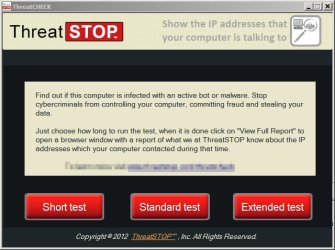
Well I use ThreatCheck's ThreatStop to get a list of ip addresses that my machine has communicated with over any given period. Sometimes I leave ThreatStop running overnight just to see if my onboard security missed anything and if there are any suspicious ip addresses listed in the results.

The problem is - ThreatStop is no longer available from the manufacturer.

ThreatCHECK.jpg

I'd also be interested to know of any similar software that's currently available - something you can leave running in the background that produces a log of all ip addresses communicated with.
 

My Computer

Computer type
Laptop
Computer Manufacturer/Model Number
ASUS
OS
Microsoft Windows 7 Home Premium 64-bit 7601 Multiprocessor Free Service Pack 1
CPU
AMD C-60 APU with Radeon(tm) HD Graphics
Motherboard
ASUSTeK COMPUTER INC. X501U
Memory
4.00 GB
Graphics Card(s)
AMD Radeon HD 6290 Graphics
Sound Card
(1) AMD High Definition Audio Device (2) Realtek High Defi
Screen Resolution
1366 x 768 x 32 bits (4294967296 colors) @ 60 Hz
Hard Drives
Hitachi HTS545050A7E380 SATA Disk Device
Antivirus
Comodo CIS & FW, SecureAplus App Whitelisting, Threatfire
Browser
Cyberfox 64bit, Opera 64bit, Airfox
Other Info
Spy-The-Spy, HitmanPro.Alert, Norton Connect Safe, MJRegWatcher, BitDefender TrafficLight, Voodoo Shield, Zemana AntiMalware
Anybody know a good free monitoring programs for windows 7 to see if it contacts Microsoft when not using Microsoft services?

Well I use ThreatCheck's ThreatStop to get a list of ip addresses that my machine has communicated with over any given period. Sometimes I leave ThreatStop running overnight just to see if my onboard security missed anything and if there are any suspicious ip addresses listed in the results.

The problem is - ThreatStop is no longer available from the manufacturer.
I'd also be interested to know of any similar software that's currently available - something you can leave running in the background that produces a log of all ip addresses communicated with.

TcpLogView - Creates TCP connections log
 

My Computer

Computer type
Laptop
Computer Manufacturer/Model Number
Employer provided Dell Latitude
OS
W7 Pro SP1 64bit
CPU
i7
Memory
8GB
Graphics Card(s)
Intel HD Graphics
Hard Drives
crappy SSD
Antivirus
Employer mandated Symantec Endpoint Protection
Browser
Pale Moon 64bit, IE11 64bit & Chrome 64bit
There are also huge perception and trust issues going on. With all that has been happening many people I know have just switched off updates completely. The point is that what MS says is happening isn't always the truth. Look at all the systems that have downloaded 6GB of windows 10 and have attempted to install it even when the user hasn't even reserved a copy. I've had this on the majority of my win7 systems before I removed the relevant KB's, and friends and colleagues have had exactly the same. The fact that this update has now switched from optional to important also muddys the water.
The rush to release these telemetry updates is proving to be a nightmare now to have to check what each KB is doing and wait for feedback from others on the web. This can only do harm to MS reputation.

@ThrashZone I believe it was KB3022345 that was the original update that screwed the system file checker so that was one that needed removal.

I like many others hadn't intentionally joined CEIP but found my task scheduler full of these tasks without my knowledge (now deleted).
 

My Computer

Computer type
PC/Desktop
OS
windows 7 ultimate 64bit

My Computer

Computer type
Laptop
Computer Manufacturer/Model Number
ASUS
OS
Microsoft Windows 7 Home Premium 64-bit 7601 Multiprocessor Free Service Pack 1
CPU
AMD C-60 APU with Radeon(tm) HD Graphics
Motherboard
ASUSTeK COMPUTER INC. X501U
Memory
4.00 GB
Graphics Card(s)
AMD Radeon HD 6290 Graphics
Sound Card
(1) AMD High Definition Audio Device (2) Realtek High Defi
Screen Resolution
1366 x 768 x 32 bits (4294967296 colors) @ 60 Hz
Hard Drives
Hitachi HTS545050A7E380 SATA Disk Device
Antivirus
Comodo CIS & FW, SecureAplus App Whitelisting, Threatfire
Browser
Cyberfox 64bit, Opera 64bit, Airfox
Other Info
Spy-The-Spy, HitmanPro.Alert, Norton Connect Safe, MJRegWatcher, BitDefender TrafficLight, Voodoo Shield, Zemana AntiMalware
Back
Top