

How to Add or Remove Favorites from Navigation Pane in Windows 7
InformationThis tutorial will show you how to add or remove the Favorites folder in the Windows Explorer Navigation Pane in Windows 7.
TipThe default folder for Favorites is the Links folder located at the location below.
C:\Users\(user-name)\Links
Warning
- You can only do this while logged into an administrator account.
- This will affect all user account's on the computer.
EXAMPLE: Favorites in Navigation Pane
NOTE: This is the Favorites group added (default) (left screenshot below) and removed (right screenshot below) from the Navigation Pane.
Here's How:
1. Open the Start Menu and type regedit.exe in the search line, then press enter.
2. If prompted by UAC, then click on Yes.
3. In Regedit, go to the location below: (See screenshot below step 4)Code:HKEY\CLASSES_ROOT\CLSID\{323CA680-C24D-4099-B94D-446DD2D7249E}\ShellFolder4. In the left pane of regedit, right click on the ShellFolder key and click on Permissions. (See screenshot below)
5. At the top, select the Administrators group. At the bottom, check the Allow box to the right of Full Control and click on OK. (See screenshot below)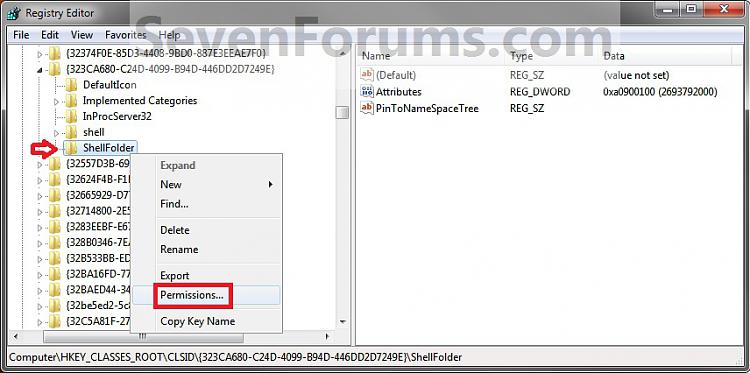
6. In the right pane of regedit, right click on Attributes and click on Modify. (See screenshot below)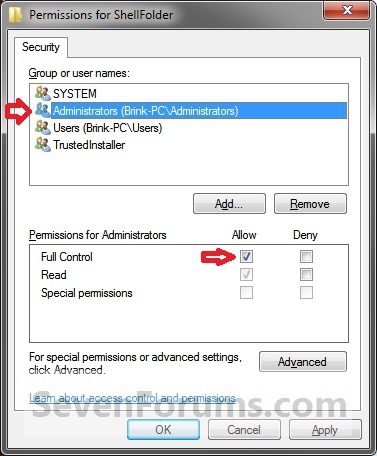
7. To Add Favorites to the Navigation Pane
NOTE: This is the default setting.
A) Type in a0900100 and click on OK. (see screenshot below)8. To Remove Favorites from the Navigation Pane
B) Go to step 9.
A) Type in a9400100 and click on OK. (see screenshot below)9. If you have 64-bit Windows 7 Installed
NoteCREDIT TO: Kookster for this addition.
To also add or remove Favorites from the "Open" and "Save as" type windows as well in 64-bit Windows 7, you will also need to do this step.
If you have a 32-bit Windows 7 installed, then skip this step since doing steps 1 to 7/8 will add or remove Favorites from the "Open" and "Save as" type windows as well.
A) In Regedit, go to the location below:Code:HKEY_LOCAL_MACHINE\SOFTWARE\Wow6432Node\Classes\CLSID\{323CA680-C24D-4099-B94D-446DD2D7249E}\ShellFolderThat's it,B) Repeat steps 4 to 7/8 above.10. Close regedit.
11. Restart the computer to fully apply.
Shawn
Related Tutorials
- How to Create a "Favorites" Shortcut in Windows 7 and Windows 8
- How to Change Default Icon of Favorites in Navigation Pane in Windows 7 and Windows 8
- How to Add or Remove the "Libraries" Folder from the Windows 7 Navigation Pane
- How to Add or Remove "Homegroup" from the Windows 7 Navigation Pane
- How to Add or Remove "Computer" from the Windows 7 Navigation Pane
- How to Add or Remove "Network" from the Windows 7 Navigation Pane
- How to Add or Remove "Control Panel" from the Windows 7 Navigation Pane
- How to Add or Remove your "User Folder" from the Windows 7 Navigation Pane
- How to Add or Remove the "Recycle Bin" from the Windows 7 Navigation Pane
- How to Hide or Show a Library in the Windows 7 Navigation Pane
- How to Turn On or Off Expand to Current Folder in Windows 7 Navigation Pane
- How to Change the Active Navigation Folder Icon in Windows 7
- How to Show or Not Show All Folders in the Windows 7 Navigation Pane
- How to Turn the Navigation Pane On or Off in Windows 7
- Fix Empty Favorites in Navigation Pane Vista, Windows 7, and Windows 8
- Restore Default Favorite Links in Navigation Pane of Windows 7 and Windows 8
- How to Rename "Favorites" in Navigation Pane in Windows 7 and Windows 8
- Add or Remove "Favorites" Links in Navigation Pane of Windows 7 and Windows 8
- How to Create a Windows 7 "Links" Library with the Correct Icon
Favorites - Add or Remove from Navigation Pane
-
-
-
New #3
Remove Personal Folder
Do you have a registry entry to remove the personal folder from the navigation pane? i.e. the one with your name containing the basics, My Music, My Videos, etc.
Thanks,
-
New #4
Hello Vijer,
I'll look into a way for you and post back if I find one. For now, you can uncheck the Show all folders option when you right click on a empty space in the navigation pane to remove it. :)
-
-
New #6
Thanks
Thanks for doing that so quickly.
Too bad all of these hacks are not part of the Personalization settings on the Control Panel. I can never figure out why Microsoft makes it so users can hack the settings but doesn't make it part of the UI. It would go a long way towards making the user community a lot happier with the Microsoft OS's.
-
-
-
New #9
Hello Enzo,
No, but you can go the registry location below, then do steps 4 & 5 for the DefaultIcon key. Afterwards, right click on (Default) in the right pane, and click on Modify. Type in the full path of the icon you want to use. You may need to log off and log on to fully apply though.
See tutorial: Favorites - Change Default Icon
Code:HKEY_CLASSES_ROOT\CLSID\{323CA680-C24D-4099-B94D-446DD2D7249E}\DefaultIcon

Hope this helps,
ShawnLast edited by Brink; 12 Mar 2010 at 02:04. Reason: Added tutorial link

Favorites - Add or Remove from Navigation Pane
How to Add or Remove Favorites from Navigation Pane in Windows 7Published by Brink


 Quote
Quote
Related Discussions