Assign Space to C partition

Codie

New member
Local time
6:40 PM
Messages
68
Location
Birmingham, England
Right, My Toshiba laptop had 116GB assigned to C and 116GB assigned to D.

I resized the D partition to 50GB so now I have 60 something gig of spare unallocated space lying around. I wanted to extend the C partition origionally so I could have more room on there but ive now discovered Windows management won't allow an extension on C, Im now buggered me thinks.

All I need to do is allocate the space taken off D, to C.

How can I do this?

Thank you all :D
 

My Computer

Computer Manufacturer/Model Number
Toshiba Satellite T130 13K. 13.3"
OS
Windows 7 Home Premium 64bit, 6.1 build (7600)
CPU
Intel Pentium U2700 1.3Ghz, ~1.3Ghz
Memory
3GB DDR3
Graphics Card(s)
Mobile Intel 4series express chipset
Monitor(s) Displays
LCD HD
Screen Resolution
1366 x 768
Hard Drives
250GB, 2.5" SATA (5400 RPM)
C:\ 116GB
D:\ 116GB
Internet Speed
802.11 b/g/n
I do not have the link to the site but it should be easily foung on google. Download a free third party took called Partition Wizzard. I think it will do the job for you. Just so you will know, disk management can only extend a partition that is adjacent to the one youu want to extend and it has to be to the right of the current partition.

I believe the information I am giving you is correct.
 

My Computers

System One System Two

  • Computer type
    PC/Desktop
    Computer Manufacturer/Model Number
    ALWAYS UNDER CONSTRUCTION
    OS
    Windows 11 Pro
    CPU
    Ryzen 9 5900X
    Motherboard
    Asus X570 Crosshair Viii Hero
    Memory
    32GB G Skill DDR4-3600
    Graphics Card(s)
    EVGA RTX 3080 FTW 3 Ultra
    Sound Card
    On Board/Sennheiser PC37X Headset
    Monitor(s) Displays
    3 X Asus 27"
    Screen Resolution
    2560x1440
    Hard Drives
    2 X 1 TB NVME drives
    PSU
    EVGA 850
    Case
    Phanteks Eclipse P400A
    Cooling
    EVGA 280 AIO
    Keyboard
    Logitech G510s/ Logitech G13
    Mouse
    Logitech G502
    Internet Speed
    24/1
    Antivirus
    ESET/MBAM Pro/SAS Pro
    Browser
    Chrome/ Firefox/ Edge
  • Computer type
    Laptop
    System Manufacturer/Model Number
    Dell 16 Plus
    OS
    Windows 11 Pro
    CPU
    Intel Ultra 9 288V
    Memory
    32 GB LPDDR5X 8533
    Monitor(s) Displays
    16" Mini-LED HDR600 Touch 90 Hz
    Screen Resolution
    2560X1600
    Hard Drives
    1 TB NVME

My Computer

Computer Manufacturer/Model Number
HP, Dell, Gateway, Toshiba - 4 laptops and 2 desktops
OS
Vista, Windows7, Mint Mate, Zorin, Windows 8
CPU
from 1.6GHz Duo to i7
Monitor(s) Displays
2x HP w2207
Hard Drives
5x HDD, 7x SSD, 12x Externals
Keyboard
with trackball - no mices
Mouse
Trackball mice
Internet Speed
DSL 6000
Is it safe to use?
Also I have TrueCrypt to Encrypt files and partitions and I obviously have to keep the software to get back into the whatever is encrypted, I don't mind I was wondering if partition wizard is safe to use on my OEM hard drive and can I delete the software afterwards without repercutions or is it safer to keep the software installed?
 

My Computer

Computer Manufacturer/Model Number
Toshiba Satellite T130 13K. 13.3"
OS
Windows 7 Home Premium 64bit, 6.1 build (7600)
CPU
Intel Pentium U2700 1.3Ghz, ~1.3Ghz
Memory
3GB DDR3
Graphics Card(s)
Mobile Intel 4series express chipset
Monitor(s) Displays
LCD HD
Screen Resolution
1366 x 768
Hard Drives
250GB, 2.5" SATA (5400 RPM)
C:\ 116GB
D:\ 116GB
Internet Speed
802.11 b/g/n
Partition Wizard if rocket safe. Do you think we would recommend flaky programs. Most senior people around here use it.
And I would never delete it. That should be standard in your toolkit - including the bootable CD that could bail you out when your system does not boot because of a disk problem.
 

My Computer

Computer Manufacturer/Model Number
HP, Dell, Gateway, Toshiba - 4 laptops and 2 desktops
OS
Vista, Windows7, Mint Mate, Zorin, Windows 8
CPU
from 1.6GHz Duo to i7
Monitor(s) Displays
2x HP w2207
Hard Drives
5x HDD, 7x SSD, 12x Externals
Keyboard
with trackball - no mices
Mouse
Trackball mice
Internet Speed
DSL 6000
I didn't mean you'd give me a dud programme, I just meant I wanna make sure I ask everything incase I do something silly with it and BANG, bye bye laptop. Sorry.

Ive downloaded and installed it, I right clicked C and clicked merge but it wouldn't let me, I haven't gotten around the programme yet obviously so I may well be doing something wrong. I cant make a Bootable ISO disk because my laptop has no disc drive, half netbook, half notebook. Its a 13"!
 

My Computer

Computer Manufacturer/Model Number
Toshiba Satellite T130 13K. 13.3"
OS
Windows 7 Home Premium 64bit, 6.1 build (7600)
CPU
Intel Pentium U2700 1.3Ghz, ~1.3Ghz
Memory
3GB DDR3
Graphics Card(s)
Mobile Intel 4series express chipset
Monitor(s) Displays
LCD HD
Screen Resolution
1366 x 768
Hard Drives
250GB, 2.5" SATA (5400 RPM)
C:\ 116GB
D:\ 116GB
Internet Speed
802.11 b/g/n
Not sure what you did wrong, keep trying and read the Help info and Ted's tutorials (there are a few).

I am sure you have a USB port. If you also have an external disk, I recommend you image your system. That is the safest way to get you back on your feet (within 20 minutes) in case your system goes on the blink. Watch my video tutorial and you'll know how to do it: http://www.sevenforums.com/tutorials/73828-imaging-free-macrium.html?ltr=I
 

My Computer

Computer Manufacturer/Model Number
HP, Dell, Gateway, Toshiba - 4 laptops and 2 desktops
OS
Vista, Windows7, Mint Mate, Zorin, Windows 8
CPU
from 1.6GHz Duo to i7
Monitor(s) Displays
2x HP w2207
Hard Drives
5x HDD, 7x SSD, 12x Externals
Keyboard
with trackball - no mices
Mouse
Trackball mice
Internet Speed
DSL 6000
I don't think im allowed to assign unallocated space to C with the software.

When I click Merge on C it says: This function is not supported in minitool partition wizard home edition.

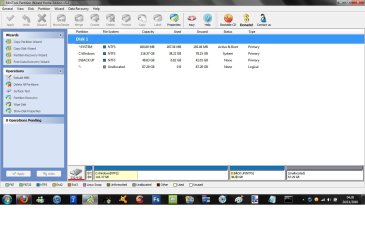
Heres my drive:

*:SYSTEM - NTFS - 400MB - Active and Boot - Primary
C:WINDOWS - NTFS - 116.37 - System - Primary
D:BACK UP - NTFS - 48.83 - None - Primary
*: - Unallocated - 67.29 - None - Logical

Ive missed out whats been used and whats free, just total sizes. Im trying to merge *: with C:WINDOWS, windows partition tool wont allow it either. Is it because it's the system/windows partition that it wont let me?
 

My Computer

Computer Manufacturer/Model Number
Toshiba Satellite T130 13K. 13.3"
OS
Windows 7 Home Premium 64bit, 6.1 build (7600)
CPU
Intel Pentium U2700 1.3Ghz, ~1.3Ghz
Memory
3GB DDR3
Graphics Card(s)
Mobile Intel 4series express chipset
Monitor(s) Displays
LCD HD
Screen Resolution
1366 x 768
Hard Drives
250GB, 2.5" SATA (5400 RPM)
C:\ 116GB
D:\ 116GB
Internet Speed
802.11 b/g/n
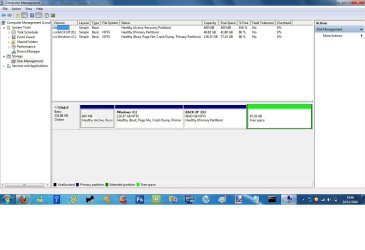
Best you post a picture of your Disk Management. Then we'll see what can be done.
 

My Computer

Computer Manufacturer/Model Number
HP, Dell, Gateway, Toshiba - 4 laptops and 2 desktops
OS
Vista, Windows7, Mint Mate, Zorin, Windows 8
CPU
from 1.6GHz Duo to i7
Monitor(s) Displays
2x HP w2207
Hard Drives
5x HDD, 7x SSD, 12x Externals
Keyboard
with trackball - no mices
Mouse
Trackball mice
Internet Speed
DSL 6000
Thank you whs:
 

Attachments

  • Partitions.jpg
    Partitions.jpg
    90.7 KB · Views: 17

My Computer

Computer Manufacturer/Model Number
Toshiba Satellite T130 13K. 13.3"
OS
Windows 7 Home Premium 64bit, 6.1 build (7600)
CPU
Intel Pentium U2700 1.3Ghz, ~1.3Ghz
Memory
3GB DDR3
Graphics Card(s)
Mobile Intel 4series express chipset
Monitor(s) Displays
LCD HD
Screen Resolution
1366 x 768
Hard Drives
250GB, 2.5" SATA (5400 RPM)
C:\ 116GB
D:\ 116GB
Internet Speed
802.11 b/g/n
Hello Codie


Please post a snip of Windows disk management not PW, thanks.

In the Windows start menu right click computer and click manage, in the left pane of the "Computer Management" window that opens click disk management and post a snip of that.
 

My Computer

Computer Manufacturer/Model Number
* BFK Customs *
OS
W 7 64-bit Ultimate
CPU
Intel Q9550 Yorkfield
Motherboard
ASUS P5Q Pro
Memory
8GB Dominator 8500C5D
Graphics Card(s)
ATI : XFX 5870
Sound Card
Realtek HD Audio 7-1
Monitor(s) Displays
1x 47" LCD HDMI & 3x 26" LCD HDMI
Screen Resolution
1920x1080P & 1920x1200
Hard Drives
1x 80GB Intel X25-M G2 SSD : 1x 500GB & 1x 640GB WD Caviar Black(s)
PSU
Corsair 620HX
Case
Cooler Master RC-690
Cooling
Tuniq Tower 120, 2x 140mm and 3x 120mm case fans
Keyboard
Microsoft 500
Mouse
Razer Diamondback 3G
Internet Speed
14 Mb/s
Other Info
1x Koutech 3Gb/s SATA HDD Hot Swap Rack
WHS I have a question for you. In his D drive he has only 6.2 GB of used space. IF he has or could borrow an external HD ( which he really needs anyway) He could transfer that 6.2GB to the HD, Delete the D partition, extend C thae amt he wants to, use the remainder and allocate it D, and transfer the 6.2 GB back into the new D partition, and be where he wants to be. This could all be done in disk management. Do you see any problems with that approach? And it may be easier on him.
 

My Computers

System One System Two

  • Computer type
    PC/Desktop
    Computer Manufacturer/Model Number
    ALWAYS UNDER CONSTRUCTION
    OS
    Windows 11 Pro
    CPU
    Ryzen 9 5900X
    Motherboard
    Asus X570 Crosshair Viii Hero
    Memory
    32GB G Skill DDR4-3600
    Graphics Card(s)
    EVGA RTX 3080 FTW 3 Ultra
    Sound Card
    On Board/Sennheiser PC37X Headset
    Monitor(s) Displays
    3 X Asus 27"
    Screen Resolution
    2560x1440
    Hard Drives
    2 X 1 TB NVME drives
    PSU
    EVGA 850
    Case
    Phanteks Eclipse P400A
    Cooling
    EVGA 280 AIO
    Keyboard
    Logitech G510s/ Logitech G13
    Mouse
    Logitech G502
    Internet Speed
    24/1
    Antivirus
    ESET/MBAM Pro/SAS Pro
    Browser
    Chrome/ Firefox/ Edge
  • Computer type
    Laptop
    System Manufacturer/Model Number
    Dell 16 Plus
    OS
    Windows 11 Pro
    CPU
    Intel Ultra 9 288V
    Memory
    32 GB LPDDR5X 8533
    Monitor(s) Displays
    16" Mini-LED HDR600 Touch 90 Hz
    Screen Resolution
    2560X1600
    Hard Drives
    1 TB NVME
WHS I have a question for you. In his D drive he has only 6.2 GB of used space. IF he has or could borrow an external HD ( which he really needs anyway) He could transfer that 6.2GB to the HD, Delete the D partition, extend C thae amt he wants to, use the remainder and allocate it D, and transfer the 6.2 GB back into the new D partition, and be where he wants to be. This could all be done in disk management. Do you see any problems with that approach? And it may be easier on him.
Yeah, that would work too but is more complicated. It should also work as is with Partition Wizard. I have asked BFK to assisit. He is the PW expert. We'll see.
 

My Computer

Computer Manufacturer/Model Number
HP, Dell, Gateway, Toshiba - 4 laptops and 2 desktops
OS
Vista, Windows7, Mint Mate, Zorin, Windows 8
CPU
from 1.6GHz Duo to i7
Monitor(s) Displays
2x HP w2207
Hard Drives
5x HDD, 7x SSD, 12x Externals
Keyboard
with trackball - no mices
Mouse
Trackball mice
Internet Speed
DSL 6000
WOW, You guys are extremely helpful :D. D: is storing my system back up and something else that was there when I first booted the system I think so it must have been windows that put it there. I have plenty of external space:

160GB Freecom drive
500GB Toshiba drive

I have back ups to both external drives aswell as D partition and discs, im due an up-to-date back up come to think of it.
 

My Computer

Computer Manufacturer/Model Number
Toshiba Satellite T130 13K. 13.3"
OS
Windows 7 Home Premium 64bit, 6.1 build (7600)
CPU
Intel Pentium U2700 1.3Ghz, ~1.3Ghz
Memory
3GB DDR3
Graphics Card(s)
Mobile Intel 4series express chipset
Monitor(s) Displays
LCD HD
Screen Resolution
1366 x 768
Hard Drives
250GB, 2.5" SATA (5400 RPM)
C:\ 116GB
D:\ 116GB
Internet Speed
802.11 b/g/n
Thank you again for all your help and patience.
 

Attachments

  • Patitions.jpg
    Patitions.jpg
    88.3 KB · Views: 12

My Computer

Computer Manufacturer/Model Number
Toshiba Satellite T130 13K. 13.3"
OS
Windows 7 Home Premium 64bit, 6.1 build (7600)
CPU
Intel Pentium U2700 1.3Ghz, ~1.3Ghz
Memory
3GB DDR3
Graphics Card(s)
Mobile Intel 4series express chipset
Monitor(s) Displays
LCD HD
Screen Resolution
1366 x 768
Hard Drives
250GB, 2.5" SATA (5400 RPM)
C:\ 116GB
D:\ 116GB
Internet Speed
802.11 b/g/n
Hello Codie.


You may need to right click, delete the free space first.

Can you right click D: and get the "extend" option to include the free space into D: then you could use PW to resize the left side of D" to create free space that C: can be extended into that free space.
 

My Computer

Computer Manufacturer/Model Number
* BFK Customs *
OS
W 7 64-bit Ultimate
CPU
Intel Q9550 Yorkfield
Motherboard
ASUS P5Q Pro
Memory
8GB Dominator 8500C5D
Graphics Card(s)
ATI : XFX 5870
Sound Card
Realtek HD Audio 7-1
Monitor(s) Displays
1x 47" LCD HDMI & 3x 26" LCD HDMI
Screen Resolution
1920x1080P & 1920x1200
Hard Drives
1x 80GB Intel X25-M G2 SSD : 1x 500GB & 1x 640GB WD Caviar Black(s)
PSU
Corsair 620HX
Case
Cooler Master RC-690
Cooling
Tuniq Tower 120, 2x 140mm and 3x 120mm case fans
Keyboard
Microsoft 500
Mouse
Razer Diamondback 3G
Internet Speed
14 Mb/s
Other Info
1x Koutech 3Gb/s SATA HDD Hot Swap Rack
I right clicked free space and clicked delete partition and it says it will become inaccessible if I delete it. Will that harm?
 

My Computer

Computer Manufacturer/Model Number
Toshiba Satellite T130 13K. 13.3"
OS
Windows 7 Home Premium 64bit, 6.1 build (7600)
CPU
Intel Pentium U2700 1.3Ghz, ~1.3Ghz
Memory
3GB DDR3
Graphics Card(s)
Mobile Intel 4series express chipset
Monitor(s) Displays
LCD HD
Screen Resolution
1366 x 768
Hard Drives
250GB, 2.5" SATA (5400 RPM)
C:\ 116GB
D:\ 116GB
Internet Speed
802.11 b/g/n
There's nothing there (in free space) so it won't hurt, right! ;)
 

My Computer

Computer Manufacturer/Model Number
* BFK Customs *
OS
W 7 64-bit Ultimate
CPU
Intel Q9550 Yorkfield
Motherboard
ASUS P5Q Pro
Memory
8GB Dominator 8500C5D
Graphics Card(s)
ATI : XFX 5870
Sound Card
Realtek HD Audio 7-1
Monitor(s) Displays
1x 47" LCD HDMI & 3x 26" LCD HDMI
Screen Resolution
1920x1080P & 1920x1200
Hard Drives
1x 80GB Intel X25-M G2 SSD : 1x 500GB & 1x 640GB WD Caviar Black(s)
PSU
Corsair 620HX
Case
Cooler Master RC-690
Cooling
Tuniq Tower 120, 2x 140mm and 3x 120mm case fans
Keyboard
Microsoft 500
Mouse
Razer Diamondback 3G
Internet Speed
14 Mb/s
Other Info
1x Koutech 3Gb/s SATA HDD Hot Swap Rack
Wahey, extended back into D so all I have is C and D now like it was when I first bought it, So now I just need to leave D with 40GB and the rest extended onto C.

Now what do I do?
 

My Computer

Computer Manufacturer/Model Number
Toshiba Satellite T130 13K. 13.3"
OS
Windows 7 Home Premium 64bit, 6.1 build (7600)
CPU
Intel Pentium U2700 1.3Ghz, ~1.3Ghz
Memory
3GB DDR3
Graphics Card(s)
Mobile Intel 4series express chipset
Monitor(s) Displays
LCD HD
Screen Resolution
1366 x 768
Hard Drives
250GB, 2.5" SATA (5400 RPM)
C:\ 116GB
D:\ 116GB
Internet Speed
802.11 b/g/n
Now look at Step One of this tutorial at the link below to get an out-line of how to resize the left side of D: to create "Unallocated" space that C: can then be expanded into.


Dual Boot : Create Partitions Using PWBD
 

My Computer

Computer Manufacturer/Model Number
* BFK Customs *
OS
W 7 64-bit Ultimate
CPU
Intel Q9550 Yorkfield
Motherboard
ASUS P5Q Pro
Memory
8GB Dominator 8500C5D
Graphics Card(s)
ATI : XFX 5870
Sound Card
Realtek HD Audio 7-1
Monitor(s) Displays
1x 47" LCD HDMI & 3x 26" LCD HDMI
Screen Resolution
1920x1080P & 1920x1200
Hard Drives
1x 80GB Intel X25-M G2 SSD : 1x 500GB & 1x 640GB WD Caviar Black(s)
PSU
Corsair 620HX
Case
Cooler Master RC-690
Cooling
Tuniq Tower 120, 2x 140mm and 3x 120mm case fans
Keyboard
Microsoft 500
Mouse
Razer Diamondback 3G
Internet Speed
14 Mb/s
Other Info
1x Koutech 3Gb/s SATA HDD Hot Swap Rack
Back
Top