C-Partition gets bigger and bigger

blackdot

New member
Member
Local time
6:07 PM
Messages
51
Seems to be normal, I was told. But as this happens anyway, i want to slow down the process as hard as possible. F.ex. by using ccleaner and transferring the temp-folder to another partition, etc.

Yet there seem to be strange things happening. I just encoded a video to a non-C-location. during the encoding the C: partition gained a few hundred MB's. But as the encoding was finished, those few hundred mb's didnt delete themselves again, even after running ccleaner.

So, basically all i did was encoding a file which is not on C: into another file, which also is not on C:. Yet C: gained finally a few hundres mb's.

Anyone know why that is?
 

My Computer My Computer

At a glance

desktop: win7 professional x86, laptop: win7 ...desktop: intel e6400 dual @ 2.13ghz, laptop: ...
OS
desktop: win7 professional x86, laptop: win7 prof. x64
CPU
desktop: intel e6400 dual @ 2.13ghz, laptop: intel i7 quad
Internet Speed
20Mbit/s dwn, 2Mbit/s up
When you run C cleaner, by default it looks for certain areas... particularly when you are decoding / encoding videos it will create a temp file.

If the temp file is not inside the Windows Directory, the Cleaner won't find it unless you tell it to look there.

Also, if your encoder / decoder program is not told to delete the left behinds it will in fact keep the temp files there as well. There are a lot of scenarios.
 

My Computer My Computer

At a glance

Windows 7 Ultimate x64AMD Phenom x6 1045t8 GBATI Radeon HD 5570
Computer Manufacturer/Model Number
HP Pavilion Elite HPE-410f
OS
Windows 7 Ultimate x64
CPU
AMD Phenom x6 1045t
Motherboard
N/A
Memory
8 GB
Graphics Card(s)
ATI Radeon HD 5570
Sound Card
Realtek Highdefinition Audio / 5.1 Dolby Setup
Monitor(s) Displays
HP w2207h Widescreen
Screen Resolution
1680*1050
Hard Drives
1 TB (fixed), 320 Portable maxtor, Server Hard drives
PSU
350 Watt
Case
HP CASE
Cooling
Bass
Keyboard
Logitech MX 5500
Mouse
Logitech MX 5500
Internet Speed
ROAD RUNNER 16MB D/512 U
But if the windows-temp-directory isnt on C anymore, the used diskspace of C shouldnt increase, right? But yet it does.

Or do programs have other temp-folders on C, which I dont know of?
 

My Computer My Computer

At a glance

desktop: win7 professional x86, laptop: win7 ...desktop: intel e6400 dual @ 2.13ghz, laptop: ...
OS
desktop: win7 professional x86, laptop: win7 prof. x64
CPU
desktop: intel e6400 dual @ 2.13ghz, laptop: intel i7 quad
Internet Speed
20Mbit/s dwn, 2Mbit/s up
A program can have its own Temp folder... most programs use the windows one because it is default for a windows system but that doesn't mean it can't have its own.
 

My Computer My Computer

At a glance

Windows 7 Ultimate x64AMD Phenom x6 1045t8 GBATI Radeon HD 5570
Computer Manufacturer/Model Number
HP Pavilion Elite HPE-410f
OS
Windows 7 Ultimate x64
CPU
AMD Phenom x6 1045t
Motherboard
N/A
Memory
8 GB
Graphics Card(s)
ATI Radeon HD 5570
Sound Card
Realtek Highdefinition Audio / 5.1 Dolby Setup
Monitor(s) Displays
HP w2207h Widescreen
Screen Resolution
1680*1050
Hard Drives
1 TB (fixed), 320 Portable maxtor, Server Hard drives
PSU
350 Watt
Case
HP CASE
Cooling
Bass
Keyboard
Logitech MX 5500
Mouse
Logitech MX 5500
Internet Speed
ROAD RUNNER 16MB D/512 U
Enocoders sometimes use a temp folder.
This can normally be moved from with then app itself.
 

My Computer My Computer

At a glance

Windows 7 Home Premium 64bitIntel Core i7 2700k8GB Mushkin Redline Ridgebacks @1866EVGA GTX570 SC
Computer Manufacturer/Model Number
Custom (Self Build)
OS
Windows 7 Home Premium 64bit
CPU
Intel Core i7 2700k
Motherboard
eVGA P67 SLI
Memory
8GB Mushkin Redline Ridgebacks @1866
Graphics Card(s)
EVGA GTX570 SC
Sound Card
XiFi Titanium HD
Monitor(s) Displays
LG W2453V
Screen Resolution
1920x1080
Hard Drives
Intel 320 80GB -- Intel X25-V 40GB --WD Black 1TB x2 -- WD Blue 640GB
PSU
Seasonic x750
Case
Corsair 600T SE White
Cooling
eVGA Superclocked CPU Cooler
Keyboard
Saitek Cyborg
Antivirus
Kaspersky
Browser
IE
Other Info
LG BD/DVD
i'm using virtual dub to encode videos and can't find any option to view or alter its temp-folder. now, virtualdub isn't located on C (if its temp-folder lies within the install-folder). also the windows-temp-folder isnt on C. Therefore, virtualdub must have something else which results in increasing diskspace usage of C. How do i find out, what that is?
 

My Computer My Computer

At a glance

desktop: win7 professional x86, laptop: win7 ...desktop: intel e6400 dual @ 2.13ghz, laptop: ...
OS
desktop: win7 professional x86, laptop: win7 prof. x64
CPU
desktop: intel e6400 dual @ 2.13ghz, laptop: intel i7 quad
Internet Speed
20Mbit/s dwn, 2Mbit/s up
You might try unhiding your files in C:, then check and see what folders have been updated most recently, or about the time you were doing your encoding/decoding. I would check the root directory of C:, then Program Data, Program Files, Program Files (x86) and the User files.

With a little investigating and process of elimination, you may find which directory is being added to.
 
Last edited:

My Computer My Computer

At a glance

Windows 10 HomeIntel Core i5 3550Corsair Vengeance DDR3 16GBNvidia GEForce GTX 970 SSC
Computer type
PC/Desktop
Computer Manufacturer/Model Number
Self build
OS
Windows 10 Home
CPU
Intel Core i5 3550
Motherboard
ASUS P8Z77-V LX (LGA1155)
Memory
Corsair Vengeance DDR3 16GB
Graphics Card(s)
Nvidia GEForce GTX 970 SSC
Monitor(s) Displays
Hanns-G 23.6", Acer 17"
Screen Resolution
1920x1080, 1440x900
Hard Drives
Sandisk SSD 256 GB
WD500GB
WD640GB
Seagage Ultra + 1TB ext.
BWD 800GB
WD 1TB ext
PSU
Antec 650w
Case
Cooler Master Centurion 534
Cooling
COOLER MASTER GeminII S524, 3 120 mm case fans.
Keyboard
Logitech MK300
Mouse
Logitech MK300
Internet Speed
Cable
Antivirus
MSSE, Malwarebytes
Browser
IE 10, Chrome
ok, i'll try this next time, thanks.
 

My Computer My Computer

At a glance

desktop: win7 professional x86, laptop: win7 ...desktop: intel e6400 dual @ 2.13ghz, laptop: ...
OS
desktop: win7 professional x86, laptop: win7 prof. x64
CPU
desktop: intel e6400 dual @ 2.13ghz, laptop: intel i7 quad
Internet Speed
20Mbit/s dwn, 2Mbit/s up
i'm using virtual dub to encode videos and can't find any option to view or alter its temp-folder. now, virtualdub isn't located on C (if its temp-folder lies within the install-folder). also the windows-temp-folder isnt on C. Therefore, virtualdub must have something else which results in increasing diskspace usage of C. How do i find out, what that is?

Hi black dot welcome to 7 forums most of all windows programs will make temp logs and files you can always do a cleaning once in a while also space will be gained on c if you are useing restore points or shadow storage you can also limit shadow storage so it wont eat the drive

but typically your encoder or set up is made to temp or make log files after each encoding or burning of a file it would be a good idea to pay attention to the installer next time some of those features you can prevent just a little heads up for next time hope this works for you :cool:
 

My Computer My Computer

At a glance

Windows 10 Home Premium 64bit sp1Intel I7-6700K @ 4.6 Ghz 1.344 volts everyday OC32GB G-Skill TridentZ 3200mhz 16-18-18-38 DDR4Sli Gigabyte Windforce GTX 980 G1
Computer type
PC/Desktop
Computer Manufacturer/Model Number
CoreI7-6700K MrFingerIII Special Builds
OS
Windows 10 Home Premium 64bit sp1
CPU
Intel I7-6700K @ 4.6 Ghz 1.344 volts everyday OC
Motherboard
Asrock Fatality K6 Z170 Socket 1151
Memory
32GB G-Skill TridentZ 3200mhz 16-18-18-38 DDR4
Graphics Card(s)
Sli Gigabyte Windforce GTX 980 G1
Sound Card
AC97 Creative Rage Tactic 3D Headphones Bluetooth
Monitor(s) Displays
27" Asus ROG Swift PG278Q G-Sync 48" Vizio Smart HD TV
Screen Resolution
2560x1440p 27"- 48" Currently Gaming at 2560x1440p Res 2K
Hard Drives
250GB Samsung Evo840SSD Seagate baracuda 500 GB WD Mybook 500Gb 1TB Seagate Barracuda
PSU
HX1050w Corsair Silver 80plus certified crosfire/sli
Case
Enthod Pro Full Tower
Cooling
Corsair H110i GT 280 mm High Performance WaterBlock
Keyboard
Logitech wireless keyboard
Mouse
Logitech wireless mouse
Internet Speed
Cox Cable 100+ mb
Antivirus
WebRoot Spysweeper with Antivirus
Browser
IE-10, Chrome, Opera
Other Info
My Other Rig is a AMD FX8320E @4.6Ghz 16GB Ballistic Sport Ram
Mobo Asrock Fatality 990FX 120GB OCZ SSD 1TB Seagate Barracuda Corsair H75 Cooling PSU Corsair CX750
GPU GTX Gigabyte 970G1
Hi black dot welcome to 7 forums most of all windows programs will make temp logs and files you can always do a cleaning once in a while also space will be gained on c if you are useing restore points or shadow storage you can also limit shadow storage so it wont eat the drive

but typically your encoder or set up is made to temp or make log files after each encoding or burning of a file it would be a good idea to pay attention to the installer next time some of those features you can prevent just a little heads up for next time hope this works for you :cool:

So many words for zero punctuation. well, I generally do pay attention to installations. In the matter of virtualdub, there is no installation at all, as you download the whole program as a zip and place it where you want it.
 

My Computer My Computer

At a glance

desktop: win7 professional x86, laptop: win7 ...desktop: intel e6400 dual @ 2.13ghz, laptop: ...
OS
desktop: win7 professional x86, laptop: win7 prof. x64
CPU
desktop: intel e6400 dual @ 2.13ghz, laptop: intel i7 quad
Internet Speed
20Mbit/s dwn, 2Mbit/s up
Hi black dot welcome to 7 forums most of all windows programs will make temp logs and files you can always do a cleaning once in a while also space will be gained on c if you are useing restore points or shadow storage you can also limit shadow storage so it wont eat the drive

but typically your encoder or set up is made to temp or make log files after each encoding or burning of a file it would be a good idea to pay attention to the installer next time some of those features you can prevent just a little heads up for next time hope this works for you :cool:

So many words for zero punctuation. well, I generally do pay attention to installations. In the matter of virtualdub, there is no installation at all, as you download the whole program as a zip and place it where you want it.

LOL you want help or you trying to teach a class

Oh, yeah you were able to read it enough said
 

My Computer My Computer

At a glance

Windows 10 Home Premium 64bit sp1Intel I7-6700K @ 4.6 Ghz 1.344 volts everyday OC32GB G-Skill TridentZ 3200mhz 16-18-18-38 DDR4Sli Gigabyte Windforce GTX 980 G1
Computer type
PC/Desktop
Computer Manufacturer/Model Number
CoreI7-6700K MrFingerIII Special Builds
OS
Windows 10 Home Premium 64bit sp1
CPU
Intel I7-6700K @ 4.6 Ghz 1.344 volts everyday OC
Motherboard
Asrock Fatality K6 Z170 Socket 1151
Memory
32GB G-Skill TridentZ 3200mhz 16-18-18-38 DDR4
Graphics Card(s)
Sli Gigabyte Windforce GTX 980 G1
Sound Card
AC97 Creative Rage Tactic 3D Headphones Bluetooth
Monitor(s) Displays
27" Asus ROG Swift PG278Q G-Sync 48" Vizio Smart HD TV
Screen Resolution
2560x1440p 27"- 48" Currently Gaming at 2560x1440p Res 2K
Hard Drives
250GB Samsung Evo840SSD Seagate baracuda 500 GB WD Mybook 500Gb 1TB Seagate Barracuda
PSU
HX1050w Corsair Silver 80plus certified crosfire/sli
Case
Enthod Pro Full Tower
Cooling
Corsair H110i GT 280 mm High Performance WaterBlock
Keyboard
Logitech wireless keyboard
Mouse
Logitech wireless mouse
Internet Speed
Cox Cable 100+ mb
Antivirus
WebRoot Spysweeper with Antivirus
Browser
IE-10, Chrome, Opera
Other Info
My Other Rig is a AMD FX8320E @4.6Ghz 16GB Ballistic Sport Ram
Mobo Asrock Fatality 990FX 120GB OCZ SSD 1TB Seagate Barracuda Corsair H75 Cooling PSU Corsair CX750
GPU GTX Gigabyte 970G1
Hi black dot welcome to 7 forums most of all windows programs will make temp logs and files you can always do a cleaning once in a while also space will be gained on c if you are useing restore points or shadow storage you can also limit shadow storage so it wont eat the drive

but typically your encoder or set up is made to temp or make log files after each encoding or burning of a file it would be a good idea to pay attention to the installer next time some of those features you can prevent just a little heads up for next time hope this works for you :cool:
I was about to mention the same thing, because I am in the process of finishing encoding several hundred videos, and I haven't noticed any growth in C: at all. Even if an encoder is installed on C:, some of them have the ability to set the path to their working folder, which can be located elsewhere.
 

My Computer My Computer

At a glance

W7x64 Pro, SuSe 12.1/** W7 x64 Pro, XP MCEPhenom II 1090T w/Noctua NH-D14 /**4400+ X2 w...2 x 2GB Patriot PGS34g1600LLKA/**4x1GB Corsai...EVGA GTX460 SC/**EVGA 8800GTS
Computer Manufacturer/Model Number
DIY
OS
W7x64 Pro, SuSe 12.1/** W7 x64 Pro, XP MCE
CPU
Phenom II 1090T w/Noctua NH-D14 /**4400+ X2 w/CM Hyper TX 3
Motherboard
ASRock 890FX Deluxe 4/**A8N-SLI
Memory
2 x 2GB Patriot PGS34g1600LLKA/**4x1GB Corsair VS
Graphics Card(s)
EVGA GTX460 SC/**EVGA 8800GTS
Sound Card
Asus Xonar D2X/**Xonar D1
Monitor(s) Displays
Acer X233H, Dell E152FPc /**LG M237-WD
Screen Resolution
1920x1080 & 1024x768/**1980x1080
Hard Drives
WDC 2TB, 1.5TB, 1TB, 500GB,Seagate 500GB , Maxtor 80GB /**500GB Seagate & WDC 1TB Black
PSU
CM RS600 w/ APC BX1000G/**Antec 500 TP w/ APC BX1000
Case
HAF922/**Antec 1040IIB
Cooling
3x200mm, 1x140 and 1x120mm/**5x80mm fans
Keyboard
Logitech Media USB/**Saitek Eclipse
Mouse
Cordless Trackman Wheel/**Ditto
Internet Speed
3.3Mbps
Other Info
SB 560 5.1 w/ Sennheiser RS140/**Creative T20 speakers, Dvico FusionHDTV7 Gold RT, Cisco E3000, HP 5510V AIO, Linksys E3000, Belkin F5U237 hub and **F5D8055 adapter
(** = 2nd rig)
LOL you want help or you trying to teach a class

Oh, yeah you were able to read it enough said
hey, beside my first sentence, i did answer your posting quite politely :D.

anyway, as i said, neither can I find any option in virtualdub to change any paths, nor is there an installation, where i could choose something.

But next time, i'll try watching which folders are changing on C.
 

My Computer My Computer

At a glance

desktop: win7 professional x86, laptop: win7 ...desktop: intel e6400 dual @ 2.13ghz, laptop: ...
OS
desktop: win7 professional x86, laptop: win7 prof. x64
CPU
desktop: intel e6400 dual @ 2.13ghz, laptop: intel i7 quad
Internet Speed
20Mbit/s dwn, 2Mbit/s up
LOL you want help or you trying to teach a class

Oh, yeah you were able to read it enough said
hey, beside my first sentence, i did answer your posting quite politely :D.

anyway, as i said, neither can I find any option in virtualdub to change any paths, nor is there an installation, where i could choose something.

But next time, i'll try watching which folders are changing on C.


The most common c: drive eater is shadow storage or system restore
 

My Computer My Computer

At a glance

Windows 10 Home Premium 64bit sp1Intel I7-6700K @ 4.6 Ghz 1.344 volts everyday OC32GB G-Skill TridentZ 3200mhz 16-18-18-38 DDR4Sli Gigabyte Windforce GTX 980 G1
Computer type
PC/Desktop
Computer Manufacturer/Model Number
CoreI7-6700K MrFingerIII Special Builds
OS
Windows 10 Home Premium 64bit sp1
CPU
Intel I7-6700K @ 4.6 Ghz 1.344 volts everyday OC
Motherboard
Asrock Fatality K6 Z170 Socket 1151
Memory
32GB G-Skill TridentZ 3200mhz 16-18-18-38 DDR4
Graphics Card(s)
Sli Gigabyte Windforce GTX 980 G1
Sound Card
AC97 Creative Rage Tactic 3D Headphones Bluetooth
Monitor(s) Displays
27" Asus ROG Swift PG278Q G-Sync 48" Vizio Smart HD TV
Screen Resolution
2560x1440p 27"- 48" Currently Gaming at 2560x1440p Res 2K
Hard Drives
250GB Samsung Evo840SSD Seagate baracuda 500 GB WD Mybook 500Gb 1TB Seagate Barracuda
PSU
HX1050w Corsair Silver 80plus certified crosfire/sli
Case
Enthod Pro Full Tower
Cooling
Corsair H110i GT 280 mm High Performance WaterBlock
Keyboard
Logitech wireless keyboard
Mouse
Logitech wireless mouse
Internet Speed
Cox Cable 100+ mb
Antivirus
WebRoot Spysweeper with Antivirus
Browser
IE-10, Chrome, Opera
Other Info
My Other Rig is a AMD FX8320E @4.6Ghz 16GB Ballistic Sport Ram
Mobo Asrock Fatality 990FX 120GB OCZ SSD 1TB Seagate Barracuda Corsair H75 Cooling PSU Corsair CX750
GPU GTX Gigabyte 970G1
Open an elevated command prompt and type (or paste) vssadmin list shadowstorage Look for Allocated. That's what it is currently used. Maximum is what it will ultimately use for restore points.
 

My Computer My Computer

At a glance

Vista, Windows7, Mint Mate, Zorin, Windows 8from 1.6GHz Duo to i7
Computer Manufacturer/Model Number
HP, Dell, Gateway, Toshiba - 4 laptops and 2 desktops
OS
Vista, Windows7, Mint Mate, Zorin, Windows 8
CPU
from 1.6GHz Duo to i7
Monitor(s) Displays
2x HP w2207
Hard Drives
5x HDD, 7x SSD, 12x Externals
Keyboard
with trackball - no mices
Mouse
Trackball mice
Internet Speed
DSL 6000
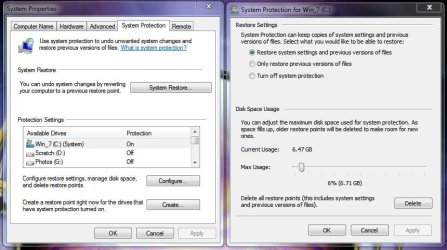
I'm surprised no one mentioned this, well SolarStarShines touched on it - anyway your restore points can eat storage space as the save points grow, but you can restrict how much space is being used by changing the amount of space used.....

Right click Computer, Properties, in the left pane click System Protection, click Configure.... and click the slider bar to change how much to use. Personally I wouldn't turn it off as you may need to restore something but that's up to you.

Configure RP Space.JPG

Good luck
 

My Computer My Computer

At a glance

Windows 10 ProIntel Core i7-4770K (3.5Ghz)32 gig Corsair Dominator Platinum (4x8Gig)Sapphire Tri-X R9 Fury
Computer type
PC/Desktop
Computer Manufacturer/Model Number
Custom built by me.
OS
Windows 10 Pro
CPU
Intel Core i7-4770K (3.5Ghz)
Motherboard
Gigabyte G1 Sniper 5 (F10 Bios)
Memory
32 gig Corsair Dominator Platinum (4x8Gig)
Graphics Card(s)
Sapphire Tri-X R9 Fury
Sound Card
Soundblaster ZXR
Monitor(s) Displays
NEC PA242W 24" LCD Monitor
Screen Resolution
1920 x 1200
Hard Drives
Primary - Samsung 850 Pro (512gig), Samsung 840 Pro (256gig), 2TB WD Caviar Black.
PSU
EVGA Supernova 1000 G2
Case
Cooler Master HAF X
Cooling
Corsair H100i with Corsair Air Series SP120 Quiet Fans
Keyboard
Logitech Wireless Wave
Mouse
Logitech Performance MX
Internet Speed
High Speed Cable
Antivirus
Norton Security
Browser
IE11
Other Info
Memory Timings - 1866MHz @ 9-9-9-27-1T @ 1.5 volts
I'm surprised no one mentioned this, well SolarStarShines touched on it - anyway your restore points can eat storage space as the save points grow, but you can restrict how much space is being used by changing the amount of space used.....

Right click Computer, Properties, in the left pane click System Protection, click Configure.... and click the slider bar to change how much to use. Personally I wouldn't turn it off as you may need to restore something but that's up to you.

View attachment 133124

Good luck
I am usually not recommending to reduce the shadowstorage - unless the disk is on a real squeeze. The more restore points you have, the better it is - also for recovering lost data with Shadow Explorer. For that, "old" restore points are often very handy.

I reduce the shadowstorage with this command - e.g. when I want to set it to 20GBs.

vssadmin resize shadowstorage /For=C: /On=C: /MaxSize=20GB

Note though that you lose your current restore points (except the most recent one) with that operation.
 
Last edited:

My Computer My Computer

At a glance

Vista, Windows7, Mint Mate, Zorin, Windows 8from 1.6GHz Duo to i7
Computer Manufacturer/Model Number
HP, Dell, Gateway, Toshiba - 4 laptops and 2 desktops
OS
Vista, Windows7, Mint Mate, Zorin, Windows 8
CPU
from 1.6GHz Duo to i7
Monitor(s) Displays
2x HP w2207
Hard Drives
5x HDD, 7x SSD, 12x Externals
Keyboard
with trackball - no mices
Mouse
Trackball mice
Internet Speed
DSL 6000
I'm surprised no one mentioned this, well SolarStarShines touched on it - anyway your restore points can eat storage space as the save points grow, but you can restrict how much space is being used by changing the amount of space used.....

Right click Computer, Properties, in the left pane click System Protection, click Configure.... and click the slider bar to change how much to use. Personally I wouldn't turn it off as you may need to restore something but that's up to you.

View attachment 133124

Good luck
I am usually not recommending to reduce the shadowstorage - unless the disk is on a real squeeze. The more restore points you have, the better it is - also for recovering lost data with Shadow Explorer. For that, "old" restore points are often very handy.

I reduce the shadowstorage with this command - e.g. when I want to set it to 20GBs.

vssadmin resize shadowstorage /For=C: /On=C: /MaxSize=20GB

Note though that you lose your current restore points with that operation.

That is kinda why i didn't want to admit how to do it i actually could post a link on this here ya go Is Vista Eating Up Your Hard Drive Space? | Live Slick you can read more about this and understand what it really means
 

My Computer My Computer

At a glance

Windows 10 Home Premium 64bit sp1Intel I7-6700K @ 4.6 Ghz 1.344 volts everyday OC32GB G-Skill TridentZ 3200mhz 16-18-18-38 DDR4Sli Gigabyte Windforce GTX 980 G1
Computer type
PC/Desktop
Computer Manufacturer/Model Number
CoreI7-6700K MrFingerIII Special Builds
OS
Windows 10 Home Premium 64bit sp1
CPU
Intel I7-6700K @ 4.6 Ghz 1.344 volts everyday OC
Motherboard
Asrock Fatality K6 Z170 Socket 1151
Memory
32GB G-Skill TridentZ 3200mhz 16-18-18-38 DDR4
Graphics Card(s)
Sli Gigabyte Windforce GTX 980 G1
Sound Card
AC97 Creative Rage Tactic 3D Headphones Bluetooth
Monitor(s) Displays
27" Asus ROG Swift PG278Q G-Sync 48" Vizio Smart HD TV
Screen Resolution
2560x1440p 27"- 48" Currently Gaming at 2560x1440p Res 2K
Hard Drives
250GB Samsung Evo840SSD Seagate baracuda 500 GB WD Mybook 500Gb 1TB Seagate Barracuda
PSU
HX1050w Corsair Silver 80plus certified crosfire/sli
Case
Enthod Pro Full Tower
Cooling
Corsair H110i GT 280 mm High Performance WaterBlock
Keyboard
Logitech wireless keyboard
Mouse
Logitech wireless mouse
Internet Speed
Cox Cable 100+ mb
Antivirus
WebRoot Spysweeper with Antivirus
Browser
IE-10, Chrome, Opera
Other Info
My Other Rig is a AMD FX8320E @4.6Ghz 16GB Ballistic Sport Ram
Mobo Asrock Fatality 990FX 120GB OCZ SSD 1TB Seagate Barracuda Corsair H75 Cooling PSU Corsair CX750
GPU GTX Gigabyte 970G1
The advantage of old shadow copies does not extend to those shown as ghosts in the Device Manager, they simply occupy space. If you select "Show Hidden Devices" in the View tab of the Device Manager, then to to Storage Volumes Shadow Copies and uninstall the ghosted shadow copies, leaving the non-ghosted ones, you can save some space, and it will help organize the volume when defragging.
 

My Computer My Computer

At a glance

W7x64 Pro, SuSe 12.1/** W7 x64 Pro, XP MCEPhenom II 1090T w/Noctua NH-D14 /**4400+ X2 w...2 x 2GB Patriot PGS34g1600LLKA/**4x1GB Corsai...EVGA GTX460 SC/**EVGA 8800GTS
Computer Manufacturer/Model Number
DIY
OS
W7x64 Pro, SuSe 12.1/** W7 x64 Pro, XP MCE
CPU
Phenom II 1090T w/Noctua NH-D14 /**4400+ X2 w/CM Hyper TX 3
Motherboard
ASRock 890FX Deluxe 4/**A8N-SLI
Memory
2 x 2GB Patriot PGS34g1600LLKA/**4x1GB Corsair VS
Graphics Card(s)
EVGA GTX460 SC/**EVGA 8800GTS
Sound Card
Asus Xonar D2X/**Xonar D1
Monitor(s) Displays
Acer X233H, Dell E152FPc /**LG M237-WD
Screen Resolution
1920x1080 & 1024x768/**1980x1080
Hard Drives
WDC 2TB, 1.5TB, 1TB, 500GB,Seagate 500GB , Maxtor 80GB /**500GB Seagate & WDC 1TB Black
PSU
CM RS600 w/ APC BX1000G/**Antec 500 TP w/ APC BX1000
Case
HAF922/**Antec 1040IIB
Cooling
3x200mm, 1x140 and 1x120mm/**5x80mm fans
Keyboard
Logitech Media USB/**Saitek Eclipse
Mouse
Cordless Trackman Wheel/**Ditto
Internet Speed
3.3Mbps
Other Info
SB 560 5.1 w/ Sennheiser RS140/**Creative T20 speakers, Dvico FusionHDTV7 Gold RT, Cisco E3000, HP 5510V AIO, Linksys E3000, Belkin F5U237 hub and **F5D8055 adapter
(** = 2nd rig)
The advantage of old shadow copies does not extend to those shown as ghosts in the Device Manager, they simply occupy space. If you select "Show Hidden Devices" in the View tab of the Device Manager, then to to Storage Volumes Shadow Copies and uninstall the ghosted shadow copies, leaving the non-ghosted ones, you can save some space, and it will help organize the volume when defragging.
Are you sure those ghosted copies take up any space at all?
 

My Computer My Computer

At a glance

Vista, Windows7, Mint Mate, Zorin, Windows 8from 1.6GHz Duo to i7
Computer Manufacturer/Model Number
HP, Dell, Gateway, Toshiba - 4 laptops and 2 desktops
OS
Vista, Windows7, Mint Mate, Zorin, Windows 8
CPU
from 1.6GHz Duo to i7
Monitor(s) Displays
2x HP w2207
Hard Drives
5x HDD, 7x SSD, 12x Externals
Keyboard
with trackball - no mices
Mouse
Trackball mice
Internet Speed
DSL 6000
Back
Top