Solved Underclocking cpu

Ash16

New member
Local time
12:24 AM
Messages
12
Hey, i've been looking for a way to underclock my cpu for heat reasons but can't find a way how too.

I've tried BIOS but don't think i have the settings in order to do so. I was just wondering if there were any programs I could use ?


Cheers
-Ash
 

My Computer My Computer

At a glance

Windows 7 home premium 32bitIntel® Pentium® Processor Extreme Edition 840...2x (Strontium 1gb PC800 DDR2)Gigabyte GV-R9200NF 128mb
Computer Manufacturer/Model Number
ASRock
OS
Windows 7 home premium 32bit
CPU
Intel® Pentium® Processor Extreme Edition 840 (2M Cache, 3.2
Motherboard
ASRock 775Dual-VSTA
Memory
2x (Strontium 1gb PC800 DDR2)
Graphics Card(s)
Gigabyte GV-R9200NF 128mb
PSU
ATX-400WB+P4
Hi Ash,

We could do with more information on your system. Is it a laptop or a desktop? Are you getting sufficient airflow through the case? Does any exhausted air feel overly warm?
 

My Computer My Computer

At a glance

Windows 8.1 Pro RTM x64Intel Core-i5-3570K 4-core @ 3.4GHz (Ivy Brid...4 x 4GB DDR3-1600 Corsair Vengeance CMZ8GX3M2...MSI GeForce GTX770 Gaming OC 2GB
Computer type
PC/Desktop
Computer Manufacturer/Model Number
Dwarf Dwf/11/2012 r09/2013
OS
Windows 8.1 Pro RTM x64
CPU
Intel Core-i5-3570K 4-core @ 3.4GHz (Ivy Bridge) (OC 4.4GHz)
Motherboard
ASRock Z77 Extreme4-M
Memory
4 x 4GB DDR3-1600 Corsair Vengeance CMZ8GX3M2A1600C9B (16GB)
Graphics Card(s)
MSI GeForce GTX770 Gaming OC 2GB
Sound Card
Realtek High Definition on board solution (ALC 898)
Monitor(s) Displays
ViewSonic VA1912w Widescreen (VGA)
Screen Resolution
1440x900
Hard Drives
OCZ Agility 3 SSD 120GB SATA III x2 (RAID 0)
Samsung HD501LJ 500GB SATA II x2
Hitachi HDS721010CLA332 1TB SATA II
Iomega 1.5TB Ext USB 2.0
WD 2.0TB Ext USB 3.0
PSU
XFX Pro Series 850W Semi-Modular
Case
Gigabyte IF233
Cooling
1 x 120mm Front Inlet 1 x 120mm Rear Exhaust
Keyboard
Microsoft Comfort Curve Keyboard 3000 (USB)
Mouse
Microsoft Comfort Mouse 3000 for Business (USB)
Internet Speed
NetGear DG834Gv3 ADSL Modem/Router (Ethernet) ~4.0 Mb/s (O2)
Antivirus
Avast! 8.0.1497
Browser
IE 11
Other Info
Optical Drive: HL-DT-ST BD-RE BH10LS30 SATA Bluray
Lexmark S305 Printer/Scanner/Copier (USB)
WEI Score: 8.1/8.1/8.5/8.5/8.25
Asus Eee PC 1011PX Netbook (Windows 7 x86 Starter)
It's a desktop, windows 7 was just installed on it so its pretty fresh, i think airflow might be the problem. I have a fan installed, goes around 2400 rpm. The cpu temp is around 65 degrees in BIOS :S. The processor is an Intel® Pentium® Processor Extreme Edition 840 (2M Cache, 3.20 GHz, 800 MHz FSB) and the comps around 3 years old.

I just underclocked it in BIOS to 2.52 ghz, found out it was labelled as core speed or something like that. Ran processor benchmark in PC Wizard 2010 which made the computer always restart before, but didn't this time. Don't know if its working for sure but seems too :D

The temp is currently at 71c.

Just wanna ask if i underclocked it too much, or missed out on other settings ?

EDIT: Ran the benchmark again, and it turned off at 88c. Dammit.

cheers =)
 

My Computer My Computer

At a glance

Windows 7 home premium 32bitIntel® Pentium® Processor Extreme Edition 840...2x (Strontium 1gb PC800 DDR2)Gigabyte GV-R9200NF 128mb
Computer Manufacturer/Model Number
ASRock
OS
Windows 7 home premium 32bit
CPU
Intel® Pentium® Processor Extreme Edition 840 (2M Cache, 3.2
Motherboard
ASRock 775Dual-VSTA
Memory
2x (Strontium 1gb PC800 DDR2)
Graphics Card(s)
Gigabyte GV-R9200NF 128mb
PSU
ATX-400WB+P4
If it were mine, the first thing I would do is remove the heatsink, clean it and the cpu, and re-apply the thermal paste. Obviously I don't know your expertise in that area, but are a couple of links that will show the basics:

Benchmark Reviews Resource Center | How to Apply Thermal Paste - FrozenCPU.com &nbsp
Appling Arctic Silver 5 to an Intel CPU

The next thing I would do is get at least one more fan. You mention "a" fan as if that's all you have. I'm a believer in good air flow, and as long as you can stay away from a negative air flow, I like all the fans I can get.

If the tower is sitting on a carpeted floor, you should find something to sit under it. Not only will it keep it cooler, it will keep it less dusty inside.

The heat problem is not going to be resolved by underclocking.
 

My Computer My Computer

At a glance

Windows 10 HomeIntel Core i5 3550Corsair Vengeance DDR3 16GBNvidia GEForce GTX 970 SSC
Computer type
PC/Desktop
Computer Manufacturer/Model Number
Self build
OS
Windows 10 Home
CPU
Intel Core i5 3550
Motherboard
ASUS P8Z77-V LX (LGA1155)
Memory
Corsair Vengeance DDR3 16GB
Graphics Card(s)
Nvidia GEForce GTX 970 SSC
Monitor(s) Displays
Hanns-G 23.6", Acer 17"
Screen Resolution
1920x1080, 1440x900
Hard Drives
Sandisk SSD 256 GB
WD500GB
WD640GB
Seagage Ultra + 1TB ext.
BWD 800GB
WD 1TB ext
PSU
Antec 650w
Case
Cooler Master Centurion 534
Cooling
COOLER MASTER GeminII S524, 3 120 mm case fans.
Keyboard
Logitech MK300
Mouse
Logitech MK300
Internet Speed
Cable
Antivirus
MSSE, Malwarebytes
Browser
IE 10, Chrome
71c at 2.5 wow you have a serious problem here. Something is wrong way wrong.

Can we see pics of the PC?
Are all your fans pointed the right way?
Do you have an intake and exhaust fan?
Was the heat sink installed correctly?
You shouldn’t need to under clock anything you are getting a huge performance robbing and a waste of money.
 

My Computer My Computer

At a glance

Windows 7 OEM Home Pre. x64Phenon II x4 n955 Black Ed.Corsair XMS3 8GB (2x 4GB)XFX Radeon HD 6850
Computer Manufacturer/Model Number
Custome Build 1-1-2011
OS
Windows 7 OEM Home Pre. x64
CPU
Phenon II x4 n955 Black Ed.
Motherboard
GA 890FX UD5
Memory
Corsair XMS3 8GB (2x 4GB)
Graphics Card(s)
XFX Radeon HD 6850
Sound Card
On board
Monitor(s) Displays
ASUS 23"
Hard Drives
OCZ Agility 2 90GB SSD
Samsung Spinpoint F3 1TB
PSU
Rosewill 1000w
Case
CM Storm Scout
Cooling
5 case fans + Zalman 9900MAX
You should probably explore upgrading your heatsink instead, to maintain having the performance of 3.2GHz.
Corsair and Antec do very good cooling products.
 

My Computer My Computer

At a glance

Windows 7 EnterpriseIntel Pentium Dual E2200 @2.2GHz4GBPalit GForce 9500GT 1GB
OS
Windows 7 Enterprise
CPU
Intel Pentium Dual E2200 @2.2GHz
Motherboard
Gigabyte II-G31
Memory
4GB
Graphics Card(s)
Palit GForce 9500GT 1GB
Sound Card
onBoard
Hard Drives
WesternDigital: 250GB + 1TB + 1TB + 2TB
PSU
450W
Case
CoolerMaster CM690
Cooling
Corsair H50
Mouse
Logitech MX518
The new Sandy Bridge processors can be underclocked easily.
The multiplier on the i7-2600 can be set from 16 to 42, at least 42 on my motherboard.
It throttles up and down between Speedstep and Hyper-Threading.
It should save on power and heat, considering that the processor is not always running at a fixed speed.
 

My Computer My Computer

At a glance

Windows 7 Home Premium 64 bitIntel Core i7-4790G.SKILL 8GB (2 x 4GB) DDR3 F3-10666CL9D-8GBNTAMD Radeon R7 250
Computer type
PC/Desktop
Computer Manufacturer/Model Number
Custom Build
OS
Windows 7 Home Premium 64 bit
CPU
Intel Core i7-4790
Motherboard
GA-Z87X-D3H
Memory
G.SKILL 8GB (2 x 4GB) DDR3 F3-10666CL9D-8GBNT
Graphics Card(s)
AMD Radeon R7 250
Sound Card
Realtek ALC892
Monitor(s) Displays
Samsung UN32EH5000, Dell 1703FPT
Screen Resolution
1920 x 1080, 1280 x 1024
Hard Drives
WD5003AZEX
WD10EZEX
Samsung HD103SJ
Samsung 128 GB 840 PRO
PSU
SeaSonic M12II SS-500GM
Case
Fractal Design Define R4
Cooling
Zalman CNPS9900ALED
Keyboard
Logitech K800
Mouse
Logitech M705
Internet Speed
16 Mbps
Antivirus
Avast
Browser
Firefox
Other Info
Bose Companion 2 Multimedia Speakers
I've changed the heatsink, but now it just restarts even faster. I'm pretty sure i put it in correctly, with the thermo paste i just put a dab in the middle and then attached the heatsink.

I've got a fan for the powersupply, and a fan on the back of the computer. If i added one on the side, would it fix it? All the fans would be around the CPU in that case.

Cheers
-Ash
 

My Computer My Computer

At a glance

Windows 7 home premium 32bitIntel® Pentium® Processor Extreme Edition 840...2x (Strontium 1gb PC800 DDR2)Gigabyte GV-R9200NF 128mb
Computer Manufacturer/Model Number
ASRock
OS
Windows 7 home premium 32bit
CPU
Intel® Pentium® Processor Extreme Edition 840 (2M Cache, 3.2
Motherboard
ASRock 775Dual-VSTA
Memory
2x (Strontium 1gb PC800 DDR2)
Graphics Card(s)
Gigabyte GV-R9200NF 128mb
PSU
ATX-400WB+P4
I agree, you have a problem in your case that is causing massive heat buildup. Your idle temps should be LOAD temps (or close).

~Lordbob
 

My Computer My Computer

At a glance

Windows 7 Ultimate x64, Mint 9Intel i5-2500k2x 4Gb Corsair VENGEANCE DDR3-1600NVidia GeForce N260GTX Twin Frozr
Computer Manufacturer/Model Number
Hera
OS
Windows 7 Ultimate x64, Mint 9
CPU
Intel i5-2500k
Motherboard
ASUS P8P67 Pro
Memory
2x 4Gb Corsair VENGEANCE DDR3-1600
Graphics Card(s)
NVidia GeForce N260GTX Twin Frozr
Sound Card
Realtek HD OnBoard Audio
Monitor(s) Displays
ASUS 24" Monitor
Screen Resolution
1920x1080
Hard Drives
G.SKILL Phoenix Series 60GB SATA II MLC Internal Solid State Drive (SSD)
SAMSUNG Spinpoint F3R 1TB 7200 RPM 32MB Cache SATA II
PSU
Cooler Master Real Power Pro 750W
Case
Cooler Master Haf 932
Cooling
Fans
Keyboard
Razer Tarantula
Mouse
Razer Lachesis
Internet Speed
not fast enough
A fan on the side wouldn't hurt, but it seems there's more going wrong than what a fan can cure. You said you changed the heatsink, was that before your original post or have you done it since then? If it's since, are the temps still about the same?

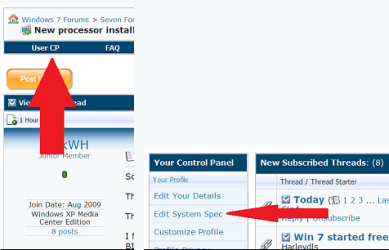
If you would fill out your system specs it would help quite a bit.
 

My Computer My Computer

At a glance

Windows 10 HomeIntel Core i5 3550Corsair Vengeance DDR3 16GBNvidia GEForce GTX 970 SSC
Computer type
PC/Desktop
Computer Manufacturer/Model Number
Self build
OS
Windows 10 Home
CPU
Intel Core i5 3550
Motherboard
ASUS P8Z77-V LX (LGA1155)
Memory
Corsair Vengeance DDR3 16GB
Graphics Card(s)
Nvidia GEForce GTX 970 SSC
Monitor(s) Displays
Hanns-G 23.6", Acer 17"
Screen Resolution
1920x1080, 1440x900
Hard Drives
Sandisk SSD 256 GB
WD500GB
WD640GB
Seagage Ultra + 1TB ext.
BWD 800GB
WD 1TB ext
PSU
Antec 650w
Case
Cooler Master Centurion 534
Cooling
COOLER MASTER GeminII S524, 3 120 mm case fans.
Keyboard
Logitech MK300
Mouse
Logitech MK300
Internet Speed
Cable
Antivirus
MSSE, Malwarebytes
Browser
IE 10, Chrome
Last edited:

My Computer My Computer

At a glance

Windows 7 ultimate 64 bit / XP Home sp3intel Core 2 Duo E8400 3.0ghz8 gigs 1066 OCZ Fata1tyEVGA GTX 580 Call of Duty Black Ops Edition
Computer Manufacturer/Model Number
Self Built
OS
Windows 7 ultimate 64 bit / XP Home sp3
CPU
intel Core 2 Duo E8400 3.0ghz
Motherboard
Asus P5ND bios 1401
Memory
8 gigs 1066 OCZ Fata1ty
Graphics Card(s)
EVGA GTX 580 Call of Duty Black Ops Edition
Sound Card
Creative Soundblaster Audigy 2zs
Monitor(s) Displays
Asus 24in LCD's 2MS X2
Screen Resolution
1920x1080p @60Hz
Hard Drives
WD Caviar 500 Black/ WD Caviar 200 Blue
PSU
OCZ 700W GameXtreme
Case
NZXT Apollo
Cooling
Corsair H50 CPU/120mm x3 /60mm x2 /Corsair Dominator Ram
Keyboard
Logitech Bluetooth Wireless MX5000
Mouse
Logitech Bluetooth Wireless MX1000
Internet Speed
Download 19.83 Upload 0.97
Other Info
Logitech Z2300 Speakers/ Bose Noise Cancelling Headphones/Avermedia PCI-e Hybrid TV Bravo/Epson NX415 all in one/ 4 Port Powered USB Hub/ LG 10x Bluray Burner /TSST Corp DVDRW External
Thanks, Fabe, I just came back to point out how to do the system specs. Forgot it while I was making the post. Eh, just getting old.
 

My Computer My Computer

At a glance

Windows 10 HomeIntel Core i5 3550Corsair Vengeance DDR3 16GBNvidia GEForce GTX 970 SSC
Computer type
PC/Desktop
Computer Manufacturer/Model Number
Self build
OS
Windows 10 Home
CPU
Intel Core i5 3550
Motherboard
ASUS P8Z77-V LX (LGA1155)
Memory
Corsair Vengeance DDR3 16GB
Graphics Card(s)
Nvidia GEForce GTX 970 SSC
Monitor(s) Displays
Hanns-G 23.6", Acer 17"
Screen Resolution
1920x1080, 1440x900
Hard Drives
Sandisk SSD 256 GB
WD500GB
WD640GB
Seagage Ultra + 1TB ext.
BWD 800GB
WD 1TB ext
PSU
Antec 650w
Case
Cooler Master Centurion 534
Cooling
COOLER MASTER GeminII S524, 3 120 mm case fans.
Keyboard
Logitech MK300
Mouse
Logitech MK300
Internet Speed
Cable
Antivirus
MSSE, Malwarebytes
Browser
IE 10, Chrome
Done. I changed the heat sink after the original post, but now its not even staying on till the windows startup screen comes on. I don't know if its the thermal paste, applied a thin layer of it but the actual paste was pretty thick. I don't think the cpu and heatsink are touching.

What else could it be ?

-Ash
 

My Computer My Computer

At a glance

Windows 7 home premium 32bitIntel® Pentium® Processor Extreme Edition 840...2x (Strontium 1gb PC800 DDR2)Gigabyte GV-R9200NF 128mb
Computer Manufacturer/Model Number
ASRock
OS
Windows 7 home premium 32bit
CPU
Intel® Pentium® Processor Extreme Edition 840 (2M Cache, 3.2
Motherboard
ASRock 775Dual-VSTA
Memory
2x (Strontium 1gb PC800 DDR2)
Graphics Card(s)
Gigabyte GV-R9200NF 128mb
PSU
ATX-400WB+P4
Done. I changed the heat sink after the original post, but now its not even staying on till the windows startup screen comes on. I don't know if its the thermal paste, applied a thin layer of it but the actual paste was pretty thick. I don't think the cpu and heatsink are touching.

What else could it be ?

-Ash

Help me out here, when you say "it's not even staying on till the windows startup screen comes on," do you mean that the fan on the heatsink shuts of before the startup screen starts? The fan shouldn't stop for any reason.

You can get too much thermal paste on it, but you said previously that you just put a "dab" on it. Did you clean all the old off completely before re-doing?

I'm still concerned about the heatsink fan thing, so straighten me out if I'm not following you.
 

My Computer My Computer

At a glance

Windows 10 HomeIntel Core i5 3550Corsair Vengeance DDR3 16GBNvidia GEForce GTX 970 SSC
Computer type
PC/Desktop
Computer Manufacturer/Model Number
Self build
OS
Windows 10 Home
CPU
Intel Core i5 3550
Motherboard
ASUS P8Z77-V LX (LGA1155)
Memory
Corsair Vengeance DDR3 16GB
Graphics Card(s)
Nvidia GEForce GTX 970 SSC
Monitor(s) Displays
Hanns-G 23.6", Acer 17"
Screen Resolution
1920x1080, 1440x900
Hard Drives
Sandisk SSD 256 GB
WD500GB
WD640GB
Seagage Ultra + 1TB ext.
BWD 800GB
WD 1TB ext
PSU
Antec 650w
Case
Cooler Master Centurion 534
Cooling
COOLER MASTER GeminII S524, 3 120 mm case fans.
Keyboard
Logitech MK300
Mouse
Logitech MK300
Internet Speed
Cable
Antivirus
MSSE, Malwarebytes
Browser
IE 10, Chrome
The computer just turns off, then the fans and all stop right after.
I took off all the old thermal paste, but it looked like the one i got was old or something so i just went and bought 2 new tubes.

Gonna take some photos then re-edit this post.

EDIT:

10hu1rb.jpg


5krayg.jpg


25z6o2a.jpg


-Ash
 
Last edited:

My Computer My Computer

At a glance

Windows 7 home premium 32bitIntel® Pentium® Processor Extreme Edition 840...2x (Strontium 1gb PC800 DDR2)Gigabyte GV-R9200NF 128mb
Computer Manufacturer/Model Number
ASRock
OS
Windows 7 home premium 32bit
CPU
Intel® Pentium® Processor Extreme Edition 840 (2M Cache, 3.2
Motherboard
ASRock 775Dual-VSTA
Memory
2x (Strontium 1gb PC800 DDR2)
Graphics Card(s)
Gigabyte GV-R9200NF 128mb
PSU
ATX-400WB+P4
Okay. I'll check back and see if that fixes it for you. Hopefully, it will.
 

My Computer My Computer

At a glance

Windows 10 HomeIntel Core i5 3550Corsair Vengeance DDR3 16GBNvidia GEForce GTX 970 SSC
Computer type
PC/Desktop
Computer Manufacturer/Model Number
Self build
OS
Windows 10 Home
CPU
Intel Core i5 3550
Motherboard
ASUS P8Z77-V LX (LGA1155)
Memory
Corsair Vengeance DDR3 16GB
Graphics Card(s)
Nvidia GEForce GTX 970 SSC
Monitor(s) Displays
Hanns-G 23.6", Acer 17"
Screen Resolution
1920x1080, 1440x900
Hard Drives
Sandisk SSD 256 GB
WD500GB
WD640GB
Seagage Ultra + 1TB ext.
BWD 800GB
WD 1TB ext
PSU
Antec 650w
Case
Cooler Master Centurion 534
Cooling
COOLER MASTER GeminII S524, 3 120 mm case fans.
Keyboard
Logitech MK300
Mouse
Logitech MK300
Internet Speed
Cable
Antivirus
MSSE, Malwarebytes
Browser
IE 10, Chrome
You may already have seen this site: Arctic Silver Incorporated - Home#

You will see references sometimes of using cotton swabs and alcohol to clean the old paste off. I prefer a coffee filter, or a paper towel with a like material. Swabs can leave little bits of cotton on the heatsink if you're not careful.

Have you removed the CPU at anytime recently?
 

My Computer My Computer

At a glance

Windows 10 HomeIntel Core i5 3550Corsair Vengeance DDR3 16GBNvidia GEForce GTX 970 SSC
Computer type
PC/Desktop
Computer Manufacturer/Model Number
Self build
OS
Windows 10 Home
CPU
Intel Core i5 3550
Motherboard
ASUS P8Z77-V LX (LGA1155)
Memory
Corsair Vengeance DDR3 16GB
Graphics Card(s)
Nvidia GEForce GTX 970 SSC
Monitor(s) Displays
Hanns-G 23.6", Acer 17"
Screen Resolution
1920x1080, 1440x900
Hard Drives
Sandisk SSD 256 GB
WD500GB
WD640GB
Seagage Ultra + 1TB ext.
BWD 800GB
WD 1TB ext
PSU
Antec 650w
Case
Cooler Master Centurion 534
Cooling
COOLER MASTER GeminII S524, 3 120 mm case fans.
Keyboard
Logitech MK300
Mouse
Logitech MK300
Internet Speed
Cable
Antivirus
MSSE, Malwarebytes
Browser
IE 10, Chrome
Yeh im pretty sure i removed the old paste, and yeh i have. I just applied the thermal paste and now the computer doesn't even stay on for 5 seconds before turning off.


Is it the way i put the processor in?

EDIT: The fan wasnt plugged in, but now it is and the temps still raising. Could it be the new fan?
Pics were updated btw
 

My Computer My Computer

At a glance

Windows 7 home premium 32bitIntel® Pentium® Processor Extreme Edition 840...2x (Strontium 1gb PC800 DDR2)Gigabyte GV-R9200NF 128mb
Computer Manufacturer/Model Number
ASRock
OS
Windows 7 home premium 32bit
CPU
Intel® Pentium® Processor Extreme Edition 840 (2M Cache, 3.2
Motherboard
ASRock 775Dual-VSTA
Memory
2x (Strontium 1gb PC800 DDR2)
Graphics Card(s)
Gigabyte GV-R9200NF 128mb
PSU
ATX-400WB+P4
Did you use a very thin coat of thermal paste and spread it uniformly to prevent air pockets? A tiny dab is all that's needed.
 

My Computer My Computer

At a glance

windows 7 Pro 64Bit2.2 GHz Intel Core i7-2675QM8GBIntel HD Graphics 3000/Radeon HD 6490M
Computer Manufacturer/Model Number
Samsung Chronos 7
OS
windows 7 Pro 64Bit
CPU
2.2 GHz Intel Core i7-2675QM
Memory
8GB
Graphics Card(s)
Intel HD Graphics 3000/Radeon HD 6490M
Sound Card
Realtek High Definition Audio
Monitor(s) Displays
Built in LCD and external Dell 22 inch LCD
Screen Resolution
1600x900
Hard Drives
1 TB HDD
Internet Speed
20 MBPS Down 1500 KBPS Up
Just used the old OEM Fan, added no thermal paste too it because there was still some on the cpu and the temp is sitting at 53 degrees moving up and down and i'm acctually on windows.

Is this a good temp ?
-Ash
 

My Computer My Computer

At a glance

Windows 7 home premium 32bitIntel® Pentium® Processor Extreme Edition 840...2x (Strontium 1gb PC800 DDR2)Gigabyte GV-R9200NF 128mb
Computer Manufacturer/Model Number
ASRock
OS
Windows 7 home premium 32bit
CPU
Intel® Pentium® Processor Extreme Edition 840 (2M Cache, 3.2
Motherboard
ASRock 775Dual-VSTA
Memory
2x (Strontium 1gb PC800 DDR2)
Graphics Card(s)
Gigabyte GV-R9200NF 128mb
PSU
ATX-400WB+P4
Back
Top