Using power supply outside of computer

the jimmy

New member
Member
Local time
10:20 AM
Messages
67
Location
Clearwater Fl
I want to use a spare power supply outside of the computer, does anyone know how to get it working since it's not connected to a motherboard?
 

My Computer My Computer

Computer type
PC/Desktop
Computer Manufacturer/Model Number
Me, as in myself
OS
Win 7 32bit HP
CPU
Intel Core 2 Duo 6600
Motherboard
Gigabyte 965P-DQ6
Memory
2 GB DDR2
Graphics Card(s)
Zotac GeForce GTX 550 Ti
Sound Card
Realtek on board
Monitor(s) Displays
Philips 32" LED-LCD 1080p
Screen Resolution
1920 x 1080
Internet Speed
cable 15mbs
Hello there, Here:

Info: Can I use two Power supplies with one computer?? - Overclock.net - Overclocking.net

Although i would NOT recommend it.. i'd rather have one GOOD PSU than 2 PSUs and probably busting up a 2k$ PC :eek:

My power supply will in no way be connected to a computer. I have a cable that has a IDE/SATA connection on one end and USB on the other, I want to look at the contents of some old hard drives without opening my computer and using one of it's power cables.
 

My Computer My Computer

Computer type
PC/Desktop
Computer Manufacturer/Model Number
Me, as in myself
OS
Win 7 32bit HP
CPU
Intel Core 2 Duo 6600
Motherboard
Gigabyte 965P-DQ6
Memory
2 GB DDR2
Graphics Card(s)
Zotac GeForce GTX 550 Ti
Sound Card
Realtek on board
Monitor(s) Displays
Philips 32" LED-LCD 1080p
Screen Resolution
1920 x 1080
Internet Speed
cable 15mbs
Use a Piece of wire or straightened paper clip to connect the Green wire on the 24 pin plug to any of the black ones
 
Last edited:

My Computer My Computer

Computer type
PC/Desktop
Computer Manufacturer/Model Number
Self Built Custom Computer.
OS
Windows 10 Pro x64
CPU
i7-4770K
Motherboard
Asus Z87 Sabertooth
Memory
16Gig DDR3-2400
Graphics Card(s)
Gigabyte GT740
Sound Card
Onboard
Monitor(s) Displays
Benq 27" - Dell 23' - Benq 22"
Screen Resolution
1680x1050
Hard Drives
Samsung 840 Pro 128g SSD
1xWestern Digital Caviar Green 1tb
2xWestern Digital Caviar Green 2 tb
PSU
Seasonic 760 watt Platinum
Case
Coolermaster Haf - X
Cooling
Noctua NH-C12P CPU Cooler
Keyboard
Logitech illuminated keyboard
Mouse
Logitech Perfomance MX
Internet Speed
Cable = speeds to 20Mbps downsteam and 512kbps upsteam
Antivirus
Avast Internet Security
Browser
Firefox
Use a Piece of wire or straightened paper clip to connect the Green wire on the 24 pin plug to any of the black ones

I'll give it a try, thanks
 

My Computer My Computer

Computer type
PC/Desktop
Computer Manufacturer/Model Number
Me, as in myself
OS
Win 7 32bit HP
CPU
Intel Core 2 Duo 6600
Motherboard
Gigabyte 965P-DQ6
Memory
2 GB DDR2
Graphics Card(s)
Zotac GeForce GTX 550 Ti
Sound Card
Realtek on board
Monitor(s) Displays
Philips 32" LED-LCD 1080p
Screen Resolution
1920 x 1080
Internet Speed
cable 15mbs
Instead of the wire, connect that to spare motherboard and RAM, and you have a great testbed for components...at least for video cards or fans
 

My Computer My Computer

Computer Manufacturer/Model Number
DIY
OS
W7x64 Pro, SuSe 12.1/** W7 x64 Pro, XP MCE
CPU
Phenom II 1090T w/Noctua NH-D14 /**4400+ X2 w/CM Hyper TX 3
Motherboard
ASRock 890FX Deluxe 4/**A8N-SLI
Memory
2 x 2GB Patriot PGS34g1600LLKA/**4x1GB Corsair VS
Graphics Card(s)
EVGA GTX460 SC/**EVGA 8800GTS
Sound Card
Asus Xonar D2X/**Xonar D1
Monitor(s) Displays
Acer X233H, Dell E152FPc /**LG M237-WD
Screen Resolution
1920x1080 & 1024x768/**1980x1080
Hard Drives
WDC 2TB, 1.5TB, 1TB, 500GB,Seagate 500GB , Maxtor 80GB /**500GB Seagate & WDC 1TB Black
PSU
CM RS600 w/ APC BX1000G/**Antec 500 TP w/ APC BX1000
Case
HAF922/**Antec 1040IIB
Cooling
3x200mm, 1x140 and 1x120mm/**5x80mm fans
Keyboard
Logitech Media USB/**Saitek Eclipse
Mouse
Cordless Trackman Wheel/**Ditto
Internet Speed
3.3Mbps
Other Info
SB 560 5.1 w/ Sennheiser RS140/**Creative T20 speakers, Dvico FusionHDTV7 Gold RT, Cisco E3000, HP 5510V AIO, Linksys E3000, Belkin F5U237 hub and **F5D8055 adapter
(** = 2nd rig)

My Computer My Computer

Computer Manufacturer/Model Number
DIY
OS
W7x64 Pro, SuSe 12.1/** W7 x64 Pro, XP MCE
CPU
Phenom II 1090T w/Noctua NH-D14 /**4400+ X2 w/CM Hyper TX 3
Motherboard
ASRock 890FX Deluxe 4/**A8N-SLI
Memory
2 x 2GB Patriot PGS34g1600LLKA/**4x1GB Corsair VS
Graphics Card(s)
EVGA GTX460 SC/**EVGA 8800GTS
Sound Card
Asus Xonar D2X/**Xonar D1
Monitor(s) Displays
Acer X233H, Dell E152FPc /**LG M237-WD
Screen Resolution
1920x1080 & 1024x768/**1980x1080
Hard Drives
WDC 2TB, 1.5TB, 1TB, 500GB,Seagate 500GB , Maxtor 80GB /**500GB Seagate & WDC 1TB Black
PSU
CM RS600 w/ APC BX1000G/**Antec 500 TP w/ APC BX1000
Case
HAF922/**Antec 1040IIB
Cooling
3x200mm, 1x140 and 1x120mm/**5x80mm fans
Keyboard
Logitech Media USB/**Saitek Eclipse
Mouse
Cordless Trackman Wheel/**Ditto
Internet Speed
3.3Mbps
Other Info
SB 560 5.1 w/ Sennheiser RS140/**Creative T20 speakers, Dvico FusionHDTV7 Gold RT, Cisco E3000, HP 5510V AIO, Linksys E3000, Belkin F5U237 hub and **F5D8055 adapter
(** = 2nd rig)
I'm not sure what you mean by not safe, because it is only 12 volts and isn't going to shock anyone. As far as it shorting out to something else, that could be prevented by using an insulated wire.
 

My Computer My Computer

Computer Manufacturer/Model Number
DIY
OS
W7x64 Pro, SuSe 12.1/** W7 x64 Pro, XP MCE
CPU
Phenom II 1090T w/Noctua NH-D14 /**4400+ X2 w/CM Hyper TX 3
Motherboard
ASRock 890FX Deluxe 4/**A8N-SLI
Memory
2 x 2GB Patriot PGS34g1600LLKA/**4x1GB Corsair VS
Graphics Card(s)
EVGA GTX460 SC/**EVGA 8800GTS
Sound Card
Asus Xonar D2X/**Xonar D1
Monitor(s) Displays
Acer X233H, Dell E152FPc /**LG M237-WD
Screen Resolution
1920x1080 & 1024x768/**1980x1080
Hard Drives
WDC 2TB, 1.5TB, 1TB, 500GB,Seagate 500GB , Maxtor 80GB /**500GB Seagate & WDC 1TB Black
PSU
CM RS600 w/ APC BX1000G/**Antec 500 TP w/ APC BX1000
Case
HAF922/**Antec 1040IIB
Cooling
3x200mm, 1x140 and 1x120mm/**5x80mm fans
Keyboard
Logitech Media USB/**Saitek Eclipse
Mouse
Cordless Trackman Wheel/**Ditto
Internet Speed
3.3Mbps
Other Info
SB 560 5.1 w/ Sennheiser RS140/**Creative T20 speakers, Dvico FusionHDTV7 Gold RT, Cisco E3000, HP 5510V AIO, Linksys E3000, Belkin F5U237 hub and **F5D8055 adapter
(** = 2nd rig)
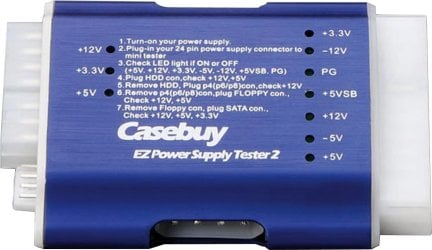
If you do this often you need one of these.
 
Last edited:

My Computer My Computer

Computer type
PC/Desktop
Computer Manufacturer/Model Number
Self Built Custom Computer.
OS
Windows 10 Pro x64
CPU
i7-4770K
Motherboard
Asus Z87 Sabertooth
Memory
16Gig DDR3-2400
Graphics Card(s)
Gigabyte GT740
Sound Card
Onboard
Monitor(s) Displays
Benq 27" - Dell 23' - Benq 22"
Screen Resolution
1680x1050
Hard Drives
Samsung 840 Pro 128g SSD
1xWestern Digital Caviar Green 1tb
2xWestern Digital Caviar Green 2 tb
PSU
Seasonic 760 watt Platinum
Case
Coolermaster Haf - X
Cooling
Noctua NH-C12P CPU Cooler
Keyboard
Logitech illuminated keyboard
Mouse
Logitech Perfomance MX
Internet Speed
Cable = speeds to 20Mbps downsteam and 512kbps upsteam
Antivirus
Avast Internet Security
Browser
Firefox
If you do this often you need one of these.

Hmm, I don't do it all that often, but I like that anyway. It's inexpensive and simple.
 

My Computer My Computer

Computer Manufacturer/Model Number
DIY
OS
W7x64 Pro, SuSe 12.1/** W7 x64 Pro, XP MCE
CPU
Phenom II 1090T w/Noctua NH-D14 /**4400+ X2 w/CM Hyper TX 3
Motherboard
ASRock 890FX Deluxe 4/**A8N-SLI
Memory
2 x 2GB Patriot PGS34g1600LLKA/**4x1GB Corsair VS
Graphics Card(s)
EVGA GTX460 SC/**EVGA 8800GTS
Sound Card
Asus Xonar D2X/**Xonar D1
Monitor(s) Displays
Acer X233H, Dell E152FPc /**LG M237-WD
Screen Resolution
1920x1080 & 1024x768/**1980x1080
Hard Drives
WDC 2TB, 1.5TB, 1TB, 500GB,Seagate 500GB , Maxtor 80GB /**500GB Seagate & WDC 1TB Black
PSU
CM RS600 w/ APC BX1000G/**Antec 500 TP w/ APC BX1000
Case
HAF922/**Antec 1040IIB
Cooling
3x200mm, 1x140 and 1x120mm/**5x80mm fans
Keyboard
Logitech Media USB/**Saitek Eclipse
Mouse
Cordless Trackman Wheel/**Ditto
Internet Speed
3.3Mbps
Other Info
SB 560 5.1 w/ Sennheiser RS140/**Creative T20 speakers, Dvico FusionHDTV7 Gold RT, Cisco E3000, HP 5510V AIO, Linksys E3000, Belkin F5U237 hub and **F5D8055 adapter
(** = 2nd rig)
If you do this often you need one of these.
Thanks, I'm handy enough to make my own, besides the shipping from down under would kill me :eek:
 

My Computer My Computer

Computer type
PC/Desktop
Computer Manufacturer/Model Number
Me, as in myself
OS
Win 7 32bit HP
CPU
Intel Core 2 Duo 6600
Motherboard
Gigabyte 965P-DQ6
Memory
2 GB DDR2
Graphics Card(s)
Zotac GeForce GTX 550 Ti
Sound Card
Realtek on board
Monitor(s) Displays
Philips 32" LED-LCD 1080p
Screen Resolution
1920 x 1080
Internet Speed
cable 15mbs
Just out of curiosity, what would shipping probably cost on a little item like that "down under"? I know that I have ordered things from overseas, and the shipping has always been pretty nominal, unless I got impatient and had to have it now.

EDIT" OOPS! That's coming from down under, rather than the other way around. It still shouldn't cost too much, but I found that their shipping calculator didn't work, and I didn't feel like registering for an account.
 

My Computer My Computer

Computer Manufacturer/Model Number
DIY
OS
W7x64 Pro, SuSe 12.1/** W7 x64 Pro, XP MCE
CPU
Phenom II 1090T w/Noctua NH-D14 /**4400+ X2 w/CM Hyper TX 3
Motherboard
ASRock 890FX Deluxe 4/**A8N-SLI
Memory
2 x 2GB Patriot PGS34g1600LLKA/**4x1GB Corsair VS
Graphics Card(s)
EVGA GTX460 SC/**EVGA 8800GTS
Sound Card
Asus Xonar D2X/**Xonar D1
Monitor(s) Displays
Acer X233H, Dell E152FPc /**LG M237-WD
Screen Resolution
1920x1080 & 1024x768/**1980x1080
Hard Drives
WDC 2TB, 1.5TB, 1TB, 500GB,Seagate 500GB , Maxtor 80GB /**500GB Seagate & WDC 1TB Black
PSU
CM RS600 w/ APC BX1000G/**Antec 500 TP w/ APC BX1000
Case
HAF922/**Antec 1040IIB
Cooling
3x200mm, 1x140 and 1x120mm/**5x80mm fans
Keyboard
Logitech Media USB/**Saitek Eclipse
Mouse
Cordless Trackman Wheel/**Ditto
Internet Speed
3.3Mbps
Other Info
SB 560 5.1 w/ Sennheiser RS140/**Creative T20 speakers, Dvico FusionHDTV7 Gold RT, Cisco E3000, HP 5510V AIO, Linksys E3000, Belkin F5U237 hub and **F5D8055 adapter
(** = 2nd rig)
I'm not sure what you mean by not safe, because it is only 12 volts and isn't going to shock anyone. As far as it shorting out to something else, that could be prevented by using an insulated wire.

Todays PC power supplies are switching power supplies. To work correctly they require a load. Using a paper clip or piece or wire to jump start them is not recommended. In some cases the power supply could fail in a very bad way. The power supply tester has load resisters in it to allow you to safely power it up with no motherboard connected. Many people have used a paper clip and got away with it. If the power supply is high quality with short circuit and overload protection it probably won't self destruct. Its still not good for it though.
 

My Computer My Computer

Computer type
PC/Desktop
Computer Manufacturer/Model Number
Home Built
OS
Windows 10 Education 64 bit
CPU
AMD Phenom II X4 980 Black Edition Deneb 3.7GHz
Motherboard
Asus M4N68T-M V2 µATX Motherboard
Memory
8GB 4GBx2 Kingston PC10600 DDR3 1333 Memory
Graphics Card(s)
Zotac NVIDIA Geforce GT640 2 Gig DDR3 PCIe
Sound Card
VIA VT1708s High Definition Audio 8-channel Onboard
Monitor(s) Displays
22" LG E2242 1080p and 2 19" I-INC AG191D
Screen Resolution
1280x1024 - 1920x1080 - 1280x1024
Hard Drives
Crucial M100 256 GB SSD and 500 GB WD Blue SATA
PSU
Thermaltake TR 620
Case
Power Up Black ATX Mid-Tower Case
Cooling
Stock heatsink and fan
Keyboard
Logitech Wireless K350 Wave
Mouse
Logitech Wireless M570 Trackman Wheel
Internet Speed
80 Mbps Down 30 Mbps Up
Antivirus
Windows Defender
Browser
Internet Explorer 11
Other Info
HP DVD1040e Lightscribe - External USB2
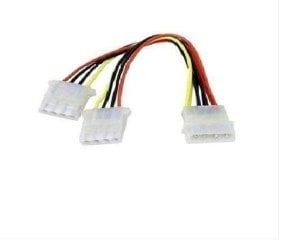
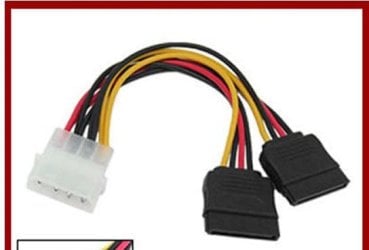
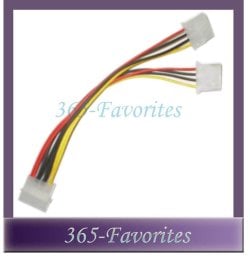
I bought several Y-splitter power cables. Linked them together & came out the back of computer in one of the empty slots. Works great with a Tri-Head USB adapter ;)
 

Attachments

  • Power_cable_Y_splitter.JPG
    Power_cable_Y_splitter.JPG
    21.5 KB · Views: 2
  • Power_Y_Sata_splitter.JPG
    Power_Y_Sata_splitter.JPG
    23.7 KB · Views: 0
  • Power_Y_splitter.JPG
    Power_Y_splitter.JPG
    41.1 KB · Views: 0
  • Tri_Head_tb24611.jpg
    Tri_Head_tb24611.jpg
    19.7 KB · Views: 3

My Computer My Computer

Computer type
PC/Desktop
Computer Manufacturer/Model Number
Built them myself, Science Experiments !
OS
Win7 Enterprise, Win7 x86 (Ult 7600), Win7 x64 Ult 7600, TechNet RTM on AMD x64 (2.8Ghz)
CPU
AMD fx8350 4ghz, AMD-32 2400mhz, AMD-64 3200mhz, AMDx64 2.8G
Motherboard
SIS 755, ECS-K8M890M-M (Ult 7600), GigaByte & others
Memory
2gb, 4gb on the Ult 7600, 4gb on Technet RTM, 32gb on FX8350
Graphics Card(s)
Draw my own Graphics, several nVidia cards
Sound Card
on motherboard
Monitor(s) Displays
19" flat scr, 28" I-Inc widescr,22" Emprex Widescr, 23" Acer
Screen Resolution
1280 x 1024, 1440 x 900, 1920 x 1080
Hard Drives
6 pata Ide HD's & 2 Sata HD's
added 80gb external on Ult 7600 computer,
numerous extra 1tb, 2TB, 3Tb SATA HD's
A collection of ext HD Docks w/ HDs
PSU
430w, 550w, 600w, 700, 800, etc
Case
All Generic Full Towers
Cooling
Open Air & a few fans, some w/ colored LEDs
Keyboard
Compaq & Dell recycled from GoodWill
Mouse
Made in China Optical Wired Mouse
Internet Speed
Fast Cable InterNet
Antivirus
AVG Free on 24 different Desktops, NO Problems!
Browser
IE 8 is preferred, but use FireFox sometimes
Other Info
Linksys Routers, switches, & Hubs
Too Many USB Flash Drives to count, Biggest is 64GB !
Eight computers in my home network.
Sixteen computers at my business network.
Linked via TeamViewer !
Lots of old used spare computer parts everywhere!
Just out of curiosity, what would shipping probably cost on a little item like that "down under"? I know that I have ordered things from overseas, and the shipping has always been pretty nominal, unless I got impatient and had to have it now.

EDIT" OOPS! That's coming from down under, rather than the other way around. It still shouldn't cost too much, but I found that their shipping calculator didn't work, and I didn't feel like registering for an account.

You're probably right, that was my first impression


I bought several Y-splitter power cables. Linked them together & came out the back of computer in one of the empty slots. Works great with a Tri-Head USB adapter ;)

Good solution
 

My Computer My Computer

Computer type
PC/Desktop
Computer Manufacturer/Model Number
Me, as in myself
OS
Win 7 32bit HP
CPU
Intel Core 2 Duo 6600
Motherboard
Gigabyte 965P-DQ6
Memory
2 GB DDR2
Graphics Card(s)
Zotac GeForce GTX 550 Ti
Sound Card
Realtek on board
Monitor(s) Displays
Philips 32" LED-LCD 1080p
Screen Resolution
1920 x 1080
Internet Speed
cable 15mbs
Todays PC power supplies are switching power supplies. To work correctly they require a load. Using a paper clip or piece or wire to jump start them is not recommended. In some cases the power supply could fail in a very bad way. The power supply tester has load resisters in it to allow you to safely power it up with no motherboard connected. Many people have used a paper clip and got away with it. If the power supply is high quality with short circuit and overload protection it probably won't self destruct. Its still not good for it though.

Interesting, did you have to look that up or do you have an electrical background? Just curious
 
Last edited:

My Computer My Computer

Computer type
PC/Desktop
Computer Manufacturer/Model Number
Me, as in myself
OS
Win 7 32bit HP
CPU
Intel Core 2 Duo 6600
Motherboard
Gigabyte 965P-DQ6
Memory
2 GB DDR2
Graphics Card(s)
Zotac GeForce GTX 550 Ti
Sound Card
Realtek on board
Monitor(s) Displays
Philips 32" LED-LCD 1080p
Screen Resolution
1920 x 1080
Internet Speed
cable 15mbs
If you are using it outside the case it means that you will be testing something with it,if you feel like it just plug a fan or something similar into one of the molex connecters and you have a load on the PSU.
I have used this method on very old and very new PSU's without any problems.

Have a Happy Birthday Today
 

My Computer My Computer

Computer type
PC/Desktop
Computer Manufacturer/Model Number
Self Built Custom Computer.
OS
Windows 10 Pro x64
CPU
i7-4770K
Motherboard
Asus Z87 Sabertooth
Memory
16Gig DDR3-2400
Graphics Card(s)
Gigabyte GT740
Sound Card
Onboard
Monitor(s) Displays
Benq 27" - Dell 23' - Benq 22"
Screen Resolution
1680x1050
Hard Drives
Samsung 840 Pro 128g SSD
1xWestern Digital Caviar Green 1tb
2xWestern Digital Caviar Green 2 tb
PSU
Seasonic 760 watt Platinum
Case
Coolermaster Haf - X
Cooling
Noctua NH-C12P CPU Cooler
Keyboard
Logitech illuminated keyboard
Mouse
Logitech Perfomance MX
Internet Speed
Cable = speeds to 20Mbps downsteam and 512kbps upsteam
Antivirus
Avast Internet Security
Browser
Firefox
Todays PC power supplies are switching power supplies. To work correctly they require a load. Using a paper clip or piece or wire to jump start them is not recommended. In some cases the power supply could fail in a very bad way. The power supply tester has load resisters in it to allow you to safely power it up with no motherboard connected. Many people have used a paper clip and got away with it. If the power supply is high quality with short circuit and overload protection it probably won't self destruct. Its still not good for it though.

Interesting, did you have to look that up or do you have an electrical background? Just curious

I'm an electronic technician by trade. I have been trained in PC repair and maintenance. At one point in my career I did a short stint in a repair facility and one of the things I worked on were switching power supplies. They weren't PC power supplies but the principles of how they work are the same. I'm retired now.
 

My Computer My Computer

Computer type
PC/Desktop
Computer Manufacturer/Model Number
Home Built
OS
Windows 10 Education 64 bit
CPU
AMD Phenom II X4 980 Black Edition Deneb 3.7GHz
Motherboard
Asus M4N68T-M V2 µATX Motherboard
Memory
8GB 4GBx2 Kingston PC10600 DDR3 1333 Memory
Graphics Card(s)
Zotac NVIDIA Geforce GT640 2 Gig DDR3 PCIe
Sound Card
VIA VT1708s High Definition Audio 8-channel Onboard
Monitor(s) Displays
22" LG E2242 1080p and 2 19" I-INC AG191D
Screen Resolution
1280x1024 - 1920x1080 - 1280x1024
Hard Drives
Crucial M100 256 GB SSD and 500 GB WD Blue SATA
PSU
Thermaltake TR 620
Case
Power Up Black ATX Mid-Tower Case
Cooling
Stock heatsink and fan
Keyboard
Logitech Wireless K350 Wave
Mouse
Logitech Wireless M570 Trackman Wheel
Internet Speed
80 Mbps Down 30 Mbps Up
Antivirus
Windows Defender
Browser
Internet Explorer 11
Other Info
HP DVD1040e Lightscribe - External USB2
Back
Top