Move Windows 7 to another disk

This is why I suggested he recreate the SysReserved partitiion he copied if he wants to keep it on Disk1. Be sure to mark it Active before running the Repair, or if you want to delete it mark Win7 partition Active instead.

Now that I look back I see you did.

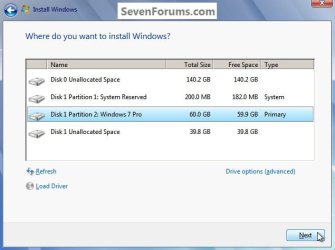
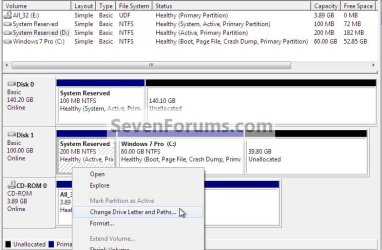
This could be used as an outline to add the SysResv to Disk 1 though Partition Wizard would have to be used to create and format the SysResv instead of using disk management as in Step Two since Windows won't boot.

System Reserved : Create for Dual Boot


I'm referring to the disk signature (4 bytes) which lives on the physical MBR (first 512 bytes). This is what Windows 7 (and Vista?) uses to avoid disk collisions and is recorded also in the registry.
A clean all (even partly run) is one of the few things to completely wipe the MBR and the old disk signature on disk 0.

Unplugging the disk 0 would have avoided this but that's history. If disk 0 is looking suspect then you'll need to do it sooner or later.

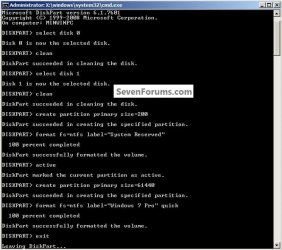
Running the clean command on Disk 0 rather than the clean all in diskpart will remove all the format configuration data and only takes seconds.

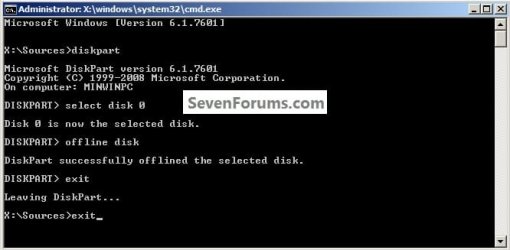
DISKPART : At PC Startup

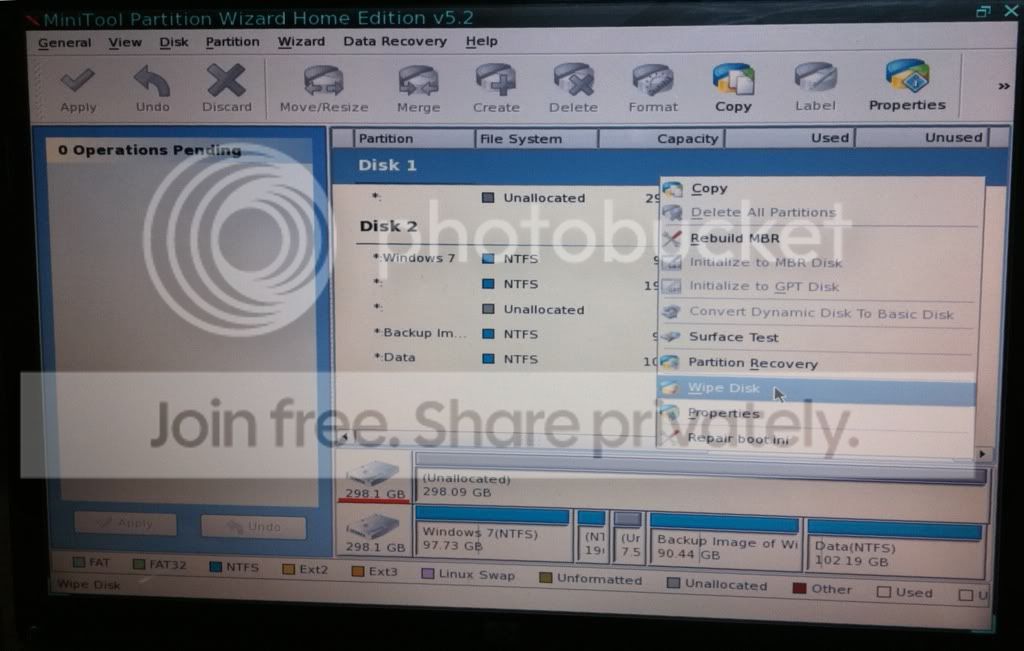
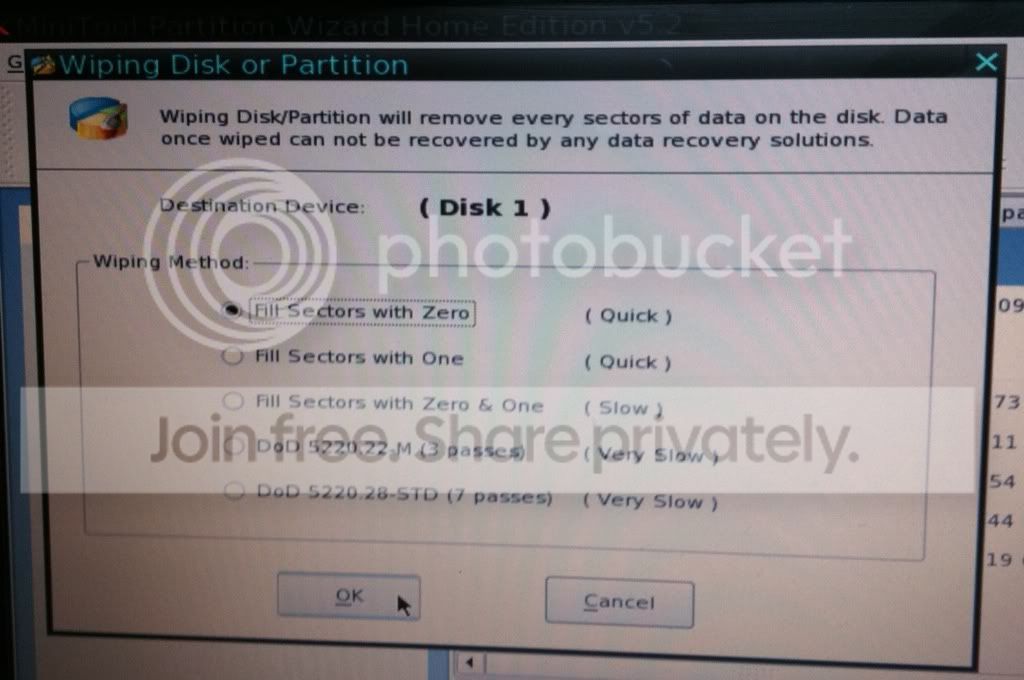
Though in this case the best way forward would be to boot the Partition Wizard boot disk and first do a wipe to write zeroes to the Disk 0 SysResv partition then delete that partition to leave unallocated space on Disk 0.
Then create, format and mark as active a new SysResv partition to the front of Disk 1 while still in Partition Wizard.

Then replace the Partition Wizard disk in the CD/DVD drive with the Windows 7 disk and restart the PC to run the 3 separate startup repairs with the restarts to the new SysResv partition on Disk 1.

Startup Repair - Run 3 Separate Times
click to enlarge
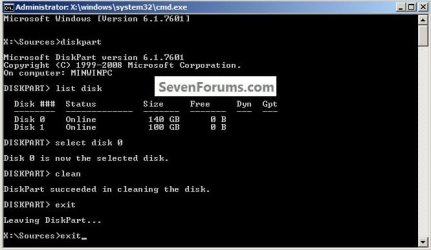
clean.jpg
 

My Computer My Computer

Computer Manufacturer/Model Number
* BFK Customs *
OS
W 7 64-bit Ultimate
CPU
Intel Q9550 Yorkfield
Motherboard
ASUS P5Q Pro
Memory
8GB Dominator 8500C5D
Graphics Card(s)
ATI : XFX 5870
Sound Card
Realtek HD Audio 7-1
Monitor(s) Displays
1x 47" LCD HDMI & 3x 26" LCD HDMI
Screen Resolution
1920x1080P & 1920x1200
Hard Drives
1x 80GB Intel X25-M G2 SSD : 1x 500GB & 1x 640GB WD Caviar Black(s)
PSU
Corsair 620HX
Case
Cooler Master RC-690
Cooling
Tuniq Tower 120, 2x 140mm and 3x 120mm case fans
Keyboard
Microsoft 500
Mouse
Razer Diamondback 3G
Internet Speed
14 Mb/s
Other Info
1x Koutech 3Gb/s SATA HDD Hot Swap Rack
Update
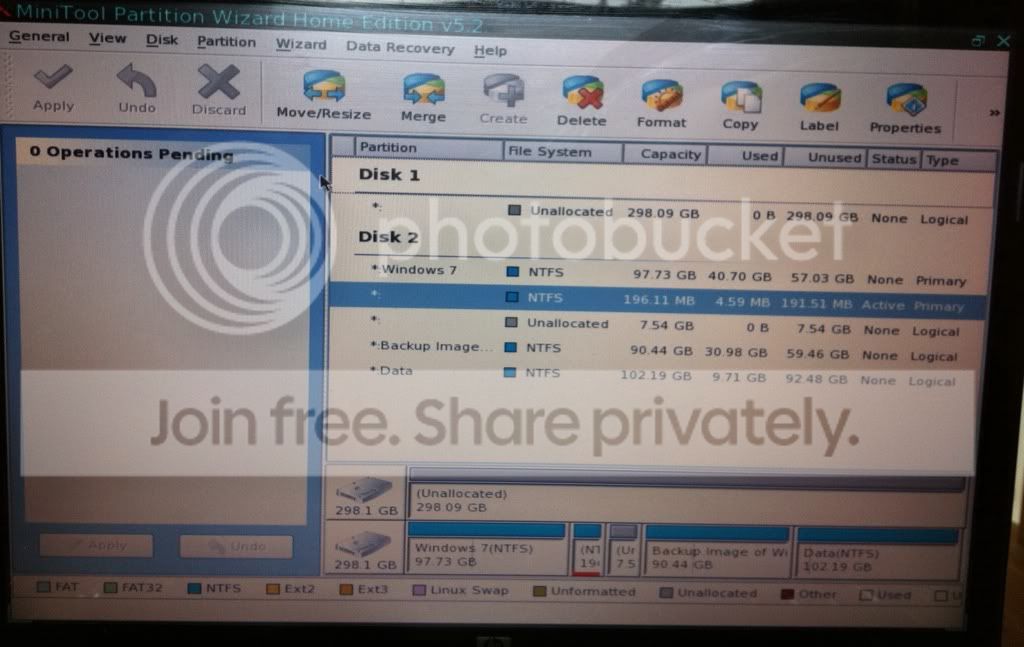
I wiped disk 0:
4acc4c53.jpg


d3e2b2c7.jpg

Then I deleted the System partition on disk 1 and then created a new 200MB primary partition.
b7258afc.jpg

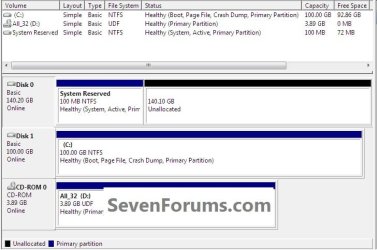
My disks then looked like this:
749a2615.jpg

Then I rebooted using my Windows 7 DVD to get to the Repair your computer option.
a8723289.jpg

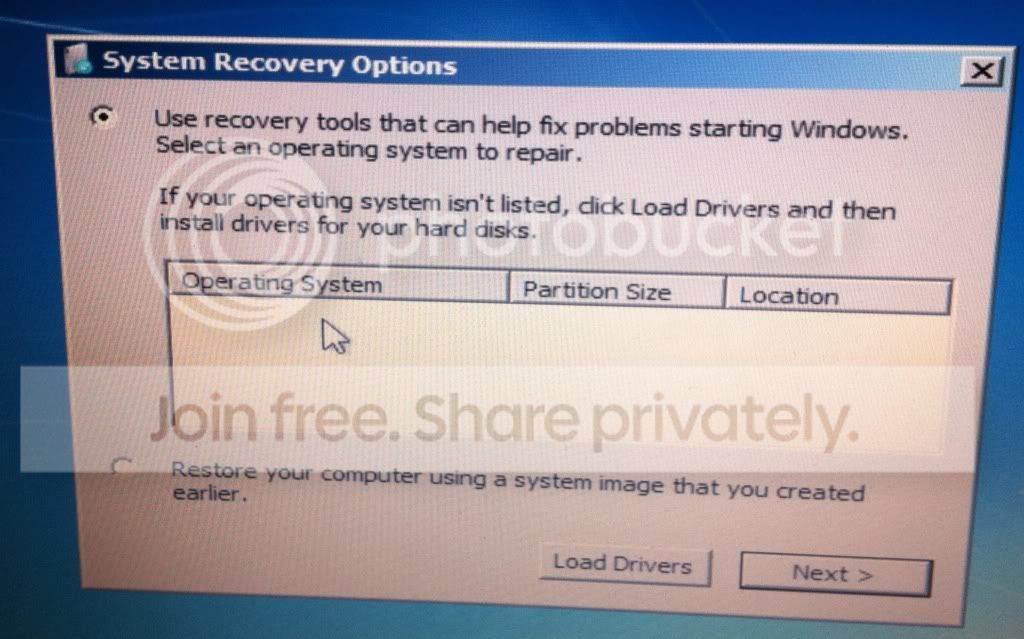
but the operating system doesn't appear in the list.
caba7431.jpg

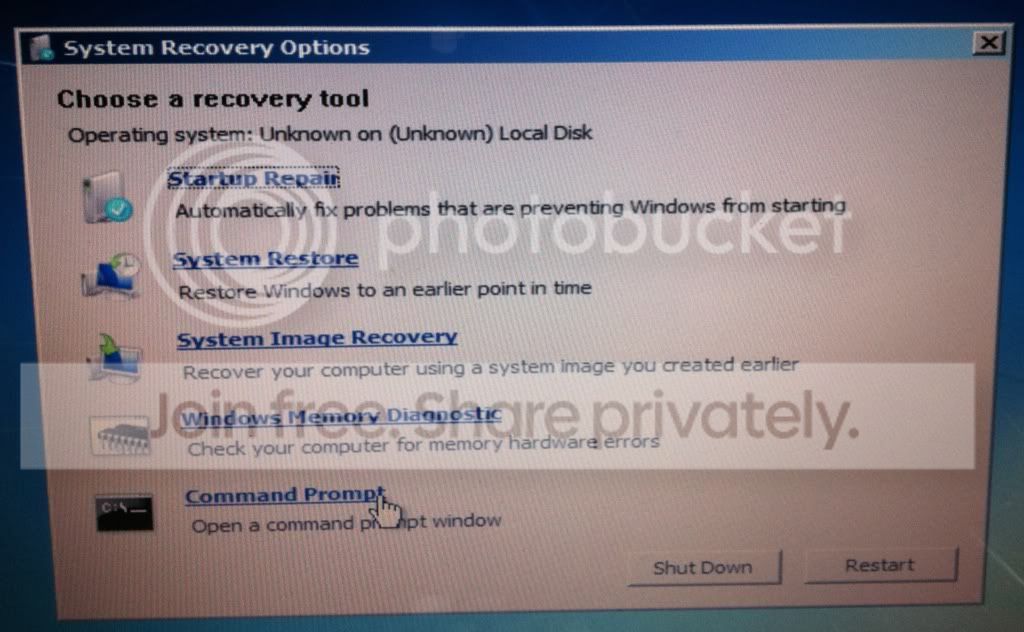
I don't want to click the Startup Repair option because whenever I do it takes ages for the operation to complete (unsuccessfully). It only seems to work if Windows appears in the list of operating systems.
1b3873d2.jpg

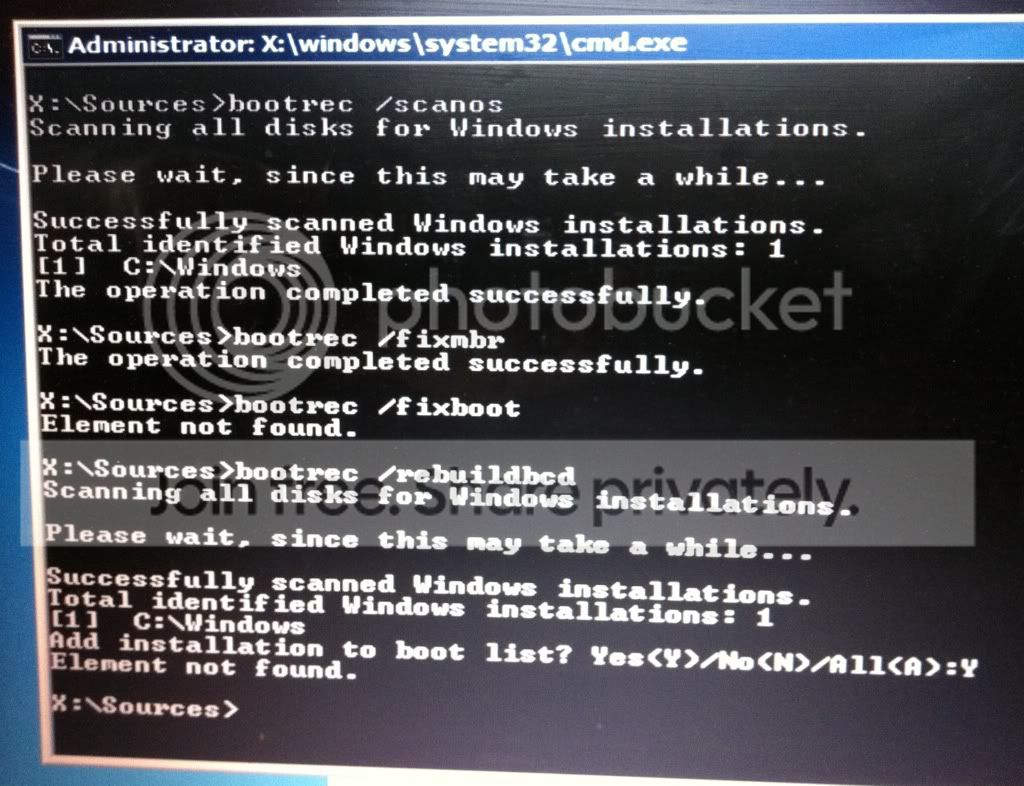
I select the Command Prompt and then perform the following commands using bootrec.
9327e027.jpg


All the previous steps were done with the Windows 7 partition set as active on disk 1.
Unfortunately Windows still won't boot.

I repeat all of the pervious steps, but this time I set the 200MB partition on disk 1 as active.
Windows still won't boot.

If there was a way to get Windows to appear in the list of operating systems I'd be much more optimistic of getting Startup Repair to work.

Does this information help? I've tried to follow the advice in this thread but I'm having difficulty getting Startup Repair to work properly. Are there any ideas I can try now, or maybe there are some steps I didn't follow correctly?
 

My Computer My Computer

Computer type
Laptop
OS
Microsoft Windows 7 Home Premium 64-bit 7601 Multiprocessor Free Service Pack 1
CPU
Intel(R) Core(TM) i7-2720QM CPU @ 2.20GHz
Motherboard
Dell Inc. 0XN71K
Memory
6,00 GB
Graphics Card(s)
(1) NVIDIA GeForce GT 555M (2) Intel(R) HD Graphics Fa
Sound Card
(1) Realtek High Definition Audio (2) Intel(R) Display Aud
Screen Resolution
0 x 0 x 0 bits (0 colors) @ 0 Hz
Hard Drives
(1) WDC WD5000BPKT-75PK4T0 (2) USB2.0 Mobile Disk USB Device
Bare Foot Kid, I'll have a look at your post tonight. Thanks.
 

My Computer My Computer

Computer type
Laptop
OS
Microsoft Windows 7 Home Premium 64-bit 7601 Multiprocessor Free Service Pack 1
CPU
Intel(R) Core(TM) i7-2720QM CPU @ 2.20GHz
Motherboard
Dell Inc. 0XN71K
Memory
6,00 GB
Graphics Card(s)
(1) NVIDIA GeForce GT 555M (2) Intel(R) HD Graphics Fa
Sound Card
(1) Realtek High Definition Audio (2) Intel(R) Display Aud
Screen Resolution
0 x 0 x 0 bits (0 colors) @ 0 Hz
Hard Drives
(1) WDC WD5000BPKT-75PK4T0 (2) USB2.0 Mobile Disk USB Device
I'm referring to the disk signature (4 bytes) which lives on the physical MBR (first 512 bytes). This is what Windows 7 (and Vista?) uses to avoid disk collisions and is recorded also in the registry.
A clean all (even partly run) is one of the few things to completely wipe the MBR and the old disk signature on disk 0.

Unplugging the disk 0 would have avoided this but that's history. If disk 0 is looking suspect then you'll need to do it sooner or later.

Running the clean command on Disk 0 rather than the clean all in diskpart will remove all the format configuration data and only takes seconds.
I said clean all.

I'm not sure if "Wipe all" in Partition Wizard wipes the MBR.
If the MBR is cleared then disk 0 should not be initializing which is what I was suggesting.

Getting late , got to go. Hope you make progress.
 
Last edited:

My Computer My Computer

Computer type
PC/Desktop
Computer Manufacturer/Model Number
Own build
OS
Windows 7x64 Home Premium SP1
CPU
Intel i7 2600k
Motherboard
ASUS P8Z68 Deluxe
Memory
G.Skill Ripjaws (DDR3-1600) 2x4GB
Graphics Card(s)
Nvidia GeForce GTS 450; Intel HD Graphics 3000(GT2+)
Monitor(s) Displays
Dell Ultrasharp IPS panel U2311H, Samsung SyncMaster P2350
Screen Resolution
1920x1080
Hard Drives
Samsung 850 Pro SSD 256GB, Samsung SSD 840 120GB, Seagates 1TB Barracuda ST31000528AS x2
PSU
Seasonic M12II 520W
Case
Lian Li Lancool PC-K60
Cooling
Case: 1x120mm, 3x140mm CPU: Hyper 212+
Keyboard
Logitech MK520 (wireless)
Mouse
Logitech MK520
Internet Speed
6-7 Mbps
Antivirus
Norton Security Premium, Malwarebytes on 2 (MSE on 3rd PC)
Browser
FireFox
Other Info
Audio: Logitech Z523 2.1
The only way I've been able to get Win7 with Active SysReserved or OS partition to be force recognized in WinRE is using the bootrec.exe /fixboot and /fixmbr.

Try also Rebuild MBR from PW CD
 
Last edited:
Well, I decided to wipe disk 0 (already done) and disk 1 (in progress). Starting with a clean slate my make things clearer to me.

Once that's finished I'm going to restore my backup image of Windows 7 to my disk 1. If it doesn't boot then I'll repeat the steps that have been described to me earlier: create a 200mb primary partition, mark Windows partition as active, perform System Restore x 3, etc.

I'll keep the thread updated on any progress.

I really hope wiping the disk 1 wasn't a big mistake!!:shock:
 

My Computer My Computer

Computer type
Laptop
OS
Microsoft Windows 7 Home Premium 64-bit 7601 Multiprocessor Free Service Pack 1
CPU
Intel(R) Core(TM) i7-2720QM CPU @ 2.20GHz
Motherboard
Dell Inc. 0XN71K
Memory
6,00 GB
Graphics Card(s)
(1) NVIDIA GeForce GT 555M (2) Intel(R) HD Graphics Fa
Sound Card
(1) Realtek High Definition Audio (2) Intel(R) Display Aud
Screen Resolution
0 x 0 x 0 bits (0 colors) @ 0 Hz
Hard Drives
(1) WDC WD5000BPKT-75PK4T0 (2) USB2.0 Mobile Disk USB Device
I really hope wiping the disk 1 wasn't a big mistake!!:shock:

I don't know that you had too many options left. If disk 0 is dying best to replace it at some stage. At worse you may have to go back to a clean install.

If you haven't already done it, maybe make disk 1 (2nd disk) rather than disk 0 the primary boot disk in the BIOS boot list.
 

My Computer My Computer

Computer type
PC/Desktop
Computer Manufacturer/Model Number
Own build
OS
Windows 7x64 Home Premium SP1
CPU
Intel i7 2600k
Motherboard
ASUS P8Z68 Deluxe
Memory
G.Skill Ripjaws (DDR3-1600) 2x4GB
Graphics Card(s)
Nvidia GeForce GTS 450; Intel HD Graphics 3000(GT2+)
Monitor(s) Displays
Dell Ultrasharp IPS panel U2311H, Samsung SyncMaster P2350
Screen Resolution
1920x1080
Hard Drives
Samsung 850 Pro SSD 256GB, Samsung SSD 840 120GB, Seagates 1TB Barracuda ST31000528AS x2
PSU
Seasonic M12II 520W
Case
Lian Li Lancool PC-K60
Cooling
Case: 1x120mm, 3x140mm CPU: Hyper 212+
Keyboard
Logitech MK520 (wireless)
Mouse
Logitech MK520
Internet Speed
6-7 Mbps
Antivirus
Norton Security Premium, Malwarebytes on 2 (MSE on 3rd PC)
Browser
FireFox
Other Info
Audio: Logitech Z523 2.1
I just started a simulation in VirtualBox and it just started installing, I'll be back after, whether it works or not.


click to enlarge
disk1.jpg
 

My Computer My Computer

Computer Manufacturer/Model Number
* BFK Customs *
OS
W 7 64-bit Ultimate
CPU
Intel Q9550 Yorkfield
Motherboard
ASUS P5Q Pro
Memory
8GB Dominator 8500C5D
Graphics Card(s)
ATI : XFX 5870
Sound Card
Realtek HD Audio 7-1
Monitor(s) Displays
1x 47" LCD HDMI & 3x 26" LCD HDMI
Screen Resolution
1920x1080P & 1920x1200
Hard Drives
1x 80GB Intel X25-M G2 SSD : 1x 500GB & 1x 640GB WD Caviar Black(s)
PSU
Corsair 620HX
Case
Cooler Master RC-690
Cooling
Tuniq Tower 120, 2x 140mm and 3x 120mm case fans
Keyboard
Microsoft 500
Mouse
Razer Diamondback 3G
Internet Speed
14 Mb/s
Other Info
1x Koutech 3Gb/s SATA HDD Hot Swap Rack
I really hope wiping the disk 1 wasn't a big mistake!!:shock:

I don't know that you had too many options left. If disk 0 is dying best to replace it at some stage. At worse you may have to go back to a clean install.

If you haven't already done it, maybe make disk 1 (2nd disk) rather than disk 0 the primary boot disk in the BIOS boot list.
I'll look at the BIOS next. Even if I'm eventually forced to do a clean install, at least I've learned plenty from the advice given here.

:thumbsup:to you guys for sticking with it. I appreciate the help.

I'll keep updating until the issue is resolved or I give up and do a clean install.
 

My Computer My Computer

Computer type
Laptop
OS
Microsoft Windows 7 Home Premium 64-bit 7601 Multiprocessor Free Service Pack 1
CPU
Intel(R) Core(TM) i7-2720QM CPU @ 2.20GHz
Motherboard
Dell Inc. 0XN71K
Memory
6,00 GB
Graphics Card(s)
(1) NVIDIA GeForce GT 555M (2) Intel(R) HD Graphics Fa
Sound Card
(1) Realtek High Definition Audio (2) Intel(R) Display Aud
Screen Resolution
0 x 0 x 0 bits (0 colors) @ 0 Hz
Hard Drives
(1) WDC WD5000BPKT-75PK4T0 (2) USB2.0 Mobile Disk USB Device
OK no surprise here, I have another plan, I'll be back.

No.jpg
 

My Computer My Computer

Computer Manufacturer/Model Number
* BFK Customs *
OS
W 7 64-bit Ultimate
CPU
Intel Q9550 Yorkfield
Motherboard
ASUS P5Q Pro
Memory
8GB Dominator 8500C5D
Graphics Card(s)
ATI : XFX 5870
Sound Card
Realtek HD Audio 7-1
Monitor(s) Displays
1x 47" LCD HDMI & 3x 26" LCD HDMI
Screen Resolution
1920x1080P & 1920x1200
Hard Drives
1x 80GB Intel X25-M G2 SSD : 1x 500GB & 1x 640GB WD Caviar Black(s)
PSU
Corsair 620HX
Case
Cooler Master RC-690
Cooling
Tuniq Tower 120, 2x 140mm and 3x 120mm case fans
Keyboard
Microsoft 500
Mouse
Razer Diamondback 3G
Internet Speed
14 Mb/s
Other Info
1x Koutech 3Gb/s SATA HDD Hot Swap Rack
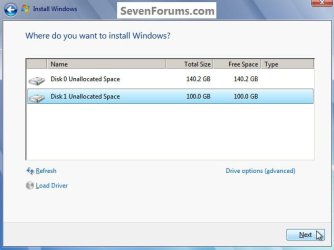
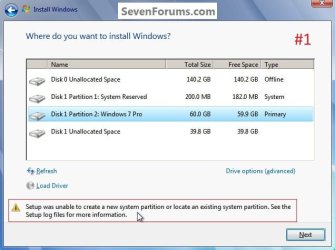
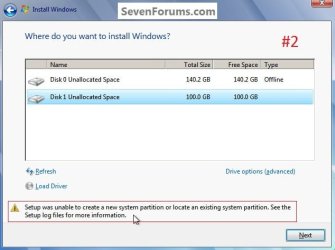
This looks promising, we'll see after the install though I did get the dialog box that Windows may create additional partitions for the install.

11.jpg
22.jpg
 

My Computer My Computer

Computer Manufacturer/Model Number
* BFK Customs *
OS
W 7 64-bit Ultimate
CPU
Intel Q9550 Yorkfield
Motherboard
ASUS P5Q Pro
Memory
8GB Dominator 8500C5D
Graphics Card(s)
ATI : XFX 5870
Sound Card
Realtek HD Audio 7-1
Monitor(s) Displays
1x 47" LCD HDMI & 3x 26" LCD HDMI
Screen Resolution
1920x1080P & 1920x1200
Hard Drives
1x 80GB Intel X25-M G2 SSD : 1x 500GB & 1x 640GB WD Caviar Black(s)
PSU
Corsair 620HX
Case
Cooler Master RC-690
Cooling
Tuniq Tower 120, 2x 140mm and 3x 120mm case fans
Keyboard
Microsoft 500
Mouse
Razer Diamondback 3G
Internet Speed
14 Mb/s
Other Info
1x Koutech 3Gb/s SATA HDD Hot Swap Rack
No dice, it gave the one I created a drive letter I'm going to remove and created one on Disk 0

I have one more thing to try, I'll be back.

nogood.jpg
 

My Computer My Computer

Computer Manufacturer/Model Number
* BFK Customs *
OS
W 7 64-bit Ultimate
CPU
Intel Q9550 Yorkfield
Motherboard
ASUS P5Q Pro
Memory
8GB Dominator 8500C5D
Graphics Card(s)
ATI : XFX 5870
Sound Card
Realtek HD Audio 7-1
Monitor(s) Displays
1x 47" LCD HDMI & 3x 26" LCD HDMI
Screen Resolution
1920x1080P & 1920x1200
Hard Drives
1x 80GB Intel X25-M G2 SSD : 1x 500GB & 1x 640GB WD Caviar Black(s)
PSU
Corsair 620HX
Case
Cooler Master RC-690
Cooling
Tuniq Tower 120, 2x 140mm and 3x 120mm case fans
Keyboard
Microsoft 500
Mouse
Razer Diamondback 3G
Internet Speed
14 Mb/s
Other Info
1x Koutech 3Gb/s SATA HDD Hot Swap Rack
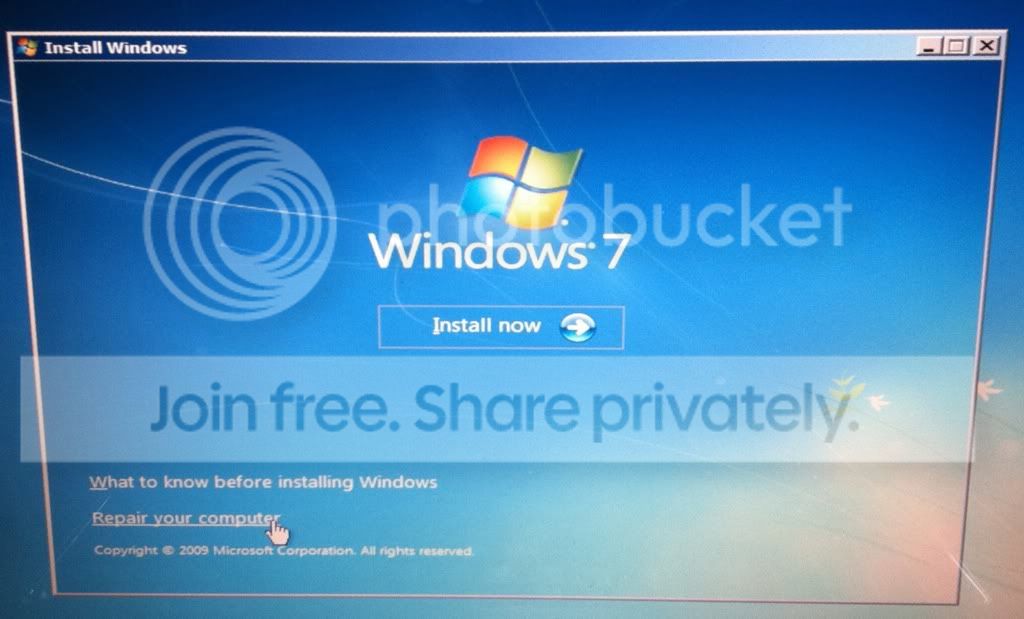
If WinRE won't see the installation to repair, and both bootrec.exe /fixboot and /fixmbr won't jumpstart it to appear with either the 100mb or the Win7 OS partitions marked Active (try both) then this may not be salvageable.

If you need to copy out your files you can use the Load Drivers mini-explorer on the DVD or Repair CD.

As a last resort I would try to SysPrep the original Win7 HD, after reapplying the image to it if necessary. This will remove the Disk Signature which as Michael explained is likely conflicting . Then you can capture your image and reimage to DISK1, mark Active and run Repairs hopefully without interference.

( Ted can u post up Kari's Move OS to another Drive Sysprep tutorial as I am in DFW airport and linkless.)


It appears you are eager to learn, and this is some of the most advanced stuff we do here.
 
Last edited:
Well it's not going to work.

I used Partition Wizard to wipe the Disk 0 SysResv and then used diskpart to mark it offline then tried the startup repairs and the first time it ran about 10 minutes then I got the "cannot repair" dialog box but I'm running it a second time though I'm not holding out much hope.

OK the second startup repair just error-d out the same as the first.

Sorry mate, I thought it would work. :confused:

offline.jpg
fail.jpg
 

My Computer My Computer

Computer Manufacturer/Model Number
* BFK Customs *
OS
W 7 64-bit Ultimate
CPU
Intel Q9550 Yorkfield
Motherboard
ASUS P5Q Pro
Memory
8GB Dominator 8500C5D
Graphics Card(s)
ATI : XFX 5870
Sound Card
Realtek HD Audio 7-1
Monitor(s) Displays
1x 47" LCD HDMI & 3x 26" LCD HDMI
Screen Resolution
1920x1080P & 1920x1200
Hard Drives
1x 80GB Intel X25-M G2 SSD : 1x 500GB & 1x 640GB WD Caviar Black(s)
PSU
Corsair 620HX
Case
Cooler Master RC-690
Cooling
Tuniq Tower 120, 2x 140mm and 3x 120mm case fans
Keyboard
Microsoft 500
Mouse
Razer Diamondback 3G
Internet Speed
14 Mb/s
Other Info
1x Koutech 3Gb/s SATA HDD Hot Swap Rack
My Computer My Computer

Computer Manufacturer/Model Number
* BFK Customs *
OS
W 7 64-bit Ultimate
CPU
Intel Q9550 Yorkfield
Motherboard
ASUS P5Q Pro
Memory
8GB Dominator 8500C5D
Graphics Card(s)
ATI : XFX 5870
Sound Card
Realtek HD Audio 7-1
Monitor(s) Displays
1x 47" LCD HDMI & 3x 26" LCD HDMI
Screen Resolution
1920x1080P & 1920x1200
Hard Drives
1x 80GB Intel X25-M G2 SSD : 1x 500GB & 1x 640GB WD Caviar Black(s)
PSU
Corsair 620HX
Case
Cooler Master RC-690
Cooling
Tuniq Tower 120, 2x 140mm and 3x 120mm case fans
Keyboard
Microsoft 500
Mouse
Razer Diamondback 3G
Internet Speed
14 Mb/s
Other Info
1x Koutech 3Gb/s SATA HDD Hot Swap Rack
- From my backup image, I have recovered the OS to the other drive (2nd drive). Then I got boot up problems (wouldn't boot) so I used the Windows 7 DVD to System Repair. This allowed me to boot up, but it seems to have created a System reserved partition on the 1st drive (I want everything on the 2nd drive), and everything else seems to be on the other drive (1st drive).
Liverpaul,
At the risk of dragging out the pain...
Your 1st post suggests you have a valid image. I'd like to hear the results of your last strategy (post #26).
 

My Computer My Computer

Computer type
PC/Desktop
Computer Manufacturer/Model Number
Own build
OS
Windows 7x64 Home Premium SP1
CPU
Intel i7 2600k
Motherboard
ASUS P8Z68 Deluxe
Memory
G.Skill Ripjaws (DDR3-1600) 2x4GB
Graphics Card(s)
Nvidia GeForce GTS 450; Intel HD Graphics 3000(GT2+)
Monitor(s) Displays
Dell Ultrasharp IPS panel U2311H, Samsung SyncMaster P2350
Screen Resolution
1920x1080
Hard Drives
Samsung 850 Pro SSD 256GB, Samsung SSD 840 120GB, Seagates 1TB Barracuda ST31000528AS x2
PSU
Seasonic M12II 520W
Case
Lian Li Lancool PC-K60
Cooling
Case: 1x120mm, 3x140mm CPU: Hyper 212+
Keyboard
Logitech MK520 (wireless)
Mouse
Logitech MK520
Internet Speed
6-7 Mbps
Antivirus
Norton Security Premium, Malwarebytes on 2 (MSE on 3rd PC)
Browser
FireFox
Other Info
Audio: Logitech Z523 2.1
I thought perhaps I could out-smart it, I guess not.

click to enlarge
maybe-not.jpg
maybe-not2.jpg
 

My Computer My Computer

Computer Manufacturer/Model Number
* BFK Customs *
OS
W 7 64-bit Ultimate
CPU
Intel Q9550 Yorkfield
Motherboard
ASUS P5Q Pro
Memory
8GB Dominator 8500C5D
Graphics Card(s)
ATI : XFX 5870
Sound Card
Realtek HD Audio 7-1
Monitor(s) Displays
1x 47" LCD HDMI & 3x 26" LCD HDMI
Screen Resolution
1920x1080P & 1920x1200
Hard Drives
1x 80GB Intel X25-M G2 SSD : 1x 500GB & 1x 640GB WD Caviar Black(s)
PSU
Corsair 620HX
Case
Cooler Master RC-690
Cooling
Tuniq Tower 120, 2x 140mm and 3x 120mm case fans
Keyboard
Microsoft 500
Mouse
Razer Diamondback 3G
Internet Speed
14 Mb/s
Other Info
1x Koutech 3Gb/s SATA HDD Hot Swap Rack
If WinRE won't see the installation to repair, and both bootrec.exe /fixboot and /fixmbr won't jumpstart it to appear with either the 100mb or the Win7 OS partitions marked Active (try both) then this may not be salvageable.

If you need to copy out your files you can use the Load Drivers mini-explorer on the DVD or Repair CD.

As a last resort I would try to SysPrep the original Win7 HD, after reapplying the image to it if necessary. This will remove the Disk Signature which as Michael explained is likely conflicting . Then you can capture your image and reimage to DISK1, mark Active and run Repairs hopefully without interference.

( Ted can u post up Kari's Move OS to another Drive Sysprep tutorial as I am in DFW airport and linkless.)


It appears you are eager to learn, and this is some of the most advanced stuff we do here.
I might have a closer look at your SysPrep suggestion after I've finished my current effort (see my eventual next post in reply to mjf).
 

My Computer My Computer

Computer type
Laptop
OS
Microsoft Windows 7 Home Premium 64-bit 7601 Multiprocessor Free Service Pack 1
CPU
Intel(R) Core(TM) i7-2720QM CPU @ 2.20GHz
Motherboard
Dell Inc. 0XN71K
Memory
6,00 GB
Graphics Card(s)
(1) NVIDIA GeForce GT 555M (2) Intel(R) HD Graphics Fa
Sound Card
(1) Realtek High Definition Audio (2) Intel(R) Display Aud
Screen Resolution
0 x 0 x 0 bits (0 colors) @ 0 Hz
Hard Drives
(1) WDC WD5000BPKT-75PK4T0 (2) USB2.0 Mobile Disk USB Device
I was trying to work out a way for you to do a clean install with the old/bad Disk 0 still connected but I couldn't sort a method so far, if you can't find a way to disconnect the Disk 0 data cable from the motherboard; Sysprep does seem your best bet at this point.
 

My Computer My Computer

Computer Manufacturer/Model Number
* BFK Customs *
OS
W 7 64-bit Ultimate
CPU
Intel Q9550 Yorkfield
Motherboard
ASUS P5Q Pro
Memory
8GB Dominator 8500C5D
Graphics Card(s)
ATI : XFX 5870
Sound Card
Realtek HD Audio 7-1
Monitor(s) Displays
1x 47" LCD HDMI & 3x 26" LCD HDMI
Screen Resolution
1920x1080P & 1920x1200
Hard Drives
1x 80GB Intel X25-M G2 SSD : 1x 500GB & 1x 640GB WD Caviar Black(s)
PSU
Corsair 620HX
Case
Cooler Master RC-690
Cooling
Tuniq Tower 120, 2x 140mm and 3x 120mm case fans
Keyboard
Microsoft 500
Mouse
Razer Diamondback 3G
Internet Speed
14 Mb/s
Other Info
1x Koutech 3Gb/s SATA HDD Hot Swap Rack
- From my backup image, I have recovered the OS to the other drive (2nd drive). Then I got boot up problems (wouldn't boot) so I used the Windows 7 DVD to System Repair. This allowed me to boot up, but it seems to have created a System reserved partition on the 1st drive (I want everything on the 2nd drive), and everything else seems to be on the other drive (1st drive).
Liverpaul,
At the risk of dragging out the pain...
Your 1st post suggests you have a valid image. I'd like to hear the results of your last strategy (post #26).
Wiped disk 0 and disk 1.
Created 200mb active primary partition on disk 1.
Restored backup image to disk 1.
Failed to boot.
Used Windows DVD (bootrec stuff) - didn't work.

I gave up on this and tried something else:
Deleted all partitions on disk 0 and disk 1.
Did a clean install of Windows 7 to disk 1 - it works.
Then I used my backup image to recover Windows to disk 1 - it works, but not as I want it to. All my programs, settings, etc are back, but I still have my original problem of having my system partition (created by Windows) on disk 0 I want it on disk 1).
So basically I'm back to square 1 :banghead:

Now I am going to repeat the above steps and get everything back onto the failing disk (disk 0). From there I am thinking of making a new backup image and pay closer attention to what I am doing. Maybe a new and improved backup image of Windows on the disk where it was originally located (disk 0) will help my get closer to my ultimate goal of moving the whole lot to disk 1.

Phew!

Any feedback is always welcome. Feel free to use me as a guinea pig for any crazy suggestions you want to try out:cool:
 

My Computer My Computer

Computer type
Laptop
OS
Microsoft Windows 7 Home Premium 64-bit 7601 Multiprocessor Free Service Pack 1
CPU
Intel(R) Core(TM) i7-2720QM CPU @ 2.20GHz
Motherboard
Dell Inc. 0XN71K
Memory
6,00 GB
Graphics Card(s)
(1) NVIDIA GeForce GT 555M (2) Intel(R) HD Graphics Fa
Sound Card
(1) Realtek High Definition Audio (2) Intel(R) Display Aud
Screen Resolution
0 x 0 x 0 bits (0 colors) @ 0 Hz
Hard Drives
(1) WDC WD5000BPKT-75PK4T0 (2) USB2.0 Mobile Disk USB Device
Back
Top