Windows 7 RC Wont Install Properly...PLEASE HELP!!!

johnny1000

New member
Local time
9:06 PM
Messages
38
Ok so I just got a new computer, put in the 64-bit RC, it told me what to do, I followed it all and then it said something like "that's all the info we need for now, will start installation and computer will restart serveral times". So it did what it did and then after a couple restarts it stayed off and my monitors power button then just kept flashing and so did my computer, it stayed off for about 20 minutes. Then I pushed the power button and turned it back on and then it loaded up and went to a black screen where it said in the bottom right corner "Windows 7 Evaluation copy. Build 7100" and it stayed on the screen for about 2 minutes and the computer then shut down on its own. Then I reboored it again and it went back to the same screen accept its been on there ever since, about 30 minutes now. What is going on? Even when I take the disk out it shows the same screen when booted up. Somebody please help, thanks!!!
 

My Computer My Computer

OS
Windows 7
Sounds like a corrupt install to me.

Try reinstalling, if that doesn't do the trick try making another copy of the disc as it may be a corrupt disc image.

It would also help if you filled out your system specs a bit more. =)
 

My Computer My Computer

Computer Manufacturer/Model Number
Custom | Whitebox
OS
Windows 7 Ultimate, OS X 10.7, Ubuntu 11.04
CPU
Intel E6750 @ 3.80GHz
Motherboard
Gigabyte GA-EP45-UD3L (Revision 1.1)
Memory
2x2GB & 2x1GB (6GB) OCZ Reaper 1066MHz @ 1080MHz
Graphics Card(s)
EVGA nVidia GTX 260 896mb (216 Core) FTW Edition
Sound Card
Realtek ALC888
Monitor(s) Displays
21" VIZIO TV
Screen Resolution
1680x1050 @ 60Hz
Hard Drives
Western Digital WD6401AALS - 640GB
Hitachi HDP725016GLA380 - 160GB
PSU
Corsair 750W
Case
NZXT Nemesis Elite
Cooling
Thermaltake SpinQ
Keyboard
Logitech Wireless S520
Mouse
Logitech Wireless S520 - Microsoft Wireless Arc Mouse
Internet Speed
Download: 20mbps, Upload: 3mbps
Specs are AMD Phenom II X3 720BE, M3A78-EM Motherboard, 4GB G-Skill Ram, Hitachi Deskstar 500GB 7200RPM and Samsung DVD Writer!!!

How can I install again? I can't do anything right now it just boots up and takes me to that black screen. I van go into safe mode, it gives me an option but I can't cause it says Windows isn't finished installing.
 

My Computer My Computer

OS
Windows 7
Specs are AMD Phenom II X3 720BE, M3A78-EM Motherboard, 4GB G-Skill Ram, Hitachi Deskstar 500GB 7200RPM and Samsung DVD Writer!!!

How can I install again? I can't do anything right now it just boots up and takes me to that black screen. I van go into safe mode, it gives me an option but I can't cause it says Windows isn't finished installing.

Hmm..

So what happens exactly when you boot your computer with the Install DVD in the DVD Drive?
 

My Computer My Computer

Computer Manufacturer/Model Number
Custom | Whitebox
OS
Windows 7 Ultimate, OS X 10.7, Ubuntu 11.04
CPU
Intel E6750 @ 3.80GHz
Motherboard
Gigabyte GA-EP45-UD3L (Revision 1.1)
Memory
2x2GB & 2x1GB (6GB) OCZ Reaper 1066MHz @ 1080MHz
Graphics Card(s)
EVGA nVidia GTX 260 896mb (216 Core) FTW Edition
Sound Card
Realtek ALC888
Monitor(s) Displays
21" VIZIO TV
Screen Resolution
1680x1050 @ 60Hz
Hard Drives
Western Digital WD6401AALS - 640GB
Hitachi HDP725016GLA380 - 160GB
PSU
Corsair 750W
Case
NZXT Nemesis Elite
Cooling
Thermaltake SpinQ
Keyboard
Logitech Wireless S520
Mouse
Logitech Wireless S520 - Microsoft Wireless Arc Mouse
Internet Speed
Download: 20mbps, Upload: 3mbps
Ok, I turn on the computer with the disk in, it turns on and shows the motherboard page quickly, then shows the windows colour logo floating thiny and then goes to that black page and says "Windows 7 Evaluation copy. Build 7100" in the bottom right corner and stays there forever. I swear stuff like this only happens to me lol. I didn't burn the disc myself either, my uncle did and he works with compurers and he's burned it for himself aswell already and it went smooth!!!
 

My Computer My Computer

OS
Windows 7
Ok, I turn on the computer with the disk in, it turns on and shows the motherboard page quickly, then shows the windows colour logo floating thiny and then goes to that black page and says "Windows 7 Evaluation copy. Build 7100" in the bottom right corner and stays there forever. I swear stuff like this only happens to me lol. I didn't burn the disc myself either, my uncle did and he works with compurers and he's burned it for himself aswell already and it went smooth!!!

Not just you, anyways.. Can you get into your bios settings?
 

My Computer My Computer

Computer Manufacturer/Model Number
Custom | Whitebox
OS
Windows 7 Ultimate, OS X 10.7, Ubuntu 11.04
CPU
Intel E6750 @ 3.80GHz
Motherboard
Gigabyte GA-EP45-UD3L (Revision 1.1)
Memory
2x2GB & 2x1GB (6GB) OCZ Reaper 1066MHz @ 1080MHz
Graphics Card(s)
EVGA nVidia GTX 260 896mb (216 Core) FTW Edition
Sound Card
Realtek ALC888
Monitor(s) Displays
21" VIZIO TV
Screen Resolution
1680x1050 @ 60Hz
Hard Drives
Western Digital WD6401AALS - 640GB
Hitachi HDP725016GLA380 - 160GB
PSU
Corsair 750W
Case
NZXT Nemesis Elite
Cooling
Thermaltake SpinQ
Keyboard
Logitech Wireless S520
Mouse
Logitech Wireless S520 - Microsoft Wireless Arc Mouse
Internet Speed
Download: 20mbps, Upload: 3mbps
Hi, when you boot your computer keep pressing F8 until you get a screen with options on it, I think you are looking for repair option or something like that, I am not turning off mine at the moment to see exactly what it says, I am doing something so I can't, sorry.
 

My Computer My Computer

Computer Manufacturer/Model Number
Self Build 64bit
OS
Vista Ult64, Win7600
CPU
Intel Core 2 Quad Q6600 @ 2400 MHz 64bit OS
Motherboard
Asus P5E3 Deluxe WiFi @p 64 bit OS
Memory
4096 MB DDR3-SDRAM
Graphics Card(s)
ATI Radeon HD 3870 Series x2 Crossfired
Sound Card
Realtek on board
Monitor(s) Displays
Samsung SyncMaster - 23 inches
Screen Resolution
1680x1050 pixels at 60 Hz in True Colors
Hard Drives
Hitachi (250 GB)/Samsung 750 GB. /Barracuda 160 GB.
My Book 1 TB external..
PSU
Cooler Master 1000w
Case
Cooler Master Cosmos 1000.
Cooling
Fans and fresh air,
Keyboard
Wireless
Mouse
Wireless
Internet Speed
Never fast enough
Other Info
I use a Magnum.
Hi, when you boot your computer keep pressing F8 until you get a screen with options on it, I think you are looking for repair option or something like that, I am not turning off mine at the moment to see exactly what it says, I am doing something so I can't, sorry.

If F8 does not work, then try ESC, F11 or F12. Varies on the Motherboard/Bios.

BIOS is Basic Input Output System (something like that) I want you to check a setting in there, first you need to get into it. :)
 

My Computer My Computer

Computer Manufacturer/Model Number
Custom | Whitebox
OS
Windows 7 Ultimate, OS X 10.7, Ubuntu 11.04
CPU
Intel E6750 @ 3.80GHz
Motherboard
Gigabyte GA-EP45-UD3L (Revision 1.1)
Memory
2x2GB & 2x1GB (6GB) OCZ Reaper 1066MHz @ 1080MHz
Graphics Card(s)
EVGA nVidia GTX 260 896mb (216 Core) FTW Edition
Sound Card
Realtek ALC888
Monitor(s) Displays
21" VIZIO TV
Screen Resolution
1680x1050 @ 60Hz
Hard Drives
Western Digital WD6401AALS - 640GB
Hitachi HDP725016GLA380 - 160GB
PSU
Corsair 750W
Case
NZXT Nemesis Elite
Cooling
Thermaltake SpinQ
Keyboard
Logitech Wireless S520
Mouse
Logitech Wireless S520 - Microsoft Wireless Arc Mouse
Internet Speed
Download: 20mbps, Upload: 3mbps
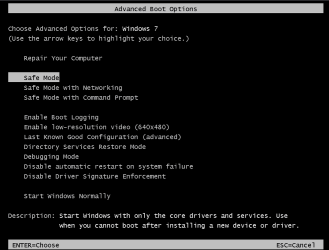
Hi here is what you are looking for when you press F8 before the splash screen.
Use the repair mode and see if it helps.

Capture2.PNG
 

My Computer My Computer

Computer Manufacturer/Model Number
Self Build 64bit
OS
Vista Ult64, Win7600
CPU
Intel Core 2 Quad Q6600 @ 2400 MHz 64bit OS
Motherboard
Asus P5E3 Deluxe WiFi @p 64 bit OS
Memory
4096 MB DDR3-SDRAM
Graphics Card(s)
ATI Radeon HD 3870 Series x2 Crossfired
Sound Card
Realtek on board
Monitor(s) Displays
Samsung SyncMaster - 23 inches
Screen Resolution
1680x1050 pixels at 60 Hz in True Colors
Hard Drives
Hitachi (250 GB)/Samsung 750 GB. /Barracuda 160 GB.
My Book 1 TB external..
PSU
Cooler Master 1000w
Case
Cooler Master Cosmos 1000.
Cooling
Fans and fresh air,
Keyboard
Wireless
Mouse
Wireless
Internet Speed
Never fast enough
Other Info
I use a Magnum.
Apparently me and jfar have different ways to approach this. =P

Though seeing as he hasn't really had a chance to install personal stuff on his computer, I see no reason why not to do a clean install. In most cases it is easier. :)
 

My Computer My Computer

Computer Manufacturer/Model Number
Custom | Whitebox
OS
Windows 7 Ultimate, OS X 10.7, Ubuntu 11.04
CPU
Intel E6750 @ 3.80GHz
Motherboard
Gigabyte GA-EP45-UD3L (Revision 1.1)
Memory
2x2GB & 2x1GB (6GB) OCZ Reaper 1066MHz @ 1080MHz
Graphics Card(s)
EVGA nVidia GTX 260 896mb (216 Core) FTW Edition
Sound Card
Realtek ALC888
Monitor(s) Displays
21" VIZIO TV
Screen Resolution
1680x1050 @ 60Hz
Hard Drives
Western Digital WD6401AALS - 640GB
Hitachi HDP725016GLA380 - 160GB
PSU
Corsair 750W
Case
NZXT Nemesis Elite
Cooling
Thermaltake SpinQ
Keyboard
Logitech Wireless S520
Mouse
Logitech Wireless S520 - Microsoft Wireless Arc Mouse
Internet Speed
Download: 20mbps, Upload: 3mbps
I can't get into anything, I tried pushing F8, F11, F12 and Esc!!!
 

My Computer My Computer

OS
Windows 7
Apparently me and jfar have different ways to approach this. =P

Though seeing as he hasn't really had a chance to install personal stuff on his computer, I see no reason why not to do a clean install. In most cases it is easier. :)
Sounds good to me, I will leave you with it, sorry for butting in, but I think we were almost posting at the same time at the beginning.
 

My Computer My Computer

Computer Manufacturer/Model Number
Self Build 64bit
OS
Vista Ult64, Win7600
CPU
Intel Core 2 Quad Q6600 @ 2400 MHz 64bit OS
Motherboard
Asus P5E3 Deluxe WiFi @p 64 bit OS
Memory
4096 MB DDR3-SDRAM
Graphics Card(s)
ATI Radeon HD 3870 Series x2 Crossfired
Sound Card
Realtek on board
Monitor(s) Displays
Samsung SyncMaster - 23 inches
Screen Resolution
1680x1050 pixels at 60 Hz in True Colors
Hard Drives
Hitachi (250 GB)/Samsung 750 GB. /Barracuda 160 GB.
My Book 1 TB external..
PSU
Cooler Master 1000w
Case
Cooler Master Cosmos 1000.
Cooling
Fans and fresh air,
Keyboard
Wireless
Mouse
Wireless
Internet Speed
Never fast enough
Other Info
I use a Magnum.
Hmm that is a problem then. Give me a few minutes to look into it a bit more.

Sounds good to me, I will leave you with it, sorry for butting in, but I think we were almost posting at the same time at the beginning.

Oh don't worry, I appreciate the help. Just didn't want to confuse the person we are both trying to help. :)

I'll probably need your help now too. lol
 

My Computer My Computer

Computer Manufacturer/Model Number
Custom | Whitebox
OS
Windows 7 Ultimate, OS X 10.7, Ubuntu 11.04
CPU
Intel E6750 @ 3.80GHz
Motherboard
Gigabyte GA-EP45-UD3L (Revision 1.1)
Memory
2x2GB & 2x1GB (6GB) OCZ Reaper 1066MHz @ 1080MHz
Graphics Card(s)
EVGA nVidia GTX 260 896mb (216 Core) FTW Edition
Sound Card
Realtek ALC888
Monitor(s) Displays
21" VIZIO TV
Screen Resolution
1680x1050 @ 60Hz
Hard Drives
Western Digital WD6401AALS - 640GB
Hitachi HDP725016GLA380 - 160GB
PSU
Corsair 750W
Case
NZXT Nemesis Elite
Cooling
Thermaltake SpinQ
Keyboard
Logitech Wireless S520
Mouse
Logitech Wireless S520 - Microsoft Wireless Arc Mouse
Internet Speed
Download: 20mbps, Upload: 3mbps
I can't get into anything, I tried pushing F8, F11, F12 and Esc. I do however get a choice to boot up in "safe mode", "safe mode with networking", "safe mode with command prompt and "start windows normally" I always chhose start windows normally. Also I forgot to tell u right when I turn on my computer a quivk messege in a paragraph comes up and says something like "espress gate is not" but I can't read it all because its gone in 2 seconds!!!
 

My Computer My Computer

OS
Windows 7
I can't get into anything, I tried pushing F8, F11, F12 and Esc. I do however get a choice to boot up in "safe mode", "safe mode with networking", "safe mode with command prompt and "start windows normally" I always chhose start windows normally. Also I forgot to tell u right when I turn on my computer a quivk messege in a paragraph comes up and says something like "espress gate is not" but I can't read it all because its gone in 2 seconds!!!

Express Gate not fully installed

Is that the error/message?
 

My Computer My Computer

Computer Manufacturer/Model Number
Custom | Whitebox
OS
Windows 7 Ultimate, OS X 10.7, Ubuntu 11.04
CPU
Intel E6750 @ 3.80GHz
Motherboard
Gigabyte GA-EP45-UD3L (Revision 1.1)
Memory
2x2GB & 2x1GB (6GB) OCZ Reaper 1066MHz @ 1080MHz
Graphics Card(s)
EVGA nVidia GTX 260 896mb (216 Core) FTW Edition
Sound Card
Realtek ALC888
Monitor(s) Displays
21" VIZIO TV
Screen Resolution
1680x1050 @ 60Hz
Hard Drives
Western Digital WD6401AALS - 640GB
Hitachi HDP725016GLA380 - 160GB
PSU
Corsair 750W
Case
NZXT Nemesis Elite
Cooling
Thermaltake SpinQ
Keyboard
Logitech Wireless S520
Mouse
Logitech Wireless S520 - Microsoft Wireless Arc Mouse
Internet Speed
Download: 20mbps, Upload: 3mbps
Sorry I am back, to get F8 to work you have to keep pressing or tapping the key like the way you use the space bar, and keep doing it until you get it to work , so that means keep turning OFF, your PC and turning it back on and re trying until you get it..

and don't worry about the Expressgate, it is only an program to get you on to the internet before you load the operating system that you are going to use, and by the way, if you want to see a message that comes on to the screen when you are booting up, and it is to fast for you, wait for it the next time and press the PAUSE button on your keyboard and that should stop it for you.
 

My Computer My Computer

Computer Manufacturer/Model Number
Self Build 64bit
OS
Vista Ult64, Win7600
CPU
Intel Core 2 Quad Q6600 @ 2400 MHz 64bit OS
Motherboard
Asus P5E3 Deluxe WiFi @p 64 bit OS
Memory
4096 MB DDR3-SDRAM
Graphics Card(s)
ATI Radeon HD 3870 Series x2 Crossfired
Sound Card
Realtek on board
Monitor(s) Displays
Samsung SyncMaster - 23 inches
Screen Resolution
1680x1050 pixels at 60 Hz in True Colors
Hard Drives
Hitachi (250 GB)/Samsung 750 GB. /Barracuda 160 GB.
My Book 1 TB external..
PSU
Cooler Master 1000w
Case
Cooler Master Cosmos 1000.
Cooling
Fans and fresh air,
Keyboard
Wireless
Mouse
Wireless
Internet Speed
Never fast enough
Other Info
I use a Magnum.
Sorry for my late replies I'm on my blackberry internet guys, I apreciate your help A LOT, its almost 3:30am where I live I just really wanna get my computer running haha. Yah the error messege says something like that. GOOD news though I got into the menu u guys wanted me to, I pushed tab when the motherboard page came up and then F8, were making progess lol. So now which option do I choose?
 

My Computer My Computer

OS
Windows 7
Sorry for my late replies I'm on my blackberry internet guys, I apreciate your help A LOT, its almost 3:30am where I live I just really wanna get my computer running haha. Yah the error messege says something like that. GOOD news though I got into the menu u guys wanted me to, I pushed tab when the motherboard page came up and then F8, were making progess lol. So now which option do I choose?

You have the option to boot into safe mode or are you in the BIOS?

If you have the option to boot into safe mode then go ahead.

Oh and its 6:25am here and I haven't slept (couldn't sleep so i got up and played Halo 2 (PC) for a bit). =P
 

My Computer My Computer

Computer Manufacturer/Model Number
Custom | Whitebox
OS
Windows 7 Ultimate, OS X 10.7, Ubuntu 11.04
CPU
Intel E6750 @ 3.80GHz
Motherboard
Gigabyte GA-EP45-UD3L (Revision 1.1)
Memory
2x2GB & 2x1GB (6GB) OCZ Reaper 1066MHz @ 1080MHz
Graphics Card(s)
EVGA nVidia GTX 260 896mb (216 Core) FTW Edition
Sound Card
Realtek ALC888
Monitor(s) Displays
21" VIZIO TV
Screen Resolution
1680x1050 @ 60Hz
Hard Drives
Western Digital WD6401AALS - 640GB
Hitachi HDP725016GLA380 - 160GB
PSU
Corsair 750W
Case
NZXT Nemesis Elite
Cooling
Thermaltake SpinQ
Keyboard
Logitech Wireless S520
Mouse
Logitech Wireless S520 - Microsoft Wireless Arc Mouse
Internet Speed
Download: 20mbps, Upload: 3mbps
You have the option to boot into safe mode or are you in the BIOS?

If you have the option to boot into safe mode then go ahead.

Oh and its 6:25am here and I haven't slept (couldn't sleep so i got up and played Halo 2 (PC) for a bit). =P

Haha, well 6-7am has been my bed time for a long time now, need to change that asap. I'm in the bios, same screen the other guy put up. I tried safe mode but u can't use it since Windows isn't done installing!!!
 

My Computer My Computer

OS
Windows 7
Back
Top