Solved Dual boot original Vista with Windows 7?

Try this:

With Vista drive as first in Bios boot order, boot 7 dvd - run startup repair.

That should put 7 entry in Vista Boot Configuration Data.

If you also want Vista in the boot menu option when you have 7 drive as the first HD in Bios boot order:

Set 7 drive as 1st in bios order

Boot into 7

Open an elevated command prompt and type:

bcdedit /copy {current} /d "Windows Vista"

It will return a long number in brackets - a GUID or identifier.

Type that, including brackets into the commands below ( Replace the D: with the Vista drive letter as seen when booted into 7)

Press enter after each command.

bcdedit /set {THE-GUID-YOU-GOT} device partition=D:

bcdedit /set {THE-GUID-YOU-GOT} osdevice partition=D:

close cmd prompt.

That's it.

i tried the part concerned with Vista as first boot hard drive, i booted to startup repair, and Windows 7 was added to startup list with a (recovered) label beside it, but it doesn't open..
when i press enter to choose it, another window opens and says an error about a file in system 32 (don't remember its name exactly but it was something with "loader" in it, i think..)
actually i tried the other thing about Windows 7 cmd thing, it didn't work either.. maybe i miswritten it, so am gonna try it again and tell you..
 

My Computer My Computer

At a glance

Microsoft Windows 7 HomePremium, 64-bitIntel Core2Quad Q6600, 2.4 GHz, 8 MB L2 Cache4 GB Kingston 800 MHz (2x2 GB)NVIDIA GeForce XFX 8500 GT, 512 MB
Computer Manufacturer/Model Number
Self-Built
OS
Microsoft Windows 7 HomePremium, 64-bit
CPU
Intel Core2Quad Q6600, 2.4 GHz, 8 MB L2 Cache
Motherboard
ASUS P5K
Memory
4 GB Kingston 800 MHz (2x2 GB)
Graphics Card(s)
NVIDIA GeForce XFX 8500 GT, 512 MB
Sound Card
Realtek HD Audio On-Board
Monitor(s) Displays
19" PHILIPS Wide Display WXGA (191EW)
Screen Resolution
1366*768 pixles
Hard Drives
320 GB Western Digital SATA HDD
1 TB Samsung SATA HDD (HD 105 SI)
PSU
Gamma
Case
Gamma
Keyboard
A4 Tech iKeyWorks Office (KBS-8) PS2
Mouse
Genius Wired Mouse (NetScroll 120) USB
Internet Speed
1 Mbps ADSL
Could it be winload.exe?

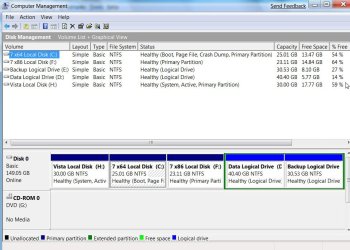
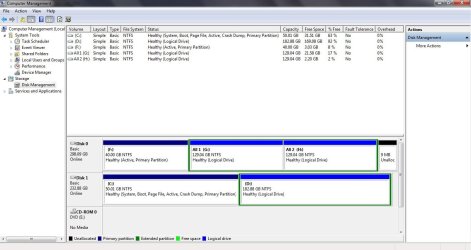
Please post a screenshot of Disk Management window, like this:

DISKMANAGEMENT2009-02-04_031947.jpg

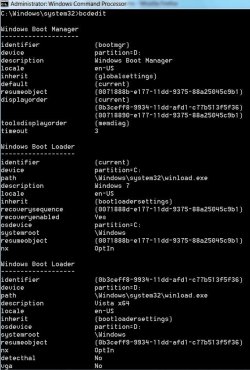
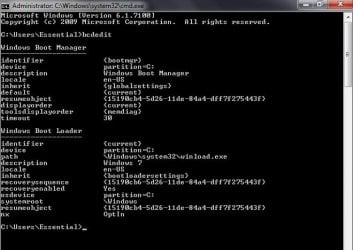
And type bcdedit into elevated cmd prompt , press enter - then post a screenshot, like this:

BCDEDIT2009-03-07_235226.jpg
 

My Computers My Computers

  • At a glance

    7 X64i5 84002x8gb 3200mhz
    Computer type
    PC/Desktop
    OS
    7 X64
    CPU
    i5 8400
    Motherboard
    gigabyte b365m ds3h
    Memory
    2x8gb 3200mhz
    Hard Drives
    various
    PSU
    pure power 11 400w cm
    Case
    Coolermaster
    Cooling
    cryorig m9i
  • At a glance

    7x64g54008gb ddr4 2400
    Computer type
    PC/Desktop
    OS
    7x64
    CPU
    g5400
    Motherboard
    ga b365m ds3h
    Memory
    8gb ddr4 2400
    PSU
    xfx pro 450w

My Computer My Computer

At a glance

Windows 7 x64Intel Core 2 Quad Q6700 @ 3.2 GHz4 GigATI Radeon HD 4870
Computer Manufacturer/Model Number
Home Built
OS
Windows 7 x64
CPU
Intel Core 2 Quad Q6700 @ 3.2 GHz
Motherboard
Gigabyte GA-965P-DQ6
Memory
4 Gig
Graphics Card(s)
ATI Radeon HD 4870
Sound Card
Creative X-Fi XtremeMusic
Monitor(s) Displays
Samsung SyncMaster 226BW
Screen Resolution
1680 x 1050
PSU
Antec TruePower TP-550
Case
Antec P180
Cooling
Zalman CNPS9700, 3 Antec TriCool 120mm
Keyboard
Logitech G15
Thanks Frostbite - better to learn how to do it manually.;)
 

My Computers My Computers

  • At a glance

    7 X64i5 84002x8gb 3200mhz
    Computer type
    PC/Desktop
    OS
    7 X64
    CPU
    i5 8400
    Motherboard
    gigabyte b365m ds3h
    Memory
    2x8gb 3200mhz
    Hard Drives
    various
    PSU
    pure power 11 400w cm
    Case
    Coolermaster
    Cooling
    cryorig m9i
  • At a glance

    7x64g54008gb ddr4 2400
    Computer type
    PC/Desktop
    OS
    7x64
    CPU
    g5400
    Motherboard
    ga b365m ds3h
    Memory
    8gb ddr4 2400
    PSU
    xfx pro 450w

My Computer My Computer

At a glance

Windows 7 x64Intel Core 2 Quad Q6700 @ 3.2 GHz4 GigATI Radeon HD 4870
Computer Manufacturer/Model Number
Home Built
OS
Windows 7 x64
CPU
Intel Core 2 Quad Q6700 @ 3.2 GHz
Motherboard
Gigabyte GA-965P-DQ6
Memory
4 Gig
Graphics Card(s)
ATI Radeon HD 4870
Sound Card
Creative X-Fi XtremeMusic
Monitor(s) Displays
Samsung SyncMaster 226BW
Screen Resolution
1680 x 1050
PSU
Antec TruePower TP-550
Case
Antec P180
Cooling
Zalman CNPS9700, 3 Antec TriCool 120mm
Keyboard
Logitech G15

Attachments

  • Disk Management.jpg
    Disk Management.jpg
    91.1 KB · Views: 37
  • bcdedit.jpg
    bcdedit.jpg
    38.7 KB · Views: 158

My Computer My Computer

At a glance

Microsoft Windows 7 HomePremium, 64-bitIntel Core2Quad Q6600, 2.4 GHz, 8 MB L2 Cache4 GB Kingston 800 MHz (2x2 GB)NVIDIA GeForce XFX 8500 GT, 512 MB
Computer Manufacturer/Model Number
Self-Built
OS
Microsoft Windows 7 HomePremium, 64-bit
CPU
Intel Core2Quad Q6600, 2.4 GHz, 8 MB L2 Cache
Motherboard
ASUS P5K
Memory
4 GB Kingston 800 MHz (2x2 GB)
Graphics Card(s)
NVIDIA GeForce XFX 8500 GT, 512 MB
Sound Card
Realtek HD Audio On-Board
Monitor(s) Displays
19" PHILIPS Wide Display WXGA (191EW)
Screen Resolution
1366*768 pixles
Hard Drives
320 GB Western Digital SATA HDD
1 TB Samsung SATA HDD (HD 105 SI)
PSU
Gamma
Case
Gamma
Keyboard
A4 Tech iKeyWorks Office (KBS-8) PS2
Mouse
Genius Wired Mouse (NetScroll 120) USB
Internet Speed
1 Mbps ADSL
This should work - if you get winload.exe is missing - it is probably because there is a mistype in the {GUID}

Open an elevated command prompt and type:

bcdedit /copy {current} /d "Windows Vista"

It will return a long number in brackets - a GUID or identifier.

Type that, including brackets into the commands below:

Press enter after each command.

bcdedit /set {THE-GUID-YOU-GOT} device partition=F:

bcdedit /set {THE-GUID-YOU-GOT} osdevice partition=F:

close cmd prompt.

Otherwise you could use Easybcd from here( it does exactly the same thing)

Download EasyBCD 1.7.2 - NeoSmart Technologies
 

My Computers My Computers

  • At a glance

    7 X64i5 84002x8gb 3200mhz
    Computer type
    PC/Desktop
    OS
    7 X64
    CPU
    i5 8400
    Motherboard
    gigabyte b365m ds3h
    Memory
    2x8gb 3200mhz
    Hard Drives
    various
    PSU
    pure power 11 400w cm
    Case
    Coolermaster
    Cooling
    cryorig m9i
  • At a glance

    7x64g54008gb ddr4 2400
    Computer type
    PC/Desktop
    OS
    7x64
    CPU
    g5400
    Motherboard
    ga b365m ds3h
    Memory
    8gb ddr4 2400
    PSU
    xfx pro 450w
hi there,
i know am kinda annoying, but would you please give a little hint about how to use this EasyBCD to get what i want?
'cause i tried some stuff inside it but none of them worked..

thanks.,
 

My Computer My Computer

At a glance

Microsoft Windows 7 HomePremium, 64-bitIntel Core2Quad Q6600, 2.4 GHz, 8 MB L2 Cache4 GB Kingston 800 MHz (2x2 GB)NVIDIA GeForce XFX 8500 GT, 512 MB
Computer Manufacturer/Model Number
Self-Built
OS
Microsoft Windows 7 HomePremium, 64-bit
CPU
Intel Core2Quad Q6600, 2.4 GHz, 8 MB L2 Cache
Motherboard
ASUS P5K
Memory
4 GB Kingston 800 MHz (2x2 GB)
Graphics Card(s)
NVIDIA GeForce XFX 8500 GT, 512 MB
Sound Card
Realtek HD Audio On-Board
Monitor(s) Displays
19" PHILIPS Wide Display WXGA (191EW)
Screen Resolution
1366*768 pixles
Hard Drives
320 GB Western Digital SATA HDD
1 TB Samsung SATA HDD (HD 105 SI)
PSU
Gamma
Case
Gamma
Keyboard
A4 Tech iKeyWorks Office (KBS-8) PS2
Mouse
Genius Wired Mouse (NetScroll 120) USB
Internet Speed
1 Mbps ADSL
Back
Top