Try this:
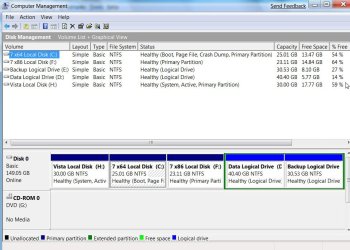
With Vista drive as first in Bios boot order, boot 7 dvd - run startup repair.
That should put 7 entry in Vista Boot Configuration Data.
If you also want Vista in the boot menu option when you have 7 drive as the first HD in Bios boot order:
Set 7 drive as 1st in bios order
Boot into 7
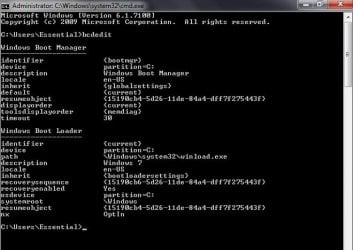
Open an elevated command prompt and type:
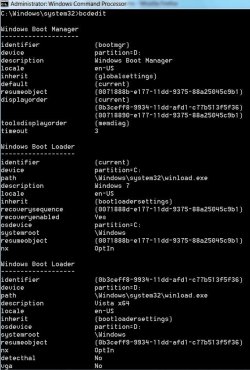
bcdedit /copy {current} /d "Windows Vista"
It will return a long number in brackets - a GUID or identifier.
Type that, including brackets into the commands below ( Replace the D: with the Vista drive letter as seen when booted into 7)
Press enter after each command.
bcdedit /set {THE-GUID-YOU-GOT} device partition=D:
bcdedit /set {THE-GUID-YOU-GOT} osdevice partition=D:
close cmd prompt.
That's it.
i tried the part concerned with Vista as first boot hard drive, i booted to startup repair, and Windows 7 was added to startup list with a (recovered) label beside it, but it doesn't open..
when i press enter to choose it, another window opens and says an error about a file in system 32 (don't remember its name exactly but it was something with "loader" in it, i think..)
actually i tried the other thing about Windows 7 cmd thing, it didn't work either.. maybe i miswritten it, so am gonna try it again and tell you..
My Computer
At a glance
Microsoft Windows 7 HomePremium, 64-bitIntel Core2Quad Q6600, 2.4 GHz, 8 MB L2 Cache4 GB Kingston 800 MHz (2x2 GB)NVIDIA GeForce XFX 8500 GT, 512 MB
- Computer Manufacturer/Model Number
- Self-Built
- OS
- Microsoft Windows 7 HomePremium, 64-bit
- CPU
- Intel Core2Quad Q6600, 2.4 GHz, 8 MB L2 Cache
- Motherboard
- ASUS P5K
- Memory
- 4 GB Kingston 800 MHz (2x2 GB)
- Graphics Card(s)
- NVIDIA GeForce XFX 8500 GT, 512 MB
- Sound Card
- Realtek HD Audio On-Board
- Monitor(s) Displays
- 19" PHILIPS Wide Display WXGA (191EW)
- Screen Resolution
- 1366*768 pixles
- Hard Drives
- 320 GB Western Digital SATA HDD
1 TB Samsung SATA HDD (HD 105 SI)
- PSU
- Gamma
- Case
- Gamma
- Keyboard
- A4 Tech iKeyWorks Office (KBS-8) PS2
- Mouse
- Genius Wired Mouse (NetScroll 120) USB
- Internet Speed
- 1 Mbps ADSL