
Solved New 7 install on added HDD,Dual Boot XP Pro

My Thanks

theog, your help and Greg's help has been invaluable, even though there were some "Big Bumps" along the path, but we were able to overcome them. I will use the links that you provided as soon as I take a long earned break from very little food or sleep over the last several days.
Thanks again
David

PS. for Greg, My one and only brother's name is "Greg"!!
 

My Computer My Computer

At a glance

Win 7 PRO / Win XP PRO / 32 bitPentium 4 3.4 Ghz Dual Core3 GB
Computer Manufacturer/Model Number
Dell Optiplex GX280
OS
Win 7 PRO / Win XP PRO / 32 bit
CPU
Pentium 4 3.4 Ghz Dual Core
Memory
3 GB
Sound Card
SoundMax
Monitor(s) Displays
IBM Flat Panel
Hard Drives
Seagate ST - Internal 80 GB
Western Digital WD10EALX - Internal 1TB
Maxtor One Touch 4 Plus - External 500GB
Case
Mini-Tower
Cooling
forced air fans, or maybe 12 nephews with a lot of wind!
Keyboard
Logitech 600 series multi-media
Mouse
Logitech MX 310 optical
Internet Speed
Qwest DSL 1.5 GB, Finally, now have 1.5GB for $9.95
Other Info
Dell Inspiron 5100 2.8 Gxz. with a wireless card when I really need some speed and can locate an open network.
Post back when ready.
 

My Computer My Computer

At a glance

ME/XP/Vista/Win7
OS
ME/XP/Vista/Win7
Good work.

This is the approach I suggested several times: install XP to the new HD with the old HD unplugged, then follow Method Two steps 7-12 in the Dual Boot tutorial to add the already-installed Win7 to Dual Boot.

Don't panic if the Dual Boot doesn't work as it can be fussy setting it up from XP. We have workarounds if necessary.
 
I am getting a Fresh Start

Good work.

This is the approach I suggested several times: install XP to the new HD with the old HD unplugged, then follow Method Two steps 7-12 in the Dual Boot tutorial to add the already-installed Win7 to Dual Boot.

Don't panic if the Dual Boot doesn't work as it can be fussy setting it up from XP. We have workarounds if necessary.

I am currently reformatting the entire drive! The XP Install AND ASR Recovery ETC. worked restoring it to almost fully SETup When I had it picture perfect, I switched to the 7 install and when It tried to boot All Hades broke Loose and lost everything because the NTLDR Issue Still existed in the Win 7 install. Could not boot back to XP and had To WIPE The ENTIRE New HDD! It is reformatting SATA 0 AS I Write and eat my Dinner. I lost Everything. It will load XP First this time which is what you wanted but lost a great deal of work, effort and time, but I learned a lot, now if I can just remember all I learned for the next attempt!
 

My Computer My Computer

At a glance

Win 7 PRO / Win XP PRO / 32 bitPentium 4 3.4 Ghz Dual Core3 GB
Computer Manufacturer/Model Number
Dell Optiplex GX280
OS
Win 7 PRO / Win XP PRO / 32 bit
CPU
Pentium 4 3.4 Ghz Dual Core
Memory
3 GB
Sound Card
SoundMax
Monitor(s) Displays
IBM Flat Panel
Hard Drives
Seagate ST - Internal 80 GB
Western Digital WD10EALX - Internal 1TB
Maxtor One Touch 4 Plus - External 500GB
Case
Mini-Tower
Cooling
forced air fans, or maybe 12 nephews with a lot of wind!
Keyboard
Logitech 600 series multi-media
Mouse
Logitech MX 310 optical
Internet Speed
Qwest DSL 1.5 GB, Finally, now have 1.5GB for $9.95
Other Info
Dell Inspiron 5100 2.8 Gxz. with a wireless card when I really need some speed and can locate an open network.
By using Win xp ASR Recovery in this way, you deleted the boot files.
Therefore giving you the boot error
NTLDR
 

My Computer My Computer

At a glance

ME/XP/Vista/Win7
OS
ME/XP/Vista/Win7
I will next want to use the ASR disc that I made previously and used for the other fresh install on the old hard Drive. What is the procedure to initiate the ASR to add the 60 GB backup image to the new install just as I did to the old HDD?

I also suspect that there is a problem with the Windows 7 install that caused the NTLDR error message. I think that I may need to use the Windows 7 repair Disc to correct any problems, what do you think?

You cannot add a backup image on top of the installed XP as it will wipe it out. You need to either install XP as you were doing, or reimage it onto the partition - you can't do both.

There is no kind of reimage that I've heard of that will run from floppy.

As stated over a dozen times, the NTLDR error has nothing to do with Win7. It is as Theog says due to the XP install being corrupted to where it won't start.

Can you not reinstall XP as you were doing and follow the steps 7-12 as given in Method Two of Dual Boot Tutorial to set up your Dual Boot?
 
Hi Greg

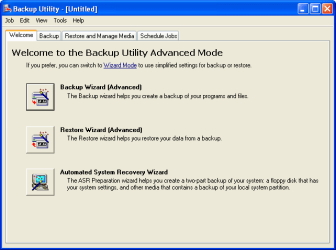
Win XP ASR is part of Ntback, to make a full image, the floppy is a startup disk.

ASR Wizard.png
 

My Computer My Computer

At a glance

ME/XP/Vista/Win7
OS
ME/XP/Vista/Win7
Trying to apply an image over a fresh install cannot be done - it wipes out the install.

If you want the XP image and not the XP install, then see if it will reimage to the target partition and try that. If you're confident you've already done that then boot Win7 DVD or flash stick to install Win7 to a partition you create for it using Custom install Drive Options as shown here: Clean Install Windows 7

Win7 should hopefully configure a Dual Boot with the XP install or reimage.

You will have to boot the WIn7 DVD or flash stick correctly as you did the XP CD in order to avoid the NTLDR error thrown up by XP trying to boot from the HD.

Try the UltraISO method given earlier to create the flash stick if necessary:

Try writing 7 ISO to flash using UltraISO which also is not known to fail:

Install UltraISO trial version.

On File tab Open DVD.

On Bootable tab Write Disk Image.

Format button.

Write button.

Now try booting under USB or HD's as it sometimes lists stick as HD.
 
Last edited:
Windows 7 has been wiped, HD is reformated.
 

My Computer My Computer

At a glance

ME/XP/Vista/Win7
OS
ME/XP/Vista/Win7
The Re-install

Windows 7 has been wiped, HD is reformated.

(1) The Flash Drive (second attempt ) failed neither program with the original ISO Image that was produced with Ultra ISO and Imgburn. I have them turned around possibly but my point is that both recommended for the Flash Drive Failed, refused to boot.
(2) I ran the Win 7 Repair Disk 32 bit and it found numerous wth the 7 install and lister boot files as well as several that I did not recognise or know how to replace. This disk wanted to reformat the drive to correct the problem and do a fresh install, which I am trying to prepare for.
(3) I downloaded the EASEUS Partition master 8.0.1... as well as the EasyBCD 2.1 in preparation for the partition and setup of the dual boot process. I already formatted the partition for the Win 7 install and have been in Tucson all day today with physical therapy and a big headache of other issues while there. I have lost the other tutorial links from the reformat and too many posts to hunt them down. Could you give me the next steps since I have finished the XP Pro install and the ASR which did work on the new HDD allowing me to do a full update of XP and it is fully prepared for the next step.
Thank you again for your patience,
David
PS. the Win 7 Repair disk Did indeed say that the 7 install had the boot issues and had a long list of missing boot and other files that I did not recognize, from which ever source and a fresh install was called for to correct all remaining boot problems. The "Ancient Floppy" has proven to be invaluable when other options were not available.

One more thing. Yesterday, the XP install was possible because I pressed the "Press any key" fast before the NTLDR message had a chance to appear and that is how I was finally able to get XP Back.
"IMPORTANT" The DVD Drive does not boot early as the CD-ROM does which makes it almost impossible to do with Win 7 as I was able to do with the XP CD because it will be the poor performing on boot-up, DVD drive!! Since the flash drive is the same and has to wait until it boots further and the NTLDR prevents that from happening. That is why the Flash drive approach has failed, not loaded further enough for either the Flash or the DVD drive to be of any help.
 

My Computer My Computer

At a glance

Win 7 PRO / Win XP PRO / 32 bitPentium 4 3.4 Ghz Dual Core3 GB
Computer Manufacturer/Model Number
Dell Optiplex GX280
OS
Win 7 PRO / Win XP PRO / 32 bit
CPU
Pentium 4 3.4 Ghz Dual Core
Memory
3 GB
Sound Card
SoundMax
Monitor(s) Displays
IBM Flat Panel
Hard Drives
Seagate ST - Internal 80 GB
Western Digital WD10EALX - Internal 1TB
Maxtor One Touch 4 Plus - External 500GB
Case
Mini-Tower
Cooling
forced air fans, or maybe 12 nephews with a lot of wind!
Keyboard
Logitech 600 series multi-media
Mouse
Logitech MX 310 optical
Internet Speed
Qwest DSL 1.5 GB, Finally, now have 1.5GB for $9.95
Other Info
Dell Inspiron 5100 2.8 Gxz. with a wireless card when I really need some speed and can locate an open network.
Back
Top