How to: Manually, download updates but not install

hkBattousai

New member
Member
Local time
10:39 PM
Messages
64
I'm using Windows 7 x64 Ultimate SP1.

I want to manually check for updates, make Windows download them if there is any, but wouldn't install at that moment, instead make Windows install them next time I shut it down.

In Windows XP, it was easy. You just selected the option to download. And when you attempt to shut down Windows, it asked if you want to shut down normally, or you want to install updates while shutting down.

However, in Windows 7, I couldn't find a way to do this same behavior. Can you please tell me how to, if there is any way to do it?
 

My Computer My Computer

At a glance

Windows 7 Ultimate x64Intel i5 7502x2GB DDR3 Dual-kitATI Radeon HD4670
OS
Windows 7 Ultimate x64
CPU
Intel i5 750
Motherboard
Gigabyte P55A U3DR
Memory
2x2GB DDR3 Dual-kit
Graphics Card(s)
ATI Radeon HD4670
Sound Card
Onboard
Monitor(s) Displays
Samsung SyncMaster P2350
Hard Drives
Western Digital 1TB, 64MB cache, internal
Samsung Story 1.5TB, external
PSU
400W rated, 460W max
Case
CoolerMaster
Cooling
Air

My Computer My Computer

At a glance

Windows 7 X64 BitIntel(R) Core(TM)i7-4771 CPU @ 3.50GHCorsair 4x8 Vengeance (32GB)NVIDIA GeForce GTX780
Computer type
PC/Desktop
OS
Windows 7 X64 Bit
CPU
Intel(R) Core(TM)i7-4771 CPU @ 3.50GH
Motherboard
Asus Sabertooth Z87
Memory
Corsair 4x8 Vengeance (32GB)
Graphics Card(s)
NVIDIA GeForce GTX780
Monitor(s) Displays
LG
Screen Resolution
1920x1080
PSU
Corsair CX750
Case
Corsair 200 series
Cooling
H80i Liquid Cooler
Keyboard
Microsoft
Mouse
Microsoft
Internet Speed
good times-500-850 kbs bad times-50-100 kbs
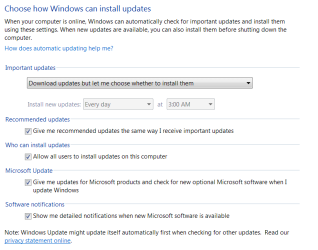
Change your update settings to download but not install.

Updates.PNG

Jim :geek:
 

My Computer My Computer

At a glance

Windows 8.1 Pro w/Media Center 64bit, Windows...Phenom II X6 1100TCrucial Balistic 8gb DDR3-1866 CL9MSI R6850 Cyclone IGD5 PE
Computer type
PC/Desktop
Computer Manufacturer/Model Number
Home Built
OS
Windows 8.1 Pro w/Media Center 64bit, Windows 7 HP 64bit
CPU
Phenom II X6 1100T
Motherboard
ASUS M5A99X EVO
Memory
Crucial Balistic 8gb DDR3-1866 CL9
Graphics Card(s)
MSI R6850 Cyclone IGD5 PE
Sound Card
On Board
Monitor(s) Displays
ASUS VE258Q 25" LED with DVI-HDMI-DisplayPort
Screen Resolution
1920 x 1080
Hard Drives
Two WD Cavier Black 2TB Sata III, WD My Book Essential 2TB USB 3.0
PSU
Seasonic X650 80 Plus GOLD Modular
Case
Corsair 400R
Cooling
Antec Kuhler H2O 620, Two 120mm and four 140mm
Keyboard
Logitech K120
Mouse
Logitech Marble Mouse USB, Logitech Precision Game Pad
Internet Speed
15MB
Antivirus
Norton IS 2013, Malwarebytes Pro Beta 2
Browser
IE-11, FF-27
Other Info
APC UPS ES 750, Netgear WNR3500L Gigabit & Wireless N Router with SamKnows Test Program, Motorola SB6120 Gigabit Cable Modem. Brother HL-2170W Laser Printer, Epson V300 Scanner
Use this address to find the updates you want
in the right hand corner theres a search box,type in your windows version
then find the specific files you want\need
then save them wherever you want

Handy for reinstalls without having to download everything again
Stop Windows Update in services first
then run your updates
then START WU again and check for updates

Microsoft Update Catalog

or
Microsoft Windows - Microsoft Download Center
It is good to know this page. But I want to fully automate this update process, without explicitly visiting a website.

Change your update settings to download but not install.

View attachment 164274

Jim :geek:
I have already do that setting. But it only works with high priority updates. I forgot to mention in my first message, I have this problem with the optional updates. Optional updates won't download automatically.
 

My Computer My Computer

At a glance

Windows 7 Ultimate x64Intel i5 7502x2GB DDR3 Dual-kitATI Radeon HD4670
OS
Windows 7 Ultimate x64
CPU
Intel i5 750
Motherboard
Gigabyte P55A U3DR
Memory
2x2GB DDR3 Dual-kit
Graphics Card(s)
ATI Radeon HD4670
Sound Card
Onboard
Monitor(s) Displays
Samsung SyncMaster P2350
Hard Drives
Western Digital 1TB, 64MB cache, internal
Samsung Story 1.5TB, external
PSU
400W rated, 460W max
Case
CoolerMaster
Cooling
Air
Back
Top