- Local time
- 7:03 PM
- Messages
- 64
I'm using Windows 7 x64 Ultimate SP1.
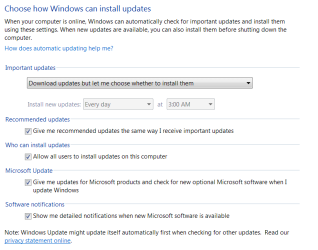
I want to manually check for updates, make Windows download them if there is any, but wouldn't install at that moment, instead make Windows install them next time I shut it down.
In Windows XP, it was easy. You just selected the option to download. And when you attempt to shut down Windows, it asked if you want to shut down normally, or you want to install updates while shutting down.
However, in Windows 7, I couldn't find a way to do this same behavior. Can you please tell me how to, if there is any way to do it?
I want to manually check for updates, make Windows download them if there is any, but wouldn't install at that moment, instead make Windows install them next time I shut it down.
In Windows XP, it was easy. You just selected the option to download. And when you attempt to shut down Windows, it asked if you want to shut down normally, or you want to install updates while shutting down.
However, in Windows 7, I couldn't find a way to do this same behavior. Can you please tell me how to, if there is any way to do it?
My Computer
At a glance
Windows 7 Ultimate x64Intel i5 7502x2GB DDR3 Dual-kitATI Radeon HD4670
- OS
- Windows 7 Ultimate x64
- CPU
- Intel i5 750
- Motherboard
- Gigabyte P55A U3DR
- Memory
- 2x2GB DDR3 Dual-kit
- Graphics Card(s)
- ATI Radeon HD4670
- Sound Card
- Onboard
- Monitor(s) Displays
- Samsung SyncMaster P2350
- Hard Drives
- Western Digital 1TB, 64MB cache, internal
Samsung Story 1.5TB, external
- PSU
- 400W rated, 460W max
- Case
- CoolerMaster
- Cooling
- Air