Not booting into Xp in dual boot with win7

Ephemeral

New member
Local time
1:57 AM
Messages
26
:cry::cry:
The title sure does not sound as hopeless as the situation actually is. This forum is
my last hope....pls guys help me out....(sry to sound so much gloomy)
pls read through my whole problm...i know its insanely big but plssssss...........

It all strtd with me wanting to have Win xp installed on my Lenovo Ideapad z560, i3 processor along with win7 ultimate which came installed when i purchased my lptp. I went thru diff pages and did a whole lot of research on the subject.
As we will know that winXp does not function with Sata drivers and related hardware on which notebooks and lptps these days are based. Previously i tried to install xp using a normal xp cd(not slpstrmd) by chnging BIOS settngs frm AHCI to AHCI comptble bt being unsuccessful i resorted to slpstrmng process. So i went through all the slipstreaming process....supplying the setup with the SATA drivers and tried to install xp......but it aborted with a BSOD...which must not have happened as i did all the pre requisites properly.
So i smwht tried a mixed approach by trying to install xp with slpstrmd bootable disc with ALSO bios mode chngd to AHCI cmptbl.
The setup wrkd and i was taken to the Xp's setup screen:shock:....but that was when it all strtd.
I didnt knew why it happend bt when i selectd the drive D: to be my Xp drive it rprtd tht the drv already had another windows installed on it even though win 7 was installed on my Drv C:. I ignrd the error and i....well.....i installed xp......in a folder inside Drv D:
Yeah yeah i know u hvnt heard anythng this foolish on this forum....installing windows inside a folder...that was so damn stupid of me...i know..but it was my frst time when i was attempting to make any machine multiboot......so i messed up.
Xp was installed with 4 partitions with xp being on D: When i first rebooted my lptp i was like totally baffled seeing no option to boot into win7. I thought win7 was deleted during xp installation as the setup warned of not installing winxp on drive D (as accrdng to it win7 was already on it) or it will overwrite the existing windows. But after much research i found that the wretchd windows xp writes its bootloader over win7 and it will evrytime boot into xp without considering win7 installation. So i made an attempt to repair the win7 bootloader by booting thru win7 DVD and doing a start repair which wud hopefully reinstate the win7 bootloader and i'm glad it did.
With no data loss (although with ie and wmplyr not wrking no more) and with 3 partitions i got win7 back....with xp setup being located on drive C: in a folder.:cry:
As i now wanted to get rid of Xp badly....i tried to repair the xp bootloader so as to have access to winxp to remove it. I used utilities EasyBCD and BCD edit to try to recreate the winxp bootloader files but all in vain....THEY CANNOT DETECT MY XP INSTALLATION BECAUSE IT IS ON THE SAME DRIVE WITH WIN7 AND THAT TOO INSIDE A FOLDER HAHAHAAA...
This being the main reason that my xp setup is not being detected. I tried to use the Xp recovery console to recreate the xp bootloader....but that ***** keep on showing "invalid admin password entered".....well thats another one of windows xp infamous error.
I further tried using BartPE to do offline registry editing so as not to allow recovery console to ask me for password bt the utility also fails as it cant too also not detect the xp setup and returns the error "gd31244.sys not found".
I know guys this is so insane and probably cud be the most disappointing thing u have ever come across.......BUT PLS ATLEAST GIVE IT A TRY.....I WILL RPLY WITH WHTVR YOU WISH TO KNOW.....

i am stranded with no option
 

My Computer My Computer

At a glance

Windows 7 Ultimate 32-bit
OS
Windows 7 Ultimate 32-bit

My Computer My Computer

At a glance

ME/XP/Vista/Win7
OS
ME/XP/Vista/Win7
Download and burn to CD free Partition Wizard bootable CD

Boot PW CD, take a camera snap of the full Drive Map with listings showing all columns. If you cannot get a snap to post up, copy the listings down exactly as they appear for each partition.

In order to repair, Win7 must be intact and be marked Active using PW CD. Then click on HD to highlight it, from Disk tab choose Rebuild MBR, Apply. If it doesnt' start, boot into DVD Repair console or Repair CD to run Startup Repair - Run 3 Separate Times

You can copy out your files using this method: Copy & Paste - in Windows Recovery Console
 
Thnx for replyng....
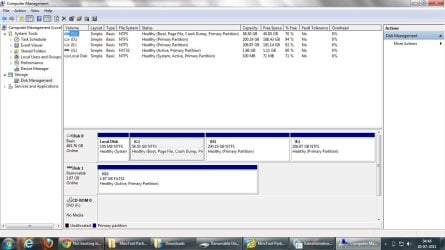
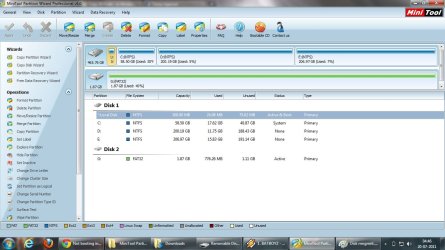
Here are the screen shots u guys asked for....
Disk mgmt.jpg


PW snap.jpg
 

My Computer My Computer

At a glance

Windows 7 Ultimate 32-bit
OS
Windows 7 Ultimate 32-bit
and i must tell you the exact situation. My win7 is wrkng absolutely fine with no prblms. The thing is Xp GOT INSTALLED IN A FOLDER WITHIN THE DRIVE WHICH CONTAINS WIN7 TOO and that being the reason i am not able to boot in xp having already tried xp recovery console which returns with "invalid password error"..
Btw the drive with both 7 and xp is C:
Thnks
 

My Computer My Computer

At a glance

Windows 7 Ultimate 32-bit
OS
Windows 7 Ultimate 32-bit
Did you make your Lenovo Ideapad z560 Recovery Disks?

1) Backup the Data on D: & E:.
2) I would delete partition 3 D: & partition 4 E:
3) Remake partition 3 to 60gb partition 4 the rest.
4) Than install Win XP to Partition 3.
5) Use method two in this tutorial to install Win XP.
http://www.sevenforums.com/tutorials/8057-dual-boot-installation-windows-7-xp.html?ltr=D
NOTE: Make sure you follow the steps from step 6 to repair Windows 7.Do a Strartup Repair:
http://www.sevenforums.com/tutorials/681-startup-repair.html?ltr=S
Note: You may need to do startup repair 3 to 4 times.
http://www.sevenforums.com/tutorials/105541-startup-repair-run-3-separate-times.html
 

My Computer My Computer

At a glance

ME/XP/Vista/Win7
OS
ME/XP/Vista/Win7
and i must tell you the exact situation. My win7 is wrkng absolutely fine with no prblms. The thing is Xp GOT INSTALLED IN A FOLDER WITHIN THE DRIVE WHICH CONTAINS WIN7 TOO and that being the reason i am not able to boot in xp having already tried xp recovery console which returns with "invalid password error"..
Btw the drive with both 7 and xp is C:
Thnks

Best to delete that folder.
 

My Computer My Computer

At a glance

ME/XP/Vista/Win7
OS
ME/XP/Vista/Win7
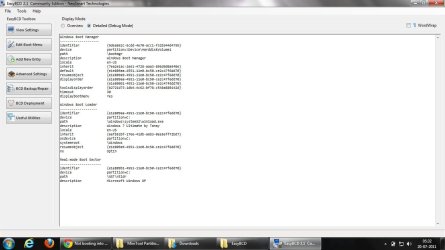
Well....heres what i tried earlier. I did a simple copy paste of the WINDOWS folder(Winxp) and in the drive D: and the easyBCD was then able to detect my xp setup and i was able to successfully boot into Xp. I am upldng the screenshot of easybcd these two boot entries...


Easybcd.jpg
 

My Computer My Computer

At a glance

Windows 7 Ultimate 32-bit
OS
Windows 7 Ultimate 32-bit
However when i tried to delete the xp setup folder within C: from Win7, i was unable to remove it.
If i do all the steps u suggested and do a clean install of xp on drive D:, will then wud i be able to delete the folder???
 

My Computer My Computer

At a glance

Windows 7 Ultimate 32-bit
OS
Windows 7 Ultimate 32-bit
Did you try booting Win XP?
 

My Computer My Computer

At a glance

ME/XP/Vista/Win7
OS
ME/XP/Vista/Win7
Yep...and i was able to boot into it
 

My Computer My Computer

At a glance

Windows 7 Ultimate 32-bit
OS
Windows 7 Ultimate 32-bit
But i wonder if i try to uninstall xp from there won't it delete the 7 as well...because acc to the easybcd both are located on the same drive even though i copied the WINDOWS(xp) to D:. Have a look at the screenshot i recently uped
 

My Computer My Computer

At a glance

Windows 7 Ultimate 32-bit
OS
Windows 7 Ultimate 32-bit
It is a good idea have 2 OS's on same partition.
 

My Computer My Computer

At a glance

ME/XP/Vista/Win7
OS
ME/XP/Vista/Win7
It is a good idea have 2 OS's on same partition.

Is it possible to move either xp or 7 to new partition?? What do you think should i go for it.....
 

My Computer My Computer

At a glance

Windows 7 Ultimate 32-bit
OS
Windows 7 Ultimate 32-bit
Can you post a screen shot of Disk management from Win XP?
 

My Computer My Computer

At a glance

ME/XP/Vista/Win7
OS
ME/XP/Vista/Win7
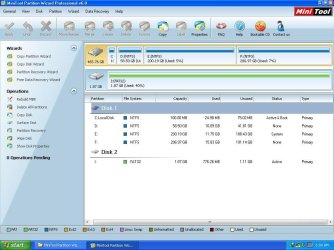
winxp pw.JPG

Took me some time.........sry the disk mgmt was running in there
 

My Computer My Computer

At a glance

Windows 7 Ultimate 32-bit
OS
Windows 7 Ultimate 32-bit
Your Drive letters in Windows 7 are C: D: E:
Your Drive letters in Windows XP are C: D: E: F:
This is why EasyBCD is showing Windows 7 as C: & Win XP as C:
 

My Computer My Computer

At a glance

ME/XP/Vista/Win7
OS
ME/XP/Vista/Win7
So according to you are they both working on different partitions or they arent?
 

My Computer My Computer

At a glance

Windows 7 Ultimate 32-bit
OS
Windows 7 Ultimate 32-bit
They are working from the same partition.
 

My Computer My Computer

At a glance

ME/XP/Vista/Win7
OS
ME/XP/Vista/Win7
Unless i require to uninstall any of them, what cud be the other downsides to this
 

My Computer My Computer

At a glance

Windows 7 Ultimate 32-bit
OS
Windows 7 Ultimate 32-bit
Back
Top