Startup Programs - Change

How to Change, Add, or Remove Startup Programs in Windows 7

   Information
This will show you how to either add, remove, enable, or disable a startup program in Windows 7.
   Note
You can also view the startup logs in Event Viewer (C:\Windows\system32\eventvwr.msc) under Applications and Services Logs, Microsoft, Windows, Diagnostics-Performance, and Operational. The logs will be in the middle to show you what ran at startup, how long it took, and more.
   Warning
User Account Control prevents programs that require elevated (run as administrator) permission or an administrator password from running automatically when Windows 7 starts. If a program is blocked, you'll see a message in the notification area that says some startup programs need permission to run. You can then right click on the notification area message and either select to run the blocked program by giving UAC permission, remove the blocked program from the startup program list, or ignore the notification and not run the program.


:note: For the Windows 10 tutorial please see here - Startup Items - Add, Delete, Enable, Disable in Windows 10 - Windows 10 Tutorials


METHOD ONE

Through the Program Itself


NOTE: Some programs may have a setting in them to allow it to run at startup or not. You will need to consult the program's documentations on how to do this specifically for their program if it is available for that program.
1. Open the program's settings menu.

2. To Add the Program to Startup
A) Select the program's Run at startup type option.
3. To Remove the Program from Startup
A) Unselect the program's Run at startup type option.


METHOD TWO

Through the Startup Folder


NOTE: You can add or remove shortcuts to programs or files from the Startup folder to have them run or open at the startup of Windows 7.

1. Right click on the exe file of the program you want to run at startup, or file to open at startup, and click on Create Shortcut.
NOTE: This is the shortcut that you will add to the Startup folder in either Option One or Option Two below. Skip this step if you are only removing a shortcut from the Startup folder.
A) Do either OPTION ONE "Current User" or OPTION TWO "All Users" below for what you want.


OPTION ONE

For Current Single User Only


:note:NOTE: The single (current) user Startup folder is a hidden system folder located at:
C:\Users\(User-Name)\AppData\Roaming\Microsoft\Windows\Start Menu\Programs\Startup
2. Open the Start Menu, click on All Programs, right click on the Startup folder, click on Open or Explore, and go to step 4 below. (See screenshot below)
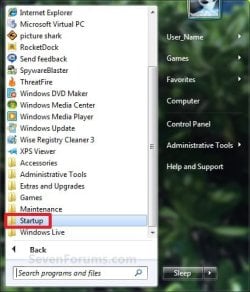
Start_Menu_Startup_Folder.jpg
OR

3. In the Start Menu search line, type shell:startup, press Enter, and go to step 4 below. (See screenshot below)
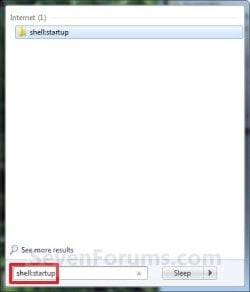
Start_Menu_shell-Startup.jpg
4. Do step 5 or 6 below for what you would like to do.

5. To Add a Startup Program or File Shortcut
A) Drag the shortcut created from step 1 to inside the Startup folder and drop it. (See screenshot below)
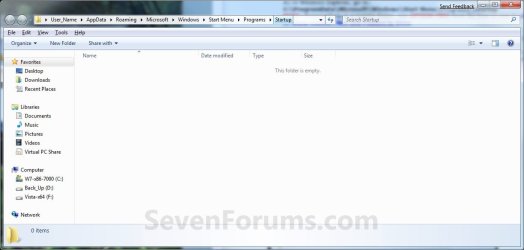
Startup_Folder.jpg
6. To Remove a Startup Program or File Shortcut
A) Right click on the shortcut in the Startup folder and click on Delete. (See screenshot above)
7. Close the Startup folder when done. (See screenshot below step 5A)


OPTION TWO

For All Users


:note:NOTE: The all users Startup folder is a hidden system folder located at:

C:\ProgramData\Microsoft\Windows\Start Menu\Programs\Startup
2. Open the Start Menu, click on All Programs, right click on the Startup folder, click on Open All Users or Explore All Users, and go to step 4 below. (See screenshot below)
Start_Menu_Startup_Folder.jpg
OR

3. In the Start Menu search line, type shell:common startup, press Enter, and go to step 4 below.

4. Do step 5 or 6 below for what you would like to do.

5. To Add a Startup Program or File Shortcut
A) Drag the shortcut created from step 1 to inside the Startup folder and drop it. (See screenshot below)
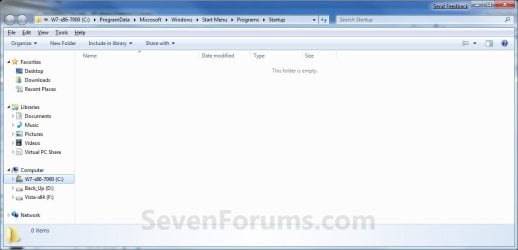
Startup_Folder_All.jpg
6. To Remove a Startup Program or File Shortcut
A) Right click on the shortcut in the Startup folder and click on Delete. (See screenshot above)
6. Close the Startup folder when done. (See screenshot below step 4A)


METHOD THREE

Through System Configuration (msconfig)


NOTE: Using the Selective Startup option in System Configuration (msconfig), you can enable or disable startup programs. You will need to be logged into an administator account, or provide the administrator password to open System Configuration.

WARNING: It would be best to also check the registry entries in METHOD FOUR below as well, since msconfig may not always show all startup programs.
1. Open the Start Menu, type msconfig in the search box, press Enter, and go to step 3 below. (See screenshot below)
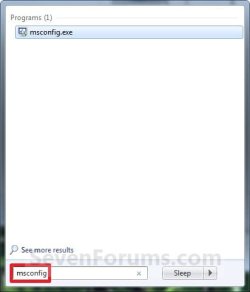
Start_Menu_msconfig.jpg
OR

2. Open the Control Panel (icons view) and click on the Administrative Tools icon, then click on System Configuration. Close the Control Panel and Administrative Tools windows.

3. If prompted, click on Continue for the UAC prompt, or type in the administrator's password.

4. Click on the Startup tab. (See screenshot below)

   Tip
If you look under the Location column for the Start Item, you will see the registry location for it that you can use to remove the startup item using METHOD FOUR below instead.
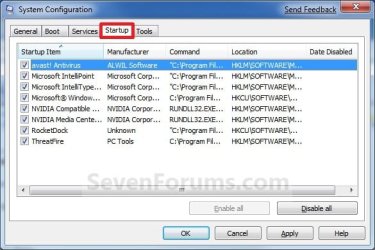
System_Configuration_Startup_Tab.jpg
5. To Disable a Startup Program
A) Select a listed startup program and uncheck it. (See screenshot above)

B) Repeat to disable anymore listed startup programs.
6. To Enable a Startup Program
A) Select a listed startup program and check it. (See screenshot below step 4)

B) Repeat to enable anymore listed startup programs.
7. To Disable All Listed Startup Programs
A) Click on the Disable all button. (See screenshot below step 4)

B) Go to step 9.
8. To Enable All Listed Startup Programs
A) Click on the Enable all button. (See screenshot below step 4)
9. Click on Apply. (See screenshot below step 4)

10. Click on the Boot tab, then check the Make all boot settings permanent box and click on OK. (See screenshot below)
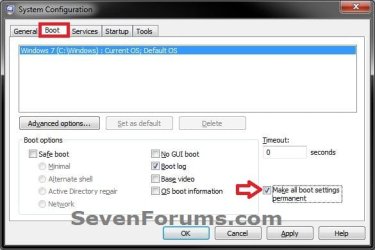
Boot-1.jpg
11. Click on Yes. (See screenshot below)
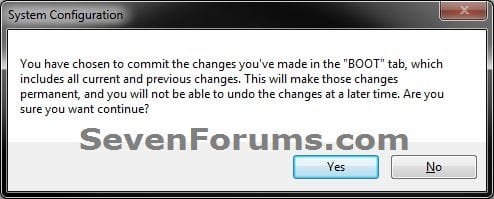
Boot-2.jpg
12. Click on the Restart button to apply. (See screenshot below)
WARNING: This will restart your computer immediately. Save and close anything that you are working on first.
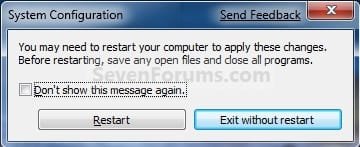
Restart.jpg


METHOD FOUR

Manually in Registry Editor


NOTE: This will allow you to remove a startup program for either the current single user or all users. If you wanted to add a startup program, then METHOD TWO above would be a safer and easier way to do so.
1. Open the Start Menu.

2. In the search line, type regedit and press Enter. (See screenshot below)
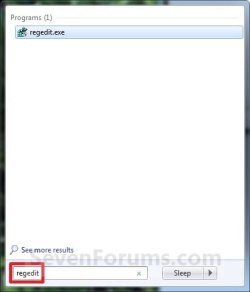
Start_Menu_regedit.jpg
3. For "Current User" Only Locations
A) In regedit, go to: (See screenshots below)

HKEY_CURRENT_USER\Software\Microsoft\Windows\CurrentVersion\Run
AND
HKEY_CURRENT_USER\Software\Microsoft\Windows\CurrentVersion\RunOnce
Current_Reg_Run.jpg

Current_Reg_RunOnce.jpg
4. For "All Users" Locations
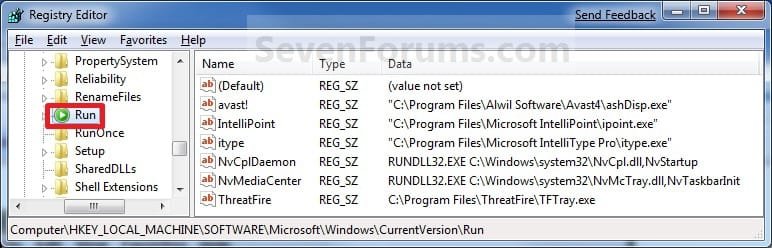
A) In regedit, go to: (See screenshots below)
For 32-bit and 64-bit Windows 7:
HKEY_LOCAL_MACHINE\SOFTWARE\Microsoft\Windows\CurrentVersion\Run
AND
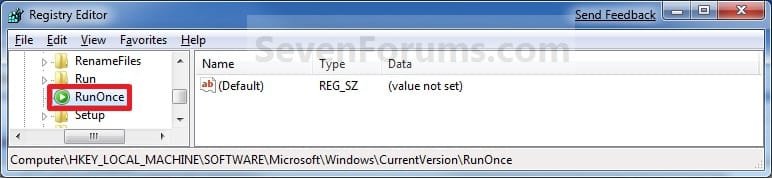
HKEY_LOCAL_MACHINE\SOFTWARE\Microsoft\Windows\CurrentVersion\RunOnce
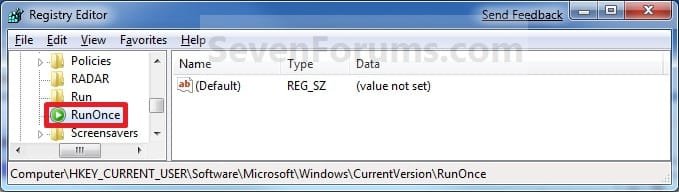
AND (If added by Group Policy)
HKEY_CURRENT_USER\Software\Microsoft\Windows\CurrentVersion\Policies\Explorer\Run
AND (If added by Group Policy)
HKEY_LOCAL_MACHINE\SOFTWARE\Microsoft\Windows\CurrentVersion\Policies\Explorer\Run
AND
For 64-bit Windows 7 only:
HKEY_LOCAL_MACHINE\SOFTWARE\Wow6432Node\Microsoft\Windows\CurrentVersion\Run
AND
HKEY_LOCAL_MACHINE\SOFTWARE\Wow6432Node\Microsoft\Windows\CurrentVersion\RunOnce
All_Users_Reg_Run.jpg

All_Users_Reg_RunOnce.jpg
5. In the right pane of Run and/or RunOnce, right click on the startup program you want to remove and click on Delete. (See screenshots above)
NOTE: RunOnce is only to run the program once for the next time that Windows 7 starts up. Run is to run the program everytime that Windows 7 starts up.

6. Click on Yes to confirm deletion.

7. When done, close regedit.


METHOD FIVE

Using CCleaner


1. If you have not already, download and install the free program CCleaner.

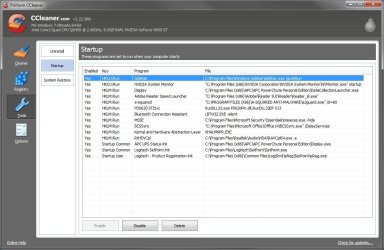
2. Open CCleaner, and click on the Tools icon (left side) and on the Startup button. (See screenshot below)
CCleaner.jpg
3. Select a startup item, then either enable, disable, or delete it from the Vista startup programs list. (See screenshot above)


METHOD SIX

Through Task Scheduler


   Note
By default, you cannot run a elevated (Run as administrator) program that requires UAC permission at startup using the normal Windows 7 startup programs above.

For a Administrator User Account:
You can have Run as administrator (elevated) programs run at startup for a administrator account by running it in a startup task in Task Scheduler.

For a Standard User Account:
You will not be able to run elevated programs at startup for a standard user account though. Only unelevated programs (ex: Notepad).


1. For how to create a startup task, see:

How to Create a Task to Run a Program at Startup and Log On in Windows 7
That's it,
Shawn


Last edited:
NO GO Reply

Hello 2 Bunny,

You might give this a try to see if it may work.

First remove the StartupCop Pro from all of the startup program lists.

Create a elevated task shortcut using the tutorial below.http://www.sevenforums.com/tutorials/11949-elevated-program-shortcut-without-uac-prompt-create.html
Next, use create a separate task using the tutorial below to run the elevated task shortcut created from above at startup and logon.http://www.sevenforums.com/tutorials/67503-task-create-run-program-startup-log.html
Hope this helps,
Shawn

Sorry. Still in the same boat after trying those unfortunately. Any other ideas?

- 2 Bunny
 

My Computer

Computer type
Laptop
Computer Manufacturer/Model Number
Lenovo N200 0769-AUU
OS
Windows 7 64Bit
CPU
Intel Pentium T2390 1.87Ghz (Dual Core)
Motherboard
Lenovo IEL10
Memory
1.5GB DDR2 PC2-5300 (Soon to Upgrade)
Graphics Card(s)
Intel GMA X3100
Sound Card
Lenovo Motherboard Standard Built in (HD)
Monitor(s) Displays
Built in display (Usable Quality)
Screen Resolution
1280X800
Hard Drives
SEAGATE!
PSU
External Lenovo (20Volt, 65Watt)
Case
Lenovo stock case
Cooling
Generic Lenovo Cooler
Keyboard
Stock Standard Lenovo Keyboard (High quality)
Mouse
Built in high quality trackpad
Internet Speed
As fast as it goes
Antivirus
Avast! Free
Browser
Firefox (2006-2014), Pale Moon (2014-?)
2 Bunny,

Other than leaving UAC turned off so that it will run, you might check to see if there may be a newer patch or version of Startup Cop Pro available than the one you currently have. It doesn't seem to be completely compatible with Windows 7. :(
 

My Computer

Computer type
PC/Desktop
Computer Manufacturer/Model Number
Self built custom
OS
64-bit Windows 11 Pro for Workstations
CPU
Intel i7-8700K OC'd to 5 GHz
Motherboard
ASUS ROG Maximus XI Formula Z390
Memory
64 GB (4x16GB) G.SKILL TridentZ RGB DDR4 3600 MHz
Graphics Card(s)
ASUS ROG-STRIX-GTX1080TI-O11G-GAMING
Sound Card
Integrated
Monitor(s) Displays
2 x Samsung Odyssey G7 27"
Screen Resolution
2560x1440
Hard Drives
1TB Samsung 990 PRO M.2,
4TB Samsung 990 PRO PRO M.2,
TerraMaster F8 SSD Plus NAS
PSU
Seasonic Prime Titanium 850W
Case
Thermaltake Core P3
Cooling
Corsair Hydro H115i
Keyboard
Logitech wireless K800
Mouse
Logitech MX Master 4
Internet Speed
2 Gb/s Download and 100 Mb/s Upload
Antivirus
Malwarebyte Anti-Malware Premium
Browser
Google Chrome
Other Info
Logitech Z625 speaker system,
Logitech BRIO 4K Pro webcam,
HP Color LaserJet Pro MFP M477fdn,
APC SMART-UPS RT 1000 XL - SURT1000XLI,
Galaxy S23 Plus phone
COMPATIBILITY TROUBLE Reply

2 Bunny,

Other than leaving UAC turned off so that it will run, you might check to see if there may be a newer patch or version of Startup Cop Pro available than the one you currently have. It doesn't seem to be completely compatible with Windows 7. :(

Do you think I'm entitled to a free upgrade because of incompatibility, or not because the system requirements at the time wouldn't have had Windows 7?

- 2 Bunny
 

My Computer

Computer type
Laptop
Computer Manufacturer/Model Number
Lenovo N200 0769-AUU
OS
Windows 7 64Bit
CPU
Intel Pentium T2390 1.87Ghz (Dual Core)
Motherboard
Lenovo IEL10
Memory
1.5GB DDR2 PC2-5300 (Soon to Upgrade)
Graphics Card(s)
Intel GMA X3100
Sound Card
Lenovo Motherboard Standard Built in (HD)
Monitor(s) Displays
Built in display (Usable Quality)
Screen Resolution
1280X800
Hard Drives
SEAGATE!
PSU
External Lenovo (20Volt, 65Watt)
Case
Lenovo stock case
Cooling
Generic Lenovo Cooler
Keyboard
Stock Standard Lenovo Keyboard (High quality)
Mouse
Built in high quality trackpad
Internet Speed
As fast as it goes
Antivirus
Avast! Free
Browser
Firefox (2006-2014), Pale Moon (2014-?)
2 Bunny,

That's really up to the program's company. It wouldn't hurt to see if there may be an update feature in the program, or an option to update for free at the program's website. If not, then the company may require you to purchase new versions instead.
 

My Computer

Computer type
PC/Desktop
Computer Manufacturer/Model Number
Self built custom
OS
64-bit Windows 11 Pro for Workstations
CPU
Intel i7-8700K OC'd to 5 GHz
Motherboard
ASUS ROG Maximus XI Formula Z390
Memory
64 GB (4x16GB) G.SKILL TridentZ RGB DDR4 3600 MHz
Graphics Card(s)
ASUS ROG-STRIX-GTX1080TI-O11G-GAMING
Sound Card
Integrated
Monitor(s) Displays
2 x Samsung Odyssey G7 27"
Screen Resolution
2560x1440
Hard Drives
1TB Samsung 990 PRO M.2,
4TB Samsung 990 PRO PRO M.2,
TerraMaster F8 SSD Plus NAS
PSU
Seasonic Prime Titanium 850W
Case
Thermaltake Core P3
Cooling
Corsair Hydro H115i
Keyboard
Logitech wireless K800
Mouse
Logitech MX Master 4
Internet Speed
2 Gb/s Download and 100 Mb/s Upload
Antivirus
Malwarebyte Anti-Malware Premium
Browser
Google Chrome
Other Info
Logitech Z625 speaker system,
Logitech BRIO 4K Pro webcam,
HP Color LaserJet Pro MFP M477fdn,
APC SMART-UPS RT 1000 XL - SURT1000XLI,
Galaxy S23 Plus phone
ALTERNATE STARTUP MANAGER Reply

2 Bunny,

That's really up to the program's company. It wouldn't hurt to see if there may be an update feature in the program, or an option to update for free at the program's website. If not, then the company may require you to purchase new versions instead.

Sounds like a plan. I might've found an alternative software that can do the same thing for free, so I'll give that a try.

Thanks for your help though. I felt like those guides you linked to got us close to the solution, but just not quite there. I guess we'll be able to try something new as a result instead.

- 2 Bunny
 

My Computer

Computer type
Laptop
Computer Manufacturer/Model Number
Lenovo N200 0769-AUU
OS
Windows 7 64Bit
CPU
Intel Pentium T2390 1.87Ghz (Dual Core)
Motherboard
Lenovo IEL10
Memory
1.5GB DDR2 PC2-5300 (Soon to Upgrade)
Graphics Card(s)
Intel GMA X3100
Sound Card
Lenovo Motherboard Standard Built in (HD)
Monitor(s) Displays
Built in display (Usable Quality)
Screen Resolution
1280X800
Hard Drives
SEAGATE!
PSU
External Lenovo (20Volt, 65Watt)
Case
Lenovo stock case
Cooling
Generic Lenovo Cooler
Keyboard
Stock Standard Lenovo Keyboard (High quality)
Mouse
Built in high quality trackpad
Internet Speed
As fast as it goes
Antivirus
Avast! Free
Browser
Firefox (2006-2014), Pale Moon (2014-?)
That sounds promising. I hope it will work for you. :)
 

My Computer

Computer type
PC/Desktop
Computer Manufacturer/Model Number
Self built custom
OS
64-bit Windows 11 Pro for Workstations
CPU
Intel i7-8700K OC'd to 5 GHz
Motherboard
ASUS ROG Maximus XI Formula Z390
Memory
64 GB (4x16GB) G.SKILL TridentZ RGB DDR4 3600 MHz
Graphics Card(s)
ASUS ROG-STRIX-GTX1080TI-O11G-GAMING
Sound Card
Integrated
Monitor(s) Displays
2 x Samsung Odyssey G7 27"
Screen Resolution
2560x1440
Hard Drives
1TB Samsung 990 PRO M.2,
4TB Samsung 990 PRO PRO M.2,
TerraMaster F8 SSD Plus NAS
PSU
Seasonic Prime Titanium 850W
Case
Thermaltake Core P3
Cooling
Corsair Hydro H115i
Keyboard
Logitech wireless K800
Mouse
Logitech MX Master 4
Internet Speed
2 Gb/s Download and 100 Mb/s Upload
Antivirus
Malwarebyte Anti-Malware Premium
Browser
Google Chrome
Other Info
Logitech Z625 speaker system,
Logitech BRIO 4K Pro webcam,
HP Color LaserJet Pro MFP M477fdn,
APC SMART-UPS RT 1000 XL - SURT1000XLI,
Galaxy S23 Plus phone
CHAMELEON Reply

That sounds promising. I hope it will work for you. :)

I've been trying the trial for Chameleon Startup manager, and it seems to be working out all right while being properly compatible with Windows 7.

Do you use any special programs for controlling the startup in your computer?

- 2 Bunny
 

My Computer

Computer type
Laptop
Computer Manufacturer/Model Number
Lenovo N200 0769-AUU
OS
Windows 7 64Bit
CPU
Intel Pentium T2390 1.87Ghz (Dual Core)
Motherboard
Lenovo IEL10
Memory
1.5GB DDR2 PC2-5300 (Soon to Upgrade)
Graphics Card(s)
Intel GMA X3100
Sound Card
Lenovo Motherboard Standard Built in (HD)
Monitor(s) Displays
Built in display (Usable Quality)
Screen Resolution
1280X800
Hard Drives
SEAGATE!
PSU
External Lenovo (20Volt, 65Watt)
Case
Lenovo stock case
Cooling
Generic Lenovo Cooler
Keyboard
Stock Standard Lenovo Keyboard (High quality)
Mouse
Built in high quality trackpad
Internet Speed
As fast as it goes
Antivirus
Avast! Free
Browser
Firefox (2006-2014), Pale Moon (2014-?)
2 Bunny,

No, I just add or remove them from the startup areas in the registry.
 

My Computer

Computer type
PC/Desktop
Computer Manufacturer/Model Number
Self built custom
OS
64-bit Windows 11 Pro for Workstations
CPU
Intel i7-8700K OC'd to 5 GHz
Motherboard
ASUS ROG Maximus XI Formula Z390
Memory
64 GB (4x16GB) G.SKILL TridentZ RGB DDR4 3600 MHz
Graphics Card(s)
ASUS ROG-STRIX-GTX1080TI-O11G-GAMING
Sound Card
Integrated
Monitor(s) Displays
2 x Samsung Odyssey G7 27"
Screen Resolution
2560x1440
Hard Drives
1TB Samsung 990 PRO M.2,
4TB Samsung 990 PRO PRO M.2,
TerraMaster F8 SSD Plus NAS
PSU
Seasonic Prime Titanium 850W
Case
Thermaltake Core P3
Cooling
Corsair Hydro H115i
Keyboard
Logitech wireless K800
Mouse
Logitech MX Master 4
Internet Speed
2 Gb/s Download and 100 Mb/s Upload
Antivirus
Malwarebyte Anti-Malware Premium
Browser
Google Chrome
Other Info
Logitech Z625 speaker system,
Logitech BRIO 4K Pro webcam,
HP Color LaserJet Pro MFP M477fdn,
APC SMART-UPS RT 1000 XL - SURT1000XLI,
Galaxy S23 Plus phone

My Computer

Computer type
PC/Desktop
Computer Manufacturer/Model Number
Custom Build
OS
Windows 10 Pro x64
CPU
Intel Core i5 4440 @Stock
Motherboard
Gigabyte Z97 D3H
Memory
4 x 4GB HyperX Fury DDR3
Graphics Card(s)
Gigabyte GTX 1050Ti O4G
Sound Card
Integrated
Monitor(s) Displays
Dell P2417H
Screen Resolution
1920 x 1080
Hard Drives
Samsung EVO 850 120GB / Toshiba DT01ACA050 1TB 7200prm 32MB
PSU
Riotoro Onyx 750W
Case
NZXT H500 Black-Red
Cooling
Stock CPU + NZXT 120mm + 2x120mm red fans
Keyboard
Modecom Volcano Lanparty
Mouse
Asus ROG Gladius / DeepCool E-Pad Plus
Internet Speed
DOCSIS 50/3 Mbit
Browser
Google Chrome
Other Info
Asus K55VJ(i5 3210M, GT635M / 2GB, 8GB DDR3, 500GB HDD)
It may be harder for some users to figure out what the listings are under msconfig>Startup than with other programs like Autoruns and CCleaner tools, although all you really need is Google to find out.
 
I was under the impression that using MSConfig to control startup entries was wrong:

Dealing with Startup Processes - MajorGeeks Support Forums

Therefore I use Autoruns.
Nobody forces you to use that method. It's just tutorial,and it helps other people... :)
And yes, Autoruns is also great.

Yes but if the tutorial is giving potentially bad advice, it's worth pointing out. If you disagree with the MajorGeeks forum post and the Microsoft support item, then may I ask why?
 

My Computer

OS
Windows 7 x64
The tutorial we are posting in has had over a million views without a single complaint.

msconfig might have been considered risky during XP when System files were intermingled with other Startups, but this is no longer the case and now it is up to user preference to use a Startup manager or the more bare-bones msconfig.

You will still get better performance from Win7 with a clean boot running NO startup items except your AV. Compare this with the average factory-preinstalled Windows which has 12-25 preset startups, a horrendous resource hog that makes getting a new computer inferior to running a clean boot.

The only factory-imposed Startup which I've found will balk is HP's useless Wireless Manager which requires selecting Independent Wireless in its Prefs before deselecting in msconfig. Then I would uninstall and bury it in the backyard.
 
Last edited:
I was under the impression that using MSConfig to control startup entries was wrong:

Dealing with Startup Processes - MajorGeeks Support Forums

Therefore I use Autoruns.
Nobody forces you to use that method. It's just tutorial,and it helps other people... :)
And yes, Autoruns is also great.

Yes but if the tutorial is giving potentially bad advice, it's worth pointing out. If you disagree with the MajorGeeks forum post and the Microsoft support item, then may I ask why?

Hello Superhans, and welcome to Seven Forums.

The Microsoft article link at Major Geeks that you referenced is a bit out of date since it is for XP.

Plus, how can you say that this tutorial may be giving bad advice when it gives you a lot more options and locations to see your startup programs than the out of date one that you referenced. Not to mention the notes and warnings within the tutorial to help.

There is absolutely nothing wrong with using msconfig to enable or disable startup entries before deciding to want to delete them in the registry or not. msconfig is also a great tool to use to test to see what startup entry may be causing an issue if having one like in these tutorials below.
http://www.sevenforums.com/tutorial...ation-conflicts-performing-clean-startup.html

Perform a clean startup to determine whether background programs are interfering with your game or program

How to troubleshoot a problem by performing a clean boot in Windows Vista or in Windows 7
However, it is true that it would be best to delete the startup entries from the registry instead of just disabling them in msconfig if you do not want them to run at startup anymore. Plus, msconfig may not always show all startup entries like the registry locations would. That being said, there's still nothing wrong with using msconfig to control startup items if one wishes to as long as you are aware this.
 

My Computer

Computer type
PC/Desktop
Computer Manufacturer/Model Number
Self built custom
OS
64-bit Windows 11 Pro for Workstations
CPU
Intel i7-8700K OC'd to 5 GHz
Motherboard
ASUS ROG Maximus XI Formula Z390
Memory
64 GB (4x16GB) G.SKILL TridentZ RGB DDR4 3600 MHz
Graphics Card(s)
ASUS ROG-STRIX-GTX1080TI-O11G-GAMING
Sound Card
Integrated
Monitor(s) Displays
2 x Samsung Odyssey G7 27"
Screen Resolution
2560x1440
Hard Drives
1TB Samsung 990 PRO M.2,
4TB Samsung 990 PRO PRO M.2,
TerraMaster F8 SSD Plus NAS
PSU
Seasonic Prime Titanium 850W
Case
Thermaltake Core P3
Cooling
Corsair Hydro H115i
Keyboard
Logitech wireless K800
Mouse
Logitech MX Master 4
Internet Speed
2 Gb/s Download and 100 Mb/s Upload
Antivirus
Malwarebyte Anti-Malware Premium
Browser
Google Chrome
Other Info
Logitech Z625 speaker system,
Logitech BRIO 4K Pro webcam,
HP Color LaserJet Pro MFP M477fdn,
APC SMART-UPS RT 1000 XL - SURT1000XLI,
Galaxy S23 Plus phone
OK thanks guys. I wasn't criticising the tutorial in any way, it's great and I always refer back to it. I just wanted some clarification which until now, no one has ever given me (yes, since the XP days!).

I'll continue to use Autoruns because I like it, but it's good to know that it's perfectly safe to use MSConfig. I'll use MSConfig on other peoples machines in the future as it's more convenient.

Thanks again.
 

My Computer

OS
Windows 7 x64
You're welcome Superhans. I'm glad that we could help. :)
 

My Computer

Computer type
PC/Desktop
Computer Manufacturer/Model Number
Self built custom
OS
64-bit Windows 11 Pro for Workstations
CPU
Intel i7-8700K OC'd to 5 GHz
Motherboard
ASUS ROG Maximus XI Formula Z390
Memory
64 GB (4x16GB) G.SKILL TridentZ RGB DDR4 3600 MHz
Graphics Card(s)
ASUS ROG-STRIX-GTX1080TI-O11G-GAMING
Sound Card
Integrated
Monitor(s) Displays
2 x Samsung Odyssey G7 27"
Screen Resolution
2560x1440
Hard Drives
1TB Samsung 990 PRO M.2,
4TB Samsung 990 PRO PRO M.2,
TerraMaster F8 SSD Plus NAS
PSU
Seasonic Prime Titanium 850W
Case
Thermaltake Core P3
Cooling
Corsair Hydro H115i
Keyboard
Logitech wireless K800
Mouse
Logitech MX Master 4
Internet Speed
2 Gb/s Download and 100 Mb/s Upload
Antivirus
Malwarebyte Anti-Malware Premium
Browser
Google Chrome
Other Info
Logitech Z625 speaker system,
Logitech BRIO 4K Pro webcam,
HP Color LaserJet Pro MFP M477fdn,
APC SMART-UPS RT 1000 XL - SURT1000XLI,
Galaxy S23 Plus phone
Nice Tutorial. Thx.

But I want to know...

Is it possible to disable most of the starting programs and services only for a specified user account? I mean, to have a secondary user account free of most of it (and not only disable the current user entries) for running heavier applications within, without disabling the same programs and services on the main admin account?

thanks in advance!
 

My Computer

OS
Win 7 Home Premium 64x
Hello Seiph, and welcome to Seven Forums.

For services, no. :(

For startup programs, yes. You could go through the tutorial and move the startup items in all of the "all users" locations to only be in specific users' Startup folders instead. This way there will be no startup items in the "all users" location, and only start items you want in each user's Startup folders.

Hope this helps,
Shawn
 

My Computer

Computer type
PC/Desktop
Computer Manufacturer/Model Number
Self built custom
OS
64-bit Windows 11 Pro for Workstations
CPU
Intel i7-8700K OC'd to 5 GHz
Motherboard
ASUS ROG Maximus XI Formula Z390
Memory
64 GB (4x16GB) G.SKILL TridentZ RGB DDR4 3600 MHz
Graphics Card(s)
ASUS ROG-STRIX-GTX1080TI-O11G-GAMING
Sound Card
Integrated
Monitor(s) Displays
2 x Samsung Odyssey G7 27"
Screen Resolution
2560x1440
Hard Drives
1TB Samsung 990 PRO M.2,
4TB Samsung 990 PRO PRO M.2,
TerraMaster F8 SSD Plus NAS
PSU
Seasonic Prime Titanium 850W
Case
Thermaltake Core P3
Cooling
Corsair Hydro H115i
Keyboard
Logitech wireless K800
Mouse
Logitech MX Master 4
Internet Speed
2 Gb/s Download and 100 Mb/s Upload
Antivirus
Malwarebyte Anti-Malware Premium
Browser
Google Chrome
Other Info
Logitech Z625 speaker system,
Logitech BRIO 4K Pro webcam,
HP Color LaserJet Pro MFP M477fdn,
APC SMART-UPS RT 1000 XL - SURT1000XLI,
Galaxy S23 Plus phone
Hi, what is "run-" folder for?

"HKEY_LOCAL_MACHINE\SOFTWARE\Microsoft\Windows\CurrentVersion\Run-"

There is some stuff in there like:

AdobeAAMUpdater-1.0 ("C:\Program Files (x86)\Common Files\Adobe\OOBE\PDApp\UWA\UpdaterStartupUtility.exe")

D:\***\Microsoft Office\Office14\BCSSync.exe" /DelayServices

And also in current user:

"C:\Users\*\AppData\Local\Google\Update\GoogleUpdate.exe" /c

Are these safe to delete?
 

My Computer

OS
Windows 7 x64
CPU
Intel C2D e4500 @ 3.0 GHz
Motherboard
Gigabyte P35-DS3P
Memory
3 x 1 GB - Kingmax DDR2 800 MHz
Graphics Card(s)
Gigabyte 8800 GT
Monitor(s) Displays
Samsung 930BF
Screen Resolution
1280x1024
Hard Drives
Seagate Baracuda 410AS - 250 GB
PSU
Chieftec 450 W
Case
Codegen Briza
Cooling
Cooler Master Hyper TX
Keyboard
Logitech Media Keyboard Elite
Mouse
Logitech RX1000
Internet Speed
DOWN: 4 Mbit UP 256 kbit
Hello Grizz,

That "Run" location in the registry is what runs at startup for all users. I'd recommend to leave them all alone, but you could delete the Adobe and Google one if you want to make sure to manually update the Adobe and Google programs they belong to. Otherwise, it's not going to hurt to leave them. :)

Those items you have listed are for this below in the same order.
  • Adobe program updater
  • Microsoft Office BCSSync.exe (Business Connectivity Services)
  • Google updater
Hope this helps,
Shawn
 

My Computer

Computer type
PC/Desktop
Computer Manufacturer/Model Number
Self built custom
OS
64-bit Windows 11 Pro for Workstations
CPU
Intel i7-8700K OC'd to 5 GHz
Motherboard
ASUS ROG Maximus XI Formula Z390
Memory
64 GB (4x16GB) G.SKILL TridentZ RGB DDR4 3600 MHz
Graphics Card(s)
ASUS ROG-STRIX-GTX1080TI-O11G-GAMING
Sound Card
Integrated
Monitor(s) Displays
2 x Samsung Odyssey G7 27"
Screen Resolution
2560x1440
Hard Drives
1TB Samsung 990 PRO M.2,
4TB Samsung 990 PRO PRO M.2,
TerraMaster F8 SSD Plus NAS
PSU
Seasonic Prime Titanium 850W
Case
Thermaltake Core P3
Cooling
Corsair Hydro H115i
Keyboard
Logitech wireless K800
Mouse
Logitech MX Master 4
Internet Speed
2 Gb/s Download and 100 Mb/s Upload
Antivirus
Malwarebyte Anti-Malware Premium
Browser
Google Chrome
Other Info
Logitech Z625 speaker system,
Logitech BRIO 4K Pro webcam,
HP Color LaserJet Pro MFP M477fdn,
APC SMART-UPS RT 1000 XL - SURT1000XLI,
Galaxy S23 Plus phone
Back
Top