Solved Corrupt Album Art Cache

I don't create a single album folder within a parent folder because I didn't start out that way orignally and well, I'm lazy. This works for me:

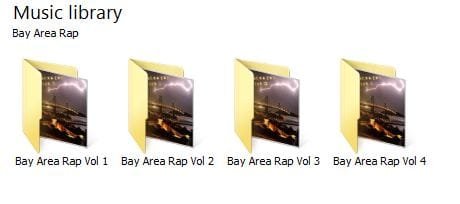
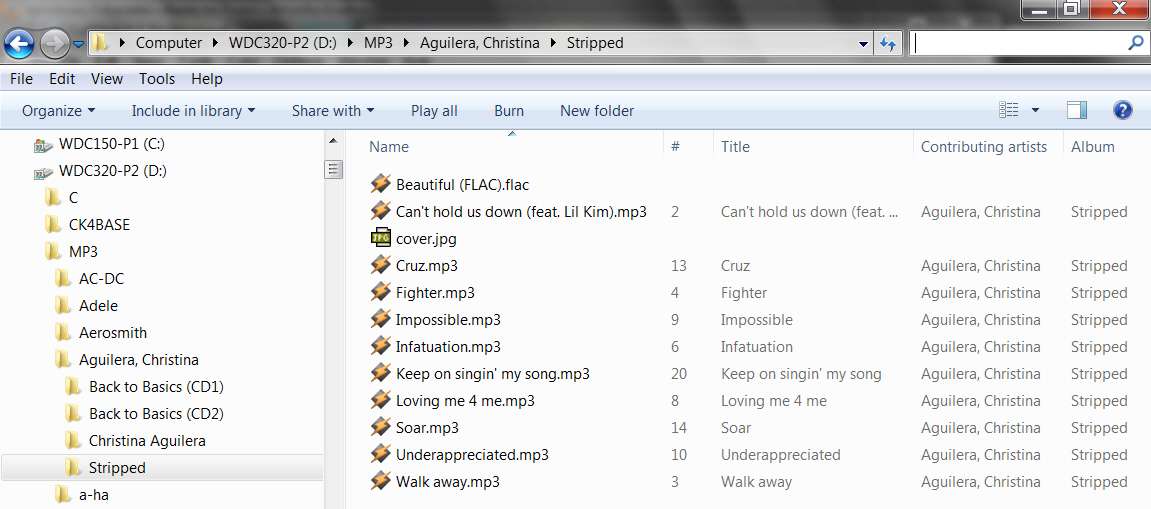
Here's an example of two: the first has multiple cd's within, the second only one cd:

exp1.JPG

Here's the multiple cd's:

exp2.JPG

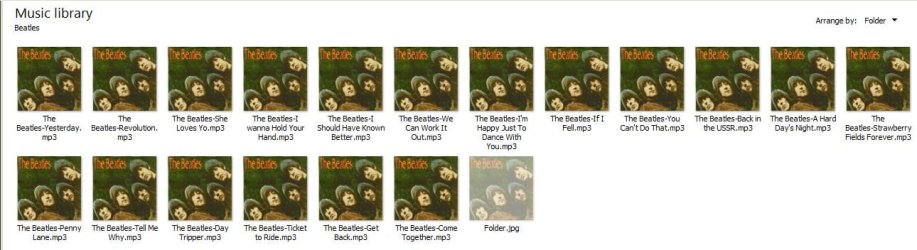
You open up the first one:

exp3.JPG

And here's the single artist file:

exp4.JPG

I guess this works for me. And you're right, I can alway view in Windows Explorer. When I play music, I never search for artist. I'm so attached to the album art that I look for that when I want to select a cd, either on my Zune or computer. Although on the Zune, it's always set to Genre.

As far as embedded album art, I'm not sure what you mean. But I did discover that when I select an album to play in Jaangle, each song shows the album artwork in the artwork pane---except the problem album, it shows on some songs and doesn't show on others. But I don't really care about that. All I care about is that the artwork is in the Album view pane, so I can quickly find what I'm looking for.

I kind of quickly looked through your post, I have to go burn supper now, but I'll look over it later and see what wisdom your are trying to impart on me.

Thanks for hanging in there with me!
 

My Computer My Computer

OS
Windows 7 Home Premium, 64 bit, SP1
I kind of quickly looked through your post, I have to go burn supper now, but I'll look over it later and see what wisdom your are trying to impart on me.
Well, all I'm trying to do is persuade you to move away from Windows Media Player as a "music player", and to move away from Windows Explorer and/or Win7 Libraries as your "music collection/organizer".

In my opinion and experience, these are products with very limited capability in comparison to 3rd-party dedicated programs, such as Jaangle. Not only is Jaangle far more appealing to look at, but it organizes and displays many times the amount of information you would ever see in Windows Explorer.

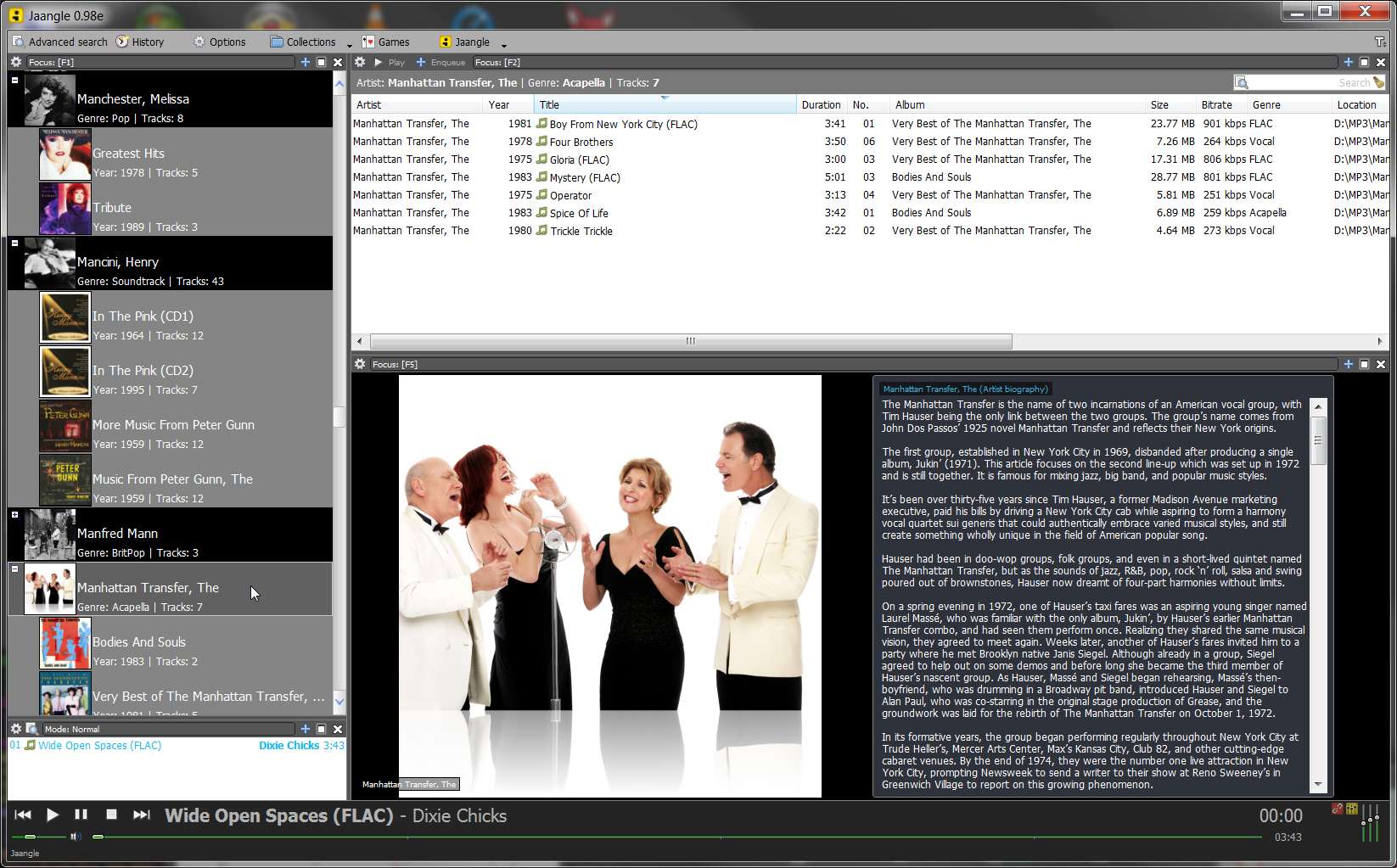
Who really cares if you can just get a peek at one angled image inside a manila folder, or multiple angled images. Who cares if you can see the individual music file names inside that folder if you open it, all with the identical micro-version of the same album art? This is all virtually nothing compared to what you can see all in one gorgeous giant organized Jaangle main window presentation:

jaanglewindow.jpg


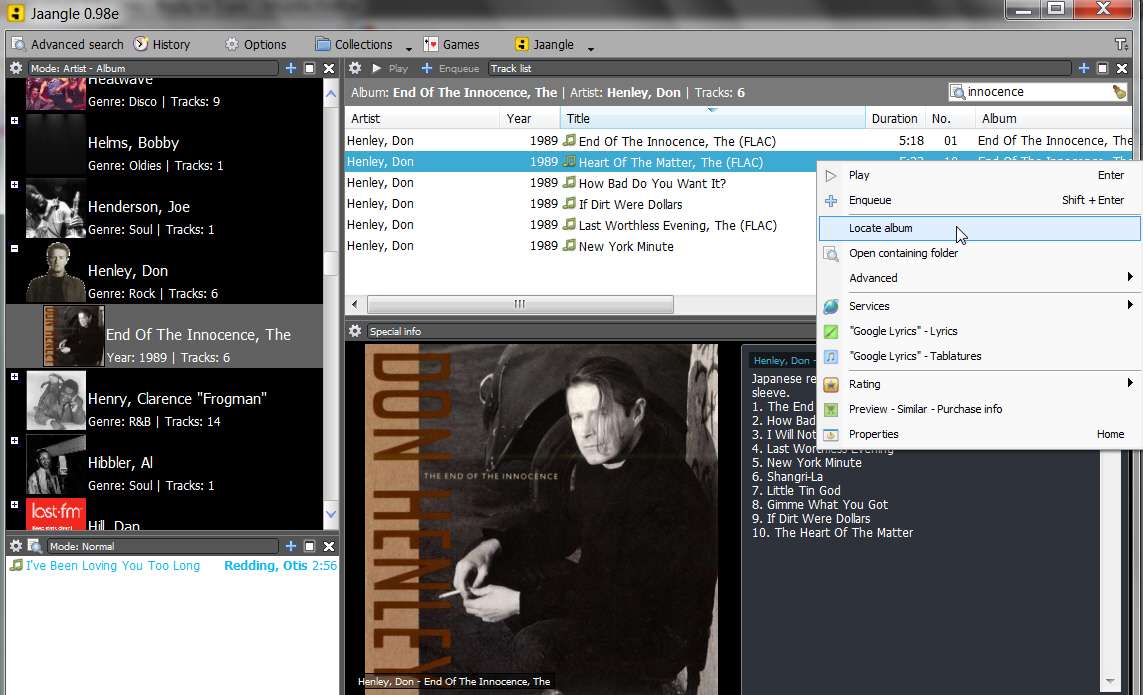
In one Jangle 4-pane presentation you see and invoke the following:

(1) artist/album pane - artist with artist photo showing genre and total number of tracks from all albums within that artist; indented albums with album cover art showing year and number of tracks in that album folder.

(2) track details pane - customizable column presentation showing all tag field values for each music file either for all albums by that artist or individually by album; physical file size and fully-qualified pathname of each file; one or more tracks can be selected and played, either using the Jaangle built-in player or using your external music player (e.g. Winamp); you can select a track and locate that track's album within Jaangle, or you can open the album folder with Windows Explorer; you can invoke Google - Lyrics or Google - tablatures; you can invoke automatic tagging functions, including renaming the file from tags or setting tag fields from the file name; copy physical pathname to clipboard.

(3) information pane - artist picture and artist biography, or album cover art picture and album review/tracklist; contents of information pane remains in sync with whatever track/album is playing.

(4) playlist pane - selected track(s) for playing, stored/added from selections in track details pane; create M3U playlist file from contents of playlist pane; load M3U playlist into playlist pane; shuffle,

Add to these panes the built-in music player at the bottom of the window, and 3-band EQ, and I just don't understand why anybody struggles to try to make the best of the severely under-qualified Windows Media Player and Windows Explorer for seriously large music collections.

I mean, look at my screenshot above. The artist/album pane showing artist photo and then album art for each album by that artist... why is this not exactly what we're all looking for? Why would you prefer the silly manila folders of Windows Explorer, with a barely visible angled photo image inside if you're lucky? Didn't you say that you browse for albums with Windows Explorer by recognizing album art? Well at least Jaangle shows the full-on album art, full-view for each album, rather than the angled partially visible photos as presented inside of manila folders by Windows Explorer.

And I still recommend that you have an album folder under each artist, even if you only have one album for that artist. It's just consistent, and usable, and you will always see your albums whenever you look in Windows Explorer... even if you have just one album for that artist (see AC-DC in the screenshot below):

windowplorer.jpg


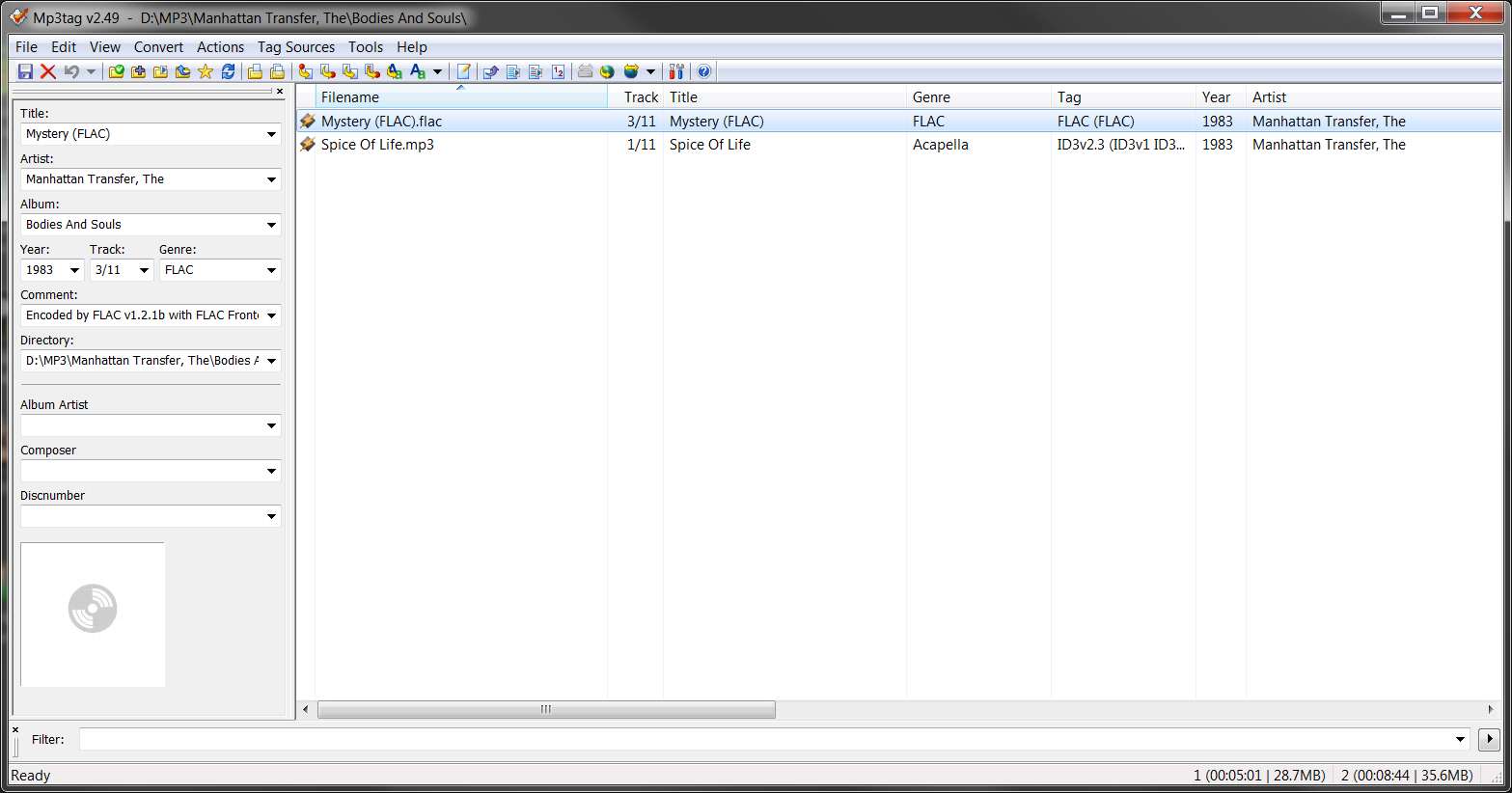
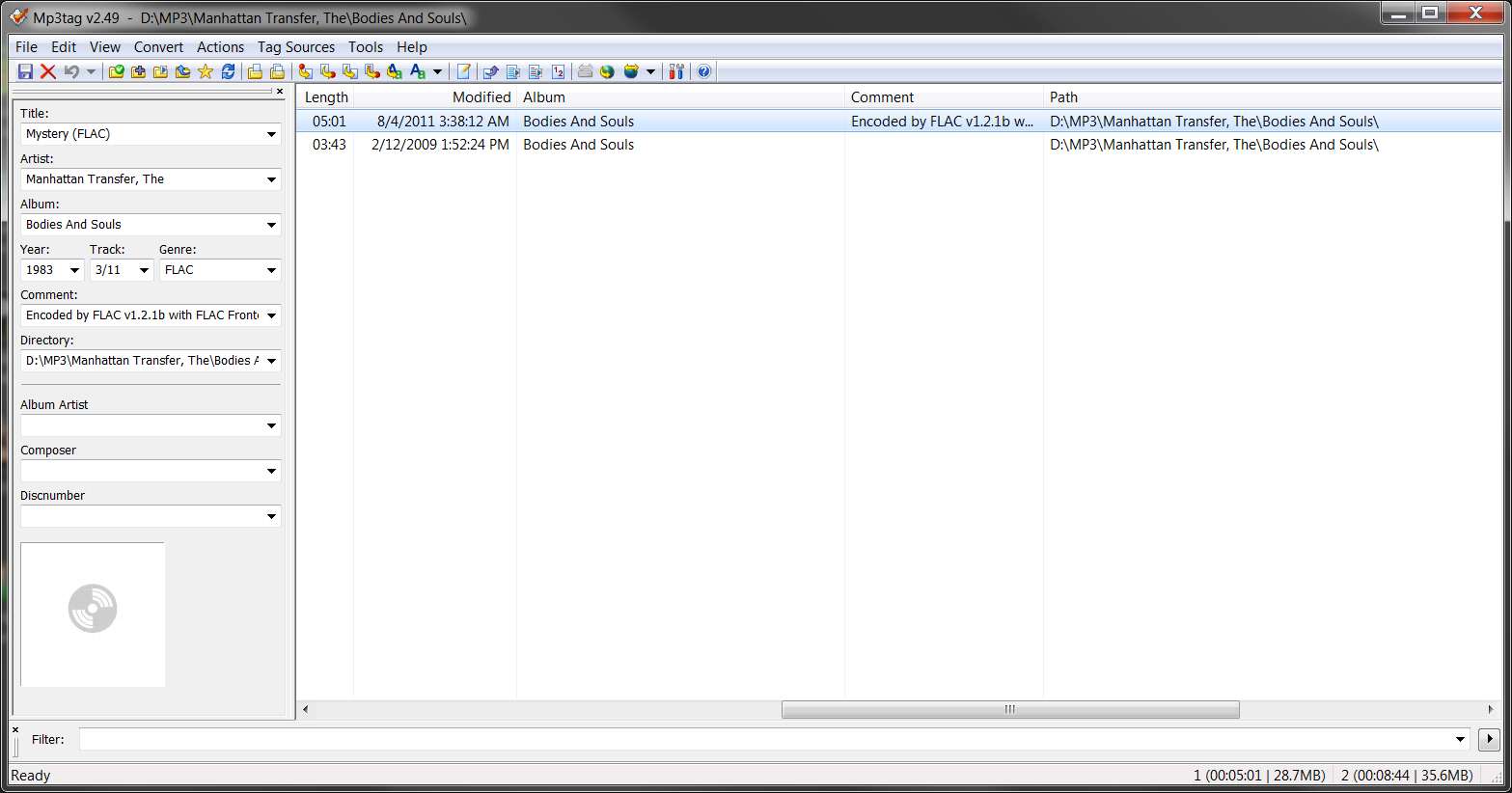
Now on the other matter, of whether the tag pane in MP3Tag will or will not show album art, the answer is it should NOT show album art for any selected file if there is no imbedded album art in the tag for that file.

mp3tagart.jpg


mp3tagpage2.jpg


If you are seeing art in MP3Tag, then you still have imbedded album art in the tags of at least some selected files. I thought you had removed ALL of the imbedded album art you had discovered, and instead created a single "folder.jpg" album art image for that album's folder (if you had two or more albums for that artist so that you actually had individual album folders).

Alternatively, based on your subsequent description of your organization I'd guessed you'd put the folder.jpg in the artist folder, if you had only one album by that artist and therefore did not have an album folder underneath the artist folder but simply had all tracks from that one album directly in the artist folder, along with folder.jpg.

But in ALL of these situations, you still should never see album art in MP3Tag unless you actually do still have imbedded art in the tags for some music files. Obviously you should remove that art in the tag for those files, if you want to avoid confusion and guarantee that your folder.jpg approach will work without fail.

You need to look at each track in that Bluegrass album, one at a time, with MP3Tag, and see which ones do or do not have imbedded album art. NONE of them should have imbedded album art any longer if you're going to get folder.jpg to be your album art solution.


You've now confided that this final Bluegrass album is still causing you problems, so there's obviously something not right about it. And actually, I'm surmising that the album TITLE is "World's Greatest Bluegrass Bands". So in this case your folder structure of \Users\Public\Music\World's Greatest Bluegrass Bands isn't specifying the "artist" at the folder level, but rather is really the "album" for that folder name. You've also kind of invented an "album artist" and called it "World's Greatest Bluegrass Bands", but to be honest it's really the album title, and not a genuine "artist".

And this is why I brought up my own invention of a "pseudo-artist" of "Oldies Collections", to create a parent folder so that all of my compilation albums (like your Bluegrass album with assorted artists for each track) could fit into my general \Music\Artist\Album folder structure.


Anyway, bottom line is I honestly feel you would benefit by weaning yourself off of Windows Explorer, Windows Media Player, Windows 7 "Music Library", etc., and simply use Jaangle for all of your music collection organizing, collecting, and playing needs.

You can certainly use Music Library for navigation and convenience, but you can also just use Computer and navigate manually to where your music collection is stored. Presumably it's simply in \Users\Public\Music and you can find it using Computer just as well as Library.

But for the rest of the time when you're playing music... that's when you want the power of a Jaangle to help you find what you're looking for, and enjoy what you're seeing and listening to. And in fact you can play music using either the Jaangle built-in player (which also plays FLAC, as well as MP3 and other formats) or you can invoke an external player (e.g. Winamp or even Windows Media Player if it's the default associated player).

You can also use Jaangle's tagging facility occasionally since it's right there for the taking, but I'd still recommend MP3Tag for your general tagging work.
 
Last edited:

My Computer My Computer

Computer type
PC/Desktop
Computer Manufacturer/Model Number
Home-built, two systems (1) and (2)
OS
Windows 7 Pro x64 (1), Win7 Pro X64 (2)
CPU
i5-3350p 3.1Ghz/6MB-cache (1); E8400 3.0Ghz/6MB-cache (2)
Motherboard
ASUS P8Z77-V Pro (1); ASUS P5Q3 (2)
Memory
8GB PC3-12800 DDR3 (1); 4GB PC3-10600 DDR3 (2)
Graphics Card(s)
ATI HD7750 (1), (see TV cards); ATI R7 250 (2)
Sound Card
Realtek ALC892 HD Audio (1); Realtek ALC1200 HD Audio (2)
Monitor(s) Displays
Eizo HD2441W LCD, Eizo S2433W (1); Eizo 24" S2433W (2)
Screen Resolution
1920x1200, 1920x1200 (1); 1920x1200 (2)
Hard Drives
(1) 1TB SATA-II (7200RPM), 2x2TB SATA-III (7200RPM), 250GB SATA-III (10000RPM) for OS; 2x2TB external USB 3.0

(2) 320GB SATA-II (7200RPM), 750GB SATA-II (7200RPM), 150GB SATA-II (10000RPM) for OS; 2TB external USB 3.0
PSU
Nesteq ECS-6001 600W (1); Nesteq ECS-5001 500W (2)
Case
Acousti-Case 360 (1) and (2)
Cooling
Noctua NH-U12P SE2 for CPU, 2x120mm case fans (1) and (2)
Keyboard
IBM PS/2 (1) and (2)
Mouse
Logitech MX Revolution wireless (1); Microsoft wired (2)
Internet Speed
100mbps down / 10mbps up
Antivirus
Microsoft Security Essentials; Malwarebyte Anti-Malware Pro
Browser
Firefox
Other Info
Ceton InfiniTV 4-tuner cablecard-enabled TV card as well as Hauppauge HVR-2250 OTA/ATSC 2-tuner TV card in (1), running under Win7 WMC
I feel really stupid now, that I didn't take more care to set my library up properly in the beginning. I never dreamed that one day I would have over 800 cd's on my computer so I didn't give it much time or effort.

I now see that I should have been more careful and I probably wouldn't have so many problems.

Whenever I made a mix cd with various artists, I would name the cd and artists with the cd's name and then use the actual name of the artists in the contributing artist's category. I thought it would be easier to find, file, etc. I now see that that was not the way to go.

I would love to get away from Windows - everything! but when I'm looking for a specific album, you can't beat Windows explorer in album view. So I'll probably never stop that.

But as far as listening to music on my computer, I'll never go back to WMP. Even with a brand new computer (less than 1 month old) it would hang, freeze, take 15-20 seconds to load/play album, etc. And it wouldn't shut down, even when I closed the window. I'd always have to use Task Manager to end process. No, I won't miss it at all.

So, should I run each and every album back through MP3Tag to remove artwork from each track? And if I don't, what will that hurt/impact?

Oh, and one more thing: World's Greatest Bluegrass album--still shows in Jaangle without the apostrophe, although I used MP3Tag to make everything match. I've updated collection, closed and reopend program, rebooted, and still it won't pick up that change...this is one evil album!

exp6.jpg
 

My Computer My Computer

OS
Windows 7 Home Premium, 64 bit, SP1
One question about Jaangle:

What does the cross in the yellow box mean? I don't think I saw that in any of your screenshots:

ex7.jpg
 

My Computer My Computer

OS
Windows 7 Home Premium, 64 bit, SP1
I feel really stupid now, that I didn't take more care to set my library up properly in the beginning. I never dreamed that one day I would have over 800 cd's on my computer so I didn't give it much time or effort.

I now see that I should have been more careful and I probably wouldn't have so many problems.
We all seem to make several long-running project/passes through our ever-growing music collections over the years.

I started my MP3 discoveries back in 1999 while still using Win98. I used Audiograbber along with a command-line MP3 encoder purchased from Fraunhofer (the inventor and patent holder and royalty collector of MP3), which I thought produced great results. It was, however, VERY VERY SLOW and 100% CPU intensive. So making MP3's as a very arduous and time-consuming process.

I even retained Win98 as an alternate boot partition when I installed WinXP in 2002, because the Fraunhofer encoder would not run under WinXP's DOS command-prompt window. So I had to re-boot to Win98 whenever I wanted to make new MP3's from newly purchased CDs.

Eventually, in 2008, I discovered LAME which not only worked perfectly under WinXP but also turned out to be a very very FAST encoder of MP3. It also produced significantly better sounding results than the original Fraunhofer encoder I'd been using, which really was the icing on the cake.

So I converted my production workflow to instead now use Augiograbber and LAME, and in October 2008 embarked on a complete re-pass of my entire CD collection (which at the time had now grown to probably around 900 CDs). My stated goal was to produce a complete replacement for all of my previous MP3 files, this time produced with the better sounding LAME.

But the project allowed me to do a complete review of everything I'd done up until then, in the previous 10 years. I was able to review all of my album art again, and re-find newer better quality covers for those I'd originally overlooked, or missed, or had accepted crummy 500x500 or smaller 200x200 art when I really wanted high-quality 500x500 art, etc. I was able to double-check naming of folders and files, and guarantee that all tags were correct.

I also used the opportunity to completely re-build my CD Database (I use a program named Musifind Pro for that) from scratch, hunting down all of the "original album/year" information for each of the tracks on all single-artist "greatest hits" collections and multi-artist "compilations", so that my CD Database was accurate and informative. I'd been fairly casual about this (apparently) originally, and I became obsessive about the accuracy of this data during this second 2008 pass.

I also used the opportunity to re-listen to every track on every CD, to encode to MP3 those "secondary" tracks I'd ignored originally. In other words, many popular artist CDs have the one or two or few "popular/hit" tracks that you recognize and probably bought the CD for those tracks. But often there really are other secondary tracks that are good, very good, or great as well. So as I was passing through all of my CDs I consciously created MP3 files for these other "surprise" tracks.

Note that for cover art, Amazon is still my primary source for a CD unless I can't find high-quality there in which case I just scan my own CD cover and tweak/re-size with Photoshop. If I do scan my own I then upload my own cover to Amazon so that others can share. There's nothing more satisfying than looking back at your covers months later and seeing a high "vote count" for your own added covers).

Anyway, this project which started in 2008 ended up taking a lot longer to complete than I expected it to. In fact it was only completed in October 2010!!! Yes, it took about 2 years for me to finally complete this re-pass of my CDs (as my CD collection had also grown to over 1000)... because it required a great deal of time and effort to painstakingly do everything new and more accurate that I had to do for each CD.

But in the end it turned out produce probably double the number of total MP3 files as I'd originally had. And, I had corrected all my previous mistakes. I had fixed spelling errors in files, artists and albums. I had found/produced high-quality album art for all CDs that I was proud of and could enjoy looking at. I had uncovered the "original album/year" for all tracks from collections and compilations.

And in the end, this second pass was well-worth it. I even bought a 64GB Cowon J3 portable music player in mid-2010, and copied my entire new music/art collection (about 6900 tracks from 1037 CDs, representing about 1600 artists) to the player so that I could carry the entire thing around with me.


Then, by listening to music from the J3 through headphones and in my car, when I realized that some of these 6900 tracks were really "my very favorites" and sounded better in FLAC than they did in MP3 I decided to make yet one more pass of the whole CD collection. This time I didn't have anything to do except decide whether I wanted to have a track in FLAC or MP3, based on its sound quality and whether or not it really was "my very favorite".

So starting in February of 2011 I began my THIRD PASS of my CD collection... this time to produce FLAC versions to replace MP3, for "my very favorites". The 64GB J3 has adequate room for what would now be larger file sizes (typically 3x-4x larger for FLAC vs. MP3).

But once again this new pass again gave me a chance to re-evaluate my existing album art and once again scan-my-own if appropriate. I discovered a fair number where I'd apparently been "tolerant" during the 2008-2010 project, but where I was now unhappy.

And not surprisingly, I again occasionally found spelling errors or organizational errors in folders and files and in tag fields as well. So I fixed those issues as well.

I'm still working on this FLAC-pass, but I now have over 800 FLAC files to replace the original MP3 versions. I am almost through, and expect to end up with probably 1000 FLAC files out of my 6900 total music files.

So, each "re-pass" through your music collection gives you a chance to review what you've done, get rid of what you don't like or want, correct errors you never saw before, re-structure and re-tag things if appropriate, and review your album art. Each such pass is no doubt time consuming, but in the end the results of each one-time project probably justifies the effort spent... espeically if you really love music, are proud of your music collection, and really do listen to it on your computer, with a portable music player, and/or in your car.


Whenever I made a mix cd with various artists, I would name the cd and artists with the cd's name and then use the actual name of the artists in the contributing artist's category. I thought it would be easier to find, file, etc. I now see that that was not the way to go.
Homemade mix CDs are a totally different story. Here you can go anyway you decide to invent for yourself. I don't do that for my own situation, but certainly have several hundred true multi-artist compilations of a commercial origin.

Which again is why I decided to invent the "pseudo-artist" of "Oldies Collections", create an "artist" parent folder of that name to fit within my \Music\Artist parent structure, and then put all of these multi-artist compilations under that "pseudo-artist" to conform to my \Music\Artist\Album structure.

And for the tags built for each track from these compilations, the "album" in all of these is truly the compilation title. The "artist" in each track's tag is the actual artist performing on that track.


I would love to get away from Windows - everything! but when I'm looking for a specific album, you can't beat Windows explorer in album view. So I'll probably never stop that.
Well, you probably haven't discovered the "search" features (both simple and advanced) in Jaangle.

For example, I just did a simple search for "innocence" on my collection using Jaangle, and sure enough all of the tracks of Don Henley's "End of the Innocence" album appeared. Then I right-clicked on one of those tracks (for example, if the search produced hits from multiple albums or artists, and I saw the one(s) I really wanted), and selected "locate album" on the popup menu. This resulted in the left artist/album pane navigating to and selecting the specified album.

jaangle18.jpg


Or, you can do a search for an artist, e.g. "Frey", who might have hits in multiple albums so that they all show up. Again, select a track from the list shown for the specific album you want, right-click and select "locate album", and you're there!! Artist/album pane navigated for you, and selected album selected for you with only its tracks showing in the details pane, and information pane showing the album art/review/tracklist for just that selected album. You yourself do not have to any folder navigation or scrollbar pulling or whatever... just enter something in the "search" area and go from there.

jaangle19.jpg


So, should I run each and every album back through MP3Tag to remove artwork from each track? And if I don't, what will that hurt/impact?
If you use folder.jpg/cover.jpg, then you don't need album art in any individual track's tag. You only need to put folder.jpg/cover.jpg in the correctly named album folder (that matches the "album" tag field values of its tracks).

So me... yes, I would remove the album art in any tags. But with MP3Tag it's trivial... just select all of the tracks for each album you select, right-click on the album art area in the tag pane, and select "remove cover" (while specifying the "< keep >" value in all other tag fields, so as not to lose anything else). The imbedded album art in all tags for all selected tracks will now be deleted, and all the other tag fields will be retained.

And if you check the "search subdirectories" item you can navigate to a high-level folder, have MP3Tag recurse down through all sub-folders and show you ALL your tracks in all sub-folders, now you can really select your entire music collection and remove album art from all tags in all your music files... with essentially a single click.

I thought you'd already done that, but I guess not. Or maybe not for everything. Anyway you should practice on one folder so that you learn exactly how to do it, and then do it on your entire collection.

There's simply no need for it since you're using folder.jpg, it's wasteful and duplicative, and it may well explain your Jaangle mysteries.


Oh, and one more thing: World's Greatest Bluegrass album--still shows in Jaangle without the apostrophe, although I used MP3Tag to make everything match. I've updated collection, closed and reopend program, rebooted, and still it won't pick up that change...this is one evil album!
You need to select all the tracks from that album, right-click and select "read tags", in order to absorb into Jaangle's database your spelling correction to the "album" field in each of the tags.

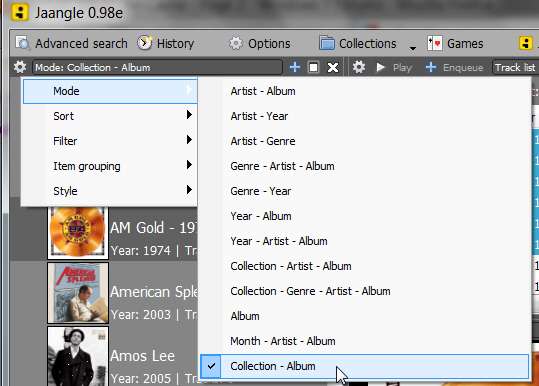
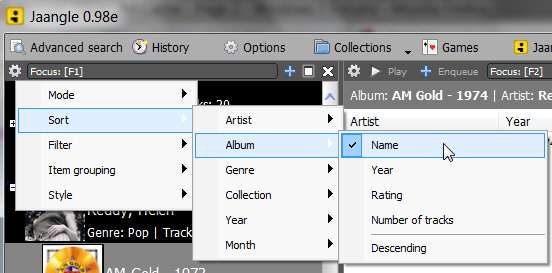
For example, I've re-arranged my "mode" to match your "collection - albums", and specified "alphabetical by album name" (so that my artist/album pane is strictly in alphabetical album order). Then I selected a particular compilation album, and then I selected all the tracks of that compilation album, and then I right-clicked and selected "read tags" to import the up-to-date tags. This should get your own Bluegrass album mystery corrected, once and for all.

jaangle15.jpg


jaangle16.jpg


jaangle17.jpg


jaangle14.jpg
 

My Computer My Computer

Computer type
PC/Desktop
Computer Manufacturer/Model Number
Home-built, two systems (1) and (2)
OS
Windows 7 Pro x64 (1), Win7 Pro X64 (2)
CPU
i5-3350p 3.1Ghz/6MB-cache (1); E8400 3.0Ghz/6MB-cache (2)
Motherboard
ASUS P8Z77-V Pro (1); ASUS P5Q3 (2)
Memory
8GB PC3-12800 DDR3 (1); 4GB PC3-10600 DDR3 (2)
Graphics Card(s)
ATI HD7750 (1), (see TV cards); ATI R7 250 (2)
Sound Card
Realtek ALC892 HD Audio (1); Realtek ALC1200 HD Audio (2)
Monitor(s) Displays
Eizo HD2441W LCD, Eizo S2433W (1); Eizo 24" S2433W (2)
Screen Resolution
1920x1200, 1920x1200 (1); 1920x1200 (2)
Hard Drives
(1) 1TB SATA-II (7200RPM), 2x2TB SATA-III (7200RPM), 250GB SATA-III (10000RPM) for OS; 2x2TB external USB 3.0

(2) 320GB SATA-II (7200RPM), 750GB SATA-II (7200RPM), 150GB SATA-II (10000RPM) for OS; 2TB external USB 3.0
PSU
Nesteq ECS-6001 600W (1); Nesteq ECS-5001 500W (2)
Case
Acousti-Case 360 (1) and (2)
Cooling
Noctua NH-U12P SE2 for CPU, 2x120mm case fans (1) and (2)
Keyboard
IBM PS/2 (1) and (2)
Mouse
Logitech MX Revolution wireless (1); Microsoft wired (2)
Internet Speed
100mbps down / 10mbps up
Antivirus
Microsoft Security Essentials; Malwarebyte Anti-Malware Pro
Browser
Firefox
Other Info
Ceton InfiniTV 4-tuner cablecard-enabled TV card as well as Hauppauge HVR-2250 OTA/ATSC 2-tuner TV card in (1), running under Win7 WMC
One question about Jaangle:

What does the cross in the yellow box mean? I don't think I saw that in any of your screenshots:
That is Jaangle's "info icons", which I have suppressed because it's not of any value for me.

You can suppress it yourself using the "gear" checkbox in the tracklist pane. Just un-check it and the info icons will disappear.

jaangle21.jpg


There's no manual or HELP with Jaangle, but I believe that the yellow "+" indicates that information is present which will appear in the lower information pane.

And I believe the blue "i" indicates that there is a "comment" or further lower-level information in one of the miscellaneous tag fields.

If you right-click on a track and select "Properties" you'll be able to browse the entire tag for that track, including all of the primary and secondary and extended tag fields.

As I mentioned above, I myself have turned off this column as having no value to me. All of my tracks have tags, and all of my tags have information in them. In particular, my FLAC files also have a "comment" in them. So these "info icons" don't provide me with any real information.
 

My Computer My Computer

Computer type
PC/Desktop
Computer Manufacturer/Model Number
Home-built, two systems (1) and (2)
OS
Windows 7 Pro x64 (1), Win7 Pro X64 (2)
CPU
i5-3350p 3.1Ghz/6MB-cache (1); E8400 3.0Ghz/6MB-cache (2)
Motherboard
ASUS P8Z77-V Pro (1); ASUS P5Q3 (2)
Memory
8GB PC3-12800 DDR3 (1); 4GB PC3-10600 DDR3 (2)
Graphics Card(s)
ATI HD7750 (1), (see TV cards); ATI R7 250 (2)
Sound Card
Realtek ALC892 HD Audio (1); Realtek ALC1200 HD Audio (2)
Monitor(s) Displays
Eizo HD2441W LCD, Eizo S2433W (1); Eizo 24" S2433W (2)
Screen Resolution
1920x1200, 1920x1200 (1); 1920x1200 (2)
Hard Drives
(1) 1TB SATA-II (7200RPM), 2x2TB SATA-III (7200RPM), 250GB SATA-III (10000RPM) for OS; 2x2TB external USB 3.0

(2) 320GB SATA-II (7200RPM), 750GB SATA-II (7200RPM), 150GB SATA-II (10000RPM) for OS; 2TB external USB 3.0
PSU
Nesteq ECS-6001 600W (1); Nesteq ECS-5001 500W (2)
Case
Acousti-Case 360 (1) and (2)
Cooling
Noctua NH-U12P SE2 for CPU, 2x120mm case fans (1) and (2)
Keyboard
IBM PS/2 (1) and (2)
Mouse
Logitech MX Revolution wireless (1); Microsoft wired (2)
Internet Speed
100mbps down / 10mbps up
Antivirus
Microsoft Security Essentials; Malwarebyte Anti-Malware Pro
Browser
Firefox
Other Info
Ceton InfiniTV 4-tuner cablecard-enabled TV card as well as Hauppauge HVR-2250 OTA/ATSC 2-tuner TV card in (1), running under Win7 WMC
First of all, WOW! You are dedicated!

I did remove the info icon, thank you for that.

I've played a little with the search features. I'm also playing with making my own skin but my dogs are being bad and distracting me so I'll save that for a quieter time.

The only--ONLY--way I could get Jaangle to show the proper stuff on that bluegrass album was to uninstall/reinstall Jaangle. I tried renaming my music directory, and installing the new one, hoping it would pick up the change there but it didn't. I tried the "read tags" thing too. Only solution was to uninstall/reinstall. What's up with that?!

And about MP3Tag: OMG, how great. I thought I only had problems with the artwork, but they went deep,deep, deep. I was able to correct so much. I probably have a few typos in there, but how amazing that I could see all the info on one line, group a bunch for change when necessary and not have to go to each song/Properties/Details in Windows to change stuff.

Well, this has been a learning experience for me. I know I'm not done but I feel like my library is now about 98% (maybe more!) and I'm putting it on a flash drive right now so that if any Windows thing tries to mess with it (can't even open up Media Player, it wants to change tags!) I'll have the "good" stuff ready to pop back on.

Okay, it's Saturday night, what do you say we get out and have some fun now? We deserve it!
 

My Computer My Computer

OS
Windows 7 Home Premium, 64 bit, SP1
The only--ONLY--way I could get Jaangle to show the proper stuff on that bluegrass album was to uninstall/reinstall Jaangle. I tried renaming my music directory, and installing the new one, hoping it would pick up the change there but it didn't. I tried the "read tags" thing too. Only solution was to uninstall/reinstall. What's up with that?!
You probably needed to do BOTH (a) "read tags" for all tracks in that folder, and (b) "update collections".

I suspect when you uninstalled Jaangle that its "database" got deleted. Then when you reinstalled, its "database" got re-built when you redefined your collection. At that time, all tags were read and the database got built.

You can accomplish the same thing with an existing install of Jaangle simply by manually doing both steps... (a) read tags after guaranteeing that they're corrected using MP3Tag, especially for those tracks which seem to be directly tied to a mysterious symptom you're seeing, and then (b) "update collections", which deletes all orphan/obsolete old references and re-detects all new currently present folders and files.


And about MP3Tag: OMG, how great. I thought I only had problems with the artwork, but they went deep,deep, deep. I was able to correct so much. I probably have a few typos in there, but how amazing that I could see all the info on one line, group a bunch for change when necessary and not have to go to each song/Properties/Details in Windows to change stuff.
Yes, it's a fantastic and well designed program.

It can work on individual tracks, or collections of multiple selected tracks in a single folder, or collections of multiple selected tracks in "recursed" multiple folders (if you have the "check subdirectories" option set ON so that you see tracks from the high-level folder as well as from all lower-level sub-folders all displayed together in the track list).

You can sort the tracks shown on individual column headings, to gather together all tracks with a particular value in that column, if you want to perform mass-change on all of them together, etc.

You can perform mass-change on selected fields (e.g. to install a new YEAR in all selected tracks) while retaining all other fields untouched (i.e. using "< keep >" in those fields of the tag pane).

Very very powerful program indeed. And the fact that you can rearrange the columns shown and their sequence, well that makes it very easy to say put all of the columns you are or likely will work on at some time in the future present on the left side, so that you can just easily see without scrolling what you're mostly concerned with, and can then tab your way across each line changing field values and simultaneously "saving" the updated tag with each TAB, until you want to skip a field (with the right-arrow) or exit the process (with the ESC key). Or, you can fix fields for individual or multiple selected tracks using the tag pane, mass-changing selected fields and "keeping" other fields.


Okay, it's Saturday night, what do you say we get out and have some fun now? We deserve it!
Good idea! I actually have a lot of TV to catch up on, which I will do as I continue to work to complete my "FLAC pass" against my CD collection. Coming down the home stretch, and it's important to me that I finish it this week.

Enjoy your evening.


Just in passing, did you notice in my own Explorer screenshot above (trying to show you with the AC-DC mention that even with a one-album artist situation, it makes excellent sense to still create an album folder under that artist rather than just throwing the tracks from that album into the artist folder) that I do NOT even have any version of Windows icons displayed? My Explorer "view" option for my D:\MP3 folder is "list", not even "details". I only want to see an optimally arranged maximum-information display of all artists when I select my D:\MP3 folder in Explorer.

So on the right pane, the "list" view does just what I want... shows me only the artist names in text form, arranged in multiple columns. That's perfect for making any navigation as easy as it can be, when browsing through my music collection using Explorer.

It's Jaangle that I use when I really want to do something important... like search, or check something, or PLAY music.

And I still have Winamp installed as my "external" player, and as my default association with music files. So even if I do happen to drill down into a music artist/album folder using Explorer, my presentation is minimal (actually, "details") but I don't care that there's no album art or info for FLAC files shown by Explorer) and the mini-icon shown is for the default associated program, not the album art.

Again, I don't really care what Explorer shows me... other than the file name. And therefore I don't dwell on its defects, or under-engineering or difficulties or limitations with its user-interface.

explorermusic.jpg


Primary tools: Jaangle, MP3Tag, Winamp, Audiograbber, LAME, FLAC and FLAC-Frontend, ACDSee (still using the old/lean/fast legacy v4.0.1 from yesteryear).

Secondary tools: Musifind Pro Internet Edition, Free Commander, Beyond Compare, CD-Runner, EAC.

No longer used (but used at one time as primary tools, when MP3 was all I had): [MP3-Explorer], MP3 Manager 32, Shuffleplay/2, MP3-Tag/Studio, Fraunhofer command-line encoder, MP3-Info Extension.
 

My Computer My Computer

Computer type
PC/Desktop
Computer Manufacturer/Model Number
Home-built, two systems (1) and (2)
OS
Windows 7 Pro x64 (1), Win7 Pro X64 (2)
CPU
i5-3350p 3.1Ghz/6MB-cache (1); E8400 3.0Ghz/6MB-cache (2)
Motherboard
ASUS P8Z77-V Pro (1); ASUS P5Q3 (2)
Memory
8GB PC3-12800 DDR3 (1); 4GB PC3-10600 DDR3 (2)
Graphics Card(s)
ATI HD7750 (1), (see TV cards); ATI R7 250 (2)
Sound Card
Realtek ALC892 HD Audio (1); Realtek ALC1200 HD Audio (2)
Monitor(s) Displays
Eizo HD2441W LCD, Eizo S2433W (1); Eizo 24" S2433W (2)
Screen Resolution
1920x1200, 1920x1200 (1); 1920x1200 (2)
Hard Drives
(1) 1TB SATA-II (7200RPM), 2x2TB SATA-III (7200RPM), 250GB SATA-III (10000RPM) for OS; 2x2TB external USB 3.0

(2) 320GB SATA-II (7200RPM), 750GB SATA-II (7200RPM), 150GB SATA-II (10000RPM) for OS; 2TB external USB 3.0
PSU
Nesteq ECS-6001 600W (1); Nesteq ECS-5001 500W (2)
Case
Acousti-Case 360 (1) and (2)
Cooling
Noctua NH-U12P SE2 for CPU, 2x120mm case fans (1) and (2)
Keyboard
IBM PS/2 (1) and (2)
Mouse
Logitech MX Revolution wireless (1); Microsoft wired (2)
Internet Speed
100mbps down / 10mbps up
Antivirus
Microsoft Security Essentials; Malwarebyte Anti-Malware Pro
Browser
Firefox
Other Info
Ceton InfiniTV 4-tuner cablecard-enabled TV card as well as Hauppauge HVR-2250 OTA/ATSC 2-tuner TV card in (1), running under Win7 WMC
Primary tools: Jaangle, MP3Tag, Winamp, Audiograbber, LAME, FLAC and FLAC-Frontend, ACDSee (still using the old/lean/fast legacy v4.0.1 from yesteryear).

Secondary tools: Musifind Pro Internet Edition, Free Commander, Beyond Compare, CD-Runner, EAC.

No longer used (but used at one time as primary tools, when MP3 was all I had): [MP3-Explorer], MP3 Manager 32, Shuffleplay/2, MP3-Tag/Studio, Fraunhofer command-line encoder, MP3-Info Extension.

Well, you really inspired me. I embarked on several days (and pulled some all-nighters) to update all my album art. It was grueling, as about 1/3 of my collection is mixed/custom cd's. Each one had to be scanned, touched up, etc. There were many purchased cd's that I couldn't find suitable artwork for and had to take what I could get and touch up as much as possible. All went well, right? No!

I opened Jaangle to admire my work, opened each and every album to have a look at the big picture (made all my artwork 500x500) and some looked blurry. I went back to Windows Explorer, checked the size and found that about 20 of them had reverted to 200x200. I know that I did these properly, but I pulled the cd's out again, redid them, went back to Jaangle and now there were different ones showing at 200x200.

Do you have any clue as to what is going on? This was a lot of work, and I'm kind of doing a slow burn over this. What/who decides that album artwork should be 200x200?

How's your week been? How's your project going?
 

My Computer My Computer

OS
Windows 7 Home Premium, 64 bit, SP1
Well, you really inspired me. I embarked on several days (and pulled some all-nighters) to update all my album art. It was grueling, as about 1/3 of my collection is mixed/custom cd's. Each one had to be scanned, touched up, etc. There were many purchased cd's that I couldn't find suitable artwork for and had to take what I could get and touch up as much as possible. All went well, right? No!

I opened Jaangle to admire my work, opened each and every album to have a look at the big picture (made all my artwork 500x500) and some looked blurry. I went back to Windows Explorer, checked the size and found that about 20 of them had reverted to 200x200. I know that I did these properly, but I pulled the cd's out again, redid them, went back to Jaangle and now there were different ones showing at 200x200.

Do you have any clue as to what is going on? This was a lot of work, and I'm kind of doing a slow burn over this. What/who decides that album artwork should be 200x200?
Need more info.

You mention "scanned"... so does that mean you actually used a scanner, to scan the CD cover yourself? If so, can you please describe this process. What scanner, what scanning software, what scanner software settings (e.g. DPI and any other sharpening/de-screening settings), what are the dimensions and format of the "raw" results of the scan (e.g. is it TIF)?

And what editing software are you using to then rotate/crop/edit the scan, touch up its contrast, brightness and color (and how are you doing this), and then how are you re-sizing and saving your adjusted scanned image into a 500x500 JPG?

After you tell me your approach, I'll tell you mine.

But obviously there's no way you should end up with a 200x200 result unless you are using some tools or techniques I'm unfamiliar with. I can attest to the fact that I end up with 500x500 high-quality JPG's when I go through my own scan-my-own procedure. Need to know how you re-size and save.

I need to hear your story, to suggest where your 200x200 results are coming from.


How's your week been? How's your project going?
I finally have finished my "single artist" CDs, and also my "soundtracks". And I'm halfway through my "compilations" (which actually have far fewer tracks I want to put into FLAC format, so they go very quickly).

I have maybe another 90 or so compilation CDs and I'll be done! Perhaps 1-2 more days, since these go very quickly now.

As I mentioned before, I'm using this pass as another opportunity to review my album art, and re-scan my own if it turns out I'd accepted one previously that while 500x500 upon further inspection looks fairly crummy.

Most exciting, it does appear I'll be able to still get the entire new collection onto my 32GB+32GB Cowon J3 player. Looks like when I'm done the entire music collection including selective FLAC replacements for MP3 will be about 59GB. I currently have 900 FLAC files out of 6700 total tracks (i.e. the rest are MP3), and will probably end up with about 950 FLAC files at the end.
 

My Computer My Computer

Computer type
PC/Desktop
Computer Manufacturer/Model Number
Home-built, two systems (1) and (2)
OS
Windows 7 Pro x64 (1), Win7 Pro X64 (2)
CPU
i5-3350p 3.1Ghz/6MB-cache (1); E8400 3.0Ghz/6MB-cache (2)
Motherboard
ASUS P8Z77-V Pro (1); ASUS P5Q3 (2)
Memory
8GB PC3-12800 DDR3 (1); 4GB PC3-10600 DDR3 (2)
Graphics Card(s)
ATI HD7750 (1), (see TV cards); ATI R7 250 (2)
Sound Card
Realtek ALC892 HD Audio (1); Realtek ALC1200 HD Audio (2)
Monitor(s) Displays
Eizo HD2441W LCD, Eizo S2433W (1); Eizo 24" S2433W (2)
Screen Resolution
1920x1200, 1920x1200 (1); 1920x1200 (2)
Hard Drives
(1) 1TB SATA-II (7200RPM), 2x2TB SATA-III (7200RPM), 250GB SATA-III (10000RPM) for OS; 2x2TB external USB 3.0

(2) 320GB SATA-II (7200RPM), 750GB SATA-II (7200RPM), 150GB SATA-II (10000RPM) for OS; 2TB external USB 3.0
PSU
Nesteq ECS-6001 600W (1); Nesteq ECS-5001 500W (2)
Case
Acousti-Case 360 (1) and (2)
Cooling
Noctua NH-U12P SE2 for CPU, 2x120mm case fans (1) and (2)
Keyboard
IBM PS/2 (1) and (2)
Mouse
Logitech MX Revolution wireless (1); Microsoft wired (2)
Internet Speed
100mbps down / 10mbps up
Antivirus
Microsoft Security Essentials; Malwarebyte Anti-Malware Pro
Browser
Firefox
Other Info
Ceton InfiniTV 4-tuner cablecard-enabled TV card as well as Hauppauge HVR-2250 OTA/ATSC 2-tuner TV card in (1), running under Win7 WMC
Need more info.

You mention "scanned"... so does that mean you actually used a scanner, to scan the CD cover yourself? If so, can you please describe this process. What scanner, what scanning software, what scanner software settings (e.g. DPI and any other sharpening/de-screening settings), what are the dimensions and format of the "raw" results of the scan (e.g. is it TIF)?

HP6480 Scanner (flatbed on my all-in-one printer)
Crappy Windows scanner software, 200DPI (resuloution?) Bitmap


And what editing software are you using to then rotate/crop/edit the scan, touch up its contrast, brightness and color (and how are you doing this), and then how are you re-sizing and saving your adjusted scanned image into a 500x500 JPG?

For my own mix cd's with my original artwork, I use Paint Shop Pro v X. I open the 200x200 folder.jpg, resize to 500x500, open the new scan in the PSP, make my adjustments, copy and paste over the original folder.jpg and hit "Save".

For purchased cd's, I drag the one I want from Amazon (500x500 or as big as I can get), delete the orginal folder.jpg and rename the new one folder.jpg. If these need touchups I take them to PSP, make my adjustments, hit "Save" and then delete orginal 200xd200, rename the new one folder.jpg.

After you tell me your approach, I'll tell you mine.

But obviously there's no way you should end up with a 200x200 result unless you are using some tools or techniques I'm unfamiliar with. I can attest to the fact that I end up with 500x500 high-quality JPG's when I go through my own scan-my-own procedure. Need to know how you re-size and save.

I need to hear your story, to suggest where your 200x200 results are coming from.

If anyone knows, I'll bet you will.


I finally have finished my "single artist" CDs, and also my "soundtracks". And I'm halfway through my "compilations" (which actually have far fewer tracks I want to put into FLAC format, so they go very quickly).

I have maybe another 90 or so compilation CDs and I'll be done! Perhaps 1-2 more days, since these go very quickly now.

As I mentioned before, I'm using this pass as another opportunity to review my album art, and re-scan my own if it turns out I'd accepted one previously that while 500x500 upon further inspection looks fairly crummy.

Most exciting, it does appear I'll be able to still get the entire new collection onto my 32GB+32GB Cowon J3 player. Looks like when I'm done the entire music collection including selective FLAC replacements for MP3 will be about 59GB. I currently have 900 FLAC files out of 6700 total tracks (i.e. the rest are MP3), and will probably end up with about 950 FLAC files at the end.

Cool!
 

My Computer My Computer

OS
Windows 7 Home Premium, 64 bit, SP1
One more thing: The only, ONLY reason that I open WMP is to rip factory cd's because it looks up all the tags. Some I want, like track names, but it adds all kinds of album art that I don't want. I suspect that this is part of my problem, as I delete those, add my own 500x500 but it reverts to 200x200. Not always, though...very puzzling.

Anyway, I looked over your primary and secondary programs that you use. I may be missing something, but what do you use to rip? And does it have album info lookup?

I have Cakewalk Pyro software, mostly for editing tracks such as fade in, fade out, etc. It has a feature for lookup but sadly it doesn't work. Will have to contact them.

If I can find a suitable program, I will never need WMP again!
 

My Computer My Computer

OS
Windows 7 Home Premium, 64 bit, SP1
One more thing: The only, ONLY reason that I open WMP is to rip factory cd's because it looks up all the tags. Some I want, like track names, but it adds all kinds of album art that I don't want. I suspect that this is part of my problem, as I delete those, add my own 500x500 but it reverts to 200x200. Not always, though...very puzzling.

Anyway, I looked over your primary and secondary programs that you use. I may be missing something, but what do you use to rip? And does it have album info lookup?
Grrr... my computer just locked up a few minutes ago, and I'd spent about 30 minutes responding to your prior post regarding the 200x200 issue. I will have to re-write it all again a bit later.

But as far as what I use to rip commercial retail CDs, it is Audiograbber. I also have Exact Audio Copy (EAC) installed but feel it is far too complex in its setup and use. I've never had any problem with Audiograbber and its interface is much much simpler and easy-to-use. Been using it since 1999.

To make an MP3, I have Audiograbber set up to invoke LAME directly for the encode step. I use the external LAME.EXE program. Audiograbber itself does the rip to WAV, then invokes LAME to encode to MP3, Audiograbber then deletes the WAV, and Audiograbber creates the ID3 tag.

And yes, when you insert a CD Audiograbber will go up to FreeDB to retrieve all of the album info and track list details.

Production of FLAC is a slightly different process, but still uses Audiograbber for the rip to WAV. However nothing further is done. I then use FLAC-Frontend to invoke the FLAC encoder against the WAV file I just ripped to with Audiograbber. FLAC-Frontend invokes the FLAC encoder, then deletes the WAV file, and also creates the FLAC tag. Unfortunately FLAC-Frontend has a minor problem that fails to fill in the internal "title" tag field value, and it also doesn't support individual artist and year for "compilations", so I have to use MP3Tag to clean up the FLAC tags after the actual encoding and partial-tagging is complete.

I'll be glad to share my Audiograbber setup (including parameters for the invoke of external LAME.EXE for MP3) if you're interested. I can post screenshots as the easiest way to provide assistance. In my opinion there's no reason for you to deal with EAC.

Note that Audiograbber does NOT deal with album art at all. This is strictly your own job, typically finding an acceptable cover from Amazon but otherwise making one yourself.
 

My Computer My Computer

Computer type
PC/Desktop
Computer Manufacturer/Model Number
Home-built, two systems (1) and (2)
OS
Windows 7 Pro x64 (1), Win7 Pro X64 (2)
CPU
i5-3350p 3.1Ghz/6MB-cache (1); E8400 3.0Ghz/6MB-cache (2)
Motherboard
ASUS P8Z77-V Pro (1); ASUS P5Q3 (2)
Memory
8GB PC3-12800 DDR3 (1); 4GB PC3-10600 DDR3 (2)
Graphics Card(s)
ATI HD7750 (1), (see TV cards); ATI R7 250 (2)
Sound Card
Realtek ALC892 HD Audio (1); Realtek ALC1200 HD Audio (2)
Monitor(s) Displays
Eizo HD2441W LCD, Eizo S2433W (1); Eizo 24" S2433W (2)
Screen Resolution
1920x1200, 1920x1200 (1); 1920x1200 (2)
Hard Drives
(1) 1TB SATA-II (7200RPM), 2x2TB SATA-III (7200RPM), 250GB SATA-III (10000RPM) for OS; 2x2TB external USB 3.0

(2) 320GB SATA-II (7200RPM), 750GB SATA-II (7200RPM), 150GB SATA-II (10000RPM) for OS; 2TB external USB 3.0
PSU
Nesteq ECS-6001 600W (1); Nesteq ECS-5001 500W (2)
Case
Acousti-Case 360 (1) and (2)
Cooling
Noctua NH-U12P SE2 for CPU, 2x120mm case fans (1) and (2)
Keyboard
IBM PS/2 (1) and (2)
Mouse
Logitech MX Revolution wireless (1); Microsoft wired (2)
Internet Speed
100mbps down / 10mbps up
Antivirus
Microsoft Security Essentials; Malwarebyte Anti-Malware Pro
Browser
Firefox
Other Info
Ceton InfiniTV 4-tuner cablecard-enabled TV card as well as Hauppauge HVR-2250 OTA/ATSC 2-tuner TV card in (1), running under Win7 WMC
I downloaded Audiograbber but it told me something like, not a valid wav file. Is this because the tracks are .cda format (or something like that?) and they have to be converted to wav before they can become mp3?

Very interested in how you do it, if not too much trouble.

As far as WMP messing with folder.jpg sizes, I got everything the way I wanted (without opening WMP!) and transferred to usb flash drive. Then I deleted my entire music library so that when I rip a new cd, I don't have to wade through all of them and the fixed ones don't get corrupted again and get mixed up with the good ones (run-on sentence, please excuse). As soon as I get one ripped and the artwork on it, in the proper size, I send it to flash drive and delete it from my computer. I went through my archives of cd's I didn't think worthy of putting on my hard drive. As it turns out, I'm looking at a pile of about 60 that I want to add to my library, but not the way I've been doing it. Way, way too much work. Stupid WMP. Why is Windows (Microsoft--Bill Gates) so evil?
 

My Computer My Computer

OS
Windows 7 Home Premium, 64 bit, SP1
I downloaded Audiograbber but it told me something like, not a valid wav file. Is this because the tracks are .cda format (or something like that?) and they have to be converted to wav before they can become mp3?

Very interested in how you do it, if not too much trouble.
I'm not sure I follow.

Assuming you set up Audiograbber correctly (see my screenshots that follow), you just insert the CD and let the rest happen automatically.

It will go up to FreeDb to try and find the CD there. If it finds a unique hit it will retrieve the information and populate the screen. Single-artist or multi-arts (compilation) will be detected automatically, and the interface of artist name and track name will be populated accordingly.

If there are multiple hits (because multiple people have submitted their own personal CD data for the same physical CD to FreeDB) then you'll get a popup box allowing you to choose one of the multiples. It's not really important which one you choose, because you can always overtype and edit whatever information gets populated on the screen. So the FreeDB info is really just a starting point, which saves lots of time usually. But again, you can make any changes you want before you do the rip/encode/tag. And even then, you can also make further changes with MP3Tag. So it really doesn't matter which album you pick when multiple hits exist.

Also, I very often make changes to either artist or title after the data from FreeDB has been retrieved, because my music collection has artist as "lastname, firstname". And I also move leading "The" to the end or artist or title, as "..., The". Inevitably this is not how the FreeDB data submitted by others looks so I have to make those changes myself.


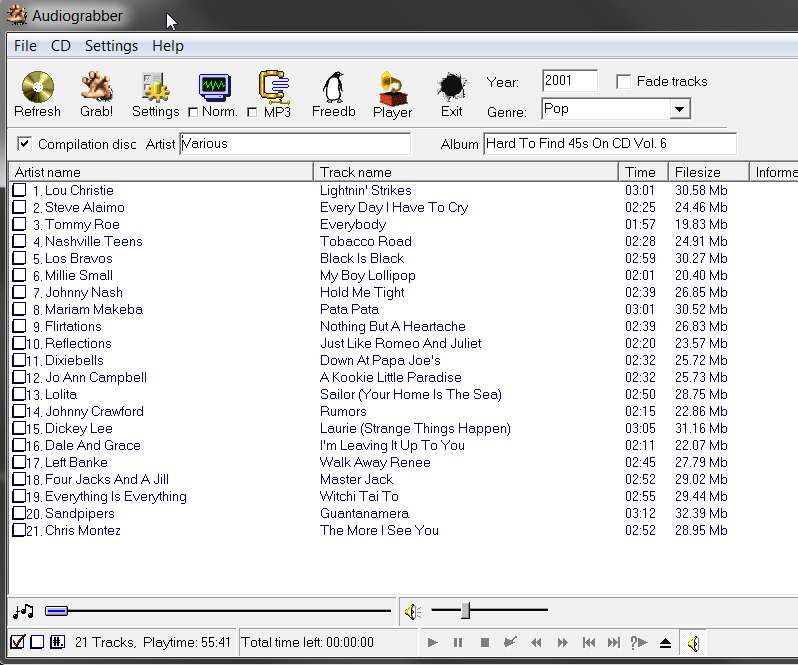
For example, I just inserted one of my "oldies compilations". FreeDB was queried, there were two hits, I picked the first one in the list, and the following results were produced by Audiograbber:

grabber1.jpg


After possibly editing the artist name and track name data, along with the master artist/album and year/genre information at the top, you check the box next to the one or more tracks you'd like to extract from the CD. When you push the GRAB button icon, the process will begin.

The two buttons at the lower-left corner allow you to automatically (a) check for all tracks, or (b) un-check for all tracks. And then you could always manually check or un-check individual tracks as you want.

You can force a re-query of FreeDB by pushing the FreeDB button.

You can preview tracks directly from the CD using the player controls at the bottom. Just select a track's artist or title value to light it up, and then push the PLAY button, etc. In order to preview another track you must first push STOP for the current track and then the select that other track and then push PLAY again. Only one track at a time can be played, so you can't select multiple tracks and than use the "skip-forward/backward" buttons (I don't know why he even invented those buttons).


Here are my settings (pay careful attention to radio buttons and checkboxes):

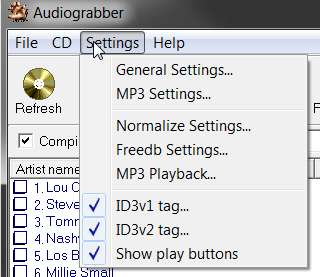
(1) Settings dropdown from Menu (note the three checked items):

settings1j.jpg


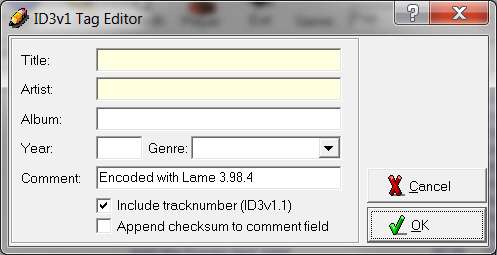
(2) ID3V1 tag... (note the comment I've inserted, indicating the encoder used, just because I wanted that information present in tags):

settings2h.jpg


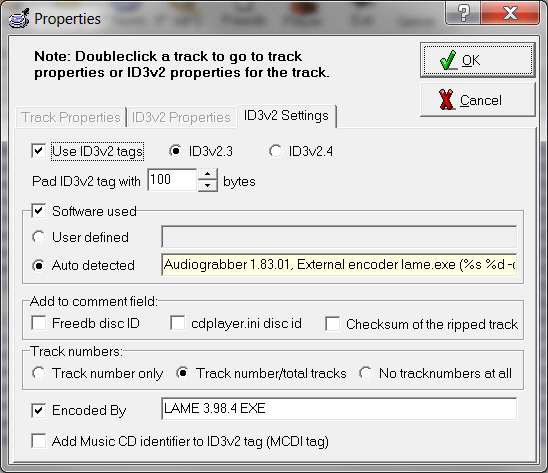
(3) ID3V2 tag... (again, my own comments are inserted just so I would know what was used to do the encoding):

settings3g.jpg


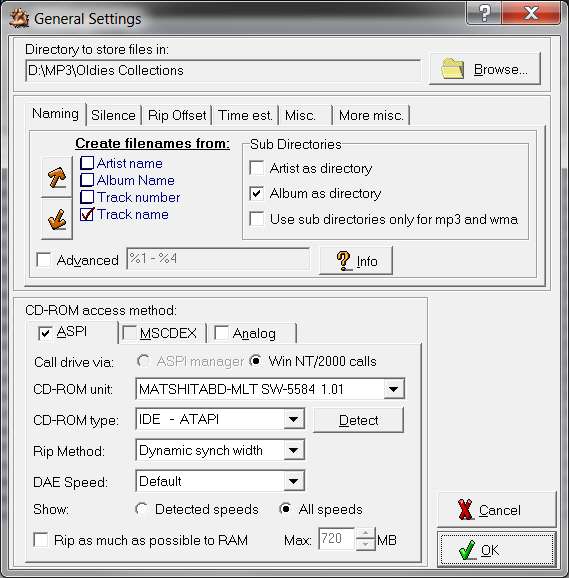
(4) General Settings, "Naming" tab. This is where the target parent folder is specified. Underneath this parent folder, sub-directories will be created according to the boxes checked. My collection organization is essentially (a) D:\MP3\Artist\Album for single-artist CDs, and (b) D:\MP3\Oldies Collections\Album for multi-artist compilations (kind of like "Oldies Collections" is the conceptual "artist" for all these albums.

So I have two approaches in Audiograbber, depending on whether I'm working on a single-artist CD or a multi-artist compilation. The example in the screenshot is shown for a compilation but either of these two setups is used depending on which type of CD I'm working on:

(a) single-artist CD: parent directory for me is D:\MP3
Sub-directories - "artist as directory" checked, "album as directory" checked.

(b) multi-artist compilation CD: parent directory is D:\MP3\Oldies Collections
Sub-directories - "artist as directory" UN-checked, "album as directory" checked.

settings4.jpg


(5) General settings, "Silence" tab. I don't have anything checked here, but Audiograbber can be requested to automatically detect leading or trailing silence on a track and to delete all but a specified amount of that silence.

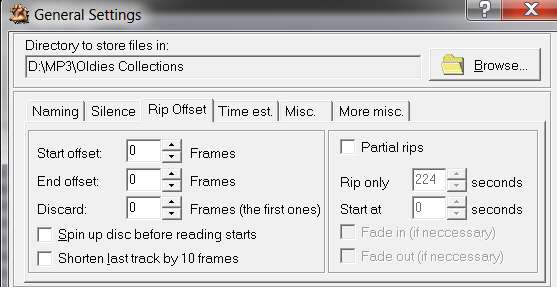
I don't use this feature. If I want to make an abbreviated partial rip (e.g. the long 12" version of a song is on a CD, but I don't want the whole thing) I will use the "Rip offset" tab to specify the start/end time manually. I would use the same manual approach if I needed to eliminate silence at start or end of the track, rather than this "delete silence automatically" tab.

settings8.jpg


(6) General settings, "rip offset" tab. As I stated above, the "partial rips" checkbox is normally UN-checked. Only for special situations would I check it, and then specify the (a) rip only value length of the rip as n seconds, and (b) starting at m seconds into the track. Alternatively you could specify it more precisely in frames rather than seconds.

settings9.jpg


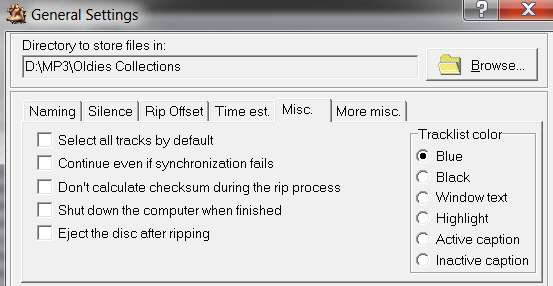
(7) General settings, "time est" tab (no changes from default), and "misc" tab:

settings11.jpg


Note that with "dynamic sync width" specified for the rip method, this is a very reliable technique. But if there is a read-error I do NOT want the rip to continue, instead I want it to fail and abort the process. So I've UN-checked the "continue even if syncronization fails" box.

Also, you can "select all tracks by default" if you want every track to automatically get checked for ripping when you insert it. I don't like that, and prefer NO tracks to be automatically checked. Instead I preview each track (if I'm not familiar with the CD) right there using the player controls, and then check that track if I decide I want to grab it.

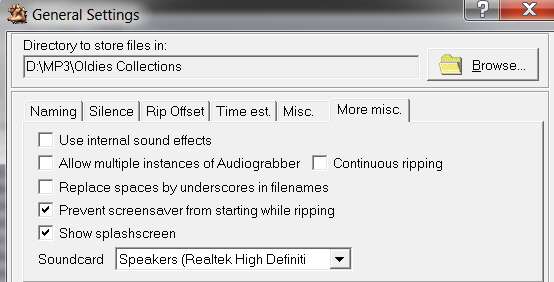
(8) General settings - "more misc" tab.

settings10.jpg


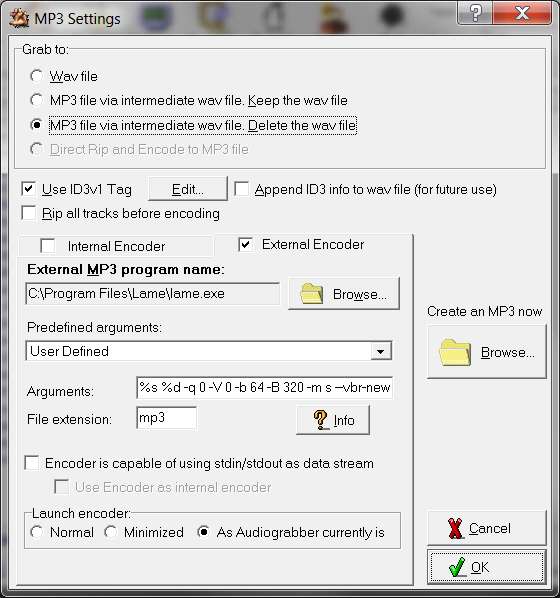
(9) MP3 Settings. This is changed either for (a) FLAC -> grab to WAV file, or (b) MP3 -> grab to MP3 file via intermediate WAV file and delete the WAV file.

settings5.jpg


Note that my command-line parameters for external encoder LAME (when encoding to MP3) is fully shown in that box. You need to download LAME from its web site and place LAME.EXE in the folder pointed to in this MP3 Settings panel.

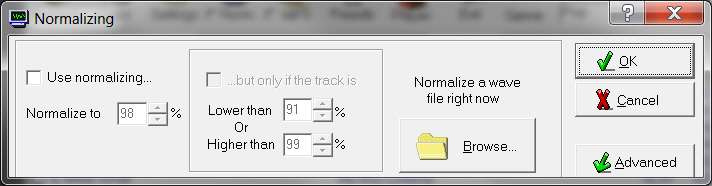
(10) Normalize settings. I normally don't use this (because I don't trust it), but theoretically "normalization" can be applied if the track is lower than or higher than a specified percentage value compared to 100% treated as fully modulated. I don't fully understand this criteria, and I don't trust it.

settings6.jpg


Besides, if a track is "quiet" I want my MP3/FLAC version to also be quiet. I only use normalizing for overloading tracks that are too loud (i.e. 100% or louder). Then I'll normalize down to 98%.

I myself only DO or DO NOT use "normalization" in this criteria-driven way as facilitated by this dialog. When I do use it I simply say "use normalizing, and normalize to 98%" (which I've pre-entered on this screen, so that this value either is or is not used for normalization, depending on the simple "normalize" checkbox on the main interface next to the normalize button icon). Alternatively, if you push the normalize button icon on the main interface you'll get this "normalize settings" window and you can fool with more details (but I don't).

So I watch the level indicator on the rip screen while the ripping is proceeding, and if it ever shoots up to 100% I know it must be "overloading". I will then push the ABORT button to stop the current overloading track's rip, uncheck earlier non-overloading tracks I may have already ripped happily without "normalizing" checked, check the "normalize" box on the main interface (which essentially checks the "use normalizing box on this screen) and then push the "grab" button again to re-initiate the rip starting at this track.

And when this track completes (with "normalize" still checked), I keep my eye on the level meter for the next track, in order to decide again whether to leave "normalize" checked for this next track or whether to abort it, uncheck the prior track, uncheck the "normalize" box, and then push the grab button to re-initiate the rip on the current track but this time with "normalize" set back to OFF.

This is just my own approach, as I don't like making MP3/FLAC versions of tracks which are too loud and hit the 100% modulation level. If they reach 98% or 99% I'll let them go. But if they hit 100% I'll "normalize" them to 98%. That's just me.

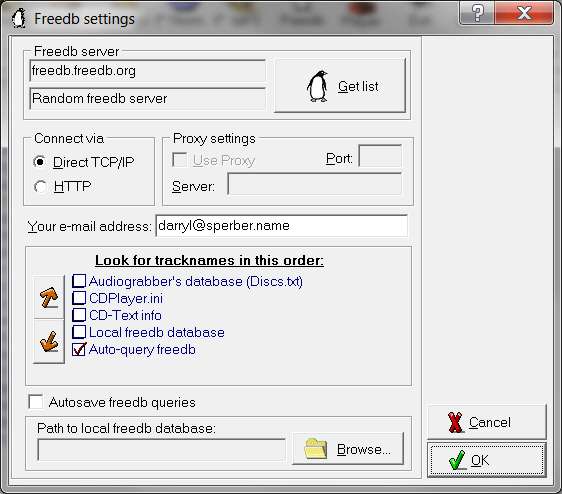
(11) FreeDB settings. Enter your own email address, which is needed for the access to complete.

settings7.jpg


Note that you can specify here that you'd like the FreeDB response data to be stored locally. This used to be in an INI file under Win98, as a locally available database. Then, if you ever reinserted the same CD again the local database INI file could be examined first and the duplicate query to FreeDB avoided. Also, this INI file used to be read by the Win98 CD player program to provide track information, before the days of WMP and its access to FreeDB.

However there used to be a limit in size for this INI file in Win98, which I think was 64K. So if you had lots of CDs then this 64K limit was eaten up very very quickly.

I've turned off that checkbox, so I have no idea how it would work today in Win7 if I turned it back on. But I don't want to retain the information anyway. I'm never going to put the CD back in for Audiograbber after right now, or if I do then I don't mind if it queries FreeDB again.


Good luck. Let me know if you have more questions (e.g. if you want to create FLAC, and not just MP3).

 
Last edited:

My Computer My Computer

Computer type
PC/Desktop
Computer Manufacturer/Model Number
Home-built, two systems (1) and (2)
OS
Windows 7 Pro x64 (1), Win7 Pro X64 (2)
CPU
i5-3350p 3.1Ghz/6MB-cache (1); E8400 3.0Ghz/6MB-cache (2)
Motherboard
ASUS P8Z77-V Pro (1); ASUS P5Q3 (2)
Memory
8GB PC3-12800 DDR3 (1); 4GB PC3-10600 DDR3 (2)
Graphics Card(s)
ATI HD7750 (1), (see TV cards); ATI R7 250 (2)
Sound Card
Realtek ALC892 HD Audio (1); Realtek ALC1200 HD Audio (2)
Monitor(s) Displays
Eizo HD2441W LCD, Eizo S2433W (1); Eizo 24" S2433W (2)
Screen Resolution
1920x1200, 1920x1200 (1); 1920x1200 (2)
Hard Drives
(1) 1TB SATA-II (7200RPM), 2x2TB SATA-III (7200RPM), 250GB SATA-III (10000RPM) for OS; 2x2TB external USB 3.0

(2) 320GB SATA-II (7200RPM), 750GB SATA-II (7200RPM), 150GB SATA-II (10000RPM) for OS; 2TB external USB 3.0
PSU
Nesteq ECS-6001 600W (1); Nesteq ECS-5001 500W (2)
Case
Acousti-Case 360 (1) and (2)
Cooling
Noctua NH-U12P SE2 for CPU, 2x120mm case fans (1) and (2)
Keyboard
IBM PS/2 (1) and (2)
Mouse
Logitech MX Revolution wireless (1); Microsoft wired (2)
Internet Speed
100mbps down / 10mbps up
Antivirus
Microsoft Security Essentials; Malwarebyte Anti-Malware Pro
Browser
Firefox
Other Info
Ceton InfiniTV 4-tuner cablecard-enabled TV card as well as Hauppauge HVR-2250 OTA/ATSC 2-tuner TV card in (1), running under Win7 WMC
Okay, it's working.... Don't know what I did the first time, I never seem to do the right thing the first time. Thank God for you!

I'll let you know when my first cd is finished and how it sounds!
 

My Computer My Computer

OS
Windows 7 Home Premium, 64 bit, SP1
Okay, it's working.... Don't know what I did the first time, I never seem to do the right thing the first time. Thank God for you!
Hope my "tutorial" above is helpful.


I'll let you know when my first cd is finished and how it sounds!
If you download LAME, and you specify the arguments to it in the MP3 Settings as I have shown:
%s %d -q 0 -V 0 -b 64 -B 320 -m s --vbr-new
then I'm sure you will be THRILLED with how it sounds in MP3 form encoded this way.

But it will sound even better (i.e. exactly like the original CD track) in FLAC, if you want to take up about 50-60% of the WAV size on your hard drive. Typically this is 3-4 times the size of the MP3 file.

And of course Jaangle can play either MP3 or FLAC. I hope you've enabled its 3-band EQ (in the lower right corner):

jaangleeq.jpg
 

My Computer My Computer

Computer type
PC/Desktop
Computer Manufacturer/Model Number
Home-built, two systems (1) and (2)
OS
Windows 7 Pro x64 (1), Win7 Pro X64 (2)
CPU
i5-3350p 3.1Ghz/6MB-cache (1); E8400 3.0Ghz/6MB-cache (2)
Motherboard
ASUS P8Z77-V Pro (1); ASUS P5Q3 (2)
Memory
8GB PC3-12800 DDR3 (1); 4GB PC3-10600 DDR3 (2)
Graphics Card(s)
ATI HD7750 (1), (see TV cards); ATI R7 250 (2)
Sound Card
Realtek ALC892 HD Audio (1); Realtek ALC1200 HD Audio (2)
Monitor(s) Displays
Eizo HD2441W LCD, Eizo S2433W (1); Eizo 24" S2433W (2)
Screen Resolution
1920x1200, 1920x1200 (1); 1920x1200 (2)
Hard Drives
(1) 1TB SATA-II (7200RPM), 2x2TB SATA-III (7200RPM), 250GB SATA-III (10000RPM) for OS; 2x2TB external USB 3.0

(2) 320GB SATA-II (7200RPM), 750GB SATA-II (7200RPM), 150GB SATA-II (10000RPM) for OS; 2TB external USB 3.0
PSU
Nesteq ECS-6001 600W (1); Nesteq ECS-5001 500W (2)
Case
Acousti-Case 360 (1) and (2)
Cooling
Noctua NH-U12P SE2 for CPU, 2x120mm case fans (1) and (2)
Keyboard
IBM PS/2 (1) and (2)
Mouse
Logitech MX Revolution wireless (1); Microsoft wired (2)
Internet Speed
100mbps down / 10mbps up
Antivirus
Microsoft Security Essentials; Malwarebyte Anti-Malware Pro
Browser
Firefox
Other Info
Ceton InfiniTV 4-tuner cablecard-enabled TV card as well as Hauppauge HVR-2250 OTA/ATSC 2-tuner TV card in (1), running under Win7 WMC
Dsperber:

You are quite the guru on mp3tag, so I am wondering if you can help me with the following:

I have a 21,000 plus mp3 collection. All are individual songs as opposed to "albums". My Explorer directory structure is by genre (blues, country, etc) and within each genre I have individual artists. Each song is named in this format:

Steve Alaimo - Every Day I Have To Cry Some

Here's the deal: I have NO interest in any tags other than artist, title, and (occasionally) album (I sometimes want to know from what CD it was ripped--usually I don't).

So, I have NO interest in album art, genre, year, and all other tags.

I would like to delete ALL tags from ALL 21,000 songs EXCEPT for artist, title, and album.

I know I can do this one song at a time, but that is so laborious I would not even begin to do it.

Can mp3tag (or any other app) do this as a batch job, walking down my entire collection in an automated fashion, and delete these unwanted tags--retaining only the three tags I want to keep???
 

My Computer My Computer

Computer type
PC/Desktop
Computer Manufacturer/Model Number
Ignatz Special; 4 speed manual gearbox; factory air conditioning; one of one
OS
Windows 7 Home Premium SP1, 64-bit
CPU
Intel Skylake i5-6600K, not overclocked
Motherboard
AsRock Z170M Extreme 4, micro ATX
Memory
8 GB HyperX DDR4-2666 (2 x 4 GB)
Graphics Card(s)
none; graphics are integrated on CPU
Sound Card
onboard: Realtek ALC1150; external: USB Behringer UF0-202
Monitor(s) Displays
Dell S2340M 23 inch IPS
Screen Resolution
1600 x 900
Hard Drives
System: Crucial MX100 series SSD, 128 GB;
Data: Samsung Spinpoint 103SJ, 1 TB;
Backup: WD Caviar Green WD30EZRX-00D8PB0, 3 TB
PSU
Rosewill SilentNight 500 watt fanless, semi-modular
Case
Antec Solo II
Cooling
Noctua NH-U12S; Noctua F12 intake, Noctua S12A exhaust
Keyboard
Microsoft 200 6JH-00001 USB
Mouse
Dell or Microsoft optical wired; USB
Antivirus
Microsoft Security Essentials and Malwarebytes Premium
Browser
Pale Moon
Other Info
All fans PWM; speeds at idle: CPU circa 500 rpm; intake circa 600 rpm; exhaust circa 600 rpm; CPU temps 27 idle and 47 C load in a warm room (27 C/81 F) when running Intel Extreme Tuning Utility stress test.
Here's the deal: I have NO interest in any tags other than artist, title, and (occasionally) album (I sometimes want to know from what CD it was ripped--usually I don't).

So, I have NO interest in album art, genre, year, and all other tags.

I would like to delete ALL tags from ALL 21,000 songs EXCEPT for artist, title, and album.

Can mp3tag (or any other app) do this as a batch job, walking down my entire collection in an automated fashion, and delete these unwanted tags--retaining only the three tags I want to keep???
Absolutely. But it's not a "batch job"... it's even simpler than that.

It's a single-click function (once you set up the tag pane correctly and get the tracklist to show all 21,000 of your files) and the program will simply mass-apply your request to all 21,000 songs. It'll take a little time to complete of course, but it will be a single-click action to do it all.

So, you want to delete (i.e. BLANK out) all tag fields except for artist, title and album, which you want to KEEP. This is really nothing more than (a) specifying the <keep> value for each field in the tag pane that you want to keep (i.e. artist, title, and album), and (b) specifying the <blank> value you want to blank out for each field in the tag pane that you want to blank out.

Then you will simply push the "SAVE" icon button (leftmost button) and your request will be mass-applied to all selected tracks in the tracklist pane.

(1) First, you must get all 21,000 tracks into the tracklist pane (on the right side). This is easily accomplished by doing a "change directory" to whatever is your highest-level parent folder older over your entire collection. The "change directory" button on the button bar can be used, or File -> change directory from the Menu bar.

(2) The "please select a directory that contains audio files" dialog window will then appear, and you navigate to that highest-level parent folder.

AND... you check the "subdirectories" box at the bottom-right of the dialog window. This will cause MP3Tag to recurse down through any and all sub-directories under the folder you just navigated to, meaning in your case ALL of your 21,000 music files will be enumerated in the track list since you pointed to your highest-level parent folder.

It may take a bit of time to recurse and list 21,000 tracks, but it will finish and the tracklist pane will now show all 21,000 tracks.

(3) Now select ALL of the tracks in the tracklist pane. Simply select the first track shown, and then press both CTRL+a on the keyboard (you can press CTRL and keep it down, and then press the "a" key) to "select ALL". Every one of the 21,000 tracks will light up.

(4) Over in the tag pane on the left, from the dropdown list for title, artist and album you pick the <keep> value. And for all other fields you pick the <blank> value.

That's all you need to do.

(5) Now push the blue SAVE icon button, and sit back and wait.

(6) Mission accomplished.


You should probably experiment first on just one folder (without the "subdirectories" box checked, for the test) to prove to yourself that this method works and you have confidence in the results.

Then you can do what I describe above with complete confidence, without first taking a backup of your collection (although I suspect you already have one, or you might want to take one anyway just in case you are skeptical or don't want to risk any disaster).

Or, perhaps you might want to do this in subsets... say one genre at a time as you have your collection with major genre sub-folders under the parent folder. Up to you.


Incidentally, you can do the same type of thing but removing album art for all your 21,000 tracks if that's also on the maintenance agenda.

Again, you select all 21,000 tracks in the tracklist pane. Then set the <keep> value in each of the tag pane's fields, so that there is no change to any of the other fields. Then right-click on the album art area (bottom left of the tag pane) and select "remove cover". I don't know if the deletion of album art for all 21,000 files will then happen immediately, of whether you also need to then click the SAVE icon to make that happen.

I don't have imbedded album art, so I can't confirm right now for myself exactly what the right sequence of steps is. But you can probably try this yourself and see how it works and what you have to do.

However I'm certain that removing album art from multiple tracks at once is done in this way, or close to this way. Experiment for yourself on a few files, just to be sure.
 

My Computer My Computer

Computer type
PC/Desktop
Computer Manufacturer/Model Number
Home-built, two systems (1) and (2)
OS
Windows 7 Pro x64 (1), Win7 Pro X64 (2)
CPU
i5-3350p 3.1Ghz/6MB-cache (1); E8400 3.0Ghz/6MB-cache (2)
Motherboard
ASUS P8Z77-V Pro (1); ASUS P5Q3 (2)
Memory
8GB PC3-12800 DDR3 (1); 4GB PC3-10600 DDR3 (2)
Graphics Card(s)
ATI HD7750 (1), (see TV cards); ATI R7 250 (2)
Sound Card
Realtek ALC892 HD Audio (1); Realtek ALC1200 HD Audio (2)
Monitor(s) Displays
Eizo HD2441W LCD, Eizo S2433W (1); Eizo 24" S2433W (2)
Screen Resolution
1920x1200, 1920x1200 (1); 1920x1200 (2)
Hard Drives
(1) 1TB SATA-II (7200RPM), 2x2TB SATA-III (7200RPM), 250GB SATA-III (10000RPM) for OS; 2x2TB external USB 3.0

(2) 320GB SATA-II (7200RPM), 750GB SATA-II (7200RPM), 150GB SATA-II (10000RPM) for OS; 2TB external USB 3.0
PSU
Nesteq ECS-6001 600W (1); Nesteq ECS-5001 500W (2)
Case
Acousti-Case 360 (1) and (2)
Cooling
Noctua NH-U12P SE2 for CPU, 2x120mm case fans (1) and (2)
Keyboard
IBM PS/2 (1) and (2)
Mouse
Logitech MX Revolution wireless (1); Microsoft wired (2)
Internet Speed
100mbps down / 10mbps up
Antivirus
Microsoft Security Essentials; Malwarebyte Anti-Malware Pro
Browser
Firefox
Other Info
Ceton InfiniTV 4-tuner cablecard-enabled TV card as well as Hauppauge HVR-2250 OTA/ATSC 2-tuner TV card in (1), running under Win7 WMC
Okay, you are my new guru--I'm officially off WMP! Your tut was excellent, I had the program set to your specs in a matter of seconds, it was darned near automatic and you're right--the sound is excellent!

MP3Tag
Jaangle
AudioGrabber w/Lame

Can't think of anything else I need, can you?

Stay well, my friend, I (and the whole darned music community) will need you again!
 

My Computer My Computer

OS
Windows 7 Home Premium, 64 bit, SP1
Back
Top