Solved Corrupt Album Art Cache

Dsperber:

Thanks for that. I will give it a go, probably a folder at a time and testing it out on backup copies.

A question:

If I were to do this, might it adversely affect other info within the mp3? I am thinking of playback volume levels in particular. I run all my mp3s through mp3gain and would NOT want to wipe that out. Not sure, but I think that info is not in the tags that mp3tag accesses, but elsewhere in the mp3?

Likewise, will I still be able to read info about the encoder used, bitrate, joint stereo, etc with a tool such as Encspot?

I am experienced with mp3tag, but ONLY in a limited way since I have no interest in most tags. I could not even name what tags are possible.

Damn! Tried to give you some rep and I was rebuffed as I need to spread more around. But kudos to you anyway.
 

My Computer My Computer

Computer type
PC/Desktop
Computer Manufacturer/Model Number
Ignatz Special; 4 speed manual gearbox; factory air conditioning; one of one
OS
Windows 7 Home Premium SP1, 64-bit
CPU
Intel Skylake i5-6600K, not overclocked
Motherboard
AsRock Z170M Extreme 4, micro ATX
Memory
8 GB HyperX DDR4-2666 (2 x 4 GB)
Graphics Card(s)
none; graphics are integrated on CPU
Sound Card
onboard: Realtek ALC1150; external: USB Behringer UF0-202
Monitor(s) Displays
Dell S2340M 23 inch IPS
Screen Resolution
1600 x 900
Hard Drives
System: Crucial MX100 series SSD, 128 GB;
Data: Samsung Spinpoint 103SJ, 1 TB;
Backup: WD Caviar Green WD30EZRX-00D8PB0, 3 TB
PSU
Rosewill SilentNight 500 watt fanless, semi-modular
Case
Antec Solo II
Cooling
Noctua NH-U12S; Noctua F12 intake, Noctua S12A exhaust
Keyboard
Microsoft 200 6JH-00001 USB
Mouse
Dell or Microsoft optical wired; USB
Antivirus
Microsoft Security Essentials and Malwarebytes Premium
Browser
Pale Moon
Other Info
All fans PWM; speeds at idle: CPU circa 500 rpm; intake circa 600 rpm; exhaust circa 600 rpm; CPU temps 27 idle and 47 C load in a warm room (27 C/81 F) when running Intel Extreme Tuning Utility stress test.
Okay, you are my new guru--
Wait... I thought I already was!


I'm officially off WMP!
Welcome to the club. For video, it's really fantastic. But for music... not so much.


Your tut was excellent, I had the program set to your specs in a matter of seconds, it was darned near automatic
Just a few tweaks off of default, based on my experience and preferences. So it's really very quick, as you observed.

I've tried several different ripping methods in the past, but the "dynamic synch width" is the fastest and most reliable, and spins up the CD quite rapidly. So ripping time per track is typically 6X - 16X, depending on the CD and your drive. Interestingly, CD spin/rip speed does sometimes seem to vary by CD itself.


and you're right--the sound is excellent!
LAME 3.98.4 is universally regarded as the "best" MP3 encoder. And the parameters I gave you produce the optimal sounding VBR encoding (which is more space-efficient than CBR) and maximum quality, using the maximum possible bitrate available. Remarkably, it is also astonishingly fast.


MP3Tag
Jaangle
AudioGrabber w/Lame

Can't think of anything else I need, can you?
These are the basics, and for MP3 should get you by without needing anything more.

My list was:
Primary tools: Jaangle, MP3Tag, Winamp, Audiograbber, LAME, FLAC and FLAC-Frontend, ACDSee (still using the old/lean/fast legacy v4.0.1 from yesteryear).

Secondary tools: Musifind Pro Internet Edition, Free Commander, Beyond Compare, CD-Runner, EAC.
So, the next question is whether or not you have a large "retail CD" collection and thus want to organize that, using a CD Database program? That would be Musifind Pro. I also use CD-Runner as my "machine-looking" CD player program. It's just another CD player program, but it's got a terrific looking interface... just like a mechanical CD player, and it also can play all sorts of multi-media audio/video file formats.

What about FLAC? Are you at all interested?

I have Winamp installed as my "external music player" that gets launched from Explorer and all other media/organizer programs (and can even be launched from Jaangle).

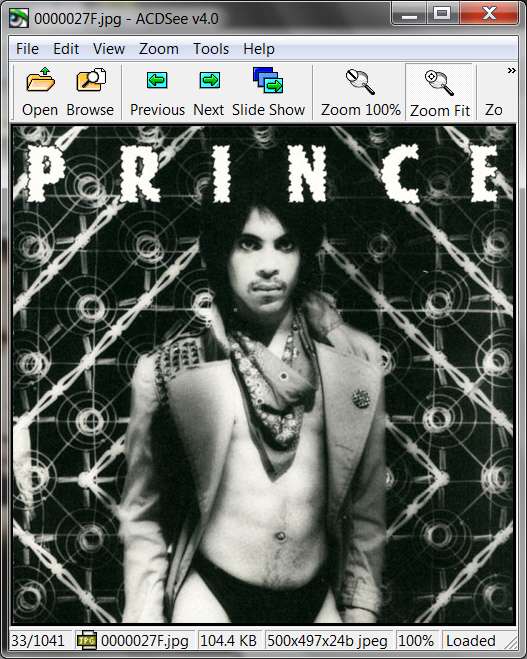
I use ACDSee (v4.01) as my image viewer, not just for album art but for everything pictures! It's fabulous as a viewer. (they don't sell it any longer, as the company now only has "Pro" versions... meaning EXPENSIVE AND BLOATED. But if you want I can make my old lean+fast version available to you, as they have abandoned it (what do they know... it is fantastic, and I've been using it for about 15 years going way back to Win95). Let me know.

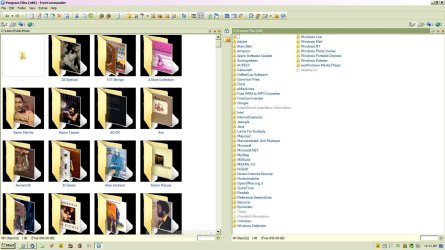
Finally, in the area of just general-purpose Windows utilities, I almost always use Free Commander instead of Windows Explorer. It's fantastic, and intuitive, and powerful.

I also use Beyond Compare to "sync" my PC music collection with my J3, as well as using it to compare folders and files on the PC in order to keep my two machines coordinated, or for any other purpose where examination of two folders is the goal.
 

My Computer My Computer

Computer type
PC/Desktop
Computer Manufacturer/Model Number
Home-built, two systems (1) and (2)
OS
Windows 7 Pro x64 (1), Win7 Pro X64 (2)
CPU
i5-3350p 3.1Ghz/6MB-cache (1); E8400 3.0Ghz/6MB-cache (2)
Motherboard
ASUS P8Z77-V Pro (1); ASUS P5Q3 (2)
Memory
8GB PC3-12800 DDR3 (1); 4GB PC3-10600 DDR3 (2)
Graphics Card(s)
ATI HD7750 (1), (see TV cards); ATI R7 250 (2)
Sound Card
Realtek ALC892 HD Audio (1); Realtek ALC1200 HD Audio (2)
Monitor(s) Displays
Eizo HD2441W LCD, Eizo S2433W (1); Eizo 24" S2433W (2)
Screen Resolution
1920x1200, 1920x1200 (1); 1920x1200 (2)
Hard Drives
(1) 1TB SATA-II (7200RPM), 2x2TB SATA-III (7200RPM), 250GB SATA-III (10000RPM) for OS; 2x2TB external USB 3.0

(2) 320GB SATA-II (7200RPM), 750GB SATA-II (7200RPM), 150GB SATA-II (10000RPM) for OS; 2TB external USB 3.0
PSU
Nesteq ECS-6001 600W (1); Nesteq ECS-5001 500W (2)
Case
Acousti-Case 360 (1) and (2)
Cooling
Noctua NH-U12P SE2 for CPU, 2x120mm case fans (1) and (2)
Keyboard
IBM PS/2 (1) and (2)
Mouse
Logitech MX Revolution wireless (1); Microsoft wired (2)
Internet Speed
100mbps down / 10mbps up
Antivirus
Microsoft Security Essentials; Malwarebyte Anti-Malware Pro
Browser
Firefox
Other Info
Ceton InfiniTV 4-tuner cablecard-enabled TV card as well as Hauppauge HVR-2250 OTA/ATSC 2-tuner TV card in (1), running under Win7 WMC
Well, I answered my own questions.

Did exactly what you said on a Richard Pryor folder and it worked exactly as you say.

I am still able to read mp3 information in Encspot. And mp3gain still contends that the Pryor files have been processed, so that info was not lost.

Thank you!!
 

My Computer My Computer

Computer type
PC/Desktop
Computer Manufacturer/Model Number
Ignatz Special; 4 speed manual gearbox; factory air conditioning; one of one
OS
Windows 7 Home Premium SP1, 64-bit
CPU
Intel Skylake i5-6600K, not overclocked
Motherboard
AsRock Z170M Extreme 4, micro ATX
Memory
8 GB HyperX DDR4-2666 (2 x 4 GB)
Graphics Card(s)
none; graphics are integrated on CPU
Sound Card
onboard: Realtek ALC1150; external: USB Behringer UF0-202
Monitor(s) Displays
Dell S2340M 23 inch IPS
Screen Resolution
1600 x 900
Hard Drives
System: Crucial MX100 series SSD, 128 GB;
Data: Samsung Spinpoint 103SJ, 1 TB;
Backup: WD Caviar Green WD30EZRX-00D8PB0, 3 TB
PSU
Rosewill SilentNight 500 watt fanless, semi-modular
Case
Antec Solo II
Cooling
Noctua NH-U12S; Noctua F12 intake, Noctua S12A exhaust
Keyboard
Microsoft 200 6JH-00001 USB
Mouse
Dell or Microsoft optical wired; USB
Antivirus
Microsoft Security Essentials and Malwarebytes Premium
Browser
Pale Moon
Other Info
All fans PWM; speeds at idle: CPU circa 500 rpm; intake circa 600 rpm; exhaust circa 600 rpm; CPU temps 27 idle and 47 C load in a warm room (27 C/81 F) when running Intel Extreme Tuning Utility stress test.
If I were to do this, might it adversely affect other info within the mp3? I am thinking of playback volume levels in particular. I run all my mp3s through mp3gain and would NOT want to wipe that out. Not sure, but I think that info is not in the tags that mp3tag accesses, but elsewhere in the mp3?
Zero effect on anything not in the tag fields being touched.


Likewise, will I still be able to read info about the encoder used, bitrate, joint stereo, etc with a tool such as Encspot?
Things like the CBR/VBR bitrate, channel mode of stereo/joint-stereo, frequency, etc., are part of the header information on the file. They are not fields in the tag.

So again if that's the information you're looking for then it will absolutely also not be affected by MP3Tag's update of one or more tag fields on one or more files at a time.

As far as information about the encoder used, this is more of a gray area. Depending on how those MP3 files were produced, and whether you use ID3V1 or ID3v2 tags or both, and whether you used the "comment" field/frame, this information may show up in assorted ways. Most commonly it's in a comment, either because you yourself added it or because your encoder put it there for you.

However since it is in the "comment" field/frame, which IS a field in the tag, you SHOULD specify <keep> rather than <blank> in the "comment" item of the tag pane for MP3Tag, if you want to retain this and any other comments during the mass change.

You hadn't mentioned this field earlier as one of the three you wanted to "keep", but now that you've brought it up you can retain all "comments" of any form by simply specifying <keep> on the tag pane.


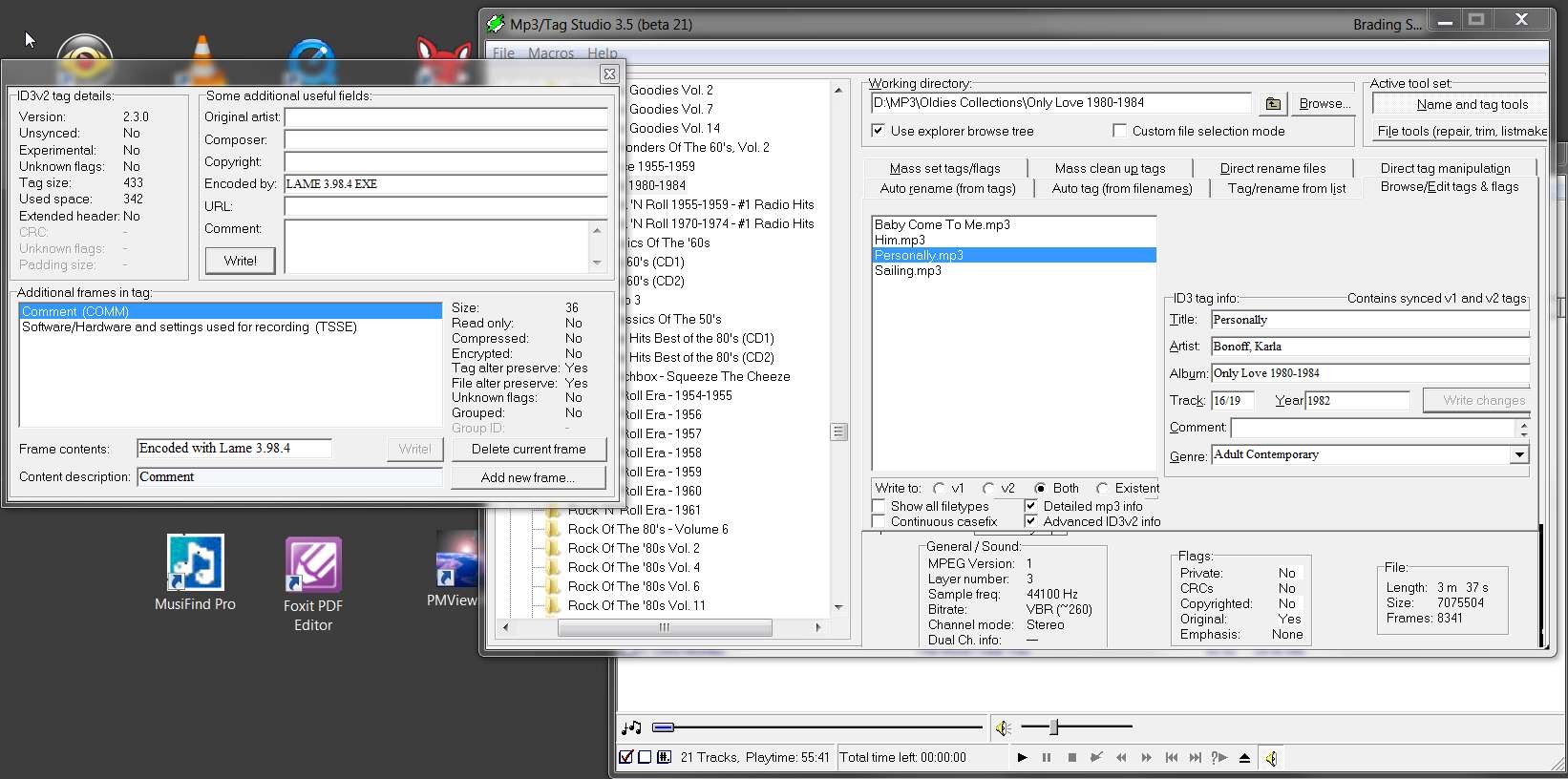
Finally, I mention one other tag-related program that I used to use before I discovered MP3Tag. MP3Tag is superior in many ways, mostly because it handles FLAC tags as well as ID3 tags, whereas the other program was created before FLAC even existed and thus only supports ID3 tags. Also, MP3Tag supports imbedded album art whereas this other program does not.

But for sheer convenience if MP3/ID3 is all you are concerned with, and no imbedded album art in tags, then you might investigate "MP3/Tag-Studio".

It can do the same type of individual or mass operations, but its user interface is a bit more Explorer-like and very intuitive. Very powerful, and can also "recurse" down through sub-folders for mass-change operations.

For example:


mp3tagstudio.jpg


Just one comment on this MP3/Tag-Studio program... it has a GUI-related issue if your Windows font size is not specified as "normal - 100%". If you use "normal - 100%" then it's perfect, but if like me you use say "medium - 125%" then some of the window painting is a bit obscured.

Doesn't affect the function of whatever you can see, but some of the information or other buttons that are obscured obviously are obscured and can't be seen or pushed.

Personally, what is obscured has never been relevant for me, and I insist on running as "medium - 125%" so I've just learned to live with it.

But the program itself is so powerful and intuitive and fantastic, that I still use it today for MP3 (although I find myself using MP3Tag a great deal as well, now that I've got about 15% of my music collection in FLAC).
 

My Computer My Computer

Computer type
PC/Desktop
Computer Manufacturer/Model Number
Home-built, two systems (1) and (2)
OS
Windows 7 Pro x64 (1), Win7 Pro X64 (2)
CPU
i5-3350p 3.1Ghz/6MB-cache (1); E8400 3.0Ghz/6MB-cache (2)
Motherboard
ASUS P8Z77-V Pro (1); ASUS P5Q3 (2)
Memory
8GB PC3-12800 DDR3 (1); 4GB PC3-10600 DDR3 (2)
Graphics Card(s)
ATI HD7750 (1), (see TV cards); ATI R7 250 (2)
Sound Card
Realtek ALC892 HD Audio (1); Realtek ALC1200 HD Audio (2)
Monitor(s) Displays
Eizo HD2441W LCD, Eizo S2433W (1); Eizo 24" S2433W (2)
Screen Resolution
1920x1200, 1920x1200 (1); 1920x1200 (2)
Hard Drives
(1) 1TB SATA-II (7200RPM), 2x2TB SATA-III (7200RPM), 250GB SATA-III (10000RPM) for OS; 2x2TB external USB 3.0

(2) 320GB SATA-II (7200RPM), 750GB SATA-II (7200RPM), 150GB SATA-II (10000RPM) for OS; 2TB external USB 3.0
PSU
Nesteq ECS-6001 600W (1); Nesteq ECS-5001 500W (2)
Case
Acousti-Case 360 (1) and (2)
Cooling
Noctua NH-U12P SE2 for CPU, 2x120mm case fans (1) and (2)
Keyboard
IBM PS/2 (1) and (2)
Mouse
Logitech MX Revolution wireless (1); Microsoft wired (2)
Internet Speed
100mbps down / 10mbps up
Antivirus
Microsoft Security Essentials; Malwarebyte Anti-Malware Pro
Browser
Firefox
Other Info
Ceton InfiniTV 4-tuner cablecard-enabled TV card as well as Hauppauge HVR-2250 OTA/ATSC 2-tuner TV card in (1), running under Win7 WMC
Just finished the operation on all 21,000 files. Took less than 10 minutes to go through all songs.

I ended up keeping: artist, title, album, comments, disk number, and track number. The last 2 will occasionally help me backtrack to an actual CD if I need to re-rip or check something in the liner notes.

A primary reason I did this is because my mp3 player software apparently sorts on the "album artist" tag (if not blank) rather than the "artist" tag. That was causing things to display out of order during playback for those songs in which those two tags were not identical. So I particularly wanted to get rid of "album artist" tags.
 

My Computer My Computer

Computer type
PC/Desktop
Computer Manufacturer/Model Number
Ignatz Special; 4 speed manual gearbox; factory air conditioning; one of one
OS
Windows 7 Home Premium SP1, 64-bit
CPU
Intel Skylake i5-6600K, not overclocked
Motherboard
AsRock Z170M Extreme 4, micro ATX
Memory
8 GB HyperX DDR4-2666 (2 x 4 GB)
Graphics Card(s)
none; graphics are integrated on CPU
Sound Card
onboard: Realtek ALC1150; external: USB Behringer UF0-202
Monitor(s) Displays
Dell S2340M 23 inch IPS
Screen Resolution
1600 x 900
Hard Drives
System: Crucial MX100 series SSD, 128 GB;
Data: Samsung Spinpoint 103SJ, 1 TB;
Backup: WD Caviar Green WD30EZRX-00D8PB0, 3 TB
PSU
Rosewill SilentNight 500 watt fanless, semi-modular
Case
Antec Solo II
Cooling
Noctua NH-U12S; Noctua F12 intake, Noctua S12A exhaust
Keyboard
Microsoft 200 6JH-00001 USB
Mouse
Dell or Microsoft optical wired; USB
Antivirus
Microsoft Security Essentials and Malwarebytes Premium
Browser
Pale Moon
Other Info
All fans PWM; speeds at idle: CPU circa 500 rpm; intake circa 600 rpm; exhaust circa 600 rpm; CPU temps 27 idle and 47 C load in a warm room (27 C/81 F) when running Intel Extreme Tuning Utility stress test.
Wait... I thought I already was!

Wasn't sure if you knew....

My list was:
Primary tools: Jaangle, MP3Tag, Winamp, Audiograbber, LAME, FLAC and FLAC-Frontend, ACDSee (still using the old/lean/fast legacy v4.0.1 from yesteryear).

Secondary tools: Musifind Pro Internet Edition, Free Commander, Beyond Compare, CD-Runner, EAC.
Aren't Jaangle and Winamp both "players"? And below you talk about CD-Runner. Three players?

So, the next question is whether or not you have a large "retail CD" collection and thus want to organize that, using a CD Database program? That would be Musifind Pro. I also use CD-Runner as my "machine-looking" CD player program. It's just another CD player program, but it's got a terrific looking interface... just like a mechanical CD player, and it also can play all sorts of multi-media audio/video file formats.

My collection is large, but I "think" I have them organized. One artist folder,all their cd's in that one, each named by their album. You're probably talking about something different, and probably really sophisticated.

What about FLAC? Are you at all interested?

If I have to go through again, what I've been through in the last week, no thank you. I'll leave that to you pros!

I have Winamp installed as my "external music player" that gets launched from Explorer and all other media/organizer programs (and can even be launched from Jaangle).

I don't understand why you would need a music player to launch another music player. What am I missing?

I use ACDSee (v4.01) as my image viewer, not just for album art but for everything pictures! It's fabulous as a viewer. (they don't sell it any longer, as the company now only has "Pro" versions... meaning EXPENSIVE AND BLOATED. But if you want I can make my old lean+fast version available to you, as they have abandoned it (what do they know... it is fantastic, and I've been using it for about 15 years going way back to Win95). Let me know.

Sounds great. But don't go to any trouble. If it's easy enough for you, I'd be happy to have it.

Finally, in the area of just general-purpose Windows utilities, I almost always use Free Commander instead of Windows Explorer. It's fantastic, and intuitive, and powerful.

I'll check it out. You know how I dislike any Windows feature....

also use Beyond Compare to "sync" my PC music collection with my J3, as well as using it to compare folders and files on the PC in order to keep my two machines coordinated, or for any other purpose where examination of two folders is the goal.

Sync, as in my Zune? I've got the software for that and it's pretty good. And did you notice I bought a Microsoft product and not an Apple? What was I thinking. But seriously, I do love my Zune. Microsoft got one thing right....
 

My Computer My Computer

OS
Windows 7 Home Premium, 64 bit, SP1
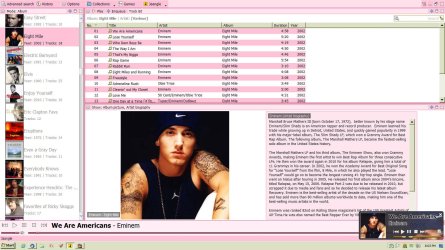
Forgot to show you what I've done so far....

ex1.jpg

Pretty girly, I know, but hey! it's my first skin. I'll get better.
 

My Computer My Computer

OS
Windows 7 Home Premium, 64 bit, SP1
Just finished the operation on all 21,000 files. Took less than 10 minutes to go through all songs.
Excellent!


I ended up keeping: artist, title, album, comments, disk number, and track number.
I had a hunch your original objective needed a small tweak, once you learned about <keep> and <blank> and took a closer look at your tag data.


A primary reason I did this is because my mp3 player software apparently sorts on the "album artist" tag (if not blank) rather than the "artist" tag. That was causing things to display out of order during playback for those songs in which those two tags were not identical. So I particularly wanted to get rid of "album artist" tags.
I see.

Anyway, case closed! You have emerged victorious.
 

My Computer My Computer

Computer type
PC/Desktop
Computer Manufacturer/Model Number
Home-built, two systems (1) and (2)
OS
Windows 7 Pro x64 (1), Win7 Pro X64 (2)
CPU
i5-3350p 3.1Ghz/6MB-cache (1); E8400 3.0Ghz/6MB-cache (2)
Motherboard
ASUS P8Z77-V Pro (1); ASUS P5Q3 (2)
Memory
8GB PC3-12800 DDR3 (1); 4GB PC3-10600 DDR3 (2)
Graphics Card(s)
ATI HD7750 (1), (see TV cards); ATI R7 250 (2)
Sound Card
Realtek ALC892 HD Audio (1); Realtek ALC1200 HD Audio (2)
Monitor(s) Displays
Eizo HD2441W LCD, Eizo S2433W (1); Eizo 24" S2433W (2)
Screen Resolution
1920x1200, 1920x1200 (1); 1920x1200 (2)
Hard Drives
(1) 1TB SATA-II (7200RPM), 2x2TB SATA-III (7200RPM), 250GB SATA-III (10000RPM) for OS; 2x2TB external USB 3.0

(2) 320GB SATA-II (7200RPM), 750GB SATA-II (7200RPM), 150GB SATA-II (10000RPM) for OS; 2TB external USB 3.0
PSU
Nesteq ECS-6001 600W (1); Nesteq ECS-5001 500W (2)
Case
Acousti-Case 360 (1) and (2)
Cooling
Noctua NH-U12P SE2 for CPU, 2x120mm case fans (1) and (2)
Keyboard
IBM PS/2 (1) and (2)
Mouse
Logitech MX Revolution wireless (1); Microsoft wired (2)
Internet Speed
100mbps down / 10mbps up
Antivirus
Microsoft Security Essentials; Malwarebyte Anti-Malware Pro
Browser
Firefox
Other Info
Ceton InfiniTV 4-tuner cablecard-enabled TV card as well as Hauppauge HVR-2250 OTA/ATSC 2-tuner TV card in (1), running under Win7 WMC
Forgot to show you what I've done so far....

View attachment 170966

Pretty girly, I know, but hey! it's my first skin. I'll get better.
Cute!!

Still have no desire for the "playlist pane" (below the album pane on the left)? It will show you the track(s) you've selected to play.

And of course you can either (a) PLAY one or more selected tracks from the tracklist pane, or (b) ENQUEUE additional one or more selected tracks from the tracklist pane.

All of these songs get shown in the "playlist pane", where you can then do further operations on them, select them individually for playing, create/update an M3U playlist from the current contents, etc.

I'm just sayin'...

(click on the blue "+" at the top of any pane to produce the "Add pane" dialog, select the "playlist pane" and select "down" as the position, and push OK. It will now appear as an additional sizable pane under your album pane above it on the left side.)

Incidentally, if you didn't already discover it, there is a "capital T" on the upper-right of the main window. Clicking on it produces a "enlarge/reduce" scale for font size... if you want to make your text characters larger (than what is shown by default, with a zoom scale of "0"). I doubt that you'd want it to be smaller (click on negative numbers), but you might want it to be larger (clikc on positive numbers).
 

My Computer My Computer

Computer type
PC/Desktop
Computer Manufacturer/Model Number
Home-built, two systems (1) and (2)
OS
Windows 7 Pro x64 (1), Win7 Pro X64 (2)
CPU
i5-3350p 3.1Ghz/6MB-cache (1); E8400 3.0Ghz/6MB-cache (2)
Motherboard
ASUS P8Z77-V Pro (1); ASUS P5Q3 (2)
Memory
8GB PC3-12800 DDR3 (1); 4GB PC3-10600 DDR3 (2)
Graphics Card(s)
ATI HD7750 (1), (see TV cards); ATI R7 250 (2)
Sound Card
Realtek ALC892 HD Audio (1); Realtek ALC1200 HD Audio (2)
Monitor(s) Displays
Eizo HD2441W LCD, Eizo S2433W (1); Eizo 24" S2433W (2)
Screen Resolution
1920x1200, 1920x1200 (1); 1920x1200 (2)
Hard Drives
(1) 1TB SATA-II (7200RPM), 2x2TB SATA-III (7200RPM), 250GB SATA-III (10000RPM) for OS; 2x2TB external USB 3.0

(2) 320GB SATA-II (7200RPM), 750GB SATA-II (7200RPM), 150GB SATA-II (10000RPM) for OS; 2TB external USB 3.0
PSU
Nesteq ECS-6001 600W (1); Nesteq ECS-5001 500W (2)
Case
Acousti-Case 360 (1) and (2)
Cooling
Noctua NH-U12P SE2 for CPU, 2x120mm case fans (1) and (2)
Keyboard
IBM PS/2 (1) and (2)
Mouse
Logitech MX Revolution wireless (1); Microsoft wired (2)
Internet Speed
100mbps down / 10mbps up
Antivirus
Microsoft Security Essentials; Malwarebyte Anti-Malware Pro
Browser
Firefox
Other Info
Ceton InfiniTV 4-tuner cablecard-enabled TV card as well as Hauppauge HVR-2250 OTA/ATSC 2-tuner TV card in (1), running under Win7 WMC
I've also discovered that many extended tags are not displayed by default in the tag panel and thus cannot be mass-deleted, but those extended tags can be added to the tag panel through tools/options/tag panel.

So I have added "length" and "encoded by" to the tag panel so I can then give them a blank value through a mass edit. I assume there is no way to edit tags (give them a blank value) without first getting the tag to appear in the tag panel?

An apparently complete list of tags is here:

Mp3tag Help - Tag field mappings

All is well so far.
 

My Computer My Computer

Computer type
PC/Desktop
Computer Manufacturer/Model Number
Ignatz Special; 4 speed manual gearbox; factory air conditioning; one of one
OS
Windows 7 Home Premium SP1, 64-bit
CPU
Intel Skylake i5-6600K, not overclocked
Motherboard
AsRock Z170M Extreme 4, micro ATX
Memory
8 GB HyperX DDR4-2666 (2 x 4 GB)
Graphics Card(s)
none; graphics are integrated on CPU
Sound Card
onboard: Realtek ALC1150; external: USB Behringer UF0-202
Monitor(s) Displays
Dell S2340M 23 inch IPS
Screen Resolution
1600 x 900
Hard Drives
System: Crucial MX100 series SSD, 128 GB;
Data: Samsung Spinpoint 103SJ, 1 TB;
Backup: WD Caviar Green WD30EZRX-00D8PB0, 3 TB
PSU
Rosewill SilentNight 500 watt fanless, semi-modular
Case
Antec Solo II
Cooling
Noctua NH-U12S; Noctua F12 intake, Noctua S12A exhaust
Keyboard
Microsoft 200 6JH-00001 USB
Mouse
Dell or Microsoft optical wired; USB
Antivirus
Microsoft Security Essentials and Malwarebytes Premium
Browser
Pale Moon
Other Info
All fans PWM; speeds at idle: CPU circa 500 rpm; intake circa 600 rpm; exhaust circa 600 rpm; CPU temps 27 idle and 47 C load in a warm room (27 C/81 F) when running Intel Extreme Tuning Utility stress test.
I've also discovered that many extended tags are not displayed by default in the tag panel and thus cannot be mass-deleted, but those extended tags can be added to the tag panel through tools/options/tag panel.

So I have added "length" and "encoded by" to the tag panel so I can then give them a blank value through a mass edit. I assume there is no way to edit tags (give them a blank value) without first getting the tag to appear in the tag panel?
Not quite true... if you want to put the field over on the right side, in a new column of the tracklist pane.

Right-click on the column heading bar, and select "customize columns...".

You will then be given a dialog that allows you to (a) add columns to the display from that same complete list of all tag fields which can add fields to the tag panel, (b) remove columns from the display, or (c) rearrange the presented order of the visible columns.

Obviously it's much easier to do mass-changes through the tag panel and then selecting the one or more tracks you want to change. But you can also do it on the track list cells themselves, typing in whatever you want.

Of course if you have to scroll the tracklist pane over to see the new columns you've added, it's not terribly convenient. But at least that is possible, and allows you to see the entire set of that tag field value looking down in a column for all tracks displayed in the tracklist pane... which is something you can't do with the tag panel which can only show tag fields for one track at a time.

And given that it's a column by itself, you can also SORT the tracklist rows on the values in that column into ascending or descending order by repeated clicks on that column heading.
 

My Computer My Computer

Computer type
PC/Desktop
Computer Manufacturer/Model Number
Home-built, two systems (1) and (2)
OS
Windows 7 Pro x64 (1), Win7 Pro X64 (2)
CPU
i5-3350p 3.1Ghz/6MB-cache (1); E8400 3.0Ghz/6MB-cache (2)
Motherboard
ASUS P8Z77-V Pro (1); ASUS P5Q3 (2)
Memory
8GB PC3-12800 DDR3 (1); 4GB PC3-10600 DDR3 (2)
Graphics Card(s)
ATI HD7750 (1), (see TV cards); ATI R7 250 (2)
Sound Card
Realtek ALC892 HD Audio (1); Realtek ALC1200 HD Audio (2)
Monitor(s) Displays
Eizo HD2441W LCD, Eizo S2433W (1); Eizo 24" S2433W (2)
Screen Resolution
1920x1200, 1920x1200 (1); 1920x1200 (2)
Hard Drives
(1) 1TB SATA-II (7200RPM), 2x2TB SATA-III (7200RPM), 250GB SATA-III (10000RPM) for OS; 2x2TB external USB 3.0

(2) 320GB SATA-II (7200RPM), 750GB SATA-II (7200RPM), 150GB SATA-II (10000RPM) for OS; 2TB external USB 3.0
PSU
Nesteq ECS-6001 600W (1); Nesteq ECS-5001 500W (2)
Case
Acousti-Case 360 (1) and (2)
Cooling
Noctua NH-U12P SE2 for CPU, 2x120mm case fans (1) and (2)
Keyboard
IBM PS/2 (1) and (2)
Mouse
Logitech MX Revolution wireless (1); Microsoft wired (2)
Internet Speed
100mbps down / 10mbps up
Antivirus
Microsoft Security Essentials; Malwarebyte Anti-Malware Pro
Browser
Firefox
Other Info
Ceton InfiniTV 4-tuner cablecard-enabled TV card as well as Hauppauge HVR-2250 OTA/ATSC 2-tuner TV card in (1), running under Win7 WMC
Aren't Jaangle and Winamp both "players"?
Yes. But Jaangle for me is a VERY LARGE window. And I don't really want to open it over most of my screen just to play a music file from a random double-click within Explorer, or from a "play" button in some other program.

I want a simple and small music player to open, that (a) does NOT take up much room and (b) sounds great. Winamp is that guy.

winampgui.jpg


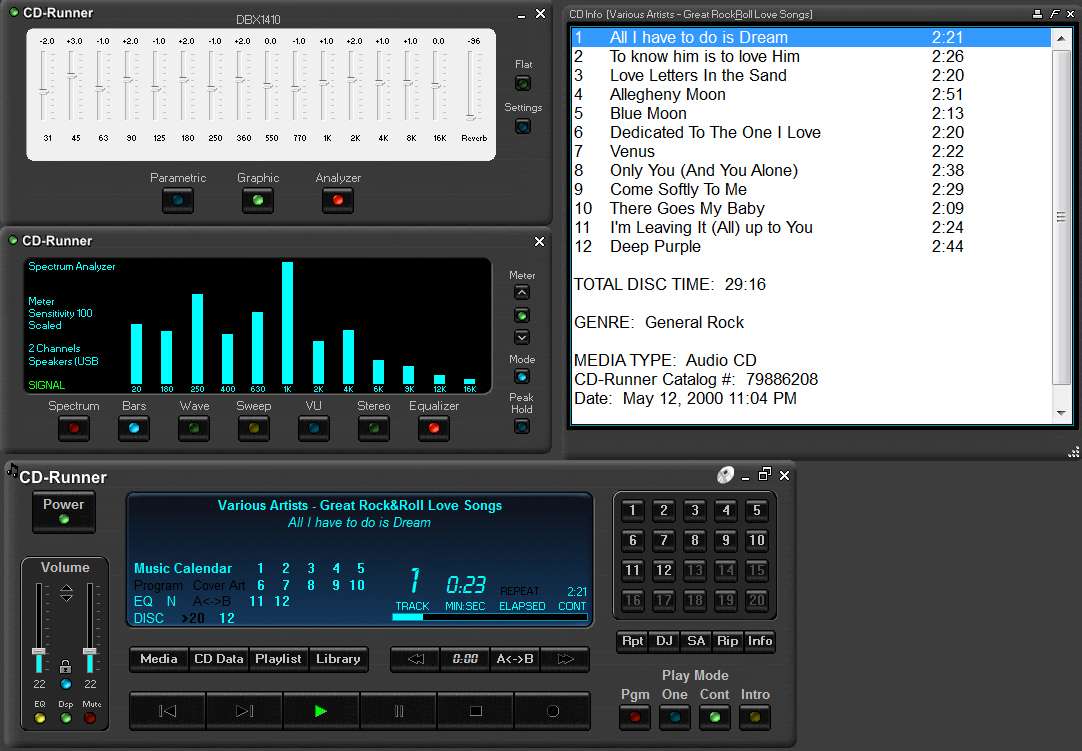
And below you talk about CD-Runner.
I just like the way it looks on the screen when I play a real CD to actually listen to it.

cdrunner.jpg


My collection is large, but I "think" I have them organized. One artist folder,all their cd's in that one, each named by their album. You're probably talking about something different, and probably really sophisticated.
I'm talking about something else entirely.

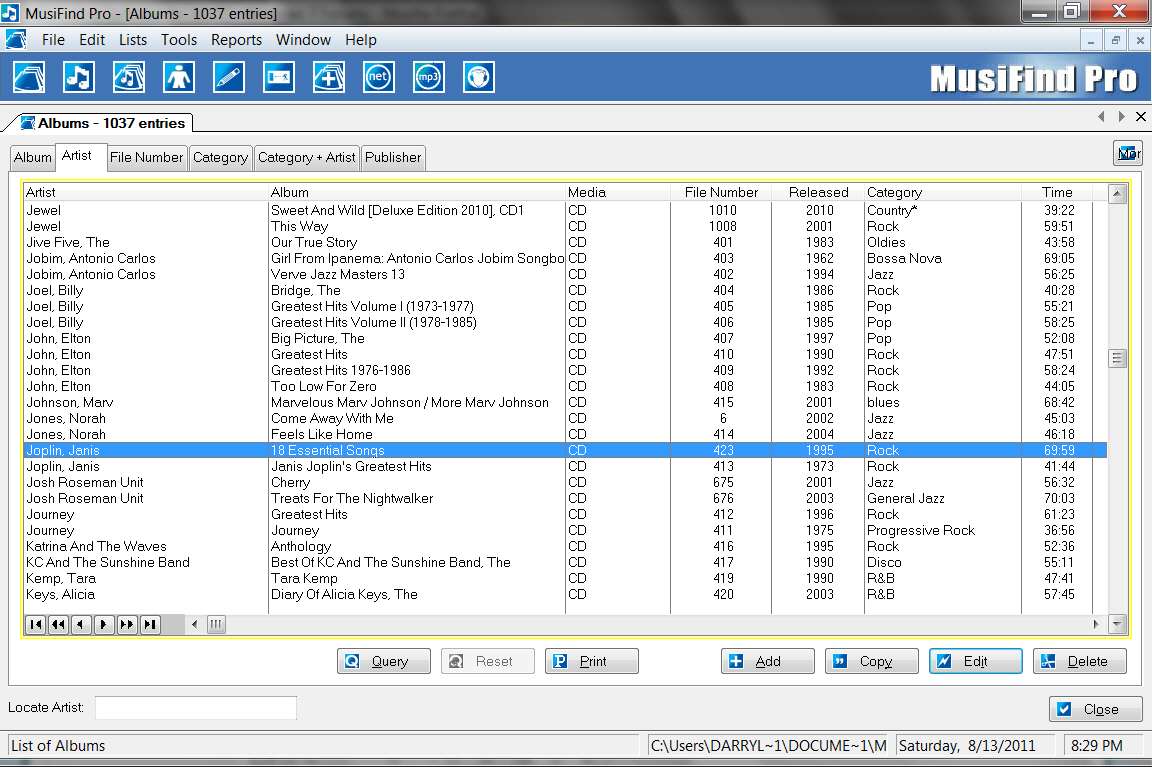
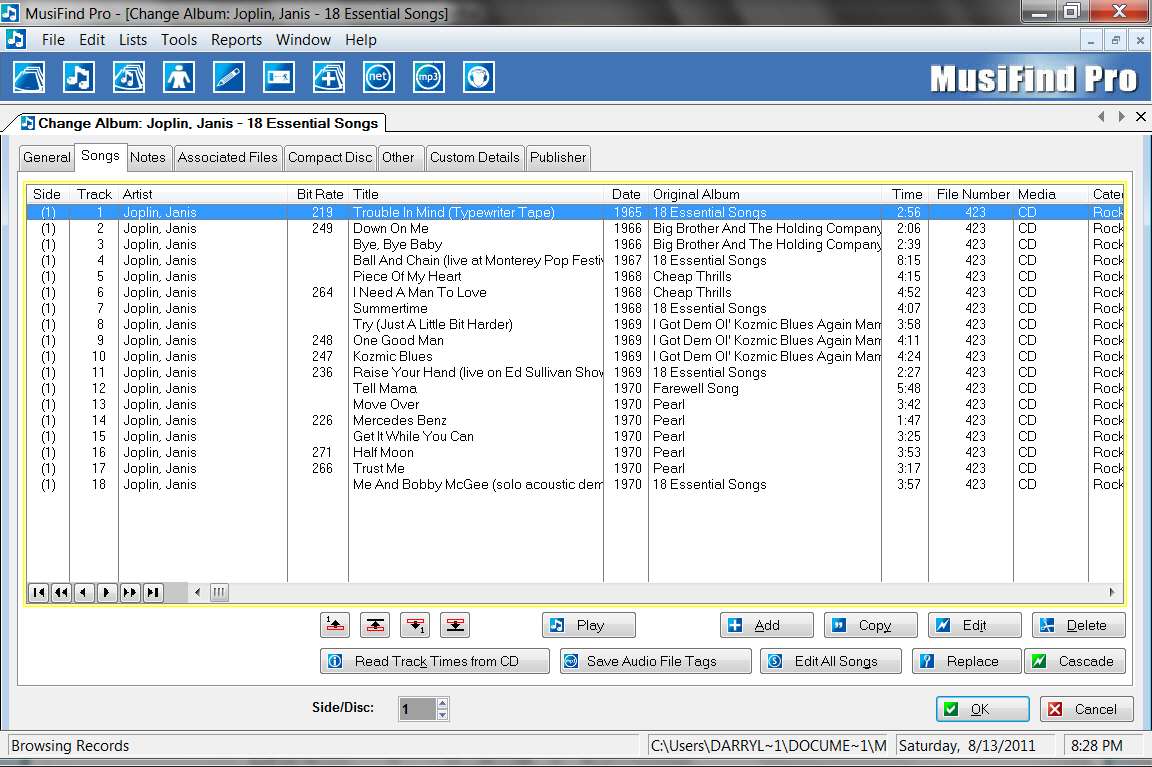
I'm talking about something like an Excel spreadsheet to keep track of all of your CDs (including all the details about tracks including links to the corresponding MP3 files if you want to play a track while looking through the spreadsheet, album art, general information, etc.)... except far more powerful than Excel.

mfpdisc.jpg


and

mfpsongs.jpg


I don't understand why you would need a music player to launch another music player. What am I missing?
No... not launching a music player from another music player. Obviously if you're in a music player, or in a super-program like Jaangle that includes a music player, you have no need to launch a secondary music player program.

I'm talking about launching a music player from some other program, most typically a music file "organizer", or just browsing using Windows Explorer, or while you're in some program that shows music files but doesn't itself contain any built-in music player capability.

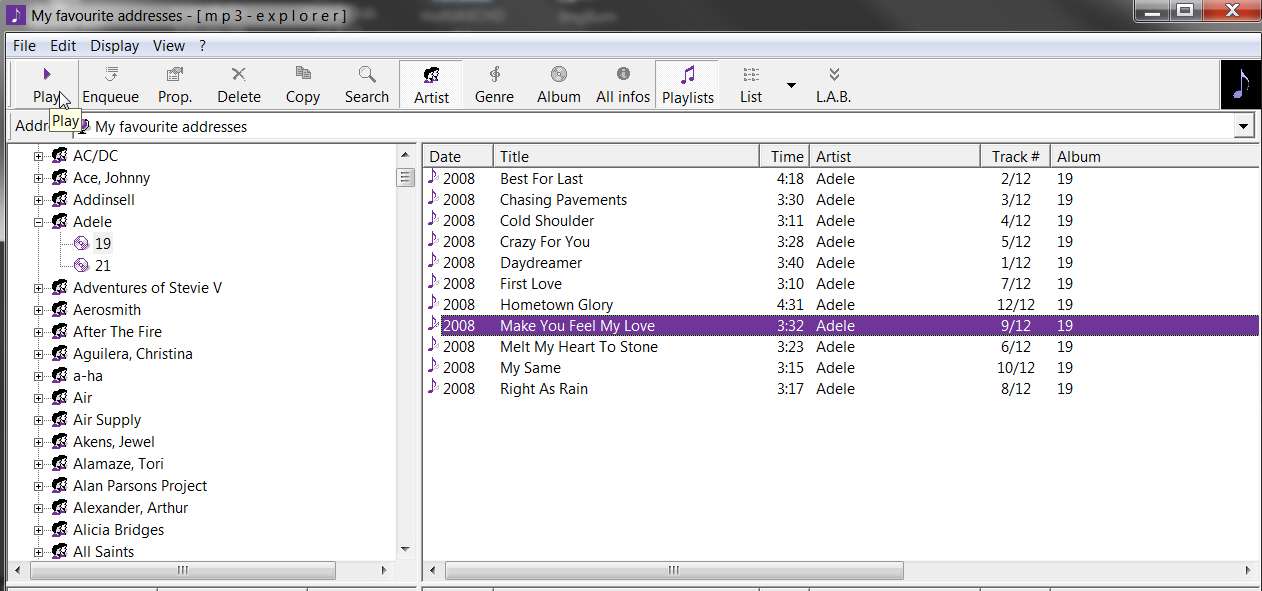
For example, before discovering Jaangle I used a program named [mp3-explorer], which was just a basic MP3 organizer program that could sort by either artist (and then album within artist) based on tags, or purely on album name. And while within this program you could select one or more tracks in the tracklist pane, and then push either the PLAY or ENQUEUE button and the selected track(s) would be sent over to the "default music player launched by Windows when an MP3 file is OPEN'ed". In my case that default MP3 player is Winamp... which is precisely the "tiny" default/external music player I want to open when I play MP3 files this way.

So for me, Winamp is the default associated player for MP3 (and all music files, actually) in Windows. And that also means the Winamp mini-icon shows up next to all music files in Explorer. And that also means Winamp will be launched from a double-click on a music file from Explorer.

mp3explorer.jpg


Sounds great. But don't go to any trouble. If it's easy enough for you, I'd be happy to have it.
If you send me a private message with your email address, I will make this available to you. URL for the installation file download (about 14MB), registry key "export" for you to "import" so that you'll just get my customization when you install it and won't have to discover things for yourself, and screenshots of the actual customizations.


Finally, in the area of just general-purpose Windows utilities, I almost always use Free Commander instead of Windows Explorer. It's fantastic, and intuitive, and powerful.
I'll check it out. You know how I dislike any Windows feature....
This one is terrific.


also use Beyond Compare to "sync" my PC music collection with my J3, as well as using it to compare folders and files on the PC in order to keep my two machines coordinated, or for any other purpose where examination of two folders is the goal.
Sync, as in my Zune? I've got the software for that and it's pretty good.
Its a folder/file comparison/sync program that can apply this mechanism to folders/files anywhere there are drive letters to navigate to.

So if your Zune is plugged into the PC and has a drive letter, and you want to copy over all "new/updated" music or album art from your now fabulous PC music collection to the Zune, this really is a piece of cake with Beyond Compare.

But beyond that particular application it can compare/sync any two folders and files within, anywhere. Once you have that general capability you'd be amazed how many times some situation comes up where that's exactly what you are looking for.

Free Commander is "free", whereas Beyond Compare is not. But it's definitely worth the small amount it costs, at least to me.


And did you notice I bought a Microsoft product and not an Apple? What was I thinking. But seriously, I do love my Zune. Microsoft got one thing right....
Also why I bought a Cowon J3 (aside from its best-of-all-players sound, and its 64GB capacity). It is 100% Windows-friendly.

Learned about it on the "anything but Ipod" forum.
 

My Computer My Computer

Computer type
PC/Desktop
Computer Manufacturer/Model Number
Home-built, two systems (1) and (2)
OS
Windows 7 Pro x64 (1), Win7 Pro X64 (2)
CPU
i5-3350p 3.1Ghz/6MB-cache (1); E8400 3.0Ghz/6MB-cache (2)
Motherboard
ASUS P8Z77-V Pro (1); ASUS P5Q3 (2)
Memory
8GB PC3-12800 DDR3 (1); 4GB PC3-10600 DDR3 (2)
Graphics Card(s)
ATI HD7750 (1), (see TV cards); ATI R7 250 (2)
Sound Card
Realtek ALC892 HD Audio (1); Realtek ALC1200 HD Audio (2)
Monitor(s) Displays
Eizo HD2441W LCD, Eizo S2433W (1); Eizo 24" S2433W (2)
Screen Resolution
1920x1200, 1920x1200 (1); 1920x1200 (2)
Hard Drives
(1) 1TB SATA-II (7200RPM), 2x2TB SATA-III (7200RPM), 250GB SATA-III (10000RPM) for OS; 2x2TB external USB 3.0

(2) 320GB SATA-II (7200RPM), 750GB SATA-II (7200RPM), 150GB SATA-II (10000RPM) for OS; 2TB external USB 3.0
PSU
Nesteq ECS-6001 600W (1); Nesteq ECS-5001 500W (2)
Case
Acousti-Case 360 (1) and (2)
Cooling
Noctua NH-U12P SE2 for CPU, 2x120mm case fans (1) and (2)
Keyboard
IBM PS/2 (1) and (2)
Mouse
Logitech MX Revolution wireless (1); Microsoft wired (2)
Internet Speed
100mbps down / 10mbps up
Antivirus
Microsoft Security Essentials; Malwarebyte Anti-Malware Pro
Browser
Firefox
Other Info
Ceton InfiniTV 4-tuner cablecard-enabled TV card as well as Hauppauge HVR-2250 OTA/ATSC 2-tuner TV card in (1), running under Win7 WMC
One more thing: The only, ONLY reason that I open WMP is to rip factory cd's because it looks up all the tags. Some I want, like track names, but it adds all kinds of album art that I don't want. I suspect that this is part of my problem, as I delete those, add my own 500x500 but it reverts to 200x200. Not always, though...very puzzling.
When you say "... IT reverts to 200x200", what is the "IT" you are referring to?

Are you talking about Jaangle? The little miniature on the left side in your album area? Or in the larger information pane?

Where are you seeing the dimensions of 200x200?
 

My Computer My Computer

Computer type
PC/Desktop
Computer Manufacturer/Model Number
Home-built, two systems (1) and (2)
OS
Windows 7 Pro x64 (1), Win7 Pro X64 (2)
CPU
i5-3350p 3.1Ghz/6MB-cache (1); E8400 3.0Ghz/6MB-cache (2)
Motherboard
ASUS P8Z77-V Pro (1); ASUS P5Q3 (2)
Memory
8GB PC3-12800 DDR3 (1); 4GB PC3-10600 DDR3 (2)
Graphics Card(s)
ATI HD7750 (1), (see TV cards); ATI R7 250 (2)
Sound Card
Realtek ALC892 HD Audio (1); Realtek ALC1200 HD Audio (2)
Monitor(s) Displays
Eizo HD2441W LCD, Eizo S2433W (1); Eizo 24" S2433W (2)
Screen Resolution
1920x1200, 1920x1200 (1); 1920x1200 (2)
Hard Drives
(1) 1TB SATA-II (7200RPM), 2x2TB SATA-III (7200RPM), 250GB SATA-III (10000RPM) for OS; 2x2TB external USB 3.0

(2) 320GB SATA-II (7200RPM), 750GB SATA-II (7200RPM), 150GB SATA-II (10000RPM) for OS; 2TB external USB 3.0
PSU
Nesteq ECS-6001 600W (1); Nesteq ECS-5001 500W (2)
Case
Acousti-Case 360 (1) and (2)
Cooling
Noctua NH-U12P SE2 for CPU, 2x120mm case fans (1) and (2)
Keyboard
IBM PS/2 (1) and (2)
Mouse
Logitech MX Revolution wireless (1); Microsoft wired (2)
Internet Speed
100mbps down / 10mbps up
Antivirus
Microsoft Security Essentials; Malwarebyte Anti-Malware Pro
Browser
Firefox
Other Info
Ceton InfiniTV 4-tuner cablecard-enabled TV card as well as Hauppauge HVR-2250 OTA/ATSC 2-tuner TV card in (1), running under Win7 WMC
HP6480 Scanner (flatbed on my all-in-one printer)
Crappy Windows scanner software, 200DPI (resuloution?) Bitmap

For my own mix cd's with my original artwork, I use Paint Shop Pro v X. I open the 200x200 folder.jpg, resize to 500x500, open the new scan in the PSP, make my adjustments, copy and paste over the original folder.jpg and hit "Save".
Well, this procedure is a bit strange. Certainly not the way I'd recommend.

Why do you have to start from or end up with the 200x200 folder.jpg original?

Why not just open the new scan in PSP, adjust it, RE-SIZE IT TO 500x500 IN PSP, and then "Save as..." to a second name (specifying JPG as the type and a good quality value, and PSP should do the conversion from BMP to JPG).

This process has nothing at all to do with the original 200x200 folder.jpg... it's simply scanning the CD cover, tweaking it, resizing to the 500x500 target size, and "Save as..." a JPG with some name. It's simply a brand new scan to JPG.

Then, delete the original 200x200 folder.jpg which you're wanting to replace with the new 500x500 JPG from the scan, and rename the saved JPG from the scan to folder.jpg. And you're done.


Just in passing, I mention that my hardware and software is totally different from yours:

(1) Epson Perfection 4990 Photo scanner
(2) SilverFast Ai scanning software from LaserSoft Imaging
(3) Adobe Photoshop for editing/saving

My workflow (which you can review, and possibly adapt to your own setup) is as follows:

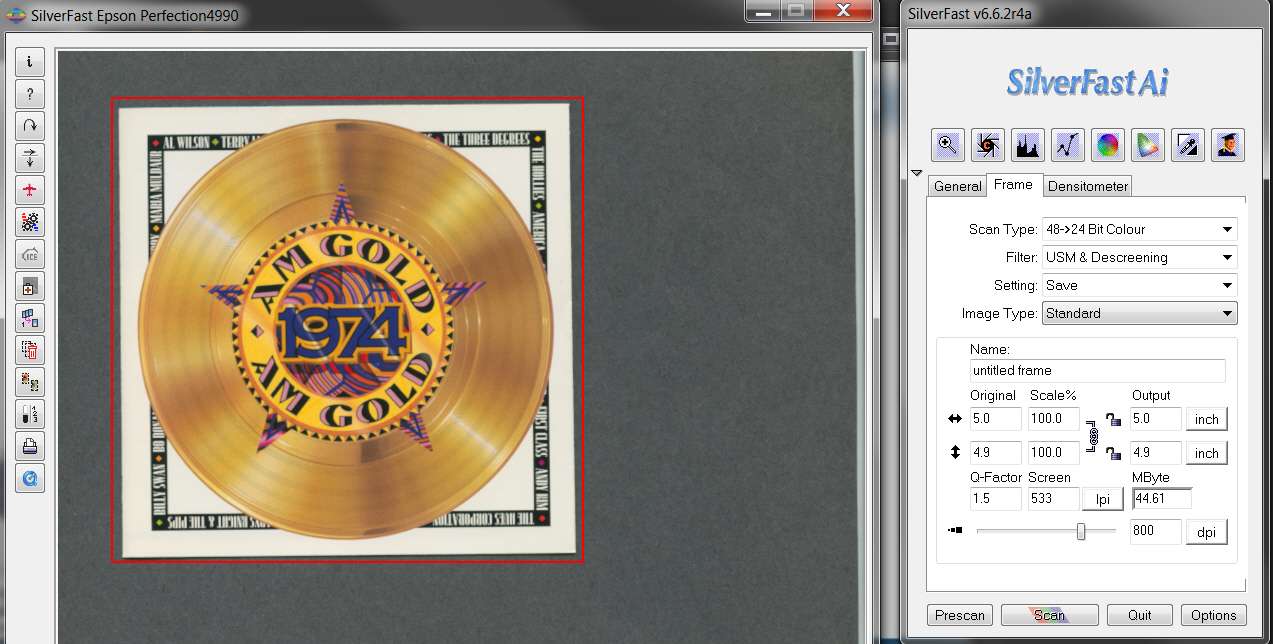
(1) Place the CD cover on the glass, and position a sheet of black construction paper behind it. For printed items that are not 100% opaque, the black background behind the image being scanned produces a better quality result. For printed items that are 100% opaque, the black background in contrast to the picture itself simply makes it a bit easier to see the outer edge of the picture being scanned, thus making it easier to position to crop outline more precisely at the edge. For printed magazine pictures, the black background is very beneficial in blocking out whatever image or text has been printed on the other side of that thin piece of paper page from bleeding through and ruining the scan of the side of the paper you're really interested in.

Open SilverFast and do a "prescan". This allows me to then adjust the red outline for the actual SCAN, to come reasonably close to the outline of the CD cover.

Since my scan is done at 800DPI (not the 200DPI you're using), the resulting output of the scan is very very large... typically about 45MB. But getting the outline fairly close to the cover art the file size is kept reasonable.

Your Windows scanner software may have a "basic/wizard" mode and an "advanced" mode. I only use "advanced", so that I have complete control over what I'm doing.

scanneruk.jpg


(2) Note that my scan setup specifies a "USM and descreening" filter. USM stands for "unsharp mask", which contrary to intuition actually results in a SHARPENING of the scanned image. And the "descreening" is to eliminate the ink-dot effect of scanning from magazine print or CD covers.

The result of both of these scanning options, plus 800DPI scanning (your scanner may not support such a high resolution), produces a very good initial "raw" scanned image.

After getting the red outline correct, I push the SCAN button. The output of the scan would normally be specified as type "TIF", although BMP is probably equivalent.

(3) SilverFast will take the scan, initiate the USM and descreening filter process, and when done saves the TIF file with a name you choose to some target folder place you navigate to at the start of the SCAN.

Then it invokes Adobe Photoshop, passing in a parameter the name of the saved TIF file it just created.

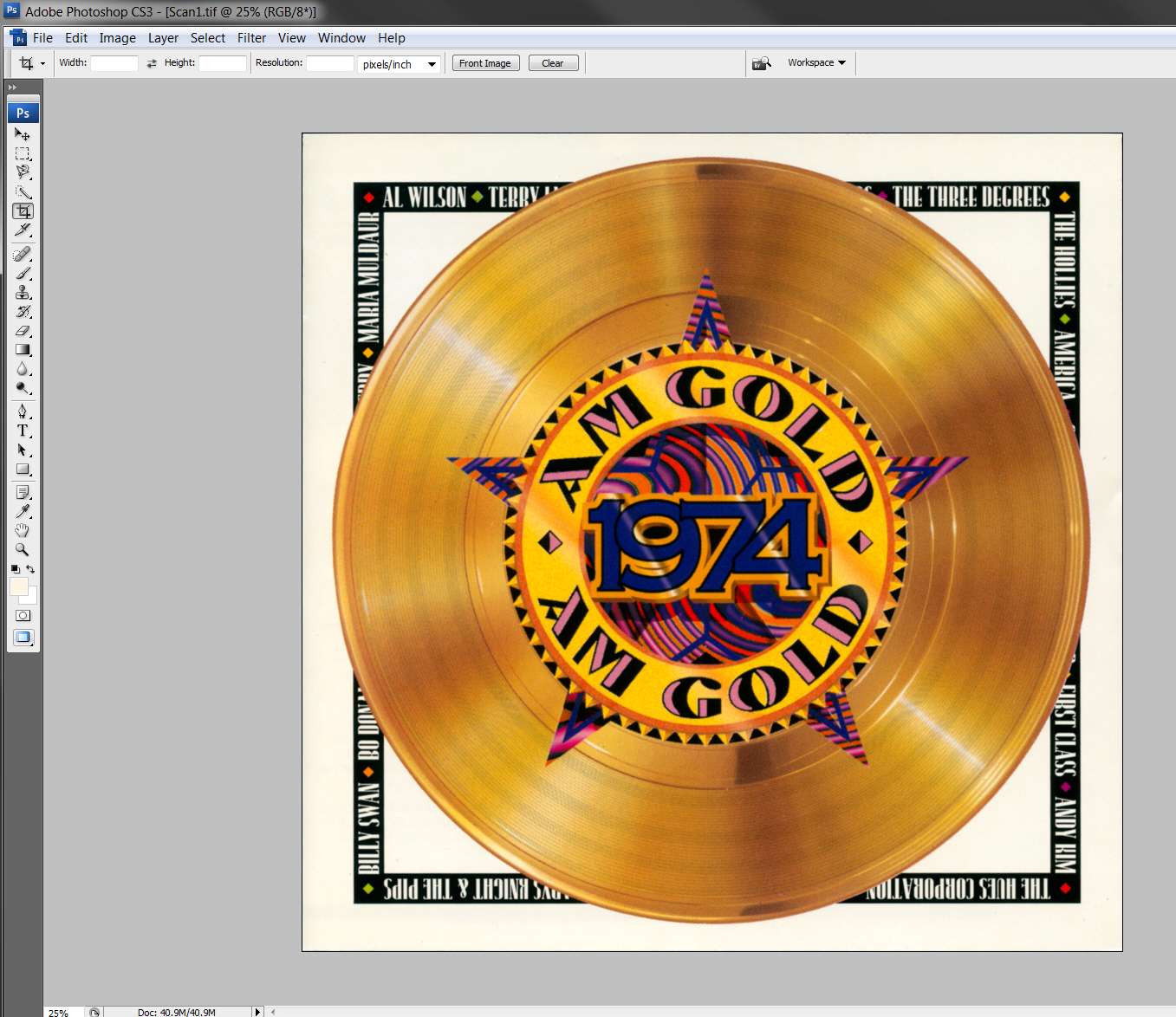
Photoshop opens, with the TIF file that got scanned as the current object to be edited. I have the "work table" maximized so that I can see great detail in the scan, so that I can get the slight rotate (which is probably necessary) and crop nicely clean and square. I then do the CROP.

It will then look like this.

photoshoptif.jpg


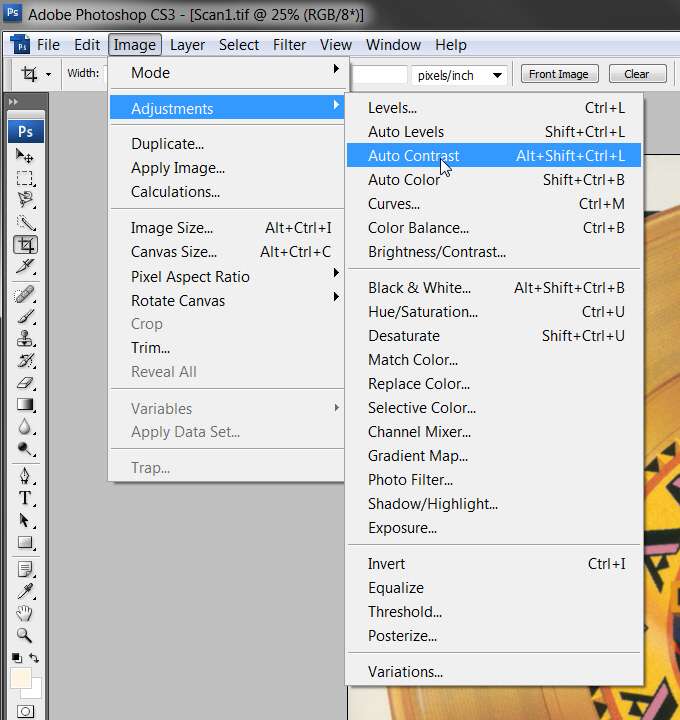
(4) I then begin my tweaking for color, brightness and contrast. Photoshop offers two different adjustment presets that I try out (auto levels, or auto contrast), to see how the result looks each way. If the results are better with one than the other, without ruining the color, I will usually go with it. Otherwise I will generally go with the other one. In worst case I manually adjust color and/or brightness and/or contrast, until I'm satisfied.

My scanner and the SilverFast scanning software generally does an excellent job on the color, so more often than not I use the "auto contrast".

photoshopadjust.jpg


Sometimes the result of "auto contrast" are dramatic, and sometimes not so much. In the current example here is the result.

photoshopcontrast.jpg


If I'm not really satisfied, I'll push Edit -> undo auto contrast to back out the adjustment, and try again with a somewhat different tweak. Sometimes I go ahead with one of the auto-adjustments, but then come in after the fact to make further manual adjustments of color, brightness or contrast.

Bottom line is I want my result to look terrific, so I do what it takes and I don't mind spending some time on it. This is essentially a one-time job, so why not do it right that one time?

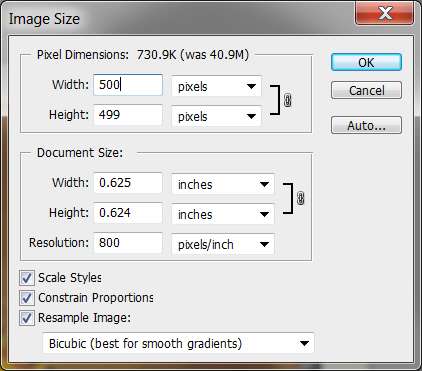
(5) Once I've got the large image (still in original TIF 3874x3874 size shown at 1:4 scale in Photoshop) tweaked to my satisfaction, I now resize the image down to 500x500. Note that "satisfaction" really means a result that is true to the original color of the cover but sharper and clearer and brighter, not auto-adjusted into some different color that looks nothing like the original. Many covers are quite artistic and beautiful but often are not really natural colors at all, but reflect the photographers intent nevertheless (e.g. sepia is very popular, which is a bit of an unnatural jaundice-like color for skin... but that's what many covers looks like). So my goal is to reproduce the cover itself as best I can, not to make up my own idea or let Photoshop destroy the original look of the cover.

Anyway, if my original red box outline was good, and the CD cover was square, the resize will produce 500x500 or very close. If the cover is a bit off-square, I simply let Photoshop keep the "proportions constrained" (i.e. retain the original scanned aspect ratio) in the resized image, with the width always specified as 500. Then Photoshop calculates the height proportionally.

Original:

photoshopresize1.jpg


Resize specification:

photoshopresize2.jpg


The result looks like this (note that Photoshop is still presenting in 1:4 scale, from the original large s3784x3784):

photoshopresize3.jpg


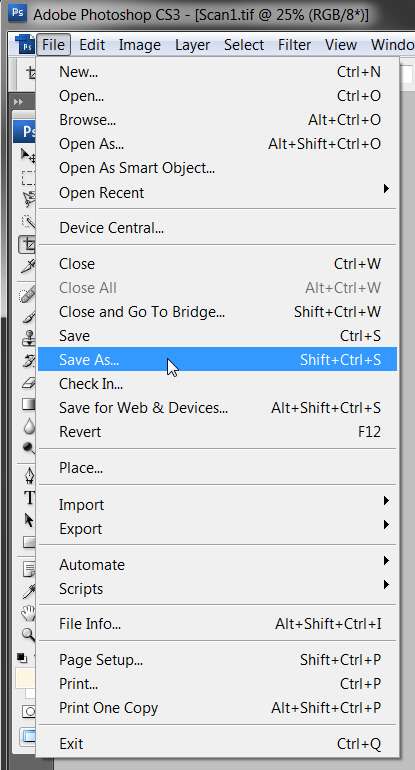
(6) Finally, it's time to "SAVE AS..." in high-quality JPG form, this tweaked and resized scan.

photoshopsavead.jpg


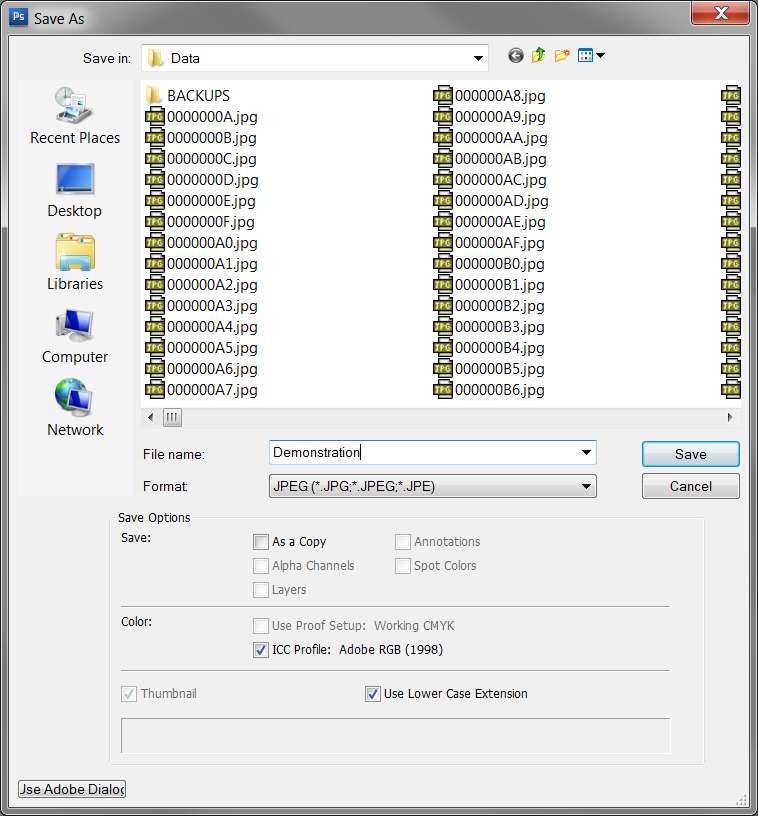
I then (a) change the format to "JPEG", and (b) specify the file name to be whatever I want.

photoshopsaveas2.jpg


Then I push the "SAVE" button (in this "Save as..." dialog).

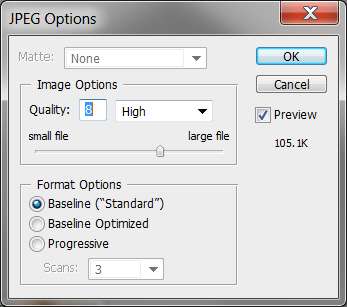
(7) Photoshop then presents a "quality" dialog, asking me what degree of JPG compression I want. Higher quality number (11 is maximum) means better quality but also larger file size. Lower quality number means poorer quality but also smaller file size.

In my mind, I'm looking for a reasonable file size which is from 50K-120K for my high-quality album art, but that's what I will get if I just always specify a quality number of 8. This is the low-end of the "high quality" range, and also still keeps the resulting file size reasonable.

photoshopjpg.jpg


I push OK, and the JPG is produced under whatever name I saved it as.

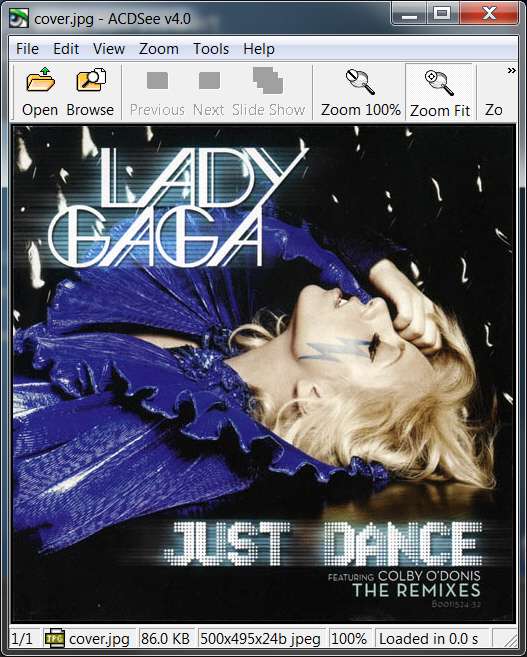
(8) Actually, I've chosen a name to conform to my CD Database program's purely numeric rule. But then I copy it to my music/album folder and rename it there to be "cover.jpg".

In its final 500x500 form it looks like this:

photoshopcover.jpg


(9) I probably should have used a different cover, to show you a more dynamic and exciting result. When I do one of these scans I also upload it to Amazon, for others to retrieve.

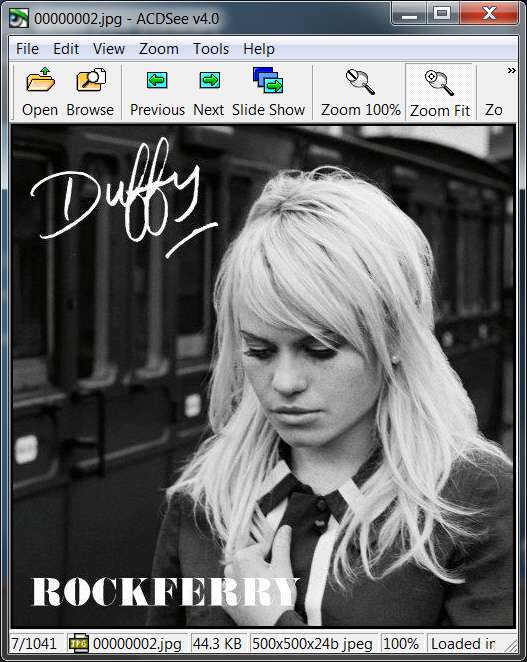
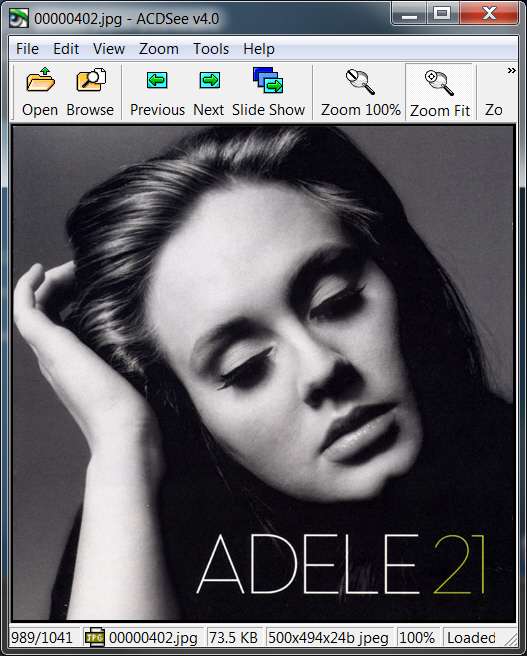
For example, here are a few other personal scans that are more interesting:

photoshopcover2.jpg


photoshopcover3.jpg


photoshopcover5.jpg


photoshopcover4.jpg


photoshopcover6.jpg


photoshopcover7.jpg


photoshopcover8.jpg


photoshopcover9.jpg


photoshopcover5.jpg


photoshopcover4.jpg
 
Last edited:

My Computer My Computer

Computer type
PC/Desktop
Computer Manufacturer/Model Number
Home-built, two systems (1) and (2)
OS
Windows 7 Pro x64 (1), Win7 Pro X64 (2)
CPU
i5-3350p 3.1Ghz/6MB-cache (1); E8400 3.0Ghz/6MB-cache (2)
Motherboard
ASUS P8Z77-V Pro (1); ASUS P5Q3 (2)
Memory
8GB PC3-12800 DDR3 (1); 4GB PC3-10600 DDR3 (2)
Graphics Card(s)
ATI HD7750 (1), (see TV cards); ATI R7 250 (2)
Sound Card
Realtek ALC892 HD Audio (1); Realtek ALC1200 HD Audio (2)
Monitor(s) Displays
Eizo HD2441W LCD, Eizo S2433W (1); Eizo 24" S2433W (2)
Screen Resolution
1920x1200, 1920x1200 (1); 1920x1200 (2)
Hard Drives
(1) 1TB SATA-II (7200RPM), 2x2TB SATA-III (7200RPM), 250GB SATA-III (10000RPM) for OS; 2x2TB external USB 3.0

(2) 320GB SATA-II (7200RPM), 750GB SATA-II (7200RPM), 150GB SATA-II (10000RPM) for OS; 2TB external USB 3.0
PSU
Nesteq ECS-6001 600W (1); Nesteq ECS-5001 500W (2)
Case
Acousti-Case 360 (1) and (2)
Cooling
Noctua NH-U12P SE2 for CPU, 2x120mm case fans (1) and (2)
Keyboard
IBM PS/2 (1) and (2)
Mouse
Logitech MX Revolution wireless (1); Microsoft wired (2)
Internet Speed
100mbps down / 10mbps up
Antivirus
Microsoft Security Essentials; Malwarebyte Anti-Malware Pro
Browser
Firefox
Other Info
Ceton InfiniTV 4-tuner cablecard-enabled TV card as well as Hauppauge HVR-2250 OTA/ATSC 2-tuner TV card in (1), running under Win7 WMC
My collection is large, but I "think" I have them organized. One artist folder,all their cd's in that one, each named by their album. You're probably talking about something different, and probably really sophisticated.
Just an update here, on the state of the "FLAC" project and incidentally a re-pitch for this "CD Database Manager" product (Musifind Pro) which I couldn't live without, given my 1000+ CD collection.

Again, this program is how I start when buying a new CD. I add it to the database, gathering all relevant information (automatically from both FreeDB as well as AllMusic.com). Then I move on to the process of ripping tracks and making MP3/FLAC music files, getting the album art, etc.

Anyway, while moving on through my final compilation CDs I came across a whole family of discs from the Time/Life "Heart of Rock 'n' Roll" series that I had apparently bought. I apparently produced about 200 MP3 files from these discs, and am now in the process of selecting which ones (if any) to make FLAC versions of instead.

Well on listening to these tracks from these discs, it turns out many of them are NOT THE ORIGINAL RADIO-HIT RECORDING VERSIONS, but obviously other out-takes or earlier tries. They are noticeably different from the actual singles which we grew up with and became familiar to us. Very annoying, that I didn't notice this before now.

The consequence of this is whenever I bought another compilation that might have had the same track on it (and possibly the REAL "hit" version), I didn't make an MP3 from that second track because I already had it from the Time/Life discs. So that means whle I could have actually ended up with the real version that I SHOULD have in my collection, I in fact ended up with a "fake".

So that's the current new side-trip project... to review all of these 200 selected tracks from 14 discs in the Time/Life collection, and see if any of these are on other compilation discs I own. If so, listen to both versions and decide if they're identical or different, and if different then is one of them the "real hit" version and is that the one I currently have in MP3 form or not?

What I needed was a "checklist" of these 200 tracks, and then I can make a pass of my CDs and get each relevant compilation CD and do what's needed, to replace potentially (but hopefully not) all of these 200 "fakes" with the "genuine" originals.

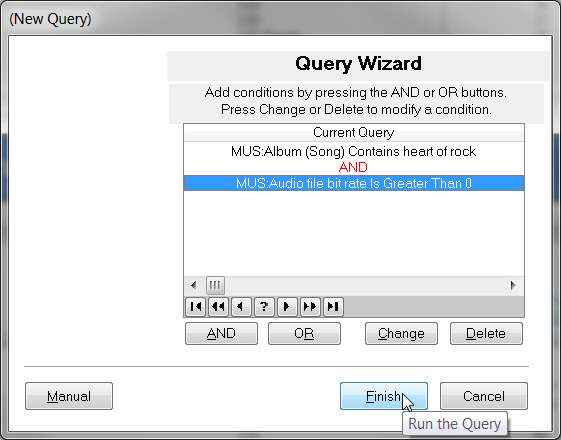
Fortunately I've got all of my CDs in the Musifind Pro database, and it provides an ad hoc reporting capability. I also have an "associated music file" linked to each track in each CD, where I'd had an MP3 created. So I can create an ad hoc report from Musifind Pro that requests (a) all tracks from CDs whose album name contains "heart of rock" and (b) which also have an "audio file bitrate" (i.e. from the linked associated music file) which is non-zero (i.e. for which I have an associated music file specified).

There are a sequence of steps to set up the report (based on my "query" criteria against the database), but when it's all finished the "query" looks like this:

mfp15.jpg


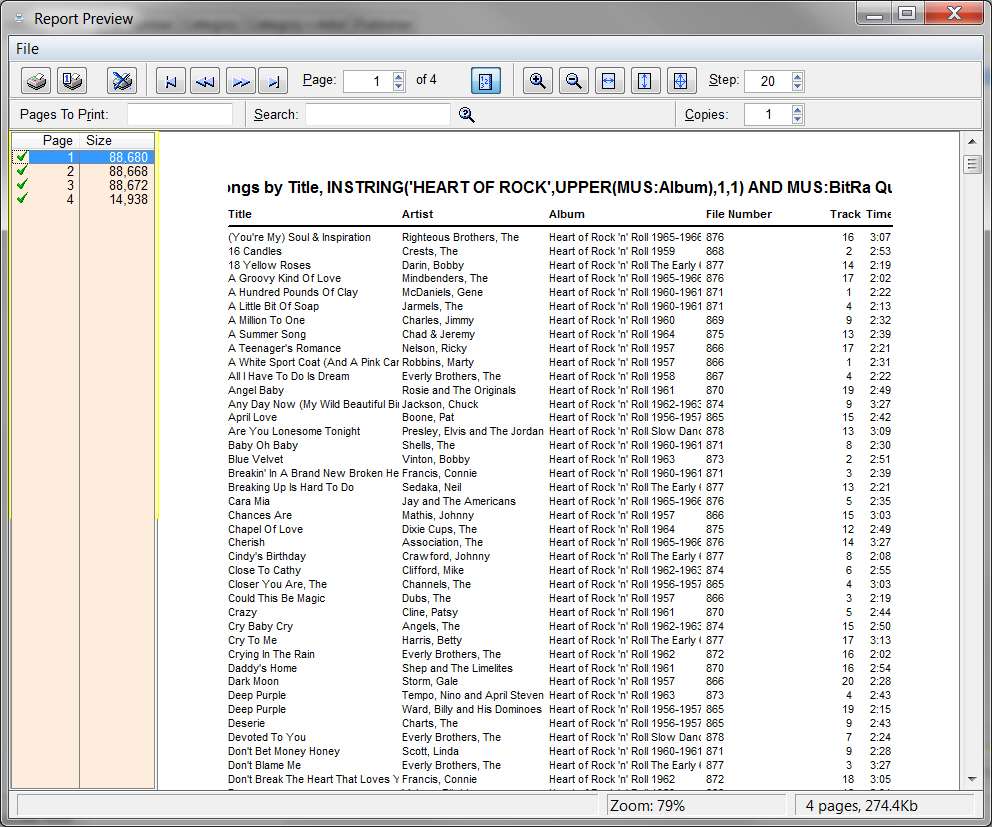
And when I run the report, the results look like this:

mfp17.jpg


I've printed these 3 pages of alphabetical (by title) song names, and will use it to evaluate each existing MP3 as I described above.

And that's the kind of thing a "CD Database" can provide, for exactly this kind of special-case situations. I will be able to review each song, discover if it exists on multiple CDs, go get the additional CDs and listen to the tracks from the real CDs vs. the MP3s from the Time/Life versions, and proceed accordingly.

Musifind Pro.


Anyway, did you ever resolve your "World's Greatest Bluegrass Bands" problem, regarding album art for that one final home-grown CD?
 

My Computer My Computer

Computer type
PC/Desktop
Computer Manufacturer/Model Number
Home-built, two systems (1) and (2)
OS
Windows 7 Pro x64 (1), Win7 Pro X64 (2)
CPU
i5-3350p 3.1Ghz/6MB-cache (1); E8400 3.0Ghz/6MB-cache (2)
Motherboard
ASUS P8Z77-V Pro (1); ASUS P5Q3 (2)
Memory
8GB PC3-12800 DDR3 (1); 4GB PC3-10600 DDR3 (2)
Graphics Card(s)
ATI HD7750 (1), (see TV cards); ATI R7 250 (2)
Sound Card
Realtek ALC892 HD Audio (1); Realtek ALC1200 HD Audio (2)
Monitor(s) Displays
Eizo HD2441W LCD, Eizo S2433W (1); Eizo 24" S2433W (2)
Screen Resolution
1920x1200, 1920x1200 (1); 1920x1200 (2)
Hard Drives
(1) 1TB SATA-II (7200RPM), 2x2TB SATA-III (7200RPM), 250GB SATA-III (10000RPM) for OS; 2x2TB external USB 3.0

(2) 320GB SATA-II (7200RPM), 750GB SATA-II (7200RPM), 150GB SATA-II (10000RPM) for OS; 2TB external USB 3.0
PSU
Nesteq ECS-6001 600W (1); Nesteq ECS-5001 500W (2)
Case
Acousti-Case 360 (1) and (2)
Cooling
Noctua NH-U12P SE2 for CPU, 2x120mm case fans (1) and (2)
Keyboard
IBM PS/2 (1) and (2)
Mouse
Logitech MX Revolution wireless (1); Microsoft wired (2)
Internet Speed
100mbps down / 10mbps up
Antivirus
Microsoft Security Essentials; Malwarebyte Anti-Malware Pro
Browser
Firefox
Other Info
Ceton InfiniTV 4-tuner cablecard-enabled TV card as well as Hauppauge HVR-2250 OTA/ATSC 2-tuner TV card in (1), running under Win7 WMC
Forgot to show you what I've done so far....

View attachment 170966

Pretty girly, I know, but hey! it's my first skin. I'll get better.
Cute!!

Still have no desire for the "playlist pane" (below the album pane on the left)? It will show you the track(s) you've selected to play.

And of course you can either (a) PLAY one or more selected tracks from the tracklist pane, or (b) ENQUEUE additional one or more selected tracks from the tracklist pane.

All of these songs get shown in the "playlist pane", where you can then do further operations on them, select them individually for playing, create/update an M3U playlist from the current contents, etc.

I'm just sayin'...

(click on the blue "+" at the top of any pane to produce the "Add pane" dialog, select the "playlist pane" and select "down" as the position, and push OK. It will now appear as an additional sizable pane under your album pane above it on the left side.)

Incidentally, if you didn't already discover it, there is a "capital T" on the upper-right of the main window. Clicking on it produces a "enlarge/reduce" scale for font size... if you want to make your text characters larger (than what is shown by default, with a zoom scale of "0"). I doubt that you'd want it to be smaller (click on negative numbers), but you might want it to be larger (clikc on positive numbers).

Okay, I now have playlist underneath the albums pane. I thought it was redundant to the top right pane but I see they are different.
 

My Computer My Computer

OS
Windows 7 Home Premium, 64 bit, SP1
One more thing: The only, ONLY reason that I open WMP is to rip factory cd's because it looks up all the tags. Some I want, like track names, but it adds all kinds of album art that I don't want. I suspect that this is part of my problem, as I delete those, add my own 500x500 but it reverts to 200x200. Not always, though...very puzzling.
When you say "... IT reverts to 200x200", what is the "IT" you are referring to?

Are you talking about Jaangle? The little miniature on the left side in your album area? Or in the larger information pane?

Where are you seeing the dimensions of 200x200?

When I would open up WMP (which is now disabled, by the way) for any reason, the next time I would look at my folder. jpg pictures, either in Jaangle or Windows Explorer, they looked blurry. I would check the size details of the pics and sure enough, some (but not all) were changed from 500x500 to 200x200. The beautiful large pics that I spent days creating were forever gone. I can only assume WMP had something to do with this because it's not happening now. That's why WMP is disabled, so that it can't happen again.
 

My Computer My Computer

OS
Windows 7 Home Premium, 64 bit, SP1
QUOTE]Why do you have to start from or end up with the 200x200 folder.jpg original?[/QUOTE]

So that when I'm done creating the 500x500 I can just hit "save" and not have to navigate to the folder. This also eliminates the 200x200 at the same time. I wouldn't have to do it this way, it just seemed like a time-saver for me.
 

My Computer My Computer

OS
Windows 7 Home Premium, 64 bit, SP1
Free Commander is "free", whereas Beyond Compare is not. But it's definitely worth the small amount it costs, at least to me.

Free Commander sure doesn't have a very pretty interface. Does yours look this bad?

ex1.jpg
 

My Computer My Computer

OS
Windows 7 Home Premium, 64 bit, SP1
Free Commander is "free", whereas Beyond Compare is not. But it's definitely worth the small amount it costs, at least to me.
Free Commander sure doesn't have a very pretty interface. Does yours look this bad?
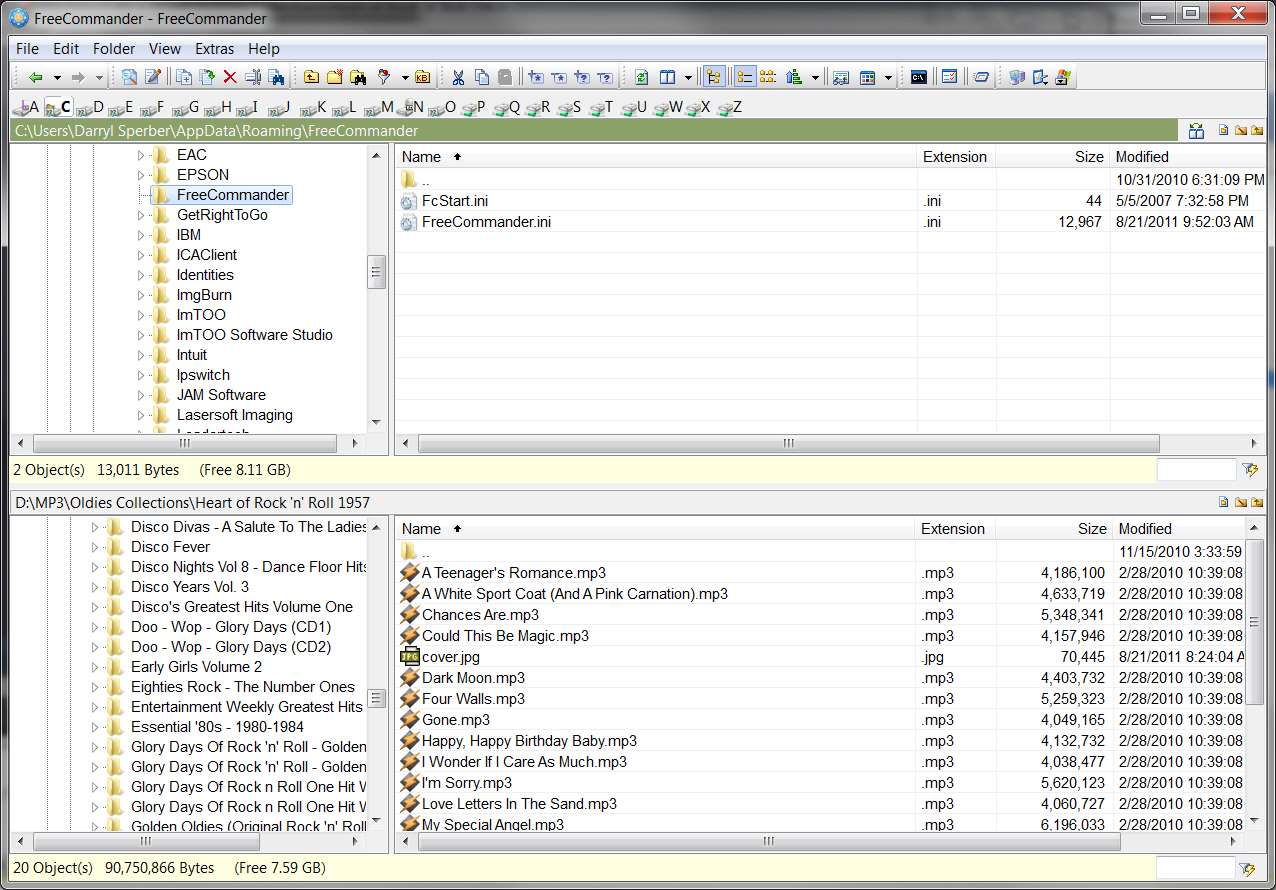
Definitely not. It should look very very easy to understand.

I'm attaching my own FreeCommander.ini file, which will define all of my customization to the GUI, including button arrangements, options, etc. Please store my INI file into your c:\Users\<username>\Appdata\Roaming\FreeCommander, replacing the current INI file you have there (you might want to save it just to be safe).

It should look like this (at least that's how I want it to look):

freecommander.jpg
 

Attachments

My Computer My Computer

Computer type
PC/Desktop
Computer Manufacturer/Model Number
Home-built, two systems (1) and (2)
OS
Windows 7 Pro x64 (1), Win7 Pro X64 (2)
CPU
i5-3350p 3.1Ghz/6MB-cache (1); E8400 3.0Ghz/6MB-cache (2)
Motherboard
ASUS P8Z77-V Pro (1); ASUS P5Q3 (2)
Memory
8GB PC3-12800 DDR3 (1); 4GB PC3-10600 DDR3 (2)
Graphics Card(s)
ATI HD7750 (1), (see TV cards); ATI R7 250 (2)
Sound Card
Realtek ALC892 HD Audio (1); Realtek ALC1200 HD Audio (2)
Monitor(s) Displays
Eizo HD2441W LCD, Eizo S2433W (1); Eizo 24" S2433W (2)
Screen Resolution
1920x1200, 1920x1200 (1); 1920x1200 (2)
Hard Drives
(1) 1TB SATA-II (7200RPM), 2x2TB SATA-III (7200RPM), 250GB SATA-III (10000RPM) for OS; 2x2TB external USB 3.0

(2) 320GB SATA-II (7200RPM), 750GB SATA-II (7200RPM), 150GB SATA-II (10000RPM) for OS; 2TB external USB 3.0
PSU
Nesteq ECS-6001 600W (1); Nesteq ECS-5001 500W (2)
Case
Acousti-Case 360 (1) and (2)
Cooling
Noctua NH-U12P SE2 for CPU, 2x120mm case fans (1) and (2)
Keyboard
IBM PS/2 (1) and (2)
Mouse
Logitech MX Revolution wireless (1); Microsoft wired (2)
Internet Speed
100mbps down / 10mbps up
Antivirus
Microsoft Security Essentials; Malwarebyte Anti-Malware Pro
Browser
Firefox
Other Info
Ceton InfiniTV 4-tuner cablecard-enabled TV card as well as Hauppauge HVR-2250 OTA/ATSC 2-tuner TV card in (1), running under Win7 WMC
Back
Top