Remove Grub - Restore Windows 7

iseeuu

New member
Guru
Gold Member
VIP
Local time
5:53 AM
Messages
2,736
You are dual booting with a Linux OS, using the Grub bootloader menu, and now you want to remove Linux and Grub and restore your Windows 7 boot manager.

Here's how:

This screen shot shows Windows XP, Vista, Windows 7, and my Ubuntu 9.10 installed on logical partitions (volumes) in an extended partition. The two partitions on the end are for Ubuntu and its swap partition. Windows does not recognize the file system used by Ubuntu, so you see no data.
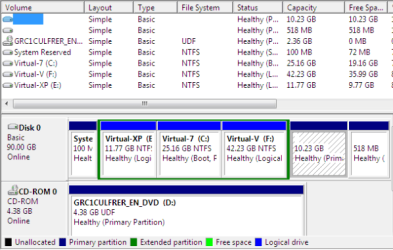
four_os_01.PNG

This is the same hard drive viewed from Ubuntu using GParted. Ubuntu does recognize the Windows NTFS file system and correctly labels the partitions. Again for verification, the last two partitions (volumes) are for Ubuntu and its swap partition.
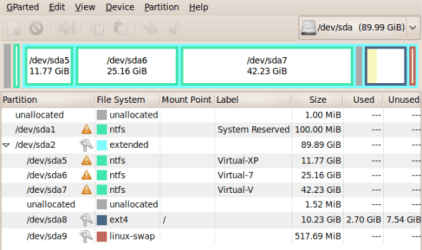
four_os_02.PNG

From Windows 7 Disk Management, remove (delete) the last two partitions or, if your installation is different, the Ubuntu partitions.

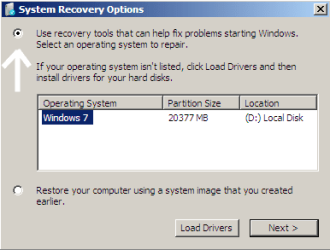
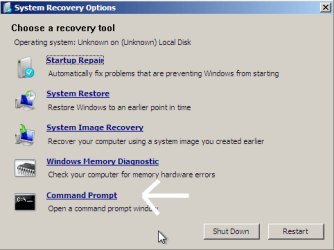
Boot to your Windows 7 install DVD (or the System Repair CD) and navigate to the Command Prompt option.
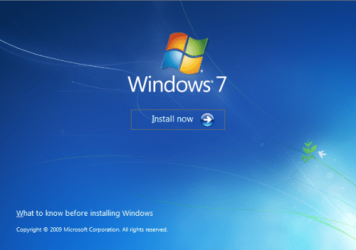
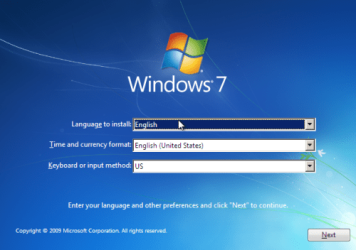
mbr_02.png mbr_03.png

mbr_04.png mbr_05.png

Type: diskpart
and press enter.

Type: select disk 0 (zero)
and press enter

Type: list volume
and press enter

and identify the drive letter of your CD/DVD drive.

Code:
Microsoft Windows [Version 6.1.7100]
Copyright (c) 2009 Microsoft Corporation.  All rights reserved.

X:\Windows\system32>[FONT=Arial Black] diskpart[/FONT]

Microsoft DiskPart version 6.1.7100
Copyright (C) 1999-2008 Microsoft Corporation.
On computer: VIRTUAL-7

DISKPART> [FONT=Arial Black]select disk 0[/FONT] 
Disk 0 is now the selected disk.

DISKPART>[FONT=Arial Black] list volume[/FONT] 
  Volume ###  Ltr  Label        Fs     Type        Size     Status     Info
  ----------  ---  -----------  -----  ----------  -------  ---------  --------
  [highlight][COLOR=red]Volume 0     D                       CD-ROM          0 B  No Media[/COLOR][/highlight]
  Volume 1     S   System Rese  NTFS   Partition    100 MB  Healthy
  Volume 2     E   Virtual-XP   NTFS   Partition     11 GB  Healthy    System
  Volume 3     C   Virtual-7    NTFS   Partition     20 GB  Healthy    Boot

DISKPART>[FONT=Arial Black] exit[/FONT]
Type: exit
to close Diskpart.

Using the drive letter you identified, type: D:
and press enter.

Type: cd \boot
and enter

Type: bootsect /nt60 SYS /mbr
and press enter
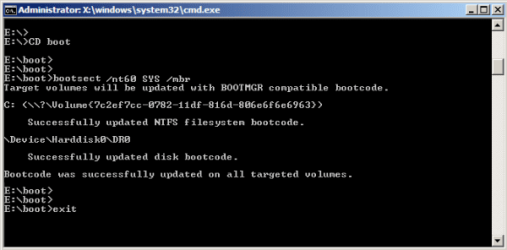
mbr_09a.png

This command should find the "Active" partition with the System files and boot code and restore your Windows 7 Boot Manager.

Type: exit
to close the Command Prompt
then restart.
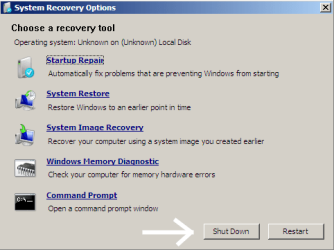
mbr_10.png

If Windows 7 is the only OS, you should boot directly to it and not see any Boot Menu.


Other links:

http://www.sevenforums.com/performance-maintenance/51100-repair-cd-system-repair-disk.html

http://www.sevenforums.com/tutorials/2083-system-repair-disc-create.html

http://www.sevenforums.com/tutorials/668-system-recovery-options.html

How to Boot to the System Recovery Options in Windows 7

How to Boot to the Advanced Boot Options in Windows 7
 
Last edited:

My Computer

OS
...
Just made an account just to say a big "THANK YOU"!
 

My Computer

OS
W7 32
I aswell just made an account to say THANK YOU!
 

My Computer

OS
Windows 7 Professional x64
Thank you!

Thank you so much man! - Like the two before me I only made an account to thank you. I cannot express how much of a relief it is to finally be able to get my PC booting correctly.

Keep up the good work.:D
 

My Computer

Computer Manufacturer/Model Number
Hp
OS
Windows 7 Home Premium x64
CPU
AMD Athlon II X4 635 Processor 2.90 GHz
Memory
8.00 GB
Graphics Card(s)
XFX Radeon HD 6950 Graphics card - 2 GB - GDDR5 SDRAM
Sound Card
C-Media PCI "audio device"
Monitor(s) Displays
Lg 32", AOC 2036 23"
Hard Drives
-WDC WD25
-WDC WD50
Case
Hp
Keyboard
Logitech MK300
Internet Speed
5 Mbps
You're a life saver!!! Thank You very much indeed! I registered for the same reason as the guys above. I'll be back soon probably. Thanks Again!
 

My Computer

OS
windows 7 ultimate x64
Very nice! Thanks for the awesome tutorial! :D
 

My Computer

Computer Manufacturer/Model Number
Customized build from CyberPower
OS
Windows 7 Home Premium 64bit SP 1
CPU
Intel i5 2500k
Motherboard
Asus P8P67 Deluxe
Memory
8 gigabytes Corsair PC3-12800 DDR3
Graphics Card(s)
EVGA GeForce GTX 460 superclocked
Sound Card
Integrated
Monitor(s) Displays
ViewSonic 23" LCD
Screen Resolution
1980 x 1080
Hard Drives
120 Gb Samsung 840 Pro SSD
120 Gb Kingston Hyper X SSD
1 Tb WD Caviar Black HDD
PSU
Coolermaster 1000 watt modular
Case
Coolermaster HAF X full tower
Cooling
Coolermaster Hyper 212 plus
Keyboard
Logitech USB
Mouse
Microsoft 3 button
Internet Speed
download 1.5 Mb/sec upload 300Kb/sec
I aswell just made an account to say THANK YOU!
Welcome to Windows Seven Forums ryan2332. Thank you for taking time to let us know!

Cheers!
Robert
 

My Computer

OS
...
Thank you so much man! - Like the two before me I only made an account to thank you. I cannot express how much of a relief it is to finally be able to get my PC booting correctly.

Keep up the good work.:D
You are most welcome 1pnoe! Glad you found a solution that worked for you and for letting us know. You are very much appreciated!

And welcome to Windows Seven Forums!

Cheers!
Robert
 

My Computer

OS
...
You're a life saver!!! Thank You very much indeed! I registered for the same reason as the guys above. I'll be back soon probably. Thanks Again!
Welcome to Windows Seven Forums llewchey. Looking forward to hearing from you.

Cheers!
Robert
 

My Computer

OS
...
I as well, had to fix a botched install of Ubuntu 11.10 and these instructions worked perfectly. Thank you so much iseeuu!
 

My Computer

OS
Windows 7 Home Premium 128 bit
I as well, had to fix a botched install of Ubuntu 11.10 and these instructions worked perfectly. Thank you so much iseeuu!
You are most welcome. Thanks for letting us know you found a solution that worked for you!

Welcome to Windows Seven Forums!

Cheers!
Robert
 

My Computer

OS
...
Nice post. Suggested this be added as a short tutorial.
 

My Computer

Computer type
PC/Desktop
Computer Manufacturer/Model Number
Home built (GeneO industries)/Model 4
OS
Windows 10 Pro. EFI boot partition, full EFI boot
CPU
i7 4770k 4.4GHz (44-44-43-43 turbo) @ 1.248V
Motherboard
ASUS Maximus VI Hero
Memory
16GB (8GBx2) @2200 MHz G.skill Sniper 10-11-10-30-1, 1.6V
Graphics Card(s)
MSI GTX 970 Gaming 4G
Sound Card
Onboard SupremeFX Audio
Monitor(s) Displays
NEC Spectraview 2490WUXi-SV
Screen Resolution
1920 x 1200
Hard Drives
Samsung 850 Pro 256GB (OS), Samsung 2x 128GB 840 Pro SSD in RAID0, 3x WD Blue 6Gb/s 1TB RAID0, WD 2TB Black external USB 3.0, 2TB WD20EARS Green external USB 3.0, 2x 500GB Seagate and 1 750 GB external USB, 1x 350GB external USB3
PSU
Seasonic X-850 (2012 KM3 model)
Case
Fractal Design Define R4
Cooling
NH-D14, NF-F12, NF-A15; NF-P14, NF-P12,NF-A14, S12A PWM
Keyboard
Cooler Master Storm Quickfire Rapid - Brown
Mouse
Logitech G602
Internet Speed
126.4 Mb/s down, 24.3 Mb/s up
Other Info
USB 3.0 x8 , SATA III x8, eSATA, USB 2.0 x6. Samsung DVD R/W drive.

WEI: CPU 7.8, Memory 7.9, Graphics 7.9, Disk 7.9
I've used these instructions several times as I "trial and error" multiboot configurations. My last trial was Linux Mint 12, which decidedly took over my system and your tutorial helped me get control back.
 

My Computer

Computer Manufacturer/Model Number
EEE PC 1015PN
OS
Windows 7 Ultimate
CPU
Intel Atom 1.5 GHz
Motherboard
Integrated
Memory
2GB Corsair DDR3
Graphics Card(s)
GMA350/Invidia Ion
Sound Card
Integrated
Monitor(s) Displays
LCD Screen
Screen Resolution
1024x600
Hard Drives
Seagate 500GB SATA3
PSU
Integrated
Case
Integrated
Cooling
Integrated Fan
Keyboard
Integrated
Mouse
Microsoft USB Optical for Notebooks
Internet Speed
Fiber
I've used these instructions several times as I "trial and error" multiboot configurations. My last trial was Linux Mint 12, which decidedly took over my system and your tutorial helped me get control back.
Thanks for letting us know you found the thread useful, jagooch!

Cheers!
Robert
 

My Computer

OS
...
Good work. This should be a little tutorial - it woudln't take long to do. Give me a shout if you would like to do it and need any assistance :geek:
 

My Computer

Computer type
PC/Desktop
Computer Manufacturer/Model Number
Golden Mk. I.4
OS
Windows 10 Pro x64 ; Xubuntu x64
CPU
Intel i7 860 @ 2.80 GHz O/C'ed to 4.0GHz
Motherboard
Gigabyte P55A-UD3R Rev.1. Award BIOS F13
Memory
16GB Corsair Vengance DDR3 @ 661 MHz Dual Channel (9-9-9-24)
Graphics Card(s)
EVGA NVidia GTX 560 1024MB
Sound Card
Realtek Integrated
Monitor(s) Displays
Dual Samsung SyncMaster 2494HS
Screen Resolution
1920*1080 and 1920*1080
Hard Drives
1*Samsung 840 EVO 120GB SSD;
1*OCZ Vertex 2 60GB SSD;
2*Samsung F3 SpinPoint 1TB in RAID0;
1*Samsung F1 SpinPoint 1TB;
2*Western Digital 1TB External USB 3.0
1*Western Digital 500GB External USB 3.0
1*Seagate 500GB External USB 2.0
PSU
Thermaltake ToughPower QFan 750W
Case
Thermaltake Element S VK60001W2Z
Cooling
Corsair H60 Water Cooling, 2*230mm and 2*80mm case fans
Keyboard
Logitech G110
Mouse
Logitech MX518

My Computer

OS
...
  • Like
Reactions: Arc
Thank You. This saved my day after start up repair decided I no longer needed a debian partition. No more dual-boot on the same drive for me. I'll use a virtual machine or separate box for linux.

Thanks again. It is a excellent write up.
 

My Computer

OS
Windows 7 Home Premium 64bit
Back
Top