Favorites - Add or Remove from Navigation Pane

How to Add or Remove Favorites from Navigation Pane in Windows 7


   Information
This tutorial will show you how to add or remove the Favorites folder in the Windows Explorer Navigation Pane in Windows 7.

   Tip
The default folder for Favorites is the Links folder located at the location below.

C:\Users\(user-name)\Links


   Warning

  • You can only do this while logged into an administrator account.
  • This will affect all user account's on the computer.
EXAMPLE: Favorites in Navigation Pane
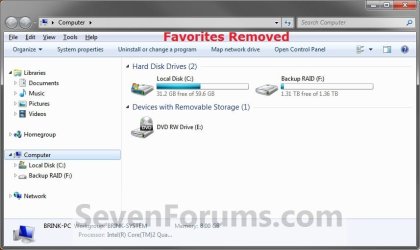
NOTE: This is the Favorites group added (default) (left screenshot below) and removed (right screenshot below) from the Navigation Pane.
Default.jpg

Removed.jpg

Here's How:
1. Open the Start Menu and type regedit.exe in the search line, then press enter.

2. If prompted by UAC, then click on Yes.

3. In Regedit, go to the location below: (See screenshot below step 4)
Code:
HKEY\CLASSES_ROOT\CLSID\{323CA680-C24D-4099-B94D-446DD2D7249E}\ShellFolder
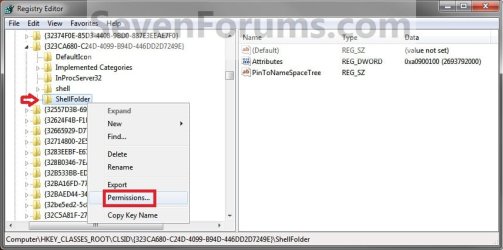
4. In the left pane of regedit, right click on the ShellFolder key and click on Permissions. (See screenshot below)
Step1.jpg
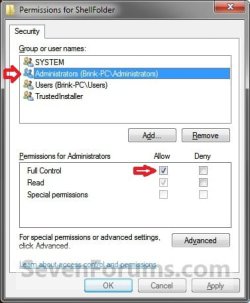
5. At the top, select the Administrators group. At the bottom, check the Allow box to the right of Full Control and click on OK. (See screenshot below)
Step2.jpg
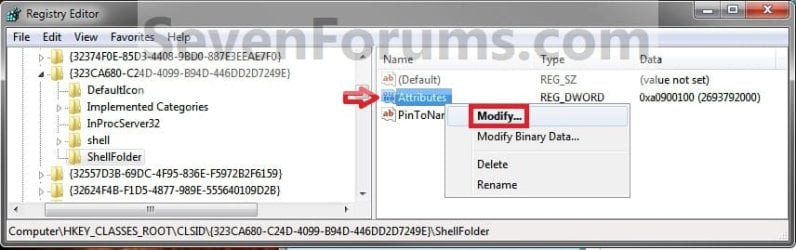
6. In the right pane of regedit, right click on Attributes and click on Modify. (See screenshot below)
Step3.jpg
7. To Add Favorites to the Navigation Pane
NOTE: This is the default setting.
A) Type in a0900100 and click on OK. (see screenshot below)
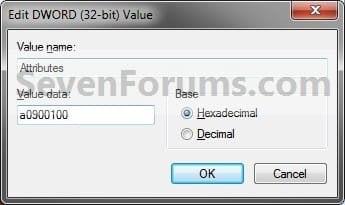
Step4.jpg
B) Go to step 9.
8. To Remove Favorites from the Navigation Pane
A) Type in a9400100 and click on OK. (see screenshot below)
Step5.jpg
9. If you have 64-bit Windows 7 Installed
   Note
CREDIT TO: Kookster for this addition.

To also add or remove Favorites from the "Open" and "Save as" type windows as well in 64-bit Windows 7, you will also need to do this step.

If you have a 32-bit Windows 7 installed, then skip this step since doing steps 1 to 7/8 will add or remove Favorites from the "Open" and "Save as" type windows as well.

A) In Regedit, go to the location below:
Code:
HKEY_LOCAL_MACHINE\SOFTWARE\Wow6432Node\Classes\CLSID\{323CA680-C24D-4099-B94D-446DD2D7249E}\ShellFolder
B) Repeat steps 4 to 7/8 above.
10. Close regedit.

11. Restart the computer to fully apply.
That's it,
Shawn


Last edited:
Brink,

as you can see from the attached screenshots my initial post remains correct:

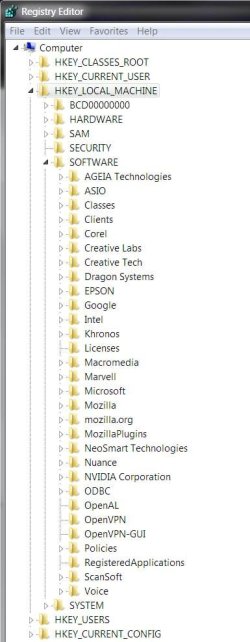
Capture is the 32 bit entry,

Capture.JPG

Capture 1 shows the registry tree where the missing registry location given in the tutorial should appear if it existed,

Capture1.JPG

Capture 2 is the 64 bit entry in HKEY_LOCAL_MACHINE\SOFTWARE\Classes\Wow6432Node\CLSID\{323CA680-C24D-4099-B94D-446DD2D7249E}\ShellFolder, which we have discussed earlier.

Capture2.JPG

I am still wondering if the version of Windows 7 one has is the reason for the different registries, as I said previously this is a new install of Windows 7 Home Premium.
 

My Computer My Computer

At a glance

Windows 7 X64I5 2500 K16 gig DDR 3 1600GTX 560 Ti
Computer Manufacturer/Model Number
Self made
OS
Windows 7 X64
CPU
I5 2500 K
Motherboard
ASRock Extreme 4
Memory
16 gig DDR 3 1600
Graphics Card(s)
GTX 560 Ti
Sound Card
Soundblaster X-Fi Titanium
Monitor(s) Displays
LG W2452T
Hard Drives
1 x Intel 120Gb SSD
4 x Seagate 2Tb HDD
1 x Seagate 250Gb HDD (Dual Boot Win XP)
PSU
Silverstone 850W
Case
Cooler Master HAF 922
Cooling
Antec Kuhler (Water)
Strange. Where did you get your copy of Windows 7 from? Is it some sort of modified version of Windows 7?

Does it still not remove Favorites from the navigation pane for you with those set, and even after restarting the computer?
 

My Computer My Computer

At a glance

64-bit Windows 11 Pro for WorkstationsIntel i7-8700K OC'd to 5 GHz64 GB (4x16GB) G.SKILL TridentZ RGB DDR4 3600...ASUS ROG-STRIX-GTX1080TI-O11G-GAMING
Computer type
PC/Desktop
Computer Manufacturer/Model Number
Self built custom
OS
64-bit Windows 11 Pro for Workstations
CPU
Intel i7-8700K OC'd to 5 GHz
Motherboard
ASUS ROG Maximus XI Formula Z390
Memory
64 GB (4x16GB) G.SKILL TridentZ RGB DDR4 3600 MHz
Graphics Card(s)
ASUS ROG-STRIX-GTX1080TI-O11G-GAMING
Sound Card
Integrated
Monitor(s) Displays
2 x Samsung Odyssey G7 27"
Screen Resolution
2560x1440
Hard Drives
1TB Samsung 990 PRO M.2,
4TB Samsung 990 PRO PRO M.2,
TerraMaster F8 SSD Plus NAS
PSU
Seasonic Prime Titanium 850W
Case
Thermaltake Core P3
Cooling
Corsair Hydro H115i
Keyboard
Logitech wireless K800
Mouse
Logitech MX Master 4
Internet Speed
2 Gb/s Download and 100 Mb/s Upload
Antivirus
Malwarebyte Anti-Malware Premium
Browser
Google Chrome
Other Info
Logitech Z625 speaker system,
Logitech BRIO 4K Pro webcam,
HP Color LaserJet Pro MFP M477fdn,
APC SMART-UPS RT 1000 XL - SURT1000XLI,
Galaxy S23 Plus phone
Brink,

I got it from a shop that sells Windows 7 and favorites still appears, the only modifications I have made to the registry are network related to improve speed and reduce logon requirements of LAN devices.

I did however check another PC I have and it has the registry entries described in the tutorial. I know registry entries can be merged, do you know if I can copy the entry from my other PC and merge it with my registry?
 

My Computer My Computer

At a glance

Windows 7 X64I5 2500 K16 gig DDR 3 1600GTX 560 Ti
Computer Manufacturer/Model Number
Self made
OS
Windows 7 X64
CPU
I5 2500 K
Motherboard
ASRock Extreme 4
Memory
16 gig DDR 3 1600
Graphics Card(s)
GTX 560 Ti
Sound Card
Soundblaster X-Fi Titanium
Monitor(s) Displays
LG W2452T
Hard Drives
1 x Intel 120Gb SSD
4 x Seagate 2Tb HDD
1 x Seagate 250Gb HDD (Dual Boot Win XP)
PSU
Silverstone 850W
Case
Cooler Master HAF 922
Cooling
Antec Kuhler (Water)
Before we try something as involved as that, try merging the REG file below to add the location below to the registry from step 9 to remove favorites. Afterwards, try the tutorial again to see if Favorites is gone.

HKEY_LOCAL_MACHINE\SOFTWARE\Wow6432Node\Classes\CLSID\{323CA680-C24D-4099-B94D-446DD2D7249E}
 

Attachments

My Computer My Computer

At a glance

64-bit Windows 11 Pro for WorkstationsIntel i7-8700K OC'd to 5 GHz64 GB (4x16GB) G.SKILL TridentZ RGB DDR4 3600...ASUS ROG-STRIX-GTX1080TI-O11G-GAMING
Computer type
PC/Desktop
Computer Manufacturer/Model Number
Self built custom
OS
64-bit Windows 11 Pro for Workstations
CPU
Intel i7-8700K OC'd to 5 GHz
Motherboard
ASUS ROG Maximus XI Formula Z390
Memory
64 GB (4x16GB) G.SKILL TridentZ RGB DDR4 3600 MHz
Graphics Card(s)
ASUS ROG-STRIX-GTX1080TI-O11G-GAMING
Sound Card
Integrated
Monitor(s) Displays
2 x Samsung Odyssey G7 27"
Screen Resolution
2560x1440
Hard Drives
1TB Samsung 990 PRO M.2,
4TB Samsung 990 PRO PRO M.2,
TerraMaster F8 SSD Plus NAS
PSU
Seasonic Prime Titanium 850W
Case
Thermaltake Core P3
Cooling
Corsair Hydro H115i
Keyboard
Logitech wireless K800
Mouse
Logitech MX Master 4
Internet Speed
2 Gb/s Download and 100 Mb/s Upload
Antivirus
Malwarebyte Anti-Malware Premium
Browser
Google Chrome
Other Info
Logitech Z625 speaker system,
Logitech BRIO 4K Pro webcam,
HP Color LaserJet Pro MFP M477fdn,
APC SMART-UPS RT 1000 XL - SURT1000XLI,
Galaxy S23 Plus phone
Brink,

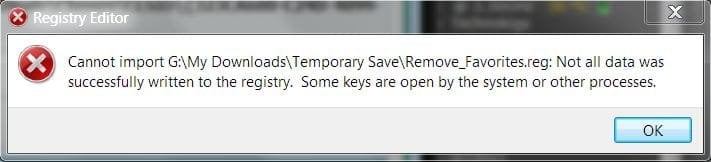
this was not as successful as we may have hoped:

Capture.JPG

in fact nothing was copied over, not even the directory structure. I tried again as the first thing I did after re-booting and still same response.

Can merges be done between POST and Windows start?
 

My Computer My Computer

At a glance

Windows 7 X64I5 2500 K16 gig DDR 3 1600GTX 560 Ti
Computer Manufacturer/Model Number
Self made
OS
Windows 7 X64
CPU
I5 2500 K
Motherboard
ASRock Extreme 4
Memory
16 gig DDR 3 1600
Graphics Card(s)
GTX 560 Ti
Sound Card
Soundblaster X-Fi Titanium
Monitor(s) Displays
LG W2452T
Hard Drives
1 x Intel 120Gb SSD
4 x Seagate 2Tb HDD
1 x Seagate 250Gb HDD (Dual Boot Win XP)
PSU
Silverstone 850W
Case
Cooler Master HAF 922
Cooling
Antec Kuhler (Water)
Shag00,

It seems that something is wrong with your installation if this key is not present. Other than doing a repair install of Windows 7, or a clean install, I'm not sure what else may fix this for you.

If this is your only issue, then you might not want to go to this extreme for just this issue though. :(
 

My Computer My Computer

At a glance

64-bit Windows 11 Pro for WorkstationsIntel i7-8700K OC'd to 5 GHz64 GB (4x16GB) G.SKILL TridentZ RGB DDR4 3600...ASUS ROG-STRIX-GTX1080TI-O11G-GAMING
Computer type
PC/Desktop
Computer Manufacturer/Model Number
Self built custom
OS
64-bit Windows 11 Pro for Workstations
CPU
Intel i7-8700K OC'd to 5 GHz
Motherboard
ASUS ROG Maximus XI Formula Z390
Memory
64 GB (4x16GB) G.SKILL TridentZ RGB DDR4 3600 MHz
Graphics Card(s)
ASUS ROG-STRIX-GTX1080TI-O11G-GAMING
Sound Card
Integrated
Monitor(s) Displays
2 x Samsung Odyssey G7 27"
Screen Resolution
2560x1440
Hard Drives
1TB Samsung 990 PRO M.2,
4TB Samsung 990 PRO PRO M.2,
TerraMaster F8 SSD Plus NAS
PSU
Seasonic Prime Titanium 850W
Case
Thermaltake Core P3
Cooling
Corsair Hydro H115i
Keyboard
Logitech wireless K800
Mouse
Logitech MX Master 4
Internet Speed
2 Gb/s Download and 100 Mb/s Upload
Antivirus
Malwarebyte Anti-Malware Premium
Browser
Google Chrome
Other Info
Logitech Z625 speaker system,
Logitech BRIO 4K Pro webcam,
HP Color LaserJet Pro MFP M477fdn,
APC SMART-UPS RT 1000 XL - SURT1000XLI,
Galaxy S23 Plus phone
Brink,

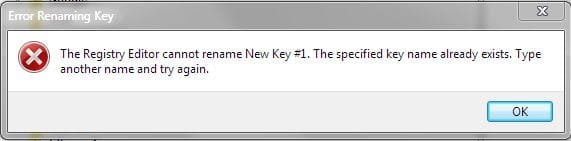
found something interesting, I tried to manually create a new key in HKEY_LOCAL_MACHINE\SOFTWARE, called wow6432Node and to my surprise I got this error message:

Capture.JPG

so it appears the key is there but not visible. I am able to create new keys with other names.
 

My Computer My Computer

At a glance

Windows 7 X64I5 2500 K16 gig DDR 3 1600GTX 560 Ti
Computer Manufacturer/Model Number
Self made
OS
Windows 7 X64
CPU
I5 2500 K
Motherboard
ASRock Extreme 4
Memory
16 gig DDR 3 1600
Graphics Card(s)
GTX 560 Ti
Sound Card
Soundblaster X-Fi Titanium
Monitor(s) Displays
LG W2452T
Hard Drives
1 x Intel 120Gb SSD
4 x Seagate 2Tb HDD
1 x Seagate 250Gb HDD (Dual Boot Win XP)
PSU
Silverstone 850W
Case
Cooler Master HAF 922
Cooling
Antec Kuhler (Water)
That sure is what it appears to be. I'm afraid that I do not know of any way to fix it other than a repair install though. :(
 

My Computer My Computer

At a glance

64-bit Windows 11 Pro for WorkstationsIntel i7-8700K OC'd to 5 GHz64 GB (4x16GB) G.SKILL TridentZ RGB DDR4 3600...ASUS ROG-STRIX-GTX1080TI-O11G-GAMING
Computer type
PC/Desktop
Computer Manufacturer/Model Number
Self built custom
OS
64-bit Windows 11 Pro for Workstations
CPU
Intel i7-8700K OC'd to 5 GHz
Motherboard
ASUS ROG Maximus XI Formula Z390
Memory
64 GB (4x16GB) G.SKILL TridentZ RGB DDR4 3600 MHz
Graphics Card(s)
ASUS ROG-STRIX-GTX1080TI-O11G-GAMING
Sound Card
Integrated
Monitor(s) Displays
2 x Samsung Odyssey G7 27"
Screen Resolution
2560x1440
Hard Drives
1TB Samsung 990 PRO M.2,
4TB Samsung 990 PRO PRO M.2,
TerraMaster F8 SSD Plus NAS
PSU
Seasonic Prime Titanium 850W
Case
Thermaltake Core P3
Cooling
Corsair Hydro H115i
Keyboard
Logitech wireless K800
Mouse
Logitech MX Master 4
Internet Speed
2 Gb/s Download and 100 Mb/s Upload
Antivirus
Malwarebyte Anti-Malware Premium
Browser
Google Chrome
Other Info
Logitech Z625 speaker system,
Logitech BRIO 4K Pro webcam,
HP Color LaserJet Pro MFP M477fdn,
APC SMART-UPS RT 1000 XL - SURT1000XLI,
Galaxy S23 Plus phone
Brink, an update - this whole area is as buggy as hell and I have spent many hours today trying to pin down what is actually happening and what is causing it.

From the top:
1. a brand new win 7 x64 install
2. only firefox, CCleaner, device drivers and windows updates installed on my machine
3. I still lost the wow6432node
4. after numerous system restores I finally managed to end up with no favourites and my wow6432node registry key intact
5. I did not need to alter the wow6432node key either

The fact that on numerous occasions doing the same thing gave different results is disconcerting (create system restore point, action, result//system restore, same action, different result) as is also the fact I did not need to change the wow6432node key.

My suspicion is that changing the locations of MY Documents/Downloads/Music/Pictures/Videos to a different drive is the root cause though after several attempts I cannot re-create the problem consistently. The problem is in here somewhere but as I have what I want I CBF to spend the hours necessary to dig out the proof.

My suggestion to anyone else with this problem is do not change the location of all of your MY XXX folders and to create a system restore point before every step.
 

My Computer My Computer

At a glance

Windows 7 X64I5 2500 K16 gig DDR 3 1600GTX 560 Ti
Computer Manufacturer/Model Number
Self made
OS
Windows 7 X64
CPU
I5 2500 K
Motherboard
ASRock Extreme 4
Memory
16 gig DDR 3 1600
Graphics Card(s)
GTX 560 Ti
Sound Card
Soundblaster X-Fi Titanium
Monitor(s) Displays
LG W2452T
Hard Drives
1 x Intel 120Gb SSD
4 x Seagate 2Tb HDD
1 x Seagate 250Gb HDD (Dual Boot Win XP)
PSU
Silverstone 850W
Case
Cooler Master HAF 922
Cooling
Antec Kuhler (Water)
Shag,

Thank you for posting back with your results. The wow6432node key is only for the smaller "Save as" type windows though in the 64-bit Windows 7.
 

My Computer My Computer

At a glance

64-bit Windows 11 Pro for WorkstationsIntel i7-8700K OC'd to 5 GHz64 GB (4x16GB) G.SKILL TridentZ RGB DDR4 3600...ASUS ROG-STRIX-GTX1080TI-O11G-GAMING
Computer type
PC/Desktop
Computer Manufacturer/Model Number
Self built custom
OS
64-bit Windows 11 Pro for Workstations
CPU
Intel i7-8700K OC'd to 5 GHz
Motherboard
ASUS ROG Maximus XI Formula Z390
Memory
64 GB (4x16GB) G.SKILL TridentZ RGB DDR4 3600 MHz
Graphics Card(s)
ASUS ROG-STRIX-GTX1080TI-O11G-GAMING
Sound Card
Integrated
Monitor(s) Displays
2 x Samsung Odyssey G7 27"
Screen Resolution
2560x1440
Hard Drives
1TB Samsung 990 PRO M.2,
4TB Samsung 990 PRO PRO M.2,
TerraMaster F8 SSD Plus NAS
PSU
Seasonic Prime Titanium 850W
Case
Thermaltake Core P3
Cooling
Corsair Hydro H115i
Keyboard
Logitech wireless K800
Mouse
Logitech MX Master 4
Internet Speed
2 Gb/s Download and 100 Mb/s Upload
Antivirus
Malwarebyte Anti-Malware Premium
Browser
Google Chrome
Other Info
Logitech Z625 speaker system,
Logitech BRIO 4K Pro webcam,
HP Color LaserJet Pro MFP M477fdn,
APC SMART-UPS RT 1000 XL - SURT1000XLI,
Galaxy S23 Plus phone
Checked again this morning and the wow6432node key has disappeared - very buggy.

Another update, went to do a system restore to start again and found that all the restore files including the ones I manually created yesterday have disappeared as well, fortunately a system image I created through Backup was still intact.

So for me the locations of the MY XXX files are staying in their default locations and Favourites are not being removed.

What I cannot understand is why many other people have not had this problem....
 
Last edited by a moderator:

My Computer My Computer

At a glance

Windows 7 X64I5 2500 K16 gig DDR 3 1600GTX 560 Ti
Computer Manufacturer/Model Number
Self made
OS
Windows 7 X64
CPU
I5 2500 K
Motherboard
ASRock Extreme 4
Memory
16 gig DDR 3 1600
Graphics Card(s)
GTX 560 Ti
Sound Card
Soundblaster X-Fi Titanium
Monitor(s) Displays
LG W2452T
Hard Drives
1 x Intel 120Gb SSD
4 x Seagate 2Tb HDD
1 x Seagate 250Gb HDD (Dual Boot Win XP)
PSU
Silverstone 850W
Case
Cooler Master HAF 922
Cooling
Antec Kuhler (Water)
Shag,

I must admit that I'm not sure why it's doing this to you. The only thing I can think of is that you may have something installed that may be messing with it.
 

My Computer My Computer

At a glance

64-bit Windows 11 Pro for WorkstationsIntel i7-8700K OC'd to 5 GHz64 GB (4x16GB) G.SKILL TridentZ RGB DDR4 3600...ASUS ROG-STRIX-GTX1080TI-O11G-GAMING
Computer type
PC/Desktop
Computer Manufacturer/Model Number
Self built custom
OS
64-bit Windows 11 Pro for Workstations
CPU
Intel i7-8700K OC'd to 5 GHz
Motherboard
ASUS ROG Maximus XI Formula Z390
Memory
64 GB (4x16GB) G.SKILL TridentZ RGB DDR4 3600 MHz
Graphics Card(s)
ASUS ROG-STRIX-GTX1080TI-O11G-GAMING
Sound Card
Integrated
Monitor(s) Displays
2 x Samsung Odyssey G7 27"
Screen Resolution
2560x1440
Hard Drives
1TB Samsung 990 PRO M.2,
4TB Samsung 990 PRO PRO M.2,
TerraMaster F8 SSD Plus NAS
PSU
Seasonic Prime Titanium 850W
Case
Thermaltake Core P3
Cooling
Corsair Hydro H115i
Keyboard
Logitech wireless K800
Mouse
Logitech MX Master 4
Internet Speed
2 Gb/s Download and 100 Mb/s Upload
Antivirus
Malwarebyte Anti-Malware Premium
Browser
Google Chrome
Other Info
Logitech Z625 speaker system,
Logitech BRIO 4K Pro webcam,
HP Color LaserJet Pro MFP M477fdn,
APC SMART-UPS RT 1000 XL - SURT1000XLI,
Galaxy S23 Plus phone
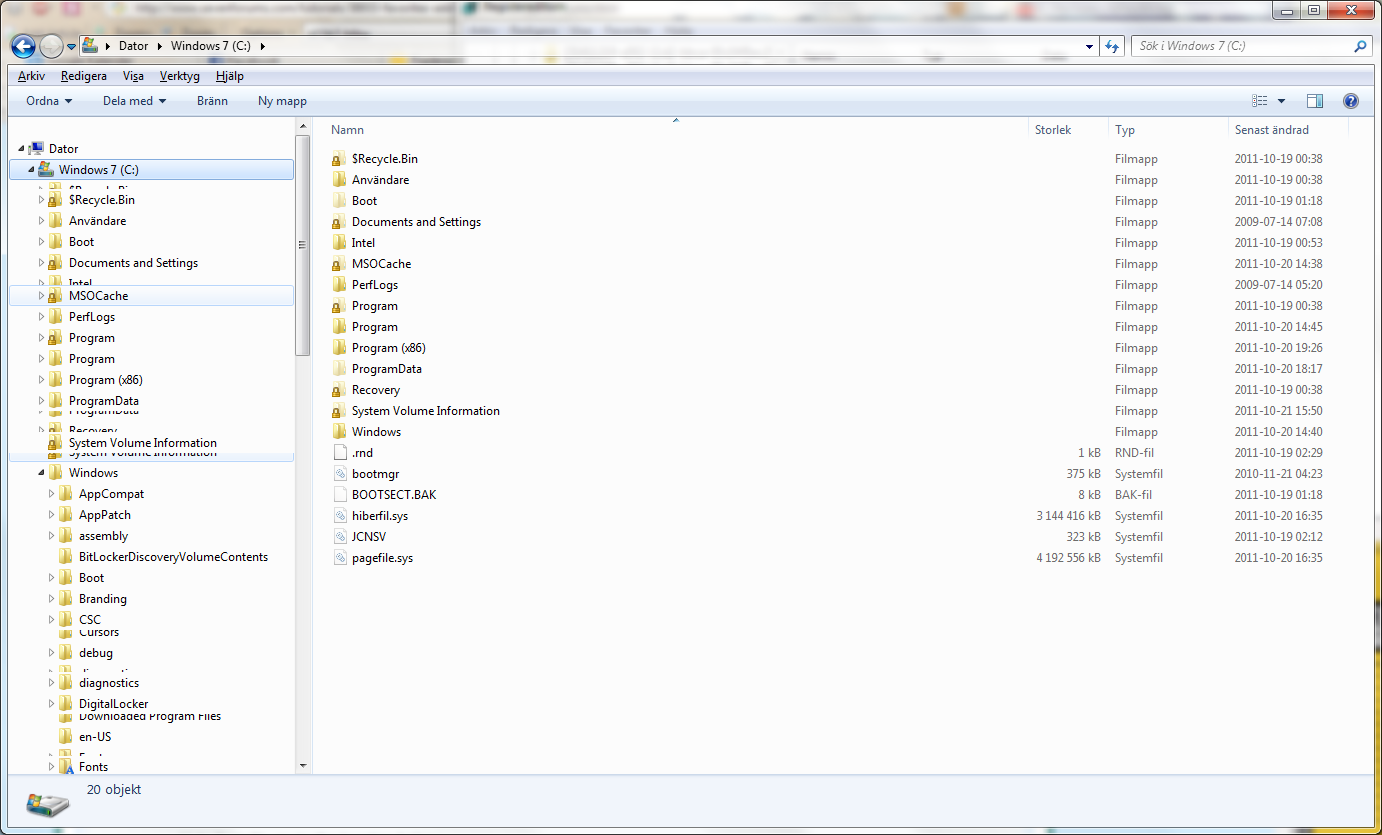
Am I the only one getting this error (after applying this "hack") when hovering over items in explorers navigation pane?
Before applying this "hack" I successfully removed both Libraries (URL) and Home Group (URL)
I have tried this on a couple different computers and different installation disc, no luck ):
ygCeA.png
 

My Computer My Computer

At a glance

Microsoft Windows 7 Ultimate SP1 x64
OS
Microsoft Windows 7 Ultimate SP1 x64
Hello Trasman, and welcome to Seven Forums.

If you are referring to the bits of jumbled lines in the navigation pane, then that appears to be some sort of issue with your video driver instead. You might see if restarting the computer may help. If not, uninstall and reinstall a new copy of your video driver.
 

My Computer My Computer

At a glance

64-bit Windows 11 Pro for WorkstationsIntel i7-8700K OC'd to 5 GHz64 GB (4x16GB) G.SKILL TridentZ RGB DDR4 3600...ASUS ROG-STRIX-GTX1080TI-O11G-GAMING
Computer type
PC/Desktop
Computer Manufacturer/Model Number
Self built custom
OS
64-bit Windows 11 Pro for Workstations
CPU
Intel i7-8700K OC'd to 5 GHz
Motherboard
ASUS ROG Maximus XI Formula Z390
Memory
64 GB (4x16GB) G.SKILL TridentZ RGB DDR4 3600 MHz
Graphics Card(s)
ASUS ROG-STRIX-GTX1080TI-O11G-GAMING
Sound Card
Integrated
Monitor(s) Displays
2 x Samsung Odyssey G7 27"
Screen Resolution
2560x1440
Hard Drives
1TB Samsung 990 PRO M.2,
4TB Samsung 990 PRO PRO M.2,
TerraMaster F8 SSD Plus NAS
PSU
Seasonic Prime Titanium 850W
Case
Thermaltake Core P3
Cooling
Corsair Hydro H115i
Keyboard
Logitech wireless K800
Mouse
Logitech MX Master 4
Internet Speed
2 Gb/s Download and 100 Mb/s Upload
Antivirus
Malwarebyte Anti-Malware Premium
Browser
Google Chrome
Other Info
Logitech Z625 speaker system,
Logitech BRIO 4K Pro webcam,
HP Color LaserJet Pro MFP M477fdn,
APC SMART-UPS RT 1000 XL - SURT1000XLI,
Galaxy S23 Plus phone
Brink said:
Hello Trasman, and welcome to Seven Forums.

If you are referring to the bits of jumbled lines in the navigation pane, then that appears to be some sort of issue with your video driver instead. You might see if restarting the computer may help. If not, uninstall and reinstall a new copy of your video driver.
Yes thats the bit I'm referring to.
Everything worked like a charm before so a videodriver issue doesn't sound possible. And the same issue happen on other computer I installed this on. Maybe this "hack" doesn't work to well with the other "hacks" I've applied. Going to try remove them and see if it solves the case.
 

My Computer My Computer

At a glance

Microsoft Windows 7 Ultimate SP1 x64
OS
Microsoft Windows 7 Ultimate SP1 x64
I can't speak for the other site's method, but I never had a issue like that using the one here. Please let us know how it goes.

It's still worth a try about the video issue though since that does appear to be a video glitch. As a test to see if it's a video glitch, does moving the window, highlighting the affected area, or scrolling in the navigation pane to move the jumbled bits clear the jumbled bits? If so, then it's a video glitch.
 

My Computer My Computer

At a glance

64-bit Windows 11 Pro for WorkstationsIntel i7-8700K OC'd to 5 GHz64 GB (4x16GB) G.SKILL TridentZ RGB DDR4 3600...ASUS ROG-STRIX-GTX1080TI-O11G-GAMING
Computer type
PC/Desktop
Computer Manufacturer/Model Number
Self built custom
OS
64-bit Windows 11 Pro for Workstations
CPU
Intel i7-8700K OC'd to 5 GHz
Motherboard
ASUS ROG Maximus XI Formula Z390
Memory
64 GB (4x16GB) G.SKILL TridentZ RGB DDR4 3600 MHz
Graphics Card(s)
ASUS ROG-STRIX-GTX1080TI-O11G-GAMING
Sound Card
Integrated
Monitor(s) Displays
2 x Samsung Odyssey G7 27"
Screen Resolution
2560x1440
Hard Drives
1TB Samsung 990 PRO M.2,
4TB Samsung 990 PRO PRO M.2,
TerraMaster F8 SSD Plus NAS
PSU
Seasonic Prime Titanium 850W
Case
Thermaltake Core P3
Cooling
Corsair Hydro H115i
Keyboard
Logitech wireless K800
Mouse
Logitech MX Master 4
Internet Speed
2 Gb/s Download and 100 Mb/s Upload
Antivirus
Malwarebyte Anti-Malware Premium
Browser
Google Chrome
Other Info
Logitech Z625 speaker system,
Logitech BRIO 4K Pro webcam,
HP Color LaserJet Pro MFP M477fdn,
APC SMART-UPS RT 1000 XL - SURT1000XLI,
Galaxy S23 Plus phone
Am I the only one getting this error (after applying this "hack") when hovering over items in explorers navigation pane?
Before applying this "hack" I successfully removed both Libraries (URL) and Home Group (URL)
I have tried this on a couple different computers and different installation disc, no luck ):
ygCeA.png

Yes, I had the same problem and fixed it by restoring the original registry values.
 

My Computer My Computer

At a glance

Windows 7 Home Basic
OS
Windows 7 Home Basic
how to transform this tutorial into a .reg file

hallo folks,

i wonder if its possible to transform given information into a .reg file for fastest possible registry patching. i never wrote a .reg file for windows 7 before but i think its most important to include "permissions" changes. i dont know whether its possible at all.
 

My Computer My Computer

At a glance

win 7 x64i7 920@3,83x2GB OCZ3P1333LVA6GKGTX 470 SOC
OS
win 7 x64
CPU
i7 920@3,8
Motherboard
GA-X58A-UD5
Memory
3x2GB OCZ3P1333LVA6GK
Graphics Card(s)
GTX 470 SOC
Sound Card
onboard
Monitor(s) Displays
iiyama ProLite E2403WS
Screen Resolution
1920x1200
Hard Drives
1 SSD
2x2TB HDD
PSU
MODU 87+ (620W)
Case
none
Cooling
all on air..
Keyboard
eVolution Barracuda XT 745
Mouse
Diamondback
Internet Speed
100MBit down
Hello Leitz,

Unfortunately, a REG file would not work for this since you have to do steps 4 and 5 to "Allow" your user account "Full Control" of the registry key before you will be able to make any changes to it. If you try and do this with a REG file before doing that, you would just get an error and the REG file would not be applied.
 

My Computer My Computer

At a glance

64-bit Windows 11 Pro for WorkstationsIntel i7-8700K OC'd to 5 GHz64 GB (4x16GB) G.SKILL TridentZ RGB DDR4 3600...ASUS ROG-STRIX-GTX1080TI-O11G-GAMING
Computer type
PC/Desktop
Computer Manufacturer/Model Number
Self built custom
OS
64-bit Windows 11 Pro for Workstations
CPU
Intel i7-8700K OC'd to 5 GHz
Motherboard
ASUS ROG Maximus XI Formula Z390
Memory
64 GB (4x16GB) G.SKILL TridentZ RGB DDR4 3600 MHz
Graphics Card(s)
ASUS ROG-STRIX-GTX1080TI-O11G-GAMING
Sound Card
Integrated
Monitor(s) Displays
2 x Samsung Odyssey G7 27"
Screen Resolution
2560x1440
Hard Drives
1TB Samsung 990 PRO M.2,
4TB Samsung 990 PRO PRO M.2,
TerraMaster F8 SSD Plus NAS
PSU
Seasonic Prime Titanium 850W
Case
Thermaltake Core P3
Cooling
Corsair Hydro H115i
Keyboard
Logitech wireless K800
Mouse
Logitech MX Master 4
Internet Speed
2 Gb/s Download and 100 Mb/s Upload
Antivirus
Malwarebyte Anti-Malware Premium
Browser
Google Chrome
Other Info
Logitech Z625 speaker system,
Logitech BRIO 4K Pro webcam,
HP Color LaserJet Pro MFP M477fdn,
APC SMART-UPS RT 1000 XL - SURT1000XLI,
Galaxy S23 Plus phone
Hi again.
New computer and a fresh install of Windows 7 Ultimate Swedish. Same problem. Guess I have to live with the favorites i the navigation pane.
 

My Computer My Computer

At a glance

Microsoft Windows 7 Ultimate SP1 x64
OS
Microsoft Windows 7 Ultimate SP1 x64
Back
Top