C: drive full. Vista-7 upgrade/dual partition

justicefire1084

New member
Local time
1:10 PM
Messages
2
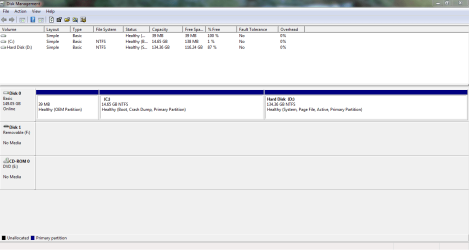
My brother-in-law purchased a laptop for my wife a last Christmas (2010). The laptop came with Vista and he had Geek Squad "upgrade" to 7. However, instead the did a dual install with Vista and 7. I've had problems ever since. First, the D: Recovery drive filled up rather quickly. I some how managed to fix that. I don't remember what I did, but I managed to free up the space on D: and the C: drive then became 1/2 full. Now the C: only has 1% left. I have nothing installed on the C: except my dj software and the normal adobe, flash, etc. HELP!!! How can I fix this problem so I can actually use my computer. Also, my brother-in-law thought he was going to fix it, and some how deleted access to Vista. I can't access Vista anymore from the boot screen, but Vista still shows up. I was in some kind of diag screen with the "7" upgrade disc, and saw that Vista is still installed on the C:. Can this be fixed or should I just buy a new computer?
 

My Computer My Computer

At a glance

windows 7 home 32bit
OS
windows 7 home 32bit
here is a screen shot of disk management

Capture.PNG
 

My Computer My Computer

At a glance

windows 7 home 32bit
OS
windows 7 home 32bit

My Computer My Computer

At a glance

Vista, Windows7, Mint Mate, Zorin, Windows 8from 1.6GHz Duo to i7
Computer Manufacturer/Model Number
HP, Dell, Gateway, Toshiba - 4 laptops and 2 desktops
OS
Vista, Windows7, Mint Mate, Zorin, Windows 8
CPU
from 1.6GHz Duo to i7
Monitor(s) Displays
2x HP w2207
Hard Drives
5x HDD, 7x SSD, 12x Externals
Keyboard
with trackball - no mices
Mouse
Trackball mice
Internet Speed
DSL 6000
If you want get rid of Vista and reclaim the space, here is how: http://www.sevenforums.com/tutorials/210983-dual-boot-delete-os.html

Read this carefully. Your Vista partition has the bootmgr that you have to copy to the C partition. But the tutorial explains that.

Wow! My head is spinning from reading about this.

I have the same predicament, Vista installed, upgraded to Windows 7.

Went fine, then I tried installing some apps, got the message no disk space.

Checked it out. Looked at My Computer, C drive is 10 GB and only has 25.4 MB available.

D drive is 220 GB and has 153 GB free.

Is there an easy way to fix this? I am thinking format the computer, and then install Windows 7.
 

My Computer My Computer

At a glance

Windows XP Pro
Computer Manufacturer/Model Number
Dell laptop D610
OS
Windows XP Pro
Please post back a screenshot of your maximized Disk Mgmt drive map with listings, using the Snipping Tool in Start menu.

Would you like to delete D and extend C into the space, or shrink D and extend C?
 
Back
Top