
Switching To SSD Questions

The boot files need to be on the SSD drive for Windows to boot to it.

The startup repair should fix it so why the reluctance to try it?
 

My Computer My Computer

Computer Manufacturer/Model Number
HP Pavilion Elite 495UK
OS
Windows 7 Ultimate SP1 64-Bit
CPU
Intel Core i7 870 @ 2.93GHz
Motherboard
MSI 2A9C (CPU1)
Memory
8Gb Dual-Channel DDR3 @ 664MHz
Graphics Card(s)
nVidia GeForce GTX 460 1024MB dedicated RAM
Sound Card
Realtek HD Audio
Monitor(s) Displays
HP2310i
Screen Resolution
1920 x 1080
Hard Drives
1x1954GB Hitachi HDS22020ALA 330 (RAID), 1x1954GB Hitachi External for backup and storage
PSU
460W
Case
HP Elite
Cooling
Air cooled
Keyboard
Logitech K750 solar-powered keyboard
Mouse
Logitech Wireless M180 mouse
Internet Speed
2Mb
Other Info
Pure Avanti Flow Internet Radio with iPod Dock, 64Gb iPod, HP USB Speakers, Sony MDR-V500 Headphones, Sony Vaio F-Series Laptop
The boot files need to be on the SSD drive for Windows to boot to it.

The startup repair should fix it so why the reluctance to try it?

There's reluctance because I have no clue...

This is what confuses me; Where are these boot-files? On the C-drive right?
So, when I've copied the C-drive exactly, shouldn't they be on the SSD after a direct copy exactly like on the original?

Or are these boot-files floating in between drives somewhere?


This is how it's in my head, the system is installed on the C-drive. So when there's an exact replica of that data, that partition, on a different drive, it should do the same with that.
But I'm not trying to make my own assumption true of course, I am trying to find some clarity. Not just following a guide not being sure what I'm doing, not being sure IF I'm fixing/doing the thing I should be fixing/doing.


By the way, I must add, I did a direct copy with EASEUS, during which it rebooted, started Windows and before going in, like with CHKDSK and boot-time-defragging and such things, so without any system-files in use, it carefully made a copy of the partition. This was not a copy/paste-thing in Explorer or anything.
But again, it's not like I even seemed to have tested to boot from the new drive yet, so I'd like to know how I even can, if that's the thing to do.
 

My Computer My Computer

OS
Windows 7 Ultimate 64bit
Make sure the SSD is the only drive connected, give it drive letter C, make sure it has the active flag and run the startup repair.
 

My Computer My Computer

Computer Manufacturer/Model Number
HP Pavilion Elite 495UK
OS
Windows 7 Ultimate SP1 64-Bit
CPU
Intel Core i7 870 @ 2.93GHz
Motherboard
MSI 2A9C (CPU1)
Memory
8Gb Dual-Channel DDR3 @ 664MHz
Graphics Card(s)
nVidia GeForce GTX 460 1024MB dedicated RAM
Sound Card
Realtek HD Audio
Monitor(s) Displays
HP2310i
Screen Resolution
1920 x 1080
Hard Drives
1x1954GB Hitachi HDS22020ALA 330 (RAID), 1x1954GB Hitachi External for backup and storage
PSU
460W
Case
HP Elite
Cooling
Air cooled
Keyboard
Logitech K750 solar-powered keyboard
Mouse
Logitech Wireless M180 mouse
Internet Speed
2Mb
Other Info
Pure Avanti Flow Internet Radio with iPod Dock, 64Gb iPod, HP USB Speakers, Sony MDR-V500 Headphones, Sony Vaio F-Series Laptop
OK, but to give it letter C, do I first simply change the current C into another so that C is free for the partition on the SSD?
After that of course turn off the system and disconnect the other drive(s)?

Or should it be able to boot on the SSD alone no matter what letter?...
 

My Computer My Computer

OS
Windows 7 Ultimate 64bit
If you can remap the old drive it will release drive letter C for the SSD.

You can disconnect the old drive then run the startup repair. Windows will look for drive letter C on the SSD.
 

My Computer My Computer

Computer Manufacturer/Model Number
HP Pavilion Elite 495UK
OS
Windows 7 Ultimate SP1 64-Bit
CPU
Intel Core i7 870 @ 2.93GHz
Motherboard
MSI 2A9C (CPU1)
Memory
8Gb Dual-Channel DDR3 @ 664MHz
Graphics Card(s)
nVidia GeForce GTX 460 1024MB dedicated RAM
Sound Card
Realtek HD Audio
Monitor(s) Displays
HP2310i
Screen Resolution
1920 x 1080
Hard Drives
1x1954GB Hitachi HDS22020ALA 330 (RAID), 1x1954GB Hitachi External for backup and storage
PSU
460W
Case
HP Elite
Cooling
Air cooled
Keyboard
Logitech K750 solar-powered keyboard
Mouse
Logitech Wireless M180 mouse
Internet Speed
2Mb
Other Info
Pure Avanti Flow Internet Radio with iPod Dock, 64Gb iPod, HP USB Speakers, Sony MDR-V500 Headphones, Sony Vaio F-Series Laptop
So, by that you mean, I do just go into Disk Management and change the old C to something else?

Because I was thinking that it would just instantly... well, crash basically, as it couldn't find the whole system-directory anymore of course.
Or would this only be changed on reboot since I'd be messing with the system-drive?
 

My Computer My Computer

OS
Windows 7 Ultimate 64bit

My Computer My Computer

Computer Manufacturer/Model Number
HP Pavilion Elite 495UK
OS
Windows 7 Ultimate SP1 64-Bit
CPU
Intel Core i7 870 @ 2.93GHz
Motherboard
MSI 2A9C (CPU1)
Memory
8Gb Dual-Channel DDR3 @ 664MHz
Graphics Card(s)
nVidia GeForce GTX 460 1024MB dedicated RAM
Sound Card
Realtek HD Audio
Monitor(s) Displays
HP2310i
Screen Resolution
1920 x 1080
Hard Drives
1x1954GB Hitachi HDS22020ALA 330 (RAID), 1x1954GB Hitachi External for backup and storage
PSU
460W
Case
HP Elite
Cooling
Air cooled
Keyboard
Logitech K750 solar-powered keyboard
Mouse
Logitech Wireless M180 mouse
Internet Speed
2Mb
Other Info
Pure Avanti Flow Internet Radio with iPod Dock, 64Gb iPod, HP USB Speakers, Sony MDR-V500 Headphones, Sony Vaio F-Series Laptop
You are over-complicating this.

You will never know if you succeeded if you have 2 drives connected.

Disconnect the old drive.

Does the PC then boot? Yes or no.

If yes, it's booting from the SSD since the SSD is the only drive connected.

If no, either do the clone again or try System Repair.
 

My Computer My Computer

Computer type
PC/Desktop
Computer Manufacturer/Model Number
Ignatz Special; 4 speed manual gearbox; factory air conditioning; one of one
OS
Windows 7 Home Premium SP1, 64-bit
CPU
Intel Skylake i5-6600K, not overclocked
Motherboard
AsRock Z170M Extreme 4, micro ATX
Memory
8 GB HyperX DDR4-2666 (2 x 4 GB)
Graphics Card(s)
none; graphics are integrated on CPU
Sound Card
onboard: Realtek ALC1150; external: USB Behringer UF0-202
Monitor(s) Displays
Dell S2340M 23 inch IPS
Screen Resolution
1600 x 900
Hard Drives
System: Crucial MX100 series SSD, 128 GB;
Data: Samsung Spinpoint 103SJ, 1 TB;
Backup: WD Caviar Green WD30EZRX-00D8PB0, 3 TB
PSU
Rosewill SilentNight 500 watt fanless, semi-modular
Case
Antec Solo II
Cooling
Noctua NH-U12S; Noctua F12 intake, Noctua S12A exhaust
Keyboard
Microsoft 200 6JH-00001 USB
Mouse
Dell or Microsoft optical wired; USB
Antivirus
Microsoft Security Essentials and Malwarebytes Premium
Browser
Pale Moon
Other Info
All fans PWM; speeds at idle: CPU circa 500 rpm; intake circa 600 rpm; exhaust circa 600 rpm; CPU temps 27 idle and 47 C load in a warm room (27 C/81 F) when running Intel Extreme Tuning Utility stress test.
You are over-complicating this.

You will never know if you succeeded if you have 2 drives connected.

Disconnect the old drive.

Does the PC then boot? Yes or no.

If yes, it's booting from the SSD since the SSD is the only drive connected.

If no, either do the clone again or try System Repair.

OK, see, I do not know these basic things. I just thought it HAD to have the C-letter or it wouldn't have the ability to boot anyway.

I'll try to copy it again and instantly try to boot with it on its own.

By the way, I don't need to change anything in the BIOS since it's an SSD?
I read something about changing the IDE-setting... But not sure if it was necessary.


Partition Wizard really is your best bet to sort out your partitioning needs.

Free Partition Magic alternative. Free Partition Manager Software for Windows 7/VISTA/XP/2000 and Windows Server 2003/2008/2000.

Once you've downloaded the ISO and burned it to disc you can boot into it and sort your drives out.

Just make any changes you need when you've booted into PW, apply the changes, and then boot back into Windows on completion.

Then I'll try this afterwards, cause it sounds really handy.

Thanks for your patience with my incompetence on this. XD
 

My Computer My Computer

OS
Windows 7 Ultimate 64bit
Thanks for that ignatzatsonic, it confirms what we've been asking the OP to do, but there seems to be some reluctance to do it.
 

My Computer My Computer

Computer Manufacturer/Model Number
HP Pavilion Elite 495UK
OS
Windows 7 Ultimate SP1 64-Bit
CPU
Intel Core i7 870 @ 2.93GHz
Motherboard
MSI 2A9C (CPU1)
Memory
8Gb Dual-Channel DDR3 @ 664MHz
Graphics Card(s)
nVidia GeForce GTX 460 1024MB dedicated RAM
Sound Card
Realtek HD Audio
Monitor(s) Displays
HP2310i
Screen Resolution
1920 x 1080
Hard Drives
1x1954GB Hitachi HDS22020ALA 330 (RAID), 1x1954GB Hitachi External for backup and storage
PSU
460W
Case
HP Elite
Cooling
Air cooled
Keyboard
Logitech K750 solar-powered keyboard
Mouse
Logitech Wireless M180 mouse
Internet Speed
2Mb
Other Info
Pure Avanti Flow Internet Radio with iPod Dock, 64Gb iPod, HP USB Speakers, Sony MDR-V500 Headphones, Sony Vaio F-Series Laptop
You are over-complicating this.

You will never know if you succeeded if you have 2 drives connected.

Disconnect the old drive.

Does the PC then boot? Yes or no.

If yes, it's booting from the SSD since the SSD is the only drive connected.

If no, either do the clone again or try System Repair.

OK, see, I do not know these basic things. I just thought it HAD to have the C-letter or it wouldn't have the ability to boot anyway.

I'll try to copy it again and instantly try to boot with it on its own.

By the way, I don't need to change anything in the BIOS since it's an SSD?
I read something about changing the IDE-setting... But not sure if it was necessary.


Partition Wizard really is your best bet to sort out your partitioning needs.

Free Partition Magic alternative. Free Partition Manager Software for Windows 7/VISTA/XP/2000 and Windows Server 2003/2008/2000.

Once you've downloaded the ISO and burned it to disc you can boot into it and sort your drives out.

Just make any changes you need when you've booted into PW, apply the changes, and then boot back into Windows on completion.

Then I'll try this afterwards, cause it sounds really handy.

Thanks for your patience with my incompetence on this. XD

Your BIOS needs to be set to AHCI for your SSD and not IDE, because IDE will impact on the drive's performance.
 

My Computer My Computer

Computer Manufacturer/Model Number
HP Pavilion Elite 495UK
OS
Windows 7 Ultimate SP1 64-Bit
CPU
Intel Core i7 870 @ 2.93GHz
Motherboard
MSI 2A9C (CPU1)
Memory
8Gb Dual-Channel DDR3 @ 664MHz
Graphics Card(s)
nVidia GeForce GTX 460 1024MB dedicated RAM
Sound Card
Realtek HD Audio
Monitor(s) Displays
HP2310i
Screen Resolution
1920 x 1080
Hard Drives
1x1954GB Hitachi HDS22020ALA 330 (RAID), 1x1954GB Hitachi External for backup and storage
PSU
460W
Case
HP Elite
Cooling
Air cooled
Keyboard
Logitech K750 solar-powered keyboard
Mouse
Logitech Wireless M180 mouse
Internet Speed
2Mb
Other Info
Pure Avanti Flow Internet Radio with iPod Dock, 64Gb iPod, HP USB Speakers, Sony MDR-V500 Headphones, Sony Vaio F-Series Laptop
There's reluctance because I have no clue...
That is what you said and I think you are right. You do not understand the concept. So let me explain:

When you turn the PC on, the BIOS loads from the motherboard. That BIOS looks for the MBR (Master Boot Record) on the disk that you have designated as boot disk. The MBR is always in the first 512 bytes of any disk, so the BIOS knows where to look.

In the MBR, there is a pointer to the 'active' partition. There can only be one active partition on each disk. This active partition contains the bootmgr. It can be the same partition as the one that contains the OS (e.g. C:\), but it can also be any other partition with any letter or no letter at all. It is even possible that the active partition and the partition containing the OS reside on different disks.

That bootmgr contains the BCD (Boot Configuration Data) - and there can be several BCDs in case you have a double boot or triple boot system. But even in that case, there is only one bootmgr. The BCD with the help of a few other components (ntldr, winload) pull the OS in starting with the kernel, the hal.dll and the registry hive.

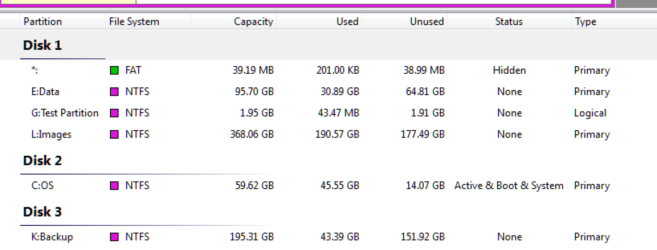
Now how does that help you with your problem? You have to first find out which partition is the active partition - that's where the bootmgr is. If it is not the OS partition on your SSD, then you have a problem. It can be fixed but depending on the configuration it may require different steps.

For an analysis of your configuration, I suggest you load Free Download Magic Partition Manager Software - Partition Wizard Online and take a picture of the screen where all this is visible:
 

Attachments

  • 2012-03-17_1424.png
    2012-03-17_1424.png
    29.3 KB · Views: 13

My Computer My Computer

Computer Manufacturer/Model Number
HP, Dell, Gateway, Toshiba - 4 laptops and 2 desktops
OS
Vista, Windows7, Mint Mate, Zorin, Windows 8
CPU
from 1.6GHz Duo to i7
Monitor(s) Displays
2x HP w2207
Hard Drives
5x HDD, 7x SSD, 12x Externals
Keyboard
with trackball - no mices
Mouse
Trackball mice
Internet Speed
DSL 6000
Back
Top