Favorites - Add or Remove from Navigation Pane

How to Add or Remove Favorites from Navigation Pane in Windows 7


   Information
This tutorial will show you how to add or remove the Favorites folder in the Windows Explorer Navigation Pane in Windows 7.

   Tip
The default folder for Favorites is the Links folder located at the location below.

C:\Users\(user-name)\Links


   Warning

  • You can only do this while logged into an administrator account.
  • This will affect all user account's on the computer.
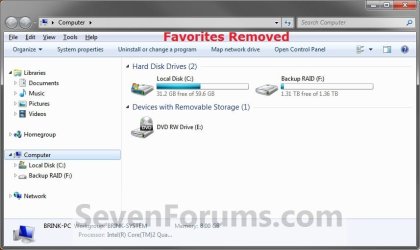
EXAMPLE: Favorites in Navigation Pane
NOTE: This is the Favorites group added (default) (left screenshot below) and removed (right screenshot below) from the Navigation Pane.
Default.jpg

Removed.jpg

Here's How:
1. Open the Start Menu and type regedit.exe in the search line, then press enter.

2. If prompted by UAC, then click on Yes.

3. In Regedit, go to the location below: (See screenshot below step 4)
Code:
HKEY\CLASSES_ROOT\CLSID\{323CA680-C24D-4099-B94D-446DD2D7249E}\ShellFolder
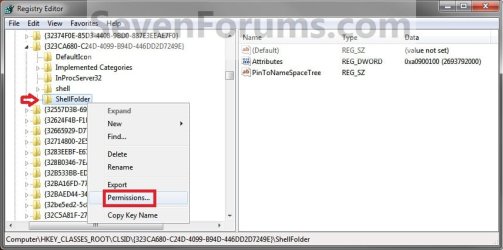
4. In the left pane of regedit, right click on the ShellFolder key and click on Permissions. (See screenshot below)
Step1.jpg
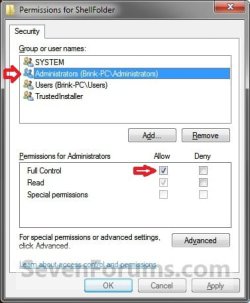
5. At the top, select the Administrators group. At the bottom, check the Allow box to the right of Full Control and click on OK. (See screenshot below)
Step2.jpg
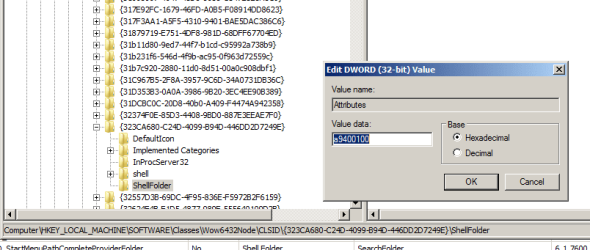
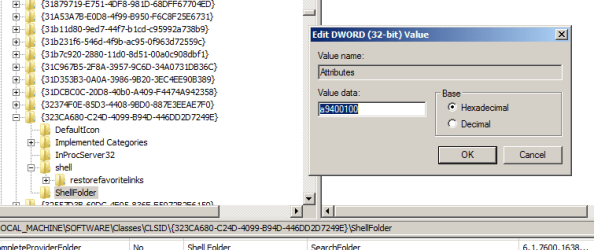
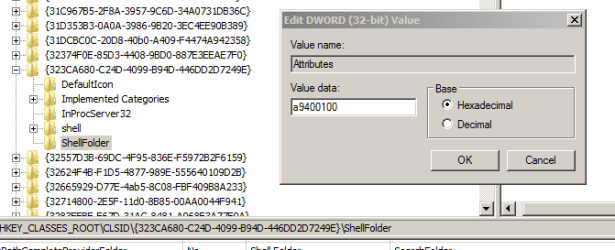
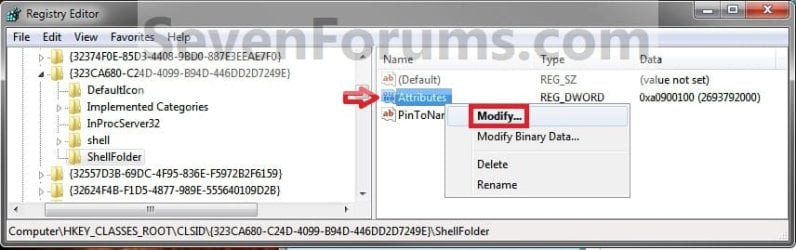
6. In the right pane of regedit, right click on Attributes and click on Modify. (See screenshot below)
Step3.jpg
7. To Add Favorites to the Navigation Pane
NOTE: This is the default setting.
A) Type in a0900100 and click on OK. (see screenshot below)
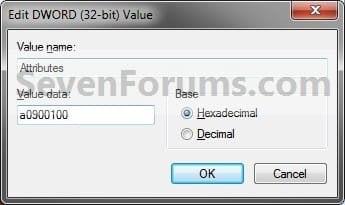
Step4.jpg
B) Go to step 9.
8. To Remove Favorites from the Navigation Pane
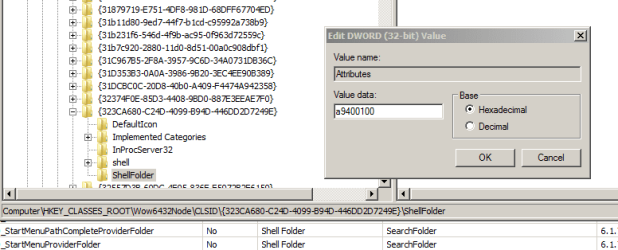
A) Type in a9400100 and click on OK. (see screenshot below)
Step5.jpg
9. If you have 64-bit Windows 7 Installed
   Note
CREDIT TO: Kookster for this addition.

To also add or remove Favorites from the "Open" and "Save as" type windows as well in 64-bit Windows 7, you will also need to do this step.

If you have a 32-bit Windows 7 installed, then skip this step since doing steps 1 to 7/8 will add or remove Favorites from the "Open" and "Save as" type windows as well.

A) In Regedit, go to the location below:
Code:
HKEY_LOCAL_MACHINE\SOFTWARE\Wow6432Node\Classes\CLSID\{323CA680-C24D-4099-B94D-446DD2D7249E}\ShellFolder
B) Repeat steps 4 to 7/8 above.
10. Close regedit.

11. Restart the computer to fully apply.
That's it,
Shawn


Last edited:
Hi again.
New computer and a fresh install of Windows 7 Ultimate Swedish. Same problem. Guess I have to live with the favorites i the navigation pane.

Hello Trasman,

Did you only use the method in the tutorial here step by step this time?

Could you post screenshots of your registry showing the settings in the tutorial?
 

My Computer My Computer

At a glance

64-bit Windows 11 Pro for WorkstationsIntel i7-8700K OC'd to 5 GHz64 GB (4x16GB) G.SKILL TridentZ RGB DDR4 3600...ASUS ROG-STRIX-GTX1080TI-O11G-GAMING
Computer type
PC/Desktop
Computer Manufacturer/Model Number
Self built custom
OS
64-bit Windows 11 Pro for Workstations
CPU
Intel i7-8700K OC'd to 5 GHz
Motherboard
ASUS ROG Maximus XI Formula Z390
Memory
64 GB (4x16GB) G.SKILL TridentZ RGB DDR4 3600 MHz
Graphics Card(s)
ASUS ROG-STRIX-GTX1080TI-O11G-GAMING
Sound Card
Integrated
Monitor(s) Displays
2 x Samsung Odyssey G7 27"
Screen Resolution
2560x1440
Hard Drives
1TB Samsung 990 PRO M.2,
4TB Samsung 990 PRO PRO M.2,
TerraMaster F8 SSD Plus NAS
PSU
Seasonic Prime Titanium 850W
Case
Thermaltake Core P3
Cooling
Corsair Hydro H115i
Keyboard
Logitech wireless K800
Mouse
Logitech MX Master 4
Internet Speed
2 Gb/s Download and 100 Mb/s Upload
Antivirus
Malwarebyte Anti-Malware Premium
Browser
Google Chrome
Other Info
Logitech Z625 speaker system,
Logitech BRIO 4K Pro webcam,
HP Color LaserJet Pro MFP M477fdn,
APC SMART-UPS RT 1000 XL - SURT1000XLI,
Galaxy S23 Plus phone
I also encountered the same problem as trasman, on two different computers. One computer is a notebook with a fresh installation of Win7 Home Premium SP1 64-bit (and no other registry hacks applied), while my desktop has been running Win7 Ultimate x64 for a couple of years. Undoing both registry changes (in HKEY_CLASSES_ROOT and in HKEY_LOCAL_MACHINE) fixed the problem on both computers.

For what it's worth, the notebook has an ATI HD3200 chip, and the desktop has an ATI HD4770 card. Doubt that's relevant though.
 

My Computer My Computer

At a glance

Windows 7 Ultimate x64 SP1
OS
Windows 7 Ultimate x64 SP1
Hello Limber, and welcome to Seven Forums.

Both locations is required to be done in a 64-bit Windows 7. Undoing the changes at both locations should just add Favorites back to the navigation pane as the default setting.

Since both systems is using ATI, it may be a issue with the video driver you are using if you getting the same jumbled garble on your screen. Are you using the latest 12.3 AMD CCC version?

http://www.sevenforums.com/graphic-cards/1810-latest-amd-catalyst-video-driver-windows-7-a.html
 
Last edited:

My Computer My Computer

At a glance

64-bit Windows 11 Pro for WorkstationsIntel i7-8700K OC'd to 5 GHz64 GB (4x16GB) G.SKILL TridentZ RGB DDR4 3600...ASUS ROG-STRIX-GTX1080TI-O11G-GAMING
Computer type
PC/Desktop
Computer Manufacturer/Model Number
Self built custom
OS
64-bit Windows 11 Pro for Workstations
CPU
Intel i7-8700K OC'd to 5 GHz
Motherboard
ASUS ROG Maximus XI Formula Z390
Memory
64 GB (4x16GB) G.SKILL TridentZ RGB DDR4 3600 MHz
Graphics Card(s)
ASUS ROG-STRIX-GTX1080TI-O11G-GAMING
Sound Card
Integrated
Monitor(s) Displays
2 x Samsung Odyssey G7 27"
Screen Resolution
2560x1440
Hard Drives
1TB Samsung 990 PRO M.2,
4TB Samsung 990 PRO PRO M.2,
TerraMaster F8 SSD Plus NAS
PSU
Seasonic Prime Titanium 850W
Case
Thermaltake Core P3
Cooling
Corsair Hydro H115i
Keyboard
Logitech wireless K800
Mouse
Logitech MX Master 4
Internet Speed
2 Gb/s Download and 100 Mb/s Upload
Antivirus
Malwarebyte Anti-Malware Premium
Browser
Google Chrome
Other Info
Logitech Z625 speaker system,
Logitech BRIO 4K Pro webcam,
HP Color LaserJet Pro MFP M477fdn,
APC SMART-UPS RT 1000 XL - SURT1000XLI,
Galaxy S23 Plus phone
The notebook is using CCC version 12.3, the desktop is still running version 11.3.

Guess I could try this out on my sister's Win7 x64 notebook which has a mobile Nvidia GeForce 8400M chip, just to see what happens.
 

My Computer My Computer

At a glance

Windows 7 Ultimate x64 SP1
OS
Windows 7 Ultimate x64 SP1
Hello Trasman,

Did you only use the method in the tutorial here step by step this time?

Could you post screenshots of your registry showing the settings in the tutorial?
I sorry but no. But this time I only used guides made from you.
"Zip Folders - Enable or Disable Windows Explorer View" and "Libraries Folder - Add or Remove from Navigation Pane" and both of them works great. But when I'm to remove the final annoying thing in the navigation pane, favorites, I get like in my prevousle screen-shoot.

I'm now using Intel HD graphics and before I used a ATI HD4870. So I don't think its the graphics. But if a recal correct all of my install have been 64 bits. Maybe has something to do with it?

If I get some time over I will trie just this reg hack on a fresh vm ware install of windows 7.
 

My Computer My Computer

At a glance

Microsoft Windows 7 Ultimate SP1 x64
OS
Microsoft Windows 7 Ultimate SP1 x64
Trasman,

I look forward to reading your findings.

It works fine in my 64-bit Windows 7 without getting that garbled mess. I'm not sure what may be causing it on your system.
 

My Computer My Computer

At a glance

64-bit Windows 11 Pro for WorkstationsIntel i7-8700K OC'd to 5 GHz64 GB (4x16GB) G.SKILL TridentZ RGB DDR4 3600...ASUS ROG-STRIX-GTX1080TI-O11G-GAMING
Computer type
PC/Desktop
Computer Manufacturer/Model Number
Self built custom
OS
64-bit Windows 11 Pro for Workstations
CPU
Intel i7-8700K OC'd to 5 GHz
Motherboard
ASUS ROG Maximus XI Formula Z390
Memory
64 GB (4x16GB) G.SKILL TridentZ RGB DDR4 3600 MHz
Graphics Card(s)
ASUS ROG-STRIX-GTX1080TI-O11G-GAMING
Sound Card
Integrated
Monitor(s) Displays
2 x Samsung Odyssey G7 27"
Screen Resolution
2560x1440
Hard Drives
1TB Samsung 990 PRO M.2,
4TB Samsung 990 PRO PRO M.2,
TerraMaster F8 SSD Plus NAS
PSU
Seasonic Prime Titanium 850W
Case
Thermaltake Core P3
Cooling
Corsair Hydro H115i
Keyboard
Logitech wireless K800
Mouse
Logitech MX Master 4
Internet Speed
2 Gb/s Download and 100 Mb/s Upload
Antivirus
Malwarebyte Anti-Malware Premium
Browser
Google Chrome
Other Info
Logitech Z625 speaker system,
Logitech BRIO 4K Pro webcam,
HP Color LaserJet Pro MFP M477fdn,
APC SMART-UPS RT 1000 XL - SURT1000XLI,
Galaxy S23 Plus phone
If I get some time over I will trie just this reg hack on a fresh vm ware install of windows 7.
I just finished installing Windows 7 on as a VMware machine. And this time the only thing I did was this tweak. Same problem...

I guess we can rule out VGA as the cause.
 

My Computer My Computer

At a glance

Microsoft Windows 7 Ultimate SP1 x64
OS
Microsoft Windows 7 Ultimate SP1 x64
Trasman,

I'm not sure what it could be since it works perfectly fine for me on all my installations and VMs. It's definitely some sort of graphical glitch that would cause a jumbled screen like that though.
 

My Computer My Computer

At a glance

64-bit Windows 11 Pro for WorkstationsIntel i7-8700K OC'd to 5 GHz64 GB (4x16GB) G.SKILL TridentZ RGB DDR4 3600...ASUS ROG-STRIX-GTX1080TI-O11G-GAMING
Computer type
PC/Desktop
Computer Manufacturer/Model Number
Self built custom
OS
64-bit Windows 11 Pro for Workstations
CPU
Intel i7-8700K OC'd to 5 GHz
Motherboard
ASUS ROG Maximus XI Formula Z390
Memory
64 GB (4x16GB) G.SKILL TridentZ RGB DDR4 3600 MHz
Graphics Card(s)
ASUS ROG-STRIX-GTX1080TI-O11G-GAMING
Sound Card
Integrated
Monitor(s) Displays
2 x Samsung Odyssey G7 27"
Screen Resolution
2560x1440
Hard Drives
1TB Samsung 990 PRO M.2,
4TB Samsung 990 PRO PRO M.2,
TerraMaster F8 SSD Plus NAS
PSU
Seasonic Prime Titanium 850W
Case
Thermaltake Core P3
Cooling
Corsair Hydro H115i
Keyboard
Logitech wireless K800
Mouse
Logitech MX Master 4
Internet Speed
2 Gb/s Download and 100 Mb/s Upload
Antivirus
Malwarebyte Anti-Malware Premium
Browser
Google Chrome
Other Info
Logitech Z625 speaker system,
Logitech BRIO 4K Pro webcam,
HP Color LaserJet Pro MFP M477fdn,
APC SMART-UPS RT 1000 XL - SURT1000XLI,
Galaxy S23 Plus phone
cannot remove favorites

Hello Brink,

I have successfully removed the favorites on my home built system (32bit home premium) But I can not remove it on either laptop. Both sony vaios. I have checked and rechecked my registry and all looks correct. The new values are saving. I have completed many other tweeks and all work perfectly. Is there something I might be missing. I know my reg entries are as described in the tutorial.

Thank you,
Chris
 

My Computer My Computer

At a glance

vista
OS
vista
Hello Chris,

I'm sure you did, but I have to ask. Did you restart the computer afterwards?

If so, there may be a stray registry entry set wrong preventing the tutorial from otherwise normally working.

Use the Find and Find Next option the registry to search for the {323CA680-C24D-4099-B94D-446DD2D7249E} key.

For each one found, check the Attributes DWORD value (if there) in it's ShellFolder subkey (if there) to make sure it's set as a9400100.
 

My Computer My Computer

At a glance

64-bit Windows 11 Pro for WorkstationsIntel i7-8700K OC'd to 5 GHz64 GB (4x16GB) G.SKILL TridentZ RGB DDR4 3600...ASUS ROG-STRIX-GTX1080TI-O11G-GAMING
Computer type
PC/Desktop
Computer Manufacturer/Model Number
Self built custom
OS
64-bit Windows 11 Pro for Workstations
CPU
Intel i7-8700K OC'd to 5 GHz
Motherboard
ASUS ROG Maximus XI Formula Z390
Memory
64 GB (4x16GB) G.SKILL TridentZ RGB DDR4 3600 MHz
Graphics Card(s)
ASUS ROG-STRIX-GTX1080TI-O11G-GAMING
Sound Card
Integrated
Monitor(s) Displays
2 x Samsung Odyssey G7 27"
Screen Resolution
2560x1440
Hard Drives
1TB Samsung 990 PRO M.2,
4TB Samsung 990 PRO PRO M.2,
TerraMaster F8 SSD Plus NAS
PSU
Seasonic Prime Titanium 850W
Case
Thermaltake Core P3
Cooling
Corsair Hydro H115i
Keyboard
Logitech wireless K800
Mouse
Logitech MX Master 4
Internet Speed
2 Gb/s Download and 100 Mb/s Upload
Antivirus
Malwarebyte Anti-Malware Premium
Browser
Google Chrome
Other Info
Logitech Z625 speaker system,
Logitech BRIO 4K Pro webcam,
HP Color LaserJet Pro MFP M477fdn,
APC SMART-UPS RT 1000 XL - SURT1000XLI,
Galaxy S23 Plus phone
I have 4 entries, all appear to be correct. Not sure how it populated to 4 entries, i made only two corrections.

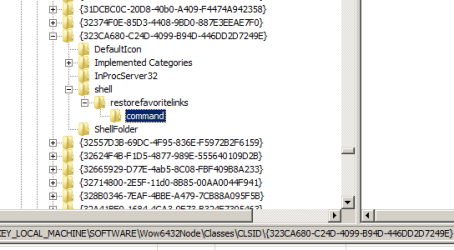
I do notice under the shell folder there is a folder called restore favorites?

see attached;

chris
 

Attachments

  • local machine2.PNG
    local machine2.PNG
    16 KB · Views: 254
  • local machine.PNG
    local machine.PNG
    14.3 KB · Views: 247
  • hkey.classes.root.PNG
    hkey.classes.root.PNG
    12.1 KB · Views: 243
  • classes.root.wow.PNG
    classes.root.wow.PNG
    13.8 KB · Views: 276
  • restore command.PNG
    restore command.PNG
    9.3 KB · Views: 235

My Computer My Computer

At a glance

vista
OS
vista
Chris,

That's all normal. When you change the values at the two locations in the tutorial, it will automatically change them at the other locations after restarting the computer. The restorefavoritelinks entry is normal as well and wouldn't cause this issue. :)

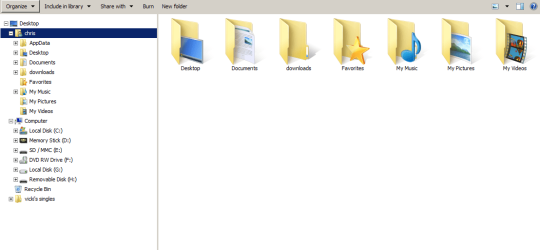
Could you also post a screenshot of your Windows Explorer window to see if anything may reveal a cause?
 

My Computer My Computer

At a glance

64-bit Windows 11 Pro for WorkstationsIntel i7-8700K OC'd to 5 GHz64 GB (4x16GB) G.SKILL TridentZ RGB DDR4 3600...ASUS ROG-STRIX-GTX1080TI-O11G-GAMING
Computer type
PC/Desktop
Computer Manufacturer/Model Number
Self built custom
OS
64-bit Windows 11 Pro for Workstations
CPU
Intel i7-8700K OC'd to 5 GHz
Motherboard
ASUS ROG Maximus XI Formula Z390
Memory
64 GB (4x16GB) G.SKILL TridentZ RGB DDR4 3600 MHz
Graphics Card(s)
ASUS ROG-STRIX-GTX1080TI-O11G-GAMING
Sound Card
Integrated
Monitor(s) Displays
2 x Samsung Odyssey G7 27"
Screen Resolution
2560x1440
Hard Drives
1TB Samsung 990 PRO M.2,
4TB Samsung 990 PRO PRO M.2,
TerraMaster F8 SSD Plus NAS
PSU
Seasonic Prime Titanium 850W
Case
Thermaltake Core P3
Cooling
Corsair Hydro H115i
Keyboard
Logitech wireless K800
Mouse
Logitech MX Master 4
Internet Speed
2 Gb/s Download and 100 Mb/s Upload
Antivirus
Malwarebyte Anti-Malware Premium
Browser
Google Chrome
Other Info
Logitech Z625 speaker system,
Logitech BRIO 4K Pro webcam,
HP Color LaserJet Pro MFP M477fdn,
APC SMART-UPS RT 1000 XL - SURT1000XLI,
Galaxy S23 Plus phone
explorer menu

Hello Brink,

AppData has shown up, not sure why,, it may have been from something else i installed. I can always reformat and start from scratch, but i have done that in the past and can never remove the favorites. It no a huge deal, just more a curiosity why it is so persistent.

thank you,
Chris
 

Attachments

  • explorer menu.PNG
    explorer menu.PNG
    26.8 KB · Views: 252

My Computer My Computer

At a glance

vista
OS
vista
Chris,

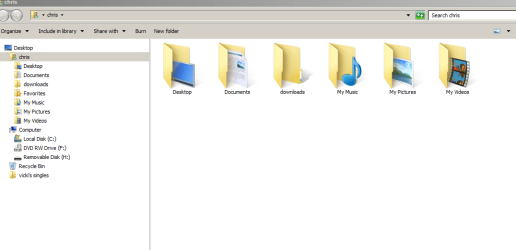
In your screenshot, Favorites is not displayed in the navigation pane (left pane) as it should be after removing it using the tutorial. It has been removed. :)

The Favorites folder you see in the main pane of Windows Explorer is normal since you have opened your C:\Users\chris folder. This is where this folder is located by default in Windows 7. You do not want to delete this folder at this location since it would cause issues with you being able to see and open Favorites in Internet Explorer.
 

My Computer My Computer

At a glance

64-bit Windows 11 Pro for WorkstationsIntel i7-8700K OC'd to 5 GHz64 GB (4x16GB) G.SKILL TridentZ RGB DDR4 3600...ASUS ROG-STRIX-GTX1080TI-O11G-GAMING
Computer type
PC/Desktop
Computer Manufacturer/Model Number
Self built custom
OS
64-bit Windows 11 Pro for Workstations
CPU
Intel i7-8700K OC'd to 5 GHz
Motherboard
ASUS ROG Maximus XI Formula Z390
Memory
64 GB (4x16GB) G.SKILL TridentZ RGB DDR4 3600 MHz
Graphics Card(s)
ASUS ROG-STRIX-GTX1080TI-O11G-GAMING
Sound Card
Integrated
Monitor(s) Displays
2 x Samsung Odyssey G7 27"
Screen Resolution
2560x1440
Hard Drives
1TB Samsung 990 PRO M.2,
4TB Samsung 990 PRO PRO M.2,
TerraMaster F8 SSD Plus NAS
PSU
Seasonic Prime Titanium 850W
Case
Thermaltake Core P3
Cooling
Corsair Hydro H115i
Keyboard
Logitech wireless K800
Mouse
Logitech MX Master 4
Internet Speed
2 Gb/s Download and 100 Mb/s Upload
Antivirus
Malwarebyte Anti-Malware Premium
Browser
Google Chrome
Other Info
Logitech Z625 speaker system,
Logitech BRIO 4K Pro webcam,
HP Color LaserJet Pro MFP M477fdn,
APC SMART-UPS RT 1000 XL - SURT1000XLI,
Galaxy S23 Plus phone
sorry

Sorry i had you trouble shooting the wrong favorites. If the favorites in my user account has to stay, It is ok. I never use IE, so if i can delete i would. If you recommend leaving it , I will.

Thank you,
Chris


ps: do you know of a tutorial for changing wmp12 to wmp11 on a 64 bit system? I made the change on my 32 bit and it works great. just not the 64 bit..
 

My Computer My Computer

At a glance

vista
OS
vista

My Computer My Computer

At a glance

64-bit Windows 11 Pro for WorkstationsIntel i7-8700K OC'd to 5 GHz64 GB (4x16GB) G.SKILL TridentZ RGB DDR4 3600...ASUS ROG-STRIX-GTX1080TI-O11G-GAMING
Computer type
PC/Desktop
Computer Manufacturer/Model Number
Self built custom
OS
64-bit Windows 11 Pro for Workstations
CPU
Intel i7-8700K OC'd to 5 GHz
Motherboard
ASUS ROG Maximus XI Formula Z390
Memory
64 GB (4x16GB) G.SKILL TridentZ RGB DDR4 3600 MHz
Graphics Card(s)
ASUS ROG-STRIX-GTX1080TI-O11G-GAMING
Sound Card
Integrated
Monitor(s) Displays
2 x Samsung Odyssey G7 27"
Screen Resolution
2560x1440
Hard Drives
1TB Samsung 990 PRO M.2,
4TB Samsung 990 PRO PRO M.2,
TerraMaster F8 SSD Plus NAS
PSU
Seasonic Prime Titanium 850W
Case
Thermaltake Core P3
Cooling
Corsair Hydro H115i
Keyboard
Logitech wireless K800
Mouse
Logitech MX Master 4
Internet Speed
2 Gb/s Download and 100 Mb/s Upload
Antivirus
Malwarebyte Anti-Malware Premium
Browser
Google Chrome
Other Info
Logitech Z625 speaker system,
Logitech BRIO 4K Pro webcam,
HP Color LaserJet Pro MFP M477fdn,
APC SMART-UPS RT 1000 XL - SURT1000XLI,
Galaxy S23 Plus phone
CMD

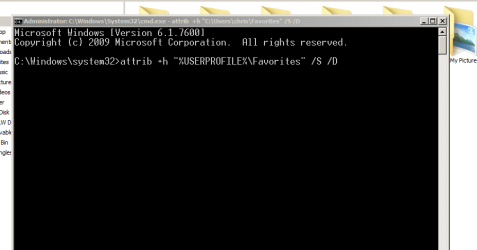
The entire string? or until the parentheses? I entered entire string and and nothing happened. Did not return to a c:\
 

Attachments

  • cmd.PNG
    cmd.PNG
    10 KB · Views: 264

My Computer My Computer

At a glance

vista
OS
vista
Yep, the entire string in bold.

It should only take a few seconds for the command prompt arrow to return after pressing enter. Did your C:\Users\Chris\Favorites folder disappear (hidden to not show) afterwards? If it's faded instead, then you have hidden folders set to show.

If not, then do you have UAC enabled with it set to the top level?
 

My Computer My Computer

At a glance

64-bit Windows 11 Pro for WorkstationsIntel i7-8700K OC'd to 5 GHz64 GB (4x16GB) G.SKILL TridentZ RGB DDR4 3600...ASUS ROG-STRIX-GTX1080TI-O11G-GAMING
Computer type
PC/Desktop
Computer Manufacturer/Model Number
Self built custom
OS
64-bit Windows 11 Pro for Workstations
CPU
Intel i7-8700K OC'd to 5 GHz
Motherboard
ASUS ROG Maximus XI Formula Z390
Memory
64 GB (4x16GB) G.SKILL TridentZ RGB DDR4 3600 MHz
Graphics Card(s)
ASUS ROG-STRIX-GTX1080TI-O11G-GAMING
Sound Card
Integrated
Monitor(s) Displays
2 x Samsung Odyssey G7 27"
Screen Resolution
2560x1440
Hard Drives
1TB Samsung 990 PRO M.2,
4TB Samsung 990 PRO PRO M.2,
TerraMaster F8 SSD Plus NAS
PSU
Seasonic Prime Titanium 850W
Case
Thermaltake Core P3
Cooling
Corsair Hydro H115i
Keyboard
Logitech wireless K800
Mouse
Logitech MX Master 4
Internet Speed
2 Gb/s Download and 100 Mb/s Upload
Antivirus
Malwarebyte Anti-Malware Premium
Browser
Google Chrome
Other Info
Logitech Z625 speaker system,
Logitech BRIO 4K Pro webcam,
HP Color LaserJet Pro MFP M477fdn,
APC SMART-UPS RT 1000 XL - SURT1000XLI,
Galaxy S23 Plus phone
premature

Hello Brink. it took a few minutes but the c prompt did appear. The fav is gone from the account but still in the user via navigation pane.
 

Attachments

  • explorer menu without favorites.PNG
    explorer menu without favorites.PNG
    25.7 KB · Views: 254

My Computer My Computer

At a glance

vista
OS
vista

My Computer My Computer

At a glance

64-bit Windows 11 Pro for WorkstationsIntel i7-8700K OC'd to 5 GHz64 GB (4x16GB) G.SKILL TridentZ RGB DDR4 3600...ASUS ROG-STRIX-GTX1080TI-O11G-GAMING
Computer type
PC/Desktop
Computer Manufacturer/Model Number
Self built custom
OS
64-bit Windows 11 Pro for Workstations
CPU
Intel i7-8700K OC'd to 5 GHz
Motherboard
ASUS ROG Maximus XI Formula Z390
Memory
64 GB (4x16GB) G.SKILL TridentZ RGB DDR4 3600 MHz
Graphics Card(s)
ASUS ROG-STRIX-GTX1080TI-O11G-GAMING
Sound Card
Integrated
Monitor(s) Displays
2 x Samsung Odyssey G7 27"
Screen Resolution
2560x1440
Hard Drives
1TB Samsung 990 PRO M.2,
4TB Samsung 990 PRO PRO M.2,
TerraMaster F8 SSD Plus NAS
PSU
Seasonic Prime Titanium 850W
Case
Thermaltake Core P3
Cooling
Corsair Hydro H115i
Keyboard
Logitech wireless K800
Mouse
Logitech MX Master 4
Internet Speed
2 Gb/s Download and 100 Mb/s Upload
Antivirus
Malwarebyte Anti-Malware Premium
Browser
Google Chrome
Other Info
Logitech Z625 speaker system,
Logitech BRIO 4K Pro webcam,
HP Color LaserJet Pro MFP M477fdn,
APC SMART-UPS RT 1000 XL - SURT1000XLI,
Galaxy S23 Plus phone
Back
Top