MBR - Restore Windows 7 Master Boot Record

How to Restore the Windows 7 MBR (Master Boot Record)

   Information
If you have been dual booting with Linux, then you probably know one of the Linux boot managers like Grub or LILO has been installed in the MBR of your hard drive. What can you do when you no longer want Linux on that hard drive? This tutorial will show you how to use your 7 DVD and BOOTSECT.EXE to restore the "bootsector code" of the MBR and allow you to begin booting to Windows 7 again.
   Tip
You can use this method to update the bootsector code for Windows 7, Vista, XP, 2000 or switch between Bootmgr and NTLDR. Just check the Microsoft TechNet site for the correct command.


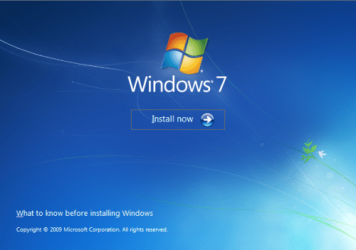
Here's How:1. Boot your computer to the Windows 7 DVD (or to a "Repair CD"). At this screen choose to install now.
25672d1251414873-mbr-restore-windows-7-master-boot-record-mbr_02.png


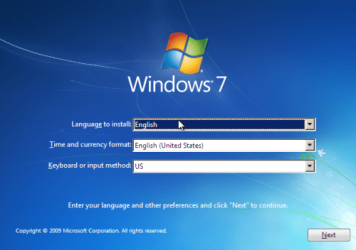
2. Select your language and click next.
25673d1251414836-mbr-restore-windows-7-master-boot-record-mbr_03.png


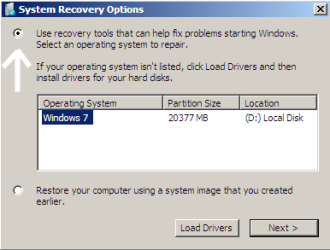
3. Click the button for "Use recovery tools".
25674d1251414836-mbr-restore-windows-7-master-boot-record-mbr_04.png


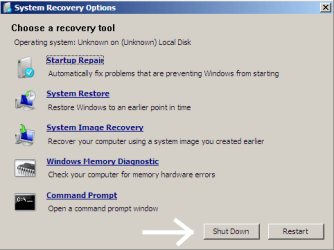
4. Then select "Command Prompt".
25675d1251414836-mbr-restore-windows-7-master-boot-record-mbr_05.png


5. When open, the command prompt will look like this:
53598d1251414836-mbr-restore-windows-7-master-boot-record-mbr_16.png


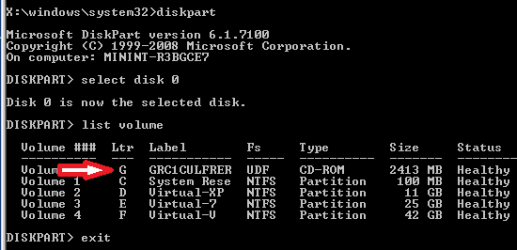
6. The command we will use, bootsect.exe, is in a folder (named boot) on the DVD.We need to know what drive letter has been assigned the DVD drive to access the folder.

Code:
Type: [B]diskpart[/B]
and press [B]Enter[/B]
 
Type: [B]select disk 0[/B] (zero)
and press [B]Enter[/B]
 
type: [B]list volume[/B]
and press [B]Enter[/B]
In this screen shot, the 7 DVD is letter: G
53599d1251414836-mbr-restore-windows-7-master-boot-record-mbr_17a.png


7. Use your DVD drive letter and

Code:
Type: [B]exit[/B]
and press [B]Enter[/B]
 
to close Diskpart
 
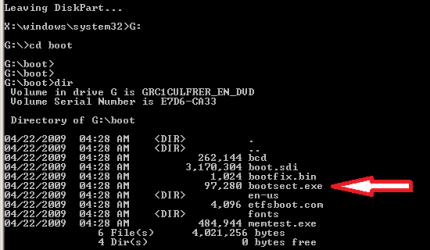
Type: [B]G:[/B] (use the letter of your DVD drive)
and press [B]Enter[/B]
 
Type: [B]cd boot[/B]
and press [B]Enter[/B]
 
Type: [B]dir[/B]
and press [B]Enter[/B]
to verify that bootcect.exe is there (if you really need to)
53600d1251414836-mbr-restore-windows-7-master-boot-record-mbr_18a.png


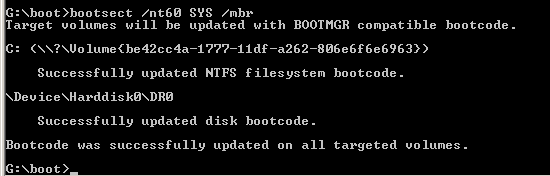
8. To restore the "bootsector code":

Code:
TYPE: [B]bootsect /nt60 SYS /mbr[/B]
and press [B]Enter[/B]
53601d1251414836-mbr-restore-windows-7-master-boot-record-mbr_19.png


NOTE: If this method fails to restore the MBR, you can try the bootrec command as it is also a tool for repairing the MBR.


9. When completed successfully,

Code:
Type: [B]exit[/B]
and press [B]Enter[/B]
This will close the command prompt window.

10. Now select Shut Down or Restart
25680d1251414836-mbr-restore-windows-7-master-boot-record-mbr_10.png


11. Then you can reboot your computer into Windows.
25681d1251414836-mbr-restore-windows-7-master-boot-record-mbr_12.png


Attachments

  • mbr_02.png
    mbr_02.png
    220.2 KB · Views: 1,640,315
  • mbr_03.png
    mbr_03.png
    212.8 KB · Views: 1,635,478
  • mbr_04.png
    mbr_04.png
    13.3 KB · Views: 1,633,763
  • mbr_05.png
    mbr_05.png
    25.7 KB · Views: 1,579,666
  • mbr_10.png
    mbr_10.png
    25 KB · Views: 1,576,678
  • mbr_12.png
    mbr_12.png
    18.2 KB · Views: 1,552,307
  • mbr_16.png
    mbr_16.png
    6.1 KB · Views: 1,554,623
  • mbr_17a.png
    mbr_17a.png
    13.4 KB · Views: 1,565,873
  • mbr_18a.png
    mbr_18a.png
    14.7 KB · Views: 1,620,585
  • mbr_19.png
    mbr_19.png
    5.3 KB · Views: 1,569,958
Last edited by a moderator:
GREAT THREAD!!! THANKS SO MUCH!!!
 

My Computer

Computer type
Laptop
Computer Manufacturer/Model Number
SAMSUNG NP350E5X-S02rs
OS
Microsoft Windows 7 Ultimate 32-bit 7601 Multiprocessor Free Service Pack 1
CPU
Intel(R) Core(TM) i3-3110M CPU @ 2.40GHz
Motherboard
SAMSUNG ELECTRONICS CO., LTD. NP350E5X-S02RS
Memory
4,00 GB
Graphics Card(s)
(1) AMD Radeon. HD 7670M (2) Intel(R) HD Graphics 4000
Sound Card
(1) Bluetooth Audio Device (2) Realtek High Definition Aud
Monitor(s) Displays
Sasung
Screen Resolution
1366 x 768 x 32 bits (4294967296 colors) @ 60 Hz
Hard Drives
Hitachi HTS547550A9E384
PSU
220 V to 240 V at 50 Hz [230 V nominal]
Keyboard
Notebook keyboard
Mouse
Logitech m180
Internet Speed
20 mbps/0.72 mbps
Antivirus
Avast internet secyrity 8.0.1483
Browser
Firefox 19.02
Quick Fix

I keep having this issue over and over due to the number of Hard Drives on my system. Is there a simple, safe and easy way to recreate and save the files needed to the specific hard drive that I keep th O.S. on?

A = Floppy
C = Main (OS) (Same kind of HD as E: 300gb Raptor)
D = Dvd R/W Drive
E = Data
F = Daily Internal Backup Drive
G = Ide Swap Cage (external backup & files)
H = USB/eSata Backup Drive in a Enclosure
R = Flashdrive (Readyboost)
S = SATA swap Cage (Currently 2tb Backup & Data)

Thank You
 

My Computer

Computer type
PC/Desktop
Computer Manufacturer/Model Number
Master Control (25 plus year old custom build)
OS
Windows 7 Premium 64 Bit
CPU
Opteron 185
Motherboard
DFI Lanparty N4 Ultra-d
Memory
4 gig OCZ High Performance Dual Channel @ 500 Mhz
Graphics Card(s)
ATI Radeon HD 5450 (Direct X11)
Sound Card
Creative SB Audigy Audio 2 ZS
Monitor(s) Displays
Dell 2208WFP (Digital)
Screen Resolution
1680 x 1050
Hard Drives
Plextor M3 Pro 128 Gb Sata 6 SSD (Main)

Western Digital Blue 320 Gb IDE 7200 RPM Internal Daily (Backup Drive)

Western Digital 2 TB RE4 SATA 3 Gb/s 7200 RPM 64 MB Cache Enterprise Hard Drive (External Data & Backup Drive).
PSU
OCZ GameXStream 850 Watt PSU.
Case
Antec Performance Series
Cooling
Working on it.
Keyboard
Saitek Eclipse II
Mouse
Kensington SlimBlade
Internet Speed
50 Gb
Antivirus
Microsoft Security Essentials
Browser
From Netscape to Internet Explorer.
Other Info
Got a mix of old and new hardware. Sound card hooked up to a 250 watt per channel Harman Kardon Amp to a pair of Dak 5 way old school acoustically suspended speakers.

My Computer

Computer type
PC/Desktop
Computer Manufacturer/Model Number
Own build
OS
Windows 7x64 Home Premium SP1
CPU
Intel i7 2600k
Motherboard
ASUS P8Z68 Deluxe
Memory
G.Skill Ripjaws (DDR3-1600) 2x4GB
Graphics Card(s)
Nvidia GeForce GTS 450; Intel HD Graphics 3000(GT2+)
Monitor(s) Displays
Dell Ultrasharp IPS panel U2311H, Samsung SyncMaster P2350
Screen Resolution
1920x1080
Hard Drives
Samsung 850 Pro SSD 256GB, Samsung SSD 840 120GB, Seagates 1TB Barracuda ST31000528AS x2
PSU
Seasonic M12II 520W
Case
Lian Li Lancool PC-K60
Cooling
Case: 1x120mm, 3x140mm CPU: Hyper 212+
Keyboard
Logitech MK520 (wireless)
Mouse
Logitech MK520
Internet Speed
6-7 Mbps
Antivirus
Norton Security Premium, Malwarebytes on 2 (MSE on 3rd PC)
Browser
FireFox
Other Info
Audio: Logitech Z523 2.1
I keep having this issue over and over due to the number of Hard Drives on my system. Is there a simple, safe and easy way to recreate and save the files needed to the specific hard drive that I keep th O.S. on?

A = Floppy
C = Main (OS) (Same kind of HD as E: 300gb Raptor)
D = Dvd R/W Drive
E = Data
F = Daily Internal Backup Drive
G = Ide Swap Cage (external backup & files)
H = USB/eSata Backup Drive in a Enclosure
R = Flashdrive (Readyboost)
S = SATA swap Cage (Currently 2tb Backup & Data)

Thank You


It appears I will have to just disconect all drives except C:\ and do the repair. I then had to delete the partition & format F:\. The problem is due to C:\ being a Sata raptor and F:\ is a IDE that is always hooked up. The motherboard wants to make the IDE the boot drive. I have it setup to boot from the Sata but after a tweak or crash it reverts back to F:\ first. All fixed for now. Thank you for all the tips on this forum! ;)
 

My Computer

Computer type
PC/Desktop
Computer Manufacturer/Model Number
Master Control (25 plus year old custom build)
OS
Windows 7 Premium 64 Bit
CPU
Opteron 185
Motherboard
DFI Lanparty N4 Ultra-d
Memory
4 gig OCZ High Performance Dual Channel @ 500 Mhz
Graphics Card(s)
ATI Radeon HD 5450 (Direct X11)
Sound Card
Creative SB Audigy Audio 2 ZS
Monitor(s) Displays
Dell 2208WFP (Digital)
Screen Resolution
1680 x 1050
Hard Drives
Plextor M3 Pro 128 Gb Sata 6 SSD (Main)

Western Digital Blue 320 Gb IDE 7200 RPM Internal Daily (Backup Drive)

Western Digital 2 TB RE4 SATA 3 Gb/s 7200 RPM 64 MB Cache Enterprise Hard Drive (External Data & Backup Drive).
PSU
OCZ GameXStream 850 Watt PSU.
Case
Antec Performance Series
Cooling
Working on it.
Keyboard
Saitek Eclipse II
Mouse
Kensington SlimBlade
Internet Speed
50 Gb
Antivirus
Microsoft Security Essentials
Browser
From Netscape to Internet Explorer.
Other Info
Got a mix of old and new hardware. Sound card hooked up to a 250 watt per channel Harman Kardon Amp to a pair of Dak 5 way old school acoustically suspended speakers.
I've got a damaged MBR (yes, tried to delete linux partition) and want to follow the steps provided in the OP (btw, thank you so much for providing them), but I've got one problem: I don't have a repair disc. Or a Windows 7 disc - my computer's an Asus G-series, and came with Windows 7 installed, but without a disc. All I've got are the recovery discs that I created when I first got the computer, and I've gotten no response from the computer when I've tried using them.

Could one of my friends who have Windows 7 create a repair disc on their machine, or is the repair disc specific to each copy of Windows 7? I'd really prefer not to have to do clean install of Windows, as I've got a few recent saved game files that aren't backed up. Any advice?
 

My Computer

Computer Manufacturer/Model Number
ASUS G73JH
OS
Windows 7, Ubuntu 11.10
I've got a damaged MBR (yes, tried to delete linux partition) and want to follow the steps provided in the OP (btw, thank you so much for providing them), but I've got one problem: I don't have a repair disc. Or a Windows 7 disc - my computer's an Asus G-series, and came with Windows 7 installed, but without a disc. All I've got are the recovery discs that I created when I first got the computer, and I've gotten no response from the computer when I've tried using them.

Could one of my friends who have Windows 7 create a repair disc on their machine, or is the repair disc specific to each copy of Windows 7? I'd really prefer not to have to do clean install of Windows, as I've got a few recent saved game files that aren't backed up. Any advice?
Hello mulceber, and welcome to Windows Seven Forums.

You can use a "System Repair Disk" burned off another computer with Windows Seven. However, you must determine if your copy of Windows Seven is 32bit or 64bit and use a compatible "Repair Disk". Please note the warning box here:

http://www.sevenforums.com/tutorials/2083-system-repair-disc-create.html

Otherwise, as long as you can boot to the repair disk and follow the instructions to restore the Windows boot files, it should work fine.

Cheers!
Robert
 

My Computer

OS
...
Thanks for the warm welcome and the advice! I'll try it out and let you guys know. I know mine is 64 bit, and I'm pretty sure my friend's is as well, so I'm not too concerned about that. My real worry is that I'm not sure I'll be able to boot from a disc - all the previous times when I tried booting from a disc, I tried pressing F12, F10 and F2 and the computer never responded to them - I just got the same message about a grub.

But we'll see - thanks so much for the help!
 

My Computer

Computer Manufacturer/Model Number
ASUS G73JH
OS
Windows 7, Ubuntu 11.10
Hey, I managed to get the repair disc made and from there it was pretty much smooth sailing. The instructions were detailed and extremely useful for fixing my copy of Windows! Thanks all!
 

My Computer

Computer Manufacturer/Model Number
ASUS G73JH
OS
Windows 7, Ubuntu 11.10
Hey, I managed to get the repair disc made and from there it was pretty much smooth sailing. The instructions were detailed and extremely useful for fixing my copy of Windows! Thanks all!
You are very welcome, mulceber. Glad you got it straightened out!

Cheers!
Robert
 

My Computer

OS
...
Just wanted to post and say thank you for this fix. So clear even I understood it.. Saved a complete reinstall
 

My Computer

OS
Windows 7 Ultimate x64
Hello, I've been reading this thread because my mbr is corrupted as well, and I think it has triggered a hard drive malfunction. I followed the first two steps of the tutorial and upon reaching the third step, no Os is detected. I read some more into the thread and noticed I could keep going even if nothing was found. Upon reaching the stages of entering command prompts I followed those until it told me to select the hdd and then stopped because no hdd was listed. This differs from the other times I attempted to follow the guide as each time it recognized that an hdd was there, but was considered empty, which is shouldn't be. I can't post screenshots as this is from an iPad and the computer in question, a dell studio xps, is our only computer. Thanks for any help.

Also, at this point I don't care if I have to reformat the hdd, I just need the computer to work asap.

Another thing I just remembered... I was doing something, I think trying to do a clean all command and it said that the I/o didn't recognize the partition or something. This was before the hdd became unlisted.
 
Last edited:

My Computer

OS
7 home premium x64
CPU
i7-960 3.2 quad core
Memory
8 Gb DDR SDRAM at 1066MHz
Graphics Card(s)
ATI Radeon HD 5770 1Gb GDDR5
Monitor(s) Displays
Dell st2410
Screen Resolution
1920x1018@60hz
Hard Drives
1 tb SATA 2 @ 7200
Hello, I've been reading this thread because my mbr is corrupted as well, and I think it has triggered a hard drive malfunction. I followed the first two steps of the tutorial and upon reaching the third step, no Os is detected. I read some more into the thread and noticed I could keep going even if nothing was found. Upon reaching the stages of entering command prompts I followed those until it told me to select the hdd and then stopped because no hdd was listed. This differs from the other times I attempted to follow the guide as each time it recognized that an hdd was there, but was considered empty, which is shouldn't be. I can't post screenshots as this is from an iPad and the computer in question, a dell studio xps, is our only computer. Thanks for any help.

Also, at this point I don't care if I have to reformat the hdd, I just need the computer to work asap.

Another thing I just remembered... I was doing something, I think trying to do a clean all command and it said that the I/o didn't recognize the partition or something. This was before the hdd became unlisted.
Hello Porkpotpie, and welcome to Windows Seven Forums!

A hard drive that cannot be recognized, as you described, indicates other issues in addition to MBR troubles. I would suggest your next step is to download a hard drive utility from either the hard drive manufacture's web site or perhaps from Dell's web site. These are designed to be burned to a bootable CD so you can check to see if there is a repairable problem with the hard drive or if the hard drive must be replaced.

Something else to check is whether the computer bios can recognize the hard drive during bootup. Moving the hard drive cable to a different place on the motherboard has helped in diagnosing these issues on a few occasions.

You should know if the hard drive is OK before investing time in trying to restore the OS. And if it is not OK, find out if the hard drive can be returned under warranty?

Cheers!
Robert
 

My Computer

OS
...
Thanks.
The reason I came to this topic is when I did the diagnose and repair choice in the advanced menu area the first time it said it was an mbr error, the second and third times it said there was no hdd, then the 4th and 5th times it said again there was an mbr error. Now whenever I can get there and do the test it only tells me it can't find the hdd. I went to a friend's house and downloaded some things about hard drives from dell but I don't know how or at which screen to use them or the maker do the drive. I think I'm going to purchase a small new one and swap it out with the one that isn't working so I can give it to a teacher I had who might be able to fix it seeing as I'm not that computer intelligent.

-Adrien
 

My Computer

OS
7 home premium x64
CPU
i7-960 3.2 quad core
Memory
8 Gb DDR SDRAM at 1066MHz
Graphics Card(s)
ATI Radeon HD 5770 1Gb GDDR5
Monitor(s) Displays
Dell st2410
Screen Resolution
1920x1018@60hz
Hard Drives
1 tb SATA 2 @ 7200
Hi, I am having problems with my Acer Aspire 5742. When I turn on my laptop this always comes on "BOOTMGR image is corrupt. The system cannot boot?" and I cant anything after that...it's just a black screen and that message and thats it...so I put in the Windows 7 64 bit recovery disk in and restarted(what I am trying to do is use startup repair or cmd)...but the problem is, is that when i do insert the disk in...nothing different happens...everything happens again(the message and the black screen)...from here..I dont know what to do...Can you guyz plz help me.
Thank you for your advise in advance!
 

My Computer

OS
Windows 7 Ultimate x32
Hi, I am having problems with my Acer Aspire 5742. When I turn on my laptop this always comes on "BOOTMGR image is corrupt. The system cannot boot?" and I cant anything after that...it's just a black screen and that message and thats it...so I put in the Windows 7 64 bit recovery disk in and restarted(what I am trying to do is use startup repair or cmd)...but the problem is, is that when i do insert the disk in...nothing different happens...everything happens again(the message and the black screen)...from here..I dont know what to do...Can you guyz plz help me.
Thank you for your advise in advance!
Hello amfg1975, and welcome to Windows Seven Forums!

When you insert the recovery CD, the computer needs to boot to the CD. Your description suggests the computer is just trying to boot to the hard drive and then cannot proceed further. You will need to find out what keyboard combinations your Acer uses (like F12, F10, F8, Delete) to either enter the BIOS Utility so you can tell the computer to boot to your CD Drive first, or if there is a Boot Menu that will allow you to select your CD Drive as the boot device. Once you are able to boot to the CD, you can use the utilities to make repairs.

Cheers!
Robert
 

My Computer

OS
...
Thanks.
The reason I came to this topic is when I did the diagnose and repair choice in the advanced menu area the first time it said it was an mbr error, the second and third times it said there was no hdd, then the 4th and 5th times it said again there was an mbr error. Now whenever I can get there and do the test it only tells me it can't find the hdd. I went to a friend's house and downloaded some things about hard drives from dell but I don't know how or at which screen to use them or the maker do the drive. I think I'm going to purchase a small new one and swap it out with the one that isn't working so I can give it to a teacher I had who might be able to fix it seeing as I'm not that computer intelligent.

-Adrien
OK! Sounds like a good plan!

Cheers!
Robert
 

My Computer

OS
...
Back
Top