Well here's an other one.. once again dual boot with windows 7

Emcha

New member
Local time
7:17 PM
Messages
23
So I got an other setup done with the same parts as the first, for my office. Trying to install two windows 7 again. Here's the exact steps.
  1. Open case
  2. Unplug all HDD's
  3. Plugin HDD 1
  4. Iinstall windows.
  5. Boot to see if windows boot, it does!
  6. Unplug HDD 1 (Media BCD, DISK E:)
  7. Plugin HDD 2 (Normal, DISK C:)
  8. Install windows
  9. Boot to see if windows boot, it does.
  10. Plugin HDD1
  11. Boot to use the one time boot options, both can boot. But HDD 2 (normal) is the default one.
  12. Install easybcd to make the boot manager.
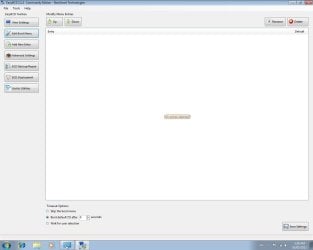
  13. Easybcd does not see any boot at all, the edit boot window is empty.
easybcd.jpg

Adding a new entry in easybcd does nothing, even if it tells me it was added successfully, I still can't see it in the edit boot menu.

I really don't know what's going on and why it's so hard to make a dual boot with windows 7, but I've been going for 4 days until I finally gave up.

This is the disk Managment, for four days I have been reformating (a true fresh format not the quick one) my hdd's and trying to install windows, and I always end up with either 1 or 2 partition in front of the actual windows partition.
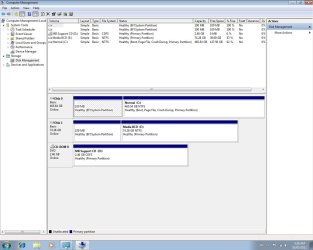
disk managment.jpg

I tried removing them using gparted, but that didn't work out either.

So once again I'm here hoping you will be able to help me sort this out.
 

My Computer My Computer

At a glance

windows 7 ultimate 64i5 2500kkingstone hyperx 1600 16 GBGtx 560 dc2 oc
Computer Manufacturer/Model Number
myself
OS
windows 7 ultimate 64
CPU
i5 2500k
Motherboard
p8p67 evo rev 3
Memory
kingstone hyperx 1600 16 GB
Graphics Card(s)
Gtx 560 dc2 oc
Sound Card
sound mixer Projectmix I/O
Monitor(s) Displays
dell
Hard Drives
2x 500 GB WD caviar black 7200
1x 1 TB WD caviar black 7200
1x 1 TB seagate freeagent usb 2.0
1x 80 GB seagate baracuda 7200
PSU
cooler master gx750w
Case
Cooler master cm 690 2 advance
Cooling
multiple fans
I don't know how you've managed it, but you have two EFI partitions that appear to have nothing in them, you don't have a System Reserved partition for the boot files and no partition holds the Active flag, which explains why EasyBCD cannot see any operating systems.

I'd be inclined to start again, but this time delete the old partitions and use the Windows installer to create a new one, as explained in this tutorial.

http://www.sevenforums.com/tutorials/1649-clean-install-windows-7-a.html
 

My Computer My Computer

At a glance

Windows 7 Ultimate SP1 64-BitIntel Core i7 870 @ 2.93GHz8Gb Dual-Channel DDR3 @ 664MHznVidia GeForce GTX 460 1024MB dedicated RAM
Computer Manufacturer/Model Number
HP Pavilion Elite 495UK
OS
Windows 7 Ultimate SP1 64-Bit
CPU
Intel Core i7 870 @ 2.93GHz
Motherboard
MSI 2A9C (CPU1)
Memory
8Gb Dual-Channel DDR3 @ 664MHz
Graphics Card(s)
nVidia GeForce GTX 460 1024MB dedicated RAM
Sound Card
Realtek HD Audio
Monitor(s) Displays
HP2310i
Screen Resolution
1920 x 1080
Hard Drives
1x1954GB Hitachi HDS22020ALA 330 (RAID), 1x1954GB Hitachi External for backup and storage
PSU
460W
Case
HP Elite
Cooling
Air cooled
Keyboard
Logitech K750 solar-powered keyboard
Mouse
Logitech Wireless M180 mouse
Internet Speed
2Mb
Other Info
Pure Avanti Flow Internet Radio with iPod Dock, 64Gb iPod, HP USB Speakers, Sony MDR-V500 Headphones, Sony Vaio F-Series Laptop
The instruction you gave me is exactly what I did each and every time.

As I said, the installation were on freshly formatted hdd's so there was no partition present at the time. Infact when I was in the windows installation menu of my dvd I deleted the partition that was created by the format, and reformatted the drive using the windows installer dvd. As I said, for the past 4 days, each time I tried to install windows, it either gave me one efi partition of 100 mb in front of the windows partition, or one efi 100 mb partition and one 127 mb system partition infront of the windows partition, and that's always using the installation dvd that I have (it's not a copy it's the actual dvd I purchased).

2012-05-05 05-01-33.176.jpg

And each time it's the same results, the windows partition is not the active one. Now in the last 4 days I've installed, deleted, reformatted, reinstalled at least 15 times, always with the same results. So I'd appreciate a way that wouldn't mean me spending an hour of reformatting/installation again.

Oh yeah btw if I tried to install it without using the uefi boot sequence (choosing the uefi drive in the bios boot) it would tell me that windows could not be installed because the selected drive was a gpt style partition and I would have no options to delete/reformat the drive in the windows installation menu dvd when working from the boot up. So I then had to reboot the computer and make sure the select the uefi windows 7 ultimate installation boot dvd drive. Now while using that one, I could delete, make new partitions, format them etc and of course install window, which it wouldn't let me do if it wasn't from the uefi boot.

My windows is a 64 bit version, so I guess it would be normal to use the uefi since it's supposed to replace bios?
 

My Computer My Computer

At a glance

windows 7 ultimate 64i5 2500kkingstone hyperx 1600 16 GBGtx 560 dc2 oc
Computer Manufacturer/Model Number
myself
OS
windows 7 ultimate 64
CPU
i5 2500k
Motherboard
p8p67 evo rev 3
Memory
kingstone hyperx 1600 16 GB
Graphics Card(s)
Gtx 560 dc2 oc
Sound Card
sound mixer Projectmix I/O
Monitor(s) Displays
dell
Hard Drives
2x 500 GB WD caviar black 7200
1x 1 TB WD caviar black 7200
1x 1 TB seagate freeagent usb 2.0
1x 80 GB seagate baracuda 7200
PSU
cooler master gx750w
Case
Cooler master cm 690 2 advance
Cooling
multiple fans
I am not sure if Visual BCD Editor - Windows 7|Vista works on EFI.
You can just run and see if loader entries are displayed.

If yes - adding second Win 7 would go like this:
right-Click in left pane select "Create missing Windows loaders" and confirm.

Curious about outcome.
 

My Computer My Computer

At a glance

Win 8 RP, Win 7, XPIntel
Computer Manufacturer/Model Number
Acer Notebook
OS
Win 8 RP, Win 7, XP
CPU
Intel

My Computer My Computer

At a glance

Windows 7 Ultimate SP1 64-BitIntel Core i7 870 @ 2.93GHz8Gb Dual-Channel DDR3 @ 664MHznVidia GeForce GTX 460 1024MB dedicated RAM
Computer Manufacturer/Model Number
HP Pavilion Elite 495UK
OS
Windows 7 Ultimate SP1 64-Bit
CPU
Intel Core i7 870 @ 2.93GHz
Motherboard
MSI 2A9C (CPU1)
Memory
8Gb Dual-Channel DDR3 @ 664MHz
Graphics Card(s)
nVidia GeForce GTX 460 1024MB dedicated RAM
Sound Card
Realtek HD Audio
Monitor(s) Displays
HP2310i
Screen Resolution
1920 x 1080
Hard Drives
1x1954GB Hitachi HDS22020ALA 330 (RAID), 1x1954GB Hitachi External for backup and storage
PSU
460W
Case
HP Elite
Cooling
Air cooled
Keyboard
Logitech K750 solar-powered keyboard
Mouse
Logitech Wireless M180 mouse
Internet Speed
2Mb
Other Info
Pure Avanti Flow Internet Radio with iPod Dock, 64Gb iPod, HP USB Speakers, Sony MDR-V500 Headphones, Sony Vaio F-Series Laptop
I am not sure if Visual BCD Editor - Windows 7|Vista works on EFI.
You can just run and see if loader entries are displayed.

If yes - adding second Win 7 would go like this:
right-Click in left pane select "Create missing Windows loaders" and confirm.

Curious about outcome.

It's not seeing disk E: so I can't work with that.:shock:
 

My Computer My Computer

At a glance

windows 7 ultimate 64i5 2500kkingstone hyperx 1600 16 GBGtx 560 dc2 oc
Computer Manufacturer/Model Number
myself
OS
windows 7 ultimate 64
CPU
i5 2500k
Motherboard
p8p67 evo rev 3
Memory
kingstone hyperx 1600 16 GB
Graphics Card(s)
Gtx 560 dc2 oc
Sound Card
sound mixer Projectmix I/O
Monitor(s) Displays
dell
Hard Drives
2x 500 GB WD caviar black 7200
1x 1 TB WD caviar black 7200
1x 1 TB seagate freeagent usb 2.0
1x 80 GB seagate baracuda 7200
PSU
cooler master gx750w
Case
Cooler master cm 690 2 advance
Cooling
multiple fans

My Computer My Computer

At a glance

windows 7 ultimate 64i5 2500kkingstone hyperx 1600 16 GBGtx 560 dc2 oc
Computer Manufacturer/Model Number
myself
OS
windows 7 ultimate 64
CPU
i5 2500k
Motherboard
p8p67 evo rev 3
Memory
kingstone hyperx 1600 16 GB
Graphics Card(s)
Gtx 560 dc2 oc
Sound Card
sound mixer Projectmix I/O
Monitor(s) Displays
dell
Hard Drives
2x 500 GB WD caviar black 7200
1x 1 TB WD caviar black 7200
1x 1 TB seagate freeagent usb 2.0
1x 80 GB seagate baracuda 7200
PSU
cooler master gx750w
Case
Cooler master cm 690 2 advance
Cooling
multiple fans
To avoid EFI installation remove the EFI Boot Disk listing from BIOS Boot order. You can then install to MBR disk without EFI. There may be other EFI settings for your mobo in BIOS setup.

I'm not sure why you would go to the trouble of configuring the cleanest method of Dual Booting - via the BIOS Boot order or one-time BIOS Boot Menu key - and then want to create a Windows Boot Menu on top of that. Why can't you use the method you have now to boot?
 
It's not seeing disk E: so I can't work with that.:shock:


If disk E: is mapped in first Windows 7 then try to manually add boot entry for second Win 7:

RightClick,
select "New Vista/7/VHD Loader"
This will create a default loader for partition1 on first disk.
Change ApplicationDevice and OSDevice to E: (doubleClick and select drive E:)

Try if new loader will boot Win 7 on second disk.

Mapping handling should be independend of underlaying MBR or EFI disk.
 

My Computer My Computer

At a glance

Win 8 RP, Win 7, XPIntel
Computer Manufacturer/Model Number
Acer Notebook
OS
Win 8 RP, Win 7, XP
CPU
Intel
To avoid EFI installation remove the EFI Boot Disk listing from BIOS Boot order. You can then install to MBR disk without EFI. There may be other EFI settings for your mobo in BIOS setup.

I'm not sure why you would go to the trouble of configuring the cleanest method of Dual Booting - via the BIOS Boot order or one-time BIOS Boot Menu key - and then want to create a Windows Boot Menu on top of that. Why can't you use the method you have now to boot?

tried that already but the problem is that it wont let me.

Oh yeah btw if I tried to install it without using the uefi boot sequence (choosing the uefi drive in the bios boot) it would tell me that windows could not be installed because the selected drive was a gpt style partition and I would have no options to delete/reformat the drive in the windows installation menu dvd when working from the boot up. So I then had to reboot the computer and make sure the select the uefi windows 7 ultimate installation boot dvd drive. Now while using that one, I could delete, make new partitions, format them etc and of course install window, which it wouldn't let me do if it wasn't from the uefi boot.


The reason being that when I work I'm not always by the computer so when it's booting and I'm doing something else, I prefer it waits until I give it which to load, than having it load the wrong one and I have to reboot the system.
 

My Computer My Computer

At a glance

windows 7 ultimate 64i5 2500kkingstone hyperx 1600 16 GBGtx 560 dc2 oc
Computer Manufacturer/Model Number
myself
OS
windows 7 ultimate 64
CPU
i5 2500k
Motherboard
p8p67 evo rev 3
Memory
kingstone hyperx 1600 16 GB
Graphics Card(s)
Gtx 560 dc2 oc
Sound Card
sound mixer Projectmix I/O
Monitor(s) Displays
dell
Hard Drives
2x 500 GB WD caviar black 7200
1x 1 TB WD caviar black 7200
1x 1 TB seagate freeagent usb 2.0
1x 80 GB seagate baracuda 7200
PSU
cooler master gx750w
Case
Cooler master cm 690 2 advance
Cooling
multiple fans
It's not seeing disk E: so I can't work with that.:shock:
If disk E: is mapped in first Windows 7 then try to manually add boot entry for second Win 7:

RightClick,
select "New Vista/7/VHD Loader"
This will create a default loader for partition1 on first disk.
Change ApplicationDevice and OSDevice to E: (doubleClick and select drive E:)

Try if new loader will boot Win 7 on second disk.

Mapping handling should be independend of underlaying MBR or EFI disk.


Hmm I'll have to check again, but from remembering this morning ( had been up for 32 hours) Only the c: was showing in the first window.
 

My Computer My Computer

At a glance

windows 7 ultimate 64i5 2500kkingstone hyperx 1600 16 GBGtx 560 dc2 oc
Computer Manufacturer/Model Number
myself
OS
windows 7 ultimate 64
CPU
i5 2500k
Motherboard
p8p67 evo rev 3
Memory
kingstone hyperx 1600 16 GB
Graphics Card(s)
Gtx 560 dc2 oc
Sound Card
sound mixer Projectmix I/O
Monitor(s) Displays
dell
Hard Drives
2x 500 GB WD caviar black 7200
1x 1 TB WD caviar black 7200
1x 1 TB seagate freeagent usb 2.0
1x 80 GB seagate baracuda 7200
PSU
cooler master gx750w
Case
Cooler master cm 690 2 advance
Cooling
multiple fans
Back
Top