Windows 7 booting into Windows.old folder, black screen with cursor

rrrrramos

New member
Local time
3:55 PM
Messages
15
I'm experiencing an issue I've been reading on here, all of the solutions thus far haven't worked for me yet though. My computer is booting up and after getting past the login screen, it will boot to a black screen with the cursor. Ctl+Alt+Del will let me bring up the task manager, and I can run explorer from there, but no programs or the like are available to run or anything of the sort. I know how I got here; I accidentally set my secondary hard drive (blank drive, just sort of for overflow once needed) as the Primary Drive. Upon booting, I was given the BOOTMANAGER is damaged screen and went through getting that all taken care of, resetting the MBR and such via the Repair/Recovery Console on the Install disc. That brings me to where I am now, logging in to a black screen with only the cursor. Upon booting into safe mode, I noticed that it was loading all my info from my "Windows.old" folder from when I upgraded to Win 7. I assume that when I set my OS for the recovery console, it used the OS found in Windows.old as opposed to the one I had been using before. I'm currently stuck trying to get this thing fixed any way possible. I assume I can install a fresh install of Windows 7 Ultimate on my secondary hard drive, and troubleshoot from there, or just use that as my boot drive, but if I can avoid that I would like to. Any help is appreciated, thank you!
 

My Computer My Computer

OS
Windows 7 Ultimate x64
CPU
AMD FX4100
Motherboard
Asus M5A88-V EVO
Memory
8GB Corsiar Vengance
Monitor(s) Displays
Acer 23" LED
Screen Resolution
1920x1080
Hard Drives
2x Western Digital Scorpio Black WD2500BEKT 250GB 7200 RPM 16MB Cache 2.5" SATA 3.0Gb/s
PSU
Corsair GS600
Case
Cooler Master HAF-912
Cooling
Corsiar H80
Internet Speed
DSL
Hi rrrrramos, and welcome!

when you boot up your machine, you can press a F key (typically F12, but consult your motherboard manual to be sure) to bring up the menu where you can choose the device from which the system should be loaded. This way you can avoid the bootloader on your blank drive. If this works, then you can further troubleshoot from within Windows.

If this does not work, then I would suggest disconnecting the blank drive altogether after which you can run the repair install on your system.

Also, you can use Partition Magic (just make a bootable disk with it on someone elses computer) to change properties of your drives.

Hope this helps.
 

My Computer My Computer

Computer Manufacturer/Model Number
Dell Inspiron 530
OS
Windows 7 Ultimate (x64)
CPU
Q6600
Memory
8 GB
Graphics Card(s)
ATI Radeon HD 2600 XT
Monitor(s) Displays
Samsung Syncmaster P2450
Screen Resolution
1920x1080
Hard Drives
Samsung HD103UJ
Samsung HD501LJ
Internet Speed
25 Mb/s
Thanks, the issue isn't with the device that the OS is booting up from, I already disconnected the blank drive and have just the one main drive connected right now. The issue is that I must have directed it to use the previous Windows install (the one in my Windows.old folder) as the Current OS and that is causing it to go blank and not allowing me access to anything including programs, network etc.. I have to get the desktop to show by starting the Task Manager and running explorer.exe.
 

My Computer My Computer

OS
Windows 7 Ultimate x64
CPU
AMD FX4100
Motherboard
Asus M5A88-V EVO
Memory
8GB Corsiar Vengance
Monitor(s) Displays
Acer 23" LED
Screen Resolution
1920x1080
Hard Drives
2x Western Digital Scorpio Black WD2500BEKT 250GB 7200 RPM 16MB Cache 2.5" SATA 3.0Gb/s
PSU
Corsair GS600
Case
Cooler Master HAF-912
Cooling
Corsiar H80
Internet Speed
DSL
Basically, I need to find out how to get my OS to boot from the Windows folder, not the Windows.old folder that it seems to be booting from now. Thanks again!
 

My Computer My Computer

OS
Windows 7 Ultimate x64
CPU
AMD FX4100
Motherboard
Asus M5A88-V EVO
Memory
8GB Corsiar Vengance
Monitor(s) Displays
Acer 23" LED
Screen Resolution
1920x1080
Hard Drives
2x Western Digital Scorpio Black WD2500BEKT 250GB 7200 RPM 16MB Cache 2.5" SATA 3.0Gb/s
PSU
Corsair GS600
Case
Cooler Master HAF-912
Cooling
Corsiar H80
Internet Speed
DSL
ramos,
go to msconfig.exe
choose the Boot tab
Is more than one OS listed there? If yes, then select the other one.
OK your way out and reboot.
 

My Computer My Computer

Computer Manufacturer/Model Number
Toshiba Satellite S875D-S7239 laptop
OS
MS Windows 7 Ultimate SP1 64-bit
CPU
AMD A10-4600M
Motherboard
AMD Pumori (Socket FT1)
Memory
6.00 GB Dual-Channel DDR3 @ 798MHz (11-11-12-28)
Graphics Card(s)
AMD Radeon HD 7660G
Sound Card
High Definition Audio Device
Monitor(s) Displays
Generic PnP Monitor (1600x900@60Hz)
Screen Resolution
1600x900@60Hz
Hard Drives
SSD 119GB Corsair CSSD-V128GB2 ATA Device
Keyboard
Standard PS/2 Keyboard
Mouse
HP Wireless Optical Mobile Mouse Model FHA-3410
Internet Speed
What the local pub, local coffee shop offers.
Other Info
Optical Drive:MATSHITA BD-CMB UJ160B ATA Device


Also have an Asus ha1002xp netbook with Win 7 Ultimate installed.
Thanks. No, the only one listed is as follows:
Windows 7 Ultimate (C:\Windows.old\Windows) : Current OS; Default OS
 

My Computer My Computer

OS
Windows 7 Ultimate x64
CPU
AMD FX4100
Motherboard
Asus M5A88-V EVO
Memory
8GB Corsiar Vengance
Monitor(s) Displays
Acer 23" LED
Screen Resolution
1920x1080
Hard Drives
2x Western Digital Scorpio Black WD2500BEKT 250GB 7200 RPM 16MB Cache 2.5" SATA 3.0Gb/s
PSU
Corsair GS600
Case
Cooler Master HAF-912
Cooling
Corsiar H80
Internet Speed
DSL

My Computer My Computer

OS
Windows 7 Ultimate x64
CPU
AMD FX4100
Motherboard
Asus M5A88-V EVO
Memory
8GB Corsiar Vengance
Monitor(s) Displays
Acer 23" LED
Screen Resolution
1920x1080
Hard Drives
2x Western Digital Scorpio Black WD2500BEKT 250GB 7200 RPM 16MB Cache 2.5" SATA 3.0Gb/s
PSU
Corsair GS600
Case
Cooler Master HAF-912
Cooling
Corsiar H80
Internet Speed
DSL
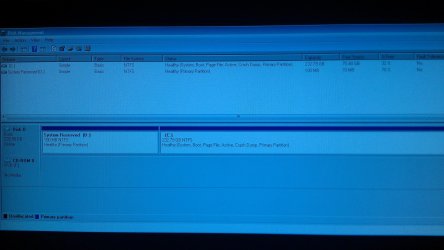
can you get us a diskmanagement map?

HOW TO POST A SNAPSHOT OF DISK MANAGEMENT DISPLAY
Run disk management:
WIN |
type DISKMGMT.MSC | ENTER
WIN=
key with Microsoft logo on top.


Maximize the output of Disk Management:
ALT-Spacebar
key combo | X key (selects Maximize) |
Drag the field separators (such as between Status and Capacity) to show entire field.


Make a snapshot:
WIN |
type SNIPPING | ENTER | New
Drag the cursor around the area you want to snip.
File | Save as | select save location and name | Save


Post the snapshot:
Post a File or Screenshot in Seven Forums

====================================
 

My Computer My Computer

Computer Manufacturer/Model Number
Toshiba Satellite S875D-S7239 laptop
OS
MS Windows 7 Ultimate SP1 64-bit
CPU
AMD A10-4600M
Motherboard
AMD Pumori (Socket FT1)
Memory
6.00 GB Dual-Channel DDR3 @ 798MHz (11-11-12-28)
Graphics Card(s)
AMD Radeon HD 7660G
Sound Card
High Definition Audio Device
Monitor(s) Displays
Generic PnP Monitor (1600x900@60Hz)
Screen Resolution
1600x900@60Hz
Hard Drives
SSD 119GB Corsair CSSD-V128GB2 ATA Device
Keyboard
Standard PS/2 Keyboard
Mouse
HP Wireless Optical Mobile Mouse Model FHA-3410
Internet Speed
What the local pub, local coffee shop offers.
Other Info
Optical Drive:MATSHITA BD-CMB UJ160B ATA Device


Also have an Asus ha1002xp netbook with Win 7 Ultimate installed.
I realize this isn't the ideal way to get the screenshot up here, but snipping wouldn't work and if it did I'd have no way to go about getting it off the computer anyways, as it's not letting me access anything, even trying to explore the drive.
 

Attachments

  • IMAG0092.jpg
    IMAG0092.jpg
    643.1 KB · Views: 31

My Computer My Computer

OS
Windows 7 Ultimate x64
CPU
AMD FX4100
Motherboard
Asus M5A88-V EVO
Memory
8GB Corsiar Vengance
Monitor(s) Displays
Acer 23" LED
Screen Resolution
1920x1080
Hard Drives
2x Western Digital Scorpio Black WD2500BEKT 250GB 7200 RPM 16MB Cache 2.5" SATA 3.0Gb/s
PSU
Corsair GS600
Case
Cooler Master HAF-912
Cooling
Corsiar H80
Internet Speed
DSL
I realize this isn't the ideal way to get the screenshot up here, but snipping wouldn't work and if it did I'd have no way to go about getting it off the computer anyways, as it's not letting me access anything, even trying to explore the drive.

Try using Visual BCD Editor - Windows 7/Vista tool, available from;

http://www.boyans.net/

There is a tab on the bottom row to edit the Boot Menu. I haven't used this in a long time, so don't remember all the particulars.

HTH
 

My Computer My Computer

Computer type
PC/Desktop
Computer Manufacturer/Model Number
Custom Built
OS
Windows 7 Professional x64
CPU
Intel i5 quad processor
Motherboard
DP67BG
Memory
16 GB
Graphics Card(s)
Radeon HD 5770
Sound Card
Realtek High Definition Audio
Monitor(s) Displays
Samsung SyncMaster
Screen Resolution
1920X1080
Hard Drives
WD 2TB (SATA Internal)
WD 1TB (USB External)
PSU
Corsair GS800
Case
Tower (Generic)
Cooling
3 Internal Fans
Keyboard
MS Wireless
Mouse
MS Optical Wired
Internet Speed
54 mbps
Antivirus
Emsisoft
Browser
IE-Version 9, Palemoon-Version 24.2.0
I realize this isn't the ideal way to get the screenshot up here, but snipping wouldn't work and if it did I'd have no way to go about getting it off the computer anyways, as it's not letting me access anything, even trying to explore the drive.

Try using Visual BCD Editor - Windows 7/Vista tool, available from;

http://www.boyans.net/

There is a tab on the bottom row to edit the Boot Menu. I haven't used this in a long time, so don't remember all the particulars.

HTH

Thanks, I'll check it out. But how can I use that if I can't get anything to run?
 

My Computer My Computer

OS
Windows 7 Ultimate x64
CPU
AMD FX4100
Motherboard
Asus M5A88-V EVO
Memory
8GB Corsiar Vengance
Monitor(s) Displays
Acer 23" LED
Screen Resolution
1920x1080
Hard Drives
2x Western Digital Scorpio Black WD2500BEKT 250GB 7200 RPM 16MB Cache 2.5" SATA 3.0Gb/s
PSU
Corsair GS600
Case
Cooler Master HAF-912
Cooling
Corsiar H80
Internet Speed
DSL
I realize this isn't the ideal way to get the screenshot up here, but snipping wouldn't work and if it did I'd have no way to go about getting it off the computer anyways, as it's not letting me access anything, even trying to explore the drive.

Try using Visual BCD Editor - Windows 7/Vista tool, available from;

http://www.boyans.net/

There is a tab on the bottom row to edit the Boot Menu. I haven't used this in a long time, so don't remember all the particulars.

HTH

Thanks, I'll check it out. But how can I use that if I can't get anything to run?

OK, I am confused, how did you get to MSConfig?
 

My Computer My Computer

Computer type
PC/Desktop
Computer Manufacturer/Model Number
Custom Built
OS
Windows 7 Professional x64
CPU
Intel i5 quad processor
Motherboard
DP67BG
Memory
16 GB
Graphics Card(s)
Radeon HD 5770
Sound Card
Realtek High Definition Audio
Monitor(s) Displays
Samsung SyncMaster
Screen Resolution
1920X1080
Hard Drives
WD 2TB (SATA Internal)
WD 1TB (USB External)
PSU
Corsair GS800
Case
Tower (Generic)
Cooling
3 Internal Fans
Keyboard
MS Wireless
Mouse
MS Optical Wired
Internet Speed
54 mbps
Antivirus
Emsisoft
Browser
IE-Version 9, Palemoon-Version 24.2.0
Try using Visual BCD Editor - Windows 7/Vista tool, available from;

http://www.boyans.net/

There is a tab on the bottom row to edit the Boot Menu. I haven't used this in a long time, so don't remember all the particulars.

HTH

Thanks, I'll check it out. But how can I use that if I can't get anything to run?

OK, I am confused, how did you get to MSConfig?

After it loads to a blank screen, I open the task manager and use the "Run" command from there. So far I'm able to get it to load explorer.exe, diskmgmt.msc and msconfig.exe. I can't access the main drive or anything like that, I've got to execute it all from the Run command.
 

My Computer My Computer

OS
Windows 7 Ultimate x64
CPU
AMD FX4100
Motherboard
Asus M5A88-V EVO
Memory
8GB Corsiar Vengance
Monitor(s) Displays
Acer 23" LED
Screen Resolution
1920x1080
Hard Drives
2x Western Digital Scorpio Black WD2500BEKT 250GB 7200 RPM 16MB Cache 2.5" SATA 3.0Gb/s
PSU
Corsair GS600
Case
Cooler Master HAF-912
Cooling
Corsiar H80
Internet Speed
DSL
Thanks, I'll check it out. But how can I use that if I can't get anything to run?

OK, I am confused, how did you get to MSConfig?

After it loads to a blank screen, I open the task manager and use the "Run" command from there. So far I'm able to get it to load explorer.exe, diskmgmt.msc and msconfig.exe. I can't access the main drive or anything like that, I've got to execute it all from the Run command.

Can you still view a DVD disk from the "Run" command? If so, use a working computer to download and then run it from there. I haven't encounterd your exact situation before, so all this is second guessing what you will be able to accomplish.
 

My Computer My Computer

Computer type
PC/Desktop
Computer Manufacturer/Model Number
Custom Built
OS
Windows 7 Professional x64
CPU
Intel i5 quad processor
Motherboard
DP67BG
Memory
16 GB
Graphics Card(s)
Radeon HD 5770
Sound Card
Realtek High Definition Audio
Monitor(s) Displays
Samsung SyncMaster
Screen Resolution
1920X1080
Hard Drives
WD 2TB (SATA Internal)
WD 1TB (USB External)
PSU
Corsair GS800
Case
Tower (Generic)
Cooling
3 Internal Fans
Keyboard
MS Wireless
Mouse
MS Optical Wired
Internet Speed
54 mbps
Antivirus
Emsisoft
Browser
IE-Version 9, Palemoon-Version 24.2.0
I loaded it to a flash drive, I'm able to run the program via a command prompt, but it won't let me install. The popup reads as follows:
"The Windows Installer Service could not be accessed. This can occur if the Windows Installer is not correctly installed. Contact your support personnel for assistance."
 

My Computer My Computer

OS
Windows 7 Ultimate x64
CPU
AMD FX4100
Motherboard
Asus M5A88-V EVO
Memory
8GB Corsiar Vengance
Monitor(s) Displays
Acer 23" LED
Screen Resolution
1920x1080
Hard Drives
2x Western Digital Scorpio Black WD2500BEKT 250GB 7200 RPM 16MB Cache 2.5" SATA 3.0Gb/s
PSU
Corsair GS600
Case
Cooler Master HAF-912
Cooling
Corsiar H80
Internet Speed
DSL
If there is a command line way to set the boot loader path to "\Windows\system32\winload.exe" rather than the "\Windows.old\Windows\system32\winload.exe" that it's set to right now, I'm able to do it that way. I'm pretty sure THAT right there is the big problem.
 

My Computer My Computer

OS
Windows 7 Ultimate x64
CPU
AMD FX4100
Motherboard
Asus M5A88-V EVO
Memory
8GB Corsiar Vengance
Monitor(s) Displays
Acer 23" LED
Screen Resolution
1920x1080
Hard Drives
2x Western Digital Scorpio Black WD2500BEKT 250GB 7200 RPM 16MB Cache 2.5" SATA 3.0Gb/s
PSU
Corsair GS600
Case
Cooler Master HAF-912
Cooling
Corsiar H80
Internet Speed
DSL
I loaded it to a flash drive, I'm able to run the program via a command prompt, but it won't let me install. The popup reads as follows:
"The Windows Installer Service could not be accessed. This can occur if the Windows Installer is not correctly installed. Contact your support personnel for assistance."

Sorry, it looks like this ain't gonna work. There is a tool that will run in a pure DOS environment that should work. It's from Terabyteunlimited and the program is "BooitIt Bare Metal". It is a pretty sophisticated partition management tool and has a fully functional 30 trial. You can download it from;

http://www.terabyteunlimited.com/bootit-bare-metal.htm

You will need to download to a working computer, then create a boot disk and have your BIOS set to boot from either a DVD or Thumb drive.

Since I have no idea of your computer skills, I will recommend caution when using this software; you can definitely cause more harm if used incorrectly. There are tutorials on the site which will provide some idea of how it works.
 

My Computer My Computer

Computer type
PC/Desktop
Computer Manufacturer/Model Number
Custom Built
OS
Windows 7 Professional x64
CPU
Intel i5 quad processor
Motherboard
DP67BG
Memory
16 GB
Graphics Card(s)
Radeon HD 5770
Sound Card
Realtek High Definition Audio
Monitor(s) Displays
Samsung SyncMaster
Screen Resolution
1920X1080
Hard Drives
WD 2TB (SATA Internal)
WD 1TB (USB External)
PSU
Corsair GS800
Case
Tower (Generic)
Cooling
3 Internal Fans
Keyboard
MS Wireless
Mouse
MS Optical Wired
Internet Speed
54 mbps
Antivirus
Emsisoft
Browser
IE-Version 9, Palemoon-Version 24.2.0
I realize this isn't the ideal way to get the screenshot up here, but snipping wouldn't work and if it did I'd have no way to go about getting it off the computer anyways, as it's not letting me access anything, even trying to explore the drive.

IMAG0092.jpg

Why do you have a System Reserved partition that has a drive letter and is not active? Was this intentional?

Before following the advice for the 30 day trial partition software, I would recommend reading through http://www.sevenforums.com/tutorials/219533-troubleshooting-windows-7-failure-boot.html

I have asked the author of that tutorial to take a look at this thread, as well.
 

My Computer My Computer

Computer Manufacturer/Model Number
HP Pavilion e9110t
OS
Windows 7 Home Premium 64 Bit
CPU
Intel(R) Core(TM)2 Quad CPU Q9550 @ 2.83GHz
Motherboard
Pegatron IPIEL-LA3
Memory
6.00 GB Hundai HMT125U6BFR8C-H9
Graphics Card(s)
ATI Radeon HD 4850
Sound Card
Realtek High Definition Audio/ATI High Definition Audio
Monitor(s) Displays
Acer AL2216W
Screen Resolution
1680x1050
Hard Drives
Hitachi HDP725050GLA360 ATA Device 500 GB
PSU
Unknown/installed by HP
Case
HP generic case
Cooling
Intel Stock Cooling
Keyboard
HP Keyboard
Mouse
HP Mouse
Internet Speed
Download: 19.15 Mbps Upload: 1.67 Mbps
Other Info
Network Adapter Realtek RTL8168D/8111D Family PCI-E Gigabit Ethernet NIC (NDIS 6.20)
Network Adapter 802.11n Wireless PCI Express Card LAN Adapter
I realize this isn't the ideal way to get the screenshot up here, but snipping wouldn't work and if it did I'd have no way to go about getting it off the computer anyways, as it's not letting me access anything, even trying to explore the drive.


Why do you have a System Reserved partition that has a drive letter and is not active? Was this intentional?

Before following the advice for the 30 day trial partition software, I would recommend reading through http://www.sevenforums.com/tutorials/219533-troubleshooting-windows-7-failure-boot.html

I have asked the author of that tutorial to take a look at this thread, as well.

I'm using a laptop hard drive as the main drive for this computer. That is how it was formatted when it was in the laptop, I've made no changes to it since. I've since got the boot loader set up to read Windows from the correct folder, now I'm experiencing an issue where it will load up, then shut the screen off before it logs on...
 

My Computer My Computer

OS
Windows 7 Ultimate x64
CPU
AMD FX4100
Motherboard
Asus M5A88-V EVO
Memory
8GB Corsiar Vengance
Monitor(s) Displays
Acer 23" LED
Screen Resolution
1920x1080
Hard Drives
2x Western Digital Scorpio Black WD2500BEKT 250GB 7200 RPM 16MB Cache 2.5" SATA 3.0Gb/s
PSU
Corsair GS600
Case
Cooler Master HAF-912
Cooling
Corsiar H80
Internet Speed
DSL
Can you start a command prompt with admin rights ?
If yes create a complete BCD dump:
bcdedit /enum all /v >bcd_full.txt

and attach to your next post.

Shifting W7 loader to boot from any directory is done over the path element of the loader. But let's see what is there in the BCD first.
 

My Computer My Computer

Computer Manufacturer/Model Number
Acer Notebook
OS
Win 8 RP, Win 7, XP
CPU
Intel
Back
Top