Solved How to Install Windows 7 Over Windows 8 | Dual Boot

Also, if you set the bootmenupolicy to Standard on the Windows 7 bootloader,

Boot should fail (if set) as loader parameters are handed over to ntoskrnl.exe.
Win 7 kernel does NOT know about bootmenupolicy as this was introduced later for Win8.
 

My Computer My Computer

At a glance

Win 8 RP, Win 7, XPIntel
Computer Manufacturer/Model Number
Acer Notebook
OS
Win 8 RP, Win 7, XP
CPU
Intel
Also, if you set the bootmenupolicy to Standard on the Windows 7 bootloader,

Boot should fail (if set) as loader parameters are handed over to ntoskrnl.exe.
Win 7 kernel does NOT know about bootmenupolicy as this was introduced later for Win8.
So using the Windows 8 boot manager (bootmgr), would not make a difference?
 

My Computer My Computer

At a glance

Windows 7 x64i7-2600K8 GGTX 480
Computer Manufacturer/Model Number
Homebuilt
OS
Windows 7 x64
CPU
i7-2600K
Motherboard
Asus P8Z77-v Pro
Memory
8 G
Graphics Card(s)
GTX 480
Sound Card
Onboard
Monitor(s) Displays
LG W2753V
Screen Resolution
1920x1080
Hard Drives
Crucial M4 128 G SSD
Give it a try and you would know (try W7 loader, bootmenupolicy=0 and bootmenupolicy=1).
It has no meaning having W7 bootmgr on active if W8 is installed as W7 bootmgr cannot load W8.
 

My Computer My Computer

At a glance

Win 8 RP, Win 7, XPIntel
Computer Manufacturer/Model Number
Acer Notebook
OS
Win 8 RP, Win 7, XP
CPU
Intel
Give it a try and you would know (try W7 loader, bootmenupolicy=0 and bootmenupolicy=1).
It has no meaning having W7 bootmgr on active if W8 is installed as W7 bootmgr cannot load W8.
Did you ever wonder why I made the statement in the first place?

How many bootmgr files do you show on your system? This thread is about a very specific configuration.
 

My Computer My Computer

At a glance

Windows 7 x64i7-2600K8 GGTX 480
Computer Manufacturer/Model Number
Homebuilt
OS
Windows 7 x64
CPU
i7-2600K
Motherboard
Asus P8Z77-v Pro
Memory
8 G
Graphics Card(s)
GTX 480
Sound Card
Onboard
Monitor(s) Displays
LG W2753V
Screen Resolution
1920x1080
Hard Drives
Crucial M4 128 G SSD
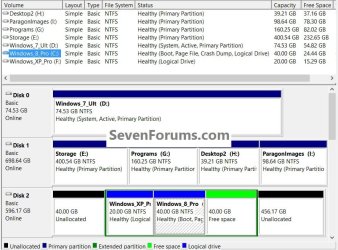
What's that HTML code ? in one of your posts on last page Saltgrass, and I have win8 in c drive and win7 in d drive can I use your command safely now ?
 

My Computer My Computer

At a glance

Windows 8.1 Pro x64Intel Core i3 (3.0 GHZ)4 GB GDDR3Sapphire ATI Radeon 7790 HD 1 GB GDDR5
Computer type
PC/Desktop
Computer Manufacturer/Model Number
Custom Build
OS
Windows 8.1 Pro x64
CPU
Intel Core i3 (3.0 GHZ)
Motherboard
Asus P7H55-M LX
Memory
4 GB GDDR3
Graphics Card(s)
Sapphire ATI Radeon 7790 HD 1 GB GDDR5
Sound Card
Builtin AMD Hight Defination Audio Controller
Monitor(s) Displays
ASUS MS228H 21.5" Wide LED Monitor
Screen Resolution
1920x1080
Hard Drives
1 TB SATA Seagate
PSU
500W
Case
Orange
Cooling
None
Keyboard
A4TECH
Mouse
Who Cares?
Internet Speed
1 MB Shared Wateen Wireless
Antivirus
Kaspersky Internet Security
Browser
Mozilla Firefox
Give it a try and you would know (try W7 loader, bootmenupolicy=0 and bootmenupolicy=1).
It has no meaning having W7 bootmgr on active if W8 is installed as W7 bootmgr cannot load W8.


Hello Boyans.


I'm not trying to be hard to get along with, just curious, with Windows 8 on an Extended partition, you're saying it's still handling the boot in this case?

DM.jpgBM.jpg

Code:
Microsoft Windows [Version 6.2.9200]
(c) 2012 Microsoft Corporation. All rights reserved.
C:\Windows\system32>bcdedit
Windows Boot Manager
--------------------
identifier              {bootmgr}
device                  partition=D:
description             Windows Boot Manager
locale                  en-US
inherit                 {globalsettings}
default                 {default}
resumeobject            {6c8678be-ed4c-11e1-8e3f-b4aaa0e8f515}
displayorder            {ntldr}
                        {current}
                        {default}
toolsdisplayorder       {memdiag}
timeout                 30
Windows Legacy OS Loader
------------------------
identifier              {ntldr}
device                  partition=D:
path                    \ntldr
description             Windows XP Pro
Windows Boot Loader
-------------------
identifier              {current}
device                  partition=C:
path                    \Windows\system32\winload.exe
description             Windows 8 Pro
locale                  en-US
inherit                 {bootloadersettings}
recoverysequence        {6c8678c0-ed4c-11e1-8e3f-b4aaa0e8f515}
recoveryenabled         Yes
allowedinmemorysettings 0x15000075
osdevice                partition=C:
systemroot              \Windows
resumeobject            {6c8678be-ed4c-11e1-8e3f-b4aaa0e8f515}
nx                      OptIn
bootmenupolicy          Standard
Windows Boot Loader
-------------------
identifier              {default}
device                  partition=D:
path                    \Windows\system32\winload.exe
description             Windows 7 Ultimate
locale                  en-US
inherit                 {bootloadersettings}
recoverysequence        {6c8678ba-ed4c-11e1-8e3f-b4aaa0e8f515}
recoveryenabled         Yes
osdevice                partition=D:
systemroot              \Windows
resumeobject            {6c8678b8-ed4c-11e1-8e3f-b4aaa0e8f515}
nx                      OptIn
C:\Windows\system32>
 

My Computer My Computer

At a glance

W 7 64-bit UltimateIntel Q9550 Yorkfield8GB Dominator 8500C5DATI : XFX 5870
Computer Manufacturer/Model Number
* BFK Customs *
OS
W 7 64-bit Ultimate
CPU
Intel Q9550 Yorkfield
Motherboard
ASUS P5Q Pro
Memory
8GB Dominator 8500C5D
Graphics Card(s)
ATI : XFX 5870
Sound Card
Realtek HD Audio 7-1
Monitor(s) Displays
1x 47" LCD HDMI & 3x 26" LCD HDMI
Screen Resolution
1920x1080P & 1920x1200
Hard Drives
1x 80GB Intel X25-M G2 SSD : 1x 500GB & 1x 640GB WD Caviar Black(s)
PSU
Corsair 620HX
Case
Cooler Master RC-690
Cooling
Tuniq Tower 120, 2x 140mm and 3x 120mm case fans
Keyboard
Microsoft 500
Mouse
Razer Diamondback 3G
Internet Speed
14 Mb/s
Other Info
1x Koutech 3Gb/s SATA HDD Hot Swap Rack
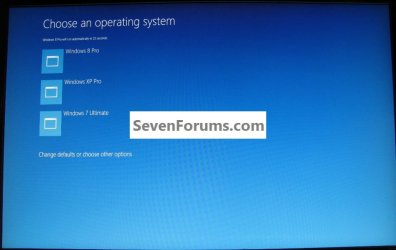
Win8 can display a text menu, or what you are calling the GUI menu.

Text menu is not "old". It is the best for multibooting - that is why it is there.

The GUI has big squares - for touch screens .

If you are multibooting, text menu is vastly better. If you only have a touchscreen - GUI is much easier to operate.

The drawback to the gui is that if you select anything apart from win8 - your machine will reboot.
 

My Computers My Computers

  • At a glance

    7 X64i5 84002x8gb 3200mhz
    Computer type
    PC/Desktop
    OS
    7 X64
    CPU
    i5 8400
    Motherboard
    gigabyte b365m ds3h
    Memory
    2x8gb 3200mhz
    Hard Drives
    various
    PSU
    pure power 11 400w cm
    Case
    Coolermaster
    Cooling
    cryorig m9i
  • At a glance

    7x64g54008gb ddr4 2400
    Computer type
    PC/Desktop
    OS
    7x64
    CPU
    g5400
    Motherboard
    ga b365m ds3h
    Memory
    8gb ddr4 2400
    PSU
    xfx pro 450w
@Ted,

with Windows 8 on an Extended partition, you're saying it's still handling the boot in this case?

Yes, you are using win8 bootmgr.
 

My Computers My Computers

  • At a glance

    7 X64i5 84002x8gb 3200mhz
    Computer type
    PC/Desktop
    OS
    7 X64
    CPU
    i5 8400
    Motherboard
    gigabyte b365m ds3h
    Memory
    2x8gb 3200mhz
    Hard Drives
    various
    PSU
    pure power 11 400w cm
    Case
    Coolermaster
    Cooling
    cryorig m9i
  • At a glance

    7x64g54008gb ddr4 2400
    Computer type
    PC/Desktop
    OS
    7x64
    CPU
    g5400
    Motherboard
    ga b365m ds3h
    Memory
    8gb ddr4 2400
    PSU
    xfx pro 450w

My Computer My Computer

At a glance

W 7 64-bit UltimateIntel Q9550 Yorkfield8GB Dominator 8500C5DATI : XFX 5870
Computer Manufacturer/Model Number
* BFK Customs *
OS
W 7 64-bit Ultimate
CPU
Intel Q9550 Yorkfield
Motherboard
ASUS P5Q Pro
Memory
8GB Dominator 8500C5D
Graphics Card(s)
ATI : XFX 5870
Sound Card
Realtek HD Audio 7-1
Monitor(s) Displays
1x 47" LCD HDMI & 3x 26" LCD HDMI
Screen Resolution
1920x1080P & 1920x1200
Hard Drives
1x 80GB Intel X25-M G2 SSD : 1x 500GB & 1x 640GB WD Caviar Black(s)
PSU
Corsair 620HX
Case
Cooler Master RC-690
Cooling
Tuniq Tower 120, 2x 140mm and 3x 120mm case fans
Keyboard
Microsoft 500
Mouse
Razer Diamondback 3G
Internet Speed
14 Mb/s
Other Info
1x Koutech 3Gb/s SATA HDD Hot Swap Rack
What's that HTML code ? in one of your posts on last page Saltgrass, and I have win8 in c drive and win7 in d drive can I use your command safely now ?

Yes, it is safe... and run it from within Windows 8 so it will use that BCD store.

It seems others cannot duplicate your situation. I seem to have no trouble duplicating it. Since you have confirmed the other suggestions, such as set Win 8 as default and have bootmenupolicy set as Standard, and it has not fixed your system, the Bcdboot command will work And I even get to keep the F8 options, but only from the text boot menu.

If you have doubts, use the bcdedit /export C:\TangoBCD.bcd so you will have the old version you can go back to if you were to feel the need.
 

My Computer My Computer

At a glance

Windows 7 x64i7-2600K8 GGTX 480
Computer Manufacturer/Model Number
Homebuilt
OS
Windows 7 x64
CPU
i7-2600K
Motherboard
Asus P8Z77-v Pro
Memory
8 G
Graphics Card(s)
GTX 480
Sound Card
Onboard
Monitor(s) Displays
LG W2753V
Screen Resolution
1920x1080
Hard Drives
Crucial M4 128 G SSD
okay fine, just tried it, currently doing some work , will post back the result tonight.
 

My Computer My Computer

At a glance

Windows 8.1 Pro x64Intel Core i3 (3.0 GHZ)4 GB GDDR3Sapphire ATI Radeon 7790 HD 1 GB GDDR5
Computer type
PC/Desktop
Computer Manufacturer/Model Number
Custom Build
OS
Windows 8.1 Pro x64
CPU
Intel Core i3 (3.0 GHZ)
Motherboard
Asus P7H55-M LX
Memory
4 GB GDDR3
Graphics Card(s)
Sapphire ATI Radeon 7790 HD 1 GB GDDR5
Sound Card
Builtin AMD Hight Defination Audio Controller
Monitor(s) Displays
ASUS MS228H 21.5" Wide LED Monitor
Screen Resolution
1920x1080
Hard Drives
1 TB SATA Seagate
PSU
500W
Case
Orange
Cooling
None
Keyboard
A4TECH
Mouse
Who Cares?
Internet Speed
1 MB Shared Wateen Wireless
Antivirus
Kaspersky Internet Security
Browser
Mozilla Firefox
And I do agree with SWI2's comments about the GUI. I would not use it either, but what makes you happy is most important.
 

My Computer My Computer

At a glance

Windows 7 x64i7-2600K8 GGTX 480
Computer Manufacturer/Model Number
Homebuilt
OS
Windows 7 x64
CPU
i7-2600K
Motherboard
Asus P8Z77-v Pro
Memory
8 G
Graphics Card(s)
GTX 480
Sound Card
Onboard
Monitor(s) Displays
LG W2753V
Screen Resolution
1920x1080
Hard Drives
Crucial M4 128 G SSD
heheheh , yup actually we've been forced to use Metro as Start Menu so why not Boot GUI, anyway I didn't notice anything bad in windows 8 so far as people were saying it will DOA
 

My Computer My Computer

At a glance

Windows 8.1 Pro x64Intel Core i3 (3.0 GHZ)4 GB GDDR3Sapphire ATI Radeon 7790 HD 1 GB GDDR5
Computer type
PC/Desktop
Computer Manufacturer/Model Number
Custom Build
OS
Windows 8.1 Pro x64
CPU
Intel Core i3 (3.0 GHZ)
Motherboard
Asus P7H55-M LX
Memory
4 GB GDDR3
Graphics Card(s)
Sapphire ATI Radeon 7790 HD 1 GB GDDR5
Sound Card
Builtin AMD Hight Defination Audio Controller
Monitor(s) Displays
ASUS MS228H 21.5" Wide LED Monitor
Screen Resolution
1920x1080
Hard Drives
1 TB SATA Seagate
PSU
500W
Case
Orange
Cooling
None
Keyboard
A4TECH
Mouse
Who Cares?
Internet Speed
1 MB Shared Wateen Wireless
Antivirus
Kaspersky Internet Security
Browser
Mozilla Firefox
I'm not real happy with it but if you can't whip 'em join 'em eh! :shock:
 

My Computer My Computer

At a glance

W 7 64-bit UltimateIntel Q9550 Yorkfield8GB Dominator 8500C5DATI : XFX 5870
Computer Manufacturer/Model Number
* BFK Customs *
OS
W 7 64-bit Ultimate
CPU
Intel Q9550 Yorkfield
Motherboard
ASUS P5Q Pro
Memory
8GB Dominator 8500C5D
Graphics Card(s)
ATI : XFX 5870
Sound Card
Realtek HD Audio 7-1
Monitor(s) Displays
1x 47" LCD HDMI & 3x 26" LCD HDMI
Screen Resolution
1920x1080P & 1920x1200
Hard Drives
1x 80GB Intel X25-M G2 SSD : 1x 500GB & 1x 640GB WD Caviar Black(s)
PSU
Corsair 620HX
Case
Cooler Master RC-690
Cooling
Tuniq Tower 120, 2x 140mm and 3x 120mm case fans
Keyboard
Microsoft 500
Mouse
Razer Diamondback 3G
Internet Speed
14 Mb/s
Other Info
1x Koutech 3Gb/s SATA HDD Hot Swap Rack
Thanks saltgrass your command works, but that GUI bootloader appears after win8's boot screen, is it normal ?
 

My Computer My Computer

At a glance

Windows 8.1 Pro x64Intel Core i3 (3.0 GHZ)4 GB GDDR3Sapphire ATI Radeon 7790 HD 1 GB GDDR5
Computer type
PC/Desktop
Computer Manufacturer/Model Number
Custom Build
OS
Windows 8.1 Pro x64
CPU
Intel Core i3 (3.0 GHZ)
Motherboard
Asus P7H55-M LX
Memory
4 GB GDDR3
Graphics Card(s)
Sapphire ATI Radeon 7790 HD 1 GB GDDR5
Sound Card
Builtin AMD Hight Defination Audio Controller
Monitor(s) Displays
ASUS MS228H 21.5" Wide LED Monitor
Screen Resolution
1920x1080
Hard Drives
1 TB SATA Seagate
PSU
500W
Case
Orange
Cooling
None
Keyboard
A4TECH
Mouse
Who Cares?
Internet Speed
1 MB Shared Wateen Wireless
Antivirus
Kaspersky Internet Security
Browser
Mozilla Firefox
Yes, it is booting into Windows 8 before it shows the boot menu. That was what SIW2 was referring to. To get into Win 7 from that boot menu, the system has to reboot, where is does not from a Text boot menu.

But we know now, if you want to get rid of the GUI, for some reason, and still have Win 8 as the default OS, you can remove the bootmenupolicy entry in the BCD Store and you will then see the Text boot menu.

Let us know how it goes with Win 8 ......
 

My Computer My Computer

At a glance

Windows 7 x64i7-2600K8 GGTX 480
Computer Manufacturer/Model Number
Homebuilt
OS
Windows 7 x64
CPU
i7-2600K
Motherboard
Asus P8Z77-v Pro
Memory
8 G
Graphics Card(s)
GTX 480
Sound Card
Onboard
Monitor(s) Displays
LG W2753V
Screen Resolution
1920x1080
Hard Drives
Crucial M4 128 G SSD
I've also used this to set the default boot-loader.


bcdedit /default {your identifier}
 

My Computer My Computer

At a glance

W 7 64-bit UltimateIntel Q9550 Yorkfield8GB Dominator 8500C5DATI : XFX 5870
Computer Manufacturer/Model Number
* BFK Customs *
OS
W 7 64-bit Ultimate
CPU
Intel Q9550 Yorkfield
Motherboard
ASUS P5Q Pro
Memory
8GB Dominator 8500C5D
Graphics Card(s)
ATI : XFX 5870
Sound Card
Realtek HD Audio 7-1
Monitor(s) Displays
1x 47" LCD HDMI & 3x 26" LCD HDMI
Screen Resolution
1920x1080P & 1920x1200
Hard Drives
1x 80GB Intel X25-M G2 SSD : 1x 500GB & 1x 640GB WD Caviar Black(s)
PSU
Corsair 620HX
Case
Cooler Master RC-690
Cooling
Tuniq Tower 120, 2x 140mm and 3x 120mm case fans
Keyboard
Microsoft 500
Mouse
Razer Diamondback 3G
Internet Speed
14 Mb/s
Other Info
1x Koutech 3Gb/s SATA HDD Hot Swap Rack
But we know now, if you want to get rid of the GUI, for some reason, and still have Win 8 as the default OS, you can remove the bootmenupolicy entry in the BCD Store and you will then see the Text boot menu.

Let us know how it goes with Win 8 ......

well I think I will stick with the text boot loader, can you plz tell me how can I get that back , I didn't backup it earlier , my mistake.
 

My Computer My Computer

At a glance

Windows 8.1 Pro x64Intel Core i3 (3.0 GHZ)4 GB GDDR3Sapphire ATI Radeon 7790 HD 1 GB GDDR5
Computer type
PC/Desktop
Computer Manufacturer/Model Number
Custom Build
OS
Windows 8.1 Pro x64
CPU
Intel Core i3 (3.0 GHZ)
Motherboard
Asus P7H55-M LX
Memory
4 GB GDDR3
Graphics Card(s)
Sapphire ATI Radeon 7790 HD 1 GB GDDR5
Sound Card
Builtin AMD Hight Defination Audio Controller
Monitor(s) Displays
ASUS MS228H 21.5" Wide LED Monitor
Screen Resolution
1920x1080
Hard Drives
1 TB SATA Seagate
PSU
500W
Case
Orange
Cooling
None
Keyboard
A4TECH
Mouse
Who Cares?
Internet Speed
1 MB Shared Wateen Wireless
Antivirus
Kaspersky Internet Security
Browser
Mozilla Firefox
I've also used this to set the default boot-loader.

bcdedit /default {your identifier}


Run this command from an elevated command window using the Windows 7 identifier to set Windows 7 as default, this tutorial is very helpful for reference.
Use these commands to create a backup of the bcd file.
   Warning

IMPORTANT: make a backup of your bcd file first. To do that, type:

bcdedit /export C:\SAVEDBCD

This will create a file c:\savebcd which is your boot entry backup.
If you mess up, you can always undo changes by:

bcdedit /import c:\savedbcd


My Computer My Computer

At a glance

W 7 64-bit UltimateIntel Q9550 Yorkfield8GB Dominator 8500C5DATI : XFX 5870
Computer Manufacturer/Model Number
* BFK Customs *
OS
W 7 64-bit Ultimate
CPU
Intel Q9550 Yorkfield
Motherboard
ASUS P5Q Pro
Memory
8GB Dominator 8500C5D
Graphics Card(s)
ATI : XFX 5870
Sound Card
Realtek HD Audio 7-1
Monitor(s) Displays
1x 47" LCD HDMI & 3x 26" LCD HDMI
Screen Resolution
1920x1080P & 1920x1200
Hard Drives
1x 80GB Intel X25-M G2 SSD : 1x 500GB & 1x 640GB WD Caviar Black(s)
PSU
Corsair 620HX
Case
Cooler Master RC-690
Cooling
Tuniq Tower 120, 2x 140mm and 3x 120mm case fans
Keyboard
Microsoft 500
Mouse
Razer Diamondback 3G
Internet Speed
14 Mb/s
Other Info
1x Koutech 3Gb/s SATA HDD Hot Swap Rack
You can do the opposite of the two things they suggested for getting the GUI to work.

Set Windows 7 as the default loader, or remove the bootmenupolicy from the BCD Store. Which means neither the Windows 7 or Windows 8 Bootloader will have the entry.
 

My Computer My Computer

At a glance

Windows 7 x64i7-2600K8 GGTX 480
Computer Manufacturer/Model Number
Homebuilt
OS
Windows 7 x64
CPU
i7-2600K
Motherboard
Asus P8Z77-v Pro
Memory
8 G
Graphics Card(s)
GTX 480
Sound Card
Onboard
Monitor(s) Displays
LG W2753V
Screen Resolution
1920x1080
Hard Drives
Crucial M4 128 G SSD
Back
Top