Windows Live Mail - Exporting Contacts loses all Category information

Joyaa

New member
Local time
4:03 AM
Messages
4
I am using Windows 7, sp1, and Windows Live Mail, Version 2011 (Build 15.4.3555.0308). I wish to copy (i.e. export then import) my Contacts list from one computer to another. I use Contact "Categories" (used to be called "Groups" in Outlook Express) extensively, but exporting WLM contacts seems to lose all Category information. I must be doing something wrong for this to happen. How do I export Contact info while maintaining each Contact in their relevant Category/Categories? Perhaps there is a way of exporting in ".wab" format; or perhaps there is a different way around this? Many thanks
 

My Computer My Computer

At a glance

Windows 7 Home Premium 64 bit
OS
Windows 7 Home Premium 64 bit
...I wish to copy (i.e. export then import) my Contacts list from one computer to another. I use Contact "Categories" (used to be called "Groups" in Outlook Express) extensively, but exporting WLM contacts seems to lose all Category information...
True, the categories are lost during export/import. However, if you had been "signing-in" you would be using your "signed-in" contact list which is duplicated at contacts.live.com. Then as soon as you sign in on the new computer you would continue to use the same list, including the categories. Do you remember if your original import from the OE *.wab file preserved the groups? If so, just do it again on the new computer. (However I don't think you can move contacts back to OE from your current WLM contact list.)

Having said that, I remember when I started using WLM back in 2009, I played around with the contacts folders in Windows Explorer just to see if I could recreate my contacts by replacing the folders created during a new install with the folders from the old install. It worked, although Windows doesn't believe you really want to do that so there are numerous confirmations like "yes" "allow" and "no I'm not crazy" but when the dust settled, I had duplicated the contacts and categories on the new install.
 

My Computer My Computer

At a glance

Windows 8 Pro w/MC 32-bitIntel Atom 1.86 GHz2 GBIntel GMA 500
Computer type
PC/Desktop
Computer Manufacturer/Model Number
OQO 2+
OS
Windows 8 Pro w/MC 32-bit
CPU
Intel Atom 1.86 GHz
Motherboard
OQO 2+
Memory
2 GB
Graphics Card(s)
Intel GMA 500
Sound Card
IDT
Monitor(s) Displays
LCD
Screen Resolution
800 x 480 (portable) 1280 x 1024 (docked)
Hard Drives
64 GB SSD
PSU
9 Ah Battery (portable) or OQO Brick (docked)
Case
Shirt Pocket Sized
Cooling
Tiny Fan
Keyboard
Slide out (portable) DiNovo Edge (docked)
Mouse
Eraser head (portable) Logitech Bluetooth (docked)
Internet Speed
WWAN or 802.11G (portable) T1 (docked)
Browser
IE 10
Other Info
DVD-RW OQO Docking Station
Thanks Roderunner and Roncerr ...
Roderunner, my problem is that exporting in csv format loses all group/category info. Unfortunately "step 2" of the link you gave does just that - it exports in csv format so again all category data would be lost.
Roncerr, no I haven't been "signing in"; instead I have been using WLM just as I used OE in the past. I'm not sure how to describe this ... maybe: "an offline email program that I have set to go online only to send and receive messages".
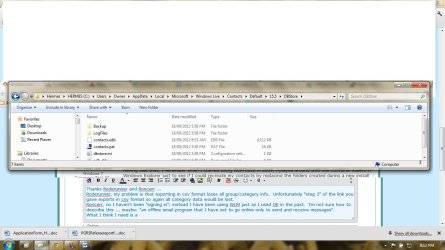
Thinking about your 2nd paragraph, what I might need is a way to understand/interpret the file "contacts.edb" - see attached screenshot, "menu bar" ("Hermes" being the name of my computer).
Or a way of exporting the WLM contacts other than cvs and vcf, neither of which keep "category" data.
I'm not an IT tech so I hope the above makes sense? Cheers.
 

Attachments

  • Menu Bar.jpg
    Menu Bar.jpg
    104.8 KB · Views: 38

My Computer My Computer

At a glance

Windows 7 Home Premium 64 bit
OS
Windows 7 Home Premium 64 bit
I strongly suggest getting a hotmail account if you don't have one already. Or better still an Outlook.com mail account. Now export your contacts from your current mail account by accessing it directly, then import them into Outlook.com directly. Sign-in to WLM, wait till all folders are added then delete the account it if you don't intend using it. Once you have reset 'Categories' they should be retained everytime you reinstall WLM & sign-in.
 

My Computer My Computer

At a glance

Win7 H.Prem. 32bit+SP1
Computer Manufacturer/Model Number
Look in my Signature.
OS
Win7 H.Prem. 32bit+SP1
Hi Roderunner.
I don't have hotmail but do have gmail so I imagine that I could use this.
In the past my wife and I have maintained the "primary" address book on her computer and periodically I exported this over to my computer (and all the "group" information was maintained intact). Do you believe that the procedure you outline will cover this situation? Would I export from my wife's computer to the online contacts list each time, then sign in from my computer to have my contacts list & categories updated? Thanks.
 

My Computer My Computer

At a glance

Windows 7 Home Premium 64 bit
OS
Windows 7 Home Premium 64 bit
All my contacts are stored in my Hotmail account which I use to sign-in to WLM, giving me instant access to them but only use Gmail in WLM. Combine both your contacts lists in Outlook.com when you get it.
 

My Computer My Computer

At a glance

Win7 H.Prem. 32bit+SP1
Computer Manufacturer/Model Number
Look in my Signature.
OS
Win7 H.Prem. 32bit+SP1
According to your initial question, all you have to start with is the "not signed-in" contact list in WLM. Categories will be lost as soon as you "export" from WLM. You could try the drag and drop (via a usb stick) procedure in Windows Explorer, with WLM closed on both computers. If it's not too much of a hardship, I'd just accept the category loss and manually re-categorize them. If you want to preserve the categories for future installs, always "sign-in" so the contact list with categories will be maintained at contacts.live.com and will simply show up in WLM when you sign-in.
 

My Computer My Computer

At a glance

Windows 8 Pro w/MC 32-bitIntel Atom 1.86 GHz2 GBIntel GMA 500
Computer type
PC/Desktop
Computer Manufacturer/Model Number
OQO 2+
OS
Windows 8 Pro w/MC 32-bit
CPU
Intel Atom 1.86 GHz
Motherboard
OQO 2+
Memory
2 GB
Graphics Card(s)
Intel GMA 500
Sound Card
IDT
Monitor(s) Displays
LCD
Screen Resolution
800 x 480 (portable) 1280 x 1024 (docked)
Hard Drives
64 GB SSD
PSU
9 Ah Battery (portable) or OQO Brick (docked)
Case
Shirt Pocket Sized
Cooling
Tiny Fan
Keyboard
Slide out (portable) DiNovo Edge (docked)
Mouse
Eraser head (portable) Logitech Bluetooth (docked)
Internet Speed
WWAN or 802.11G (portable) T1 (docked)
Browser
IE 10
Other Info
DVD-RW OQO Docking Station
Thanks RR & RC. I did set up a hotmail account but these seem so prone to hacking [I got another of those scam emails today - "i am presently in London,i am stranded here because i happened to get my wallet and phone stolen...." etc etc] that I am really averse to going down this route...
So I have decided to go with RC's suggestion of manually recategorising the contacts, and no longer trying to synchronise the contacts/categories list on our various computers. Sad, but if WLM doesn't easily support this there's little point.
That said, I may change my mind so I'd like to ask about RC's drag 'n drop approach - specifically, in which folder in W7 does one locate the contacts list - with "categories" maintained? Even if I don't go with this approach, someone reading this thread will...
Many thanks, J.
 

My Computer My Computer

At a glance

Windows 7 Home Premium 64 bit
OS
Windows 7 Home Premium 64 bit
...I did set up a hotmail account but these seem so prone to hacking...
The LiveID that you set up with Microsoft for purposes of downloading software (like the live Essentials suite) or for signing in to WLM may take the form of a Hotmail address, but you never have to use that address for email and if it appears in WLM as an email account, you can simply delete that email account. Of course, everything saved in "the cloud" is out there to be hacked but Microsoft is well aware of this possibility and provides many safeguards. It's a good idea to go through the security options and the level-of-sharing options available at Live.com, in addition to not using "123456" as your LiveID password.
 

My Computer My Computer

At a glance

Windows 8 Pro w/MC 32-bitIntel Atom 1.86 GHz2 GBIntel GMA 500
Computer type
PC/Desktop
Computer Manufacturer/Model Number
OQO 2+
OS
Windows 8 Pro w/MC 32-bit
CPU
Intel Atom 1.86 GHz
Motherboard
OQO 2+
Memory
2 GB
Graphics Card(s)
Intel GMA 500
Sound Card
IDT
Monitor(s) Displays
LCD
Screen Resolution
800 x 480 (portable) 1280 x 1024 (docked)
Hard Drives
64 GB SSD
PSU
9 Ah Battery (portable) or OQO Brick (docked)
Case
Shirt Pocket Sized
Cooling
Tiny Fan
Keyboard
Slide out (portable) DiNovo Edge (docked)
Mouse
Eraser head (portable) Logitech Bluetooth (docked)
Internet Speed
WWAN or 802.11G (portable) T1 (docked)
Browser
IE 10
Other Info
DVD-RW OQO Docking Station
Back
Top